The best capture cards with HDMI make it easier to stream console gameplay, record video, or use a DSLR, camcorder, or action camera as a webcam. The right model depends on more than headline resolution: connection speed, passthrough, latency, software support, and your computer’s ports all matter.
This roundup includes affordable USB 3.0 options for 1080p streaming, loop-out models for gaming setups, and advanced HDMI 2.1 hardware for high-refresh 4K workflows. Use the guide below to narrow the choices based on your source device and intended setup.
Best 10 Capture Cards with Hdmi Picks for 2026
Portable USB-C Pick
Guermok 1080P60 HDMI Capture Card
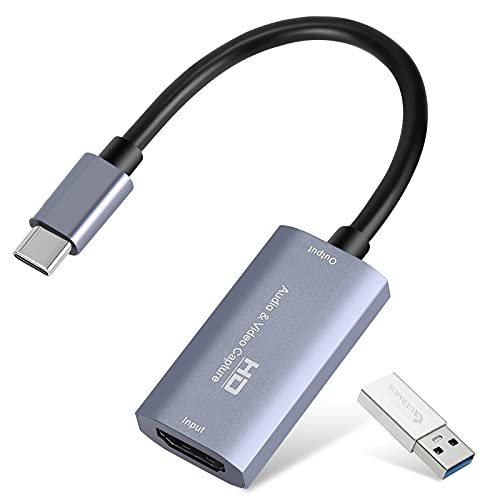
- 1080p60 output with 4K30 input
- USB-A and USB-C connectivity
- Plug-and-play portable design
Best For: Portable streaming and everyday HDMI capture
Camera Streaming Choice

- 1080p60 and up to 4K60 capture
- Designed for cameras and mobile devices
- Ultra-low-latency USB 3.0 connection
Best For: Camera-based streaming and webcam upgrades
Console Capture Value
VIXLW 1080P60 HDMI Capture Card

- 1080p capture with 4K input support
- HDMI loop-out for gameplay
- 3.5mm microphone input
Best For: Console streaming with commentary and pass-through
High-Refresh Premium Pick

- Up to 4K144 capture
- HDMI 2.1 with VRR pass-through
- 1080p240 and HDR10 support
Best For: High-refresh gaming capture on modern systems
Best Compact 4K-Input Pick
VIXLW U168-1 HDMI Capture Card

- 4K HDMI input with 2K30 or 1080p60 recording
- Plug-and-play USB 3.0/USB-C connectivity
- Broad compatibility with consoles, cameras, and streaming apps
Best For: Portable streaming and recording setups
Best for Loop-Out Monitoring

- 4K30 HDMI input and loop-out monitoring
- 2K30 or 1080p60 recording
- USB-A and USB-C interfaces with broad OS support
Best For: Low-delay gaming preview and streaming
Best Simple 1080p60 Option
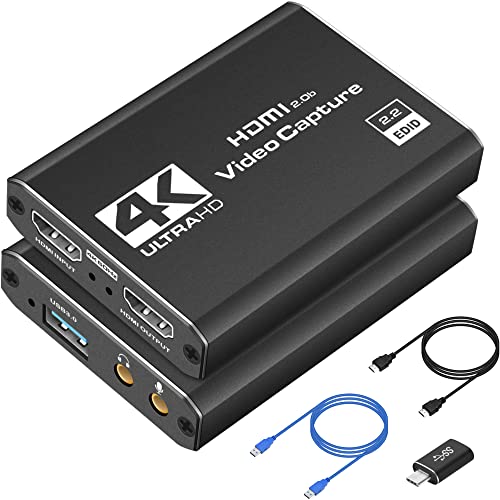
- 1080p60 recording from a 4K HDMI source
- 4K preview and HDMI loop-out
- Plug-and-play design with useful included cables
Best For: Beginner console and camera streaming
Best All-Around Pick

- 4K input with 1080p60 output
- USB-A and USB-C connectivity
- Built-in mic input for commentary
Best For: Gamers and creators seeking flexible, low-latency capture
Best for 2K Capture
UGREEN 2K HDMI Video Capture Card
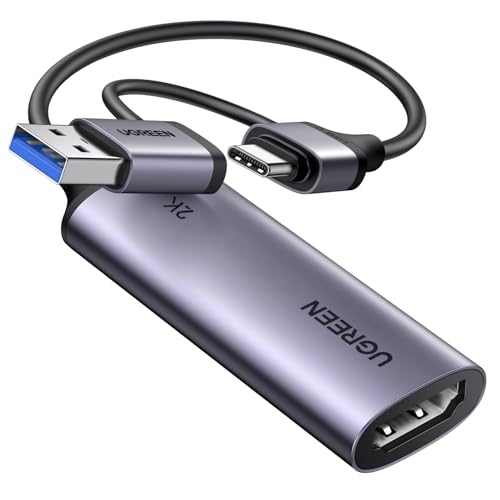
- 4K input and 2K30 output
- 1080p60 backward compatibility
- USB-A and USB-C interfaces
Best For: Compatible 2K streaming and recording setups
Best for Loop-Out Gaming

- 4K60 HDMI loop-out
- 1080p60 or 2K30 USB capture
- Mic input and dual USB ports
Best For: Console gamers using a 4K display while streaming
Portable USB-C Pick – Guermok 1080P60 HDMI Capture Card
If you need capture cards with hdmi for portable streaming, recording, meetings, or online teaching, the Guermok offers a compact plug-and-play setup. It accepts input up to 4K at 30Hz and outputs up to 1080p at 60Hz or 2K at 30Hz through USB 3.0.
Best For: Portable streaming and everyday HDMI capture with USB-A or USB-C computers.
Pros:
- Captures up to 1080p at 60Hz and accepts 4K30 input.
- Includes USB-C and USB 3.0 connectivity options.
- Requires no drivers or external power and supports common software such as OBS, VLC, and Zoom.
Cons:
- It is designed for capture only, not direct HDMI screen casting.
- USB 3.0 is recommended for the best bandwidth and resolution.
- Audio setup in OBS may require restarting the software.
This is a practical, travel-friendly choice for buyers who value easy setup and broad device compatibility, provided they understand its one-way HDMI-to-USB operation.
Camera Streaming Choice – Elgato Cam Link 4K
For creators comparing capture cards with hdmi for camera-based streaming, the Elgato Cam Link 4K turns a compatible DSLR, mirrorless camera, camcorder, action camera, or iPhone into a computer-connected video source. It supports 1080p60 and up to 4K60 capture, depending on the camera and model compatibility.
Best For: Webcam upgrades, camera streaming, and high-quality video calls on PC, Mac, or iPad.
Pros:
- Supports 1080p60 and up to 4K60 capture with compatible equipment.
- Ultra-low latency helps keep video and audio synchronized.
- Works with platforms and apps including OBS, Zoom, and Discord.
Cons:
- 4K60 requires a compatible camera and the latest Cam Link 4K model.
- Its main focus is camera input rather than gaming-console features.
- Compatibility depends on the computer, camera, and operating system.
Cam Link 4K is a strong fit for content creators who want a simple, compact route from HDMI camera output to live production software.
Console Capture Value – VIXLW 1080P60 HDMI Capture Card
Among capture cards with hdmi for console streaming, this VIXLW model combines 1080p capture, HDMI loop-out, and a microphone input. It accepts 4K30/60Hz input and supports common sources such as PlayStation, Xbox, cameras, DVDs, and set-top boxes.
Best For: Console gameplay capture with lag-free HDMI pass-through and external commentary.
Pros:
- Supports up to 1080p capture with 4K30/60Hz input.
- HDMI loop-out is designed for playing without display delay.
- Includes a 3.5mm microphone input for game commentary.
Cons:
- It does not support 4K120Hz or 4K144Hz input.
- The microphone input accepts a 3.5mm TRS standard headset.
- Its listed warranty is 60 days.
This model is especially appealing to budget-minded console streamers who want pass-through gaming and a straightforward microphone connection, rather than 4K recording.
High-Refresh Premium Pick – Elgato 4K X HDMI 2.1
For advanced setups that need capture cards with hdmi and high-refresh support, the Elgato 4K X uses HDMI 2.1 input and output with USB 3.2 Gen 2 connectivity. It supports up to 4K144 capture, 1080p240 capture, HDR10, and VRR pass-through for compatible gaming systems and displays.
Best For: High-refresh PS5, Xbox Series X, PC, and competitive gaming capture setups.
Pros:
- Supports HDMI 2.1, up to 4K144 capture, and 1080p240 capture.
- VRR pass-through helps support smooth, tear-reduced gameplay.
- Works with OBS, Streamlabs, Twitch Studio, Zoom, Teams, and other apps.
Cons:
- Full performance requires a USB 3.2 Gen 2 port and capable computer.
- USB 3.2 Gen 1 operation reduces the available capture resolution.
- Its advanced features may be unnecessary for basic 1080p streaming.
The 4K X is the most capable option here for modern high-frame-rate gaming, but its system requirements make it best suited to buyers with compatible hardware and a premium capture workflow.
Best Compact 4K-Input Pick – VIXLW U168-1 HDMI Capture Card
For shoppers comparing capture cards with HDMI, the VIXLW U168-1 is a compact USB 3.0 option with 4K HDMI input and recording up to 2K at 30Hz or 1080p at 60Hz. Its plug-and-play design supports common streaming and video-call software without requiring external power.
Best For: Gamers, streamers, and mobile creators who need broad device compatibility and a portable setup.
Pros:
- Accepts 4K HDMI input and records up to 1080p at 60fps.
- Supports Windows, macOS, Linux, and Android.
- Includes USB 3.0-to-USB-C adapter and requires no driver or external power.
- Works with OBS, Zoom, Twitch Studio, consoles, cameras, and tablets.
Cons:
- Recording is limited to 2K at 30Hz or 1080p at 60Hz rather than 4K recording.
- Tablet use requires OTG support to be enabled.
- Video capture requires a USB 3.0 or USB-C connection and sufficient processing power.
The VIXLW stands out for its flexible operating-system support, compact aluminum design, and included adapter. It is a practical choice when 4K input matters more than native 4K recording.
Best for Loop-Out Monitoring – UGREEN 4K HDMI Capture Card
Among capture cards with HDMI, the UGREEN 25773 is a strong fit for users who want local loop-out monitoring. It accepts 4K at 30Hz, captures up to 2K at 30fps or 1080p at 60fps, and offers both USB-A and USB-C recording connections.
Best For: Streamers and gamers who want real-time monitoring through HDMI loop-out while recording to a computer or compatible device.
Pros:
- Supports 4K@30Hz input and 4K@30Hz HDMI loop-out.
- Captures up to 2K at 30fps or 1080p at 60fps.
- Provides USB-A and USB-C connectivity with MJPEG and YUY2 formats.
- Works with Windows, macOS, Linux, and Android systems.
Cons:
- Does not support 4K capture.
- PS4 and PS5 require HDCP to be turned off.
- Not compatible with Fire TV Stick; Windows 7 requires USB 3.0 drivers.
The UGREEN is especially useful when low-delay preview and loop-out are priorities. Its dual USB interface adds flexibility, while the 2K recording limit should be considered before purchase.
Best Simple 1080p60 Option – Dcyfol 4K HDMI Capture Card
If you are comparing capture cards with HDMI for straightforward streaming, the Dcyfol capture device focuses on 1080p at 60fps recording from a 4K HDMI source. It is designed for plug-and-play use with Windows and Mac systems and supports software such as OBS Studio, Streamlabs, and XSplit.
Best For: Beginners, gamers, and creators who want a compact USB 3.0 capture setup for consoles, cameras, or PCs.
Pros:
- Captures 1080p video at 60fps from a 4K HDMI source.
- Offers 4K HDMI real-time preview and HDMI loop-out.
- Requires no drivers and works with popular streaming software.
- Includes HDMI extension, USB-to-USB-C adapter, and USB extension cables.
Cons:
- It records at 1080p60 rather than capturing 4K video.
- Compatibility details focus on Windows and Mac systems.
- Requires a USB 3.0 port.
The Dcyfol is a practical entry-level choice for 1080p streaming, especially if the included cables and adapters match your setup. Its loop-out and low-latency features also suit gameplay monitoring.
Best All-Around Pick – Acer 4K HDMI Capture Card
If you want capture cards with HDMI for gaming, streaming, or recording, the Acer OCB5B0 offers a practical combination of 4K input, 1080p at 60Hz output, and HDMI loop-out. Its USB 3.0 connection, mic input, and broad device compatibility make it a flexible choice for everyday content creation.
Best For: Gamers and creators who want low-latency capture with 4K input and easy microphone commentary.
Pros:
- Supports 4K HDMI input and smooth 1080p at 60Hz output.
- Includes USB-A and USB-C connectivity for flexible setup options.
- Built-in 3.5mm mic input helps keep commentary synced with video.
- Works with OBS, XSplit, VLC, Windows, macOS, Linux, and a range of consoles.
Cons:
- USB 3.0 is required for USB 3.0 performance.
- The listed capture resolutions top out at 1080p, despite 4K input support.
Choose this Acer model if you value a simple, driver-free setup and broad compatibility. It is especially well suited to console streaming where 4K pass-through and 1080p60 capture are more useful than higher-resolution recording.
Best for 2K Capture – UGREEN 2K HDMI Video Capture Card
Among capture cards with HDMI, the UGREEN model stands out for supporting up to 2K at 30Hz output while accepting 4K input. USB 3.0 transfer, USB-A and USB-C interfaces, and driver-free operation give it useful flexibility for streaming, recording, and video transfer.
Best For: Users who want 2K capture for compatible cameras, consoles, computers, or mobile-device streaming setups.
Pros:
- Supports 4K at 30Hz input, 2K at 30Hz output, and 1080p at 60FPS.
- Offers both USB-A and USB-C interfaces for modern laptops, tablets, and desktops.
- Compatible with Windows, macOS, Linux, and iPadOS 17 or later.
- Aluminum-alloy housing helps with heat dissipation and EMI shielding.
Cons:
- Only accepts HDMI input and sends a unidirectional signal to USB output.
- iPadOS compatibility requires version 17 or later.
- Console use may require HDCP to be disabled.
The UGREEN is a strong option when 2K output is more important than 4K capture. Check the resolution support of both your source device and computer before buying, particularly for iPad and console workflows.
Best for Loop-Out Gaming – XIIXMASK 4K HDMI Capture Card
For capture cards with HDMI that prioritize console play-through, the XIIXMASK model combines 4K60 HDMI input and loop-out with 1080p60 or 2K30 USB capture. Its aluminum-alloy construction, mic input, and dual USB connectivity make it suited to gaming streams and real-time recording.
Best For: Console gamers who want 4K60 loop-out while capturing gameplay at 1080p60 or 2K30.
Pros:
- Supports 4K at 60Hz HDMI input and 4K at 60Hz loop-out.
- Captures up to 1080p60 or 2K30 through USB 3.0.
- Includes USB-A and USB-C connectivity plus a 3.5mm mic input.
- Compatible with PS4, PS5, Xbox, Switch, cameras, OBS, VLC, and Zoom.
Cons:
- The mic input does not record party chat.
- OBS may need to be restarted after audio setup to produce sound output.
- The supplied details list Windows as the minimum system requirement.
This XIIXMASK capture card is a practical fit for gamers who want to keep playing through a 4K display while sending a lower-resolution feed to a computer. Its setup is flexible, but audio configuration may require an extra OBS restart.
How We Picked These Capture Cards with Hdmi
We compared the selected models by their input and output specifications, supported capture resolutions and frame rates, connection type, passthrough features, compatibility, and likely use case. Models advertising 4K input are not automatically 4K capture devices, so we separated high-resolution passthrough from the resolution actually recorded by the computer.
We also considered whether each card is better suited to console streaming, camera capture, portable recording, or high-refresh gaming. USB 3.0 models generally offer a practical balance of price, compatibility, and 1080p performance, while HDMI 2.1 hardware is aimed at newer consoles and gaming PCs.
Quick Comparison
- Best for 4K gaming: Elgato 4K X, with HDMI 2.1 support and high-refresh capabilities.
- Best for camera input: Elgato Cam Link 4K, designed for DSLR, camcorder, and action-camera workflows.
- Best budget category: Basic USB 3.0 HDMI capture cards offering 1080p at 60 frames per second.
- Best for passthrough setups: UGREEN and Acer models with HDMI loop-out options.
- Best for simple portability: Compact USB-C capture cards that can connect directly to compatible laptops and mobile devices.
Key Buying Factors for Capture Cards with Hdmi
Capture Resolution and Frame Rate
Check the maximum resolution and frame rate the card can record, not just the signal it can accept. For most streaming, 1080p at 60fps provides smooth motion and manageable file sizes. Choose a 4K-capable model when you need detailed recordings or want more flexibility for editing.
Passthrough and Latency
HDMI passthrough sends the source signal to a monitor or television while the computer captures it. This is especially useful for gaming because you can play on a display without relying on the preview window. Look for low-latency specifications and verify that passthrough supports your desired resolution and refresh rate.
Ports and Compatibility
USB 3.0 is preferable for high-bandwidth video, while USB-C describes the connector rather than the performance standard. Confirm that your computer has a suitable high-speed port and that the card works with your operating system and streaming software. Most UVC-compatible devices work with common applications, but camera users should also verify HDMI output settings and whether the camera can provide a clean signal.
HDMI Version and Source Devices
HDMI 2.1 matters for 4K at very high refresh rates, while HDMI 2.0 or earlier may be sufficient for 1080p and standard 4K workflows. Make sure the card supports the output from your console, graphics card, or camera rather than choosing based only on its maximum advertised input.
Who Should Buy Which Capture Cards with Hdmi?
Choose an entry-level USB 3.0 model if you mainly stream a Nintendo Switch, older console, or camera at 1080p. Select a loop-out card if you want to play on a television or gaming monitor while recording on a computer. A Cam Link-style device is the better fit for a DSLR or camcorder used for live presentations, teaching, or content creation.
For PS5, Xbox Series, or PC gaming at 4K and high refresh rates, prioritize HDMI 2.1 support and confirm the complete signal chain, including monitor, cable, and computer. If your needs are mixed, a reliable 1080p60 capture card with 4K passthrough can offer the most practical balance of cost and performance.