Optical media remains useful for photographers, videographers, families, and anyone who wants an offline copy of important files. The best Blu-ray drives for archiving combine dependable writing, broad disc support, and a connection that fits your computer.
This roundup compares 10 internal and external models, from compact USB-C burners to faster desktop drives. Look closely at capacity, M-DISC compatibility, operating-system support, and whether you need standard Blu-ray or UHD capabilities before choosing.
Best 10 Blu Ray Drives for Archiving Picks for 2026
Best Slim M-DISC Pick
ASUS SBW-06D5H-U External Blu-ray Burner

- BDXL and M-DISC support
- USB-A and USB-C connectivity
- Compact 240 g design
Best For: Portable Mac or PC archiving
Best High-Speed External Pick
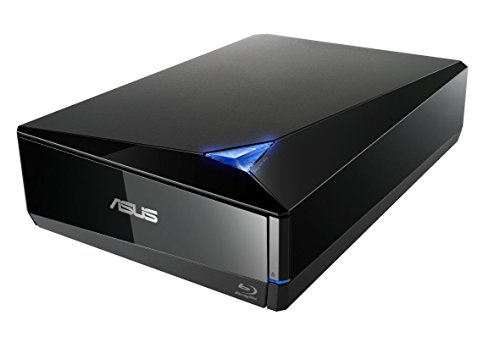
- 16x Blu-ray writing
- BDXL support up to 128 GB
- Mac and Windows compatibility
Best For: Large, fast external archival jobs
Best Internal M-DISC Bundle
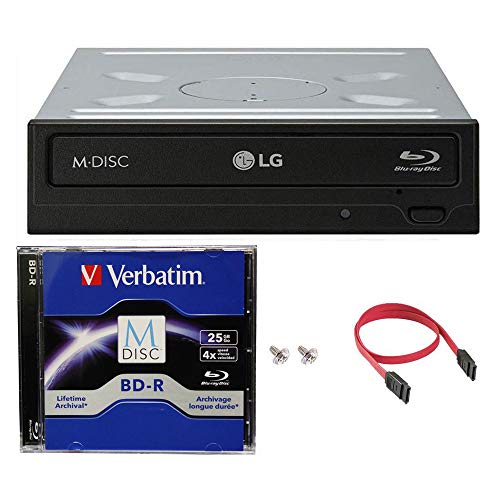
- Includes 25GB M-DISC BD
- Up to 14x BD-R writing
- SATA desktop installation
Best For: Windows desktops with a 3.5-inch bay
Best UHD-Capable External Pick
archgon Aluminum 4K Blu-ray Writer

- M-DISC BD-R support
- Reads UHD Blu-ray
- Aluminum USB enclosure
Best For: PC users needing UHD reading and archival writing
Best High-Speed Archiver

- 16x Blu-ray writing and reading
- M-DISC and BDXL support
- Up to 128GB per disc
Best For: Fast desktop backups and long-term archival storage
Best Slim Internal Drive

- Slim 9.5mm SATA design
- Burns Blu-ray, DVD, and CD media
- Supports 100GB BDXL discs
Best For: Laptop upgrades and compact archival setups
Best Portable Option
External USB 3.0 Blu-ray Burner

- USB 3.0 and USB-C connectivity
- Works with Windows, macOS, and Linux
- Reads and writes 50GB Blu-ray discs
Best For: Portable, cross-platform Blu-ray archiving
Best Slim Internal Pick
SilverStone TOB04 Ultra-Slim Blu-ray Drive

- Reads and writes Blu-ray, DVD, and CD media
- Up to 8x Blu-ray read/write speed
- Includes SATA cable, screws, and bezel
Best For: Compatible laptop or desktop upgrades
Best External Branded Option
ASUS SBW-06D2X-U Blu-ray Writer

- Supports BDXL media
- Up to 6x Blu-ray read/write speed
- Horizontal or vertical placement
Best For: External PC and Mac archiving
Best USB-C Flexibility

- USB 3.0 and Type-C connectivity
- Reads and writes Blu-ray, DVD, and CD media
- Includes an additional USB power cable
Best For: Portable Windows, macOS, and Linux archiving
Best Slim M-DISC Pick – ASUS SBW-06D5H-U External Blu-ray Burner
ASUS SBW-06D5H-U BDXL External Ultra Slim Blu-ray and MDisc Burner USB 3.1 USB-C 2 Cables Black
Check Price On AmazonFor shoppers comparing blu ray drives for archiving, the ASUS SBW-06D5H-U is a compact external option with BDXL and M-DISC support. Its USB 3.1 Type-A and Type-C connectivity, plus included cables, make it practical for laptops and desktops.
Best For: Users who want a portable, slim Blu-ray and M-DISC burner for Mac or PC.
Pros:
- Supports BDXL and M-DISC media.
- Includes USB 3.1 Type-A and Type-C connectivity.
- Ultra-slim 240 g design suits portable setups.
- Supports write speeds up to 10x for listed optical media.
Cons:
- Its listed Blu-ray read speed is 8x.
- The compact form factor may prioritize portability over a full-size desktop design.
This ASUS drive is a sensible archival companion when portability and broad USB compatibility matter more than maximum writing speed.
Best High-Speed External Pick – ASUS BW-16D1X-U Blu-ray Drive
The ASUS BW-16D1X-U stands out among blu ray drives for archiving with 16x Blu-ray writing and BDXL support up to 128 GB. It connects through USB 3.0 and works with compatible Mac and Windows systems, while M-DISC support adds an archival-media option.
Best For: Desktop users who want a fast external Blu-ray writer for large archival jobs.
Pros:
- Offers 16x Blu-ray writing speed.
- Supports BDXL discs with stated storage up to 128 GB.
- Compatible with Mac and Windows systems listed in the notes.
- Includes CyberLink Power2Go 8 with optional file encryption.
Cons:
- At 2.6 pounds, it is less portable than slim external drives.
- Requires an external power adapter and power cord.
Choose this model when faster disc creation and higher-capacity BDXL support are priorities for a USB-connected archival workstation.
Best Internal M-DISC Bundle – LG WH14NS40 Blu-ray Burner
For a desktop build focused on blu ray drives for archiving, the LG WH14NS40 combines an internal SATA burner with a 25GB M-DISC BD, SATA cable, power cable, and mounting screws. Its M-DISC support and advertised rock-like data layer make it a purpose-built choice for durable optical storage.
Best For: Windows desktop owners with a 3.5-inch drive bay who want an internal archival burner bundle.
Pros:
- Includes one 25GB M-DISC BD and installation accessories.
- Supports M-DISC’s non-volatile, rock-like data layer.
- Burns BD-R at up to 14x, DVD media at up to 16x, and CD-R at up to 48x.
- Includes under-run prevention and a stated warranty package.
Cons:
- Requires a 3.5-inch bay, SATA interface, and internal installation.
- The listed operating-system compatibility is limited to older Windows versions.
This bundle offers strong value for a compatible Windows desktop, especially if you want to begin archiving immediately with an included M-DISC.
Best UHD-Capable External Pick – archgon Aluminum 4K Blu-ray Writer
archgon Premium Aluminum External USB 3.0 UHD 4K Blu-Ray Writer Super Drive for PC and Mac
Check Price On AmazonThe archgon external drive is a flexible choice among blu ray drives for archiving, offering M-DISC BD support and the ability to read UHD Blu-ray while writing regular Blu-ray, DVD, and CD media. Its USB connection and aluminum body suit users who want an external drive for PC or Mac, with important software limitations to consider.
Best For: PC users seeking an external UHD-capable drive for archival writing and disc playback.
Pros:
- Supports M-DISC BD-R for archival media.
- Reads UHD Blu-ray and writes regular Blu-ray, DVD, and CD media.
- Uses a USB connection and works with PC and Mac for supported formats.
- Features a CNC aluminum body.
Cons:
- UHD playback requires compatible PC hardware and separately purchased CyberLink PowerDVD.
- Mac users cannot use the drive for UHD Blu-ray playback according to the supplied notes.
- Listed Blu-ray writing speed is 12x.
This is an appealing premium external option for PC users who need UHD reading alongside regular disc writing, but verify software compatibility before buying.
Best High-Speed Archiver – ASUS BW-16D1HT
ASUS BW-16D1HT - Ultra-Fast 16X Blu-ray Burner with M-DISC Support, Black, 1 Year Warranty
Check Price On AmazonFor anyone comparing blu ray drives for archiving, the ASUS BW-16D1HT is a strong fit for a desktop PC with an available 5.25-inch bay. It combines 16x Blu-ray writing and reading with M-DISC support and BDXL compatibility for discs up to 128GB.
Best For: Fast desktop backups, long-term M-DISC storage, and high-capacity BDXL projects.
Pros:
- 16x Blu-ray write and read speeds
- M-DISC support for archival-focused storage
- BDXL support for up to 128GB per disc
- SATA 6.0 Gb/s interface for compatible PCs
Cons:
- Requires an available internal 5.25-inch bay
- Designed for PC hardware rather than portable use
This is the most capable option here for speed and disc capacity, particularly if your archiving setup is a conventional desktop tower. Confirm that your computer has the required SATA connection and bay before buying.
Best Slim Internal Drive – BU40N 6X SATA Blu-ray Drive
The BU40N is a slim SATA Blu-ray drive for laptops and other systems using a 9.5mm tray-loading optical bay. It reads and burns Blu-ray, DVD, and CD media, supports BDXL discs up to 100GB, and adds 4K UHD Blu-ray playback on compatible Windows setups.
Best For: Laptop upgrades, compact installations, and users who need BDXL burning in a slim form factor.
Pros:
- Fits compatible 9.5mm SATA laptop bays
- Reads and burns Blu-ray, DVD, and CD media
- Supports 100GB BDXL discs
- Includes 4K UHD Blu-ray playback support on Windows with suitable software
Cons:
- Limited to a 6x write speed
- 4K UHD playback is not supported on Mac according to the listing
- Requires a compatible slim SATA tray-loading bay
Choose this model when internal space is limited and laptop compatibility matters more than maximum write speed. Verify the bay size and software requirements, especially if UHD playback is important to you.
Best Portable Option – External USB 3.0 Blu-ray Burner
This external drive is a convenient choice for blu ray drives for archiving when you want to use one burner with multiple computers. Its built-in USB 3.0 and USB-C cables support up to 6x Blu-ray writing, while the plug-and-play design works with Windows, macOS, and Linux systems.
Best For: Portable backups, cross-platform use, and computers without an internal optical drive.
Pros:
- Built-in USB 3.0 and USB-C connectivity
- Reads and writes 50GB Blu-ray discs
- Compatible with Windows, macOS, and Linux
- Slim design is suited to travel and flexible setups
Cons:
- Does not support 4K Ultra HD Blu-ray discs
- Playback and burning software is not included
- Limited to 6x Blu-ray writing
Its broad operating-system support and dual-cable design make it the easiest option to move between machines. It is well suited to standard Blu-ray archiving, but users with UHD discs or higher-speed requirements should consider another model.
Best Slim Internal Pick – SilverStone TOB04 Ultra-Slim Blu-ray Drive
Silverstone TOB04 Ultra-Slim Internal Optical 9.5mm Ultra HD Blu-ray Drive SST-TOB04-V2
Check Price On AmazonFor blu ray drives for archiving in a compatible laptop or desktop, the SilverStone TOB04 is a practical internal option. It reads and writes Blu-ray, DVD, and CD media at up to 8x and uses a slim 9.5mm form factor, with a SATA interface for supported systems.
Best For: Laptop or desktop upgrades with a compatible slim optical-drive bay.
Pros:
- Reads and writes Blu-ray, DVD, and CD media.
- Supports up to 8x Blu-ray read and write speeds.
- Includes a SATA cable, screws, instruction manual, and 12.7mm bezel.
- Supports Windows, macOS, and Linux systems.
Cons:
- Requires an available compatible 9.5mm or 12.7mm optical slot.
- Its SATA connection is not suited to computers without an internal drive interface.
The TOB04 makes the most sense when you want an integrated archival drive rather than a portable accessory. Confirm the bay size and SATA compatibility before buying.
Best External Branded Option – ASUS SBW-06D2X-U Blu-ray Writer
The ASUS SBW-06D2X-U is a convenient choice among blu ray drives for archiving when you need an external writer. Its USB 2.0 connection, BDXL support, and horizontal or vertical placement give it flexible use with compatible Windows or Mac computers.
Best For: PC and laptop users who want a compact external Blu-ray writer with BDXL support.
Pros:
- Supports BDXL media for higher-capacity disc projects.
- Offers up to 6x Blu-ray read and write speeds.
- Can be positioned horizontally or vertically.
- Includes ATP Technology, Disc Encryption II, and Drag and Burn features.
Cons:
- Uses USB 2.0 rather than a faster USB 3.0 interface.
- Compatibility is specified for PCs and laptops running Windows or Mac OS.
Choose the ASUS when external placement and BDXL support matter more than maximum interface speed. Its one-year warranty adds a useful layer of purchase protection.
Best USB-C Flexibility – Dainty External Blu-ray Drive
For blu ray drives for archiving across newer and older computers, the Dainty external drive offers USB 3.0 and Type-C connectivity. It can read and write Blu-ray, DVD, and CD media, while its included additional power cable is designed to support steadier operation during disc work.
Best For: Users who need a portable drive with USB 3.0 and Type-C connectivity for Windows, macOS, or Linux computers.
Pros:
- Supports USB 3.0 and Type-C computer connections.
- Reads and writes Blu-ray, DVD, and CD media.
- Supports Blu-ray media at up to 6x read speed and compatible BD-R at up to 6x write speed.
- Includes an additional USB power cable for more stable operation.
Cons:
- Playback and writing software is not included.
- Not compatible with TVs, tablets, PS4, iPads, Chromebooks, projectors, or vehicles.
- Actual writing speeds vary by media type.
The Dainty is a versatile portable option, especially for computers with USB-C ports. Budget separately for compatible Blu-ray software if your workflow includes playback or disc authoring.
How We Picked the Best Blu Ray Drives for Archiving
We focused on drives that can write Blu-ray media rather than only play discs. The selection includes BDXL-compatible models for higher-capacity projects, M-DISC support for users prioritizing archival-oriented media, and external drives for flexible use across computers. We also considered writing speed, interface options, physical design, and whether each drive is intended for internal desktop installation or portable operation.
Because bundled software, cables, firmware, and operating-system compatibility can vary, confirm the seller’s current specifications before buying. A drive is only part of an archival workflow: quality blank discs, verified writing, and multiple copies matter just as much.
Quick Comparison
- Best for portability: Slim external USB drives such as the ASUS SBW-06D5H-U and SBW-06D2X-U are easy to move between compatible computers.
- Best for high-capacity projects: BDXL-capable models support larger discs than standard single-layer Blu-ray burners.
- Best for desktop performance: 16X internal or external drives can shorten large backup jobs when the computer and media support their rated speeds.
- Best for compact PC builds: Slim SATA models such as the BU40N and SilverStone TOB04 fit systems designed for 9.5mm optical drives.
- Best for a simple low-cost setup: A basic USB 3.0 external burner can handle ordinary Blu-ray, DVD, and CD tasks without requiring an internal bay.
Key Buying Factors for Blu-Ray Drives for Archiving
Disc Capacity and Format Support
Check whether the drive supports single-layer, dual-layer, and BDXL media. Standard Blu-ray discs commonly hold 25GB or 50GB, while BDXL media can provide substantially more space. Higher-capacity discs cost more, so choose a drive based on the size and growth rate of your archive.
M-DISC Compatibility
M-DISC support can be valuable for users creating long-term physical copies, but it does not eliminate the need for careful storage and verification. Make sure the drive supports the specific M-DISC format you plan to use and that your authoring software can write it correctly.
Connection and Installation
External models are usually the easiest choice for laptops and computers without an optical bay. USB 3.0 offers practical transfer performance, while USB-C can simplify connection to newer systems; some drives include both cable types. Internal SATA models require an available bay, data connection, power, and enough clearance.
Speed, Software, and Compatibility
Rated speeds are maximums and depend on the disc, software, and computer. Verify Windows or macOS support, UHD requirements, included cables, and whether burning software is supplied. UHD playback can also require additional hardware and software beyond the drive itself.
Who Should Buy Which Blu Ray Drives for Archiving?
Choose a portable external drive if you archive from a laptop, switch between computers, or want the simplest installation. Pick a 16X desktop-oriented burner if you regularly write large batches and have compatible media. BDXL models suit extensive photo, video, and document libraries, while M-DISC-capable drives are a sensible fit for users building deliberately maintained long-term copies. For a small-form-factor computer, select a slim internal SATA drive only after confirming the bay size and connectors.
Whichever model you choose, keep at least two verified copies, store discs away from heat, light, and moisture, and periodically check that archived files remain readable.