The best Blu-ray drive for disc ripping should combine dependable disc compatibility, stable read performance, and an interface that suits your computer. The right choice depends on whether you need UHD support, portability, fast archival work, or a simple external reader.
We selected 10 Blu-ray drives spanning internal SATA models, slim laptop-style mechanisms, and plug-and-play USB drives for Windows and Mac users. Before buying, confirm your computer connections, required software, and whether your discs are standard Blu-ray or UHD Blu-ray.
Best 10 Blu Ray Drives for Disc Ripping Picks for 2026
Best Internal Ripper
ASUS BW-16D1HT 16X Blu-ray Burner

- 16x Blu-ray reading and writing
- BDXL support up to 128GB
- M-DISC archival support
Best For: Windows desktop users with an available 5.25-inch bay
Best External UHD Option
archgon Aluminum External Blu-ray Writer

- USB connection for PC and Mac
- Reads UHD Blu-ray media
- Writes regular Blu-ray, DVD, and CD
Best For: Users wanting external UHD reading with an aluminum enclosure
Best Slim USB-C Drive
ASUS SBW-06D5H-U Portable Burner

- Ultra-slim external design
- USB-A and USB-C connectivity
- M-DISC and BDXL support
Best For: Laptop users needing a portable Blu-ray burner
Best High-Speed External Drive
ASUS BW-16D1X-U USB Blu-ray Drive
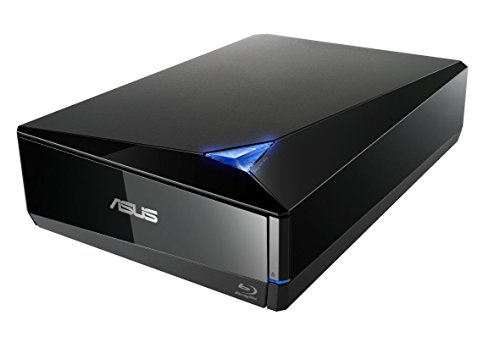
- 16x Blu-ray read and write speeds
- USB 3.0 Mac and PC compatibility
- BDXL and M-DISC support
Best For: Users wanting fast external ripping on Mac or PC
Best Internal UHD Option

- Internal 9.5mm SATA design
- Supports BDXL and 3D BD
- Windows UHD playback support
Best For: Compatible laptop upgrades and Windows UHD playback
Best Software Bundle
Buffalo Portable BDXL Blu-ray Drive

- Supports BD-R and BD-RE XL
- Includes CyberLink software suite
- Portable USB external design
Best For: Disc backup, editing, burning, and playback
Best Plug-and-Play Value

- Built-in USB-A and USB-C cable
- Reads and writes 50GB discs
- Supports Windows, Mac, and Linux
Best For: Portable standard Blu-ray ripping and burning
Best All-Around Option
Dainty USB 3.0/Type-C Blu-ray Drive

- Reads and writes Blu-ray, DVD, and CD media
- Includes an extra USB power cable
- Supports Windows, macOS, and Linux
Best For: Versatile disc reading and writing on laptops and PCs
Best for Extra Connectivity

- Adds two USB ports and SD/TF card slots
- Supports USB-A and Type-C connections
- Portable design with embedded cable
Best For: Users combining disc work with USB and memory-card transfers
Best for CD/DVD Burning

- Reads Blu-ray discs up to 6X
- Burns CDs and DVDs but not Blu-rays
- Uses USB 3.0 and Type-C connectors
Best For: Blu-ray reading with frequent CD and DVD burning
Best Internal Ripper – ASUS BW-16D1HT 16X Blu-ray Burner
ASUS BW-16D1HT - Ultra-Fast 16X Blu-ray Burner with M-DISC Support, Black, 1 Year Warranty
Check Price On AmazonFor desktop builders seeking blu ray drives for disc ripping, the ASUS BW-16D1HT is a fast internal SATA option with Blu-ray read speeds up to 16x. It also supports BDXL media and M-DISC for long-term storage.
Best For: PC users who want a high-speed internal drive for reading, writing, and archiving Blu-ray media.
Pros:
- Up to 16x Blu-ray read and write speeds
- Supports BDXL discs up to 128GB
- M-DISC support for durable archival storage
Cons:
- Requires an available 5.25-inch internal bay
- Uses a SATA connection rather than USB
- Supplied operating-system compatibility is centered on Windows versions
This is a practical choice for a Windows desktop with a free drive bay, especially when speed and large-capacity disc support matter more than portability.
Best External UHD Option – archgon Aluminum External Blu-ray Writer
archgon Premium Aluminum External USB 3.0 UHD 4K Blu-Ray Writer Super Drive for PC and Mac
Check Price On AmazonThe archgon external drive is a versatile pick among blu ray drives for disc ripping, connecting over USB to PCs and Macs. It reads UHD Blu-ray and reads and writes regular Blu-ray, DVD, and CD media when used with suitable software.
Best For: Users who need an external aluminum drive with UHD reading capability and broad regular-disc support.
Pros:
- External USB design works with PC and Mac
- Reads UHD Blu-ray discs
- Reads and writes regular Blu-ray, DVD, and CD media
- Supports M-DISC BD-R and has an aluminum enclosure
Cons:
- UHD playback requires suitable software, with CyberLink PowerDVD recommended
- UHD Blu-ray software support is not available for Mac according to the supplied notes
- Software may require an additional purchase
Choose this model when UHD capability and cross-platform connectivity are priorities, but verify your computer and software meet the required playback specifications before buying.
Best Slim USB-C Drive – ASUS SBW-06D5H-U Portable Burner
ASUS SBW-06D5H-U BDXL External Ultra Slim Blu-ray and MDisc Burner USB 3.1 USB-C 2 Cables Black
Check Price On AmazonFor laptop owners comparing blu ray drives for disc ripping, the ASUS SBW-06D5H-U offers an ultra-slim external design with USB 3.1 Type-A and Type-C connectivity. It supports Blu-ray, BDXL, and M-DISC burning in a compact format.
Best For: Notebook and desktop users who value a lightweight, portable drive with both USB-A and USB-C cables.
Pros:
- Ultra-slim 0.58-inch form factor
- Includes USB 3.1 Type-A and Type-C interfaces
- Supports M-DISC and BDXL media
- Compatible with desktop and notebook computers
Cons:
- Listed Blu-ray read speed is up to 8x
- More compact design may prioritize portability over maximum speed
- Supplied notes list macOS compatibility but provide limited Windows detail
This drive is a convenient fit for modern laptops and mixed USB setups, particularly when portability and connection flexibility are more important than 16x performance.
Best High-Speed External Drive – ASUS BW-16D1X-U USB Blu-ray Drive
The ASUS BW-16D1X-U combines an external USB 3.0 connection with 16x Blu-ray read and write speeds, making it a strong option among blu ray drives for disc ripping. It also supports BDXL discs up to 128GB and works with Mac and PC computers.
Best For: Mac and PC users who want fast external Blu-ray performance and large-capacity disc support.
Pros:
- 16x Blu-ray reading and writing
- BDXL support for discs up to 128GB
- Mac and Windows compatibility via USB 3.0
- Includes M-DISC support and a one-year warranty
Cons:
- Requires an external power adapter and power cord
- Heavier and larger than ultra-slim portable models
- Listed operating-system details are more specific for Windows than macOS
This is a well-rounded external choice for users who want internal-drive-level speed without opening a computer, provided they have room for the larger enclosure and access to wall power.
Best Internal UHD Option – BU40N Slim 4K Blu-ray Drive
For shoppers seeking blu ray drives for disc ripping, the BU40N is a slim internal SATA option for compatible laptops and desktops. It reads and writes Blu-ray, DVD, and CD media, with support for BDXL discs and 4K UHD Blu-ray playback on Windows with suitable software.
Best For: Laptop upgrades and Windows users who want an internal drive with UHD playback capability.
Pros:
- Supports Blu-ray, DVD, CD, BDXL, and 3D BD media.
- Offers up to 6x Blu-ray writing and 8x reading speeds.
- Fits compatible 9.5mm SATA tray-loading laptop bays.
- Includes a stated three-year after-service warranty.
Cons:
- Requires a compatible 9.5mm SATA bay and installation.
- UHD playback is described for Windows; Mac users cannot play UHD discs with the stated software limitations.
- The drive itself does not include an external enclosure.
This is the most specialized choice of the group, combining a slim internal design with UHD and BDXL support. Confirm your computer’s bay dimensions and software compatibility before buying.
Best Software Bundle – Buffalo Portable BDXL Blu-ray Drive
The Buffalo BRXL-PUS6U3-BK/N is a practical external pick for blu ray drives for disc ripping, backups, burning, and editing. It connects over USB to Windows PCs and compatible Macs, supports high-capacity BDXL media, and includes several CyberLink software tools.
Best For: Users who want a portable external drive with bundled playback, burning, editing, and backup software.
Pros:
- Supports BD-R XL and BD-RE XL media, including four-layer BD-R XL at up to 4x.
- Works with USB 3.2 Gen 1, USB 3.0, and USB 2.0 Type-A ports.
- Includes PowerDVD, Power2Go, PowerDirector, PowerBackup, and PhotoDirector LE.
- Compact, lightweight design with bus power and included power cable support.
Cons:
- Uses Type-A USB connections rather than a built-in USB-C interface.
- Some setups may need the included power cable or a USB charger.
- Mac compatibility depends on the listed operating-system support and available software.
With broad disc support and bundled CyberLink applications, Buffalo’s drive is a well-rounded option for archiving and optical media projects. Its Type-A connection and power requirements are the main compatibility points to check.
Best Plug-and-Play Value – External USB Blu-ray Burner
This compact external model is a straightforward choice among blu ray drives for disc ripping, with a built-in USB-A and USB-C cable for flexible computer connections. It reads and writes 50GB Blu-ray discs and supports Windows, macOS, and Linux, but playback and burning software must be supplied separately.
Best For: Travelers and multi-platform users who need a lightweight external Blu-ray writer with USB-A and USB-C connectivity.
Pros:
- Built-in 2-in-1 USB 3.0 and USB-C cable works with common computer ports.
- Reads and writes 50GB Blu-ray discs at up to 6x.
- Supports DVD and CD media with speeds up to 8x and 24x, respectively.
- Compatible with Windows, macOS, and Linux computers.
Cons:
- Does not support 4K Ultra HD Blu-ray discs.
- Playback and burning software is not included.
- Not compatible with Chromebooks, smartphones, tablets, TVs, or car players.
The dual-connector cable and broad desktop operating-system support make this a convenient portable drive. It is best suited to standard Blu-ray workflows, since UHD discs are explicitly unsupported and software is an extra consideration.
Best All-Around Option – Dainty USB 3.0/Type-C Blu-ray Drive
For shoppers comparing blu ray drives for disc ripping, the Dainty external drive offers broad CD, DVD, and Blu-ray read/write support, USB 3.0 connectivity, and compatibility with Windows, macOS, and Linux. Its included additional USB power cable can help provide more stable operation during demanding disc tasks. Blu-ray playback and writing software is required separately.
Best For: Users who want a versatile external drive for reading and writing multiple disc formats across major desktop operating systems.
Pros:
- Supports Blu-ray, DVD, and CD reading and writing.
- Offers USB 3.0 and Type-C connection options.
- Includes an additional USB power cable for more stable power delivery.
- Works with Windows, macOS, and Linux computers.
Cons:
- Playback and Blu-ray writing software is not included.
- Not compatible with TVs, tablets, PS4, iPads, Chromebooks, projectors, or vehicles.
With its wide operating-system support and stated BD-R, BD-RE, DVD, and CD write speeds, this is a practical pick for users who need more than basic playback. Confirm that your computer has suitable software and available USB connections before buying.
Best for Extra Connectivity – BUNUD 5-in-1 Blu-ray Drive
The BUNUD 5-in-1 is a useful choice among blu ray drives for disc ripping when you also need ports for external storage. Along with Blu-ray, DVD, and CD support, it provides two USB ports plus SD and TF card slots, and it connects through either USB-A or Type-C. It does not support 4K Ultra HD discs.
Best For: Laptop and desktop users who want disc access combined with USB and memory-card connectivity.
Pros:
- Combines a Blu-ray/DVD/CD drive with two USB ports and SD/TF slots.
- Includes both USB and Type-C connection cables.
- Supports Windows, macOS, and Linux-compatible computer setups as listed.
- Lightweight design includes an embedded cable for easier storage.
Cons:
- Does not play 4K Ultra HD discs.
- Not compatible with iPads, tablets, projectors, TVs, Chrome OS, cars, or smartphones.
- Its listed BD-ROM video read speed is 2X, with 6X maximum read speed.
The extra ports make this model more flexible than a basic optical drive, particularly for transferring files or photos from cards and USB devices. It is best suited to standard Blu-ray media rather than 4K Ultra HD playback.
Best for CD/DVD Burning – LLMHHKYK 2-in-1 Blu-ray Drive
The LLMHHKYK 2-in-1 drive is worth considering for blu ray drives for disc ripping if your priority is Blu-ray reading alongside dependable CD and DVD burning. It supports Blu-ray reading up to 6X, while CD and DVD playback and burning work through USB 3.0 or Type-C. Importantly, it can read but cannot burn Blu-ray discs.
Best For: Users who need Blu-ray playback or reading but primarily burn and archive CD and DVD media.
Pros:
- Reads Blu-ray discs at up to 6X, with DVD and CD read support.
- Burns CDs and DVDs through USB 3.0 or Type-C.
- Lightweight, portable design with an embedded data cable.
- Compatible with Windows, macOS, and Linux computers.
Cons:
- Cannot burn Blu-ray discs.
- Blu-ray playback requires third-party software.
- Not compatible with Chromebooks, TVs, tablets, iPads, trucks, or cars.
This model has a clear division of strengths: Blu-ray reading and CD/DVD burning. If your ripping workflow requires writing Blu-ray media, choose a different drive; for mixed playback and standard optical-disc burning, its portable dual-connector design is convenient.
How We Picked the Best Blu Ray Drives for Disc Ripping
We focused on the features that matter most for reliable disc archiving: Blu-ray read support, compatibility with DVDs and CDs, connection type, portability, sustained performance, and reported UHD or BDXL capability. The lineup includes internal 16x-class burners, slim SATA mechanisms, and external USB models with USB-A or USB-C connectivity.
Drive hardware is only part of the ripping setup. Commercial discs may require compatible computer software, decryption support, sufficient storage, and a legal right to make a backup. Always check current software compatibility before purchasing.
Quick Comparison
| Drive type | Best for | Main advantage | Watch for |
|---|---|---|---|
| Internal 16x Blu-ray burner | Desktop archiving | Fast performance and stable installation | Requires an available SATA bay and power connection |
| External USB Blu-ray drive | Most laptops and flexible setups | Easy to move between computers | May need the included cable or extra power |
| Slim SATA drive | Compact computers and upgrades | Low-profile design | Needs a compatible enclosure or adapter |
| UHD-capable drive | 4K Blu-ray workflows | Potential support for UHD media | Confirm firmware, software, and disc compatibility |
Key Buying Factors for Blu-Ray Drives for Disc Ripping
Disc and UHD Compatibility
Check whether the drive reads standard Blu-ray, BD-R/BD-RE, BDXL, and UHD Blu-ray if those formats are part of your library. “Blu-ray writer” does not automatically guarantee UHD ripping support.
Connection and Computer Fit
External models with USB 3.0 or USB 3.2 are convenient, while USB-C support can reduce adapter use on newer laptops. Internal drives require a desktop SATA data connection, power, and an appropriately sized bay.
Read Speed and Stability
Higher advertised speeds can shorten large transfers, but real-world results depend on the disc, software, USB connection, and error handling. A stable drive with consistent reads is generally more useful than maximum speed alone.
Software and Power
Look for bundled playback or burning software only as a bonus; verify that it works with your operating system. Bus-powered drives are convenient, but some systems may perform better with a model that includes a dedicated power cable.
Who Should Buy Which Blu Ray Drives for Disc Ripping?
Choose the ASUS BW-16D1HT or another full-size internal model if you have a desktop and want fast, repeatable archival work. An external ASUS, Buffalo, or archgon drive is better for laptop users, shared workstations, and anyone who wants a simpler installation.
Pick a slim BU40N-style SATA mechanism for a custom compact build or replacement, provided you already have the correct enclosure and adapter. For occasional Blu-ray, DVD, and CD reading, a lightweight USB-A/USB-C portable drive offers the easiest setup. If your collection includes 4K discs, prioritize a model that explicitly lists UHD support and verify the complete software and firmware workflow before ordering.