Finding the right charging dock can make PS VR2 playtime simpler, cleaner, and more organized. A good station keeps your Sense controllers ready without cable clutter.
Below, we focus on the best options for charging convenience, desk space, and everyday usability so you can pick the right fit for your setup.
Best 10 Playstation Vr2 Charging Station for Controllers Picks for 2026
Official Sony Dock
PlayStation VR2 Sense Controller Charging Station

- Official dock for PS VR2 Sense controllers
- Charges both controllers at once
- Click-in design with no console connection
Best For: Players who want the official, no-fuss dual charging dock
All-in-One Vertical Stand
KIWI design D2 3-in-1 Charging Station

- Charges PSVR2 and PS5 controllers together
- Vertical stand also displays the headset
- LED indicators show charging status
Best For: Gamers who want a space-saving all-in-one VR display and charging stand
Tabletop Indicator Dock
NACON PlayStation VR2 Charging Station and Stand
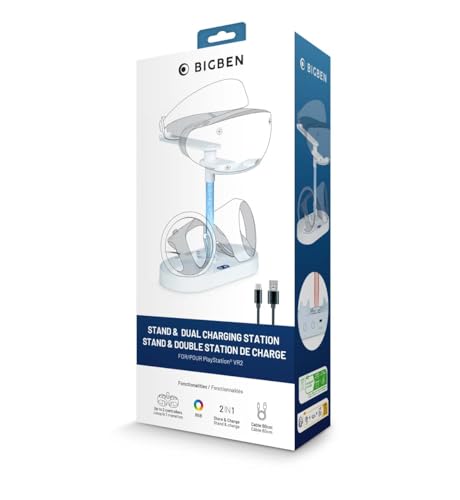
- Tabletop dock made for PS VR2 controllers
- Charging indicator helps track status
- Includes 80 cm USB cable
Best For: PS VR2 owners who want a simple tabletop charger with status feedback
Clear Magnetic Dock
TiMOVO PSVR2 Charging Station with LED Light

- PSVR2-specific dock with headset stand
- Magnetic type-C connectors and LED status light
- Smart chip protection for safer charging
Best For: PSVR2 users who want a display-friendly dock with lighting and protection
Compact All-in-One Stand
FASTSNAIL PSVR2 Headset & Controller Dock

- Charges two PS VR2 controllers
- Stores headset vertically
- Includes overcharge and heat protection
Best For: Compact desks that need charging and headset storage in one stand
LED Display Dock

- Fast magnetic charging for two controllers
- LED indicators show charge status
- Vertical stand keeps the setup organized
Best For: Gamers who want quick charging with easy-to-read LED indicators
Cooling Tower Bundle

- Charges two PS VR2 Sense controllers
- Includes dual cooling fans
- Stores discs and accessories in one tower
Best For: PS5 setups that need cooling, charging, and storage together
All-in-One VR Stand
PSVR2 Headset & Dual Controller Charger

- Charges two PS VR2 Sense controllers together
- Vertical stand stores headset and accessories
- Magnetic connectors and LED indicators simplify use
Best For: Players who want one tidy stand for charging and display storage
Compact Dual Dock
MoKo PS VR2 Controller Charger

- Dual charges PS VR2 Sense controllers
- Magnetic dongles make alignment easy
- Compact dock with anti-slip base
Best For: PS VR2 owners who want a simple controller-only charger
RGB Storage Station
FASTSNAIL PS VR2 Charging Stand

- Dual-charges controllers with magnetic adapters
- 15 RGB light modes add a gaming look
- Also stores headset, cables, and headphones
Best For: Gamers who want charging plus colorful storage in one stand
Official Sony Dock – PlayStation VR2 Sense Controller Charging Station
If you want a straightforward playstation vr2 charging station for controllers, Sony’s official dock keeps the setup simple. It uses a click-in design, charges both PS VR2 Sense controllers at the same time, and doesn’t require a console connection, making it a clean pick for a dedicated gaming space.
Best For: Players who want the official, no-fuss charging dock for dual controller charging.
Pros:
- Charges both controllers simultaneously.
- Click-in design keeps placement quick and easy.
- No console connection required.
- Compact white dock fits the PS5/PS VR2 setup.
Cons:
- Only supports PS VR2 Sense controllers.
- No extra headset storage or display function.
This is the most direct choice if you mainly want reliable controller charging without extra features. It stays focused on the basics and should appeal to anyone who prefers an official accessory over a multi-function station.
All-in-One Vertical Stand – KIWI design D2 3-in-1 Charging Station
This playstation vr2 charging station for controllers is built for people who want more than just charging. KIWI design combines PSVR2 controller charging, a headset display stand, and a compact vertical footprint, so it can help reduce clutter while keeping the whole VR setup organized.
Best For: Gamers who want a space-saving stand that charges controllers and displays the headset.
Pros:
- Charges PSVR2 and PS5 controllers simultaneously.
- Vertical design helps save desk space.
- Includes a PSVR2 headset display stand.
- LED indicators show charge status in real time.
Cons:
- More complex than a basic controller-only dock.
- Uses a proprietary connector type.
If you want one station to handle charging and headset storage, this is the most feature-rich option in the group. The 22.5W adapter and real-time indicators make it especially appealing for organized setups where convenience matters.
Tabletop Indicator Dock – NACON PlayStation VR2 Charging Station and Stand
For a practical playstation vr2 charging station for controllers, NACON keeps things simple with a tabletop dock, two USB ports, and a charging indicator. It is designed specifically for PS VR2 controllers and includes an 80 cm USB cable, which makes it a solid pick if you want a tidy charging spot without extra accessories.
Best For: PS VR2 owners who want a straightforward tabletop charger with basic status feedback.
Pros:
- Built for PlayStation VR2 controllers.
- Includes a charging indicator for easy status checks.
- Tabletop mount keeps the dock accessible.
- Comes with an 80 cm USB cable.
Cons:
- Rated at 2.5W, so it is not a high-power charger.
- Does not include headset storage.
This is a functional, no-frills dock for users who mainly want a stable charging base and visible charge feedback. The tabletop format and included cable make it convenient, but it is better suited to basic charging needs than to a full VR setup refresh.
Clear Magnetic Dock – TiMOVO PSVR2 Charging Station with LED Light
If you want a playstation vr2 charging station for controllers that also doubles as a display piece, TiMOVO’s clear white dock leans into both function and presentation. It is designed specifically for PSVR2, uses magnetic type-C connectors, includes LED lighting, and adds a headset holder so you can charge and store your gear in one place.
Best For: PSVR2 users who want a charging dock with a clear display stand and ambient lighting.
Pros:
- Designed specifically for PSVR2 hardware.
- Includes magnetic type-C connectors for the controllers.
- Built-in smart chip protection against common charging issues.
- LED light changes color based on charge status and can be turned off.
Cons:
- Requires a separate 5V2A charging head.
- Controllers are not included.
This dock makes sense if you value a neat desktop setup and want added charging safeguards. Its clear stand and soft lighting give it a more decorative feel than a basic charger, while still keeping the core charging function front and center.
Compact All-in-One Stand – FASTSNAIL PSVR2 Headset & Controller Dock
If you want a playstation vr2 charging station for controllers that also tidies up your headset, this FASTSNAIL dock takes a simple all-in-one approach. It combines dual charging slots for PS VR2 Sense controllers with vertical headset storage, making it a practical pick for desks where space is tight.
Best For: Players who want a compact desktop organizer that charges two controllers and stores the PS VR2 headset in one place.
Pros:
- Dual charging dock for two PS VR2 controllers
- Vertical stand stores the headset and saves desk space
- Built-in protection against overcharge, overcurrent, and overheating
- Can be powered through a PS5 console or USB-C adapter
Cons:
- Focused on storage and charging, not extra console features
- Uses magnetic charging interfaces, so setup depends on the included parts
This is a straightforward choice if you care most about keeping your VR gear charged and displayed neatly. It leans more toward a clean storage solution than a feature-heavy station, which should suit minimal setups well.
LED Display Dock – PSVR2 3-in-1 Charging Stand
This playstation vr2 charging station for controllers is built for gamers who want fast charging plus a clean display stand. It powers two PS VR2 Sense controllers with magnetic Type-C dongles and keeps the headset upright in a compact tower design, while LED indicators make charge status easy to read.
Best For: Players who want a tidy PS VR2 dock with visual charging status and quick drop-and-charge convenience.
Pros:
- Charges two PS VR2 Sense controllers with magnetic Type-C connectors
- LED lights show charging and fully charged status
- Vertical stand helps organize the headset and controllers
- Includes overcharge, over-current, and short-circuit protection
Cons:
- Uses a battery-powered listing in the supplied specs, so placement may matter
- Best suited to PS VR2 and PS5 setups rather than broader accessory needs
If you want a dock that looks tidy on a gaming desk and gives you quick status feedback, this one is easy to understand and use. The included magnetic dongles and simple tower layout make it a practical everyday charging base.
Cooling Tower Bundle – SOTY PS5 VR2 Charging Station
If you need a playstation vr2 charging station for controllers plus extra console organization, this SOTY tower covers a lot of ground. It combines dual PS VR2 Sense controller charging with a cooling station for PS5, PS5 Slim, and PS5 Pro, making it a strong fit for more complete gaming setups.
Best For: PS5 owners who want controller charging, cooling, and accessory storage in one vertical station.
Pros:
- Dedicated fast-charging docks for two PS VR2 Sense controllers
- Built-in dual cooling fans for airflow during longer sessions
- Also charges DualSense controllers and stores game discs and accessories
- Vertical layout helps keep the gaming area organized
Cons:
- Larger all-in-one design may be more than some users need
- Best suited to PlayStation 5 family consoles and VR2 accessories
This is the most setup-focused option in the group, especially if you want cooling and storage alongside charging. It makes sense for players who keep their PS5 and VR gear in one central station instead of using separate accessories.
All-in-One VR Stand – PSVR2 Headset & Dual Controller Charger
If you want a playstation vr2 charging station for controllers that also cleans up your setup, this all-in-one stand combines dual magnetic charging with a vertical headset display. It’s designed to charge two PS VR2 Sense controllers at once while keeping the headset and accessories organized in one place.
Best For: Players who want a space-saving vertical dock with controller charging and headset storage in one unit.
Pros:
- Magnetic Type-C connectors help the controllers align easily for charging.
- Charges two PS VR2 Sense controllers at the same time.
- Built-in smart chip adds overcharge, overvoltage, and short-circuit protection.
- LED status lights show standby, charging, and fully charged states.
Cons:
- Best suited to PS VR2 gear, so it is not a general-purpose dock.
- Headphones should not be placed at the outermost end for better balance.
This is a practical pick if you want charging plus display storage rather than just a basic dock. The RGB lighting and one-button power-off add extra convenience, but the main appeal is the tidy vertical design and fast dual-controller charging.
Compact Dual Dock – MoKo PS VR2 Controller Charger
If you’re shopping for a playstation vr2 charging station for controllers and want a simple tabletop dock, this MoKo model focuses on dual charging and stable placement. It uses magnetic dongles for easy alignment and is built specifically for PS VR2 Sense controllers.
Best For: PS VR2 owners who want a compact, controller-only charger with straightforward status lights.
Pros:
- Charges two PS VR2 Sense controllers simultaneously.
- Includes 4 magnetic dongles and a USB-C cable for setup.
- Smart chip helps protect against over-current, over-voltage, and short-circuit issues.
- Bottom anti-slip rubber helps keep the dock in place.
Cons:
- Does not include a power adapter.
- Designed for controllers only, so it won’t store the headset.
This is a good fit if you mainly want reliable controller charging without extra bulk. The dock is compact, easy to use, and keeps the focus on safe dual charging rather than extra display features.
RGB Storage Station – FASTSNAIL PS VR2 Charging Stand
This playstation vr2 charging station for controllers is aimed at buyers who want charging, storage, and lighting in one tabletop stand. It supports dual controller charging with magnetic adapters and adds a built-in RGB effect that can double as a gaming-room accent.
Best For: Gamers who want a multifunctional PS VR2 stand with lighting and headset storage.
Pros:
- Charges two sense controllers at the same time with magnetic adapters.
- Offers 15 RGB lighting modes, including memory mode.
- Stores the headset, cables, and headphones in a stable 5-in-1 stand.
- Can be powered by a PS5 console or a 5V/2A adapter.
Cons:
- A 1A adapter may not provide enough input current for proper operation.
- More of a storage station than a minimal charging-only dock.
If you want your charging station to also organize the rest of your PS VR2 setup, this option stands out. The lighting and all-in-one storage make it more visually distinctive, while the magnetic charging keeps the basics practical.
How We Picked the Best Playstation Vr2 Charging Station for Controllers
We focused on practical features that matter most for daily use: secure controller fit, clear charging indicators, stable docking, and whether the station adds real value beyond basic charging. For many buyers, the best Playstation Vr2 Charging Station for Controllers should also be easy to place near a console, simple to use in low light, and durable enough for frequent docking.
We also weighed design extras such as headset storage, RGB lighting, cooling fans, and vertical stands. Those features are helpful only when they improve organization without making the dock bulky or harder to use.
Quick Comparison: What Matters Most
If you want the simplest setup, a dedicated controller-only dock is usually the easiest choice. If your gaming area is tight, a 3-in-1 stand can combine controller charging with headset storage and reduce clutter. If you already have a PS5 tower or want more functionality, a combo station with cooling or display lighting may be worth the extra footprint.
Best for Minimalism
Choose a compact dock with direct charging and obvious status lights.
Best for All-In-One Setups
Look for a charging stand that also stores the headset and organizes accessories.
Best for Busy Gaming Rooms
Pick a unit with a stable base, magnetic or drop-in connectors, and fast visual charging feedback.
Key Buying Factors for Playstation Vr2 Charging Station for Controllers
Connector type: Magnetic tips and Type-C docks can make alignment easier, but they should still hold the controllers securely.
Charging speed: Most buyers do not need the fastest possible output, but they do need consistent charging that finishes both controllers reliably.
Indicators: LED or RGB status lights help you see charge state at a glance. This is especially useful if the dock sits under a desk or in a media cabinet.
Footprint and stability: A charging station should stay planted when controllers are inserted or removed. If space is limited, check the base size before buying.
Extra features: Cooling, headset storage, and display styling can be useful, but only if they match how you actually use your PS5 area.
Who Should Buy Which Playstation Vr2 Charging Station for Controllers?
Get a basic controller dock if you mainly want dependable charging and a tidy setup.
Choose a 3-in-1 station if you want to store the headset and controllers together in one place.
Pick a feature-rich stand if you value RGB lighting, cooling, or a more complete PS5 display solution.
Go compact and simple if your desk or shelf space is limited and you want the easiest daily routine.
In short, the best choice depends on whether you want the most streamlined charge-only solution or a broader storage station that supports your whole VR setup.