If you want a cleaner VR setup, a dedicated charging dock can make daily use much easier. The right stand keeps controllers, headsets, and motion accessories powered and ready without cable clutter.
In this roundup, we focus on practical options for Meta Quest, Pico, and PlayStation VR users who want reliable charging, tidy storage, and simple drop-in convenience.
Best 10 Vr Motion Tracker Charging Dock Picks for 2026
Portable Pick
Pico 4 Motion Tracker 3-in-1 Dock

- Fits Pico 4 / Pico 4 Pro / Pico 4 Ultra
- Plug-and-play setup for simple use
- Compact base stand saves space and travels easily
Best For: Pico 4 users who need a small, no-fuss motion tracker dock
All-in-One Station
Quest 3/3S/2 Charging Dock with Batteries

- Supports Quest 3, 3S, and 2
- Includes adapter, USB A to C cable, and 4 batteries
- Magnetic charging plus multi-color lighting modes
Best For: Quest users who want a feature-packed charging and storage dock
Expanded Capacity
Pico 4 5-in-1 Motion Tracker Dock
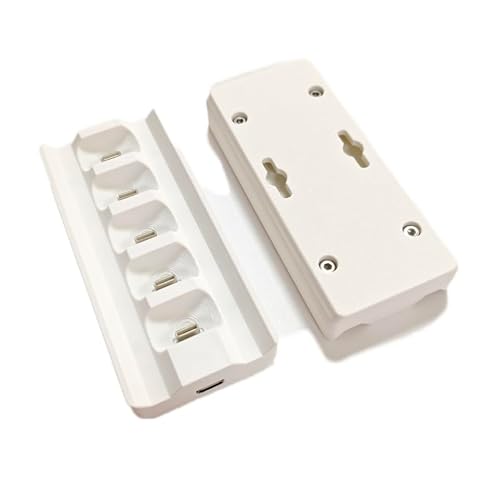
- Fits Pico 4 / Pico 4 Pro / Pico 4 Ultra
- 5-in-1 design adds more charging capacity
- Portable, compact base with plug-and-play use
Best For: Pico 4 users who want more slots in a compact dock
Fast-Charge Favorite
Quest 3 Charging Dock with Batteries

- For Quest 3 and Quest 3S accessories
- 30W adapter with magnetic charging connectors
- Includes 2 rechargeable 1800mAh batteries
Best For: Quest 3/3S owners who want a fast, battery-included charging station
PSVR Charging Dock

- Charges two PlayStation Move controllers
- Compact footprint for tidy storage
- Includes AC adapter and non-slip feet
Best For: PSVR users who want a compact dual charger for Move controllers
PS4 VR Dual Charger

- Charges two PS4 VR controllers
- Compact tabletop design
- USB-powered with fast charging
Best For: PS4 VR owners who need a simple dual controller dock
All-in-One Desk Dock

- Supports Meta Quest 3, 3S, and 2.
- Includes 4 rechargeable 1100mAh controller batteries.
- Works as both a charger and display stand.
Best For: Quest users who want an all-in-one charging and display solution.
Space-Saving Wall Dock
Meta Quest 3 3-in-1 Charging Dock

- Desk or wall-mountable design saves space.
- Charges headset and both controllers.
- LED lights show charging status at a glance.
Best For: Quest 3 owners looking for a compact dock with wall-mount flexibility.
Fast-Charge Starter Kit
Quest 3S/3 Charging Dock with 2100mAh Batteries

- Supports simultaneous charging for headset and controllers.
- Includes two 2100mAh rechargeable batteries.
- Comes with charger, cable, and battery covers.
Best For: Quest 3S/3 owners who want a complete charging kit with larger batteries.
Portable Pick – Pico 4 Motion Tracker 3-in-1 Dock
If you want a compact vr motion tracker charging dock for Pico 4 gear, this 3-in-1 base keeps things simple. It is designed for Pico 4, Pico 4 Pro, and Pico 4 Ultra 2nd Generation Motion Tracker use, with a plug-and-play setup that suits small spaces and travel bags.
Best For: Pico 4 users who want a space-saving, easy-to-carry charging base for their motion tracker accessories.
Pros:
- Compatible with Pico 4, Pico 4 Pro, and Pico 4 Ultra 2nd Gen Motion Tracker
- Plug-and-play operation keeps setup straightforward
- Compact design helps save desk space and makes it easy to carry
- Includes one 3-in-1 charger base
Cons:
- Type-C cable is not included
- Only the charger base is included in the package
- Built for Pico 4 ecosystem devices rather than broader VR setups
This is a practical pick if you mainly need a minimal dock for Pico motion tracker charging without extra clutter. The 3D-printed accessory approach and simple design focus more on convenience than on bundled extras.
All-in-One Station – Quest 3/3S/2 Charging Dock with Batteries
This vr motion tracker charging dock is aimed at Meta/Oculus Quest users who want a full desktop charging station instead of a basic stand. It supports Quest 3, 3S, and 2, and adds controller batteries, cable hardware, and lighting effects for a more feature-rich setup.
Best For: Quest owners who want a multi-device charging station with included batteries and display-friendly lighting.
Pros:
- Works with Oculus Meta Quest 3, 3S, and 2
- Includes four rechargeable replacement batteries plus adapter and USB A to C cable
- Magnetic USB-C connectors help align the headset for charging
- Offers 9 ambient light colors and 5 lighting modes
Cons:
- Requires 5V 2A power to operate properly
- Bulky compared with a simple charging base
- Package is built around Quest devices, not Pico trackers
If you want a dock that doubles as storage and a visual display piece, this model delivers a lot of extras. The included batteries and charging indicators make it especially useful for users who prefer an organized all-in-one station.
Expanded Capacity – Pico 4 5-in-1 Motion Tracker Dock
For buyers comparing a vr motion tracker charging dock for Pico gear, this 5-in-1 version is the more expanded option. It supports Pico 4, Pico 4 Pro, and Pico 4 Ultra 2nd Generation Motion Tracker use, while keeping the same portable, plug-and-play idea as the smaller version.
Best For: Pico 4 users who want a higher-capacity dock in a compact, portable format.
Pros:
- Compatible with Pico 4, Pico 4 Pro, and Pico 4 Ultra 2nd Gen Motion Tracker
- 5-in-1 charger offers more capacity than the 3-in-1 version
- Compact design is still easy to carry and store
- Plug-and-play use keeps setup simple
Cons:
- Type-C cable is not included
- Only one charger unit is included in the package
- Designed specifically for the Pico 4 motion tracker ecosystem
This is a sensible step up if you want more charging capacity without giving up portability. It keeps the same no-frills setup, making it a good fit for users who value convenience over bundled accessories.
Fast-Charge Favorite – Quest 3 Charging Dock with Batteries
If you want a vr motion tracker charging dock for Meta Quest 3 or Quest 3S, this dock focuses on speed and convenience. It uses a 30W adapter, magnetic charging, and included rechargeable batteries to reduce battery swaps and keep your headset area organized.
Best For: Quest 3 and Quest 3S users who want a fast-charging dock with rechargeable batteries included.
Pros:
- Designed for Meta/Oculus Quest 3 and Quest 3S
- 30W adapter supports faster charging for the headset and controllers
- Includes 2 rechargeable 1800mAh batteries and magnetic USB-C connectors
- Built-in safety and circuit management features add peace of mind
Cons:
- Compatible with Quest 3/3S only, not Pico trackers
- Requires tabletop placement
- Powered as a full charging station rather than a small portable base
This dock makes sense if charging speed and bundled battery replacements matter more than portability. The all-in-one package is practical for keeping Quest accessories ready without frequent battery changes.
PSVR Charging Dock – Compact Dual Controller Stand
PowerA Charging Dock for PlayStation VR Move Motion Controllers - PSVR - PlayStation 4
Check Price On AmazonIf you want a simple vr motion tracker charging dock for PlayStation VR Move controllers, this PowerA stand keeps two motion controllers charged and stored in one compact spot. It’s a practical pick for PS4 VR setups where you want a tidy desk and a dedicated place to dock your controllers between sessions.
Best For: PSVR owners who want a compact, no-fuss dual charger for Move controllers.
Pros:
- Charges two PlayStation Move Motion Controllers at the same time
- Compact design helps with storage and desk organization
- Non-slip feet add stability on a tabletop or shelf
- Includes an AC power adapter for wall outlet use
Cons:
- Built specifically for PlayStation Move controllers, not broader VR devices
- Uses a corded power setup, so it needs outlet access
This is a straightforward charging dock if your priority is keeping PSVR motion controllers ready and easy to grab. It focuses on simple storage and dual charging rather than extra features.
Meta Quest 2 Magnetic Dock – Fast Charging VR Stand
This vr motion tracker charging dock is built for Meta Quest 2 owners who want an all-in-one charging stand for the headset and controllers. With magnetic alignment, LED indicators, and a compact footprint, it’s geared toward keeping your VR area organized while cutting down on cable clutter.
Best For: Meta Quest 2 users who want a bundled magnetic dock with batteries included.
Pros:
- Charges the headset and both controllers at the same time
- Magnetic alignment means no plugging in cables each time
- Includes two 2000mAh rechargeable batteries and matching covers
- PD 18W charging is rated to fully charge the headset in about 3 hours
Cons:
- Made specifically for Meta Quest 2 accessories, so compatibility is limited
- More complex bundle than a basic dock if you only need simple storage
If you want a feature-rich Quest 2 charging station, this package stands out for convenience and completeness. It’s a strong fit for users who prefer an organized setup with batteries and accessories included.
PS4 VR Dual Charger – Motion Controller Dock
If you need a basic vr motion tracker charging dock for PS4 VR accessories, this dual charger is built to handle two controllers at once and keep them organized on the stand. It’s aimed at users who want a simple tabletop solution for charging and storage without extra bells and whistles.
Best For: PS4 VR users who want a compact dual charging stand for two controllers.
Pros:
- Charges two PS4 VR controllers simultaneously
- Tabletop design helps keep controllers organized and ready
- Compact build can save workspace
- Uses USB connectivity and supports fast charging
Cons:
- Designed around PS4 VR controller use, so compatibility is narrow
- Does not include a plug, so you’ll need to rely on your own power setup
This dock keeps the focus on straightforward charging and desktop organization. It makes sense if you want a no-frills station that fits a PS4 VR setup and handles two controllers together.
All-in-One Desk Dock – Quest 3/3S/2 Charging Stand
If you want a vr motion tracker charging dock that does more than just power up your gear, this station is built for Meta Quest 3, 3S, and 2 users who want charging and display in one place. It bundles headset charging, controller battery charging, and a standing display dock into a single setup, while the transparent acrylic design keeps the desk looking clean.
Best For: Quest owners who want a tidy charging-and-display dock with included rechargeable batteries.
Pros:
- Charges the headset and controller batteries at the same time.
- Includes 4 rechargeable 1100mAh controller batteries and a PD 15W adapter.
- Built-in ambient lighting and charging indicators add visual feedback.
- Acts as both a charger and a VR display stand.
Cons:
- Headset is not included.
- Requires a 15W-18W fast charging adapter for best performance.
- Designed for Quest 3/3S/2 only.
This is a practical pick if you want a single dock that reduces cable clutter and keeps the headset and controllers ready to grab. The included batteries and clear charge indicators make it especially convenient for everyday use.
Space-Saving Wall Dock – Meta Quest 3 3-in-1 Charging Dock
This vr motion tracker charging dock is a smart fit for Meta Quest 3 owners who want a compact charging setup with flexible placement. It works as a desktop dock or can be rotated for wall mounting, and the LED indicators make it easy to see charging status for both the headset and controllers.
Best For: Quest 3 users who want a space-saving dock that can sit on a desk or mount to a wall.
Pros:
- 3-in-1 design charges the headset and both controllers.
- Can be used on a desk or mounted on the wall.
- LED indicators show charging and full-charge status clearly.
- Non-slip base and ABS construction help keep it steady.
Cons:
- Designed specifically for Meta Quest 3.
- Controllers need compatible rechargeable batteries and the provided covers.
If your priority is a cleaner setup with more mounting flexibility, this dock stands out. It focuses on straightforward charging and organization rather than extra accessories, which may be exactly what some Quest 3 setups need.
Fast-Charge Starter Kit – Quest 3S/3 Charging Dock with 2100mAh Batteries
For buyers comparing a vr motion tracker charging dock for Meta Quest 3S and Quest 3, this option focuses on fast, simultaneous charging and a complete accessory bundle. It charges the headset and two controllers together, includes two 2100mAh rechargeable batteries, and is designed to keep your gaming area organized.
Best For: Players who want a complete Quest 3S/3 charging kit with higher-capacity rechargeable batteries.
Pros:
- Charges the headset and two controllers at the same time.
- Includes 2 rechargeable 2100mAh batteries, battery covers, and charging accessories.
- Designed for stable, organized storage of headset and controllers.
- Claims full charging in about 4-5 hours.
Cons:
- Compatible only with Meta Quest 3S and Quest 3.
- Uses a specific kit layout, so it’s less universal than multi-model docks.
This is a strong choice if you want an all-in-one kit with more battery capacity out of the box. The higher-capacity batteries and included charging hardware make it appealing for users who prefer a ready-to-go setup.
How We Picked the Best Vr Motion Tracker Charging Dock
We prioritized compatibility, charging speed, included batteries or adapters, build quality, and how well each Vr Motion Tracker Charging Dock supports everyday use. We also looked for clear indicators, stable bases, and designs that are easy to place on a desk or mount in tighter spaces.
Quick Comparison
For most buyers, the main decision comes down to platform support and setup style. Some docks are designed around Meta Quest 3/3S/2, others fit Pico 4 variants, and a few are made for older PSVR or Move controllers. If you want the simplest setup, choose a dock that includes the right batteries, cables, and adapter in the box.
Key Buying Factors for Vr Motion Tracker Charging Dock
Compatibility
Check exact headset and controller support first. A dock may look universal but still use custom battery covers, magnetic contacts, or shaped cradles that only fit specific models.
Charging Method
Some stations use direct contacts, while others rely on rechargeable battery packs. Contact-based charging is often more convenient, but battery-based systems can be more flexible if you swap accessories often.
Power Output and Speed
Look for a dock with an included adapter that matches the charging load. Faster charging is useful, but only if the station stays cool and is designed for the devices it supports.
Layout and Space
Desk stands are best for easy access, while wall-mountable or compact designs help in smaller rooms. A stable base matters if you store heavy headsets or multiple controllers.
Indicators and Ease of Use
LED indicators make it easy to confirm charging status at a glance. A good Vr Motion Tracker Charging Dock should also make placement intuitive, so you are not adjusting devices every time you charge.
Who Should Buy Which Vr Motion Tracker Charging Dock?
Meta Quest users should focus on docks built specifically for Quest 3, 3S, or 2, especially if they want bundled rechargeable batteries. Pico owners should look for models designed around the Pico 4 family, since fit and accessory alignment matter more than general compatibility claims. PSVR and Move users should choose a dedicated station for those older controllers rather than forcing a newer dock to do a job it was not built for.
If you want the cleanest everyday setup, buy the dock that matches your exact headset generation and includes everything needed to charge immediately. That usually gives the best value and the least frustration.