An Apple Vision Pro deserves a stand that does more than sit on a desk. The best options help protect the headset, organize the battery cable, and keep charging convenient between sessions.
Below, we focus on practical picks for stability, fit, materials, and cable handling so you can choose a setup that feels tidy and reliable.
Best 10 Apple Vision Pro Charging Stand Picks for 2026
Fast Charging Dock
PRISMXR 65W Vision Pro Battery Dock

- 65W contact charging
- Soft silicone finish
- Cable storage and safety protection
Best For: Fast, organized battery charging
Desk Stand
Vision Pro Stand with Battery Holder

- Headset and battery storage
- Built-in Type-C cable channel
- PLA plastic and pine wood
Best For: Tidy storage with cord management
Protective Tray
elago Silicone Vision Pro Rest Tray

- Silicone shock protection
- Grooved headset fit
- Simple neutral desktop design
Best For: Protecting the headset when resting
Aluminum Workstation Dock
Xmount360 Low-Profile Vision Pro Dock

- Vertical low-profile battery placement
- Anodized aluminum construction
- Natural cable routing and retention
Best For: Minimal workstation charging and cable control
Premium Stability Stand
Macally Vision Pro Stand with Battery Holder
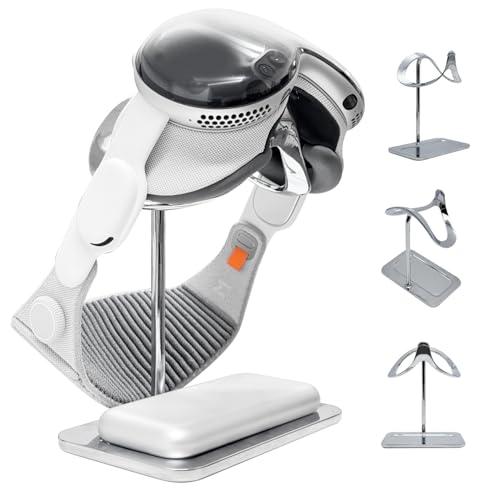
- Heavy 2.31 lb base for added stability
- Integrated battery dock keeps workspace organized
- Soft padding and scratch-resistant film help protect lenses
Best For: premium tabletop storage with battery organization
Magnetic Charging Dock
Vision Pro Stand with LED Lights

- Magnetic charging design for Vision Pro
- LED breathing lights add desktop style
- 30W rating with 3A output listed
Best For: charging-focused desktop setups with a visual accent
Protective Cable Stand
iofeiwak Aluminum Vision Pro Holder

- Aluminum alloy frame with silicone anti-slip base
- Hook stores the Vision Pro battery cable
- Enclosed top holder helps protect from dust
Best For: protective storage with cable organization
Best with Extra Features
Apple Vision Pro Charging Dock & Organizer

- Magnetic USB-C alignment
- Built-in cable management hook
- Weighted base for stability
Best For: Vision Pro users who want a tidy, stable charging dock
Premium Display Stand
Universal VR Stand for Vision Pro

- Aluminum, TPU, and silicone build
- Non-slip grip for secure storage
- Cable holder keeps desk tidy
Best For: Users who want a premium headset stand with cable management
Magnetic Charging Base
Vision Pro Battery Charger Stand

- Magnetic dock for easy placement
- LED lights show charging status
- Secure custom-fit tabletop design
Best For: Buyers who want a dedicated Vision Pro charging base
Fast Charging Dock – PRISMXR 65W Vision Pro Battery Dock
If you want an apple vision pro charging stand that focuses on speed and convenience, this dock is built around contact charging and a compact desktop footprint. It supports the Vision Pro battery with a Pogo Pin connection, includes cable storage to reduce clutter, and uses a soft silicone finish to help prevent scratches during daily use.
Best For: Users who want the fastest charge and an organized, protective desktop dock.
Pros:
- 65W charging is claimed to bring the Vision Pro battery to 80% in about 40 minutes.
- Silicone finish adds a soft-touch surface and scratch protection.
- Built-in cable storage helps keep the desk tidy.
- Includes over-current, over-voltage, overheat, and overcharge protection.
Cons:
- Not compatible with third-party battery covers.
- Focused on charging the battery rather than storing the full headset.
This is a strong pick if charging speed matters most and you want a dedicated dock that keeps the battery easy to place, charge, and store. The design is practical for a clean setup, but buyers should confirm compatibility with their battery cover before ordering.
Desk Stand – Vision Pro Stand with Battery Holder
Generic Stand for Apple Vision Pro with Battery Holder and Integrated Cord Management
Check Price On AmazonThis apple vision pro charging stand is more about storage and cable control than high-speed charging. It pairs a headset stand with a battery holder and integrated cord management, using a mix of PLA plastic and natural pine wood for a clean desktop display that keeps the original Type-C cable organized.
Best For: Owners who want a simple headset-and-battery stand with built-in cord management.
Pros:
- Includes a headset stand plus a dedicated battery holder.
- Built-in cable channel is designed for the original Type-C charging cable.
- Cable organizer helps reduce tabletop clutter.
- Constructed from eco-friendly PLA plastic and natural pine wood.
Cons:
- Does not include the headset, battery, or cables.
- No fast-charging specs are listed.
For buyers who mainly want a tidy place to park the Vision Pro setup, this stand covers the essentials without extra complexity. It is best viewed as a storage-and-organization accessory, not a charging upgrade.
Protective Tray – elago Silicone Vision Pro Rest Tray
elago Tray for Apple Vision Pro Stand | Shock and Scratch Protection Pad, Precisely Shaped Grooves
Check Price On AmazonIf you need an apple vision pro charging stand accessory that prioritizes protection over charging, this elago tray is a focused option. It uses premium silicone with precisely shaped grooves so the headset rests securely and the front screen is less exposed to shock and scratches when placed on a surface.
Best For: Users who want a protective resting tray for the Vision Pro headset.
Pros:
- Premium silicone is designed to absorb shock and reduce scratches.
- Precisely shaped grooves help the headset rest more securely.
- Silicone material is described as non-deforming over time.
- Neutral light grey design is meant to fit different spaces.
Cons:
- This is a tray, not a charging dock.
- Does not include battery or cable management features.
This is a good add-on if your main concern is keeping the Vision Pro screen safe when it is off your head. It offers a simple, purpose-built resting spot, but shoppers looking for charging support will need a separate dock.
Aluminum Workstation Dock – Xmount360 Low-Profile Vision Pro Dock
Workstation Dock Compatible with Apple Vision Pro — Aluminum Battery Stand with Cable Retention
Check Price On AmazonFor buyers comparing an apple vision pro charging stand for desk use, this Xmount360 dock is designed around a low-profile vertical battery position and natural cable routing. It uses anodized aluminum for a quiet, refined look and supports charging with your original charger and USB-C cable, while also aiming for full-speed USB compatibility.
Best For: Desk setups that want a minimal aluminum dock with cable retention.
Pros:
- Low-profile vertical battery orientation saves desk space.
- Natural cable routing helps reduce coiling and snags.
- Single-piece anodized aluminum body has a refined desktop look.
- Supports native-speed charging with your original charger and cable.
Cons:
- Headset, USB-C cable, and power adapter are not included.
- Requires using the stock Vision Pro cable inserts and compatible setup.
This dock is a strong fit for a workstation where clean cable behavior and minimal visual clutter matter. It is less about accessories and more about creating a stable, polished charging point for the battery.
Premium Stability Stand – Macally Vision Pro Stand with Battery Holder
If you want an apple vision pro charging stand that also doubles as a tidy display cradle, this Macally option leans hard into stability and clean desk presentation. Its zinc alloy body, heavy base, and integrated battery dock are built for users who want a secure, minimalist place to keep Vision Pro and the battery pack together.
Best For: Users who want a premium, stable tabletop stand with organized battery storage and a polished look.
Pros:
- Solid die-cast zinc alloy build with a refined metallic finish
- Heavy 2.31 lb base helps reduce tipping and shaking
- Integrated battery dock keeps the battery pack neatly in place
- Soft cradle padding and scratch-resistant film add lens and battery protection
Cons:
- Does not include charging electronics or magnetic charging features in the supplied details
- Heavier base may be less convenient if you want a very lightweight stand
Overall, this is a strong choice if your priority is a premium-looking stand that keeps the headset and battery organized while protecting contact points during daily storage.
Magnetic Charging Dock – Vision Pro Stand with LED Lights
This apple vision pro charging stand is aimed at buyers who want a dedicated dock with magnetic charging support and a more visible desktop presence. The Takzop VR-15 adds LED breathing lights, a tabletop form factor, and a 30W rating, making it a more feature-forward pick for charging-focused setups.
Best For: Buyers who want a magnetic Vision Pro dock with built-in charging convenience and LED accents.
Pros:
- Magnetic charging design for Vision Pro compatibility
- LED breathing lights add a distinctive desktop look
- 30W wattage and 3A output are listed in the supplied details
- Tabletop mount keeps the dock set up neatly on a desk
Cons:
- Only one USB port is listed
- Style may be less minimal than a simple display-only stand
- Supplied details do not emphasize headset lens protection features
If charging convenience matters most, this model stands out for combining magnetic power delivery with a purpose-built dock layout and visual flair.
Protective Cable Stand – iofeiwak Aluminum Vision Pro Holder
For shoppers comparing an apple vision pro charging stand alternative, this iofeiwak stand focuses on protection, cable management, and simple tabletop storage rather than powered charging. Its aluminum alloy frame, silicone anti-slip base, and enclosed top holder are designed to keep Vision Pro steady and shielded when not in use.
Best For: Users who want a protective stand with cable storage and a clean, scratch-conscious design.
Pros:
- Durable aluminum alloy base and pillars provide stable support
- Lightweight ABS top holder makes placement easy
- Hook accessory helps store the Vision Pro battery cable
- Enclosed design helps block dust and reduce lens exposure
Cons:
- Does not advertise charging capability in the supplied details
- Top holder is not designed for reverse Solo strap placement
- Less of a charging dock and more of a protective storage stand
This is a practical pick if your main goal is a safe resting place with better cable control and less risk of surface contact during storage.
Best with Extra Features – Apple Vision Pro Charging Dock & Organizer
If you want an apple vision pro charging stand that also helps tame desk clutter, this magnetic dock is built around convenience and organization. It uses a magnetic USB-C insert for easier alignment, adds cable storage, and includes extra weight to help keep the base steady during everyday use.
Best For: Vision Pro owners who want a charging stand with built-in cable management and added stability.
Pros:
- Magnetic connection makes docking and charging simpler.
- Dedicated cable hook helps keep the setup tidy.
- Magnetic USB-C insert is designed to reduce port wear.
- Weighted base helps resist sliding or tipping.
Cons:
- Does not include the headset.
- Includes only the dock, magnetic insert, and C-to-C cable.
- Purpose-built for Apple Vision Pro, so it is not a universal stand.
Overall, this is a practical pick if your priority is a charging dock that protects the port, manages the cable, and stays planted on the desk. It focuses on everyday usability rather than extra features.
Premium Display Stand – Universal VR Stand for Vision Pro
If you are shopping for an apple vision pro charging stand-style desk setup, this Spigen model is really more of a premium display stand with cable management. It is designed to hold the headset securely with a silicone grip, while the built-in cable holder keeps the charging lead organized.
Best For: Owners who want a stylish headset display stand with cable organization, not an active charger.
Pros:
- Premium TPU, aluminum, and silicone construction.
- Non-slip silicone grip helps keep the headset secure.
- Built-in cable holder reduces tangles on the desk.
- Compatible with Apple Vision Pro, Galaxy XR, and Meta Quest 3/3S.
Cons:
- Does not advertise charging electronics or docked charging.
- Designed as a display stand rather than a powered charging base.
- Compatibility note specifies Vision Pro M2 and M5 chip versions.
This is the cleanest option in the group if you mainly want a refined stand to store your headset and route the cable neatly. Just keep in mind that it is not a charging dock on its own.
Magnetic Charging Base – Vision Pro Battery Charger Stand
For buyers looking specifically for an apple vision pro charging stand, this ZVTE dock is the most direct charging-focused option. It uses magnetic charging, includes LED indicator lights, and is designed to hold the headset securely while it charges at the desk.
Best For: Shoppers who want a simple, dedicated charging base with visible charge status.
Pros:
- Magnetic charging helps the headset snap into place easily.
- LED indicator lights show charging status at a glance.
- Custom-fit docking mechanism is designed for a secure hold.
- Minimalist design fits neatly into a modern setup.
Cons:
- Single-port design limits versatility.
- Power details are relatively modest at 5 watts.
- Uses a tabletop corded setup, so it is not portable.
This is the best match if your main goal is straightforward charging with clear visual feedback. It keeps the design simple and focused on the charging experience.
How We Picked the Best Apple Vision Pro Charging Stand
For this roundup, we looked for stands that balance protection, charging convenience, and everyday usability. The strongest options in the Apple Vision Pro Charging Stand category offer a stable base, secure battery placement, and sensible cable routing without making the desk feel cluttered.
We also favored designs with smooth contact points, scratch protection, and materials that look at home beside premium Apple gear. Where possible, we prioritized stands that make setup simple while still supporting regular charge-and-store use.
Quick Comparison
Some stands are built mainly for charging speed and cable retention, while others emphasize display quality, accessory organization, or a heavier base for extra stability. Universal VR stands can be useful if you also own other headsets, but Vision Pro-specific designs usually provide a more exact fit for the battery and headset shape.
Key Buying Factors for an Apple Vision Pro Charging Stand
Fit and Support
Choose a stand that supports both the headset and battery without forcing cables into tight bends. A good fit reduces stress on connectors and makes daily storage easier.
Stability and Materials
A weighted base, aluminum construction, or anti-slip feet can help prevent tipping. If your desk is busy or frequently bumped, stability should be a top priority.
Cable Management
Look for integrated cord routing, magnetic charging alignment, or battery holders that keep the cable neatly in place. Clean cable management makes the setup safer and more convenient.
Protection for the Headset
Soft contact surfaces, lens-safe cradles, and shaped grooves help reduce scratches and pressure points. This matters most if you store the device on the stand daily.
Charging Convenience
Some Apple Vision Pro Charging Stand models focus on fast charging or magnetic placement, while others are more about organized storage. Pick the style that matches how often you recharge and how quickly you want to dock the headset.
Who Should Buy Which Apple Vision Pro Charging Stand?
If you want the cleanest desktop setup, choose a stand with integrated cable management and a dedicated battery holder. If stability is your biggest concern, go with a heavier aluminum or premium-base design. If you want a simple display-first solution, a protective tray or minimalist cradle may be enough. And if you need flexibility for multiple headsets, a universal VR stand can be the most practical option.
For most buyers, the best Apple Vision Pro Charging Stand is the one that keeps the battery secure, the cable tidy, and the headset protected without adding unnecessary bulk.