A compact desk converter can add sit-stand flexibility without replacing your existing desk. The best models balance a small footprint with enough room for your monitor, laptop, keyboard, or essential accessories.
We’ve selected 10 compact desk converters in several lift styles, widths, and price ranges to help you find a practical fit for your workspace.
Best 10 Compact Desk Converters Picks for 2026
Best Overall
VIVO 26-Inch Standing Desk Converter
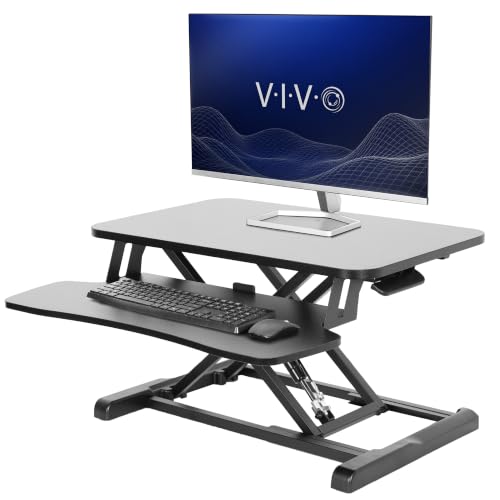
- 33-pound desktop capacity
- Two-tier monitor and keyboard layout
- 4.5- to 16.9-inch manual adjustment
Best For: Sturdy monitor-and-keyboard setups in smaller workspaces
Best Ultra-Slim Option

- Zero assembly required
- Five lockable height settings
- 17.6-pound load capacity
Best For: Laptop or single-monitor workstations needing a slim riser
Best for Portability
UPLIFT Desk E3 Compact Converter

- Less than 1 inch closed
- 11-pound lifting capacity
- Ships fully assembled
Best For: Moving a lightweight laptop workstation between surfaces
Most Portable
SAIJI Metal Laptop Desk Standing Converter
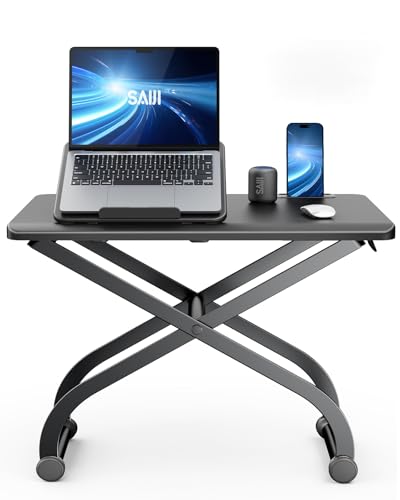
- Built-in laptop stand for elevated viewing
- Adjusts from 4.7 to 16.5 inches
- Preassembled with an 88-pound maximum load
Best For: Portable laptop-based sit-stand workstations
Best for Simple Adjustments
VIVO 28-Inch Single-Top Converter

- Eight height positions from 2 to 14 inches
- Vertical scissor-lift movement
- Preassembled 27.5-by-12-inch platform
Best For: Lightweight laptop or monitor setups
Best Surface Area
Adjustable 25-Inch Sit-Stand Desk Riser
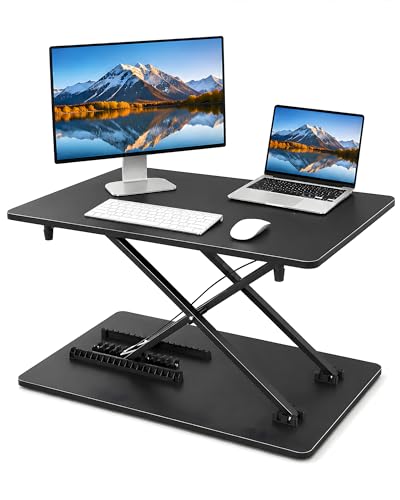
- 25.16-by-15.75-inch work surface
- Twelve adjustable height positions
- Supports up to 33 pounds
Best For: Multi-device desk setups with keyboard and mouse
Compact Sit-Stand Choice
VIVO Manual Height Adjustable Standing Desk Converter

- Two-tier 25-inch workspace
- Gas-spring lift from 5 to 16 inches
- 17.6-pound total capacity
Best For: Compact workstations needing a keyboard tray
Small-Space Heavy-Duty Pick
FLEXISPOT 28-Inch Standing Desk Converter

- 33-pound desktop capacity
- Mechanical spring lift to 19.6 inches
- Designed for laptop or single-monitor use
Best For: Small spaces needing extra stability and capacity
Lightweight No-Assembly Option
23.6-Inch Standing Desk Converter

- 23.62-by-13.38-inch compact surface
- Adjusts from 2.3 to 15.6 inches
- No assembly required
Best For: Simple laptop or monitor setups in tight spaces
Best Overall – VIVO 26-Inch Standing Desk Converter
For shoppers comparing compact desk converters, the VIVO K Series offers a practical balance of usable workspace, lifting capacity, and a relatively small footprint. Its two-tier design accommodates a monitor or laptop plus a keyboard, while the manual lift mechanism raises the workstation from sitting to standing.
Best For: Users who want a sturdy, two-tier converter for a monitor-and-keyboard setup.
Pros:
- 25.6-by-15.7-inch surface fits many smaller workspaces.
- Supports up to 33 pounds on the desktop.
- Adjusts from 4.5 to 16.9 inches with a simple touch height lock.
- Requires only minimal assembly and includes a three-year warranty.
Cons:
- The manual lift design requires user effort.
- The keyboard tray supports only 4.4 pounds.
- At 22.5 pounds, it is not especially lightweight for moving between desks.
This is a strong all-around choice among compact desk converters when stability and capacity matter more than portability. The dual-tier layout is particularly useful for a conventional monitor and keyboard arrangement.
Best Gas-Spring Lift – Mount-It! Compact 25-Inch Desk Riser
The Mount-It! MI-7957 is one of the more convenient compact desk converters for small offices, dorms, and shared work areas. Its gas-spring mechanism supports quick height changes, while the separate keyboard tray and built-in device slot help keep a daily workstation organized.
Best For: Small-space users who prioritize smooth height transitions and built-in device organization.
Pros:
- Compact 25-inch design is suited to limited desk space.
- Gas-spring lift adjusts from 5 to 16 inches.
- Supports laptops, monitors, or all-in-one computers up to 33 pounds.
- Includes a 13-inch device slot and lifetime warranty.
Cons:
- The supplied specifications list a 22-pound maximum weight recommendation, which is lower than the product bullet’s 33-pound claim.
- Its approximately 19.7-inch depth may require more desk depth than some compact risers.
- It is designed for tabletop use rather than a freestanding desk replacement.
The gas-spring lift makes this a convenient pick for users who switch positions frequently. Because the supplied notes show conflicting capacity figures, verify the applicable limit before placing a heavier monitor setup on it.
Best Ultra-Slim Option – VIVO Single-Top 26-Inch Riser
Among compact desk converters, the VIVO Single Top stands out for its low-profile design and zero-assembly setup. The single surface provides room for a laptop, single monitor, and full-size keyboard, while five lockable height settings allow quick manual adjustments.
Best For: Laptop or single-monitor users who need a slim, ready-to-use riser.
Pros:
- Ultra-slim surface measures 26.4 by 18.5 inches.
- Arrives fully assembled and ready to use.
- Offers five lockable height settings from 1.8 inches to 15.9 inches.
- Steel support holds up to 17.6 pounds.
Cons:
- The 17.6-pound capacity is lower than some two-tier converters.
- It has a single top rather than a separate keyboard tray.
- Manual height settings are preset rather than continuously adjustable.
This model makes sense when minimizing setup time and desk bulk is the priority. Its capacity and single-surface layout are best matched with lighter laptop or single-monitor arrangements.
Best for Portability – UPLIFT Desk E3 Compact Converter
The UPLIFT Desk E3 is designed for users who need compact desk converters that can move between surfaces. It folds to less than one inch, ships fully assembled, and uses an internal gas spring to elevate lighter loads such as laptops and books.
Best For: Portable laptop workstations used across tables, islands, craft areas, and spare desks.
Pros:
- Less than one inch thick when fully closed for easier storage.
- Ships fully assembled with no tools or installation required.
- Internal gas spring provides adjustable standing height up to 16.8 inches.
- Includes a 15-year comprehensive warranty.
Cons:
- Its 11-pound lifting capacity limits it to lighter setups.
- The 27-inch width may be wider than some portable work surfaces.
- It is less suited to heavier monitor-and-keyboard configurations.
The E3 is a focused portability choice rather than a high-capacity workstation riser. Its slim closed profile and long warranty make it appealing for flexible laptop use around the home or studio.
Most Portable – SAIJI Metal Laptop Desk Standing Converter
The SAIJI is one of the more portable compact desk converters for users who want a dedicated laptop platform in a small footprint. Its built-in laptop stand, tool-free setup, and broad height range make it easy to move between sitting and standing positions.
Best For: Laptop users who prioritize portability, eye-level positioning, and a simple single-device workstation.
Pros:
- Built-in laptop stand helps raise the screen toward eye level.
- Adjusts from 4.7 to 16.5 inches with a simple-touch locking mechanism.
- 22.4-by-11-inch surface fits a laptop and mouse.
- Arrives assembled and supports up to 88 pounds.
Cons:
- The narrow surface is designed primarily for a laptop and mouse rather than a full desktop setup.
- Its 5.52-kilogram weight may be less convenient to carry than lighter risers.
Choose this SAIJI model if you want a compact desk converter with unusually high stated load capacity and a laptop-focused ergonomic design. It is especially practical for moving between workstations without assembly.
Best for Simple Adjustments – VIVO 28-Inch Single-Top Converter
The VIVO Single Top is a straightforward choice among compact desk converters, offering a single 27.5-by-12-inch platform and eight preset height positions. Its scissor-lift design raises vertically without shifting, while the preassembled construction keeps setup quick.
Best For: Laptop users or lightweight monitor setups that need a space-efficient riser with clearly defined height settings.
Pros:
- Eight height settings range from 2 to 14 inches above the desk.
- Scissor-lift mechanism elevates the platform straight upward.
- 27.5-by-12-inch surface suits a variety of desk layouts.
- Requires no assembly and includes a three-year warranty.
Cons:
- 11-pound load capacity limits it to lightweight equipment.
- The single-tier surface provides less separation for a monitor and keyboard.
The VIVO is a sensible pick when predictable manual adjustment matters more than a large workstation surface. Check your equipment weight carefully, since its capacity is notably lower than some larger converters.
Best Surface Area – Adjustable 25-Inch Sit-Stand Desk Riser
This adjustable desk riser stands out among compact desk converters with a 25.16-by-15.75-inch work surface designed for a monitor, laptop, keyboard, mouse, and office essentials. Twelve height positions and a no-assembly design make it a flexible upgrade for an existing desk.
Best For: Users who need room for a more complete computer setup while keeping their current desk.
Pros:
- Large flat surface can hold a monitor, laptop, keyboard, and mouse.
- Twelve height positions accommodate different desks and working positions.
- Can function as a keyboard platform without a separate tray.
- Reinforced X-shaped frame supports up to 33 pounds.
Cons:
- Its 15.75-inch depth may require more desktop space than the smaller laptop-focused options.
- The 33-pound capacity is lower than the SAIJI model’s stated capacity.
Consider this riser if surface area is your main concern. It offers more room for everyday computer accessories than a single-laptop platform while retaining the low-profile, freestanding format expected from a compact desk converter.
Compact Sit-Stand Choice – VIVO Manual Height Adjustable Standing Desk Converter
Among compact desk converters, the VIVO Manual Height Adjustable Standing Desk Converter offers a two-tier layout for a monitor, laptop, or accessories without taking over most workstations. Its gas-spring lift adjusts from 5 to 16 inches and locks at the selected height.
Best For: Users who want a compact, sturdy riser with a separate keyboard tray and minimal setup.
Pros:
- 25-by-18-inch upper surface and 25-by-10-inch lower tier fit a range of setups.
- Gas-spring adjustment operates in one smooth motion with a locking mechanism.
- Supports up to 17.6 pounds overall, with a 5-pound keyboard tray capacity.
- Requires little to no assembly and includes a three-year warranty.
Cons:
- Its 34.7-pound weight may make repositioning inconvenient.
- The 17.6-pound total capacity is lower than some heavy-duty converters.
This VIVO model is a practical pick when stability, a dedicated keyboard tray, and a two-level surface matter more than having the lightest riser.
Small-Space Heavy-Duty Pick – FLEXISPOT 28-Inch Standing Desk Converter
The FLEXISPOT 28-inch riser is one of the more capable compact desk converters for small spaces. It combines a mechanical spring lift with a reinforced steel frame, offering a 33-pound desktop capacity for a laptop, single monitor, and office accessories.
Best For: Apartment, dorm, and home-office users who need a stable converter for a laptop or single-monitor setup.
Pros:
- Compact design is intended for limited desk areas and minimalist setups.
- Mechanical spring system provides smooth height adjustment from 4.9 to 19.6 inches.
- Desktop supports up to 33 pounds, while the keyboard tray holds up to 11 pounds.
- Arrives almost fully assembled; only the keyboard tray needs attachment.
Cons:
- The design is aimed at a laptop or single monitor rather than larger multi-monitor setups.
- At 31 pounds, it is not especially lightweight to move.
Choose this FLEXISPOT when you want a compact footprint without giving up a comparatively high desktop weight capacity or a broad height range.
Lightweight No-Assembly Option – 23.6-Inch Standing Desk Converter
For shoppers comparing compact desk converters, this 23.6-inch model keeps the format simple: a 23.62-by-13.38-inch work surface, manual height adjustment, and no assembly required. It raises from 2.3 to 15.6 inches for switching between seated and standing work.
Best For: Users who want a straightforward, ready-to-use riser for a laptop or monitor in a home, office, or classroom.
Pros:
- Compact desktop leaves more open space on the existing desk.
- Comes ready to use without assembly.
- Manual adjustment covers a 2.3- to 15.6-inch height range.
- Simple handle-operated design allows transitions between sitting and standing.
Cons:
- The supplied notes do not specify a weight capacity.
- The 23.62-by-13.38-inch surface may be limiting for larger setups.
- Adjustment requires using both hands according to the operating instructions.
This converter stands out for quick setup and a small footprint, making it worth considering when simplicity and desk space are more important than extensive capacity details.
How We Picked These Compact Desk Converters
We focused on desktop risers that suit smaller work areas and provide a usable transition between sitting and standing. Our comparison considers platform width and depth, height-adjustment range, lifting method, keyboard space, stability, and the type of equipment each converter can reasonably support.
Because desk setups vary, we included manual and assisted-lift designs, single-level and keyboard-equipped platforms, and models ranging from laptop-focused options to wider surfaces for a monitor and accessories. Product specifications and intended use should be checked carefully before ordering, especially when pairing a converter with a heavy monitor or monitor arm.
Quick Comparison
| Feature | What to compare | Why it matters |
|---|---|---|
| Width and depth | Approximately 23.6 to 28 inches wide, with varying front-to-back depth | Determines whether your display and input devices fit comfortably |
| Lift style | Manual, gas-spring, or assisted adjustment | Affects setup effort, speed, and long-term convenience |
| Platform layout | Single top or separate keyboard tier | Influences available workspace and typing posture |
| Equipment capacity | Check the manufacturer’s weight rating | Helps prevent instability or difficult height changes |
Key Buying Factors for Compact Desk Converters
Measure Your Desk First
Measure the usable desk surface, not just its advertised width. Leave room behind and beside the converter for cables, speakers, and other accessories. Also check the desk’s depth and clearance if the riser will sit near a wall or monitor stand.
Match the Platform to Your Setup
A laptop-only setup can work well on a smaller top, while a desktop monitor, keyboard, and mouse usually need more surface area. A dedicated keyboard tier may improve ergonomics, but it can reduce flexibility for larger accessories or writing materials.
Consider Adjustment and Stability
Gas-spring models generally make frequent changes easier, while manual designs can be simpler and less dependent on moving mechanisms. Whichever style you choose, look for a broad base, smooth movement, and a weight capacity that exceeds your equipment’s combined weight.
Check Ergonomic Range
The converter should raise your screen close to eye level while allowing your elbows to remain relaxed and your wrists reasonably neutral. If you use a laptop for extended periods, consider whether an external keyboard and mouse will be necessary.
Who Should Buy Which Compact Desk Converters?
Choose a narrow laptop-focused converter if desk space is extremely limited or you need a simple occasional standing option. A 25- to 26-inch model is a practical middle ground for many single-monitor or laptop setups. If you need room for a larger display and keyboard, a 28-inch converter may provide a more comfortable working surface, provided your desk can support it.
Buy an assisted-lift model if you switch positions often or want easier adjustments. A manual converter may be the better value for occasional use. For shared workstations, prioritize a wide height range and straightforward controls so different users can find a comfortable position quickly.