Wireless VR lives or dies by latency, signal stability, and real-world throughput. The right access point can make PC streaming feel smooth, responsive, and far less frustrating.
Below, we focus on options that can better support a high speed access point for wireless vr setup, from dedicated VR-focused routers to business-grade access points with the bandwidth and reliability needed for immersive play.
Best 10 High Speed Access Point for Wireless Vr Picks for 2026
Budget PC-VR Streaming Router
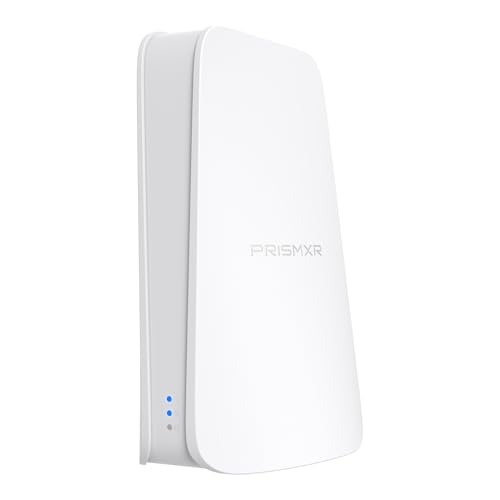
- Wi‑Fi 6 dual-band up to 1500 Mbps
- Dedicated VR streaming link with PrismPulse mode
- One-click stream checks in the desktop app
Best For: Budget-minded VR players who want easy wireless PC streaming
Enterprise 6 GHz AP

- Tri-band Wi‑Fi 7 with up to 5.8 Gbit/s
- 10 Gigabit Ethernet for fast backhaul
- Built for dependable, secure business networking
Best For: Advanced networks needing maximum wireless and wired speed
Wi‑Fi 7 Mesh Access Point

- Wi‑Fi 7 dual-band with up to 5.0 Gbps
- 2.5G port plus PoE+ or DC power
- Omada management, mesh, and WPA3 roaming
Best For: People wanting a future-proof Wi‑Fi 7 access point with flexible deployment
Compact Enterprise AP
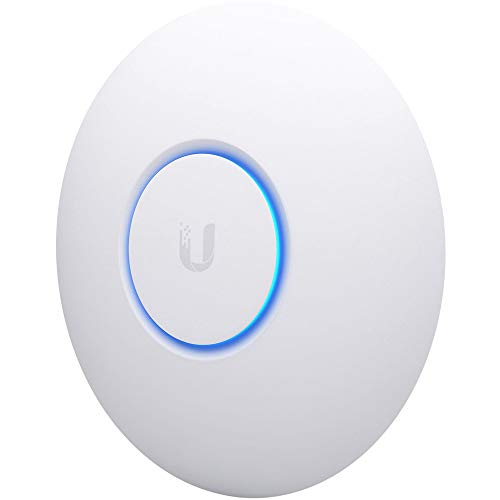
- 802.11ac Wave2 four-stream wireless
- Supports 200+ concurrent users
- Compact PoE ceiling/wall-mount design
Best For: Discreet mounted networking on an existing wired setup
Home Mesh Gaming Router

- 3000Mbps Wi-Fi 6 speeds
- AP mode with mesh expansion
- OFDMA, MU-MIMO, Beamforming
Best For: Home gaming and wireless VR setups
Business 6E AP Kit

- Wi-Fi 6E tri-band with 6GHz
- Smart Mesh and easy app management
- Up to 3.6Gbps maximum throughput
Best For: Multi-AP networks for VR, gaming, and business
Pro Range Access Point
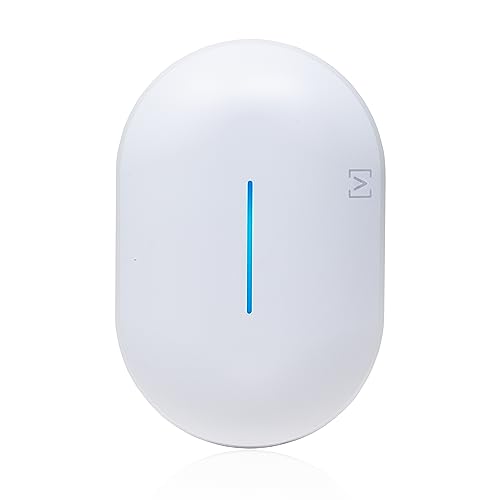
- Up to about 6.3Gbps throughput
- 4x4 MU-MIMO and 4096 QAM
- PoE+ with seamless roaming
Best For: Performance-focused wireless VR and dense networks
Cloud-Managed Business AP
Omada EAP610 WiFi 6 Access Point

- AX1800 Wi‑Fi 6 with 4 spatial streams
- Omada cloud, app, and SDN management
- PoE+, passive PoE, or DC power options
Best For: Managed networks needing roaming-friendly Wi‑Fi 6 for VR
Compact Business Coverage

- AX1800 Wi‑Fi 6 with MU‑MIMO support
- Up to 4 SSIDs for network separation
- PoE or adapter power with compact design
Best For: Small offices needing secure, compact Wi‑Fi 6 coverage
Budget PC-VR Streaming Router – Puppis S1 Lite
If you want a high speed access point for wireless vr without overcomplicating setup, the Puppis S1 Lite is built around dedicated PC-to-headset streaming. It uses Wi‑Fi 6 dual-band networking and a plug-and-play design so you can create a separate link for VR and skip the usual cable clutter.
Best For: Quest and Pico users who want a simple, dedicated wireless VR streaming setup for PC gaming.
Pros:
- Wi‑Fi 6 dual-band design with up to 1500 Mbps total network speed
- Dedicated PrismPulse mode creates a point-to-point streaming link
- One-click stream check in the desktop app helps troubleshoot streaming issues
- Works with Virtual Desktop, Steam Link, Quest, and Pico4 headsets
Cons:
- Single dedicated-link design is focused on VR streaming rather than general networking
- Only one Ethernet port is listed
- Best results depend on a clean 5 GHz connection
This is a practical pick if your main goal is smoother PC-to-VR streaming with minimal setup. Its strength is simplicity: dedicated routing, app-based diagnostics, and broad headset compatibility all make it easier to get wireless VR working fast.
Enterprise 6 GHz AP – U7-PRO-XG
If you need a high speed access point for wireless vr in a more demanding environment, the Ubiquiti U7-PRO-XG is built for serious throughput. It supports tri-band Wi‑Fi 7 with a rated wireless transmission speed up to 5.8 Gbit/s and adds 10 Gigabit Ethernet for fast wired backhaul.
Best For: Business or advanced home networks that need very high wireless and wired throughput.
Pros:
- Tri-band Wi‑Fi 7 with up to 5.80 Gbit/s wireless transmission speed
- 10 Gigabit Ethernet connectivity for high-speed wired networking
- Supports modern wireless standards including 802.11be, ax, ac, and n
- Designed for dependable connectivity and enhanced data security
Cons:
- Business-focused hardware may be more than many VR-only setups need
- Only one port is listed in the supplied details
- Coverage is described as wireless, but no simple consumer setup is emphasized
For users building a premium network around VR and other high-bandwidth devices, this access point offers a lot of headroom. It stands out most where fast wired infrastructure and top-end wireless performance matter more than simple plug-and-play convenience.
Wi‑Fi 7 Mesh Access Point – Omada EAP720
The Omada EAP720 is a strong high speed access point for wireless vr if you want Wi‑Fi 7 performance with flexible installation. It combines dual-band 4-stream wireless, a 2.5G port, and support for PoE+ or DC power, which makes it a practical fit for fast, stable streaming setups.
Best For: Users who want a Wi‑Fi 7 access point with modern networking features and flexible mounting options.
Pros:
- Wi‑Fi 7 with up to 5.0 Gbps total speed
- 2.5G Ethernet port supports faster network backhaul
- Supports PoE+ or DC power, and the adapter is included
- Omada features include mesh, roaming, VLAN, and centralized remote management
Cons:
- Business-focused feature set may be more than needed for a simple VR-only setup
- Coverage is listed at 1500 square feet, which may be limiting for larger spaces
- Full benefits depend on using the Omada ecosystem and compatible network design
For wireless VR, the EAP720 makes sense when you want a modern access point that can also serve the rest of your network well. Its Wi‑Fi 7 platform, multi-gig port, and roaming/mesh support give it strong future-proofing for growing setups.
Compact Enterprise AP – UniFi nanoHD
Ubiquiti UniFi nanoHD Compact 802.11ac Wave2 MU-MIMO Enterprise Access Point ( UAP-NANOHD-US)
Check Price On AmazonThe UniFi nanoHD is a compact access point that can still serve as a high speed access point for wireless vr when you want a clean, ceiling-friendly design. It uses 802.11ac Wave2 MU-MIMO with four streams and supports more than 200 concurrent users, making it a solid enterprise-style option for dense networks.
Best For: Users who want a discreet, ceiling-mountable access point for an existing wired network.
Pros:
- 802.11ac Wave2 four-stream design with up to 1733 Mbps data rate
- Supports 200+ concurrent users for busy networks
- 802.3af PoE compatibility simplifies mounting
- Compact design with optional covers to blend into the environment
Cons:
- WiFi 5 is older than Wi‑Fi 6 and Wi‑Fi 7 options
- LAN port bandwidth is listed at 100 Mbps in the supplied details
- Better suited to established wired installations than quick VR-only setups
This model still has a place if you value low-profile hardware and reliable enterprise access-point behavior. It is less cutting-edge than newer Wi‑Fi 6/7 choices, but its compact build and PoE support keep it relevant for tidy, mounted deployments.
Home Mesh Gaming Router – AX3000 Wi-Fi 6 Dual Band
If you want a high speed access point for wireless vr without jumping straight to a full enterprise setup, this Wi-Fi 6 router is a practical fit. It combines AX3000 dual-band speeds, AP mode, and mesh expandability, which can help support low-latency wireless gaming and VR at home.
Best For: Home users who want a fast Wi-Fi 6 router with AP mode and mesh support for gaming or wireless VR.
Pros:
- Wi-Fi 6 AX3000 performance with up to 3000Mbps combined throughput.
- AP mode and Everything Mesh support for flexible home network setups.
- OFDMA, MU-MIMO, Beamforming, and 160MHz for better multi-device efficiency.
- Designed for low-latency use cases like gaming and VR.
Cons:
- Requires a separate modem to get online.
- Best suited to home or office use rather than managed business deployments.
Overall, this is a strong value-oriented option if you want faster wireless performance and the ability to build out coverage later. The AP mode and mesh features make it easier to adapt as your VR setup grows.
Business 6E AP Kit – Instant On AP32 5-Pack
For buyers looking for a high speed access point for wireless vr in a multi-room or business-style network, the AP32 stands out for its Wi-Fi 6E support and tri-band design. The 6GHz band is reserved for Wi-Fi 6E devices, which can help deliver cleaner capacity for newer headsets, laptops, and phones.
Best For: Small business, eGaming, or advanced home networks that need multiple Wi-Fi 6E access points.
Pros:
- Wi-Fi 6E with 6GHz support for newer devices.
- Tri-band design with up to 3.6Gbps maximum throughput.
- Smart Mesh support for extending coverage without extra cabling.
- PoE or 12V power options, with simple app and web management.
Cons:
- Power sources are not included in this 5-pack.
- Best value comes when you can use all five access points.
This is a strong pick when you need multiple access points and want the cleaner spectrum benefits of Wi-Fi 6E. It is especially appealing for environments where consistent roaming and easy centralized management matter.
Pro Range Access Point – AP6-PRO WiFi 6
If you need a high speed access point for wireless vr with more headroom than a typical home router, the AP6-PRO is built for performance. Its Wi-Fi 6 platform, 4×4 MU-MIMO, and 4096 QAM are aimed at fast, low-latency connectivity for dense device environments and wide coverage.
Best For: Users who want a high-performance Wi-Fi 6 access point for demanding home, creator, or small business networks.
Pros:
- Up to about 6.3Gbps throughput with Wi-Fi 6 and 4096 QAM.
- 4×4 MU-MIMO and proprietary antenna design for stronger coverage.
- Seamless roaming with 802.11k/v/r and mesh support.
- PoE+ deployment makes ceiling or wall installs cleaner.
Cons:
- Requires Ethernet-based installation and PoE+ power.
- Cloud-managed features may be more than casual users need.
For buyers focused on speed, roaming, and enterprise-style deployment, this access point is the most performance-forward option here. It makes the most sense when you want a dedicated AP rather than an all-in-one router.
Wall-Plug WiFi 6 Upgrade – BrosTrend AX3000 Access Point
If you need a high speed access point for wireless vr in a room that starts with only wired networking, this BrosTrend AX3000 is a straightforward way to add Wi‑Fi 6 coverage. Its dual-band AX3000 rating, 160MHz 5GHz support, and gigabit Ethernet port make it a practical pick for fast local performance without a complicated install.
Best For: Home users who want a simple wall-plug access point with fast Wi‑Fi 6 speeds for VR, streaming, and gaming.
Pros:
- AX3000 Wi‑Fi 6 performance with up to 2402Mbps on 5GHz and 574Mbps on 2.4GHz
- 160MHz 5GHz channel bandwidth for smoother 4K/8K streaming and gaming
- Built-in 1Gbps gigabit Ethernet port for wired backhaul
- Beamforming and external antennas help direct signal toward connected devices
Cons:
- Requires an Internet-enabled Ethernet port or router LAN connection to create the new network
- Wall-plug design may be less flexible than ceiling or wall-mounted business APs
This is a good fit if you want a neat, no-fuss way to add strong Wi‑Fi 6 coverage in a home setup. The 45-device capacity and dual-band design make it versatile, but the real appeal is the fast 5GHz throughput for latency-sensitive wireless VR use.
Cloud-Managed Business AP – Omada EAP610 WiFi 6 Access Point
For a high speed access point for wireless vr in a business or multi-room environment, the Omada EAP610 brings Wi‑Fi 6 AX1800 performance with features aimed at stable multi-device networking. It supports Omada cloud management, PoE+ power, mesh, seamless roaming, and WPA3, which makes it easier to deploy and manage across offices, classrooms, or hospitality spaces.
Best For: Businesses and advanced home users who want centralized management, PoE installation, and roaming-friendly Wi‑Fi 6 coverage.
Pros:
- Wi‑Fi 6 AX1800 speeds up to 1800Mbps with 4 spatial streams
- Supports Omada cloud management, app access, and SDN controller options
- Mesh WiFi and seamless roaming support for larger deployments
- Flexible powering via 802.3at PoE+, passive PoE, or DC adapter
Cons:
- Mesh and seamless roaming require Omada SDN controllers
- More deployment-focused than plug-and-play consumer access points
This model stands out when you want network control as much as raw wireless performance. If your VR setup is spread across multiple rooms or you need consistent roaming in a managed environment, the EAP610 offers a strong balance of speed, flexibility, and administration tools.
Compact Business Coverage – NETGEAR WAX210PA Access Point
If you’re shopping for a high speed access point for wireless vr in a small office or retail space, the NETGEAR WAX210PA is built to extend an existing wired network with Wi‑Fi 6 AX1800 speeds. Its compact form, PoE option, and support for up to four SSIDs make it a practical choice for secure, separated networks with simple browser-based setup.
Best For: Small businesses and professional spaces that need compact Wi‑Fi 6 coverage with isolated guest and staff networks.
Pros:
- Wi‑Fi 6 AX1800 speeds up to 1800Mbps with MU‑MIMO support
- Supports up to 128 registered devices and 30 active devices at once
- Up to 4 SSIDs for keeping staff and guest networks separated
- Can be powered by the included adapter or a PoE-capable switch
Cons:
- Requires an existing router and Ethernet connection
- Browser-based setup is straightforward, but it is still a business-style AP rather than a consumer mesh system
This access point is a solid fit when you want dependable Wi‑Fi 6 coverage without a bulky installation. For wireless VR, the combination of AX1800 speeds, MU‑MIMO, and a wired Ethernet uplink helps it serve as a stable network extension in smaller professional environments.
How We Picked the Best High Speed Access Point for Wireless Vr
We prioritized access points and routers with strong wireless standards, fast Ethernet uplinks, low-lag performance, and features that matter in VR such as Wi‑Fi 6/6E/7 support, OFDMA, MU-MIMO, and stable roaming. For wireless VR, consistency matters more than peak headline speed, so we emphasized hardware known for dependable local streaming and clean radio performance.
Quick Comparison
For the best wireless VR experience, look first at band support, wired backhaul speed, and whether the device is designed for standalone router use or managed AP deployment. A 6GHz-capable model can help reduce interference, while a strong Wi‑Fi 6 dual-band option may be enough for a dedicated play space. Mesh features are useful for coverage, but a direct access point near the headset usually delivers the lowest latency.
Key Buying Factors for High Speed Access Point for Wireless Vr
Latency and Stability
Wireless VR depends on a fast, steady connection more than raw throughput. Prioritize access points with strong antenna design, good radio tuning, and support for congestion-reducing features like OFDMA and beamforming.
Band and Channel Availability
Wi‑Fi 6 and Wi‑Fi 6E are often the sweet spot, with 6E offering the cleaner 6GHz band where supported. If you are using a High Speed Access Point for Wireless Vr in a crowded home, less interference can improve responsiveness more than a higher theoretical speed rating.
Wired Uplink
Use at least a gigabit Ethernet connection, and consider 2.5G if you want more headroom for a busy network or future upgrades. A wired link from the PC or router to the access point is essential for the most stable VR streaming setup.
Placement and Coverage
Keep the access point close to the play area with minimal walls or obstructions. VR is sensitive to dropouts, so a nearby dedicated AP often beats a stronger device placed farther away.
Who Should Buy Which High Speed Access Point for Wireless Vr?
If you want the simplest upgrade for a single headset, choose a compact Wi‑Fi 6 router or access point that can sit near your gaming space. If you have multiple users, a managed business AP with PoE and better roaming tools is the smarter long-term choice. If you’re chasing the cleanest possible wireless VR link and your headset supports it, consider 6E or newer hardware. For mixed use, pick a model that balances VR performance with general home networking reliability.