Upgrading your case fans can improve airflow, reduce heat buildup, and give your PC a cleaner, more personalized look. The right RGB fan setup balances cooling performance with noise, software compatibility, and installation simplicity.
This roundup compares 10 RGB computer cooling fans and multi-fan kits, including premium PWM models, budget-friendly bundles, reverse-blade options, and kits with hubs or remote controls.
Best 10 RGB Computer Cooling Fans Picks for 2026
Best Daisy-Chain Setup
CORSAIR RS120 ARGB Triple Pack
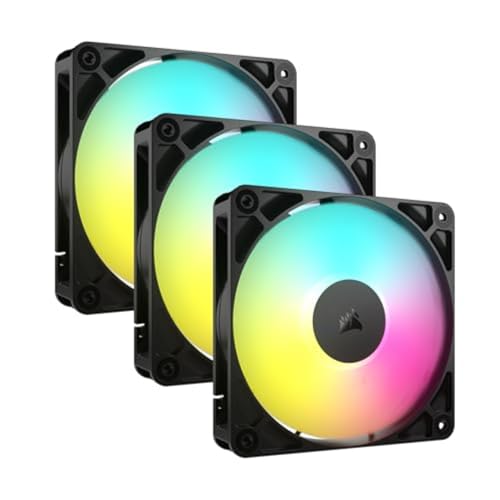
- Daisy-chain PWM and ARGB connections
- Up to 2,100 RPM and 72.8 CFM
- Radiator-friendly 2.8 mm-H2O static pressure
Best For: Cleanly wired multi-fan and radiator builds
Best High-Speed Single Fan

- Up to 3,000 RPM with PWM control
- 77 CFM airflow and high static pressure
- FDB bearing with low-speed stop mode
Best For: Single-fan radiator or restrictive-panel upgrades
Best Infinity-Mirror Value

- Layered infinity-mirror lighting
- ARGB blades and frame
- Three 120 mm fans with PWM control
Best For: Visual-focused case builds with moderate cooling needs
Best Premium Three-Pack

- Three fans with included Y-cable splitter
- 600–3,000 RPM PWM range
- 77 CFM high-static-pressure airflow
Best For: Performance case or radiator upgrades
Easy-Remote RGB Kit
DS 6-Pack 120mm RGB Cooling Fans

- Six 120mm fans for coordinated builds
- RF remote controls colors and patterns
- Requires a compatible 6-pin setup
Best For: Supported six-fan RGB installations with wireless lighting control
Airflow-Blend ARGB Pack

- Four forward and three reverse-blade fans
- 1550 RPM with 4-pin PWM control
- 28 ARGB LEDs and 19 dB listed noise
Best For: Large gaming cases, AIOs, and CPU-cooler airflow layouts
High-Airflow ARGB Value

- Up to 66.17 CFM airflow per listed specifications
- 4-pin PWM with automatic speed control
- S-FDB bearings and motherboard ARGB sync
Best For: High-airflow case, radiator, and CPU-cooler installations
Best Value 5-Pack

- Five 120mm fans with hub and remote
- Up to 53 CFM airflow at 1,300 RPM
- Suitable for cases, radiators, and CPU coolers
Best For: Multi-fan case builds on a budget
Quiet White Pick

- Three white 120mm PWM fans
- 23.2 dBA listed noise level
- Up to 47.6 CFM airflow at 1,500 RPM
Best For: Quiet white-themed desktop builds
Best High-Airflow Lighting
AsiaHorse COSMIQ ARGB Fan 3-Pack

- Up to 68.5 CFM at 2,000 RPM
- Infinity-mirror lighting with controller
- Daisy-chain wiring for tidier builds
Best For: High-airflow gaming and showcase PCs
Best Daisy-Chain Setup – CORSAIR RS120 ARGB Triple Pack
The CORSAIR RS120 ARGB triple pack is a practical choice for builders who want rgb computer cooling fans with simplified wiring. Daisy-chain support lets three fans share one 4-pin PWM connection and one 5V ARGB connection, while AirGuide vanes and high static pressure make them suitable for radiators or heatsinks.
Best For: Streamlined multi-fan builds, radiator cooling, and motherboard-controlled ARGB lighting.
Pros:
- Daisy-chains multiple fans through one PWM and one ARGB connection.
- Reaches up to 2,100 RPM and 72.8 CFM airflow.
- AirGuide vanes and 2.8 mm-H2O static pressure help direct air through obstructions.
- Includes eight LEDs per fan and a five-year manufacturer warranty.
Cons:
- Requires a compatible motherboard for ARGB control.
- Listed noise level is 36 dB.
Choose the RS120 when clean cable management and radiator-capable performance matter more than minimizing connections on every individual fan. Its triple-pack format is convenient for a coordinated cooling upgrade.
Best High-Speed Single Fan – ARCTIC P12 Pro A-RGB
The ARCTIC P12 Pro A-RGB is a strong single-fan option for rgb computer cooling fans when static pressure and speed control are priorities. Its 4-pin PWM connection supports adjustment up to 3,000 RPM, while the fluid dynamic bearing and redesigned blades are intended to balance cooling output with smooth operation.
Best For: Radiators, restrictive mesh panels, and desktop builders who need one high-performance 120 mm fan.
Pros:
- High static pressure helps push air through radiators and dense panels.
- Wide PWM range reaches 3,000 RPM and can stop below 5% PWM.
- Fluid dynamic bearing and precision balancing support smooth, quiet operation.
- Provides up to 77 CFM airflow with a six-year warranty.
Cons:
- This listing includes one fan rather than a multi-pack.
- ARGB operation requires compatible motherboard hardware.
For a single replacement or targeted intake, exhaust, or radiator position, the P12 Pro A-RGB offers unusually broad speed control. It is especially appealing when a system needs strong airflow through resistance without giving up a low-speed stop mode.
Best Infinity-Mirror Value – DARKROCK Black F120 3-Pack
The DARKROCK Black F120 3-pack focuses on visual impact for rgb computer cooling fans. Its infinity-mirror center and side effects combine with ARGB blade and frame lighting, while PWM control, hydraulic bearings, and rubber pads provide adjustable and quieter case cooling.
Best For: Showpiece desktop cases that need coordinated ARGB lighting and three 120 mm fans.
Pros:
- Infinity-mirror design creates layered lighting effects at the center and sides.
- ARGB lighting covers both the blades and frame.
- PWM speed control adjusts operation from 800 to 1,600 RPM.
- Hydraulic bearing and eight rubber pads support stable, low-noise operation.
Cons:
- Maximum airflow is listed at 46.7 CFM, lower than the ARCTIC and CORSAIR options here.
- Uses a listed 3-pin power connector, so connection compatibility should be checked.
- Noise is listed at 36 dB.
The F120 is best selected for its distinctive lighting and included three-fan configuration rather than maximum airflow. It makes sense for a visually focused case build with moderate cooling demands.
Best Premium Three-Pack – ARCTIC P12 Pro A-RGB 3-Pack
The ARCTIC P12 Pro A-RGB 3-pack gives builders three high-speed rgb computer cooling fans with a Y-cable splitter for easier installation. Each 120 mm fan offers high static pressure, 600–3,000 RPM PWM control, a 0 RPM mode below 5% PWM, and a fluid dynamic bearing for smooth operation.
Best For: Performance-oriented cases and radiators that need three synchronized ARGB PWM fans.
Pros:
- Three-fan pack includes a Y-cable splitter for connecting the set.
- Reaches up to 3,000 RPM with a broad PWM adjustment range.
- High static pressure and 77 CFM airflow suit restrictive cooling positions.
- FDB bearing, balanced construction, and redesigned blades target smooth running.
Cons:
- High maximum speed may be unnecessary for basic case ventilation.
- Requires compatible 5V digital RGB and PWM connections.
Among these options, this pack is the most directly suited to a performance-focused three-fan upgrade. Its splitter, stop mode, and high static pressure make it flexible for case or radiator layouts, provided the motherboard supports the required connections.
Easy-Remote RGB Kit – DS 6-Pack 120mm RGB Cooling Fans
For shoppers comparing rgb computer cooling fans, this six-fan DS kit offers 120mm sizing, remote-controlled lighting, and airflow suited to cases, radiators, and CPU cooling setups. Its 1300 RPM speed and vibration-reducing silicone pads make it a practical choice for a coordinated installation, but compatibility requirements should be checked first.
Best For: Users building a supported six-fan setup who want wireless control of RGB colors, speed, and patterns.
Pros:
- Six 120mm fans provide a coordinated cooling and lighting installation.
- RF remote enables one-touch adjustment of colors, speed, and lighting patterns.
- Silicone pads help reduce vibration noise, with a listed noise level of 28 dB.
- Standard 120mm format works with various cases, radiators, and CPU cooling applications.
Cons:
- Cannot be used independently; it is intended for six-fan kits or specific fan-and-LED-strip combinations.
- Requires a 6-pin connector, so connector compatibility must be verified.
- Its 30 CFM airflow rating is lower than the airflow listed for the Thermalright option in this roundup.
This is a visually focused, complete fan package for compatible builds. Confirm the hub, connector, and kit requirements before purchasing, especially if you are replacing individual fans rather than installing a full set.
Airflow-Blend ARGB Pack – 7-Pack 120mm PWM PC Fans
Among rgb computer cooling fans, this seven-pack stands out for combining four forward-blade fans with three reverse-blade fans. The 4-pin PWM connection, 1550 RPM speed, and 28 ARGB LEDs support both practical case airflow and an illuminated gaming build.
Best For: Gaming PCs needing a large mixed-direction fan set for case, AIO, or CPU-cooler airflow layouts.
Pros:
- Includes four forward-blade and three reverse-blade fans for flexible airflow planning.
- 4-pin PWM control supports motherboard-based speed management.
- 1550 RPM operation is designed to balance cooling performance and acoustic comfort.
- 28 ARGB LEDs provide infinity-mirror lighting, with a listed noise level of 19 dB.
Cons:
- The supplied notes do not specify a lighting hub or controller, so system compatibility should be checked.
- A seven-fan configuration may be more than smaller cases need.
- Reverse-blade airflow requires careful orientation planning during installation.
This pack is a strong fit when you want to populate several fan positions while keeping PWM control and coordinated ARGB lighting. Its mixed blade directions are useful, but airflow orientation should be planned around the case layout.
High-Airflow ARGB Value – Thermalright TL-C12C-S 5-Pack
For builders prioritizing airflow and motherboard control, these Thermalright rgb computer cooling fans offer five 120mm PWM units with S-FDB bearings, 1550 RPM operation, and up to 66.17 CFM of airflow. The ARGB lighting supports motherboard synchronization, while the included long cables help with PWM series control.
Best For: Users wanting a high-airflow five-fan pack for cases, radiators, or CPU cooler support with motherboard-synced ARGB.
Pros:
- Listed airflow reaches 66.17 CFM, supporting demanding case and cooler applications.
- 4-pin PWM enables automatic motherboard speed adjustment based on temperature.
- S-FDB bearings are designed to reduce blade shake, noise, and wear.
- ARGB lighting offers up to 17 modes and motherboard synchronization.
Cons:
- Maximum speed is rated at 1550 RPM, so users seeking faster fans may need another option.
- Lighting synchronization depends on a compatible motherboard port.
- The listed noise level is up to 25.6 dBA, higher than the seven-pack’s stated 19 dB rating.
This is the most airflow-oriented option of the three based on its supplied specifications. It makes sense for performance-focused builds that have suitable PWM and ARGB motherboard connections and can use all five fans.
Best Value 5-Pack – 120mm ARGB PWM Fan Kit
This five-pack is a practical choice for shoppers comparing rgb computer cooling fans for a multi-fan case setup. The included hub and remote simplify control, while PWM support allows compatible systems to adjust fan speed according to cooling needs.
Best For: Builders who need several 120mm fans for a case, radiator, or CPU-cooling setup.
Pros:
- Includes five 120mm fans, a hub, and a remote.
- Supports PWM control with speeds up to 1,300 RPM.
- Provides up to 53 CFM airflow with listed noise up to 24 dBA.
- Can be used as case fans or alongside CPU coolers and radiators.
Cons:
- The listed interface combines a 5V 3-pin RGB connection with a 4-pin PWM connection, so compatibility should be checked before installation.
- The maximum speed is lower than some higher-performance 120mm fan options.
With five fans in one package, this kit emphasizes coverage and value. It is a sensible option when you want to populate multiple mounting points without buying individual fans separately.
Quiet White Pick – Thermalright TL-S12W X3
Thermalright’s three-pack is aimed at buyers seeking rgb computer cooling fans with a white finish, PWM control, and a quieter operating profile. Its S-FDB bearings, silicone corner feet, and 1,500 RPM rating support everyday case or CPU-cooler use.
Best For: White-themed desktop builds and users who prioritize lower listed noise with PWM speed control.
Pros:
- Three 120mm fans rated for up to 1,500 RPM.
- Listed noise level is 23.2 dBA, with S-FDB bearings for smoother operation.
- Silicone feet help reduce vibration and noise.
- Offers up to 47.6 CFM airflow and can work with cases, heatsinks, or CPU air coolers.
Cons:
- Airflow is lower than some faster 120mm options.
- The pack includes three fans rather than five, which may require additional purchases for larger cases.
This pack balances a clean white appearance with modest airflow and a low listed noise level. It fits builds where acoustic comfort and coordinated styling matter more than maximum airflow.
Best High-Airflow Lighting – AsiaHorse COSMIQ ARGB Fan 3-Pack
The AsiaHorse COSMIQ three-pack targets users who want rgb computer cooling fans with strong airflow and elaborate lighting. Its infinity-mirror design, daisy-chain wiring, included controller, and motherboard synchronization support make it especially suitable for showcase gaming builds.
Best For: Gaming PCs and modded builds that need high airflow, coordinated ARGB lighting, and tidier cable routing.
Pros:
- Offers up to 68.5 CFM airflow and 2.05 mmH₂O static pressure.
- Adjusts from 800 to 2,000 RPM through PWM control.
- Daisy-chain connections help reduce cable clutter during installation.
- Includes infinity-mirror lighting, music-sync modes, and a dedicated controller.
Cons:
- Listed maximum noise is 29.2 dBA, higher than the quieter Thermalright option.
- Only three fans are included.
- Lighting uses a 5V 3-pin ARGB connection, so motherboard compatibility should be verified.
This is the performance-and-appearance choice in the group. The higher airflow rating and 2,000 RPM ceiling suit demanding gaming loads, while daisy chaining and the controller help keep a heavily lit build manageable.
How We Picked the Best RGB Computer Cooling Fans
We evaluated these fans based on the factors that matter most in a real PC build: airflow potential, PWM speed control, noise-conscious design, bearing type, RGB connection standard, included accessories, and overall kit value. We also considered whether each product suits case intake, exhaust, radiator use, or a complete multi-fan upgrade.
Compatibility is especially important because RGB fan connectors are not universally interchangeable. A 5V 3-pin ARGB connector is different from a 12V 4-pin RGB connector, and some kits rely on a proprietary hub or controller.
Quick Comparison
| Best For | Look For | Recommended Type |
|---|---|---|
| Quiet everyday builds | PWM control and quality bearings | Low-noise 120mm PWM fans |
| High-performance cooling | Wide RPM range and strong airflow | Performance-focused premium fans |
| Large case upgrades | Multi-packs and included splitters | Five- to seven-fan kits |
| Simple lighting control | Included hub or remote | Controller-based RGB kits |
| Showcase builds | ARGB, mirror effects, and reverse blades | ARGB or reverse-blade fans |
Key Buying Factors for RGB Computer Cooling Fans
Airflow, Static Pressure, and Placement
Standard case fans are usually best for open mesh panels, while fans designed for higher static pressure are better behind dust filters, restricted front panels, or radiators. Plan intake and exhaust positions before choosing a large pack.
PWM Speed Control and Noise
Four-pin PWM fans can adjust speed through the motherboard, helping balance cooling and acoustics. A broad speed range is useful for both quiet idle operation and heavier gaming or workstation loads.
ARGB Compatibility
Most modern addressable RGB fans use 5V 3-pin ARGB. Confirm that your motherboard has the correct header, or choose a kit with its own controller. Daisy-chain support can reduce cable clutter, but check how many fans the controller supports.
Fan Count and Accessories
Multi-packs offer better value when outfitting a whole case, but included hubs, splitters, screws, and extension cables can be just as important. Make sure your case has enough mounting positions and available power connections.
Who Should Buy Which RGB Computer Cooling Fans?
Choose a premium PWM fan when you want dependable control, stronger performance, or radiator compatibility. A three-pack is a practical starting point for a front-intake and rear-exhaust configuration. Larger five- or seven-fan kits make sense for spacious gaming cases and coordinated lighting builds.
For buyers who prioritize easy installation, a kit with a hub or remote control is often the safest choice. If appearance is the main goal, look for ARGB effects, infinity-mirror styling, or reverse-blade fans that display cleaner lighting from the visible side. Before ordering, verify fan size, connector type, motherboard support, and whether the included controller is required.