The right Thunderbolt cable can determine whether your desktop setup reaches its expected transfer speeds, display resolution, and charging performance. A dependable cable also helps reduce connection dropouts between a computer, dock, monitor, external SSD, or other high-bandwidth accessory.
We selected 10 Thunderbolt 5, Thunderbolt 4, and USB4 options with different strengths, including Intel-certified models, long cables, high-wattage charging, and value-focused multipacks. Use the guide below to match cable specifications with your actual desktop hardware.
Best 10 Thunderbolt Cables for Desktop Setups Picks for 2026
Top-Speed Pick
Anker Prime Thunderbolt 5 Cable

- 80Gbps data and 240W charging
- Supports dual 8K displays at 60Hz
- Compact 3.3-foot length with 18-month warranty
Best For: Compact, high-performance desktop workstations
Durability Pick
Cable Matters Intel-Certified Thunderbolt 5 Cable

- Braided jacket resists tangles and wear
- 80Gbps data with 240W power delivery
- Supports dual 8K or triple 4K displays
Best For: Durable professional workstations and multi-monitor setups
Long-Reach Mac Pick
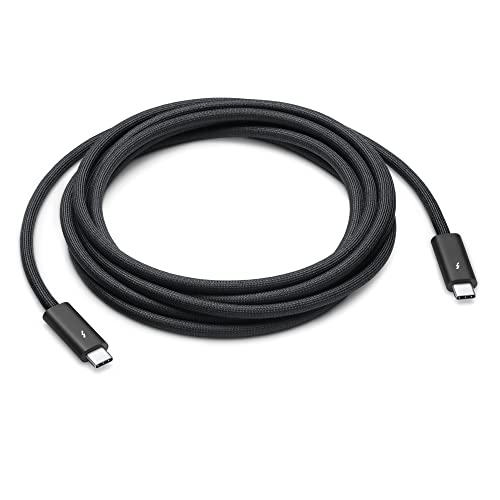
- Extra-long 3-meter braided design
- Up to 40Gbps Thunderbolt and USB4 transfer
- Supports displays, docks, storage, and 100W charging
Best For: Mac desktops with widely spaced peripherals
Fixed-Desk Powerhouse

- 80Gbps data and up to 120Gbps video bandwidth
- Supports dual 8K or triple 4K displays
- Heavy-duty 4-foot design with 240W charging
Best For: Stationary professional workstations and pro-dock setups
Best Overall
Cable Matters Thunderbolt 4 Cable

- Certified 40Gbps Thunderbolt 4 and USB4 performance
- Up to 240W USB Power Delivery 3.1
- Supports one 8K or two 4K displays
Best For: Versatile professional and home desktop setups
Best for Fast Charging
Anker Prime Thunderbolt 4 Cable

- 240W charging for compatible devices
- 40Gbps file transfers
- Single 8K or dual 4K display support
Best For: Powerful laptops and multi-display workstations
Best Durable Design

- 40Gbps USB4 data transfer
- 8K at 60Hz video support
- Braided cable with aluminum alloy casing
Best For: Reinforced everyday desktop connectivity
Best Certified Pick
Silkland USB4 Thunderbolt 4 Cable
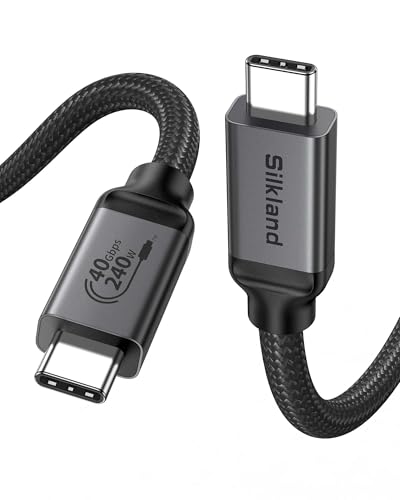
- 40Gbps data and 8K display support
- 240W charging with E-Marker safety chip
- USB-IF certified; 3.3-foot length
Best For: Nearby desktop connections where certification and broad compatibility are priorities
Best Two-Cable Value
Maxonar USB4 Thunderbolt 4 2-Pack

- Includes two 40Gbps USB4 cables
- Supports 240W charging and 8K video
- Braided jackets and multiple length options
Best For: Home and office setups needing a spare or second high-speed cable
Best Simple Pick

- 40Gbps transfers and up to 8K display output
- Supports up to 240W charging
- Tested for up to 5,000 bends
Best For: Compact desktop setups with frequent cable handling
Top-Speed Pick – Anker Prime Thunderbolt 5 Cable
For desktop setups built around fast storage, multiple displays, or high-power laptops, the Anker Prime is a compelling choice among thunderbolt cables for desktop setups. Its 80Gbps Thunderbolt 5 performance, 240W charging, and 3.3-foot length suit compact workstations that need one high-capacity connection.
Best For: High-performance desktop users who want fast transfers, powerful charging, and dual 8K display support in a short cable.
Pros:
- Supports up to 80Gbps data transfers and 240W charging.
- Can handle dual 8K displays at 60Hz with up to 120Gbps video bandwidth.
- Includes an 18-month warranty and USB-IF specification compliance.
Cons:
- The 3.3-foot length may be limiting for larger or spread-out desks.
- The supplied details do not identify a braided outer jacket.
The Anker Prime is a strong fit when maximum Thunderbolt 5 throughput matters more than extra reach. Its short length keeps a compact desktop connection tidy, while 240W power delivery gives it room for demanding compatible laptops.
Durability Pick – Cable Matters Intel-Certified Thunderbolt 5 Cable
The Cable Matters Thunderbolt 5 cable combines 80Gbps connectivity with a braided jacket and aluminum connectors, making it a practical option for thunderbolt cables for desktop setups that are frequently plugged and unplugged. Intel certification adds a useful reliability signal for professional workstation builds.
Best For: Professionals who need a durable 3.3-foot cable for high-speed data, demanding displays, and regular desktop use.
Pros:
- Braided outer jacket helps resist tangling and everyday wear.
- Supports 80Gbps data, up to 240W power delivery, and up to 120Gbps video bandwidth.
- Supports dual 6K or 8K displays and triple 4K displays at 144Hz.
- Intel certified for Thunderbolt performance and reliability.
Cons:
- At 3.3 feet, it may not reach across larger desktop layouts.
- The supplied compatibility list focuses on newer Thunderbolt laptops and does not specify broader device coverage.
With its braided construction, aluminum connectors, and Intel certification, this Cable Matters model is well suited to a fixed workstation that sees regular connection changes. It offers especially strong display flexibility for creators and professionals.
Long-Reach Mac Pick – Apple Thunderbolt 4 Pro Cable
The 3-meter Apple Thunderbolt 4 Pro Cable stands out when desktop components are positioned farther apart. For thunderbolt cables for desktop setups, its long braided design offers useful reach while supporting Thunderbolt 3, Thunderbolt 4, USB4, displays, docks, storage, and charging up to 100W.
Best For: Mac-based desktop setups that need a long cable for displays, docks, hard drives, or daisy-chained Thunderbolt devices.
Pros:
- Generous 3-meter length helps connect widely spaced desktop equipment.
- Braided design coils without tangling.
- Supports up to 40Gbps Thunderbolt or USB4 data transfer and DisplayPort video output.
- Supports charging up to 100W and daisy-chaining up to six Thunderbolt 3 devices.
Cons:
- Its 40Gbps maximum is lower than the Thunderbolt 5 cables in this roundup.
- Charging is limited to 100W rather than 240W.
- The supplied notes primarily describe Mac and Apple display compatibility.
This Apple cable makes the most sense when reach and Apple ecosystem compatibility are more important than next-generation Thunderbolt 5 speeds. The long braided construction is particularly useful for organized, spacious desks.
Fixed-Desk Powerhouse – Maxonar Thunderbolt 5 Cable
Designed specifically for stationary workstations, the 4-foot Maxonar cable is built for sustained high-bandwidth connections. It is one of the more specialized thunderbolt cables for desktop setups, pairing 80Gbps data, 120Gbps video bandwidth, 240W power delivery, and heavy-duty shielding with a deliberately rigid design.
Best For: Professional desktop workstations using high-speed storage, docks, eGPUs, or multiple high-resolution displays.
Pros:
- Supports 80Gbps bidirectional data and up to 120Gbps video bandwidth.
- Handles dual 8K at 60Hz or triple 4K at 144Hz display setups.
- Provides 240W PD 3.1 charging and backward compatibility with 140W, 100W, and 60W devices.
- Includes a 2-year support commitment and SGS-verified recycled-material shielding.
Cons:
- The thick, rigid construction is not intended for travel, tight bends, or flexible routing.
- Its stationary design may be excessive for simple charging or basic peripheral connections.
The Maxonar is best treated as a set-and-forget workstation cable. Its stiffness can complicate cable management, but that tradeoff is intentional for users prioritizing sustained bandwidth, powerful charging, and multi-display performance.
Best Overall – Cable Matters Thunderbolt 4 Cable
For desktop setups that need one dependable connection for fast storage, displays, and charging, the Cable Matters Thunderbolt 4 cable is a versatile choice. It combines Thunderbolt 4 and USB4 support in a 3.3-foot certified cable, making it well suited to professional workstations and home offices.
Best For: Creators and professionals who want certified 40Gbps performance, high-resolution display support, and broad USB-C compatibility.
Pros:
- Supports 40Gbps Thunderbolt 4 and USB4 data transfer.
- Supports up to 240W USB Power Delivery 3.1 charging.
- Can drive one 8K display or two 4K displays.
- Backward compatible with Thunderbolt 3 and multiple USB-C standards.
Cons:
- The 3.3-foot length may be limiting for larger desktop layouts.
- Its premium capabilities require compatible host, display, and charger hardware.
This is a strong all-around pick when you want a certified cable that can handle demanding desktop connections without giving up compatibility with older Thunderbolt 3 equipment.
Best for Fast Charging – Anker Prime Thunderbolt 4 Cable
The Anker Prime Thunderbolt 4 cable is a practical option for desktop setups where charging and high-speed data transfers matter equally. Its 3.3-foot USB-C design supports 240W charging, 40Gbps transfers, and high-resolution display connections in a Thunderbolt 4-certified package.
Best For: Users who frequently move large files, charge powerful laptops, or connect multiple displays from a compatible desktop computer.
Pros:
- Supports up to 240W fast charging.
- Transfers data at up to 40Gbps.
- Supports a single 8K or dual 4K display setup when device requirements are met.
- Thunderbolt 4 certified and USB4 compliant.
Cons:
- Dual-display daisy chaining depends on compatible USB-C DisplayPort Alt Mode or Thunderbolt ports.
- The short 3.3-foot length may not suit every desktop arrangement.
Choose this cable if quick charging is a central requirement alongside high-speed connectivity. The included 18-month warranty adds useful support for a frequently used desktop cable.
Best Durable Design – Acer USB4 Thunderbolt Cable
For desktop setups that need a sturdy everyday cable, the Acer USB4 cable combines 40Gbps transfer speeds, 8K video support, and up to 240W charging. Its braided construction and aluminum alloy casing are designed to better withstand bending, heat, and pressure during regular use.
Best For: Desktop users connecting laptops, monitors, SSDs, docks, or portable displays who value a reinforced cable design.
Pros:
- Supports 40Gbps USB4 data transfer.
- Handles up to 8K at 60Hz video output.
- Supports up to 240W PD 3.1 charging with compatible equipment.
- Braided construction and aluminum alloy casing provide added durability.
Cons:
- It is only 3.3 feet long, which may restrict placement options.
- Display, charging, and Thunderbolt performance depend on compatible devices and ports.
- The supplied notes identify USB4 certification and Thunderbolt compatibility, rather than Thunderbolt certification.
This Acer cable is a sensible fit for busy desks where durability matters as much as bandwidth. It offers broad USB4 and Thunderbolt 3/4 compatibility while covering demanding display and charging needs.
Best Certified Pick – Silkland USB4 Thunderbolt 4 Cable
For desktop setups that need a dependable single-cable connection, the Silkland USB4 cable combines 40Gbps transfers, high-resolution display support, and up to 240W charging. Its 3.3-foot length is especially practical for side-by-side laptop, monitor, dock, or SSD connections.
Best For: Users who prioritize USB-IF certification and a compact cable for nearby desktop devices.
Pros:
- Supports up to 40Gbps data transfer and single 8K or dual 4K displays.
- Offers up to 240W charging with an E-Marker chip and PD3.1 support.
- USB-IF certified and compatible with Thunderbolt 4, Thunderbolt 3, USB4, and older USB standards.
Cons:
- The 3.3-foot length may be limiting when a computer or dock sits farther from the monitor.
- Actual transfer and display performance depends on the connected devices and their support.
Silkland is a strong choice for a tidy, high-performance desktop connection, particularly when certification and broad compatibility matter. Consider a longer version for floor-level computers or separated components.
Best Two-Cable Value – Maxonar USB4 Thunderbolt 4 2-Pack
The Maxonar 2-pack is a convenient option for desktop setups that need more than one high-speed cable. Each 3.3-foot cable supports 40Gbps transfers, up to 240W charging, and single 8K or dual 4K displays, making the pair useful for home and office workstations.
Best For: Home-office users who want one cable for the desk and another for travel or a second setup.
Pros:
- Two cables provide strong value for multi-device or shared workspaces.
- Supports 40Gbps data, 240W power delivery, and 8K or dual 4K displays.
- Braided nylon construction and reinforced connectors are designed for regular plugging and unplugging.
- Longer versions are available for setups where the computer and dock are farther apart.
Cons:
- The included 3.3-foot length may not suit larger or spread-out desktop layouts.
- Display and transfer results depend on the capabilities of the connected hardware.
With two cables in the package and a durable braided exterior, Maxonar fits users building or maintaining multiple desktop stations. The 3.3-foot version works best for close connections, while the listed longer options offer more placement flexibility.
Best Simple Pick – Anker 515 USB4 Cable
Anker’s 3.3-foot USB4 cable is a straightforward pick for thunderbolt cables for desktop setups, delivering 40Gbps transfers, up to 240W charging, and support for displays up to 8K at 60Hz or 4K at 144Hz. Its tested bend resistance also suits frequently adjusted workspaces.
Best For: Users who want a compact, durable cable from an established accessory brand.
Pros:
- Supports 40Gbps data transfer and high-resolution external displays.
- Handles up to 240W charging with compatible equipment.
- Tested to withstand up to 5,000 bends.
- Includes an 18-month warranty and customer service.
Cons:
- The 3.3-foot length is best for nearby devices rather than widely spaced components.
- The supplied details do not specify broad device compatibility beyond laptops, monitors, tablets, and televisions.
Anker’s cable emphasizes everyday durability without giving up the speed and display features expected from a USB4 connection. It is a sensible fit for compact desktop arrangements where the cable may be plugged and unplugged often.
How We Picked the Best Thunderbolt Cables for Desktop Setups
We focused on cables that suit demanding desktop connections rather than basic charging alone. The selection includes Thunderbolt 5 models rated up to 80Gbps, Thunderbolt 4 and USB4 cables rated up to 40Gbps, and options supporting up to 240W USB Power Delivery where specified. We also considered certification, listed display support, cable length, construction, and whether the price makes sense for a multi-device workspace.
Compatibility still depends on every component in the connection. A Thunderbolt 5 cable cannot make a Thunderbolt 4 computer or dock operate at Thunderbolt 5 speeds, and host, device, display, and dock specifications may impose lower limits.
Quick Comparison
| Need | Best specification to prioritize | Suitable picks |
|---|---|---|
| Newest high-bandwidth setup | Thunderbolt 5 and 80Gbps support | Anker Prime Thunderbolt 5, Cable Matters Thunderbolt 5, Maxonar Thunderbolt 5 |
| Reliable Thunderbolt 4 connection | 40Gbps certification and clear display support | Apple Pro, Cable Matters, Anker Prime Thunderbolt 4 |
| USB4 flexibility | 40Gbps, USB-IF certification, and suitable power rating | Acer, Silkland, Maxonar 2-Pack, Anker 240W USB-C |
| Multiple desk locations | Longer length or extra cable included | Apple Pro 3m, Maxonar 4ft, Maxonar 2-Pack |
Key Buying Factors for Thunderbolt Cables for Desktop Setups
Speed and Protocol
Match the cable to the slowest device in the chain. Thunderbolt 4 and many USB4 cables provide up to 40Gbps, while Thunderbolt 5 models can provide up to 80Gbps with compatible hardware. If you mainly connect a dock, monitor, and ordinary peripherals, 40Gbps may be sufficient. Fast external storage, multiple displays, and newer workstations make the extra bandwidth of Thunderbolt 5 more useful.
Power Delivery
A 240W rating is valuable for charging compatible laptops and accessories, but it does not guarantee that your computer will accept 240W. Check the charger, host port, and device requirements before paying extra for the highest rating.
Length, Construction, and Certification
Choose the shortest cable that comfortably reaches between devices to help manage a clean desk. A 3.3-foot cable works well for adjacent equipment, while a 4-foot or 3-meter option can better suit monitor arms, floor-level docks, or larger workstations. Intel or USB-IF certification can provide additional reassurance, especially for expensive storage and display equipment.
Who Should Buy Which Thunderbolt Cables for Desktop Setups?
Choose a Thunderbolt 5 cable if you are building around a Thunderbolt 5 computer, dock, or storage device and want maximum headroom. Pick an Intel-certified Thunderbolt 4 cable for a business workstation or mixed Thunderbolt setup where predictable compatibility matters most. Apple’s 3-meter Pro Cable is a practical choice when reach and Apple desktop integration are priorities.
For most Thunderbolt 4 desktops, the 40Gbps Acer, Silkland, Maxonar, and Anker USB4 options can deliver strong everyday performance when their stated capabilities match your equipment. The Maxonar 2-Pack is particularly useful for multi-device desks or as a spare, while a 240W model makes the most sense when both your charger and computer support high-power USB-C charging.