The right enclosure can help keep an Anycubic printer cleaner, quieter, and more consistent while providing a defined space for ventilation and temperature management.
We compared these 10 options by compatibility, enclosure size, materials, airflow features, lighting, and everyday usability so you can choose a setup that fits your printer and workspace.
Best 10 3d Printer Enclosure for Anycubic Picks for 2026
Best Kobra 3 Fit
YOOPAI LED Enclosure for Anycubic Kobra 3

- Purpose-built for Kobra 3 series printers
- Built-in LED strip for print visibility
- Fire-resistant, dustproof, enclosed design
Best For: Anycubic Kobra 3 owners wanting a close-fit enclosure
Best Ventilation Setup
Filtered Ventilated Tent for Anycubic Resin Printers

- Adjustable 12V fan and ventilation system
- Three-layer filtration for dust and gases
- UV-blocking window for resin printing
Best For: Compatible Anycubic Photon users prioritizing fume extraction
Best Large Universal Option
VEVOR Large LED Enclosure for Anycubic Printers

- Spacious design fits many popular models
- LED light and clear window aid monitoring
- Flame-retardant and dustproof construction
Best For: Users needing a larger cross-brand printer enclosure
Best Fume Control
Makacces Ventilated Anycubic Printer Enclosure

- Includes adjustable fan, pipe, and controller
- UV-protective window for resin materials
- Works with many Anycubic resin and FDM models
Best For: Anycubic users prioritizing built-in smoke and odor extraction
Best Large Enclosure

- Large 27.5 x 29.5 x 35.4-inch interior
- LED lighting and transparent viewing window
- Optional fan ports for ventilation upgrades
Best For: Large Anycubic printers and spacious work areas
Best Ventilated Fit

- Built-in 4,500 RPM exhaust fan
- USB LED light and high-transparency window
- Compact Kobra X-compatible dimensions
Best For: Kobra X owners needing compact active exhaust
Best Medium Enclosure
LED Constant-Temperature Cover

- 21.7 x 25.6 x 30.7-inch stated interior
- Built-in LED strip for print monitoring
- Dustproof, fire-resistant, and noise-isolating design
Best For: Medium printers needing simple enclosed protection
Best Value Dust Protection
YOOPAI Anycubic Printer Enclosure

- Temperature-retaining enclosed design
- External filament and exhaust openings
- Quick setup with broad compatibility
Best For: Anycubic users seeking a roomy, straightforward protective cover
Best Feature-Rich Option
Upgraded Anycubic Kobra X Enclosure

- Built-in USB LED lighting
- Side-mountable 4,600 RPM ventilation fan
- Dust, noise, and temperature control
Best For: Kobra X users wanting active ventilation and clear print monitoring
Best for Ventilated Resin Printing
VEVOR Anycubic Resin Printer Tent
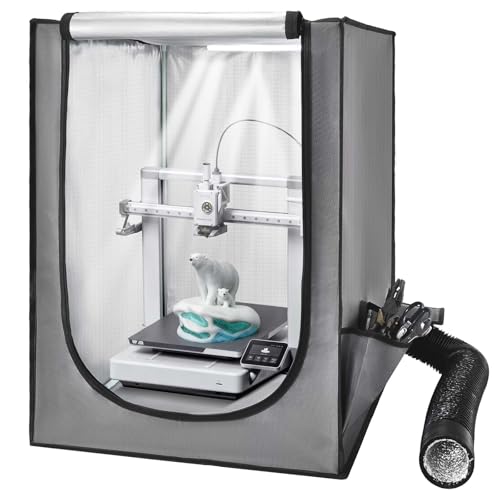
- Ventilation system for smoke and dust
- LED light with clear viewing window
- Fits Photon Mono, Mars 3, and similar printers
Best For: Small Anycubic resin printers needing enclosed ventilation
Best Kobra 3 Fit – YOOPAI LED Enclosure for Anycubic Kobra 3
For shoppers seeking a 3d printer enclosure for anycubic Kobra 3 models, the YOOPAI enclosure offers a close-fit design with LED lighting, temperature control, and a six-sided structure. It is compatible with the Kobra 3 series, including Combo and V2 versions, and supports installation of a separately sold right-side ventilation kit.
Best For: Anycubic Kobra 3 owners who want a purpose-built enclosure with lighting, dust protection, and noise reduction.
Pros:
- Designed for Anycubic Kobra 3, Kobra 3 Combo, Kobra 3 V2, and V2 Combo.
- Built-in LED light strip improves visibility while monitoring prints.
- Fire-resistant, dustproof construction helps protect the printer and prints.
- Quick installation and a sturdy structure support long-term use.
Cons:
- Right-side ventilation kit is sold separately.
- Its compatibility is focused on the Anycubic Kobra 3 series rather than a broad range of printers.
The YOOPAI is the most targeted option here for Kobra 3 users. Its integrated light and enclosed design are useful for routine monitoring, while the lack of an included ventilation kit may matter if active exhaust is a priority.
Best Ventilation Setup – Filtered Ventilated Tent for Anycubic Resin Printers
This multifunctional tent is a practical 3d printer enclosure for anycubic resin printers when odor and fume management are key concerns. It includes an adjustable-speed 12V fan system, ventilation tubing, and three-layer filtration, while its UV-blocking window lets you observe the print area.
Best For: Owners of compatible Anycubic Photon printers and other small resin machines who want adjustable ventilation and odor filtration.
Pros:
- Adjustable-speed 12V ventilation system helps extract smoke and fumes.
- Three-layer filter is designed to absorb dust particles and harmful gases.
- UV-blocking window protects resin prints while allowing visibility.
- Stainless steel frame and fire-resistant fabric add durability and safety features.
Cons:
- Printer is not included.
- Fit varies by printer, so measuring the complete machine before ordering is required.
- Replacing the steel fan bracket requires printing a plastic adapter from a Thingiverse file.
Among these options, this tent stands out for resin-printing ventilation. It is especially appealing when adjustable airflow and filtration are more important than a model-specific fit, but careful measurement and some setup work are part of the purchase.
Best Large Universal Option – VEVOR Large LED Enclosure for Anycubic Printers
The VEVOR tent is a spacious 3d printer enclosure for anycubic and other popular printer brands. Its 21.6 x 25.6 x 29.5-inch interior is designed to accommodate multiple models, and the enclosed, flame-retardant structure adds dust protection, temperature control, and noise reduction.
Best For: Users with larger or varied printer setups who want an LED-equipped enclosure with broad model compatibility.
Pros:
- Large dimensions accommodate many Creality, ELEGOO, and Anycubic models.
- Constant-temperature environment can help reduce warping, cracking, clogging, and jamming.
- Transparent viewing window and included LED lighting make monitoring easier.
- Flame-retardant, dustproof, enclosed design helps protect the printer and workspace.
Cons:
- Ventilation components are not included; the side openings are intended for optional fan installations.
- Compatibility is broad rather than tailored to one specific Anycubic model, so dimensions should be checked.
VEVOR is a flexible choice when you need extra enclosure space and cross-brand compatibility. Its LED and protective construction are useful, but shoppers seeking built-in fume extraction will need to add ventilation hardware separately.
Best Fume Control – Makacces Ventilated Anycubic Printer Enclosure
The Makacces enclosure is a strong 3d printer enclosure for anycubic users who want active ventilation across resin LCD and FDM printing. It includes a pre-installed 12V fan, adjustable speed controller, ventilation pipe, UV-protective brown window, and fire-resistant fabric.
Best For: Anycubic owners who need built-in odor and smoke extraction with compatibility across resin and filament printer types.
Pros:
- Pre-installed adjustable-speed fan and ventilation pipe help remove fumes and smoke.
- UV-protective brown window helps shield resin from premature curing.
- Compatible with numerous Anycubic models, including Kobra 2, Kobra 2 Pro, Kobra 3 V2, Photon Mono, M5, M7, and others.
- Fire-resistant fabric and a stainless steel frame support a stable enclosure structure.
Cons:
- Despite broad compatibility claims, printer dimensions should still be compared with the 25 x 21 x 29.5-inch enclosure size.
- The brown UV-protective window may provide less natural viewing light than a clear window.
Makacces is the most ventilation-focused option for mixed resin and FDM use. Its included fan hardware reduces the need for add-ons, while the broad compatibility list makes it a versatile pick for Anycubic owners with different printer types.
Best Large Enclosure – VEVOR 3D Printer Tent
If you need a roomy 3d printer enclosure for anycubic or another popular printer, this VEVOR tent offers a large enclosed workspace with temperature control, dust protection, lighting, and optional ventilation support. Measure your printer first, especially if it has a large spool holder or other accessories.
Best For: Larger Anycubic and other compatible printers that need generous enclosure space and a cleaner, quieter printing area.
Pros:
- Large 27.5 x 29.5 x 35.4-inch enclosure accommodates many full-size printer models.
- Stable internal temperature may help reduce warping, clogging, and material waste.
- Flame-retardant, dustproof construction includes a transparent viewing window and built-in LED light.
- Ventilation holes allow optional fan installation for additional smoke and dust management.
Cons:
- Fans or other ventilation components are not included.
- The large footprint may require substantial desk or floor space.
- Compatibility still depends on your printer’s exact dimensions.
Choose this model when size and broad compatibility matter most. Its lighting and viewing window make monitoring easier, while the enclosed structure adds noise and dust control for a more contained setup.
Best Ventilated Fit – Anycubic Kobra X Printer Tent
Designed specifically around the Anycubic Kobra X size range, this compact 3d printer enclosure for anycubic combines a 4,500 RPM exhaust fan, flame-retardant fabric, integrated lighting, and a sealed Oxford-cloth structure. Confirm that your printer, including its spool holder, fits within 21.65D x 26.77W x 29.53H inches.
Best For: Anycubic Kobra X owners and users who want built-in exhaust, cable-management access, and a compact enclosure.
Pros:
- Includes a 4,500 RPM smoke-exhaust fan that can mount on either side.
- Built-in 32 cm light tube, USB connection, and large transparent viewing window support easy monitoring.
- Thickened 600D Oxford fabric and aluminum-foil lining help isolate noise and block dust.
- Quick-release top window simplifies cable management and maintenance.
Cons:
- The enclosure is described as very compact and may be too small for some setups.
- Interior clearance must account for the spool holder and printer accessories.
- Its listed compatibility does not guarantee a fit for every Anycubic model.
This is the most focused option for a Kobra X-sized setup, particularly if active exhaust and convenient maintenance access are priorities. Its compact dimensions make careful measuring essential before purchase.
Best Medium Enclosure – LED Constant-Temperature Cover
This medium enclosure is a practical 3d printer enclosure for anycubic users who want a controlled, dust-resistant printing space without moving to a larger tent. It adds LED illumination, noise isolation, fire-resistant materials, and a stated 21.7 x 25.6 x 30.7-inch interior.
Best For: Medium-sized Anycubic and similar printers that fit within the listed interior dimensions and need straightforward enclosure protection.
Pros:
- Built-in LED strip improves visibility for monitoring jams, adhesion issues, and misalignments.
- Constant-temperature design is intended to reduce print failures, clogs, and material waste.
- Fire-resistant, dustproof construction helps protect the printer and limit accidental contact.
- Five-minute installation and a sturdy structure support convenient long-term use.
Cons:
- No ventilation fan or exhaust system is specified in the supplied details.
- Compatibility depends on staying within the 21.7 x 25.6 x 30.7-inch interior.
- The listed product-dimension details appear inconsistent, so verify the usable interior before ordering.
Consider this model for a medium printer setup where lighting, temperature stability, and basic dust and noise control are more important than built-in exhaust. Dimension checks are especially important before purchase.
Best Value Dust Protection – YOOPAI Anycubic Printer Enclosure
If you need a practical 3d printer enclosure for Anycubic machines, the YOOPAI cover provides a spacious, enclosed workspace designed to help maintain temperature, limit dust, reduce noise, and protect the printer from accidental contact. Its 29.5 x 25.6 x 21.6-inch dimensions make measuring your printer, including the spool holder, essential before ordering.
Best For: Anycubic Kobra or Mega Pro users who want a simple, roomy enclosure with external-filament and exhaust-kit openings.
Pros:
- Helps maintain a more consistent printing temperature and reduce dust-related issues.
- Fire-resistant construction and an enclosed six-sided design add protection around the printer.
- Quick installation, disassembly, and support for external filament feeding.
- Enclosed structure can help reduce printing noise and vibration.
Cons:
- Not water resistant.
- Compatibility depends on the printer’s total dimensions, including the spool holder.
- Ventilation fan and exhaust accessories are not included in the supplied details.
YOOPAI is a sensible choice when your priority is basic temperature control and dust protection without giving up useful access ports. Confirm the available space carefully, since the enclosure is designed around a specific maximum size.
Best Feature-Rich Option – Upgraded Anycubic Kobra X Enclosure
This upgraded tent is a strong option for shoppers seeking a feature-rich 3d printer enclosure for Anycubic printers. It combines a 4,600 RPM ventilation fan, built-in USB LED lighting, a large viewing window, dust and flame-retardant materials, and a quick-release top window. Check your printer’s dimensions carefully because the usable limit is 26.8 x 19.7 x 28.3 inches.
Best For: Anycubic Kobra X owners who want integrated lighting, active ventilation, noise dampening, and convenient monitoring.
Pros:
- Fan can be mounted on either side for flexible ventilation setup.
- Built-in 32 cm USB light and transparent window improve print visibility.
- Thickened 600D Oxford fabric and sealed structure help reduce dust, noise, and temperature loss.
- Includes a waste-removal window, tool pouch, and quick-release top window.
Cons:
- The enclosure is described as very compact, so larger printers may not fit.
- Requires careful measurement including the spool holder.
- Its additional features make it heavier than a basic tent.
Among these options, this model offers the most complete monitoring and ventilation package. It is especially appealing for Kobra X users, provided the compact interior dimensions work with the entire printer setup.
Best for Ventilated Resin Printing – VEVOR Anycubic Resin Printer Tent
The VEVOR tent is a practical 3d printer enclosure for Anycubic resin machines such as the Photon Mono, while also accommodating many FDM and LCD printers. Its 21.65 x 25.59 x 29.53-inch size, ventilation system, LED light, and transparent viewing window make it useful for monitoring prints while helping expel smoke and dust.
Best For: Anycubic Photon Mono and other small LCD or resin printers needing ventilation and an illuminated enclosed workspace.
Pros:
- Designed to fit many LCD resin printers, including Photon Mono and Mars 3.
- Ventilation system helps remove smoke and dust after printing.
- Constant-temperature design may help reduce warping, cracking, clogging, and material waste.
- LED lighting and a clear window make print monitoring easier in low light.
Cons:
- Compatibility still requires measuring the printer before purchase.
- The supplied details do not specify the ventilation system’s fan speed or included ducting.
- Its size may be more than needed for especially compact printers.
VEVOR stands out when ventilation is a central requirement, particularly for resin-printing setups. Its broad stated compatibility is useful, but measuring the printer and checking the intended exhaust arrangement remain important before buying.
How We Picked the Best 3d Printer Enclosure for Anycubic
We focused on the features that matter most in real home, workshop, and hobbyist setups: printer compatibility, interior dimensions, frame stability, fabric or panel construction, ventilation, access, visibility, and included lighting. We also considered whether each enclosure is better suited to filament or resin printing, since those applications have different airflow and odor-control needs.
Compatibility claims should be treated as a starting point rather than a guarantee. Measure your printer, including the spool holder, cable connections, bed movement, and any external accessories. Leave clearance around the machine for maintenance and ventilation equipment.
Quick Comparison
| Best For | Look For | Most Relevant Options |
|---|---|---|
| Anycubic Kobra 3 or Kobra 3 V2 | Model-specific fit and accessible front opening | YOOPAI Kobra 3 enclosure |
| Anycubic Kobra X | Large interior and room for moving components | Kobra X standard or upgraded large covers |
| Resin printers | Ventilation, odor management, and chemical-resistant handling | Resin LCD/UV and ventilated VEVOR models |
| General filament printing | Dust protection, LED lighting, and temperature retention | VEVOR, YOOPAI, and medium-size universal tents |
Key Buying Factors for a 3d Printer Enclosure for Anycubic
Fit and Interior Clearance
Check both the listed enclosure dimensions and usable interior space. A tight fit can restrict bed travel, pinch cables, or make filament changes difficult. For larger machines such as the Kobra X, choose an enclosure explicitly sized for the printer or a large universal model.
Ventilation and Filtration
Ventilation is especially important for resin printing and for any setup where odors or airborne particles are a concern. Look for a duct port, flexible exhaust path, or compatible inline fan. An enclosure alone does not eliminate fumes; venting should discharge safely, and resin work still requires appropriate protective equipment.
Temperature, Materials, and Safety
Oxford-cloth and similar soft enclosures can reduce drafts and dust, but they are not automatically fireproof. Keep heaters, power supplies, and wiring in good condition, and never leave a printer operating unattended. Temperature retention can help some filament prints, but excessive heat may affect electronics or low-temperature materials.
Access, Visibility, and Lighting
Clear viewing panels, wide doors, cable openings, and LED lighting make monitoring and maintenance easier. A removable or roll-up front is useful when loading filament, leveling the bed, or removing finished prints.
Who Should Buy Which 3d Printer Enclosure for Anycubic?
Choose a model-specific YOOPAI enclosure if you want a straightforward fit for a Kobra 3 or compatible Creality machine. Kobra X owners should prioritize the dedicated standard or upgraded large enclosure, checking clearance before ordering. Pick a ventilated resin enclosure if odor control and ducting are central requirements. For general filament printing, a medium or universal VEVOR-style tent is a practical choice when you mainly need dust protection, lighting, and improved temperature stability.