A good enclosure can make a home 3D printing setup cleaner, quieter, and easier to manage. The right design also helps contain dust, reduce drafts, organize filament, and route ventilation away from your workspace.
We selected 10 enclosure styles for popular Creality, Bambu Lab, Prusa, and general-purpose printers, ranging from compact fire-resistant tents to full cabinets with storage and lighting.
Best 10 3d Printer Enclosures for Home Workshops Picks for 2026
Budget Temperature Control
Creality Fireproof 3D Printer Enclosure

- Flame-resistant materials and tested design
- Helps stabilize printing temperature
- Folding, portable frame with tool pockets
Best For: Ender-series owners wanting an economical enclosure
Workshop Storage Station
Double-Layer 3D Printer Cabinet

- Wide desktop for large printers
- Storage for up to 30 filament rolls
- Metal frame rated for 140 pounds
Best For: Organized, semi-permanent home workshop setups
Resin-Focused Fume Control
Ventilated 3D Printer Enclosure

- Adjustable fan with three-layer filtration
- UV-blocking viewing window
- Designed for compatible LCD resin printers
Best For: Resin printing with adjustable ventilation needs
Best DIY IKEA LACK Kit

- Fits the IKEA LACK table setup
- Includes plexiglass panels and LED lighting
- Ventilation-ready, but printed parts are excluded
Best For: Makers who want a customizable LACK-based enclosure
Best Budget Tent-Style Cover
Dustproof Constant-Temperature Enclosure

- Sets up in about five minutes
- Helps limit dust, noise, and temperature swings
- Includes exhaust and external-filament ports
Best For: Owners of compatible Creality, Anycubic, or Elegoo printers
Best Storage Cabinet
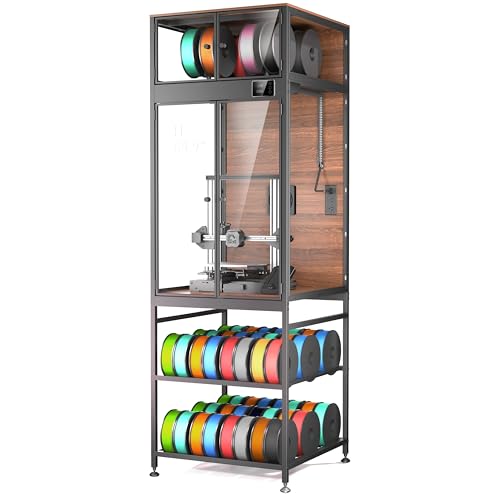
- Stores up to 48 standard filament spools
- Includes LED, fan, and thermo-hygrometer
- Fits many larger printers after measuring
Best For: Makers needing a permanent, high-capacity workshop cabinet
Large Ventilated Enclosure
Insulated Fume-Reducing Printer Tent

- 180 CFM ventilation kit with ducting and LED lighting
- Insulated chamber supports a more stable print environment
- Large interior fits select FDM and resin printer setups
Best For: Large printers needing ventilation, insulation, and accessory space
Workshop Station Enclosure
Heavy-Duty Printer Table with Storage

- Steel workstation combines enclosure, storage, and power access
- Reinforced frame helps reduce printer movement
- Window and three-tone LED improve print visibility
Best For: Permanent FDM printing stations prioritizing organization and stability
Bambu A1 AMS Enclosure
Ventilated Fire-Resistant Printer Cover

- Designed for the Bambu Lab A1 with AMS Lite
- 8025 fan helps exhaust smoke and dust
- LED lighting plus dustproof, fire-resistant construction
Best For: Bambu A1 with AMS Lite owners seeking a dedicated enclosure
Budget Temperature Control – Creality Fireproof 3D Printer Enclosure
For home workshops seeking practical 3d printer enclosures for home workshops, this folding tent-style cover offers a compact way to contain dust and help maintain a steadier printing environment. It is designed for several Creality and similarly sized printers, including multiple Ender models.
Best For: Ender-series owners who want an economical, portable enclosure for more consistent printing and basic dust protection.
Pros:
- Flame-resistance testing is noted, with a flame-retardant exterior and aluminum-film interior.
- Helps maintain a more constant temperature for high-temperature filaments and bed adhesion.
- Folding construction, observation panels, tool pockets, and a stable frame support convenient workshop use.
Cons:
- The listed 18.89 x 23.62 x 28.34-inch storage size may not fit larger printers.
- It is a tent-style enclosure rather than a rigid cabinet.
This is a straightforward choice when portability and affordability matter more than built-in electronics or furniture-style storage. Measure your printer, including its spool arrangement, before ordering.
Workshop Storage Station – Double-Layer 3D Printer Cabinet
This cabinet takes a furniture-style approach to 3d printer enclosures for home workshops, combining an enclosed printing area with a wide work surface and filament storage. Its metal construction and acrylic panels are intended for users who need an organized, sturdy station rather than a lightweight cover.
Best For: Home workshops, studios, garages, or offices that need substantial printer support and organized filament storage.
Pros:
- 23.6-inch-wide by 23.2-inch-deep desktop accommodates large or heavy printers and other equipment.
- Two lower storage shelves reportedly hold up to 30 one-kilogram filament rolls.
- Metal frame supports up to 140 pounds, while closed acrylic panels are designed to reduce noise by 40%.
Cons:
- At 59 pounds, it is substantially less portable than a fabric enclosure.
- Assembly is required, even though instructions and accessories are included.
Choose this option if storage capacity and a permanent workstation are priorities. It is especially useful for multi-filament setups, but confirm that your printer fits the desktop and enclosed area.
Feature-Rich Monitoring – YOOPAI Enclosure with LED and Ventilation
For makers wanting more than a basic cover, this YOOPAI model adds lighting, environmental monitoring, and ventilation to the 3d printer enclosures for home workshops category. The enclosed six-sided design is aimed at improving visibility, temperature control, dust protection, and noise isolation.
Best For: Creality and other compatible printer owners who want built-in illumination and temperature and humidity readings.
Pros:
- Built-in LED lighting makes it easier to inspect prints and spot issues in low-light conditions.
- Temperature and humidity monitoring helps users track the printing environment.
- Ventilation, fire-resistant materials, dust protection, and a six-sided enclosure add practical workshop features.
- Listed compatibility covers numerous Creality, Neptune, AnkerMake, and Anycubic models.
Cons:
- The printer, including its spool holder height, must fit within the stated 21.6 x 25.6 x 29.5-inch limit.
- Its added electronics make it more feature-dependent than a simple folding tent.
This is a strong middle-ground choice for users who regularly monitor prints or work in a dim, shared, or dusty space. Carefully measure the complete printer setup before purchase.
Resin-Focused Fume Control – Ventilated 3D Printer Enclosure
This resin-oriented enclosure is a specialized option among 3d printer enclosures for home workshops, pairing a UV-blocking viewing window with an adjustable fan and three-layer filtration. It is designed for compatible LCD and resin printers, though the manufacturer recommends measuring any printer before ordering.
Best For: Owners of compatible resin printers who want adjustable ventilation, odor and particle filtration, and UV-blocking viewing.
Pros:
- Includes a 12V adjustable-speed ventilation kit and three-layer filter system.
- UV-blocking window helps protect resin prints while allowing progress monitoring.
- Stainless-steel frame, fire-resistant fabric, and a large viewing window support practical use.
- Listed compatibility includes Photon Mono, Elegoo Saturn and Mars models, and Creality Halot series printers.
Cons:
- It is intended mainly for small LCD/resin printers and requires careful size checking.
- The enclosure is not water-resistant.
- A plastic adapter must be printed to replace the steel fan bracket, according to the product notes.
For resin printing, the included adjustable ventilation and filtration are the main reasons to consider this model. It is less suitable as a universal enclosure, so verify dimensions and plan for the required adapter.
Best DIY IKEA LACK Kit – Modular Enclosure with LED
For makers building 3d printer enclosures for home workshops around an IKEA LACK table, the DELACK kit offers a customizable, ventilation-ready cabinet layout. It includes plexiglass panels, hardware, and LED lighting, while the printed connectors and accessories are left for you to produce and customize.
Best For: DIY-focused users with an IKEA LACK setup who want modular accessories and a tailored enclosure.
Pros:
- Designed to fit the popular IKEA LACK table configuration.
- Includes plexiglass panels, hardware, LED strip, and 5V adapter.
- Supports optional 120 mm fans, HEPA filtration, and external venting through a 4-inch duct adapter.
- Offers downloadable accessories and a removable top panel for maintenance or MMU3 access.
Cons:
- This is a kit only; printed parts are not included.
- Requires an IKEA LACK table and the ability to print connectors or accessories.
- Optional fans and filtration components are not included.
The DELACK is a strong choice when customization matters more than turnkey assembly. Confirm that your printer and table arrangement suit its approximately 21.7 × 19.1 × 17.7-inch dimensions before ordering.
Best Budget Tent-Style Cover – Dustproof Constant-Temperature Enclosure
The YOOPAI tent is a practical option for shoppers comparing 3d printer enclosures for home workshops across several Creality, Anycubic, and Elegoo models. Its six-sided cover helps limit dust, reduce noise, and create a more stable printing environment while providing ports for exhaust accessories and external filament feeding.
Best For: Users who need a quick-to-install protective cover for a compatible desktop printer.
Pros:
- Designed for quick installation in about five minutes and can be disassembled for moving.
- Helps reduce dust, accidental contact, noise, and temperature fluctuations.
- Includes openings for fan-based exhaust accessories and external filament feeding.
- Works with a broad list of Creality, Anycubic, and Elegoo printers when size requirements are met.
Cons:
- Printer dimensions, including spool-holder height, must remain below 29.5 × 25.6 × 21.6 inches.
- Fans or exhaust accessories are not stated as included.
- The cover is not water resistant.
YOOPAI makes sense for a straightforward enclosure that prioritizes broad compatibility and easy setup. Measure the complete printer footprint and height before buying, especially if the spool holder sits above the machine.
Best Storage Cabinet – 48-Spool Enclosure with LED
For larger home workshops, the Crafit combines printer protection, filament organization, and monitoring features in one cabinet. Among 3d printer enclosures for home workshops, it stands out for its carbon-steel frame, integrated storage, ventilation control, thermo-hygrometer, and space for printers up to 21.6 inches wide, 22 inches deep, and 28.7 inches high.
Best For: High-volume makers who need substantial filament storage and a stable cabinet for a larger printer.
Pros:
- Base storage system holds up to 48 standard filament spools.
- Top compartment stores up to eight spools and supports up to four feed-through filaments.
- Includes LED lighting, PET viewing panels, a thermo-hygrometer, and a manually controlled fan.
- Heavy-duty carbon-steel construction is designed to dampen vibration and reduce noise.
Cons:
- Its approximately 23 × 23 × 70-inch exterior requires substantial floor or workshop space.
- At 66 pounds, it is considerably less portable than a fabric enclosure.
- Printer fit should be verified against the stated internal size before purchase.
The Crafit is best suited to an organized, permanent workstation rather than a temporary setup. Its large footprint is justified when storing many spools and routing multiple filaments are priorities.
Large Ventilated Enclosure – Insulated Fume-Reducing Printer Tent
For home workshops that need generous coverage, this large enclosure combines insulation, ventilation, lighting, and flexible hose routing. Its 70 × 75 × 90 cm internal space suits many large FDM and resin printers, but carefully compare your printer’s dimensions and travel before ordering.
Best For: Large FDM, LCD, DLP, and SLA printers requiring ventilation and extra workspace.
Pros:
- Includes a tested 180 CFM fan, 3-meter duct, backdraft valve, and LED light.
- Insulated lining can raise the internal temperature by approximately 5°C to 15°C.
- Airtight zippers, EVA seals, and secured ports help reduce fumes, odors, dust, and noise.
- Extra room can accommodate a wash-and-cure station, resin supplies, or filament spools.
Cons:
- Its large footprint requires substantial workshop space.
- Not suitable for printers with a Y-axis mechanism of 370 mm or more.
- Not suitable for LCD screens larger than 23.8 inches.
This is the most feature-complete option of the three for users who want ventilation and a more stable printing environment in a home workshop. Dimension checks are essential, especially for unusually large machines.
Workshop Station Enclosure – Heavy-Duty Printer Table with Storage
This workstation is a practical choice for home workshops that need both an enclosure and a dedicated printer stand. It combines a steel-framed table, two-tier filament storage, built-in power access, an LED light, and a cover designed to help reduce dust and noise.
Best For: FDM printer owners who want an organized, stable, all-in-one workstation.
Pros:
- Combines the printer enclosure, heavy-duty stand, storage rack, and power strip in one unit.
- Steel construction and reinforced cross support help limit shaking during printing.
- Clear front window allows print monitoring without opening the enclosure.
- LED light offers warm, natural, and cool brightness settings.
Cons:
- At 52 inches high, it may not suit rooms with limited vertical clearance.
- The supplied notes describe it as fitting most FDM printers, so printer dimensions still need checking.
- It is a workstation enclosure rather than a compact, portable tent.
Choose this model if organization and stability matter as much as enclosure coverage. Its integrated storage and power access can simplify a permanent printing corner, while the tall design makes it less appropriate for cramped spaces.
Bambu A1 AMS Enclosure – Ventilated Fire-Resistant Printer Cover
Designed specifically for the Bambu Lab A1 with AMS Lite, this enclosure adds ventilation, LED lighting, dust protection, and noise reduction to a home workshop setup. Confirm that you have the AMS Lite before buying, since the enclosure may be too short for an A1 without it when the external spool is mounted on top.
Best For: Bambu Lab A1 users with AMS Lite who want a purpose-built enclosure.
Pros:
- Purpose-built dimensions accommodate the Bambu Lab A1 with AMS Lite.
- 8025 ventilation fan helps remove smoke and dust from the printing area.
- Fire-resistant and dustproof construction helps protect the printer and workspace.
- Built-in LED lighting improves visibility when monitoring prints.
Cons:
- Compatibility is specifically dependent on having the AMS Lite setup.
- The supplied notes do not indicate that it is suitable for a broad range of printer models.
- Ventilation is provided by an 8025 fan, rather than the larger exhaust system included with the first model.
For the correct Bambu configuration, this is a focused and lightweight enclosure with useful protection and visibility features. It is less flexible than a universal enclosure, so compatibility should be the deciding factor.
How We Picked These 3d Printer Enclosures for Home Workshops
We compared the selected enclosures by printer compatibility, interior capacity, construction, ventilation options, storage, visibility, access, and everyday usability. We also considered whether each design suits a compact desktop printer, a larger enclosed setup, or a multi-spool workshop station.
Product claims such as “fireproof,” “constant temperature,” and odor reduction should be treated as design goals rather than substitutes for safe operation. Always follow the printer and enclosure manufacturer’s instructions, use appropriate ventilation, and never leave a running printer unattended.
Quick Comparison
| Enclosure style | Best for | Standout benefit |
|---|---|---|
| Fire-resistant tent | Compact desktop printers | Dust and draft containment |
| Ventilated enclosure | Users concerned about fumes or odors | Supports ducting and air extraction |
| Printer cabinet | Organized workshops | Storage for filament and tools |
| Printer table with enclosure | Permanent workstations | Combines support, storage, and enclosure space |
| Large-format enclosure | Bambu Lab A1 Combo and similar setups | More room for printers and accessories |
Key Buying Factors for 3d Printer Enclosures for Home Workshops
Fit and Usable Interior Space
Check the enclosure’s internal dimensions, not just its listed printer compatibility. Leave room for the printer’s moving parts, spool holder, power cable, and ventilation tubing. Top-mounted spools and rear-mounted cable connections can require additional clearance.
Ventilation and Filtration
A ventilation port, duct adapter, fan, or filter can make an enclosure more practical in a home workshop. Decide where exhaust will go before buying, and check whether the included kit matches your room layout. Avoid sealing a printer in a completely airtight box without a suitable heat and air-management plan.
Access, Visibility, and Lighting
Clear viewing panels let you monitor prints without opening the enclosure. Front doors, removable panels, and LED lights improve access and inspection, especially in dim work areas. Make sure zippers, doors, and cable openings are positioned conveniently.
Storage and Stability
Cabinets and tables can reduce clutter by holding filament, tools, and accessories, but they need adequate load capacity and a stable, level surface. A lightweight tent is easier to move, while a dedicated workstation is usually better for a permanent installation.
Material and Safety Features
Look for sturdy frames, heat-resistant outer material, secure closures, and sensible cable routing. An enclosure can help contain dust and drafts, but it does not eliminate fire risk or replace smoke detection, supervision, and proper electrical practices.
Who Should Buy Which 3d Printer Enclosures for Home Workshops?
- Choose a compact tent if you want an affordable way to reduce dust, drafts, and printer noise around a single desktop machine.
- Choose a ventilated model if odor control and routing exhaust outside the immediate workspace are priorities.
- Choose a cabinet if you need organized filament storage and prefer a more finished workshop appearance.
- Choose a printer table with an enclosure if you are building a dedicated, stable printing station rather than adding a temporary cover.
- Choose a larger enclosure if your printer has a wide footprint, uses an external spool setup, or needs space for accessories and cable management.
Before ordering, measure the printer, confirm the exact model match, verify ventilation-port placement, and compare the enclosure’s external footprint with the space available in your workshop.