The best compact smart displays combine voice control, useful at-a-glance information, and a smaller footprint for nightstands, counters, desks, and walls.
We compared these 10 options across screen size, smart-home compatibility, audio, installation, and everyday usability to help you choose the right fit.
Best 10 Compact Smart Displays Picks for 2026
Best Nightstand Pick
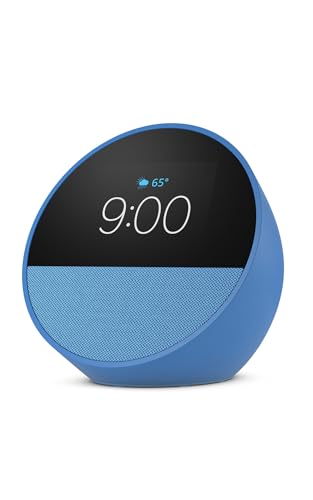
- Customizable clock faces and glanceable information
- Clear vocals with deep bass
- Alexa routines and smart-home control
Best For: Nightstands, offices, and compact Alexa setups
Best Wall-Mounted Control Panel
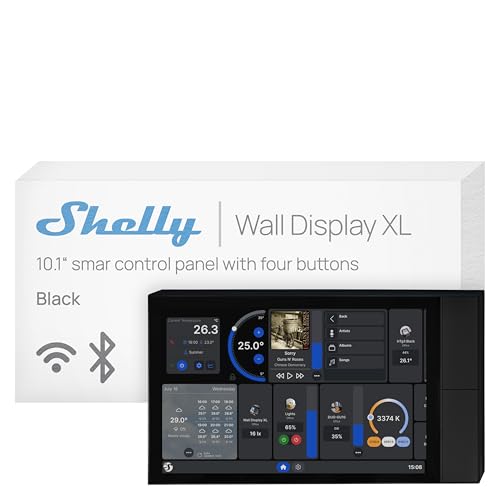
- 10.1-inch touchscreen with four buttons
- Built-in 5A relay for appliance control
- Works with major smart-home platforms
Best For: Permanent, centralized smart-home control
Best PC Build Display

- 1920×480 IPS panel at 60Hz
- USB-powered secondary display
- Customizable ARGB frame and L-Connect 3 control
Best For: Gaming PCs and workstation dashboards
Best Small Video-Capable Display
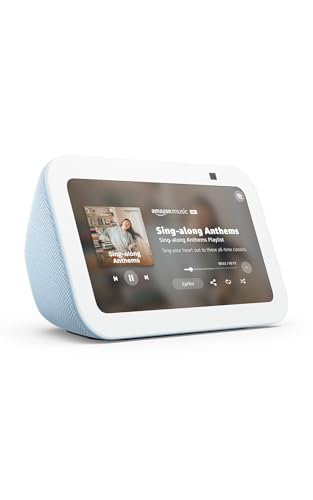
- 5.5-inch screen for media and information
- 2MP camera for calls and home check-ins
- Improved bass and clearer vocals
Best For: Video calls, media, and compact Alexa control
Family Planning Pick

- Syncs Google, iCloud, and Outlook schedules
- Tracks chores, meals, lists, and reminders
- Wall-mountable with photo slideshow mode
Best For: Families managing shared routines and household tasks
All-Purpose Smart Display

- 8.7-inch HD display with spatial audio
- Controls Alexa-compatible smart-home devices
- Supports streaming, video calls, and daily planning
Best For: Households wanting one versatile Alexa display
Security Monitoring Hub

- Shows alerts and live security camera feeds
- Supports four simultaneous video views
- Offers local event replay and HomeBase 3 recognition
Best For: Homes needing a dedicated eufy security monitor
Best Commercial Pick

- Compact 24-inch Full HD commercial display
- Built-in Wi-Fi and Samsung VXT remote management
- IP5X rating and three-year warranty
Best For: Commercial signage, offices, and promotional displays
Best Compact Assistant

- 7-inch touchscreen for small spaces
- Google Assistant enables hands-free help and smart-home control
- Supports videos, music, photos, reminders, and recipes
Best For: Kitchens, bedrooms, desks, and nightstands
Best Entertainment Value
Google Nest Hub 1st Gen Charcoal

- 7-inch 1024x600 touchscreen
- Supports YouTube, Spotify, Pandora, and Google Photos
- Voice Match personalizes calendars, commutes, and reminders
Best For: Compact entertainment and personalized household routines
Best Nightstand Pick – Amazon Echo Spot
The Amazon Echo Spot is one of the most practical compact smart displays for a nightstand, office, or kitchen. Its customizable clock faces, glanceable information, Alexa controls, and built-in speaker make it useful without taking up much space.
Best For: Nightstands, bedside routines, compact Alexa controls, and users who want an alarm clock with music and smart-home features.
Pros:
- Compact design with customizable clock faces, colors, weather, reminders, and song information.
- Delivers clear vocals and deep bass for music, podcasts, and audiobooks.
- Supports routines, compatible smart-home control, and an optional eero mesh Wi-Fi extension.
- Includes a microphone-off button and in-app privacy controls.
Cons:
- Its smaller display is intended for quick glances rather than extended viewing.
- eero Built-in requires an existing eero network to extend Wi-Fi coverage.
The Echo Spot stands out among compact smart displays when an alarm-clock format matters most. It is a strong fit for buyers who want useful visual information and sound in a small footprint, especially beside the bed.
Best Wall-Mounted Control Panel – Shelly Wall Display XL
The Shelly Wall Display XL is a 10.1-inch touchscreen control panel for buyers who want compact smart displays integrated into a room rather than placed on a counter. It combines device control, customizable buttons, automation access, and media controls in a wall-mounted design.
Best For: Whole-home control, wall-mounted smart-home installations, Shelly users, and Home Assistant setups.
Pros:
- Large 10.1-inch touchscreen with four customizable buttons.
- Built-in 5A relay can control compatible lights, fans, heaters, coffee makers, and other appliances.
- Works with Shelly Smart Control, Home Assistant, Alexa, Google, and HomeKit.
- Can control Bluetooth or Sonos audio and supports automations without an extra hub or app.
Cons:
- Wall installation requires a standard electrical box and a neutral wire.
- At 920 g, it is less portable than countertop smart displays.
- The built-in relay is rated for 5A, so electrical compatibility should be checked before installation.
This is a specialized choice rather than a casual bedside display. Its strengths are permanent installation, broad platform integration, and direct appliance control, making it particularly suitable for structured smart-home projects.
Best PC Build Display – Lian Li SM088X 8.8-inch LCD
The Lian Li SM088X is a compact secondary display for desktops rather than a traditional voice assistant. Its 8.8-inch IPS panel, USB connection, adjustable stand, and customizable ARGB frame make it a useful option for PC builders who want extra stats, media, or visual content.
Best For: Gaming PCs, workstation dashboards, system monitoring, and RGB-focused desktop setups.
Pros:
- 8.8-inch IPS display with 1920×480 resolution, 60Hz refresh rate, and 500-nit brightness.
- USB-powered operation preserves GPU ports for other uses.
- Height- and tilt-adjustable mounting bracket supports flexible placement.
- Customizable content and diffused ARGB lighting are managed through L-Connect 3.
Cons:
- It is a USB desktop display, not a voice-assistant or smart-home control panel.
- Its 1920×480 aspect ratio is specialized and less versatile than a standard monitor.
- Installation requires using the specified stand screws from the manual.
For PC enthusiasts, the SM088X offers a focused way to add information and lighting without occupying the space of a full monitor. It is best viewed as a customizable hardware dashboard within a desktop setup.
Best Small Video-Capable Display – Amazon Echo Show 5
The Amazon Echo Show 5 is a versatile option among compact smart displays, pairing a 5.5-inch screen with Alexa, improved sound, video calling, and a built-in camera. It fits well on a bedside table, kitchen counter, or desk while still supporting visual media and connected-home features.
Best For: Video calls, camera check-ins, music and streaming, photo displays, and compact Alexa smart-home control.
Pros:
- 5.5-inch display shows news, weather, song titles, photos, shows, and camera feeds.
- Deeper bass and clearer vocals support music, podcasts, and compatible streaming services.
- Built-in 2MP camera enables video calls and home check-ins with compatible devices.
- Includes camera shutter, mic/camera-off controls, and support for end-to-end encrypted Ring video.
Cons:
- The 5.5-inch screen is compact, so it is better for short viewing than long-form entertainment.
- Video calling and camera features depend on compatible Alexa devices, apps, or doorbells.
- Its camera may be unnecessary for buyers seeking only an alarm clock or speaker.
The Echo Show 5 is a well-rounded compact smart display for households that want more than voice control. Its camera, video-call support, and media features give it broader functionality than a basic smart clock while keeping the footprint small.
Family Planning Pick – 10.1-Inch Digital Calendar
This wall-mountable digital calendar is one of the more focused compact smart displays for organizing household routines. It syncs with Google, iCloud, and Outlook calendars, while also adding shared chores, meal planning, grocery lists, weather, reminders, and photo slideshows.
Best For: Families that want a shared command center for schedules, chores, meals, and memories.
Pros:
- Synchronizes schedules across Google, iCloud, and Outlook.
- Includes chore tracking with points and reward support for children.
- Combines meal planning, grocery lists, reminders, weather, and photo display.
- Supports wall mounting for placement in a high-traffic area.
Cons:
- Its features are centered on family organization rather than entertainment or broader smart-home control.
- The supplied details do not specify display resolution or app compatibility beyond the listed calendar services.
Choose this model if shared household planning matters more than streaming or voice-assistant features. Its calendar-first design and wall-mounting option make it a practical fit for busy family spaces.
All-Purpose Smart Display – Echo Show 8
The newest Echo Show 8 is a versatile choice among compact smart displays, pairing an 8.7-inch HD touchscreen with Alexa+, entertainment features, video calling, and smart-home control. It is designed for shoppers who want one countertop display to handle several daily tasks.
Best For: Households seeking a general-purpose display for entertainment, calls, calendars, recipes, and Alexa-compatible devices.
Pros:
- Offers an 8.7-inch HD touchscreen with 15% more viewing area than the 2023 Echo Show 8.
- Supports Prime Video, Netflix, spatial audio, and improved bass.
- Controls compatible lights, thermostats, cameras, and other smart-home devices without a separate hub.
- Includes a centered auto-framing camera with 3.3x zoom and noise reduction.
Cons:
- Many advanced assistant features depend on Alexa+ and compatible services or devices.
- Its camera and microphones may require privacy management, although dedicated disable controls are included.
This is the strongest all-rounder in the group for shoppers who want more than a calendar. Its combination of entertainment, household assistance, calling, and smart-home control makes it especially flexible for shared living spaces.
Security Monitoring Hub – eufy Smart Display E10
The eufy Smart Display E10 is a security-focused option among compact smart displays. Its 8-inch touchscreen can show live camera feeds, surface alerts for doorbells and detected activity, and provide access to recorded events through the eufy security ecosystem.
Best For: Homes that want a dedicated, easy-to-use screen for monitoring cameras, doors, packages, and property activity.
Pros:
- Automatically displays live video and voice alerts for doorbell, door, and camera activity.
- Can show four simultaneous live feeds for broad property visibility.
- Downloads historical events to local storage for quick replay.
- Provides facial and package recognition features through HomeBase 3.
Cons:
- Its primary purpose is eufy security monitoring rather than general entertainment or calendar use.
- The listed recognition and summary features rely on the eufy ecosystem and HomeBase 3.
- At 2.44 pounds, it is heavier than the smaller family calendar display.
Consider the E10 if security visibility is your priority. Four-feed monitoring, local event access, and automatic alerts make it better suited to a security station than a general household assistant.
Best Commercial Pick – Samsung 24-Inch UHD Display
For businesses seeking compact smart displays, this 24-inch Samsung commercial display combines a space-conscious landscape design with Full HD resolution and built-in Wi-Fi. Its Home UI, remote control, and cloud-based management make it suited to signage and shared commercial environments.
Best For: Entrances, offices, promotional signage, and other commercial spaces needing centralized display management.
Pros:
- Compact 24-inch design supports efficient space utilization.
- Full HD resolution with a Home UI that puts popular categories on one screen.
- Built-in Wi-Fi, center IR, and Samsung VXT support remote management.
- Includes a three-year warranty and IP5X rating.
Cons:
- Designed for wall mounting and landscape orientation.
- Its commercial signage features may be more than needed for basic home use.
The Samsung is the most purpose-built option here for professional signage. Choose it when remote administration, commercial compliance, and a compact wall-mounted format matter more than voice-assistant features.
Best Compact Assistant – Google Nest Hub 7-Inch Chalk
Google Nest Hub 7” Smart Display with Google Assistant (1st Gen) - Chalk (Bulk Packaging)
Check Price On AmazonThis Google Nest Hub is a practical choice among compact smart displays for kitchens, bedrooms, desks, and nightstands. Its 7-inch touchscreen pairs with Google Assistant for hands-free information, smart-home control, entertainment, and everyday organization.
Best For: Users who want a small Google Assistant display for smart-home controls, reminders, recipes, music, and videos.
Pros:
- Compact 7-inch design fits counters, desks, and nightstands.
- Google Assistant supports voice-controlled smart-home devices and daily tasks.
- Handles music, videos, Google Photos, weather, timers, reminders, and recipes.
- Language can be changed to English after setup through Google Home settings.
Cons:
- This listing is identified as an international/Korean version.
- Bulk packaging may offer less retail-style presentation.
The Nest Hub offers broad everyday usefulness in a small footprint. Confirm the international version and setup-language details before buying, then use it as a simple countertop assistant and smart-home controller.
Best Entertainment Value – Google Nest Hub 1st Gen Charcoal
For shoppers comparing compact smart displays, this charcoal Google Nest Hub adds a 7-inch 1024×600 touchscreen to Google Assistant voice control. It is built for checking information, managing compatible devices, streaming content, and personalizing routines through Voice Match.
Best For: Homes wanting a compact Google Assistant display for entertainment and personalized daily organization.
Pros:
- 7-inch touchscreen shows weather, calendars, YouTube videos, and Google Photos.
- Works with over 200 devices from more than 50 brands, according to the supplied specifications.
- Supports YouTube, Spotify, Pandora, and other entertainment services.
- Voice Match can tailor calendars, commutes, and reminders to the user.
Cons:
- It is a first-generation model.
- The 1024×600 display is smaller and lower resolution than larger modern screens.
This Nest Hub is a well-rounded compact option when entertainment and personalized routines are priorities. Its small footprint and broad compatibility make it a convenient shared display, while its first-generation status is worth considering for buyers seeking newer hardware.
How We Picked the Best Compact Smart Displays
We evaluated the selected Compact Smart Displays by looking at their primary use case, display size and clarity, control methods, platform compatibility, audio performance, installation requirements, and overall practicality. The list includes voice assistants, dedicated smart-home panels, security hubs, digital calendars, and display-focused options, so the best choice depends on how you plan to use it.
We also separated true smart displays from products that are better suited to signage, PC monitoring, or wall-mounted control. Features such as Wi-Fi, touchscreen access, smart-home integration, privacy controls, and software support can vary significantly between categories.
Quick Comparison
| Best For | Recommended Option | Why It Stands Out |
|---|---|---|
| Nightstands and alarms | Amazon Echo Spot | Compact alarm-clock design with Alexa features |
| Small rooms and desks | Amazon Echo Show 5 | Small footprint with voice control and improved audio |
| More screen and sound | Amazon Echo Show 8 | Larger display and spatial-audio support |
| Smart-home control | Shelly Wall Display XL | Wall-mounted touchscreen with built-in relay |
| Security monitoring | eufy Smart Display E10 | Designed as a security and smart-home control panel |
| Family scheduling | 10.1-Inch Digital Calendar Display | Large shared planning surface |
| Google services | Google Nest Hub | Google Assistant, media, and home controls |
| Custom PC display | Lian Li SM088X | Compact LCD with an ARGB frame |
| Commercial or signage use | Samsung 24-Inch Commercial Display | Larger UHD display with commercial-oriented features |
Key Buying Factors for Compact Smart Displays
Size, Placement, and Mounting
Measure the available space before buying. A 5- to 8-inch unit is usually easiest for a nightstand, kitchen counter, or desk. Wall panels and calendar displays need suitable mounting space and convenient access to power. A larger commercial display may be compact for signage but oversized for a bedside table.
Platform and Smart-Home Compatibility
Choose the ecosystem you already use. Alexa models are a natural fit for Amazon services and compatible smart-home devices, while Nest Hub models are better suited to Google Assistant, YouTube, Spotify, and Google-based routines. Dedicated panels may offer deeper control for specific ecosystems but can be less flexible than a general-purpose assistant.
Screen, Sound, and Controls
Look for a screen size and brightness that match your viewing distance. Touch controls are useful when voice commands are inconvenient, while microphones and speakers matter for calls, alarms, recipes, and media. If you mainly need schedules or device controls, prioritize visibility and responsiveness over premium audio.
Privacy, Reliability, and Installation
Check microphone and camera controls, account requirements, software support, and whether the device is intended for continuous operation. Wall-mounted products may require more planning, and relay-equipped hardware should be installed only in accordance with local electrical requirements.
Who Should Buy Which Compact Smart Displays?
Choose the Echo Spot for a compact alarm-clock experience, or the Echo Show 5 when you want a small general-purpose Alexa display. Step up to the Echo Show 8 for more comfortable viewing and stronger media performance.
The Shelly Wall Display XL is the better match for dedicated wall control, while the eufy Smart Display E10 suits buyers building around security devices. Pick the digital calendar display for household schedules and the Nest Hub for Google services and Assistant-based routines.
The Lian Li SM088X is aimed at PC builders seeking a custom internal or desk display rather than a voice assistant. The Samsung commercial display is better for signage or larger information screens. Before purchasing, confirm compatibility, mounting needs, power connections, and the level of hands-on setup you are comfortable managing.