Wireless smart displays can do far more than show photos. The right model can organize family schedules, run a countertop menu, display artwork, mirror a phone, or add voice control to a smart home.
This roundup compares 10 options across those use cases, with attention to screen size, connectivity, power, software, and everyday usability.
Best 10 Wireless Smart Displays Picks for 2026
Best Family Calendar
15.6-Inch Digital Calendar & Chore Chart
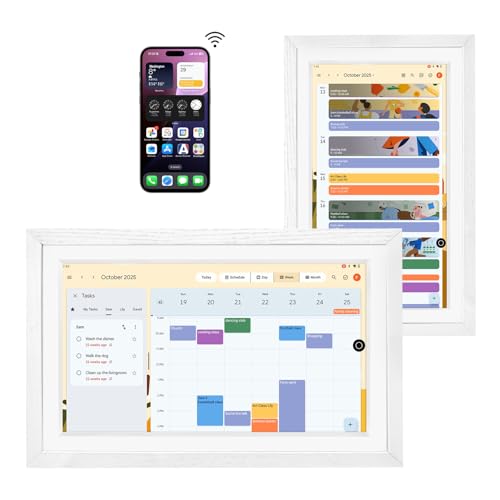
- Large anti-glare FHD touchscreen
- Syncs calendars and supports Android apps
- Built-in battery with voice control
Best For: Families needing a shared schedule, chore chart, and photo hub
Best Portable Business Signage
WeADS Android Tabletop Display

- Android 11 with 4GB RAM and 32GB storage
- Removable 23,200mAh battery
- Supports USB and cloud/CMS content management
Best For: Portable restaurant, bar, and retail signage
Best Compact Smart Home Hub

- 7-inch touchscreen with Google Assistant
- Controls compatible smart-home devices
- Streams YouTube, Spotify, and Google Photos
Best For: Compact home control, reminders, photos, and media
Best Countertop Menu Display
7-Inch Wi-Fi Digital Signage Display

- 7-inch Android touchscreen for menus and ads
- Cloud CMS supports images and MP4 video
- Large battery with built-in phone charging
Best For: Restaurant, cafe, retail, and reception-counter signage
Wireless Mirroring Pick

- AirPlay and Miracast support
- Plug-and-play HDMI mirroring
- HDCP app restrictions apply
Best For: Mirroring phones and laptops to TVs, projectors, or monitors
Interactive Business Display
15.6-Inch Digital Signage Screen

- Full HD IPS touchscreen
- Android 11 with signage tools
- Built-in battery and wireless mirroring
Best For: Interactive business signage, retail, exhibitions, and public spaces
Memory Display Choice

- 1280×800 touch screen
- Wireless photo sharing
- Adjustable metal stand and remote
Best For: Displaying shared family photos, videos, and music in close-range settings
Best Commercial Tabletop Pick
Dual-Screen Digital Signage Display
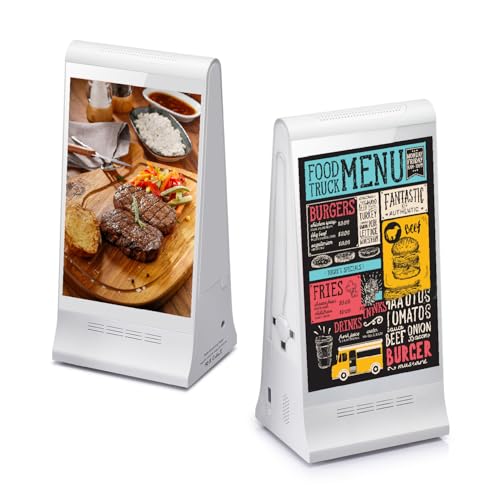
- Dual 8-inch touchscreens show content from both directions
- Cloud management updates multiple displays remotely
- Large battery includes table-side device charging
Best For: Restaurants, retail counters, and other commercial spaces
Best Paper-Like Personal Display
Wireless E-Ink Smart Picture Frame

- Glare-free E-Ink screen stays visible when asleep
- Displays photos, weather, clocks, text, and QR codes
- Rechargeable and controllable by phone or web browser
Best For: Desks, bedrooms, fridges, and low-glare information displays
Best Screen-Mirroring Adapter
1080p Wireless Display Receiver

- Mirrors compatible devices at up to 1080p
- Supports AirPlay, Miracast, and DLNA
- No app or drivers required for setup
Best For: Presentations, classrooms, travel, and existing TVs or projectors
Best Family Calendar – 15.6-Inch Digital Calendar & Chore Chart
For families comparing wireless smart displays, the Changingtouch F16S stands out as a large touchscreen hub for shared calendars, chores, photos, and entertainment. It supports Android apps, Google Assistant, Bluetooth, Wi-Fi, and calendar syncing through Google Calendar, including Apple iCloud data when configured through the Google Calendar app.
Best For: Families wanting a wall- or desk-mounted scheduling hub with photo display and chore-chart features.
Pros:
- Large 15.6-inch anti-glare FHD touchscreen with full-lamination technology
- Supports calendar, chore, photo, music, and smart-home uses
- Built-in battery, stylus pen, voice assistant, and multiple frame styles
- No subscription is required for Google Calendar
Cons:
- Its larger footprint is less convenient than a compact smart display
- Calendar syncing may require installing and configuring additional apps
This is a versatile choice when visibility matters more than minimal size. Its broad feature set makes it useful as a family command center, though buyers should expect some setup for app and calendar integration.
Best Portable Business Signage – WeADS Android Tabletop Display
This WeADS unit is a business-focused option among wireless smart displays, combining an Android 11 interface with Wi-Fi, touchscreen control, and a removable high-capacity battery. It is designed for restaurants, bars, retail counters, and other settings that need portable digital content.
Best For: Businesses that need movable tabletop signage with local or cloud-based content management.
Pros:
- Android 11 system supports a wide range of applications
- 4GB RAM and 32GB of internal storage
- 23,200mAh removable battery supports extended portable use
- Supports USB uploads, cloud/CMS management, and custom apps
Cons:
- Its feature set is focused on commercial signage rather than home entertainment
- The supplied notes do not specify display resolution or operating time
With flexible content options and a detachable battery, this display suits businesses that regularly change placement or messaging. Confirm CMS compatibility and runtime needs before relying on it for all-day deployment.
Best Compact Smart Home Hub – Google Nest Hub (1st Gen)
The first-generation Google Nest Hub is a compact wireless smart display for voice-controlled home routines, media, photos, and everyday information. Its 7-inch touchscreen works over Wi-Fi and Bluetooth, while Google Assistant connects with compatible smart-home devices and supported services.
Best For: Users seeking a small Google Assistant display for calendars, reminders, streaming, and smart-home control.
Pros:
- Compact 7-inch touchscreen with 1024×600 resolution
- Google Assistant supports reminders, questions, and voice control
- Works with over 200 devices from more than 50 brands
- Supports Google Photos, YouTube, Spotify, and other entertainment services
Cons:
- The first-generation model has a smaller display than larger calendar hubs
- It requires Wi-Fi for its connected features
This remains a practical choice for users already invested in Google services and compatible smart-home products. Its compact size fits easily on a counter or nightstand, while Voice Match adds personalized calendar and reminder access.
Best Countertop Menu Display – 7-Inch Wi-Fi Digital Signage Display
This 7-inch Android display is built for commercial use, making it a specialized choice among wireless smart displays. Its Wi-Fi cloud CMS handles menus, promotions, and announcements, while the large battery supports flexible countertop placement without constant wall power.
Best For: Restaurants, cafes, retail counters, reception desks, and other indoor customer-facing locations.
Pros:
- Compact 7-inch touchscreen for menus, advertising, and product information
- Cloud CMS supports JPG, PNG, and MP4 uploads over 2.4GHz Wi-Fi
- 23,000-plus mAh battery offers extended operation depending on settings
- Built-in charging cables and dual USB-A outputs add customer convenience
Cons:
- Designed for commercial signage rather than general-purpose home use
- Battery runtime varies with brightness, playback, and charging activity
- The supplied details do not specify Android version or storage capacity
For a countertop menu or promotional screen, this model combines content flexibility with useful charging features. Its battery-powered design can simplify placement, but businesses should plan around brightness and runtime requirements.
Wireless Mirroring Pick – 4K HDMI Display Dongle
This compact adapter is a practical choice for adding wireless screen mirroring to a TV, projector, or monitor. It supports AirPlay for Apple devices and Miracast for Android and Windows, while its plug-and-play design avoids installing an app or joining Wi-Fi.
Best For: Travelers, presentations, home entertainment, and users who want to mirror a phone or laptop to a larger HDMI display.
Pros:
- Supports up to 4K input and 1080p/60Hz Full HD output.
- Works across Apple, Android, Windows, and Mac systems.
- Uses 2.4GHz and 5GHz antennas with claimed transmission up to 16 feet.
- Offers one-click mirroring, privacy mode, and landscape or portrait switching.
Cons:
- Some HDCP-protected streaming apps, including Netflix and Prime Video, may not work.
- Its listed video output resolution is 1920×1080.
- Requires an HDMI-equipped display.
Among wireless smart displays accessories, this is best viewed as a simple mirroring bridge rather than a standalone streaming player. Its broad device support and low advertised latency are useful, but app restrictions matter if protected streaming is your main goal.
Interactive Business Display – 15.6-Inch Digital Signage Screen
This 15.6-inch touchscreen combines digital signage features with wireless screen mirroring, making it a more capable option for business and public-facing uses. Its Android 11 platform, built-in playback and scheduling tools, and selection of physical ports support flexible content presentation.
Best For: Retail counters, exhibitions, hotels, restaurants, offices, museums, and other spaces needing interactive signage or wayfinding.
Pros:
- Full HD 1920×1080 IPS display with a 60Hz refresh rate.
- Android 11 provides an open app ecosystem.
- Includes wireless screen mirroring, automatic playback, and timing functions.
- 10-point capacitive touch and a 10,000mAh battery support interactive use for a stated 4–6 hours.
Cons:
- The 15.6-inch screen may be small for viewing across large rooms.
- Battery life is limited to the stated 4–6 hours.
- It is designed primarily for business and signage applications rather than casual home viewing.
This is the strongest all-in-one option here for commercial wireless smart displays. The touchscreen and scheduling features add useful interactivity, while HDMI, USB, microSD, and Ethernet connectivity make it easier to integrate into an existing setup.
Memory Display Choice – 13.3-Inch Android Photo Frame
This Android photo frame offers a personal way to use wireless smart displays for sharing photos, videos, and music. Its 13.3-inch touch screen, wireless connection support, remote control, and adjustable metal stand make it suitable for both tabletop viewing and hands-on use.
Best For: Families, offices, reception areas, and small promotional setups that need wireless photo sharing or a simple multimedia display.
Pros:
- Uses a 13.3-inch 1280×800 touch display.
- Supports wireless sharing for convenient photo updates.
- Includes a remote control for photos, videos, and music.
- Adjustable all-metal stand supports different viewing angles and positions.
Cons:
- The 1280×800 resolution is lower than Full HD.
- The supplied notes do not specify the operating system version or battery life.
- Its photo-frame focus may be less suitable for demanding signage or high-resolution video.
For memory sharing and lightweight multimedia, this frame is a straightforward alternative to larger wireless smart displays. The adjustable stand and wireless updates are convenient, while the modest resolution keeps it better suited to close-range viewing than detailed professional signage.
Best Commercial Tabletop Pick – Dual-Screen Digital Signage Display
For businesses comparing wireless smart displays, the WeADS tabletop signage unit stands out as a commercial-focused option. Its two-sided 8-inch touchscreens, Wi-Fi cloud management, and built-in rechargeable battery support menus, promotions, videos, and customer interaction from a compact tabletop footprint.
Best For: Restaurants, bars, cafés, hotels, retail counters, and reception desks that need remotely managed digital menus or promotions.
Pros:
- Dual-sided 8-inch HD touchscreens improve visibility from both directions.
- License-free cloud platform supports remote updates to multiple displays.
- 23,200mAh battery and integrated 3-in-1 charging cable add practical table-side utility.
- Portable desk-mount design can replace printed menus and promotional signage.
Cons:
- Its commercial signage features may be more than needed for home use.
- The 1.5 kg unit is less convenient to move than a small consumer display.
The WeADS is a strong choice when visibility, customer engagement, and centralized content control matter more than a minimal personal display. The one-year warranty and software compatibility testing add useful support for business deployments.
Best Paper-Like Personal Display – Wireless E-Ink Smart Picture Frame
This wireless smart display combines a glare-free E-Ink screen with Wi-Fi control for photos, art, weather, clocks, quotes, QR codes, and other changing content. Its compact rechargeable design works from a tabletop, wall, fridge, or magnetic surface, while NFC setup simplifies connecting compatible phones to a 2.4 GHz network.
Best For: Bedrooms, offices, desks, refrigerators, and users who want a low-glare information or photo display.
Pros:
- Paper-like E-Ink screen remains visible while the device is asleep.
- Supports photos, art, weather, transit arrivals, clocks, custom text, and QR codes.
- NFC setup works with iPhone, Android, and web-browser controls.
- Built-in battery avoids visible power cords and recharges over USB-C.
Cons:
- Only 2.4 GHz Wi-Fi is supported; 5 GHz-only networks require configuration changes.
- The 4.2-inch display is quite small for viewing from across a room.
- The listed warranty is limited to one month.
The Paper Portrait is better suited to calm, glanceable information than video or touch-heavy interaction. Its E-Ink panel and flexible mounting options make it appealing where low glare and a paper-like appearance are priorities.
Best Screen-Mirroring Adapter – 1080p Wireless Display Receiver
For buyers who already own a TV, projector, or monitor, this SmartSee adapter provides a straightforward way to create a wireless smart display setup. The dongle mirrors compatible phones, tablets, laptops, and PCs at up to 1080p through AirPlay, Miracast, or DLNA, without requiring an app or driver.
Best For: Presentations, classroom demonstrations, travel viewing, product showcases, and sharing unencrypted media on a larger screen.
Pros:
- Supports up to 1080p mirroring from compatible iOS, Android, Mac, and Windows devices.
- Plug-and-connect setup requires no dedicated app or drivers.
- Works with AirPlay, Miracast, and DLNA across multiple use cases.
- Automatic OTA firmware updates help maintain compatibility with newer devices.
Cons:
- Encrypted services including Netflix, Amazon Video, HBO Go, Hulu Plus, Sky Go, and DIRECTV are not supported.
- Google Pixel and Motorola devices are not supported, and Android or Windows devices need Miracast support.
- It requires a compatible HD input and USB power source.
This adapter is a practical low-cost way to add wireless mirroring to an existing large display, especially for work or education. Check device compatibility and streaming-service limitations before buying, since it is a receiver rather than a standalone screen.
How We Picked These Wireless Smart Displays
We selected models that represent the main ways shoppers use Wireless Smart Displays: shared calendars and chore charts, digital signage, photo frames, smart-home control, media streaming, and wireless screen mirroring. We also considered practical specifications such as display size, resolution, Wi-Fi support, operating system, battery operation, stand design, app compatibility, and whether ongoing subscriptions are required.
Because these products serve different purposes, the best choice is not necessarily the largest or most feature-packed display. A family organizer has different priorities from a restaurant menu board or a traveler who wants to mirror a phone to a television.
Quick Comparison
| Best For | Look For | Notable Options |
|---|---|---|
| Family schedules | Calendar syncing, touch controls, no subscription | 15.6-inch digital calendar and chore chart |
| Digital signage | Android, CMS support, adjustable stand, strong battery | WeADS and 7-inch tabletop displays |
| Smart-home control | Voice assistant, compatible services, reliable Wi-Fi | Google Nest Hub |
| Photos and artwork | High-resolution screen, app support, wireless updates | 13.3-inch photo frame and wireless E-Ink frame |
| Screen mirroring | iOS/Android compatibility, HDMI output, low setup friction | SmartSee Anycast and wireless HDMI adapter |
Key Buying Factors for Wireless Smart Displays
Purpose and Software
Start with the main task. Calendar displays need dependable syncing with services such as Google or iCloud. Signage screens should support the content-management system you plan to use. Photo frames benefit from simple mobile or web apps, while smart speakers and hubs depend on voice-assistant compatibility.
Screen Size, Resolution, and Placement
A 7-inch screen works well on a kitchen counter or reception desk, but a 15.6-inch display is easier to read across a room. For photos, menus, and artwork, resolution and viewing angles matter. Check whether the stand is adjustable and whether the screen supports portrait, landscape, or both orientations.
Wireless Connectivity and Power
Most models use Wi-Fi, but wireless features vary. Some receive content through a dedicated app, while HDMI adapters mirror another device. Battery-powered signage is more flexible for temporary displays, whereas a continuously powered unit is usually better for permanent placement. Confirm network-band compatibility and charging requirements before buying.
Privacy, Updates, and Ongoing Costs
Displays with microphones, cameras, or cloud services deserve extra privacy consideration. Review app permissions and account requirements. Also check whether core features are available without a subscription, how software updates are delivered, and whether replacement accessories are easy to find.
Who Should Buy Which Wireless Smart Displays?
Choose the large calendar and chore-chart display if your priority is coordinating a household at a glance. Pick a WeADS or tabletop Android signage model for menus, promotions, reception desks, or other business messaging. The Google Nest Hub is the better fit for shoppers who want voice control, media playback, and smart-home commands in a compact display.
For rotating family photos or artwork, compare the 13.3-inch Android frame with the wireless E-Ink model based on your preferred look, refresh behavior, and app experience. If you already own a television or projector and mainly need wireless mirroring, an HDMI adapter is the more focused and economical solution.