The best smart displays with built-in cameras combine video calling, voice control, entertainment, and at-a-glance information in one screen. The right choice depends on whether you need a compact bedside assistant, a kitchen hub, a monitor for work, or a larger interactive display.
We compared these 10 options by screen size, camera functionality, smart-home compatibility, audio, portability, connectivity, and everyday usability to help you choose with confidence.
Best 10 Smart Displays with Built in Cameras Picks for 2026
Best Smart Monitor for Work and Streaming
Samsung M8 M80D 32-Inch 4K Smart Monitor

- 4K display with HDR10+ and AI upscaling
- SlimFit camera and built-in speakers
- USB-C, TV streaming, and Gaming Hub
Best For: Multipurpose offices and compact entertainment setups
Best Large Kitchen Hub

- 15.6-inch Full HD family dashboard
- Built-in Fire TV and customizable widgets
- Auto-framing camera with privacy shutter
Best For: Family organization and shared kitchen spaces
Best Camera-Equipped 4K Smart Monitor

- 32-inch 4K display with HDR10+
- Detachable camera and 65W USB-C power
- Tizen apps, AirPlay, and built-in speakers
Best For: Laptop users wanting a flexible smart-monitor setup
Best Compact Smart Display

- Space-saving 5.5-inch display
- Built-in 2MP camera for calls and check-ins
- Privacy shutter and smart-home controls
Best For: Bedrooms, desks, and small countertops
Best Large Portable Pick
ApoloSign 32-Inch 4K Rolling Smart TV
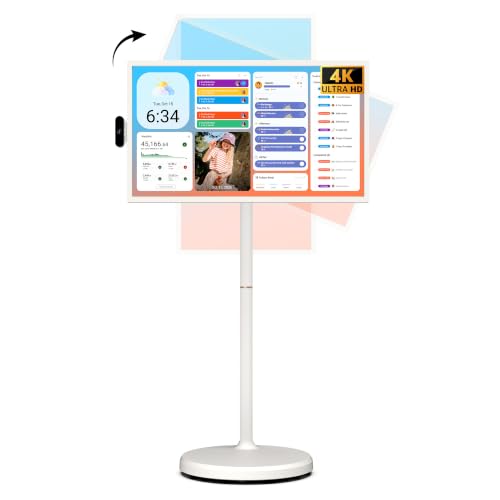
- 32-inch 4K 10-point touchscreen
- Up to 6 hours of cordless use
- Android 16 with 256GB storage
Best For: Large-room entertainment, work, learning, and movable kiosk use
Best Compact Camera Display
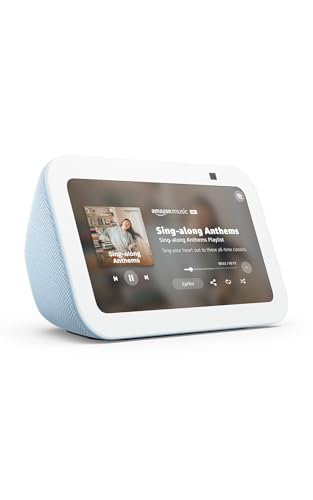
- Built-in 2MP camera for calls and check-ins
- 5.5-inch display for glanceable information
- Camera shutter and mic/camera-off controls
Best For: Small spaces needing video calls, Alexa, and home monitoring
Best Interactive Meeting Board
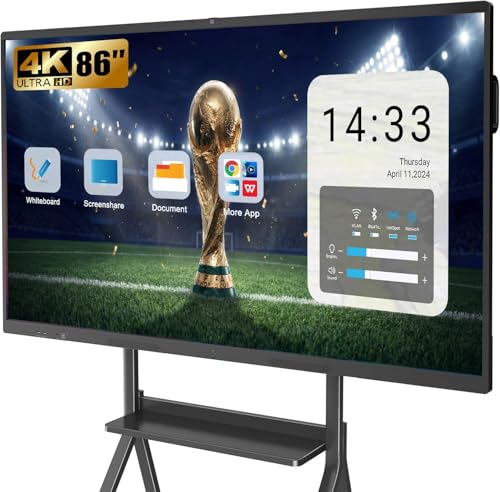
- 13MP camera with 8-array microphones
- 86-inch 4K 20-point touchscreen
- Wall-mounted board for meetings and classes
Best For: Business meetings, classrooms, training, and collaborative presentations
Best Security Hub

- Automatic live feeds and voice alerts
- Four-camera simultaneous viewing
- Local event playback and HomeBase 3 features
Best For: Dedicated home security monitoring
Best for Meetings and Classrooms

- 4K 20-point interactive touchscreen
- Built-in 13MP camera and eight microphones
- Supports projection for up to four users
Best For: Collaborative meetings, teaching, and presentations
Best for Pet and Senior Monitoring
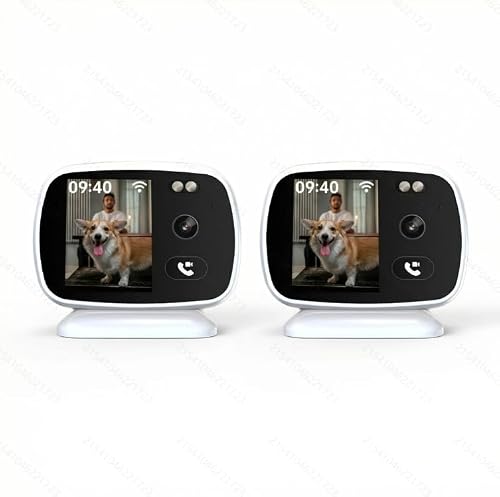
- Built-in screen with one-click video calling
- Two-way audio and motion alerts
- Full-color night vision with MicroSD support
Best For: Simple indoor pet and senior check-ins
Best Smart Monitor for Work and Streaming – Samsung M8 M80D 32-Inch 4K Smart Monitor
The Samsung M8 M80D is a strong option among smart displays with built in cameras for shoppers who want a 32-inch 4K screen that can also stream TV, support video calls, and handle connected-device workflows. Its SlimFit camera, USB-C connectivity, built-in speakers, and ergonomic stand make it suited to compact offices and multipurpose rooms.
Best For: Workspaces that need a large 4K monitor with streaming, conferencing, and light gaming features.
Pros:
- 4K UHD resolution with HDR10+ and AI upscaling for compatible content.
- Built-in SlimFit camera, speakers, USB-C, HDMI, and USB-A connectivity.
- Height-adjustable, tilting, and pivoting stand supports a more comfortable setup.
- Samsung Gaming Hub and Samsung TV Plus add streaming and cloud-gaming access.
Cons:
- Its 60Hz refresh rate is less suited to high-refresh competitive gaming.
- Only one HDMI port is listed in the supplied specifications.
The M8 M80D is most compelling when one screen needs to cover office work, entertainment, video calls, and gaming access. Choose it over a smaller smart display if screen size, resolution, and desk connectivity matter most.
Best Large Kitchen Hub – Amazon Echo Show 15
The Echo Show 15 is a wall-friendly family dashboard and entertainment screen for shoppers comparing smart displays with built in cameras. Its 15.6-inch Full HD display, customizable widgets, Fire TV, and centered auto-framing camera make it practical for kitchens, shared spaces, and household organization.
Best For: Families that want calendars, to-do lists, smart-home controls, video calls, and streaming in one prominent display.
Pros:
- Large 15.6-inch 1080p screen provides room for widgets and video content.
- Built-in Fire TV supports services including Prime Video, Netflix, YouTube, and Apple TV.
- Centered camera offers auto-framing, a wide field of view, 3.3x zoom, and noise reduction.
- Camera shutter and mic/camera-off button provide physical privacy controls.
Cons:
- Some entertainment services may require separate subscriptions.
- The larger format is better suited to a wall or countertop hub than a bedside table.
With its combination of household widgets, smart-home controls, video calling, and Fire TV, the Echo Show 15 is a natural command center for busy homes. It is a better fit than a compact display when visibility across a room matters.
Best Camera-Equipped 4K Smart Monitor – Samsung M8 M80F 32-Inch
The Samsung M8 M80F combines a 32-inch 4K VA panel with smart TV functions, a detachable camera, and USB-C charging, making it a versatile choice among smart displays with built in cameras. It is designed for users who want a PC-free entertainment setup that can also support video calls and connected devices.
Best For: Users seeking a 4K smart monitor with a detachable camera, 65W USB-C power delivery, and built-in streaming features.
Pros:
- 4K resolution, HDR10+, 60Hz refresh rate, and 4ms response time.
- Detachable camera supports video calls while allowing a cleaner setup when not needed.
- USB-C provides up to 65W power delivery for compatible devices.
- Built-in 10W speakers, Tizen apps, AirPlay, Wi-Fi, Bluetooth, and Gaming Hub add flexibility.
Cons:
- The 60Hz refresh rate limits its appeal for high-refresh gaming.
- The supplied details do not specify the camera’s resolution or privacy features.
The M80F is a practical all-in-one monitor for desks that need both productivity and entertainment without a separate TV or streaming box. Its detachable camera and USB-C power make it especially convenient for modern laptop setups.
Best Compact Smart Display – Amazon Echo Show 5
The Echo Show 5 is a compact and affordable-style option for shoppers comparing smart displays with built in cameras for bedrooms, desks, or small countertops. Its 5.5-inch screen supports video calls, camera viewing, smart-home controls, music, and streaming while taking up little space.
Best For: Small rooms and bedside or countertop setups that need Alexa controls and basic video calling.
Pros:
- Compact 5.5-inch display shows weather, news, song information, and video content.
- Built-in 2MP camera supports video calls and checking in on family or pets.
- Camera shutter and mic/camera-off button provide straightforward privacy controls.
- Supports compatible smart-home devices, video doorbells, music, podcasts, and Prime Video.
Cons:
- The small screen is less suitable for group viewing or detailed dashboards.
- Video calling is limited to contacts using the Alexa app or a compatible Echo device with a screen.
The Echo Show 5 makes the most sense when space is limited and the priority is quick access to Alexa, smart-home controls, calls, and casual entertainment. It offers useful camera features without the footprint of a larger hub or monitor.
Best Large Portable Pick – ApoloSign 32-Inch 4K Rolling Smart TV
If you want smart displays with built in cameras for larger rooms, note that this ApoloSign model is a portable touchscreen TV rather than a camera-equipped display. Its 32-inch 4K screen, Android 16 platform, rolling stand, and rechargeable battery make it flexible for entertainment, work, learning, and video calls with compatible external equipment.
Best For: Families, home offices, classrooms, and small businesses that need a large touchscreen display they can move between rooms.
Pros:
- Large 32-inch 4K UHD touchscreen with responsive 10-point touch.
- Built-in 15,000mAh battery provides up to 6 hours of cordless use.
- Android 16, Google Play access, 256GB storage, HDMI, USB, Wi-Fi 6, and Bluetooth 5.3.
- Rolling stand and dashboard support uses such as calendars, kiosks, menus, and fitness displays.
Cons:
- The supplied specifications do not list a built-in camera.
- Wireless mirroring does not support AirPlay, Google Cast, or streaming-service casting.
- Its large rolling design takes substantially more space than a compact countertop display.
This is a versatile big-screen option when portability and touch interaction matter more than an integrated camera. Buyers specifically seeking smart displays with built in cameras should plan on adding compatible video equipment or choosing another product.
Best Compact Camera Display – Amazon Echo Show 5
The Echo Show 5 is a strong match for shoppers seeking smart displays with built in cameras in a compact format. Its 5.5-inch screen, 2MP camera, Alexa features, and privacy shutter support video calls, home check-ins, compatible camera viewing, smart-home control, and everyday media playback.
Best For: Bedrooms, kitchens, desks, and other small spaces where video calling, Alexa control, and home monitoring are priorities.
Pros:
- Built-in 2MP camera supports video calls and home check-ins.
- Physical camera shutter and microphone/camera-off button provide added privacy control.
- Shows news, weather, photos, song information, compatible cameras, and streaming content.
- Improved bass and clearer vocals in a small footprint.
Cons:
- The 5.5-inch display is better suited to glanceable information than group viewing.
- Video calling and camera features depend on compatible Alexa devices, apps, or doorbells.
- Its feature set is centered on Alexa and supported services.
For a small countertop device, the Echo Show 5 combines the most relevant features for camera-equipped smart displays: two-way calling, privacy controls, smart-home access, and visual information at a glance.
Best Interactive Meeting Board – YCKJNB 86-Inch 4K Smart Board
For offices and classrooms that need smart displays with built in cameras, this 86-inch YCKJNB smart board pairs a 13MP camera with an 8-microphone array, dual 20W speakers, and a 4K interactive touchscreen. It is designed for video conferencing, presentations, annotation, remote demonstrations, and collaborative learning.
Best For: Businesses, classrooms, training rooms, and large home learning spaces that need a wall-mounted interactive collaboration display.
Pros:
- Large 86-inch 4K UHD screen with precise 20-point infrared multi-touch.
- Built-in 13MP camera, 8-array microphones, and two 20W speakers support conferencing.
- Open Android app ecosystem supports additional work and learning software.
- Supports wireless projection for up to four users and includes a wall mount.
Cons:
- Its 86-inch size requires substantial wall space and careful installation.
- The included mounting solution is wall-based; a mobile stand is separate.
- Its business-oriented scale may be excessive for casual home use.
This is the most capable collaboration-focused choice in the group, offering a high-resolution camera system and expansive touch workspace. It makes the most sense where shared presentations, conferencing, and annotation justify the large installation.
Best Security Hub – eufy Smart Display E10
The eufy Smart Display E10 is a practical choice among smart displays with built in cameras for households already using compatible eufy security equipment. Its 8-inch touchscreen brings live camera feeds, doorbell and door activity alerts, local event playback, and everyday monitoring controls into one hub.
Best For: Homeowners who want a dedicated security-monitoring screen with hands-free alerts and multi-camera viewing.
Pros:
- Automatically shows a live feed and voice alert when activity is detected.
- Supports viewing four simultaneous live feeds.
- Stores historical events locally for quick replay.
- Includes facial and package recognition features through HomeBase 3.
Cons:
- Its security-focused features are most useful within the eufy ecosystem.
- The 8-inch screen is designed for monitoring rather than large-format viewing.
- The supplied dimensions may be worth verifying before choosing a mounting location.
Choose the E10 if fast access to security video matters more than general-purpose entertainment features. The simple touchscreen and included wall mount or charging station make it flexible for household monitoring.
Best for Meetings and Classrooms – YCKJNB 55-Inch Smart Board
The YCKJNB 55-inch Smart Board is a large-format option among smart displays with built in cameras, pairing a 4K touchscreen with a built-in 13MP camera, microphone array, and speakers. It is built for presentations, collaborative annotation, video conferences, classroom activities, and home learning.
Best For: Offices, classrooms, and home users who need a wall-mounted interactive display for meetings and shared work.
Pros:
- 4K UHD screen with 20-point infrared multi-touch.
- Built-in 13MP camera, eight microphones, and two 20W speakers.
- Supports wireless projection for up to four users.
- Open Android app ecosystem with Wi-Fi, Bluetooth, USB, Ethernet, and HDMI connectivity.
Cons:
- At 55 inches, it requires substantially more space than a personal smart display.
- The listed configuration includes a wall mount, while a mobile stand is separate.
- Its glossy finish may be less suitable for rooms with strong reflections.
This Smart Board makes the most sense when collaboration is the priority. Its camera, audio hardware, large touch surface, and app support create a more complete meeting or teaching setup than a compact countertop display.
Best for Pet and Senior Monitoring – PHANSATIM Indoor Camera Pair
This two-camera PHANSATIM system takes a focused approach to smart displays with built in cameras, adding a built-in screen and one-click video calling to an indoor Wi-Fi monitoring setup. The 3K listing, real-time viewing, motion alerts, two-way audio, and full-color night vision are aimed at checking on pets and seniors without requiring a phone for every interaction.
Best For: Indoor monitoring of pets or seniors where simple visible intercom calls and desktop placement are useful.
Pros:
- Built-in display supports one-click visible video calls.
- Offers two-way audio and real-time live view.
- Includes motion alerts and full-color night vision.
- Supports MicroSD storage up to 256GB according to the supplied specifications.
Cons:
- The supplied specifications contain conflicting resolution details, listing both 3K/5MP and 2MP figures.
- It requires corded power and has no battery.
- The notes describe indoor use, despite also listing water resistance and outdoor-style mounting details.
Consider this pair when a built-in screen and quick two-way communication are more important than broad smart-home control. Before buying, confirm the exact resolution, mounting method, and intended indoor placement because the specifications are inconsistent.
How We Picked the Best Smart Displays with Built in Cameras
We focused on the features that matter most in daily use: display quality, camera placement and usefulness, microphone performance, speaker output, operating system, app support, privacy controls, and setup requirements. We also considered how well each display fits its intended role. A small Echo Show is judged differently from a 32-inch smart monitor, a portable display on wheels, or a large touchscreen board.
Because product specifications and software features can vary by region and change over time, confirm current compatibility, included accessories, camera availability, and subscription requirements before buying.
Quick Comparison
| Best For | Look For | Featured Types |
|---|---|---|
| Compact assistance | Small footprint, voice control, video calling | Echo Show 5 |
| Kitchen and family organization | Larger screen, calendar tools, streaming support | Echo Show 15 |
| Work and entertainment | 4K resolution, USB-C, ergonomic adjustment | Samsung M8 models |
| Flexible viewing | Battery power, wheels, portable design | ApoloSign portable TV |
| Meetings and collaboration | Large touchscreen, camera, Android apps | Smart Board models |
| Security monitoring | Camera feeds, alerts, home-device integration | eufy and indoor camera options |
Key Buying Factors for Smart Displays with Built-In Cameras
Screen Size and Placement
Choose the screen around your viewing distance and available space. Compact displays work well on nightstands and counters, while 32-inch monitors suit desks. Large smart boards require substantial wall or floor space but are better for meetings, teaching, and group viewing.
Camera Purpose and Privacy
A camera for video calls is not the same as a security camera for monitoring rooms. Check resolution, viewing angle, low-light performance, call-platform support, and whether the lens has a physical shutter or software disable option. Position any camera carefully and review account permissions before connecting it to your home network.
Operating System and Ecosystem
App availability determines how useful a display remains over time. Alexa-based models are convenient for compatible smart-home devices and voice routines. Android-based boards and portable TVs may offer broader app access, while Samsung smart monitors add desktop connectivity and streaming features. Confirm support for the services you use most.
Connectivity, Audio, and Power
For desk use, USB-C with power delivery can reduce cable clutter. HDMI, Wi-Fi reliability, Bluetooth, and Ethernet support may matter for work or fixed installations. Built-in speakers are convenient, but larger rooms may require stronger audio or external speakers. Battery-powered models offer flexibility but need regular charging.
Who Should Buy Which Smart Displays with Built in Cameras?
Choose an Echo Show 5 for a compact assistant, bedside display, basic calling, timers, and smart-home control. Choose the Echo Show 15 if your priority is a shared family dashboard, kitchen planning, and built-in streaming on a larger screen.
Choose a Samsung M8 for a desk setup that combines 4K viewing, USB-C connectivity, streaming, and video calls. Choose a portable wheeled display when you want to move the screen between rooms or use it away from a wall outlet.
Choose a large smart board for classrooms, conference rooms, presentations, or collaborative touch work. Choose an eufy or dedicated indoor camera display when monitoring cameras and connected security devices is more important than general entertainment or productivity.