The best smart displays with large screens do more than show content: they can support collaboration, streaming, video calls, organization, and interactive work in one flexible device.
This roundup compares 10 options ranging from compact rolling displays and kitchen hubs to large touchscreen boards designed for classrooms and offices. Use the guide below to match screen size, software, mobility, and features to your space.
Best 10 Smart Displays with Large Screens Picks for 2026
Best Interactive Whiteboard
COOLHOOD 65-Inch 4K Smart Board

- 65-inch 4K touchscreen with 20-point multi-touch
- Wireless sharing and annotation tools for collaboration
- Wall mount included; optional stand sold separately
Best For: Classrooms, offices, and collaborative presentations
Best Family Hub
Amazon Echo Show 15 Smart Display

- 15.6-inch Full HD screen with customizable widgets
- Built-in Fire TV and Alexa smart-home controls
- Auto-framing video calls with privacy shutter
Best For: Family organization, kitchen use, and streaming
Best Google-Certified Board
NewBoard 65E 4K Interactive Display

- Google EDLA certification with Play Store and Workspace access
- 50-point touch supports up to 10 simultaneous writers
- Wireless casting supports up to 16 devices
Best For: Google-focused classrooms and hybrid workspaces
Best Mobile Smart Monitor
LG Smart Monitor Swing 32-Inch 4K

- 32-inch 4K IPS touchscreen with HDR10
- Wheeled base with tilt, height, swivel, and pivot adjustment
- webOS, USB-C, HDMI, AirPlay 2, and Screen Share
Best For: Mobile home-office work and multipurpose viewing
Best for Collaboration
YCKJNB 86-Inch 4K Interactive Smart Board
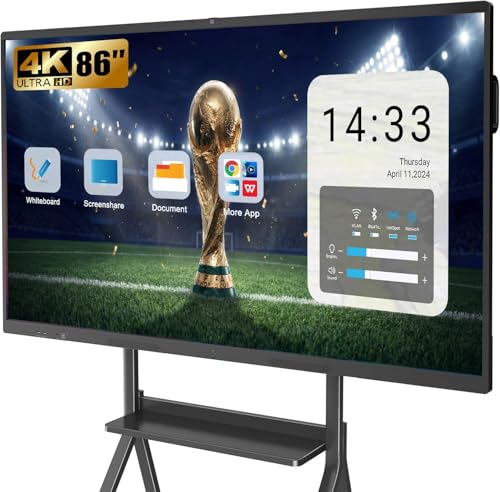
- 86-inch 4K touchscreen with 20-point multitouch
- Integrated camera, microphones, and 20W speakers
- Open apps, wireless projection, and annotation tools
Best For: Classrooms, offices, and group presentations
Best Portable Option
ApoloSign 32-Inch 4K Rolling Smart TV

- 4K touchscreen on a rolling, swiveling stand
- 15,000mAh battery offers up to six hours of runtime
- Android 16, Google Play, casting, and 256GB storage
Best For: Room-to-room home entertainment and flexible viewing
Best Ultrawide Monitor
LG 34-inch QHD Curved Smart Monitor

- 34-inch curved 3440x1440 ultrawide display
- Built-in webOS streaming and LG Channels
- 100Hz refresh rate with HDR10 support
Best For: Multitasking, streaming, and home-office setups
Best Heavy-Duty Pick
JAV 55-inch 4K Smart Board Pro
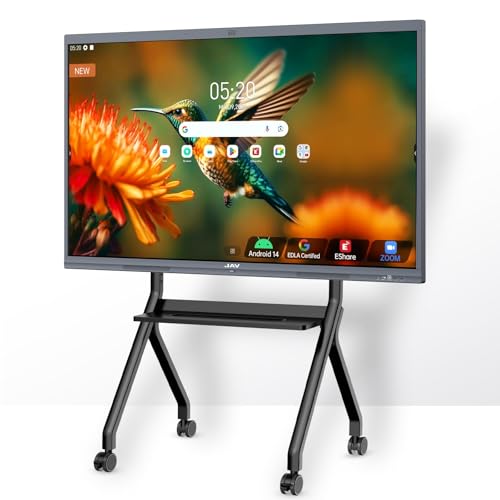
- 55-inch 4K touchscreen with 20-point touch
- Built-in AI camera and meeting audio tools
- Whiteboarding, annotation, and wireless sharing features
Best For: Classrooms, offices, and hybrid collaboration
Best Portable Display
32-inch Rolling Android Smart TV

- 10-point Full HD touchscreen with Android 14
- Built-in battery and wheeled floor-standing design
- 13MP webcam plus HDMI, USB-C, Wi-Fi, and Bluetooth
Best For: Mobile presentations, meetings, teaching, and demonstrations
Best Interactive Whiteboard – COOLHOOD 65-Inch 4K Smart Board
For buyers seeking smart displays with large screens for teaching, meetings, or collaborative work, the COOLHOOD combines a 65-inch 4K touchscreen with Android 13, wireless sharing, and built-in annotation tools. Its wall-mount design suits permanent installations, while the optional stand must be purchased separately.
Best For: Classrooms, offices, and home studios that need a large interactive display for presentations, annotation, and video conferencing.
Pros:
- 65-inch 4K display with 20-point multi-touch and a 6ms response time
- Supports wireless screen sharing from Mac, Windows, iOS, and Android devices
- Works with Zoom, Google Meet, Microsoft Teams, and Webex
- Open app ecosystem, cloud storage, QR file sharing, and 128GB storage
Cons:
- Stand is sold separately; the package includes a wall mount only
- Only one HDMI port is listed
This is a collaboration-focused smart board rather than a conventional home entertainment display. Its large touch surface and productivity features are well suited to group work, but buyers should plan for wall mounting or the added cost of a compatible stand.
Best Family Hub – Amazon Echo Show 15 Smart Display
The Echo Show 15 is a practical choice among smart displays with large screens for kitchen organization, entertainment, and household control. Its 15.6-inch Full HD screen supports customizable widgets, built-in Fire TV, Alexa smart-home controls, and video calling.
Best For: Families that want a wall-oriented kitchen hub for calendars, lists, streaming, smart-home control, and video calls.
Pros:
- 15.6-inch 1080p display with customizable family organization widgets
- Built-in Fire TV supports services including Prime Video, Netflix, YouTube, and Apple TV
- Centered camera offers auto-framing, a wide field of view, and 3.3x zoom
- Includes camera shutter and microphone/camera-off controls for privacy
Cons:
- Some streaming services may require subscriptions
- It is smaller and lower-resolution than the large interactive whiteboards in this roundup
Choose the Echo Show 15 if your priority is household coordination and entertainment rather than handwriting or group annotation. The widget-based interface and Fire TV integration make it especially useful in a busy kitchen or shared family space.
Best Google-Certified Board – NewBoard 65E 4K Interactive Display
The NewBoard 65E stands out among smart displays with large screens by combining a 65-inch 4K panel with Google EDLA certification, Android 14, and access to Google Play and Workspace. Its 50-point touch support and wireless casting are designed for classrooms and hybrid meetings.
Best For: Education and business environments that rely on Google apps, collaborative writing, and multi-device screen sharing.
Pros:
- Google EDLA-certified with access to Google Play Store, Workspace, and Education Suite
- Android 14 with 8GB RAM and 64GB storage for multitasking
- 50-point multi-touch allows up to 10 users to write simultaneously
- Wireless sharing supports up to 16 smartphones, tablets, or laptops
Cons:
- The listed connectivity includes only one HDMI port
- Glossy screen finish may be less suitable for rooms with reflections
This model is a strong fit when Google integration and simultaneous collaboration matter more than entertainment features. Its included wall mount and mobile-cart compatibility also provide more installation flexibility than a wall-only board.
Best Mobile Smart Monitor – LG Smart Monitor Swing 32-Inch 4K
For buyers who want smart displays with large screens but need mobility, the LG Smart Monitor Swing offers a 32-inch 4K IPS touchscreen on a wheeled, fully adjustable base. webOS enables standalone use, while USB-C, HDMI, AirPlay 2, and Android screen sharing support flexible work and entertainment setups.
Best For: Home offices and multipurpose rooms where a movable display, touchscreen control, and adjustable viewing positions are priorities.
Pros:
- 4K IPS touchscreen with up to 95% DCI-P3 color coverage and HDR10
- Wheeled base supports tilt, height, swivel, and portrait adjustments
- webOS enables smart features and home-office functions without a PC
- Three USB-C ports provide connectivity and up to 65W power delivery
Cons:
- Its 32-inch screen is substantially smaller than the 65-inch interactive boards
- The rolling stand may require more floor space than a wall-mounted display
The LG is the most flexible option here for users who move a display between work, viewing, and presentation areas. It is not designed for large-group whiteboard collaboration, but its wheeled stand, touchscreen, webOS, and broad connectivity make it versatile for personal productivity.
Best Smart Monitor – Samsung M7 43-Inch 4K Smart Monitor
If you want smart displays with large screens for streaming, gaming, and everyday computing, the Samsung M7 combines a spacious 43-inch 4K panel with built-in smart features. Samsung TV Plus, AI-assisted picture and voice adjustments, and USB-C connectivity make it a flexible desk-based entertainment and productivity display.
Best For: Users who want a large 4K smart monitor for mixed work, streaming, and gaming use.
Pros:
- 43-inch 4K UHD resolution provides a detailed, spacious viewing area.
- Streams content directly and includes Samsung TV Plus live and on-demand programming.
- USB-C, HDMI, USB-A, Bluetooth, and Wi-Fi support flexible connections.
- AI picture optimization and Active Voice Amplifier adapt visuals and dialogue to your needs.
Cons:
- The 60Hz refresh rate is less suited to high-refresh competitive gaming.
- Its desk-mount design may not fit users seeking a dedicated wall-mounted display.
The M7 is a strong all-around choice when you want one large screen to handle work, streaming, and casual gaming without adding a separate TV or streaming device.
Best for Collaboration – YCKJNB 86-Inch 4K Interactive Smart Board
For classrooms, offices, and training spaces, this 86-inch YCKJNB smart board is one of the most purpose-built smart displays with large screens. Its 4K touchscreen, 20-point infrared multitouch, integrated camera, microphones, and speakers support presentations, annotation, and remote collaboration from one wall-mounted display.
Best For: Business meetings, classrooms, group presentations, and collaborative whiteboarding.
Pros:
- Large 86-inch 4K UHD touchscreen is easy for groups to view.
- 20-point multitouch supports writing, annotation, and interaction.
- Built-in 13MP camera, eight-array microphones, and dual 20W speakers support video conferences.
- Open app ecosystem, wireless projection for up to four users, and multiple connection options add flexibility.
Cons:
- Its large wall-mounted form factor requires substantial installation space.
- A mobile stand is not included; the supplied mounting hardware is for wall mounting.
- The listed refresh rate is 60Hz, which is aimed at collaboration rather than high-refresh gaming.
This is the most specialized option in the group, offering the hardware and interactive tools needed to turn a meeting room or classroom into a shared digital workspace.
Best Portable Option – ApoloSign 32-Inch 4K Rolling Smart TV
The ApoloSign Gen2 offers a more mobile approach to smart displays with large screens, pairing a 32-inch 4K touchscreen with a rolling stand, rotating screen, and built-in battery. It can move between rooms for recipes, workouts, casual viewing, presentations, or entertainment without needing to stay beside a wall outlet.
Best For: Flexible home entertainment and room-to-room viewing where portability matters.
Pros:
- 32-inch 4K touchscreen provides sharp detail in a portable format.
- Rolling design, full swivel rotation, and adjustable viewing angles suit different rooms and activities.
- Built-in 15,000mAh battery provides up to six hours of runtime.
- Android 16, Google Play access, 256GB storage, casting, and HDMI support offer versatile use.
Cons:
- At 32 inches, it is smaller than the other large-screen options in this roundup.
- Premium services such as Hulu and Netflix may require casting or a dedicated TV stick according to the supplied notes.
- The 16ms response time and 60Hz refresh rate are not aimed at demanding competitive gaming.
Choose the ApoloSign when mobility is more important than maximum screen size. Its battery-powered rolling design makes it particularly convenient for kitchens, bedrooms, home gyms, and flexible living spaces.
Best Ultrawide Monitor – LG 34-inch QHD Curved Smart Monitor
The LG 34SR60QC-W is a strong choice among smart displays with large screens for users who want an ultrawide workspace that also supports streaming. Its 34-inch curved QHD panel, built-in webOS, HDR10, and 21:9 aspect ratio suit multitasking, entertainment, and compatible work-from-home applications.
Best For: Multitasking, streaming, home offices, and users who want an ultrawide desk display with built-in smart features.
Pros:
- 34-inch 3440×1440 curved ultrawide screen provides a 21:9 viewing area.
- Built-in webOS offers access to major streaming apps and over 300 free LG Channels.
- Supports HDR10, up to 99% sRGB color gamut, and a 100Hz refresh rate.
- Includes two HDMI ports, three USB ports, AirPlay 2, HomeKit, and screen sharing.
Cons:
- Its desk-oriented monitor design may not replace a larger TV or dedicated interactive display.
- Brightness is rated at 300 cd/m², which may be less suitable for very bright rooms.
- The Magic Remote is compatible but available separately.
This LG is particularly appealing when screen width matters more than touch interaction. It combines a spacious curved monitor with streaming and casting features, making it a practical hybrid for work and leisure.
Best Heavy-Duty Pick – JAV 55-inch 4K Smart Board Pro
The JAV Smart Board Pro is designed for organizations seeking smart displays with large screens for collaboration rather than simple viewing. Its 55-inch 4K touchscreen combines whiteboarding, wireless screen sharing, video conferencing, and Google-integrated tools in one wall-mountable unit.
Best For: Classrooms, meeting rooms, training spaces, hybrid work, and collaborative presentations.
Pros:
- 55-inch 4K UHD touchscreen supports up to 20 touch points for shared work.
- Includes OCR, handwriting annotation, PDF import, templates, voting, timers, and QR-based content export.
- Supports AirPlay, Miracast, Chromecast, and cross-platform screen sharing.
- Built-in 48MP AI camera, microphone array, and noise-suppression features support online meetings.
Cons:
- Its classroom and conference-room feature set may be excessive for casual home viewing.
- The large wall-mountable format requires more installation space than a conventional monitor.
- Meeting and collaboration features may require setup with compatible services or software.
This is the most collaboration-focused option in the group. The combination of a large 4K touch surface, Android 14, Google EDLA certification, camera, and audio tools makes it suitable for teams that need to present, annotate, and meet from one display.
Best Portable Display – 32-inch Rolling Android Smart TV
The 32-inch Smart Portable TV on Wheels adds mobility to the smart displays with large screens category. It combines a Full HD touchscreen, Android 14, built-in battery, rolling floor stand, webcam, and multiple inputs for meetings, presentations, teaching, streaming, and demonstrations.
Best For: Users who need a movable screen for home offices, classrooms, trade shows, video calls, or presentations.
Pros:
- 32-inch 1920×1080 touch display offers 10-point interaction.
- Built-in 10,000mAh battery provides approximately 4–5 hours of cordless use.
- Rolling stand allows the display to move between rooms and work areas.
- Includes a 13MP webcam, dual microphones, HDMI, USB-C, Wi-Fi, and Bluetooth.
Cons:
- Full HD resolution is lower than the 4K resolution offered by the JAV smart board.
- Battery life is limited to about 4–5 hours according to the supplied specifications.
- The floor-standing design requires space and has one height position.
This model stands out when flexibility is more important than maximum resolution. Its cordless operation, wheels, touch control, and webcam make it a practical all-purpose display for spaces where the screen needs to move frequently.
How We Picked the Best Smart Displays with Large Screens
We selected these displays across several practical use cases rather than treating screen size as the only measure of value. Our comparison considers display resolution, operating system, touch capability, built-in cameras and speakers, app support, connectivity, mounting or mobility, and the type of work each model is designed to handle.
Large interactive boards are especially useful for classrooms, meeting rooms, training spaces, and collaborative offices. Smart monitors and rolling TVs can be a better fit for homes, kitchens, bedrooms, and flexible work areas where a smaller footprint or easier repositioning matters more.
Quick Comparison
| Best For | Typical Size | Features to Prioritize |
|---|---|---|
| Classrooms and training | 55–86 inches | Touch response, whiteboarding tools, camera, casting, durable design |
| Office collaboration | 55–65 inches | 4K resolution, conferencing support, app compatibility, connectivity |
| Home organization | 15–43 inches | Streaming apps, voice control, widgets, simple setup |
| Flexible rooms | 32–43 inches | Wheels, adjustable viewing angles, speakers, and compact storage |
Key Buying Factors for Smart Displays with Large Screens
Screen Size and Resolution
A larger panel improves visibility for groups, but it also requires more wall or floor space. Choose 4K for large screens used close to viewers or for detailed presentations. QHD and Full HD can still be practical on smaller displays, especially when portability is more important than maximum sharpness.
Touch and Collaboration Features
For classrooms and meetings, check whether the display supports multi-touch, annotation, handwriting, screen sharing, and compatible whiteboard software. A built-in camera can simplify video calls, but verify its resolution and placement before relying on it for hybrid meetings.
Software and Connectivity
Look for an operating system that supports the apps you already use. Google EDLA certification can help with access to Google services on compatible boards, while webOS, Android, Fire TV, and Alexa-based devices serve different streaming and productivity needs. HDMI, USB-C, USB-A, Wi-Fi, Bluetooth, and wireless casting support can determine how easily devices connect.
Mobility, Audio, and Power
Wheeled bases are valuable when one screen serves multiple rooms. Battery-powered models offer even more flexibility, but compare battery capacity, charging time, and expected runtime. Also check speaker quality and whether the display includes a stable stand, height adjustment, or VESA mounting support.
Who Should Buy Which Smart Displays with Large Screens?
Choose a large interactive board if you need collaborative lessons, presentations, annotation, or group brainstorming. The 65-inch and 86-inch models are best suited to classrooms, conference rooms, and training environments.
Choose a smart monitor for a home office, media room, or multipurpose workspace where sharp 4K or ultrawide viewing matters without requiring a full classroom whiteboard.
Choose a rolling or battery-powered display when portability is the priority. These models work well in bedrooms, kitchens, small apartments, and flexible workspaces.
Choose a compact kitchen or home hub if you mainly want calendars, streaming, voice assistance, household organization, and quick access to content rather than an interactive presentation surface.