The best smart displays for families make busy schedules easier to see, update, and share. From dedicated touchscreen calendars to versatile kitchen hubs, these devices can bring appointments, chores, meal plans, and reminders into one central place.
We selected 10 family-focused displays with different strengths, including large screens, calendar syncing, chore tracking, photo features, smart-home controls, and subscription-free planning.
Best 10 Smart Displays for Families Picks for 2026
Best Overall

- 15.6-inch Full HD family hub
- Built-in Fire TV and smart-home controls
- Video calling with privacy controls
Best For: Families wanting organization, entertainment, and smart-home features together
Best Dedicated Planner

- 15.4-inch shared touchscreen calendar
- Syncs with major calendar platforms
- Chores, lists, and meal planning included
Best For: Busy families focused on schedules, routines, and household coordination
Best Compact No-Fee Option

- Compact HD touchscreen with stand
- Apple and Google Calendar syncing
- No subscription fees for core features
Best For: Smaller spaces and families wanting an affordable-feeling all-in-one planner
Best Large No-Subscription Planner

- Large glare-free HD touchscreen
- Real-time multi-platform calendar sync
- Chores, meal planning, and photo storage
Best For: Busy or multigenerational households wanting a large shared planner without essential fees
Best No-Subscription Pick

- No subscription for core features
- Syncs Google, iCloud, and Outlook calendars
- Adds chores, meals, lists, and photos
Best For: Families wanting a compact, feature-rich household planner
Best Large-Screen Command Center
Dragon Touch 15.6-Inch Family Planner

- Large 15.6-inch Full HD touchscreen
- Real-time calendar syncing without monthly fees
- Supports wall or desk mounting
Best For: Busy families needing a highly visible shared schedule
Best Flexible-Mount Display
Masyrt 15.6-Inch Smart Calendar
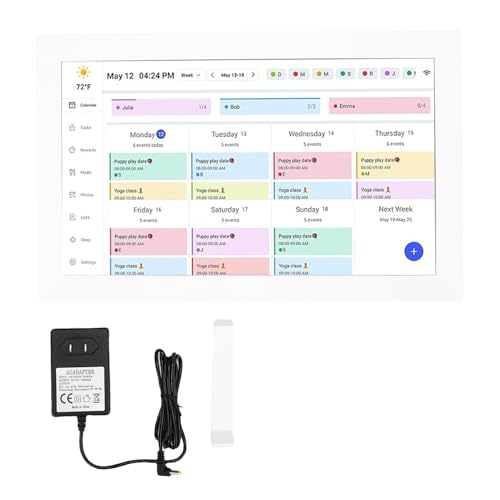
- 15.6-inch Full HD touchscreen
- Two-way syncing through a mobile app
- Supports countertop, vertical, horizontal, and wall placement
Best For: Families prioritizing flexible installation and shared scheduling
Best Wall-Mounted Family Planner

- 15.6-inch Full HD touchscreen with calendar sync
- Chore rewards and meal-planning tools
- Photo frame mode plus adaptive sensors
Best For: Families wanting a wall-mounted planner with rich scheduling features
Best Connected Family Command Center

- Syncs five major calendar platforms
- Remote iOS and Android app control
- Supports wall or desktop placement
Best For: Busy families managing schedules from multiple phones
Best No-Subscription Family Organizer

- No monthly subscription required
- Calendar sync, chores, meals, and custom lists
- Desktop or wall placement with photo mode
Best For: Families wanting a flexible planner without recurring fees
Best Overall – Amazon Echo Show 15
The Amazon Echo Show 15 is one of the most versatile smart displays for families, combining a large Full HD screen with shared calendars, to-do lists, smart-home controls, video calling, and built-in Fire TV. Its customizable widgets make it especially useful in a busy kitchen or central living space.
Best For: Families that want household organization, entertainment, and smart-home control in one large display.
Pros:
- Large 15.6-inch Full HD screen with customizable family widgets
- Built-in Fire TV supports services including Prime Video, Netflix, YouTube, and Apple TV
- Centered auto-framing camera with wide field of view and 3.3x zoom
- Includes camera shutter and mic/camera-off controls for added privacy
Cons:
- Some entertainment services may require subscriptions
- Its broad feature set may be more than families seeking only a calendar
Choose the Echo Show 15 if you want a true family hub rather than a dedicated planner. It stands out for combining scheduling with video calls, entertainment, photo displays, and smart-home management.
Best Dedicated Planner – Skylight Calendar 15
The Skylight Calendar is a purpose-built choice among smart displays for families, focusing on shared schedules, chores, lists, and meal planning. Its 15.4-inch touchscreen can be wall-mounted or placed on a countertop, making household plans easy to see and update.
Best For: Busy households that prioritize a shared calendar and interactive chore system over entertainment features.
Pros:
- Large 15.4-inch touchscreen designed for at-a-glance family planning
- Syncs with Google, iCloud, Outlook, Cozi, and Yahoo calendars
- Includes chore charts, tasks, lists, and weekly meal planning
- Supports wall or countertop placement and includes a wall mount
Cons:
- Some extras, including photo screensavers, rewards, and Disney mode, require the optional Plus Plan
- It is focused on organization rather than general smart-display entertainment
The Skylight Calendar is a strong fit when visibility and routine management matter most. Its broad calendar compatibility and dedicated chore features make it especially practical for coordinating multiple schedules.
Best Compact No-Fee Option – 10.1-Inch Digital Calendar
This 10.1-inch digital calendar offers a compact approach to smart displays for families, with color-coded Apple and Google Calendar syncing, chore rewards, meal planning, reminders, weather, and a photo slideshow. Its adjustable stand suits a kitchen, desk, or home office.
Best For: Families wanting a smaller organizer with calendar, chore, weather, and photo-frame functions without monthly fees.
Pros:
- Compact 10.1-inch HD touchscreen with adjustable stand
- Syncs with Apple and Google Calendars for color-coded schedules
- Combines chores, reward points, meal plans, grocery lists, and reminders
- Offers a photo slideshow and weather information with no subscription fees
Cons:
- The smaller screen provides less viewing area than 15-inch alternatives
- Calendar syncing is described specifically for Apple and Google Calendars
This model makes sense for homes with limited wall or counter space. It provides many of the core family-planning tools found on larger displays while keeping the footprint compact and the essential features subscription-free.
Best Large No-Subscription Planner – 15.6-Inch Digital Calendar
This 15.6-inch digital calendar is a family-focused alternative among smart displays for families, combining shared scheduling, meal planning, chores, rewards, and photo display. It syncs with Google, Outlook, and iCloud in real time and supports wall or desk placement.
Best For: Larger households seeking a spacious family command center with essential calendar features and no subscription fees.
Pros:
- Large glare-free 15.6-inch HD touchscreen for shared viewing
- Real-time syncing with Google, Outlook, iCloud, and other platforms
- Includes meal planning, chore rewards, and simultaneous family editing
- Offers 32GB storage, expandable space, and AI photo restoration
Cons:
- Batteries are not included
- The notes specify desk mounting and included mounting hardware, but do not detail all installation options
Consider this display if you want the visibility of a large wall calendar without essential monthly subscription fees. Its chore rewards, photo features, multi-platform syncing, and two-year warranty add useful value for busy or multigenerational households.
Best No-Subscription Pick – Forc 10.1-Inch Family Planner
For families seeking smart displays for families without another monthly bill, the Forc 10.1-inch planner combines shared scheduling with chores, meals, lists, and photos. Its compact touchscreen and companion app make it well suited to a kitchen counter or family command center.
Best For: Families wanting an affordable, no-subscription planner with broad household-organizing features.
Pros:
- No recurring subscription required for core features.
- Syncs supported Google Calendar, iCloud, and Outlook accounts.
- Includes chore rewards, meal planning, recipes, grocery lists, and remote photo sharing.
Cons:
- The 10.1-inch screen is smaller than the 15.6-inch alternatives.
- Some features depend on WiFi, the companion app, or supported calendar services.
The Forc is a versatile choice when space and ongoing cost matter more than maximum screen size. It offers an unusually complete mix of family planning and household-management tools in one display.
Best Large-Screen Command Center – Dragon Touch 15.6-Inch Family Planner
For households that want smart displays for families to be easy to read at a glance, the Dragon Touch pairs a 15.6-inch Full HD touchscreen with real-time calendar syncing, chores, dinner planning, and grocery lists. It can be wall- or desk-mounted and doubles as a photo frame.
Best For: Larger or busy families that need a prominent shared schedule and a generous display.
Pros:
- Large 15.6-inch 1080p screen with color-coded family schedules.
- Real-time Google, Outlook, and iCloud syncing with no monthly fee.
- Includes chore tracking, dinner planning, phone management, and photo-frame mode.
- Backed by a stated two-year warranty and responsive customer service.
Cons:
- Its larger footprint may require more wall or counter space.
- The feature set may be more than smaller households need.
The Dragon Touch stands out when visibility is the priority. Its large screen and real-time updates make it a practical central hub for coordinating multiple family members.
Best Flexible-Mount Display – Masyrt 15.6-Inch Smart Calendar
The Masyrt smart calendar is one of the more flexible smart displays for families, offering a 15.6-inch 1080p touchscreen, app-based schedule management, photo playback, and multiple placement options. Its two-way synchronization is designed to keep family calendars aligned across the device and mobile apps.
Best For: Families wanting a large display that can be positioned vertically, horizontally, on a counter, or on a wall.
Pros:
- 15.6-inch Full HD screen switches to digital picture-frame mode.
- Two-way synchronization updates the device and family members’ apps.
- Detachable stand supports horizontal or vertical placement, plus VESA wall mounting.
- Offers customizable colors and labels for organizing family schedules.
Cons:
- A storage card is not included if you want to use the supported 32GB expansion capacity.
- The supplied details do not specify supported calendar services or subscription terms.
- Music playback is listed, but the notes provide no details about supported services or formats.
The Masyrt is a good fit for shoppers prioritizing placement flexibility and a large, clear screen. Before buying, confirm calendar compatibility and the details of its app ecosystem for your household.
Best Wall-Mounted Family Planner – Full HD Smart Calendar
For families comparing smart displays for families, this 15.6-inch touchscreen combines a clear Full HD schedule view with chore tracking, meal planning, and calendar syncing. Its wall-mountable design makes it a practical household command center.
Best For: Families wanting a wall-mounted planner with sharp display quality and built-in chore and meal planning.
Pros:
- Syncs Google, iCloud, Outlook, and other calendars through the eCalendar app.
- Full HD touchscreen can switch to a digital photo-frame slideshow.
- Includes customizable chore rewards and a comprehensive meal planner.
- Features weather, auto-brightness, auto-rotation, and sleep mode.
Cons:
- Its 15.6-inch wall-mount design may require dedicated space.
- Calendar features depend on Wi-Fi and the companion app.
This model stands out when visibility and family routines matter most. The combination of Full HD clarity, adaptive sensors, chore rewards, and meal planning makes it a strong fit for a shared kitchen or family planning area.
Best Connected Family Command Center – Interactive Wall Calendar
This interactive 15.6-inch display is designed as an all-in-one household hub. Among smart displays for families, it emphasizes quick setup, two-way mobile control, shared calendars, chore rewards, meal planning, and flexible desktop or wall placement.
Best For: Busy households that want remote access and broad calendar compatibility in a central family organizer.
Pros:
- Syncs Google, iCloud, Outlook, Cozi, and Yahoo calendars.
- Companion iOS and Android app supports remote event, chore, and meal updates.
- Combines color-coded schedules, chore rewards, meal planning, and weather.
- Works as either a desktop or wall-mounted display and includes a photo-frame mode.
Cons:
- Requires Wi-Fi and companion-app setup for connected features.
- The 15.6-inch screen may be larger than needed for smaller spaces.
Its strongest advantage is household-wide accessibility: family members can update the planner from the touchscreen or remotely through the app. A two-year warranty and stated 24/7 support add reassurance for buyers seeking an ongoing family organization system.
Best No-Subscription Family Organizer – Smart Digital Wall Planner
Families seeking smart displays for families without a monthly fee may appreciate this 15.6-inch touchscreen planner. It combines shared schedules, chores, meal planning, weather, custom lists, and photo slideshows, with both desktop and wall-mount options.
Best For: Families wanting a no-subscription organizer that can handle schedules, routines, lists, and photos.
Pros:
- Provides core features without a monthly subscription.
- Syncs Google, iCloud, Outlook, Cozi, and Yahoo calendars.
- Includes color-coded tasks, star-based chore tracking, and meal planning.
- Supports custom checklists, photo albums, weather, and scheduled sleep/wake mode.
Cons:
- Connected calendar syncing requires Wi-Fi and the companion app.
- Its 15.6-inch format may need substantial wall or desk space.
This is a versatile choice for households that want one screen to cover both planning and everyday lists. The no-subscription approach, flexible placement, and straightforward family-focused features make it especially practical for kitchens, living rooms, and home offices.
How We Picked the Best Smart Displays for Families
We focused on the features that matter most in a shared household planner: screen size, touchscreen responsiveness, calendar compatibility, Wi-Fi connectivity, wall-mounting or countertop flexibility, and ease of use for multiple family members. We also considered whether each display supports chore charts, meal planning, rewards, photo display, reminders, or broader smart-home functions.
Because family needs vary, this list includes both dedicated digital calendars and multipurpose smart displays. A device with extensive features is not automatically better if it is difficult to configure or requires services your household does not need.
Quick Comparison
- Best multipurpose option: Amazon Echo Show 15, which combines family organization with streaming, Alexa controls, and kitchen-hub features.
- Best dedicated calendar approach: Skylight Calendar, designed specifically for shared schedules, chores, and household planning.
- Best large-screen format: The 15.6-inch models, which provide more room for calendars, lists, photos, and multiple daily tasks.
- Best compact choice: The 10.1-inch planners, which fit smaller counters, desks, and walls while still offering touchscreen organization.
- Best for flexible planning: Models with Google, Outlook, or multi-phone synchronization, especially for households using different calendars.
Key Buying Factors for Smart Displays for Families
Screen Size and Placement
A 15.6-inch screen is easier to read from across a kitchen or entryway and gives everyone room to view several schedules at once. A 10.1-inch display may be more practical for a countertop, home office, or smaller wall. Check the included stand, mounting hardware, and viewing angle before choosing a location.
Calendar and Device Compatibility
Confirm that the display works with the calendars your household already uses. Google and Outlook support can be especially important when parents, children, or caregivers manage separate accounts. Multi-phone access is also useful when several people need to add or edit events.
Chores, Rewards, and Meal Planning
Families looking beyond appointments should compare chore charts, recurring tasks, reward systems, grocery lists, and meal-planning tools. These features can make a display more useful every day, but they should be simple enough for children to understand and update.
Subscriptions and Privacy
Review whether core calendar functions require a recurring fee. A no-subscription model may offer lower long-term costs, while a subscription service may provide better cloud syncing or specialized family-planning features. Also check account permissions, camera or microphone availability, and how shared information is handled.
Who Should Buy Which Smart Displays for Families?
Choose the Echo Show 15 if your family wants a household organizer that also handles entertainment, Alexa commands, and smart-home controls. Choose a Skylight-style dedicated calendar if the main goal is a simple, highly visible family schedule with chores and routines.
Pick a 10.1-inch planner for smaller spaces or a focused planning station. Choose a 15.6-inch touchscreen calendar if visibility, detailed schedules, photo rotation, and wall-based organization are priorities. Households using multiple calendar platforms should prioritize real-time synchronization and broad account compatibility, while budget-conscious shoppers should compare included features and subscription requirements before buying.