A good universal remote should make your entertainment setup easier, not add another layer of menus and troubleshooting. The best smart remote controls with hub combine physical controls with app setup, device compatibility, and one-touch activities.
We compared ten options across SwitchBot, SofaBaton, Logitech, and replacement-remote categories to help you find the right balance of convenience, connectivity, customization, and price.
Best 10 Smart Remote Controls with Hub Picks for 2026
Best Matter-Ready Pick
SwitchBot Universal Remote with Hub Mini

- Controls up to 25 IR and Bluetooth devices
- Matter support through Hub Mini or Hub 2
- Large buttons and up to 150-day battery life
Best For: Apple Home and SwitchBot households
Best Premium Control Center

- Supports IR, Bluetooth, Wi-Fi, and RF devices
- Touchscreen, charging dock, and one-touch activities
- Integrates with Home Assistant, Alexa, and Google Assistant
Best For: Complex home theater and automation setups
Best Simple Hub Bundle
Logitech Harmony Smart Control
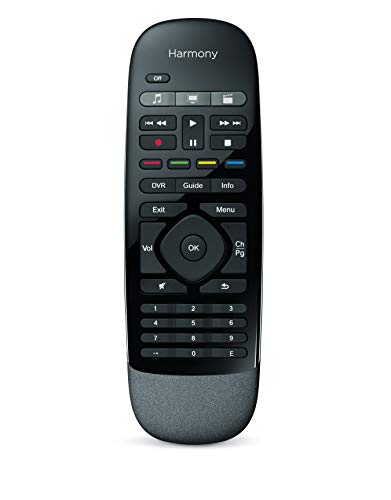
- Controls up to eight entertainment devices
- Hub reaches equipment behind cabinets or walls
- Includes handheld remote and smartphone activities
Best For: Compact entertainment systems
Best Customizable Value
SofaBaton X1S Universal Remote with Hub

- Supports more than 500,000 IR, Bluetooth, and Wi-Fi devices
- Offers macros, activities, button remapping, and app customization
- Includes a 360-degree hub and voice assistant support
Best For: Custom home theater control
Simple Samsung Replacement

- Samsung TV replacement with Smart Hub button
- Backlit controls for dim rooms
- No programming required; batteries not included
Best For: Samsung TV owners seeking a simple replacement remote
Advanced Hub Control

- Controls up to 49 IR, Bluetooth, RF, and Wi-Fi devices
- Touchscreen, app customization, and charging dock
- Built-in IR hub supports 360-degree coverage
Best For: Complex home theaters and multi-device smart homes
Family-Friendly Smart Hub

- Controls 25 devices and 10 custom scenes
- Hub 3 adds IR learning and Apple Home support
- Rechargeable battery lasts up to 150 days
Best For: Families with compatible IR, SwitchBot, and Apple Home devices
Best Premium Smart-Home Integration

- Touchscreen offers quick keys, favorites, and macros
- Supports Alexa, Google Assistant, and Home Assistant
- Includes hub and two IR blasters for expanded coverage
Best For: Connected homes wanting touchscreen and voice control
Best Standalone Upgrade
SofaBaton X2 Touchscreen Remote

- Controls IR, Bluetooth, RF, and Wi-Fi devices
- 2.4-inch touchscreen supports keys and macros
- Standalone package includes no hub or dock
Best For: Existing X2 owners and hub-free setups
Best Matter-Ready Pick – SwitchBot Universal Remote with Hub Mini
For shoppers seeking smart remote controls with hub functionality, the SwitchBot Universal Remote combines IR appliance control with support for SwitchBot Bluetooth devices. It can manage up to 25 devices, but check compatibility carefully: it does not support RF remotes or most third-party Bluetooth devices, and it requires 2.4GHz Wi-Fi.
Best For: Apple Home users who want a physical remote for TVs, air conditioners, IR appliances, and compatible SwitchBot devices.
Pros:
- Supports up to 25 devices, including 10 IR and 15 Bluetooth devices.
- Works with SwitchBot Hub Mini (Matter) or Hub 2 for Apple Home integration.
- Large code library, learning options, spacious buttons, and a battery rated for up to 150 days.
Cons:
- RF remotes and most third-party Bluetooth devices are not supported.
- Matter integration is currently limited to Apple Home rather than Google Home or Alexa.
- Requires 2.4GHz Wi-Fi and a compatible SwitchBot hub for Matter features.
This is a practical choice when your setup is centered on IR appliances, SwitchBot products, and Apple Home. Verify each device before buying, especially if you rely on RF or non-SwitchBot Bluetooth equipment.
Best Premium Control Center – SofaBaton X2 Universal Remote
The SofaBaton X2 is one of the more feature-rich smart remote controls with hub support, pairing a touchscreen remote with a 360-degree hub, wired IR blasters, activities, and app customization. Its broad device support includes IR, Bluetooth, Wi-Fi, and RF equipment.
Best For: Home theater users who want touchscreen navigation, one-touch activities, voice control, and Home Assistant integration.
Pros:
- Supports more than 500,000 devices across 6,000-plus brands.
- Creates activities such as Movie Night to coordinate power, inputs, volume, and lighting.
- Includes a charging dock, touchscreen, Home Assistant integration, MQTT triggers, and Alexa and Google Assistant support.
- Hub and wired IR blasters help control equipment in cabinets or across a room.
Cons:
- R1 repeaters for extending control through walls are not included.
- The feature set and touchscreen may be more than casual users need.
- Listed maximum range is 45 feet.
The X2 stands out for complex entertainment systems that benefit from macros and automation. It is especially compelling if you already use Home Assistant or want voice-triggered activities rather than simple button-by-button control.
Best Simple Hub Bundle – Logitech Harmony Smart Control
Logitech Harmony Smart Control with Smartphone App and Simple All In One Remote - Black
Check Price On AmazonThe Logitech Harmony Smart Control remains a straightforward option among smart remote controls with hub functionality. Its included hub lets you operate devices hidden behind cabinet doors or walls, while the physical remote and smartphone app provide flexible control for an entertainment system of up to eight devices.
Best For: Smaller entertainment setups that need app control, a simple handheld remote, and hub-based operation of concealed devices.
Pros:
- Controls up to eight devices from a single system.
- Supports more than 270,000 devices, including streaming players, consoles, TVs, and select smart-home products.
- Included hub can control equipment hidden behind doors or walls.
- App offers one-touch activities, swipe and tap controls, and up to 50 favorite channels.
Cons:
- Supports fewer devices than the newer SofaBaton options in this roundup.
- Listed maximum range is 10 feet.
- Smartphone app compatibility details supplied are limited to older iOS and Android versions.
This bundle is a sensible fit for a modest TV or media setup where simplicity matters more than advanced automation. Its main advantage is the combination of a familiar handheld remote, smartphone control, and a hub for concealed components.
Best Customizable Value – SofaBaton X1S Universal Remote with Hub
The SofaBaton X1S combines a customizable universal remote with a powerful hub, making it a strong option for smart remote controls with hub features. It supports a wide range of entertainment devices, offers one-touch activities and macros, and connects with Alexa, Google Assistant, IFTTT, and iOS Shortcuts.
Best For: Home theater owners who want extensive device compatibility, programmable buttons, backlighting, and customizable activities.
Pros:
- Cloud code library supports more than 500,000 IR, Bluetooth, and Wi-Fi devices.
- One-touch activities, macros, and reassigned buttons simplify multi-device routines.
- Hub provides 360-degree signaling, with wired IR transmitters for enclosed equipment.
- Includes raise-to-wake functionality, backlit buttons, voice control, and API integration options.
Cons:
- Listed maximum range is 40 feet.
- Advanced customization may require more setup than a basic universal remote.
- The hub may need wired IR transmitters when components are placed inside a cabinet.
The X1S is a well-rounded choice for users who want to tailor button layouts and create repeatable home theater scenes. Its extensive device database and integration options make it particularly useful for more involved entertainment setups.
Simple Samsung Replacement – Backlit Smart TV Remote
If you need a straightforward replacement rather than a full smart-home controller, this MYHGRC remote is a practical option for Samsung LED smart TVs. Its Smart Hub button and backlit design make basic TV navigation easier, especially in dim rooms. It requires no programming, though you will need two AA batteries.
Best For: Samsung TV owners who want a simple replacement remote with a Smart Hub button and backlit controls.
Pros:
- Designed for Samsung LED smart TVs and includes a Smart Hub button.
- Backlit buttons help with nighttime use.
- No setup or programming is required after inserting batteries.
- Tested for responsive button presses and a stated 0.2-second transmission response.
Cons:
- Supports one device type: Samsung televisions.
- Uses replaceable batteries, which are not included.
- Infrared connectivity is less suitable for broader smart-home control.
This is not a hub-based universal controller, but it can be a convenient low-complexity choice when your priority is replacing a Samsung TV remote and retaining Smart Hub access.
Advanced Hub Control – SofaBaton X2 Universal Remote
For shoppers looking for smart remote controls with hub functionality, the SofaBaton X2 is built for complex entertainment and smart-home setups. It supports up to 49 devices across IR, Bluetooth, RF, and 2.4G Wi-Fi, while its touchscreen, charging dock, scenes, and built-in IR hub reduce the need to juggle multiple remotes.
Best For: Users with multi-device home theaters or smart-home systems who want customizable activities and broad connectivity.
Pros:
- Supports up to 49 devices across IR, Bluetooth, RF, and Wi-Fi.
- Controls can be customized through the app, including button remapping and macros.
- Built-in IR emitters provide 360-degree coverage with a stated range of up to 40 feet.
- Works with platforms and devices such as Roku, Sonos, Hue, Govee, LIFX, and Home Assistant.
Cons:
- Its extensive setup and customization may be more than needed for a single TV.
- Whole-home coverage requires an optional repeater sold separately.
- Advanced features depend on app configuration and compatible devices.
The X2 is the strongest fit here for a full universal remote-and-hub setup. Its combination of touchscreen control, activity scenes, charging dock, and multi-protocol support is particularly useful when several entertainment and smart-home devices need to work together.
Family-Friendly Smart Hub – SwitchBot Remote with Hub 3
The SwitchBot Universal Remote with Hub 3 offers a more focused smart-control setup for compatible IR appliances, SwitchBot devices, and select Bluetooth TV boxes. It can manage up to 25 devices and 10 scenes, while Hub 3 adds IR learning, Matter support, and Apple Home integration. Check compatibility carefully, since RF remotes and most third-party Bluetooth devices are not supported.
Best For: Families wanting a simple rechargeable remote for compatible TVs, appliances, SwitchBot products, and Apple Home setups.
Pros:
- Controls up to 25 devices and supports up to 10 custom scenes.
- Hub 3 enables IR learning, code matching, Matter, and Apple Home integration.
- Rechargeable 2000mAh battery is rated for up to 150 days per charge.
- Simple 19-button layout and touch wheel are designed for one-hand and family use.
Cons:
- Does not support RF remotes or most third-party Bluetooth devices.
- Wi-Fi setup requires a 2.4GHz network rather than 5GHz.
- Matter control for this remote is currently supported in Apple Home, not necessarily Google Home or Alexa.
This is a sensible middle ground between a basic remote and a highly complex universal controller. Its hub expands the feature set, but buyers should verify device compatibility before choosing it for a mixed-brand setup.
Best All-Around Control – SofaBaton X1S Smart Remote with Hub
For shoppers comparing smart remote controls with hub support, the SofaBaton X1S is a practical all-in-one option for common home entertainment setups. It combines IR, Bluetooth, and Wi-Fi control with customizable activities, a hub, and broad device compatibility.
Best For: Households that want one remote for TVs, streaming devices, sound systems, and set-top boxes without aiming directly at each device.
Pros:
- Supports more than 6,000 brands and 500,000 device models.
- One-click activities can control several devices with one press.
- Hub and IR blasters provide 360-degree control from around the room.
- Backlit buttons, raise-to-wake display, and a remote-finding feature improve everyday usability.
Cons:
- The listed setup requires two AAA batteries rather than a rechargeable battery.
- Its 12-button layout may provide less direct access than a touchscreen remote.
The X1S offers a balanced feature set for buyers who want hub-based control and customizable macros without moving to a more elaborate touchscreen system. Its broad compatibility and flexible API make it especially useful in mixed-device entertainment rooms.
Best Premium Smart-Home Integration – SofaBaton X2 Remote with Hub
The SofaBaton X2 is a strong choice among smart remote controls with hub functionality for users who want a touchscreen, charging dock, and deeper smart-home integration. It supports IR, Bluetooth, Wi-Fi, and RF devices while adding voice control and whole-home IR coverage.
Best For: Smart-home users who want touchscreen activities, Alexa or Google Assistant voice commands, and Home Assistant integration in one system.
Pros:
- Touchscreen provides quick access to numeric keys, favorites, and macros.
- One-touch activities can power devices, change inputs, adjust sound, and dim lights.
- Works with Alexa, Google Assistant, and Home Assistant.
- Hub and two IR blasters extend control through walls and closed cabinets.
Cons:
- The feature-rich system may be more setup than a basic universal remote requires.
- An optional R1 repeater is sold separately for larger homes.
With its charging dock, touchscreen interface, voice support, and expandable IR coverage, the X2 is the most capable hub-based option here for connected homes. It makes the most sense when automation and whole-home control matter as much as conventional device switching.
Best Standalone Upgrade – SofaBaton X2 Touchscreen Remote
Unlike the other smart remote controls with hub options in this roundup, this SofaBaton X2 listing includes the standalone remote only, with no hub or dock. It still provides IR, Bluetooth, RF, and Wi-Fi control, plus touchscreen access, app customization, and programmable activities.
Best For: Existing X2 owners who need a replacement remote, or buyers who want a feature-rich controller and do not need the included hub-and-dock package.
Pros:
- Supports more than 500,000 devices across 6,000+ brands.
- 2.4-inch HD touchscreen provides quick access to numeric keys and macros.
- Supports customized activities, button remapping, and cloud-backed settings.
- Works with IR, Bluetooth, RF, and Wi-Fi devices and offers Home Assistant integration through MQTT.
Cons:
- This package explicitly includes no hub or charging dock.
- It may be a poor fit for shoppers who need a complete hub-based system immediately.
The standalone X2 delivers much of the control flexibility of the X2 platform in a replacement-style package. Check the contents carefully before buying: it includes the remote, charging cable, reset pin, and manual, but not the hub or dock.
How We Picked the Best Smart Remote Controls with Hub
We focused on how well each remote can consolidate everyday entertainment controls while connecting reliably to a hub, app, or smart-home platform. Our comparison considered supported connection types, device capacity, activity or macro support, setup flexibility, button layout, display quality, charging options, and compatibility with common TVs and streaming equipment.
Not every product in this roundup offers the same hub experience. Some are full all-in-one systems designed for multiple components, while others are replacement remotes or hub-enabled controllers aimed at broader smart-home integration. We treated those differences as buying considerations rather than assuming one design fits every household.
Quick Comparison
| Best for | Look for | Typical advantage |
|---|---|---|
| Complex home theaters | Hub, activities, macros, and broad device support | Fewer remotes and easier one-touch control |
| Smart-home integration | App control, Matter, Wi-Fi, or Bluetooth support | More flexible automation and remote access |
| Simple TV replacement | Direct TV compatibility and familiar buttons | Fast setup with less configuration |
| Premium daily use | Touchscreen, ergonomic layout, and charging dock | Convenient navigation and reduced battery hassle |
Key Buying Factors for Smart Remote Controls with Hub
Compatibility and Connection Types
Check whether your equipment uses infrared, Bluetooth, radio frequency, Wi-Fi, or a mixture of these technologies. A hub can improve line-of-sight flexibility, but it cannot guarantee compatibility with every device. Confirm support for your TV, streaming box, soundbar, game console, and receiver before buying.
Activities, Macros, and Customization
Activities let one command perform several actions, such as turning on the television, selecting an input, and adjusting the receiver. Customizable buttons and macros are especially useful for households with complicated setups, but simpler users may prefer a remote that requires less programming.
App and Smart-Home Features
Companion apps can make setup easier and enable scenes, device naming, firmware updates, or phone-based control. If you use a smart-home ecosystem, look for clearly stated platform support and Matter compatibility rather than assuming that every hub works with every service.
Screen, Layout, and Charging
Touchscreens provide flexibility and can display activity-specific controls, while physical buttons are often faster in a dark room. A charging dock is convenient for frequent use; otherwise, consider battery life and replacement-battery availability.
Who Should Buy Which Smart Remote Controls with Hub?
Choose a hub-based SofaBaton model if you want a dedicated controller for multiple home-theater components, activity macros, and a more traditional remote experience. A touchscreen and dock are worthwhile for users who prioritize navigation and easy daily charging.
SwitchBot is a strong fit for shoppers who want a remote tied to app control, scenes, or a wider smart-home setup, especially where Matter support is important. Consider Logitech if you prefer a familiar established universal-remote approach, while a Samsung replacement remote makes more sense when you only need straightforward television control.
Finally, verify the exact bundle before ordering. Several products use similar names but differ in hub, dock, connectivity, and included accessories. If your system only needs one remote, a no-hub model may be sufficient; if you want centralized control across rooms or devices, choose the complete hub package.