The best smart displays for home automation make everyday control faster and more visible, whether you want to adjust lights, monitor cameras, manage routines, or organize the household.
This roundup compares 10 touchscreen hubs, wall panels, and digital command centers across major ecosystems, screen sizes, connectivity options, and installation styles.
Best 10 Smart Displays for Home Automation Picks for 2026
Best Overall

- Customizable smart home dashboard
- Built-in support for major device protocols
- Controls devices, cameras, routines, and security
Best For: Alexa households wanting a flexible central control panel
Best Built-In Switching
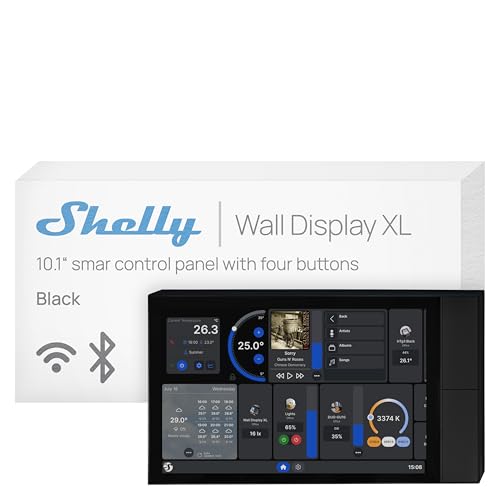
- 10.1-inch touchscreen control panel
- Built-in 5A relay and four buttons
- Works with Home Assistant and major platforms
Best For: Shelly users planning a wired wall installation
Best Refurbished Value
- Certified refurbished and tested
- Supports major Alexa smart home protocols
- Customizable controls for devices and cameras
Best For: Budget-conscious Alexa households
Best for Family Scheduling
Apolosign 27-Inch Digital Calendar

- Large 27-inch shared family display
- Syncs multiple calendar platforms
- Combines chores, meals, apps, and smart home controls
Best For: Families managing schedules and household routines
Best Integrated Alexa Panel

- 5-inch touchscreen for device and scene control
- Built-in Alexa and Zigbee gateway
- Supports wired or wireless networking
Best For: Smart Life users wanting an all-in-one Alexa and Zigbee control panel
Best Large Family Dashboard

- Large Full HD touchscreen for shared visibility
- Google Play app flexibility without a subscription
- Supports wall mounting or countertop placement
Best For: Families combining smart home controls with calendars and household planning
Best for Monitoring and Security

- 4.7-inch touchscreen for control and monitoring
- Customizable security modes with phone alerts
- Camera viewing and weekly energy statistics
Best For: Users prioritizing security, cameras, and energy monitoring
Best for Wired Home Assistant Setups
JEESTON 10.1-Inch PoE Touch Panel
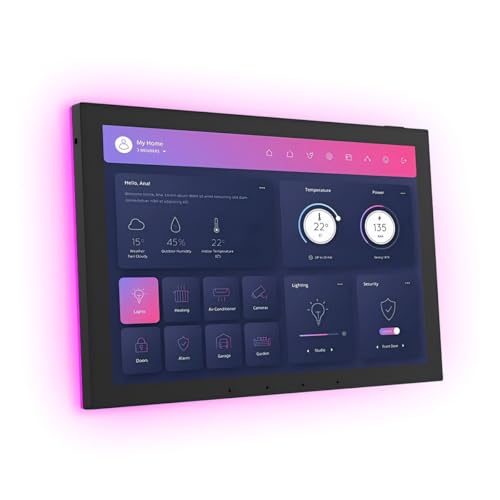
- 10.1-inch Android 14 touchscreen
- PoE, Wi-Fi 6E, and Gigabit Ethernet
- RS-232, RS-485, IR, and sensor support
Best For: Permanent wired home automation dashboards
Best for Everyday Smart-Home Control

- 4.7-inch control display
- Energy, thermostat, lighting, and camera features
- Customizable security modes with alerts
Best For: Compact central control of compatible smart-home devices
Best for Security Monitoring

- 8-inch touchscreen security hub
- Four simultaneous live camera feeds
- Local event replay and HomeBase 3 recognition
Best For: eufy households needing an accessible security monitor
Best Overall – Amazon Echo Hub
The Amazon Echo Hub is a practical choice among smart displays for home automation when you want a dedicated Alexa control panel. Its customizable dashboard, built-in smart home hub, and broad device compatibility make it useful for managing lights, cameras, routines, and security from one wall-mounted screen.
Best For: Alexa households seeking a flexible central control panel.
Pros:
- Customizable dashboard with adjustable sections and controls.
- Built-in support for Wi-Fi, Bluetooth, Zigbee, Matter, Sidewalk, and Thread devices.
- Can manage cameras, security systems, routines, and media.
- Supports wall mounting and optional tabletop or cable-management accessories.
Cons:
- Some features require compatible devices or subscriptions sold separately.
- Wall-mounting accessories and power-over-Ethernet equipment are optional extras.
Choose the Echo Hub if broad Alexa compatibility and a personalized control layout matter most. It is especially well suited to homes with a varied collection of compatible smart devices.
Best Built-In Switching – Shelly Wall Display XL
The Shelly Wall Display XL is a strong option among smart displays for home automation if you want touchscreen control combined with physical switching. Its 10.1-inch display, built-in 5A relay, and four customizable buttons support direct control of appliances and Shelly devices without requiring an additional hub.
Best For: Shelly users and wired installations needing local appliance control.
Pros:
- Large 10.1-inch touchscreen with four customizable buttons.
- Built-in relay can control lights, fans, heaters, coffee makers, and other appliances.
- Integrates with Shelly Smart Control, Home Assistant, Alexa, Google, and HomeKit.
- Can control Bluetooth or Sonos audio from the display.
Cons:
- Requires a neutral wire for installation.
- Rated relay current is 5A, which may limit some appliance applications.
- Designed for installation in a standard electrical wall box rather than flexible tabletop placement.
This display is a particularly practical fit for remodels or rooms where you want a permanent control station with direct switching. Check wiring requirements and relay limits before installation.
Best Refurbished Value – Like-New Amazon Echo Hub
The like-new Amazon Echo Hub offers a lower-cost route into smart displays for home automation. This certified refurbished 8-inch panel provides Alexa control, a customizable dashboard, and built-in compatibility with Wi-Fi, Bluetooth, Zigbee, Matter, Sidewalk, and Thread devices.
Best For: Buyers who want Echo Hub features at a refurbished-device price.
Pros:
- Refurbished, tested, and certified to look and work like new.
- Compatible with thousands of connected locks, thermostats, speakers, and other devices.
- Customizable controls and widgets support cameras, routines, and device management.
- Includes a limited warranty matching the new-device warranty.
Cons:
- May arrive in generic Amazon-branded packaging.
- Stand, cable pass-through, and power-over-Ethernet accessories are sold separately.
- Some functionality depends on compatible devices.
If you want the Echo Hub platform but are comfortable buying refurbished, this model retains the key control-panel features while potentially offering better value. Verify the listing’s condition and warranty details before ordering.
Best for Family Scheduling – Apolosign 27-Inch Digital Calendar
The Apolosign Digital Calendar is a large-format alternative among smart displays for home automation, combining family scheduling with a customizable Android dashboard. It can sync calendars, manage chores and meal planning, display photos, and provide access to smart home controls from a wall-mounted family hub.
Best For: Families that prioritize shared schedules, chores, and household planning.
Pros:
- 27-inch display provides a highly visible shared planning surface.
- Syncs with Google Calendar, iCloud, Outlook, and other calendars.
- Includes chore tracking, routines, grocery lists, and meal-planning features.
- Android Mode supports apps, widgets, Google Photos, and compatible smart home controls.
Cons:
- Its primary focus is family organization rather than dedicated device automation.
- Requires Wi-Fi and setup of calendars or connected services for full functionality.
- The large 27-inch format requires substantial wall space.
Consider the Apolosign when a household dashboard needs to do more than operate lights and cameras. Its large screen and planning tools make it a better fit for shared family coordination than for compact, automation-first control.
Best Integrated Alexa Panel – MOES Smart Home Control Panel
The MOES Smart Home Control Panel is a practical option for anyone comparing smart displays for home automation around the Smart Life ecosystem. Its 5-inch touchscreen, built-in Alexa, and integrated Zigbee gateway combine everyday device control in one wall- or desk-friendly panel.
Best For: Smart Life users who want touchscreen, Alexa, and Zigbee control in a single hub.
Pros:
- Works with a broad range of compatible Smart Life devices, including lights, switches, cameras, sockets, and door locks.
- Built-in Alexa supports hands-free control of devices, scenes, and voice skills.
- Integrated Zigbee gateway eliminates the need for a separate gateway.
- Supports wired or wireless networking and Type-C or circuit power connections.
Cons:
- The display is smaller than larger family-dashboard alternatives at 5 inches.
- Its compatibility focus is centered on Smart Life devices and supported integrations.
Choose the MOES panel when centralized Smart Life control and Alexa voice operation matter more than having a large, room-wide display. The built-in Zigbee hub also helps simplify an expanding setup.
Best Large Family Dashboard – Mazera 21.5-Inch Smart Hub
The Mazera 21.5-inch Smart Hub takes a broader approach to smart displays for home automation, combining smart home controls with calendars, reminders, widgets, and family planning. Google Play access lets you choose compatible apps rather than relying on one proprietary calendar system.
Best For: Families wanting a large shared touchscreen for schedules, household organization, apps, and compatible smart home controls.
Pros:
- Large Full HD anti-glare touchscreen with auto brightness is easy to view across a room.
- Google Play supports compatible calendar, productivity, streaming, photo, and smart home apps.
- Can display calendars, chores, meal plans, reminders, widgets, and smart home controls.
- Works on a wall or countertop with the included metal stand.
Cons:
- Its 21.5-inch size is less compact than dedicated small control panels.
- Smart home functionality depends on compatible apps and devices.
- Hands-free features are described as supported Google Gemini capabilities rather than universal device control.
This is the strongest fit when household organization is as important as automation. Its large screen and flexible Android-style app approach make it useful in a kitchen, office, or shared family area, though it requires more space than a compact panel.
Best for Monitoring and Security – SONOFF NSPanel Pro 120
The SONOFF NSPanel Pro 120 is a focused choice among smart displays for home automation, with a 4.7-inch touchscreen for device control, camera viewing, thermostat adjustments, energy tracking, and security modes. It suits users who want operational information and monitoring at a glance.
Best For: Homes needing a compact touchscreen for Zigbee-based control, camera monitoring, security alerts, and energy statistics.
Pros:
- Combines lighting, thermostat, camera, energy, and other controls on one touchscreen.
- Supports customizable security modes with alarms and phone notifications when sensors trigger.
- Displays live views from four supported camera types.
- Tracks daily energy consumption over a week for devices with energy-statistics functions.
Cons:
- The 4.7-inch display provides less viewing area than a large family hub.
- Camera viewing and energy tracking depend on supported camera and device features.
- Web browsing and media features may be secondary to its control and monitoring functions.
Consider the NSPanel Pro 120 if security and status monitoring are central to your setup. It offers more dedicated oversight than a basic touchscreen controller, while remaining compact enough for convenient placement.
Best for Wired Home Assistant Setups – JEESTON 10.1-Inch PoE Touch Panel
For shoppers comparing smart displays for home automation, the JEESTON JEMT101 is a feature-rich in-wall controller built around Android 14. Its 10.1-inch touchscreen combines PoE networking with wired control interfaces for compatible smart-home installations.
Best For: Permanent home automation dashboards, especially setups using Ethernet, RS-232, RS-485, IR, or Home Assistant-compatible equipment.
Pros:
- 10.1-inch 1280×800 capacitive touchscreen with Android 14.
- Supports Wi-Fi 6E, Gigabit Ethernet, Bluetooth 5.3, and RJ45 PoE power.
- Includes RS-232, RS-485, IR, and I/O connectivity for wired automation control.
- Proximity, light, temperature, and humidity sensors add useful environmental inputs.
Cons:
- Its in-wall design is less convenient for renters or portable use.
- The supplied notes do not confirm future software-update support.
- More specialized installation may be required than with a basic plug-in display.
The JEMT101 stands out when reliable wired connectivity and a larger wall-mounted interface matter more than simplicity. Its sensor package and PoE support make it a strong option for a purpose-built automation control point.
Best for Everyday Smart-Home Control – SONOFF NSPanel Pro 120
The SONOFF NSPanel Pro 120 is a compact choice among smart displays for home automation, offering a 4.7-inch screen for tapping into connected devices and household information. It also adds camera viewing, energy tracking, security modes, and webpage access.
Best For: Users who want a small central panel for lighting, thermostat adjustments, energy monitoring, security alerts, and compatible camera feeds.
Pros:
- Combines device control, thermostat adjustment, energy statistics, and camera viewing.
- Supports three customizable security modes with alerts and phone notifications.
- Can display live feeds from four supported camera types.
- Saved webpages provide quick access to music, videos, or information.
Cons:
- The 4.7-inch display offers less viewing area than larger control panels.
- Camera and device features depend on compatibility with supported equipment.
- The supplied notes do not specify included mounting hardware or connectivity details.
This panel is a practical all-in-one controller for homes already using compatible SONOFF devices and cameras. Its compact size suits smaller spaces, while the security and energy features broaden its usefulness beyond simple lighting control.
Best for Security Monitoring – eufy Smart Display E10
The eufy Smart Display E10 focuses on security-oriented smart displays for home automation, pairing an 8-inch touchscreen with eufy camera and doorbell monitoring. It can surface alerts, show multiple live feeds, and provide access to stored event footage.
Best For: Households using eufy Security equipment that want a simple, always-available screen for doorbell alerts, camera feeds, and event review.
Pros:
- Automatically displays live video and voice alerts for supported doorbell, lock, and camera events.
- Shows up to four simultaneous live feeds for broader property awareness.
- Stores historical events locally for quick replay without waiting for buffering.
- HomeBase 3 supports facial and package recognition summaries.
Cons:
- Its strongest features are centered on the eufy Security ecosystem.
- The supplied notes do not establish broad compatibility with third-party automation platforms.
- Security recognition features may require compatible HomeBase 3 equipment.
The E10 is best viewed as a dedicated eufy security hub rather than a general-purpose smart-home tablet. For eufy users, its automatic alerts, multi-camera view, and local event access make monitoring convenient for different members of the household.
How We Picked the Best Smart Displays for Home Automation
We selected these models based on their usefulness as central control points rather than treating every touchscreen tablet as an equivalent option. Our comparison considers platform compatibility, smart-home protocol support, display size, installation flexibility, camera and security features, voice control, responsiveness, and suitability for daily household use.
We also included both mainstream hubs and specialist wall-mounted panels. Some products are designed for Alexa or Zigbee ecosystems, while others use Android or Google Play to provide broader app access. Digital calendar displays are included for buyers who prioritize family organization alongside device control.
Quick Comparison
| Best For | Look For | Most Suitable Type |
|---|---|---|
| Alexa-centered homes | Alexa integration, routines, and broad device compatibility | Echo Hub-style panel |
| Zigbee device control | Built-in Zigbee gateway and compatible accessories | Zigbee control panel |
| Large family dashboards | Large screen, calendar sync, chores, and meal planning | Digital wall planner |
| Custom Android control | Google Play, Android support, and flexible apps | Android touchscreen panel |
| Security monitoring | Camera viewing, alerts, and security ecosystem support | Security-focused smart display |
| Permanent installation | In-wall mounting, PoE, relay, or electrical-box compatibility | Wired wall controller |
Key Buying Factors for Smart Displays for Home Automation
Ecosystem and Compatibility
Start with the platform already used in your home. Alexa, Google, Zigbee, proprietary security systems, and Android-based panels do not offer identical device support. Check compatibility with your lights, locks, thermostats, cameras, sensors, and routines before choosing a display.
Screen Size and Placement
An 8-inch panel is compact for a kitchen counter, hallway, or bedside table. Larger 10-inch to 27-inch displays work better as shared family dashboards but require more wall space. Confirm whether the unit is intended for tabletop use, surface mounting, or an in-wall installation.
Wired Features and Installation
PoE, Ethernet, relays, RS232, RS485, and electrical-box support can make a panel more suitable for permanent automation projects. They may also require professional installation. A plug-in hub is easier to deploy, while a wired controller can look cleaner and remain reliably powered.
Connectivity and Local Control
Review Wi-Fi requirements, Zigbee support, Bluetooth, and any dependence on cloud services. Local control can improve responsiveness and reliability, but compatibility varies by device and platform. A built-in hub may reduce the number of separate bridges you need.
Household Features
If the display will serve the whole family, prioritize glanceable schedules, multiple-user access, camera previews, voice control, and simple interfaces. Calendar and chore-focused products may be more useful than a traditional voice assistant if organization is the primary goal.
Who Should Buy Which Smart Displays for Home Automation?
- Choose an Echo Hub-style display if your home already relies on Alexa and you want a focused touchscreen for routines and compatible devices.
- Choose a Zigbee panel if you want a built-in gateway for sensors, switches, and other Zigbee accessories.
- Choose a large digital calendar if family schedules, chores, meal planning, and shared visibility matter more than advanced automation.
- Choose an Android or Google Play panel if you want app flexibility and are comfortable configuring a more open platform.
- Choose a wired in-wall or PoE controller for a permanent installation, cleaner appearance, and dependable power.
- Choose a security-focused display if camera feeds, alerts, and monitoring are central to your smart-home setup.
Before buying, verify current software support, required subscriptions, mounting hardware, and compatibility with the devices you already own. The best smart display is the one that fits both your preferred ecosystem and the location where you will actually use it.