Smart displays can make an apartment easier to manage without taking up the space of a full home command center. The right model can combine voice control, calendars, entertainment, reminders, security tools, and household organization in one compact device.
This roundup compares 10 useful options, from Alexa-enabled displays and bedside smart clocks to large digital planners, home-security hubs, and safety devices. Use the guide below to match features, size, connectivity, and privacy considerations to your apartment.
Best 10 Smart Displays for Apartments Picks for 2026
Best All-Around Display

- 11-inch Full-HD screen with expanded viewing area
- Spatial audio and strong entertainment features
- Built-in smart home hub and video calling
Best For: Versatile apartment entertainment and smart home control
Best Large Family Hub

- Large 21.5-inch Full HD touchscreen
- Google Play supports multiple calendar and productivity apps
- Works on a wall or countertop
Best For: Shared family scheduling in common apartment spaces
Best Compact Nightstand Pick
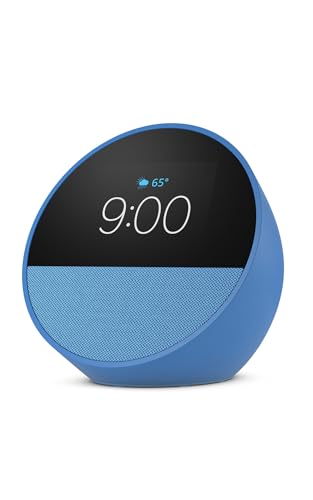
- Small design for nightstands, desks, and kitchens
- Customizable clock with weather and reminders
- Good sound plus Alexa smart home control
Best For: Compact apartment bedside and countertop use
Best No-Subscription Family Planner

- Syncs with major calendar platforms
- Adds chores, rewards, meal plans, and shared lists
- No subscription fees with wall or desk placement
Best For: Budget-conscious family organization in apartments
Best Compact Alexa Display

- Compact 5.5-inch screen for small spaces
- Streams entertainment and shows information at a glance
- Supports calls, compatible cameras, and smart-home control
Best For: Apartment residents wanting a versatile, space-saving Alexa display
Best Apartment Family Organizer

- Real-time Google, Outlook, and iCloud syncing
- Combines calendars, meals, chores, and rewards
- Wall- or desk-mountable touchscreen with photo mode
Best For: Families coordinating schedules and chores in a shared apartment
Best Security-Focused Smart Display

- Shows live feeds and alerts from compatible eufy devices
- Supports four simultaneous camera views
- Provides local event playback through HomeBase 3
Best For: eufy security users who want centralized apartment monitoring
Smart Safety Pick
Kidde Smart Carbon Monoxide Detector

- App alerts without a subscription
- Plug-in power with AA backup
- UL 2034 tested and ETL Listed
Best For: Apartment CO monitoring with remote alerts
Renter-Friendly Alarm Choice
XUK WiFi Wireless Alarm System

- No-drill wireless installation
- 4.3-inch touch screen
- Wi-Fi and GSM/4G connectivity
Best For: DIY apartment security without monthly fees
Complete Apartment Kit
DEEPVIGLX 8-Piece Security System

- Eight-piece alarm package
- Touchscreen with temperature and weather
- App, remote, touch, and voice control
Best For: Bundled apartment entry and motion protection
Best All-Around Display – Echo Show 11
For shoppers seeking smart displays for apartments, the Amazon Echo Show 11 combines a spacious Full-HD screen with room-filling audio and built-in smart home control. Its larger display is practical for recipes, calendars, entertainment, camera feeds, and video calls without requiring a separate hub.
Best For: Apartment residents who want one versatile Alexa display for entertainment, organization, and smart home management.
Pros:
- Vibrant 11-inch Full-HD screen with 60% more viewing area than the Echo Show 8 (2025 release)
- Spatial audio, wider soundstage, and up to twice the bass versus the Echo Show 8 (2023 release)
- Built-in smart home hub with support for compatible lights, thermostats, cameras, and routines
- Centered auto-framing camera with 3.3x zoom and noise reduction for video calls
Cons:
- The larger footprint may require more counter or wall space than compact smart displays
- Some personalized Alexa+ features depend on the Alexa+ experience and compatible services
The Echo Show 11 is the strongest general-purpose pick here if you want a display that can serve as an entertainment screen, household organizer, and apartment smart-home controller.
Best Large Family Hub – Mazera 21.5-Inch Smart Hub
Among smart displays for apartments, the Mazera stands out as a large shared planning center rather than a compact voice assistant. Its 21.5-inch Full HD touchscreen can show calendars, chores, meal plans, reminders, widgets, photos, and compatible smart home apps from Google Play.
Best For: Families or roommates who need a highly visible shared calendar and task dashboard in a kitchen, office, or common area.
Pros:
- Large anti-glare 21.5-inch Full HD touchscreen with auto brightness
- Supports Google Calendar, Apple Calendar, Outlook, Cozi, and other apps through Google Play
- Flexible wall-mounted or countertop setup with an included metal stand
- Customizable dashboard can include calendars, reminders, weather, photos, and smart home controls
Cons:
- The large size may be excessive for a small apartment counter or nightstand
- Its broad app flexibility may require more setup than a dedicated calendar system
Mazera is a good fit when visibility and customization matter most. It makes the most sense as a central household station, not as a small bedside or personal assistant display.
Best Compact Nightstand Pick – Echo Spot
For smaller apartments, the Echo Spot is one of the more space-conscious smart displays for apartments. It provides a glanceable clock, weather, reminders, music controls, and Alexa smart home access in a compact design suited to nightstands, desks, kitchens, and offices.
Best For: Apartment residents who want a compact alarm clock and voice assistant with useful smart home controls.
Pros:
- Compact design made for nightstands, offices, and kitchens
- Customizable clock faces with time, weather, song titles, and reminders
- Rich sound with clear vocals and deep bass for music, podcasts, and audiobooks
- Can extend coverage by up to 1,000 square feet on an existing eero network
Cons:
- The smaller display is less suitable for detailed recipes, calendars, or video calls
- The Wi-Fi extender feature requires an existing eero network
The Echo Spot is a practical choice when space is limited and your priorities are alarms, music, quick information, and simple Alexa control rather than a large visual dashboard.
Best No-Subscription Family Planner – 10.1-Inch Digital Calendar
This 10.1-inch digital calendar is a focused option for shoppers comparing smart displays for apartments and wanting household organization without recurring fees. It syncs with major calendar services, adds chore rewards, meal planning, shared to-dos, and doubles as a digital photo frame.
Best For: Families who want a wall-or-desk planner with chore tracking, shared lists, photo display, and lifetime access without subscription fees.
Pros:
- Syncs with Google Calendar, iCloud, Outlook, Cozi, and Yahoo Calendar
- Includes color-coded schedules, chore charts, points, rewards, meal plans, and shared grocery lists
- Supports wall mounting or desktop placement and remote management through its app
- No subscription fees, with a stated two-year warranty
Cons:
- The 10.1-inch screen offers less viewing area than the 21.5-inch Mazera
- Its primary focus is family organization rather than general entertainment or broad smart home control
This calendar is a strong apartment-friendly organizer for households that prefer a dedicated planning tool. Its no-subscription model and flexible placement make it especially appealing for ongoing family use.
Best Compact Alexa Display – Echo Show 5
For shoppers comparing smart displays for apartments, the Echo Show 5 is a compact option that fits easily on a nightstand, kitchen counter, or desk. Its 5.5-inch screen supports video calls, compatible camera viewing, entertainment, photo slideshows, and smart-home controls.
Best For: Apartment residents who want a small Alexa display for everyday information, entertainment, calls, and compatible smart-home control.
Pros:
- Compact 5.5-inch display suits limited counter and shelf space.
- Supports music, shows, podcasts, news, weather, and photo slideshows.
- Built-in camera enables video calls and compatible camera or doorbell viewing.
- Includes a camera shutter and mic/camera-off button for added privacy control.
Cons:
- The small screen may be less suitable for extended video viewing or detailed camera monitoring.
- Smart-home control depends on compatibility with the devices you own.
The Echo Show 5 is a practical pick when apartment space is limited and you want a general-purpose Alexa display rather than a dedicated security or scheduling panel. Its privacy controls and compact footprint add flexibility for shared living spaces.
Best Apartment Family Organizer – 15.6-Inch Digital Calendar
This 15.6-inch digital calendar is one of the more organization-focused smart displays for apartments, combining shared calendars, meal planning, chores, and photo display in one touchscreen. It can mount on a wall or sit on a desk, making it useful where household coordination matters more than entertainment.
Best For: Busy households and families that need shared scheduling, chore tracking, and a large always-visible planning screen.
Pros:
- Syncs in real time with Google, Outlook, iCloud, and other calendar platforms.
- Includes meal planning and a digital chore chart with reward points.
- Offers wall or desk placement with a 15.6-inch glare-free HD touchscreen.
- Works as a digital photo frame with 32GB of storage and expandable capacity.
Cons:
- Batteries are not included.
- The larger 15.6-inch format requires more wall, counter, or desk space than compact displays.
- Its primary focus is household organization rather than entertainment or voice control.
Choose this model if your apartment benefits from a visible family command center. The no-subscription calendar features, flexible mounting, and chore tools make it especially useful for shared homes, though its footprint should be measured before purchase.
Best Security-Focused Smart Display – eufy Smart Display E10
The eufy Smart Display E10 stands out among smart displays for apartments as a dedicated security hub. Its 8-inch touchscreen can show live feeds, alert you to doorbell and camera activity, and provide access to recorded events for compatible eufy security setups.
Best For: Apartment residents using compatible eufy cameras, doorbells, and HomeBase 3 who want a central monitoring screen.
Pros:
- Automatically displays a live feed and voice alert for supported doorbell, door, and camera events.
- Can show four simultaneous live feeds for broader property visibility.
- Stores historical events locally for quick replay without buffering.
- Includes an 8-inch touchscreen designed for straightforward use by children and seniors.
Cons:
- Its most advanced features depend on compatible eufy devices and HomeBase 3.
- It is primarily a security monitor, so it is less versatile for general entertainment or household scheduling.
- The supplied specifications list a 12-month warranty.
The E10 makes the most sense when your apartment already uses, or will use, eufy security equipment. It offers a focused way to see alerts and multiple camera feeds, but shoppers seeking a general-purpose smart display may prefer a broader platform.
Smart Safety Pick – Kidde Smart Carbon Monoxide Detector
For apartments where simple, connected safety matters, the Kidde Smart Carbon Monoxide Detector is a practical addition to a smart-home setup. It sends real-time alerts through the Kidde app, sounds an 85-dB alarm when CO is detected, and works with Alexa-enabled devices and Google Home.
Best For: Renters and homeowners who want app-based carbon monoxide alerts, a digital display, and backup protection during power outages.
Pros:
- Real-time app notifications without a subscription, including alerts when you are away.
- Plug-in power with two included AA backup batteries and a rotating plug for flexible outlet placement.
- UL 2034, 5th Edition tested and ETL Listed, with a 10-year limited warranty.
- Designed for smart-home integration with Alexa-enabled devices and Google Home.
Cons:
- Requires a 2.4 GHz Wi-Fi network for connected features.
- It monitors carbon monoxide rather than serving as a broader security system.
Among smart displays for apartments, this model is especially useful when the priority is dependable CO monitoring with remote notifications. Its plug-in design keeps installation straightforward, while the battery backup adds resilience during outages.
Renter-Friendly Alarm Choice – XUK WiFi Wireless Alarm System
The XUK WiFi Wireless Alarm System suits apartment residents who want a touchscreen security hub without drilling or hardwiring. Its wireless setup is designed for DIY installation and includes GSM/4G and Wi-Fi connectivity, instant alerts, and Alexa compatibility.
Best For: Renters and homeowners seeking a compact, no-monthly-fee alarm system with a 4.3-inch touch screen and wireless installation.
Pros:
- No tools, drilling, or wiring are required for setup.
- Supports Wi-Fi and GSM/4G connectivity with instant alerts.
- Includes a 4.3-inch touch screen and Alexa compatibility.
- Advertised features include pet activity tracking and no monthly fee.
Cons:
- The alarm control panel must be paired with the system upon receipt.
- The supplied notes do not specify the included sensor count or detailed component list.
This is a flexible option for smart displays for apartments when easy removal and minimal installation effort are important. Confirm the included components and pairing process before buying, especially if you need coverage for multiple entry points.
Complete Apartment Kit – DEEPVIGLX 8-Piece Security System
The DEEPVIGLX 8-piece system combines a touchscreen control panel with entry and motion detection for apartment security. The 2.4-inch display shows temperature and weather conditions, while app, remote, touch, and voice controls provide several ways to manage the system.
Best For: Apartment, garage, or office users who want a bundled alarm kit with a motion sensor, door/window contact sensor, remotes, RFID tags, and siren.
Pros:
- Includes an 8-piece package with control panel, motion sensor, door/window sensor, two remotes, two RFID tags, and siren.
- 2.4-inch full-touch display provides a graphical interface plus temperature and weather information.
- Offers app, remote, touch, and voice control, with Alexa compatibility.
- Wireless installation supports screw-in or self-adhesive mounting.
Cons:
- The listed maximum range is 50 feet, which may limit placement in larger spaces.
- The system has a 1-year manufacturer warranty.
- Its battery-powered design may require attention to long-term charging or battery maintenance.
For shoppers comparing smart displays for apartments, this kit stands out as a more complete starting point than a standalone alarm panel. Its included sensors and multiple control methods offer broad functionality, though the 50-foot stated range should be considered when planning placement.
How We Picked the Best Smart Displays for Apartments
We evaluated these products for apartment-friendly practicality rather than screen size alone. Key considerations included footprint, mounting or placement flexibility, setup requirements, voice-assistant compatibility, calendar and reminder features, smart-home integration, security usefulness, and whether the device requires a subscription. We also included different product types because an apartment’s needs vary: a kitchen display, bedside clock, family planner, and security hub do not need the same feature set.
Before buying, confirm the product’s Wi-Fi requirements, supported apps, power needs, and compatibility with devices you already own. Some products are full smart displays, while others are dedicated planners, alarms, or safety devices that complement a connected apartment.
Quick Comparison
| Best For | Look For | Recommended Type |
|---|---|---|
| Everyday voice control | Assistant support, speakers, routines | Amazon Echo Show |
| Schedules and household organization | Large touchscreen, calendar tools, photo display | Digital calendar touchscreen |
| Nightstand use | Compact footprint, alarms, clear clock display | Small smart display or smart clock |
| Smart-home control | Device compatibility and central dashboard | Dedicated smart-home hub |
| Apartment safety | Battery backup, notifications, loud alarms | CO detector or wireless alarm system |
Key Buying Factors for Smart Displays for Apartments
Size and Placement
Measure the intended surface before choosing a screen. Compact models work well on nightstands, narrow counters, and desks, while larger calendar displays need a wall or dedicated tabletop space. Check whether a stand, wall mount, or both are included.
Assistant and App Compatibility
Choose a platform that works with your phone, calendar, music services, and existing smart plugs, lights, cameras, or thermostats. A display with broad compatibility is usually more useful than one with an attractive screen but limited integrations.
Privacy and Connectivity
For apartments, consider camera controls, microphone mute switches, notification settings, and where recordings or account data are stored. Most connected displays depend on reliable Wi-Fi, so placement near a strong signal matters.
Organization and Shared Use
If several people share the space, prioritize readable screens, multiple calendar accounts, chore or reminder support, and easy editing. Subscription-free digital planners can be appealing when you mainly want schedules, photos, and household tasks.
Safety Features
Smart displays do not replace dedicated safety equipment. Pair them with properly installed carbon monoxide detectors and, where appropriate, a security system with dependable alerts, backup power, and clearly documented monitoring terms.
Who Should Buy Which Smart Displays for Apartments?
Choose an Echo Show if you want voice-controlled entertainment, calls, reminders, and smart-home routines in one device. A compact Echo Spot is better for a nightstand or small office, while the Echo Show 5 suits buyers who want a small screen with stronger everyday audio.
Choose a digital calendar touchscreen if shared schedules, chores, family reminders, and photo display are your priority. Larger 15.6-inch or 21.5-inch models are easier to read from across a room; a 10.1-inch model is more practical where counter or wall space is limited.
Choose the eufy smart display if centralized control for compatible security and smart-home devices matters most. For safety-focused buyers, add a smart carbon monoxide detector or wireless alarm system based on the apartment’s layout, lease rules, and required installation permissions.