A touchscreen universal remote can replace a cluttered coffee table full of controllers with one clearer, more flexible interface. The right model can combine TV, streaming, audio, and smart-home commands while keeping frequently used functions easy to reach.
We compared these 10 options across device compatibility, connection types, setup, charging, automation, and everyday usability so you can choose a remote that fits your entertainment system—not just the biggest feature list.
Best 10 Smart Remote Controls with Touchscreen Picks for 2026
Best Whole-Home Hub

- Supports up to 49 devices over IR, Bluetooth, RF, and Wi-Fi
- 2.4-inch touchscreen with activities and app customization
- Includes R1 repeater for control through walls and cabinets
Best For: Multi-device homes needing customizable, room-to-room control
Best Classic Touchscreen Remote
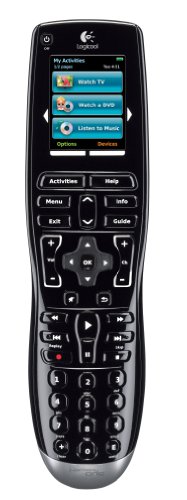
- Color LCD touchscreen with dedicated activity buttons
- Backlit, contoured physical controls
- Can learn IR codes from existing remotes
Best For: Simple setups favoring tactile controls and guided configuration
Best Samsung TV Replacement
Rechargeable Voice Remote for Samsung TVs

- Compatible with Samsung Smart TVs from 2019-2026
- USB-C and solar recharging options
- Bluetooth voice control with a two-year warranty
Best For: Samsung TV owners replacing a standard remote
Best Docked Universal Remote
SofaBaton X2 with Hub and Charging Dock

- 2.4-inch touchscreen with swipe-to-start activities
- Supports up to 49 devices across multiple connection types
- Built-in 360-degree IR hub with Type-C charging dock
Best For: Home theaters needing a customizable, centralized control system
App-Connected Pick
One For All Smart Control Pro Touch

- App, infrared, and Bluetooth control
- Supports up to 12 devices
- Custom activities, screens, and backlit keys
Best For: Customizable TV-centered entertainment setups
Smart-Home Power User Pick
SofaBaton X2 Touchscreen Remote

- 2.4-inch HD touchscreen with charging dock
- Controls up to 50 devices across multiple signal types
- Supports activities, voice control, and Home Assistant
Best For: Complex entertainment and smart-home systems
Fireplace Comfort Pick

- Touchscreen and button control for millivolt fireplaces
- Up to nine-hour timer and constant-temperature mode
- Backlit display, wall bracket, and child protection
Best For: Compatible millivolt gas fireplaces
Best Touchscreen Universal Remote

- 2.4-inch HD touchscreen with shortcut buttons
- Supports IR, Bluetooth, RF, and Wi-Fi devices
- Includes charging dock and smart-home integrations
Best For: Complex home theaters and Home Assistant users
Best Budget IR Smart Remote

- Controls common infrared home devices
- Works with Smart Life/Tuya, Alexa, and Google Assistant
- DIY learning supports some unlisted remotes
Best For: Single-room app and voice control
Best Whole-Home Touchscreen Remote

- Touchscreen offers quick access to channels and macros
- Hub and IR blasters extend coverage
- Works with major smart-home assistants
Best For: Multi-room entertainment and smart-home setups
Best Whole-Home Hub – SofaBaton X2 with R1 Repeater
For shoppers comparing smart remote controls with touchscreen functionality, the SofaBaton X2 stands out as a broad-compatibility option for entertainment and smart-home equipment. Its 2.4-inch touchscreen, multi-protocol connectivity, customizable activities, and included R1 IR repeater are designed for flexible control across rooms and device types.
Best For: Multi-device households that want touchscreen control, custom macros, and extended IR coverage.
Pros:
- Supports up to 49 devices across IR, Bluetooth, RF, and Wi-Fi, with a database covering more than 500,000 devices.
- Includes a 2.4-inch HD touchscreen, rechargeable battery, and Type-C charging dock.
- Supports custom activities, app-based remapping, Alexa, and Home Assistant via MQTT.
- R1 repeater and hub emitters help control equipment inside cabinets or beyond direct line of sight.
Cons:
- Its extensive setup and customization options may be more than needed for a simple TV system.
- Some smart-home features require app configuration and compatible equipment.
The X2 is a strong choice when one remote needs to handle a complete entertainment setup plus connected-home commands. Choose it if whole-home coverage and customization matter more than simplicity.
Best Classic Touchscreen Remote – Logitech Harmony One
The Logitech Harmony One is a straightforward option for shoppers seeking smart remote controls with touchscreen navigation. It combines a color LCD touchscreen with dedicated activity buttons, backlit physical controls, and internet-based setup for managing compatible home entertainment gear.
Best For: Users who prefer a familiar button layout with a color touchscreen and guided setup.
Pros:
- Color LCD touchscreen provides on-screen activity controls.
- Contoured, backlit buttons support use in dim rooms.
- Can learn IR codes from existing remote controls.
- Offers internet-based setup and live customer support.
Cons:
- Supplied specifications list a maximum of one supported device, so verify compatibility for your setup.
- It uses a lithium-ion battery, and the notes do not mention a charging dock or USB-C charging.
The Harmony One is best suited to buyers who value physical buttons alongside a touchscreen and want an internet-assisted setup process. Its listed device specification makes checking your exact equipment especially important.
Best Samsung TV Replacement – Rechargeable Voice Remote for Samsung TVs
This Nettech replacement is a focused alternative among smart remote controls with touchscreen searches, although it uses voice control rather than a touchscreen. It is designed for Samsung Smart TVs from 2019 through 2026 and adds USB-C, solar recharging, Bluetooth pairing, and a two-year warranty.
Best For: Samsung TV owners who want voice commands and rechargeable convenience in a replacement remote.
Pros:
- Designed for Samsung Smart TVs from 2019-2026.
- Supports both USB-C fast charging and solar charging.
- Bluetooth voice control works from across the room after pairing.
- Includes a two-year full warranty.
Cons:
- It is intended for Samsung TVs rather than broad multi-brand device control.
- It does not include a touchscreen; control is voice- and button-based.
- Voice control requires pairing according to the provided procedure.
If you need a replacement for a compatible Samsung TV, this remote emphasizes convenience and reduced disposable-battery use rather than universal control. It is not the right match for shoppers specifically requiring a touchscreen or multi-device hub.
Best Docked Universal Remote – SofaBaton X2 with Hub and Charging Dock
The SofaBaton X2 is a versatile pick for shoppers comparing smart remote controls with touchscreen interfaces and built-in hubs. It combines a 2.4-inch HD display, customizable activities, support for up to 49 devices, and 360-degree IR transmission with a Type-C charging dock.
Best For: Home theater users who want a docked touchscreen remote with broad device and smart-home support.
Pros:
- Works with more than 500,000 devices from over 6,000 brands using IR, Bluetooth, RF, and 2.4G Wi-Fi.
- Touchscreen activities can trigger multiple devices with a swipe.
- Built-in hub provides seven IR emitters, 360-degree coverage, and up to 40 feet of range.
- Supports app customization, direct IP control, and Home Assistant integration via MQTT.
Cons:
- Advanced app, network, and activity features may require a longer setup process.
- Whole-home IR coverage beyond the main area requires an optional repeater sold separately.
This version is a good fit for a centralized home theater or smart-home setup where charging convenience and flexible device control are priorities. Consider the optional repeater if equipment is located in other rooms.
App-Connected Pick – One For All Smart Control Pro Touch
The One For All URC7985 is a practical choice among smart remote controls with touchscreen features if you want app setup combined with traditional infrared and Bluetooth control. It supports up to 12 devices and adds custom activities, screens, and backlit keys for easier use in low light.
Best For: Households seeking a customizable universal remote for a television-centered setup with app and Bluetooth support.
Pros:
- Combines app control, infrared, and Bluetooth connectivity.
- Supports up to 12 devices.
- Offers custom activities, screens, and backlit keys.
- Includes a one-year manufacturer warranty.
Cons:
- Its listed maximum range is 20 feet.
- Requires four AAA batteries.
- The supplied compatibility details specifically list television devices.
Choose this model when app-based customization and familiar physical buttons matter more than extensive smart-home integration. Its moderate device capacity makes it well suited to everyday entertainment systems.
Smart-Home Power User Pick – SofaBaton X2 Touchscreen Remote
The SofaBaton X2 stands out among smart remote controls with touchscreen displays for complex home-entertainment systems. Its 2.4-inch HD touchscreen works alongside a quick-access panel, while the hub supports infrared, Bluetooth, Wi-Fi, and RF control for up to 50 devices.
Best For: Advanced users who want activity-based entertainment control, voice assistants, and Home Assistant integration.
Pros:
- Supports more than 500,000 devices from over 6,000 brands, according to the supplied listing.
- Controls up to 50 devices using IR, Bluetooth, Wi-Fi, or RF.
- Supports macros, one-tap activities, Alexa, Google Assistant, Home Assistant, and MQTT triggers.
- Includes a 2.4-inch HD touchscreen and Type-C charging dock.
Cons:
- Its 1,000-gram listed weight is substantially heavier than typical handheld remotes.
- R1 repeaters for extending control through walls are not included.
- The feature set may be more involved than needed for a simple TV setup.
The X2 is the most capable option here for users managing multiple entertainment and smart-home devices. It costs convenience in complexity, but its hub, automation features, and charging dock create a powerful centralized setup.
Fireplace Comfort Pick – Casmer Millivolt Touch Remote
The Casmer Universal Smart Fireplace Remote is a specialized option among smart remote controls with touchscreen functionality. Designed for most millivolt gas-valve fireplaces, it combines touchscreen and button control with temperature regulation, up to nine hours of timing, and a backlit display.
Best For: Owners of compatible millivolt gas fireplaces who want timed heating, temperature control, and child protection features.
Pros:
- Universal design supports many millivolt-valve fireplace brands and models.
- Provides touchscreen and button control with constant-temperature mode.
- Offers up to nine hours of timing and a 20-foot listed control distance, up to 30 feet.
- Includes a wall bracket, backlit LCD display, and three-year replacement warranty.
Cons:
- It is intended for millivolt gas-valve fireplaces rather than general home-entertainment devices.
- It is not OEM manufactured.
- Compatibility should be checked carefully, especially for locking-solenoid and servo-motor systems.
This remote makes sense only when its fireplace-system compatibility matches your installation. For a compatible millivolt fireplace, its timer, temperature mode, and safety-oriented features add practical everyday convenience.
Best Touchscreen Universal Remote – SofaBaton X2
For shoppers seeking smart remote controls with touchscreen capability, the SofaBaton X2 combines a 2.4-inch HD display with physical shortcut buttons, broad device support, and a charging dock. It is designed to consolidate entertainment equipment and selected smart-home functions in one customizable remote.
Best For: Home theaters that need touchscreen navigation, one-touch activities, and Home Assistant integration.
Pros:
- Supports IR, Bluetooth, RF, and Wi-Fi devices across more than 6,000 brands and 500,000 devices.
- Touchscreen, shortcut buttons, custom macros, and one-touch activities simplify multi-device control.
- Includes a Type-C charging dock and supports Alexa, Google Assistant, and Home Assistant features.
Cons:
- Advanced setup and customization may require using the companion app.
- Voice control is focused on activating pre-programmed activities.
The X2 is a strong choice when a touchscreen interface and broad connectivity matter more than a simple plug-and-play remote. Its app customization and smart-home integrations make it especially suitable for more complex entertainment setups.
Best Budget IR Smart Remote – MOES WiFi IR Controller
The MOES WiFi Smart IR Remote Controller is a compact alternative for controlling infrared equipment through an app or voice assistant. While it does not include a touchscreen, it can complement smart remote controls with touchscreen by adding app-based control for TVs, air conditioners, fans, and other IR devices.
Best For: Budget-conscious users who want app and voice control for infrared devices without adding a hub.
Pros:
- Controls compatible TVs, air conditioners, fans, DVD players, set-top boxes, and TV boxes.
- Works with the Smart Life/Tuya app for remote control from anywhere.
- Supports Alexa, Google Assistant, and a DIY learning function for unsupported IR remotes.
Cons:
- Supports infrared only; RF devices are not included.
- Requires a 2.4 GHz Wi-Fi connection.
- Infrared signals do not pass through walls, so one unit is recommended per room.
This MOES controller is best viewed as an inexpensive IR blaster rather than a complete touchscreen remote. It makes sense for a single room where app access, voice commands, and basic automation are more important than physical remote hardware.
Best Whole-Home Touchscreen Remote – SofaBaton X2 with Hub
The SofaBaton X2 with Hub is one of the more feature-rich smart remote controls with touchscreen for shoppers managing entertainment and smart-home devices together. Its touchscreen provides quick access to channels, favorites, and macros, while the hub and additional IR blasters help extend control across rooms and cabinets.
Best For: Whole-home entertainment setups that need touchscreen activities, expanded IR coverage, and voice control.
Pros:
- Supports IR, Bluetooth, Wi-Fi, and RF devices across more than 6,000 brands and 500,000 devices.
- Quick-access touchscreen, one-touch activities, macros, and custom app commands streamline control.
- Hub includes two additional IR blasters and supports Alexa, Google Assistant, and Home Assistant.
Cons:
- Whole-home coverage depends on hub placement and the included IR blasters.
- Some larger setups may require the optional R1 repeater, sold separately.
This version stands out when reliable coverage beyond the immediate viewing area is a priority. It offers more expansive control than a basic touchscreen handset, though its broader feature set may take more time to configure.
How We Picked These Smart Remote Controls with Touchscreen
We focused on the features that matter after setup: broad device compatibility, dependable infrared performance, Bluetooth and Wi-Fi support where available, responsive touchscreens, useful physical controls, charging convenience, and realistic smart-home integration. We also separated full universal remotes from replacement remotes and IR hubs, since they solve different problems.
Products were considered for their intended use, including multi-device home theaters, Samsung TV replacement, smart-home control, and specialty equipment such as millivolt fireplaces. A touchscreen alone does not make a remote universal, so compatibility and control method were weighted heavily.
Quick Comparison
| Best For | Look For | Typical Control Method |
|---|---|---|
| Full home theater | Device profiles, activities, hub support | IR, Bluetooth, Wi-Fi, or RF |
| Streaming and TV basics | Voice control, familiar buttons, USB-C charging | Bluetooth or infrared |
| Smart-home equipment | IR blaster, app automation, wide appliance support | Wi-Fi and infrared |
| Specialty appliances | Exact equipment compatibility | Dedicated infrared or radio signal |
Key Buying Factors for Smart Remote Controls with Touchscreen
Compatibility Comes First
Make a list of every device you want to control, including TVs, receivers, soundbars, streaming boxes, game consoles, air conditioners, and unusual equipment. Check whether each device uses IR, Bluetooth, RF, or a proprietary connection. A remote may control a television perfectly but lack the right signal for a receiver or powered cabinet.
Touchscreen Design and Physical Controls
Touchscreens are useful for activities, macros, menus, and less frequently used commands. Physical volume, channel, navigation, and playback buttons are often faster in the dark and easier to use without looking. Favor a model that combines both if the remote will be used daily.
Hub, Range, and Connectivity
A hub can hide equipment in a cabinet and improve line-of-sight reliability. Wi-Fi may enable app setup, cloud features, and smart-home routines, while Bluetooth is useful for compatible TVs and streaming devices. Confirm whether the hub is included, optional, or sold in a separate bundle.
Battery and Setup
Rechargeable batteries and a charging dock reduce maintenance, but battery life and dock placement still matter. Also check how devices are added, whether activities can be customized, and whether the companion app is required for initial setup.
Who Should Buy Which Smart Remote Controls with Touchscreen?
Choose a full universal touchscreen remote if you want one controller for a receiver, television, streaming player, and other components. Look for activity shortcuts, a hub, and both touchscreen and hard-button controls.
Choose a dedicated TV replacement if your main goal is restoring simple control to a compatible Samsung television. These models are generally easier to operate but are not substitutes for a multi-device home-theater remote.
Choose an IR Wi-Fi blaster if you want phone-based control or smart-home routines for several infrared appliances. It is best for hidden equipment and automation, but it may not provide the tactile experience of a handheld remote.
Choose a specialty remote only after confirming the exact appliance and signal requirements. Fireplace and other dedicated controls should be purchased for verified compatibility rather than touchscreen features alone.