The best Blu-ray drives make it easier to watch, back up, and burn high-capacity discs when your computer lacks a built-in optical drive. The right model depends on your preferred connection, disc formats, portability needs, and whether you need reading, writing, or both.
We selected 10 external Blu-ray drives ranging from slim USB-C models to faster desktop burners, so you can find a practical fit for home media, data archiving, or on-the-go use.
Best 10 Blu Ray Drives Picks for 2026
Best Slim Blu-ray Burner

- Ultra-slim external design
- USB-A and USB-C connectivity
- M-DISC support
Best For: Portable Blu-ray burning with flexible USB connections
Best Supported Portable Blu-ray Drive

- Reads and writes BD/DVD/CD
- Type-C adapter included
- Two-year manufacturer warranty
Best For: Portable backups and media playback on Mac or Windows
Best Multifunction Blu-ray Drive
Wbacon 7-in-1 External Blu-ray

- Writes 100GB Blu-ray discs
- Built-in SD and TF slots
- Works with Windows, macOS, and Linux
Best For: Data transfer, archiving, and multi-device connectivity
Best High-Speed Blu-ray Drive
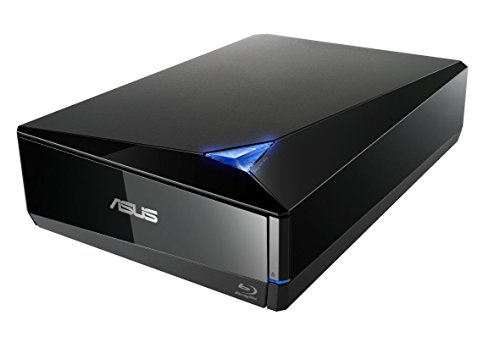
- Up to 16x Blu-ray writing
- Supports BDXL up to 128GB
- Includes external power adapter
Best For: Desktop users creating fast, high-capacity Blu-ray discs
Best Value Blu-ray Drive

- Reads Blu-ray, DVD, and CD media
- Burns DVD and CD discs
- Adds USB ports and TF/SD card access
Best For: Portable disc reading with versatile connectivity
Best Premium UHD Blu-ray Drive

- Reads UHD 4K Blu-ray discs
- Reads and writes regular Blu-ray, DVD, and CD
- Uses a premium aluminum enclosure
Best For: Compatible Windows PCs needing UHD Blu-ray support
Best Blu-ray Burner With Hub

- Reads and burns regular Blu-ray media
- Offers four USB ports plus TF/SD access
- Includes case and four disc sleeves
Best For: Portable Blu-ray burning and expanded laptop connectivity
Best All-Around Blu-ray Drive
6X USB-C & USB 3.0 Blu-ray Burner

- Reads and burns BD, DVD, and CD media
- Dual USB-A and USB-C connectivity
- Windows, Mac, and Linux compatible
Best For: Full-format playback, burning, and data archiving
Best Feature-Rich Blu-ray Drive
5-in-1 Portable Blu-ray Reader

- Adds two USB ports and SD/TF card slots
- Supports USB 3.0 and USB-C connections
- Works with Windows and Mac computers
Best For: Users needing optical media and extra connectivity
Best Budget Blu-ray Player
Portable CD/DVD Burner with Blu-ray Playback

- Reads Blu-ray discs but does not burn them
- Burns CDs and DVDs via USB 3.0 or USB-C
- Lightweight and compatible with Windows, Mac, and Linux
Best For: Blu-ray viewing and basic CD/DVD burning
Best Slim Blu-ray Burner – ASUS SBW-06D5H-U
ASUS SBW-06D5H-U BDXL External Ultra Slim Blu-ray and MDisc Burner USB 3.1 USB-C 2 Cables Black
Check Price On AmazonThe ASUS SBW-06D5H-U is one of the more compact blu ray drives for laptop and desktop users who want Blu-ray burning, M-DISC support, and flexible USB connectivity. Its ultra-slim design and included USB-A and USB-C interfaces make it convenient for mobile setups.
Best For: Users seeking a slim external Blu-ray burner with USB-A/USB-C compatibility and M-DISC support.
Pros:
- Ultra-slim 0.58-inch form factor and lightweight 240 g design
- Supports USB 3.1 Type-A and Type-C connections
- Supports M-DISC and multiple Blu-ray write speeds up to 6x listed
Cons:
- Supplied specifications list a Blu-ray read speed of 8x, but other read-speed fields vary
- Maximum operating temperature is listed as 45 °C
This ASUS drive is a practical choice when portability and connection flexibility matter more than the highest available write speed. Confirm your computer and playback or burning software requirements before purchasing.
Best Supported Portable Blu-ray Drive – BUFFALO 6X Portable Blu-ray
The BUFFALO 6X is a portable option among blu ray drives, with read/write support for Blu-ray, DVD, CD, and M-DISC media. It includes a USB Type-C adapter, Windows software, and a two-year manufacturer warranty, making it a well-rounded choice for travel and everyday backups.
Best For: Windows and Mac users who want a compact, bus-powered Blu-ray writer with included Windows playback and burning software.
Pros:
- Reads and writes Blu-ray, DVD, CD, and M-DISC media
- USB 3.2 Gen 1 Type-A connection with Type-C adapter included
- Compact 6 x 5 x 0.5-inch design and 0.5-pound weight
- Includes CyberLink Media Suite for Windows and a two-year warranty
Cons:
- Blu-ray read and write speeds are limited to 6x
- Included CyberLink software is for Windows only
Choose this BUFFALO model if broad disc support, portability, and manufacturer backing are priorities. Its included adapter improves compatibility, while the 6x Blu-ray speed is suited to routine playback and burning rather than maximum-speed work.
Best Multifunction Blu-ray Drive – Wbacon 7-in-1 External Blu-ray
The Wbacon 7-in-1 stands out among blu ray drives by combining Blu-ray burning with SD, TF, USB-A, and USB-C ports. It supports 100GB disc writing and works with Windows, macOS, and Linux, although Blu-ray playback and writing require compatible third-party software.
Best For: Users who want an external Blu-ray burner with integrated memory-card and USB connectivity.
Pros:
- Supports reading and writing 100GB Blu-ray discs
- Includes SD, TF, USB-A, and two Type-C ports
- Compatible with Windows, macOS, and Linux
- Reads Blu-ray at up to 6x, DVD at 8x, and CD at 24x
Cons:
- Does not support UHD or 4K Blu-ray playback
- Blu-ray functions require separate software
- SD and TF cards cannot be used simultaneously
This Wbacon drive offers the most connectivity in the group, especially for users moving files between optical discs, memory cards, and USB storage. It is best suited to flexible data transfer and archiving rather than plug-and-play 4K movie playback.
Best High-Speed Blu-ray Drive – ASUS BW-16D1X-U
The ASUS BW-16D1X-U is a full-size external option among blu ray drives, offering up to 16x Blu-ray writing with BDXL support for discs up to 128GB. Its USB 3.0 connection, included power adapter, and CyberLink burning software make it designed for a more permanent desktop setup.
Best For: Desktop users who prioritize high Blu-ray write speeds and large-capacity BDXL support.
Pros:
- Up to 16x Blu-ray writing and reading listed
- BDXL support for storage capacities up to 128GB
- M-DISC support for archival media
- Includes USB cable, power adapter, installation CD, and power cord
Cons:
- Much larger and heavier than slim portable models
- Requires an external power connection
- Listed operating-system support varies by specification, so compatibility should be checked
This ASUS drive is the strongest fit for faster desktop disc creation and high-capacity BDXL projects. Its 2.6-pound, 9.5-inch-long enclosure is less convenient for travel, but the full-size design supports higher listed speeds than the portable alternatives.
Best Value Blu-ray Drive – 5-in-1 External Blu-ray Drive
For shoppers comparing blu ray drives, this 5-in-1 external model combines disc reading with DVD and CD burning, plus useful USB and memory-card connectivity. It reads Blu-ray media but does not burn Blu-ray discs or support 4K Blu-ray playback.
Best For: Windows or Mac users who want a portable Blu-ray reader with DVD/CD burning and extra ports.
Pros:
- Reads BD, DVD, and CD formats, including BD-XL and M-Disc.
- Burns DVD and CD media at up to 8x and 24x, respectively.
- Includes USB-A/USB-C connectivity, USB ports, and a TF/SD card slot.
Cons:
- Cannot burn Blu-ray discs or play 4K Blu-ray content.
- TF and SD cards cannot be read simultaneously.
- Requires third-party software for 3D Blu-ray playback.
This is a practical choice for general disc access, backups, and media playback, especially if the added hub and card-reader functions will be useful. Its six-month warranty and included pouch add convenience for portable use.
Best Premium UHD Blu-ray Drive – Aluminum 4K Blu-ray Writer
archgon Premium Aluminum External USB 3.0 UHD 4K Blu-Ray Writer Super Drive for PC and Mac
Check Price On AmazonThis premium external option stands out among blu ray drives for its aluminum enclosure and UHD 4K Blu-ray support. It can read UHD discs and read/write regular Blu-ray, DVD, and CD media when used with suitable software.
Best For: PC users seeking an external UHD Blu-ray writer with a durable aluminum body.
Pros:
- Supports UHD 4K Blu-ray reading on compatible Windows PCs.
- Reads and writes regular Blu-ray, DVD, and CD media.
- Aluminum enclosure and M-DISC BD-R support add durability and archival flexibility.
Cons:
- UHD playback requires compatible hardware and separately purchased CyberLink PowerDVD.
- Mac users cannot currently play UHD Blu-ray with suitable software, according to the supplied notes.
- Software compatibility should be checked before purchase.
Choose this model when UHD Blu-ray capability matters more than built-in hub features. The main buying consideration is system and software compatibility, particularly for 4K playback on Windows PCs.
Best Blu-ray Burner With Hub – 8-in-1 External Blu-ray Drive
Among blu ray drives, this 8-in-1 external model is designed for users who need both broad disc support and extra connectivity. It reads and burns regular Blu-ray, DVD, and CD media, while its built-in hub adds USB-C, USB-A, and TF/SD card functionality.
Best For: Laptop and MacBook users who want Blu-ray burning plus a portable multiport hub.
Pros:
- Reads and burns regular Blu-ray, DVD, and CD discs.
- Supports BD-R recording up to 50GB and reads BD-XL media.
- Includes two USB-C ports, USB 3.0, USB 2.0, and a TF/SD card slot.
- Comes with a carrying case and four disc-protection sleeves.
Cons:
- Does not support 4K Blu-ray playback or BD-XL recording.
- TF and SD cards cannot be used simultaneously.
- 3D Blu-ray playback requires third-party software.
This is the strongest fit for buyers who need a genuine Blu-ray burner and frequently connect accessories or transfer photos from memory cards. Its compact 300-gram design and included storage accessories also suit travel.
Best All-Around Blu-ray Drive – 6X USB-C & USB 3.0 Blu-ray Burner
For shoppers comparing blu ray drives, this model stands out as a full-featured option for Blu-ray playback, disc burning, and long-term data backup. It supports BD, DVD, and CD media, reaches up to 6X for Blu-ray, and includes both USB-A and USB-C connectivity.
Best For: Users who need Blu-ray writing, broad format support, and a portable drive for Windows, Mac, or Linux computers.
Pros:
- Reads and burns Blu-ray discs at up to 6X, with DVD and CD support.
- Includes an integrated USB 3.0 and USB-C cable for flexible connectivity.
- Supports Windows, macOS, and Linux, with a slim design and built-in cable storage.
- Offers 3D Blu-ray playback when paired with compatible software and display hardware.
Cons:
- Blu-ray playback requires third-party software.
- 3D playback also requires a compatible display and software.
- Not compatible with Chromebooks, tablets, TVs, iPads, or car systems.
This is the strongest fit when you want one of the more capable blu ray drives for both reading and burning across several disc formats. Low-power devices may need the included external power cable for reliable operation.
Best Feature-Rich Blu-ray Drive – 5-in-1 Portable Blu-ray Reader
Among blu ray drives with extra connectivity, this BUNUD model adds two USB ports plus SD and TF card slots. It can play and burn supported discs, transfer files, and connect through either USB 3.0 or USB-C without requiring a separate driver.
Best For: Laptop and desktop users who want a Blu-ray drive combined with convenient USB and memory-card expansion.
Pros:
- Combines Blu-ray, DVD, and CD functionality with two USB ports and SD/TF slots.
- Offers USB 3.0 and USB-C connections for newer and older computers.
- Supports Windows and Mac computers, including MacBook Pro/Air and iMac.
- Compact, lightweight design includes an embedded cable and one-year warranty.
Cons:
- Does not play 4K Ultra HD discs.
- Not compatible with iPads, tablets, projectors, TVs, Chrome OS, phones, or car systems.
- BD-ROM video read speed is listed at 2X, with up to 6X maximum Blu-ray reading.
Choose this drive if the added ports and card-reader slots are as important as optical-disc support. It is a practical desktop or laptop accessory, but buyers seeking 4K UHD playback should consider another option.
Best Budget Blu-ray Player – Portable CD/DVD Burner with Blu-ray Playback
This compact option is one of the simpler blu ray drives for playback and everyday disc tasks. It reads Blu-ray discs at up to 6X while handling CD and DVD playback and burning through USB 3.0 or USB-C connections.
Best For: Users who mainly need Blu-ray playback plus CD/DVD burning in a lightweight external drive.
Pros:
- Reads Blu-ray, DVD, and CD media, with up to 24X CD and 8X DVD read speeds.
- Burns CDs and DVDs while using a plug-and-play USB-A or USB-C connection.
- Portable brushed-texture design includes an embedded data cable.
- Compatible with Windows, Mac, and Linux systems.
Cons:
- Can read but cannot burn Blu-ray discs.
- Blu-ray playback requires third-party software such as PowerDVD or Leawo.
- Not compatible with Chromebooks, TVs, tablets, iPads, trucks, or cars.
This drive makes sense when Blu-ray burning is not required and you want a straightforward player with CD/DVD writing capability. Its dual connector design also makes it easier to use with a range of laptops and desktops.
How We Picked the Best Blu Ray Drives
We focused on external drives that offer a useful combination of compatibility, connection flexibility, portability, and recording capability. The selection includes Blu-ray readers and burners, models with USB-A and USB-C support, and options designed for both Windows PCs and Macs. We also considered features such as BDXL support, M-DISC compatibility, advertised write speeds, included cables, and compact construction.
Because real-world performance can depend on the computer, operating system, media, and software, advertised speeds should be treated as maximums rather than guaranteed results. Buyers should also verify current compatibility and included accessories before ordering.
Quick Comparison
| Best For | Features to Prioritize |
|---|---|
| Portable use | Slim design, low weight, USB-C, and bus-powered operation |
| Disc burning | BD-RE writing, reliable software support, and appropriate media compatibility |
| Large backups | BDXL support, M-DISC compatibility, and sufficient storage capacity |
| Desktop performance | Higher rated write speeds, stable power, and a full-size enclosure |
| Mixed computers | USB-A and USB-C connectivity plus broad Windows and macOS support |
Key Buying Factors for Blu Ray Drives
Read, Write, or Both
A read-only Blu-ray drive can be enough for movie playback and accessing discs, while a burner is necessary for creating or rewriting Blu-ray media. If you plan to archive photos, video, or important files, look for BD-R and BD-RE support. BDXL models can handle higher-capacity discs, but compatible media is typically more expensive.
Connection and Power
USB 3.0 or newer provides suitable bandwidth for external optical drives. USB-C is convenient on newer laptops, while USB-A remains common on desktops and older computers. Dual-interface models are more flexible. Check whether the drive is bus-powered or requires an additional power adapter, particularly when using it with laptops, hubs, or tablets.
Software and Operating-System Support
Hardware compatibility does not always guarantee seamless playback. Commercial Blu-ray movie playback may require licensed software, and some included applications work only with specific operating systems. Confirm support for your version of Windows or macOS and check whether burning software is included.
Portability and Build Quality
A slim drive is easier to carry, but a larger desktop model may offer better stability and faster rated writing. Consider cable storage, enclosure durability, tray construction, and whether the drive fits your workspace.
Who Should Buy Which Blu Ray Drives?
Choose a slim USB-C model if you mainly use a laptop and want occasional disc access without adding much weight. Select a BDXL- or M-DISC-compatible burner for long-term data archiving or large project backups. A dual USB-A/USB-C drive is the safest choice for households with several computers. If writing speed and frequent disc creation matter most, a larger desktop Blu-ray burner is likely the better fit. For simple movie or file reading, avoid paying extra for recording features you will not use.