The right streaming encoder for gaming can improve picture quality, reduce computer workload, and make your broadcasts more reliable. The best choice depends on your console or PC, target resolution, streaming platform, and network setup.
We compared 10 options ranging from compact 1080p HDMI encoders and capture cards to 4K units with NDI, SRT, SDI, IPTV, and multi-input support.
Best 10 Streaming Encoder for Gaming Picks for 2026
Compact Standalone Pick

- 4K capture with zero-lag HDMI pass-through
- Standalone RTMP and multi-protocol streaming
- Compact design with NDI and PoE support
Best For: Portable PC-free gaming and IP streaming setups
Professional SDI Choice
Blackmagic Streaming Encoder 4K
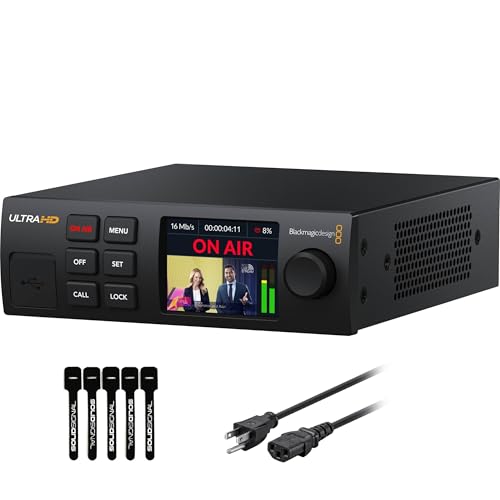
- 12G-SDI encoding up to 2160p60
- Ethernet and mobile failover connectivity
- Includes standards conversion and webcam output
Best For: SDI-based gaming broadcasts and live production
Budget PC Streaming Pick

- 4K HDMI input with 1080p capture
- Plug-and-play USB 3.0 connection
- HDMI loop-out and microphone input
Best For: Affordable OBS streaming from consoles and cameras
All-in-One Production Pick

- HDMI and SDI inputs with dual-source mixing
- Streams to up to six destinations
- Simultaneous 4K streaming and recording
Best For: Multi-source gaming broadcasts and live production
Flexible Network Streaming
ISEEVY Mini H.264 1080P HDMI Encoder

- 1080p at 60 fps HDMI encoding
- Broad RTMP, SRT, RTSP, and UDP support
- Browser setup with text and logo overlays
Best For: Network-based gaming streams needing protocol flexibility
Plug-and-Play Console Capture
Fifine AmpliGame V3 Capture Card

- 1080p at 60 fps USB 3.0 capture
- 4K at 30 fps HDMI pass-through
- Works with consoles, Mac, Windows, and OBS
Best For: Simple computer-based streaming from consoles or PC
Advanced HDMI Broadcast Control
J-Tech Digital IPTV HDMI Encoder

- 4K 60 Hz input with 1080p 60 Hz output
- H.264, H.265, and MJPEG compression
- Streams to up to four platforms with PoE support
Best For: Feature-rich gaming and AV broadcast installations
Best Compact Encoder
1080p60 H.265/H.264 Streaming Encoder

- Dedicated hardware encoding supports 1080p60.
- Browser setup with extensive streaming protocols.
- Compact unit with audio and OSD overlay support.
Best For: Single-source gaming, live streaming, and IP video distribution
Best Multi-Input Encoder
4-Channel 4K Streaming Encoder

- Four HDMI channels support complex setups.
- Up to 2CH 4K30 and 2CH 1080p60 input.
- Supports up to 16 simultaneous platform feeds.
Best For: Multi-console gaming, events, IPTV, and broadcast production
Best Flexible 4K Encoder
4K HDMI Network Streaming Encoder

- Accepts 4K input at up to 30fps.
- Outputs four streams with different protocols.
- Offers extensive video, audio, and overlay controls.
Best For: Customizable 4K gaming streams and multi-platform distribution
Compact Standalone Pick – ZowieBox 4K NDI Encoder
The Zowietek ZowieBox is a practical streaming encoder for gaming when you want PC-free operation, 4K capture, and flexible IP connectivity in a very compact enclosure. It supports HDMI pass-through, NDI workflows, and several common streaming protocols.
Best For: Gamers and creators who need a portable standalone encoder with HDMI pass-through and NDI support.
Pros:
- Captures up to 4K with zero-lag HDMI pass-through.
- Supports NDI|HX3/HX2/HX, SRT, RTMP(S), and RTSP workflows.
- Offers web-based control, PoE, USB-C power, and a built-in LCD status screen.
Cons:
- Encoder and decoder modes cannot operate simultaneously.
- Full NDI signals are not supported.
- USB capture-card functionality is not currently supported.
Choose the ZowieBox if size, standalone streaming, and network flexibility matter more than a traditional PC capture-card setup. Its broad protocol support also makes it useful beyond gaming, although the mode limitations should be checked before purchase.
Professional SDI Choice – Blackmagic Streaming Encoder 4K
The Blackmagic Design Streaming Encoder 4K is a streaming encoder for gaming and live production systems built around 12G-SDI. It can encode up to 2160p60 in H.264 or H.265 without requiring a dedicated encoding PC, while offering wired and mobile connectivity.
Best For: Advanced gaming, broadcast, and event workflows using SDI cameras or production equipment.
Pros:
- Supports HD and Ultra HD streaming up to 2160p60.
- Provides 12G-SDI input, loop output, and HDMI and SDI monitor outputs.
- Offers Ethernet plus USB-C phone tethering with automatic failover.
- Includes webcam output, closed-caption support, timecode, and REST API control.
Cons:
- Designed for SDI-based systems rather than direct HDMI gaming consoles.
- Its professional feature set and 1/3 RU form factor may be more than a basic streamer needs.
This encoder is a strong fit when reliability, standards conversion, and production control are priorities. For a simple console-to-stream setup, its SDI-oriented design may be unnecessary, but it is better suited to scalable broadcast-style environments.
Budget PC Streaming Pick – VIXLW 1080p Capture Card
The VIXLW capture card is a straightforward streaming encoder for gaming when your computer will handle the actual broadcast software. It accepts 4K HDMI input, outputs up to 1080p capture, and connects over USB 3.0 for use with systems such as OBS.
Best For: Console and camera streamers who want an inexpensive USB capture device with HDMI pass-through.
Pros:
- Plug-and-play operation without drivers or external power.
- Supports 4K input and HDMI loop-out for low-delay gameplay.
- Works with Windows and Mac systems and supports microphone commentary.
Cons:
- Capture output is limited to 1080p, while output supports up to 2K30.
- It does not support 4K120Hz or 4K144Hz input.
- The listed warranty is only 60 days.
This is best viewed as a USB capture card rather than a standalone hardware encoder. It is a practical entry-level choice for OBS-based gaming streams, provided 1080p capture is sufficient and your computer meets the stated requirements.
All-in-One Production Pick – Magewell Ultra Encode AIO
The Magewell Ultra Encode AIO is a versatile streaming encoder for gaming and live production, combining HDMI and SDI inputs with 4K encoding, recording, overlays, and multi-destination delivery. It is designed for users who need more than a basic single-source stream.
Best For: Multi-source gaming broadcasts, event production, and creators who need simultaneous streaming and recording.
Pros:
- Accepts HDMI or SDI sources and can mix them in picture-in-picture or side-by-side layouts.
- Supports 4K encoding with H.264 or HEVC compression.
- Can stream to up to six destinations using protocols including RTMP, SRT, NDI|HX, and HLS.
- Records to SD card, USB storage, or network drives while streaming.
Cons:
- Its 3.6-pound rack-mountable design is less portable than compact gaming encoders.
- The extensive production feature set may be excessive for a single-console setup.
The Ultra Encode AIO is the most flexible option here for complex workflows. Its dual-input mixing, overlays, recording, and six-destination streaming make it particularly attractive for production teams, though simpler setups may not need its larger feature set.
Flexible Network Streaming – ISEEVY Mini H.264 1080P HDMI Encoder
ISEEVY Mini H.264 1080P HDMI Video Encoder Support RTMP RTMPS SRT RTSP RTP UDP HTTP FLV Protocols
Check Price On AmazonThe ISEEVY Mini is a practical streaming encoder for gaming when you want to send an HDMI source directly over a wired network. It accepts up to 1080p at 60 fps and supports a broad range of streaming protocols, including RTMP, RTMPS, SRT, RTSP, and UDP.
Best For: Gamers and creators who need a compact Ethernet encoder with flexible protocol support and browser-based configuration.
Pros:
- Supports up to 1920×1080 at 60 fps from an HDMI source.
- Works with RTMP, RTMPS, SRT, RTSP, RTP, UDP, HTTP, FLV, and multicast or unicast workflows.
- Browser-based setup allows text, scrolling text, logos, and time overlays.
- Supports several audio formats, including AAC, MP3, AC3, Opus, and G.711.
Cons:
- Output resolution is limited to 1080p.
- Uses Ethernet connectivity rather than a direct USB connection to a computer.
Choose this model for protocol versatility and built-in stream customization in a small enclosure. It is a better fit for network-based setups than for users seeking a simple USB capture device.
Plug-and-Play Console Capture – Fifine AmpliGame V3 Capture Card
The Fifine AmpliGame V3 is a straightforward streaming encoder for gaming that connects consoles or a PC to a computer over USB 3.0. It captures 1080p at 60 fps, provides 4K at 30 fps HDMI pass-through, and includes connections for audio and headsets.
Best For: Console and PC gamers who want an easy USB capture setup for OBS, Twitch, YouTube, Discord, or similar platforms.
Pros:
- Captures 1080p video at 60 fps through USB 3.0.
- Provides 4K at 30 fps HDMI loop-out for pass-through gameplay.
- Compatible with Windows and Mac, plus PS4, PS5, Switch, and Xbox setups.
- Includes HDMI output, line-in, and headset ports, along with nine RGB lighting modes.
Cons:
- Requires a computer with USB 3.0 and HDMI input/output connections.
- Capture resolution is 1080p, even though pass-through supports 4K at 30 fps.
- The supplied original USB cable is recommended for best performance.
This is the most accessible choice for a conventional computer-based gaming stream. Its plug-and-play design and pass-through output make it useful for console gameplay, while the audio ports add flexibility for team communication.
Advanced HDMI Broadcast Control – J-Tech Digital IPTV HDMI Encoder
The J-Tech Digital HDMI encoder is a capable streaming encoder for gaming and other HDMI broadcast applications. It accepts 4K at 60 Hz, outputs 1080p at 60 Hz, and supports H.264, H.265, and MJPEG compression alongside multiple network protocols.
Best For: Advanced gaming, AV, and live-event setups that need audio embedding, multi-platform output, overlays, and PoE installation.
Pros:
- Accepts 4K at 60 Hz while providing 1080p at 60 Hz output.
- Supports H.264, H.265, and MJPEG compression with RTMP, RTMPS, SRT, RTSP, UDP, HLS, FLV, and other protocols.
- Can stream simultaneously to up to four platforms, including YouTube, Facebook Live, and Twitch.
- Includes analog audio input, custom OSD overlays, a no-signal screen, and PoE support.
Cons:
- Output is limited to 1080p at 60 Hz.
- PoE operation requires a PoE network switch.
- Its broader feature set may be more than needed for a basic single-platform stream.
For creators building a more involved wired broadcast system, this encoder offers the strongest feature set of the three. Its multi-platform output, compression choices, audio input, and PoE support are especially useful when a gaming stream is part of a larger AV workflow.
Best Compact Encoder – 1080p60 H.265/H.264 Streaming Encoder
For gamers seeking a practical streaming encoder for gaming, the UNISHEEN BM1000 offers dedicated 1080p60 hardware encoding without requiring PC software. Its browser-based setup and broad network-protocol support make it suitable for sending console or computer video to compatible streaming and monitoring platforms.
Best For: Gamers and creators who want a small, low-power encoder for 1080p60 streaming, remote monitoring, or IPTV workflows.
Pros:
- Hardware H.265/H.264 encoding supports 1080p60 output.
- Supports RTMP(S), RTSP, SRT, HLS, WebRTC, and other protocols.
- Browser-based setup requires no drivers or operating-system-specific software.
- Compact design includes HDMI audio, external 3.5mm audio, and OSD overlays.
Cons:
- Advanced configurations require basic networking knowledge.
- It is designed around a single HDMI input.
- The power adapter is not included with a plug.
This is a strong fit when simplicity, continuous operation, and flexible IP streaming matter more than multi-input production. The 1-year warranty and 24/7 online technical support add useful reassurance for live deployments.
Best Multi-Input Encoder – 4-Channel 4K Streaming Encoder
For larger gaming broadcasts or multi-source productions, this ORIVISION unit is a streaming encoder for gaming that handles up to four HDMI channels. It supports 4K30 on up to two channels and 1080p60 on two others, while allowing as many as 16 simultaneous feed outputs across supported protocols.
Best For: Multi-console setups, event broadcasts, IPTV systems, and users who need several HDMI sources or destinations.
Pros:
- Four HDMI inputs and outputs support multi-source workflows.
- Handles up to two 4K30 channels plus two 1080p60 channels.
- Can broadcast each channel to up to four platforms, for a maximum of 16 feeds.
- LCD status screen, OSD tools, mirror/flip controls, and broad protocol support improve flexibility.
Cons:
- Its multi-channel design is more equipment than a single-source streamer needs.
- Operating several feeds may require more configuration and network planning.
- The power adapter is listed without a plug.
This is the most capable choice in the group for multi-camera or multi-console streaming. Its 1-year warranty, firmware upgrades, and remote technical support are helpful for demanding continuous-use installations.
Best Flexible 4K Encoder – 4K HDMI Network Streaming Encoder
This URayCoder model is a flexible streaming encoder for gaming when you want 4K input support, customizable overlays, and multiple network outputs. It accepts 4K video at up to 30fps and supports frame rates up to 120fps at 2K and lower resolutions, making it suitable for varied gaming and live-production sources.
Best For: Creators who need 4K input, multiple streaming protocols, adjustable encoding settings, and branding controls.
Pros:
- Supports 4K input and output at up to 30fps, plus up to 120fps at 2K and lower resolutions.
- Can output four streams using different protocols simultaneously.
- Offers adjustable resolution, frame rate, bitrate, cropping, flipping, and mirroring.
- Includes text, scrolling caption, logo, timestamp, and dual-audio options.
Cons:
- 4K operation is limited to 30fps.
- It requires an HDMI source and network connection; it is not a standalone capture solution.
- Its extensive configuration options may be more than casual streamers need.
Choose this encoder when customization and protocol compatibility are priorities. The management interface, real-time URL viewing, lifetime free warranty, and technical support make it a versatile option for both creator and enterprise-oriented workflows.
How We Picked the Best Streaming Encoder for Gaming
We evaluated these devices by looking at supported input types, maximum resolution and frame rate, encoding formats, streaming protocols, connection options, and setup requirements. We also considered whether each model is better suited to console streaming, PC workflows, remote production, IPTV distribution, or professional live events.
Protocol support matters because platforms and production tools do not all use the same delivery method. RTMP and RTMPS are common for online platforms, while SRT can provide a more resilient connection over unpredictable networks. NDI and NDI|HX are useful when video must move across a local network without adding more capture hardware.
Quick Comparison
| Best For | Look For | Typical Strength |
|---|---|---|
| Simple console streaming | HDMI input, USB or Ethernet output | Easy setup and lower cost |
| 4K gaming workflows | 4K input pass-through or encoding | Higher source quality and future-proofing |
| Remote or unstable connections | SRT, RTMPS, or adaptive network tools | More dependable transmission |
| Professional production | SDI, NDI, recording, or multiple inputs | Flexible studio integration |
| IPTV and local distribution | RTSP, UDP, HLS, or multicast support | Network-based delivery |
Key Buying Factors for a Streaming Encoder for Gaming
Resolution, Frame Rate, and Pass-Through
Check both the encoded output and the input pass-through specification. A device may accept a 4K signal while streaming only at 1080p. For fast games, 1080p at 60 frames per second is often more useful than a higher resolution at a lower frame rate. If you play in 4K, confirm that the encoder can pass through your preferred signal without limiting your gaming display.
Connection and Compatibility
HDMI is the usual choice for consoles and consumer graphics cards. SDI is more common in professional environments, while Ethernet enables direct streaming without keeping a computer running. USB capture devices are convenient, but they generally depend on streaming software such as OBS and may require a compatible USB 3.0 port.
Protocols and Encoding
H.264 offers broad compatibility, while H.265 can reduce bandwidth at comparable quality when the destination supports it. Confirm that the encoder supports the exact protocol and platform you plan to use. Features such as audio input, embedded HDMI audio, PoE, recording, and multiple simultaneous outputs can also affect the best fit.
Who Should Buy Which Streaming Encoder for Gaming?
Choose a compact USB capture card if you want the simplest PC-based setup for a console or single HDMI source. Select a standalone Ethernet encoder if you want to stream without tying up your gaming computer. A 4K-capable model makes sense for high-resolution sources, especially when pass-through is important. Buyers building a studio, classroom, venue, or IPTV system should prioritize SDI, NDI, multi-input mixing, recording, and broad protocol support over basic plug-and-play convenience.