Corner workspaces can make excellent use of limited floor area, but standard standing desk converters often waste the space where two desktops meet. The right corner-friendly design can improve monitor placement, posture, and daily flexibility without requiring a complete office rebuild.
We selected 10 options spanning manual and electric converters, dual-monitor platforms, corner desks, and connector accessories. Use the guide below to match capacity, adjustment style, and footprint to your workspace.
Best 10 Desk Converters for Corner Spaces Picks for 2026
Best Corner Riser
VIVO 38-Inch Manual Standing Desk Converter

- 37.5-inch wide surface for corner setups
- 4.3- to 20-inch manual height range
- Supports up to 33 pounds on the desktop
Best For: Existing corner desks with dual monitors or laptops
Best Full Corner Desk
LDAILE 90-Degree Desk with Storage
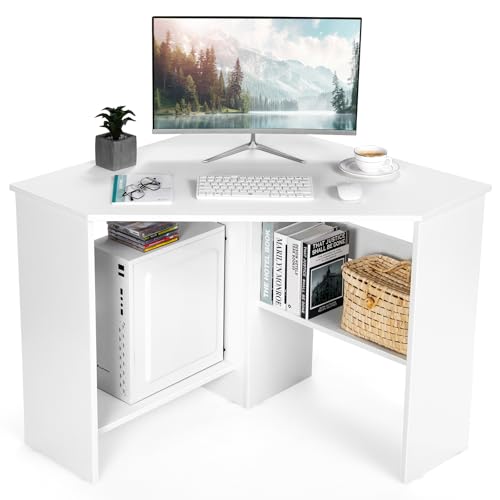
- Triangular design fits directly into corners
- 48-inch desktop with two open shelves
- Desktop supports up to 200 pounds
Best For: Permanent corner workstations with storage needs
Best for Dual Monitors
VIVO Standing Converter with Monitor Stand
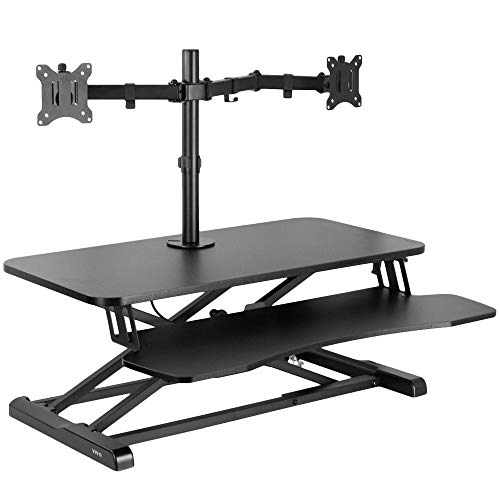
- Dual mount fits two 13- to 30-inch monitors
- 4.5- to 20-inch height adjustment
- Tilt, swivel, and rotation controls
Best For: Dual-monitor corner workstations
Best Storage Upgrade
L-Shaped Corner Desk with Hutch

- Seven shelves plus hutch storage
- USB-C and two AC charging outlets
- Built-in pegboard and LED reading light
Best For: Compact rooms needing organized vertical storage
Spacious Manual Riser
VIVO Vintage Brown Corner Converter

- 43.3-by-28.3-inch work surface
- 6- to 17-inch manual height range
- Dual-tier design with keyboard tray
Best For: Broad corner workstations using one or two monitors
All-in-One Storage Desk
Reversible Corner Desk with Hutch

- Reversible 90-degree corner layout
- Shelves, drawers, and printer storage
- 2 AC outlets and 2 USB ports
Best For: Small rooms needing storage and an integrated workstation
Quiet Electric Lift
VIVO Black Dual-Tier Converter

- Powered 6.5- to 16.2-inch adjustment
- 43.3-by-22-inch work surface
- 33-pound total weight capacity
Best For: Frequent sit-stand changes at a corner workstation
Best Heavy-Duty Corner Converter

- Corner-specific design for L-shaped desks and cubicles
- 6.1–23-inch pneumatic height range
- Supports up to 28 pounds and multiple displays
Best For: Large, multi-monitor corner workstations
Best Corner Workspace Add-On

- Adds a platform to an existing L-shaped desk
- Fits desktops up to 1.4 inches thick
- Fully assembled steel design
Best For: Keyboard placement and compact corner organization
Best Spacious Corner Riser

- 37-by-19-inch work surface for monitors and laptops
- Supports up to 33 pounds
- Synchronized wide keyboard tray and pneumatic adjustment
Best For: Dual-monitor corner setups with generous desk space
Best Corner Riser – VIVO 38-Inch Manual Standing Desk Converter
If you want desk converters for corner spaces without replacing your existing desk, this VIVO riser offers a wide 37.5-inch work surface designed for corner setups. Its pneumatic lift adjusts from 4.3 to 20 inches, while the attached keyboard tray rises with the desktop.
Best For: Corner workstations using dual monitors, a laptop, or a combination of devices.
Pros:
- Wide surface provides room for monitors, laptops, and office supplies.
- Desktop supports up to 33 pounds.
- Manual height adjustment includes a simple locking mechanism.
- Requires very little assembly.
Cons:
- The keyboard tray supports only up to 4.4 pounds.
- It adds a sizable 18-inch depth to the existing desk.
This is a practical choice when you already have a corner desk and want sit-stand flexibility. Its broad platform and synchronized keyboard tray make it especially suitable for multi-device setups.
Best Full Corner Desk – LDAILE 90-Degree Desk with Storage
Among desk converters for corner spaces, this LDAILE model is a complete corner workstation rather than a desktop riser. Its 90-degree triangular design fits into a corner and combines a 48-inch desktop with two open shelves and cable-management holes.
Best For: Dorms, bedrooms, home offices, and other spaces needing a permanent corner desk with storage.
Pros:
- 90-degree design makes efficient use of an unused corner.
- Two open shelves add accessible storage.
- Desktop supports up to 200 pounds.
- Cable holes help keep cords organized.
Cons:
- This is a full desk, not a height-adjustable converter.
- Assembly is required.
- The engineered-wood construction is heavier and less portable than a riser.
If your goal is to create a dedicated corner workstation, this desk offers more storage and surface area than a converter placed on an existing table. Choose it when permanent furniture is preferable to sit-stand adjustment.
Best for Dual Monitors – VIVO Standing Converter with Monitor Stand
This VIVO model is a strong option for desk converters for corner spaces where monitor positioning matters. The 31.5-inch riser includes a dual-monitor mount for two 13- to 30-inch displays, plus a height range from 4.5 to 20 inches.
Best For: Dual-monitor users who want adjustable viewing angles and a sit-stand setup on an existing desk.
Pros:
- Mounts two compatible VESA monitors weighing up to 17.6 pounds each.
- Monitor arms tilt, swivel, rotate, and adjust in height.
- Desktop and keyboard tray rise together.
- Steel construction and underside padding support stability and desk protection.
Cons:
- Monitor compatibility depends on 13- to 30-inch screens with VESA 75×75 or 100×100 patterns.
- The 31.5-inch surface is narrower than the 38-inch VIVO alternative.
- Assembly is still needed for the tray, arms, and monitors.
For a corner setup centered on two displays, the integrated monitor stand can reduce the need for separate monitor hardware. It is best suited to users who value screen adjustability as much as the standing function.
Best Storage Upgrade – L-Shaped Corner Desk with Hutch
For shoppers comparing desk converters for corner spaces with more substantial storage, this L-shaped desk adds a hutch, shelves, pegboard, and under-desk compartments. It also includes a built-in charging station with USB-C and two AC outlets.
Best For: Small-space work or study areas where vertical organization, charging access, and built-in lighting are priorities.
Pros:
- Seven shelves and a hutch provide extensive vertical storage.
- Integrated pegboard helps organize cables, headsets, and accessories.
- Built-in charging station includes USB-C and two AC outlets.
- Adjustable LED reading light is included.
Cons:
- At roughly 66 inches high, the hutch requires substantial vertical clearance.
- The listed maximum weight recommendation is 40 pounds.
- Self-assembly is required.
This is a storage-focused corner workstation rather than a height-adjustable desktop converter. Its charging station, pegboard, shelves, and light make it a useful all-in-one choice when organizing a compact room is the main objective.
Spacious Manual Riser – VIVO Vintage Brown Corner Converter
For shoppers comparing desk converters for corner spaces, this VIVO model offers a broad, vintage-brown work surface that sits on an existing desk. Its dual-tier design accommodates monitors and a keyboard while the pneumatic lift supports sitting-to-standing transitions.
Best For: Corner workstations needing generous monitor space and a manually adjustable standing option.
Pros:
- 43.3-by-28.3-inch surface supports single- or dual-monitor setups.
- Keyboard tray raises with the main platform.
- 33-pound lift assist and 6-to-17-inch height range.
- Requires minimal assembly.
Cons:
- Manual adjustment requires lifting rather than an electric motor.
- At 39.2 pounds, it may be cumbersome to reposition.
The wide surface and corner-compatible design make this a practical choice when you want a standing setup without replacing your existing desk. Confirm your desktop dimensions and available clearance before buying.
All-in-One Storage Desk – Reversible Corner Desk with Hutch
Although it is a complete desk rather than a tabletop riser, this model belongs on a desk converters for corner spaces shortlist when storage and workstation functionality matter more than portability. Its reversible triangular layout is designed to use otherwise wasted corner space.
Best For: Small rooms, bedrooms, dorms, and home offices needing a full corner workstation with storage and charging.
Pros:
- Reversible installation lets the hutch and storage fit left- or right-sided layouts.
- Includes open shelves, a printer shelf, drawers, and side compartments.
- Built-in 2 AC outlets and 2 USB ports help consolidate charging.
- RGB lighting and a headphone hook add workstation features.
Cons:
- It is a full 59.06-inch-high desk, not a riser placed on an existing desk.
- Assembly is required.
- The 89-by-92 cm tabletop may be less suitable for very large setups.
This is best viewed as a corner-space replacement desk for buyers who want organization, power, and ambient lighting in one unit. Measure both the floor area and vertical clearance before assembly.
Quiet Electric Lift – VIVO Black Dual-Tier Converter
For desk converters for corner spaces where easy height changes are a priority, this VIVO electric riser provides powered adjustment on an existing desk. Its black dual-tier layout leaves room for monitors while keeping the keyboard on a lower platform.
Best For: Corner users who want powered sit-stand adjustment and space for dual monitors or a laptop.
Pros:
- Quiet electric motor adjusts from 6.5 to 16.2 inches.
- 43.3-by-22-inch work area suits dual-monitor and laptop setups.
- Lower platform supports a keyboard and mouse at a comfortable typing angle.
- Supports up to 33 pounds, with a 5-pound keyboard-tray capacity.
Cons:
- It must be placed on a suitable existing desk.
- The work surface is narrower front-to-back than the brown manual model.
- Partial assembly is required.
The electric lift is the main reason to choose this converter over a manual alternative, especially if you expect to change positions frequently. Check the 22-inch depth and your desk’s usable corner area before ordering.
Best Heavy-Duty Corner Converter – StarTech ARMSTSCORNR
For shoppers comparing desk converters for corner spaces, the StarTech ARMSTSCORNR is built specifically for corner, cubicle, and L-shaped desks. Its pneumatic height adjustment, large work surface, and dual-monitor support make it a substantial sit-stand workstation for offices that have enough surrounding clearance.
Best For: Corner workstations needing a sturdy, fully assembled converter for multiple displays.
Pros:
- Designed for corner, cubicle, and L-shaped desk layouts.
- Adjusts from 6.1 to 23 inches with a lever-controlled pneumatic spring.
- Supports up to 28 pounds and offers a 35.7-by-20.9-inch work surface.
- Includes an adjustable keyboard tray and integrated cable-management features.
Cons:
- The weighted base requires about 35 by 25.5 inches of desk surface.
- Its 21.4-pound weight and large footprint may be more than compact desks can accommodate.
This is a strong choice when stability, height range, and monitor capacity matter more than a minimal footprint. Confirm your corner width and available desktop area before buying.
Best Corner Workspace Add-On – VIVO DESK-AC07S
The VIVO DESK-AC07S takes a different approach to desk converters for corner spaces: it adds a compact platform to an existing L-shaped desk rather than lifting the entire workstation. It can create room for a keyboard above or below the desktop while preserving the desk’s low-profile appearance.
Best For: L-shaped desk users who need a small, sturdy corner platform for keyboard placement.
Pros:
- Creates additional corner space for a keyboard or accessory setup.
- Fits desktops up to 1.4 inches thick.
- Solid steel construction provides sturdy support.
- Arrives fully assembled with hardware and installation instructions.
Cons:
- It is a platform, not a complete height-adjustable sit-stand converter.
- The 16.8-by-9.8-inch surface offers less room than full-size risers.
- Keyboard-tray compatibility is specifically listed for select VIVO models.
Choose this model if your main goal is reclaiming corner space or repositioning a keyboard, not raising monitors and a laptop together. Check your desktop thickness and tray compatibility before installation.
Best Spacious Corner Riser – VIVO 38-Inch Corner Converter
The VIVO 38-inch corner converter is a practical option for desk converters for corner spaces when you want a broad surface for monitors and a laptop. Its pneumatic spring supports quick transitions between sitting and standing, while the wide keyboard tray moves with the desktop.
Best For: Corner or cubicle setups that need room for dual monitors, a laptop, and a full-width keyboard area.
Pros:
- Provides a 37-by-19-inch desktop with capacity up to 33 pounds.
- Adjusts smoothly from approximately 4.7 to 16 inches using a pneumatic spring.
- Wide 36.6-by-11.3-inch keyboard tray raises in sync with the desktop.
- Requires little to no assembly.
Cons:
- The 33.6-pound unit may be difficult to reposition once placed.
- Its broad 37-inch footprint needs sufficient corner desk space.
- The height range is lower than the StarTech model’s maximum height.
This converter balances generous workspace with straightforward sit-stand adjustment. It is particularly appealing for dual-monitor users, provided the existing desk can support its size and weight.
How We Picked the Best Desk Converters for Corner Spaces
We evaluated these options for corner compatibility, usable work surface, height-adjustment approach, monitor support, footprint, and storage potential. The selection includes true sit-stand converters as well as corner desks and platform accessories because corner workstations vary widely: some users need a riser for an existing desk, while others need a complete L-shaped setup.
We also considered practical details such as whether a model can support one or two monitors, how much room remains for a keyboard and mouse, and whether manual adjustment or powered movement better suits the intended routine. Always confirm the product dimensions and your desk’s weight capacity before purchasing.
Quick Comparison
| Best For | Look For | Most Suitable Option Type |
|---|---|---|
| Simple sit-stand upgrades | Wide platform and stable manual lift | Manual corner converter |
| Frequent height changes | Push-button electric adjustment | Electric dual-tier converter |
| Two-screen setups | Integrated monitor stand or sufficient depth | Dual-monitor converter |
| Small rooms | Compact footprint and vertical storage | Corner desk with shelves |
| Existing L-shaped desks | Compatible connector width and clamp clearance | Corner platform accessory |
Key Buying Factors for Desk Converters for Corner Spaces
Measure the Corner and Desktop First
Measure both desktop runs, the depth available from the corner, and any nearby walls, shelves, or windows. A converter that fits the width may still block drawers or extend beyond the front edge. Leave enough clearance to stand comfortably and move your chair.
Choose the Right Adjustment Method
Manual models usually cost less and avoid motor noise, but they require more effort when changing height. Electric models are convenient for frequent transitions and heavier setups, although they need a nearby outlet and add mechanical complexity.
Check Monitor and Equipment Capacity
For two monitors, look for a dual-tier surface or an integrated monitor stand. Confirm the platform’s weight rating, usable depth, and cable-routing space. A tall monitor arrangement may also require checking wall and shelf clearance above the corner.
Prioritize Stability and Ergonomics
The platform should remain steady while typing and should rise high enough to keep your elbows near a comfortable angle. If you use a laptop, plan for an external keyboard and mouse at standing height. Anti-fatigue support and a suitable standing mat can further improve longer sessions.
Who Should Buy Which Desk Converters for Corner Spaces?
Choose a manual corner converter if you want an affordable, straightforward way to alternate between sitting and standing. An electric dual-tier model is better for users who change height often or have a heavier monitor and keyboard arrangement. Shoppers running two displays should prioritize a dedicated monitor stand or generous upper tier.
If your primary need is storage or a complete workstation rather than height adjustment, a corner desk with a hutch or shelves may be the better fit. Finally, owners of an existing L-shaped desk can consider a connector platform when they need a compact central work surface without replacing the whole desk.