Shared workspaces need more than a one-size-fits-all desk. The right converter makes it easier for different people to switch between sitting and standing without permanently changing the workstation.
We selected 10 desk converters spanning compact two-tier designs, wide work surfaces, electric adjustment, manual lift systems, and corner-friendly layouts. This guide explains which features matter most when a desk must serve multiple users.
Best 10 Desk Converters for Shared Workspaces Picks for 2026
Best Balanced Pick
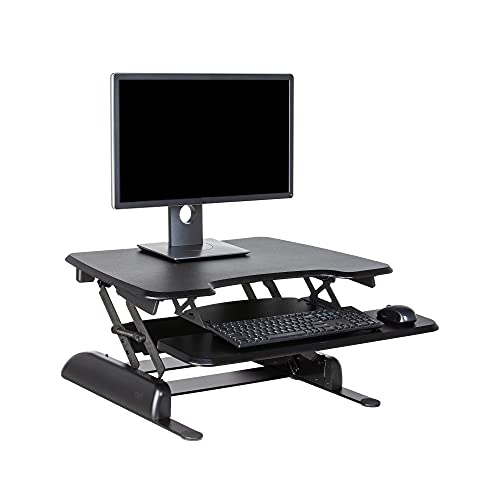
- Two-tier 30-inch workstation
- 11 manual height settings
- Fully assembled with weighted base
Best For: Shared desks needing simple, stable sit-stand flexibility
Best Electric Option
VIVO 36-Inch Electric Converter

- Push-button electric lift
- 36-inch surface for multiple devices
- 50-pound desktop capacity
Best For: Teams sharing a spacious workstation and preferring motorized adjustment
Best for Dual Monitors
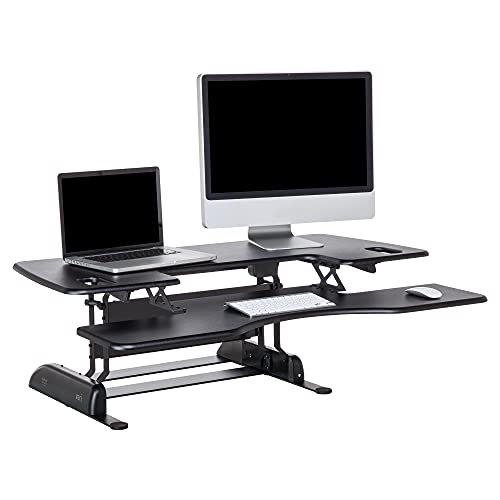
- Extra-wide 48-inch upper tier
- Designed for two monitors
- Heavy base with dual stability bars
Best For: Permanent shared stations with large dual-monitor setups
Best Monitor-Mount Value
VIVO 32-Inch Dual-Monitor Converter

- Integrated dual-monitor stand
- 4.5- to 20-inch height range
- Flexible tilt, swivel, and rotation
Best For: Shared workstations using compatible dual monitors
Large-Surface Workhorse
FLEXISPOT 40-Inch Desk Converter
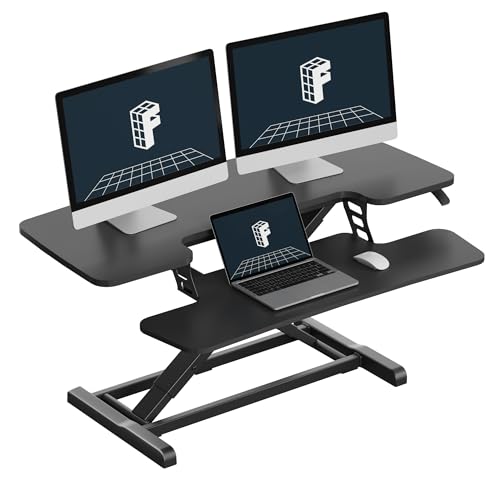
- 40-inch surface for dual monitors and accessories
- Mechanical spring lift system for stable adjustment
- Supports up to 33 pounds on the desktop
Best For: Multi-device shared desks needing maximum workspace
Corner-Friendly Pick
VIVO 43-Inch Dual-Tier Converter

- Fits corner and regular desk setups
- 43.3-inch surface for single or dual monitors
- 6- to 17-inch manual adjustment range
Best For: Corner-based shared workstations with rotating users
Balanced Standard Size
FLEXISPOT 36-Inch Desk Converter

- 36-inch surface fits a dual-monitor setup
- Reinforced frame supports up to 33 pounds
- Nearly assembled for quick installation
Best For: Standard shared desks needing dual-monitor flexibility
Wide Dual-Monitor Pick
42-Inch VIVO Standing Desk Converter

- 42-by-15.7-inch surface for dual monitors
- 33-pound desktop capacity
- Manual adjustment from 4.5 to 20 inches
Best For: Shared desks needing a spacious dual-monitor setup
Maximum Surface Pick
48-Inch VIVO Standing Desk Converter

- 47.6-by-15.7-inch work surface
- Accommodates dual monitors and laptops
- 33-pound desktop capacity
Best For: Large shared desks with multiple display needs
Space-Saving Pick
32-Inch VIVO Standing Desk Converter

- 31.5-inch surface saves desk space
- Supports up to 33 pounds
- Pneumatic adjustment with keyboard tray
Best For: Compact shared desks needing dual-monitor support
Best Balanced Pick – VariDesk Essential 30
For shared workspaces needing straightforward flexibility, the VariDesk Essential 30 is one of the more practical desk converters for shared workspaces. Its two-tier layout keeps the monitor or laptop above the keyboard and mouse, while 11 height settings support alternating between sitting and standing.
Best For: Shared desks that need a stable, ready-to-use converter for a single-user workstation.
Pros:
- Fully assembled for quick placement on an existing desk.
- Two-tier surface separates the display from keyboard and mouse.
- Dual handles and spring-assisted lift raise the platform up to 17.75 inches.
- Weighted base, 25-pound capacity, and 3-year warranty support everyday use.
Cons:
- The 30-inch width offers less room than larger converter models.
- Manual adjustment requires lifting through the spring-assisted mechanism.
The Essential 30 is a sensible middle ground for teams that want ergonomic height adjustment without adding a motor or requiring installation. Its compact footprint and fully assembled design make desk handoffs easier.
Best Electric Option – VIVO 36-Inch Electric Converter
The VIVO Electric Standing Desk Converter adds push-button adjustment to the desk converters for shared workspaces category. Its 36-inch surface accommodates dual monitors and a laptop, while the synchronized keyboard tray keeps the workstation together as it moves.
Best For: Shared offices where users want quiet, motorized height changes and generous equipment space.
Pros:
- Electric lift adjusts from 5.7 to 19.5 inches with a button press.
- 36-inch surface provides room for dual-monitor and laptop setups.
- Supports up to 50 pounds on the desktop.
- Requires very minimal assembly, mainly attaching the keyboard tray.
Cons:
- Its 36-inch width and 34.6-pound weight may take substantial shared-desk space.
- Electric operation requires access to power.
This model is a strong choice when multiple users need effortless height changes throughout the day. The white finish and minimalist design can also blend into a range of office layouts.
Best for Dual Monitors – VariDesk Pro Plus 48
For wide collaborative or hot-desk stations, the VariDesk Pro Plus 48 offers one of the largest platforms among these desk converters for shared workspaces. Its 48-inch upper tier is designed for two monitors, with a lower deck for the keyboard, mouse, and other essentials.
Best For: Shared workstations that require a broad dual-monitor setup and a particularly stable platform.
Pros:
- 48-inch upper tier provides substantial room for two monitors.
- Lower deck keeps the keyboard and mouse at a separate working level.
- Heavy base and dual stability bars support steadiness at any height.
- Arrives fully assembled and includes dual handles with a spring-assisted lift.
Cons:
- The 57-pound unit is heavy to reposition between users.
- Its wide footprint may not fit smaller shared desks.
- Maximum recommended load is 45 pounds.
The Pro Plus 48 prioritizes capacity and stability over portability. It makes the most sense where the converter can remain in place and multiple users depend on a spacious, dual-monitor-ready surface.
Best Monitor-Mount Value – VIVO 32-Inch Dual-Monitor Converter
The VIVO 32-Inch Standing Desk Converter combines a height-adjustable riser with an integrated dual-monitor stand, making it a versatile option among desk converters for shared workspaces. Its mount supports two compatible 13- to 30-inch screens and allows tilt, swivel, rotation, and portrait or landscape positioning.
Best For: Shared desks where users need adjustable dual-monitor positioning as well as sit-stand height changes.
Pros:
- Dual monitor mount supports screens from 13 to 30 inches with compatible VESA patterns.
- Monitor arms offer tilt, swivel, rotation, and height adjustment.
- Riser adjusts from 4.5 to 20 inches and includes a wide keyboard tray.
- Steel frame and underside padding help protect equipment and the desk surface.
Cons:
- Assembly is more involved than a fully assembled converter.
- The desktop is rated for 33 pounds, while each monitor is limited to 17.6 pounds.
- Monitor compatibility depends on the stated size, weight, and VESA requirements.
This model suits teams that share a monitor-heavy station and value flexible screen positioning. The monitor mount adds capability, but buyers should confirm screen specifications and allow time for setup.
Large-Surface Workhorse – FLEXISPOT 40-Inch Desk Converter
For shared workspaces that need room for multiple devices, this 40-inch FLEXISPOT is one of the more spacious desk converters for shared workspaces. Its broad surface accommodates dual monitors, a laptop, and office accessories, while the spring lift system supports sit-stand adjustments without relying on a gas spring.
Best For: Multi-device stations and shared desks where generous workspace and quick setup matter.
Pros:
- Large 40-inch surface supports dual monitors, laptops, and accessories.
- Mechanical spring lift system is designed for smooth, stable adjustment.
- Reinforced steel frame supports up to 33 pounds on the desktop.
- Almost fully assembled, with the keyboard tray as the primary attachment.
Cons:
- The wide footprint may be difficult to fit on smaller desks.
- The keyboard tray has a lower 11-pound capacity than the main surface.
This model is a practical choice when several people share a workstation and need flexible monitor space. Measure the existing desk carefully before choosing this large format.
Corner-Friendly Pick – VIVO 43-Inch Dual-Tier Converter
Designed for corner or standard desk setups, the VIVO dual-tier riser gives shared workspaces a broad 43.3-inch surface and a keyboard tray that moves with the desktop. Its pneumatic lift and 6- to 17-inch adjustment range make it useful when users alternate between seated and standing work.
Best For: Corner desks and shared stations that need a wide surface with synchronized keyboard positioning.
Pros:
- Works with both corner and regular desk configurations.
- 43.3-inch desktop accommodates single or dual monitor setups.
- Dual pneumatic spring assistance supports smooth height adjustment.
- Requires minimal assembly and includes a wide keyboard tray.
Cons:
- The 33-pound maximum weight recommendation limits heavier equipment setups.
- At 42.6 pounds, the riser may be cumbersome to reposition.
- The large 28.3-inch depth requires substantial desk space.
Choose this VIVO when compatibility with a corner desk is important. Its broad work area and synchronized tray are especially useful for rotating users, provided the host desk can support its footprint.
Balanced Standard Size – FLEXISPOT 36-Inch Desk Converter
This 36-inch FLEXISPOT offers a useful middle ground for shared workspaces: enough room for a dual-monitor setup while taking up less width than a 40-inch model. It combines a mechanical spring lift, reinforced metal frame, and nearly tool-free setup for teams that need a straightforward workstation upgrade.
Best For: Standard-size shared desks supporting dual monitors without the footprint of an extra-wide converter.
Pros:
- 36-inch surface is designed for dual monitors and accessories.
- Mechanical spring system is intended to provide stable daily adjustment.
- Desktop supports up to 33 pounds, with an 11-pound keyboard tray.
- Almost fully assembled for quick installation.
Cons:
- Provides less workspace than the 40-inch and 43-inch options.
- Its 24.9-inch depth still requires a sufficiently deep desk.
For shared desks with moderate space, this is the most balanced option of the three. It keeps dual-monitor functionality while avoiding the widest footprint, making it easier to accommodate different users and desk layouts.
Wide Dual-Monitor Pick – 42-Inch VIVO Standing Desk Converter
For shared workspaces that need a generous surface without replacing the existing desk, this 42-inch VIVO converter is a practical choice. Its two-tier layout accommodates dual monitors, while the manual lift mechanism raises the workstation from 4.5 to 20 inches.
Best For: Shared desks where multiple users need a spacious dual-monitor setup.
Pros:
- 42-by-15.7-inch work surface provides room for dual monitors.
- 33-pound desktop capacity supports common monitor and laptop setups.
- Keyboard tray raises with the main surface for a coordinated workstation.
- Minimal assembly is required before use.
Cons:
- The wide 42-inch footprint requires substantial desk space.
- The keyboard tray holds 4.4 pounds, less than the main desktop capacity.
- Height adjustment is manual rather than motorized.
The straight-up lift design and 33-pound lift assist make this a capable desk converter for shared workspaces, especially when surface area is more important than compactness.
Maximum Surface Pick – 48-Inch VIVO Standing Desk Converter
This 48-inch VIVO model is designed for shared workspaces where users may switch between dual monitors and laptop setups. The expansive surface rises from 4.5 to 20 inches, giving users sit-stand flexibility while keeping the keyboard tray aligned.
Best For: Large shared desks with room for dual monitors and a laptop.
Pros:
- 47.6-by-15.7-inch top offers the most workspace in this selection.
- Supports up to 33 pounds on the desktop.
- Wide keyboard tray lifts in sync with the main surface.
- Minimal assembly helps simplify setup.
Cons:
- The 48-inch width may be excessive for smaller shared desks.
- The keyboard tray is rated for 4 pounds.
- Its height adjustment is manual.
Choose this version when shared users need maximum usable surface area. It is the most spacious option here, but its large footprint should be measured against the available desk.
Space-Saving Pick – 32-Inch VIVO Standing Desk Converter
When shared workstations have limited desktop space, this 32-inch VIVO converter keeps the setup relatively compact while still allowing room for dual monitors. Its pneumatic lift adjusts from approximately 4.2 to 19.7 inches, and the included keyboard tray moves with the top.
Best For: Smaller shared desks that still need a dual-monitor sit-stand option.
Pros:
- 31.5-inch surface maximizes space efficiency.
- Desktop supports up to 33 pounds.
- Pneumatic lift provides adjustable sitting and standing heights.
- Includes a keyboard tray and requires minimal assembly.
Cons:
- The smaller surface provides less room for accessories than the larger models.
- Adjustment tops out at 19.7 inches, slightly below 20 inches.
- The manual design does not provide powered height adjustment.
This is the practical choice for desk converters for shared workspaces where available width is limited. It retains dual-monitor support while taking up less room than the 42- and 48-inch alternatives.
How We Picked the Best Desk Converters for Shared Workspaces
We focused on practical features that affect everyday flexibility: height-adjustment range, operating method, desktop and keyboard-tray space, monitor compatibility, stability, footprint, and ease of repositioning. Electric models can simplify frequent adjustments, while manual converters may offer straightforward operation without a power connection. We also included several width options so you can match the converter to a compact workstation, a standard desk, or a larger shared setup.
Because shared users may have different monitor, keyboard, and posture preferences, we gave particular attention to usable surface area and adjustment flexibility rather than treating maximum width as the only measure of quality.
Quick Comparison
| Best For | Look For | Recommended Style |
|---|---|---|
| Frequent height changes | Powered adjustment | Electric converter |
| Simple shared use | Accessible controls and broad adjustment | Manual sit-stand riser |
| Dual-monitor setups | Monitor clearance and stable support | Wide converter or monitor-stand model |
| Small desks | Compact footprint and tiered storage | Two-tier converter |
| Corner workstations | Angled or corner-friendly desktop | Corner converter |
Key Buying Factors for Desk Converters for Shared Workspaces
Adjustment Range and Controls
Check whether the converter can place both shorter and taller users in a comfortable typing position. A broad range is helpful, but controls should also be easy to reach and understand. Electric adjustment is convenient for repeated changes; manual designs work well when users adjust the station less often.
Surface Area and Monitor Support
Measure the desk, keyboard, mouse, laptop, and monitor footprint before buying. A wide surface is valuable for dual monitors or paperwork, while a two-tier layout can separate screens from the keyboard. Confirm that the converter can support your monitor arrangement without crowding the usable work area.
Stability, Weight, and Clearance
A shared converter should remain steady when users type, raise the platform, or move equipment. Check the listed weight capacity and leave room for cables, monitor bases, and desk accessories. Also measure the space beneath shelves or cabinets to ensure the raised converter will not collide with them.
Power and Repositioning
Electric models require a nearby outlet and may be less convenient to move. Manual models avoid cord management and can be easier to place in flexible offices. For hot desks, consider whether the converter is light enough to reposition without disrupting monitors and accessories.
Who Should Buy Which Desk Converters for Shared Workspaces?
Choose an electric model if several people will change heights throughout the day or if effortless adjustment is a priority. Choose a wide converter when shared users rely on two monitors, a full-size keyboard, or extra desk accessories. A compact two-tier design is better for smaller desks and users who need a dedicated keyboard level. Corner models suit L-shaped or angled workstations, while a straightforward manual converter is a practical choice for offices that value simplicity, portability, and fewer power requirements.