Multi-camera streaming demands more than simply connecting several cameras to a computer. The right encoder or all-in-one production system must handle your camera inputs, switching workflow, streaming protocols, recording needs, and network conditions without adding unnecessary complexity.
These 10 options cover portable live-production systems, HDMI and SDI encoders, NDI-capable hardware, and professional tools for studios, houses of worship, events, education, and remote production.
Best 10 Streaming Encoders for Multi Camera Setups Picks for 2026
Best All-in-One Switcher
Neolive R5 4K Multi-Camera Encoder

- Four HDMI inputs with two supporting 4K60
- Built-in RTMP, NDI, and SRT workflows
- PTZ control, audio mixing, recording, and UVC output
Best For: Integrated live event and multi-camera production
Best for Large Camera Rigs
YoloBox Extreme Multi-Cam Encoder

- Eight HDMI inputs with 4K60 scaling
- ISO recording and multi-camera instant replay
- Large OLED touchscreen with extended battery life
Best For: Sports, events, and high-input-count productions
Best Compact Network Encoder
Zowietek ZowieBox 4K NDI Encoder

- Compact HDMI-to-IP encoder and decoder
- Supports NDI HX, SRT, RTMP(S), and RTSP
- PoE, tripod mounting, and HDMI passthrough
Best For: Distributed IP video and compact camera installations
Best for Mobile Streaming
YoloBox Ultra Portable Encoder

- Combines encoder, switcher, monitor, and recorder
- Bonds three cellular links, Wi-Fi, and Ethernet
- Battery-powered platform for portable production
Best For: Mobile streams where connection redundancy is important
Flexible IP Encoder
Compact Multi-Channel H.265 Streaming Encoder

- Dual streams per HDMI input for different servers
- Broad RTMPS, SRT, HLS, UDP, and WebRTC support
- Adjustable video, audio, and overlay settings
Best For: HDMI-based multi-destination streaming and IPTV workflows
Broadcast-Ready Encoder
Blackmagic Streaming Encoder 4K
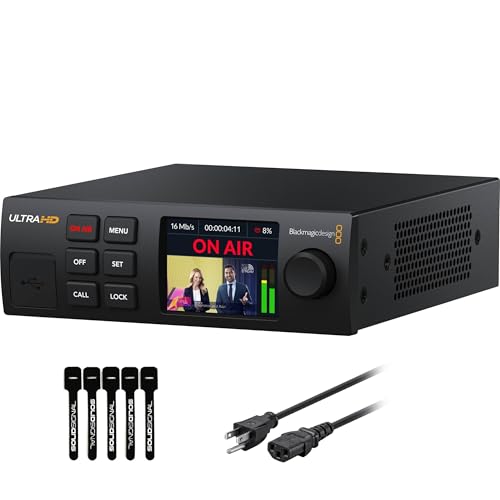
- 4K60 H.264/H.265 streaming over SRT or RTMP
- 12G-SDI input with standards conversion
- Ethernet-to-mobile auto-failover and webcam output
Best For: Professional SDI productions and resilient 4K live streaming
All-in-One Production Switcher

- Four HDMI inputs with dual monitoring outputs
- Streams to three platforms or connects to OBS/vMix
- Built-in switching, audio, recording, and graphics
Best For: HDMI-based events needing integrated live production controls
Professional SDI Pick
Magewell Ultra Encode SDI Plus

- 4K SDI encoding up to 4096×2160p30
- Multi-protocol, multi-destination streaming
- Simultaneous recording with 128GB storage
Best For: Professional SDI-based productions and contribution workflows
Most Flexible Input Option

- HDMI and SDI inputs in one encoder
- Picture-in-picture and side-by-side mixing
- Streams to up to six destinations
Best For: Mixed-input productions needing onboard source composition
Best HDMI Workflow
Magewell Ultra Encode HDMI Plus

- 4K HDMI encoding up to 4096×2160p30
- HDMI loop-through for monitoring or pass-through
- Simultaneous streaming and recording
Best For: HDMI-based camera, event, education, and AV setups
Best All-in-One Switcher – Neolive R5 4K Multi-Camera Encoder
For creators comparing streaming encoders for multi camera setups, the Neolive R5 combines HDMI switching, hardware encoding, recording, audio mixing, and PTZ control in one unit. It supports four HDMI inputs, NDI, RTMP, SRT, and direct streaming without a computer.
Best For: Live events, worship services, podcasts, conferences, and creators needing an integrated multi-camera production workflow.
Pros:
- Four HDMI inputs, including two supporting 4K60.
- Built-in dual RTMP streaming, NDI, and SRT support.
- USB 3.0 UVC output works with OBS, Zoom, Teams, Streamlabs, and vMix.
- Includes PTZ control, audio mixing, chroma key, graphics, recording, and portrait-format support.
Cons:
- Only two HDMI inputs support 4K60; the other two support up to 1080p60.
- Its extensive production features may be more than simple streaming setups require.
The Neolive R5 is a strong choice when you want a self-contained switcher and encoder rather than separate hardware for each production task. Its broad input, output, and streaming support makes it particularly flexible for event-oriented workflows.
Best for Large Camera Rigs – YoloBox Extreme Multi-Cam Encoder
The YoloBox Extreme stands out among streaming encoders for multi camera setups with eight HDMI inputs, assignable HDMI outputs, NDI support, and ISO recording. Its large OLED touchscreen and built-in battery are designed for hands-on production in the field.
Best For: Sports, events, and professional productions that need many camera inputs, isolated recordings, and instant replay.
Pros:
- Connects up to eight HDMI sources with 4K60 scaling.
- Records inputs separately in up to 4K30 or 1080p60, depending on the number of inputs.
- Supports up to six NDI HX inputs and six-camera 1080p60 instant replay.
- Features an 11.2-inch 2.5K OLED touchscreen and claimed 10-hour battery life.
Cons:
- Its larger input and recording feature set may be excessive for smaller productions.
- ISO recording resolution and input count vary by operating mode.
With the highest HDMI input count in this group, the YoloBox Extreme is built for complex multi-camera productions. ISO recording and replay add useful flexibility when live switching is not the only priority.
Best Compact Network Encoder – Zowietek ZowieBox 4K NDI Encoder
For smaller streaming encoders for multi camera setups, the Zowietek ZowieBox provides a compact way to send HDMI sources over IP. It supports NDI HX, RTMP(S), SRT, and RTSP, while also offering HDMI passthrough and web-based control.
Best For: Compact installations, gaming, PTZ camera workflows, and productions that rely on network video transport rather than local switching.
Pros:
- Small aluminum enclosure with tripod mount, tally light, and LCD status screen.
- Supports NDI HX3/HX2/HX, SRT, RTMP(S), and RTSP workflows.
- Offers 4K HDMI passthrough and H.264/H.265 encoding.
- Can use USB-C power, PoE, or DC power and includes web-based configuration.
Cons:
- Encoder and decoder modes cannot operate simultaneously.
- USB capture card functionality is not currently supported.
- It is a network encoder/decoder rather than a multi-input HDMI switcher.
The ZowieBox is best viewed as a flexible IP conversion tool for individual cameras or sources. Its compact design and PoE support suit distributed setups, but users needing live source switching should choose a dedicated switcher instead.
Best for Mobile Streaming – YoloBox Ultra Portable Encoder
YoloLiv YoloBox Ultra Portable Multi-Camera Encoder/Switcher/Monitor/Recorder in One
Check Price On AmazonThe YoloBox Ultra is a portable encoder, switcher, monitor, and recorder designed for flexible field production. For buyers evaluating streaming encoders for multi camera setups, its key advantage is connectivity: it can bond three cellular connections with Wi-Fi and Ethernet.
Best For: Mobile producers and professionals who prioritize connection redundancy and a portable all-in-one workflow.
Pros:
- Combines encoding, switching, monitoring, and recording in one device.
- Supports bonding across three cellular connections, Wi-Fi, and Ethernet.
- Uses a battery power source for portable operation.
- Provides a higher-performance platform than the listed YoloBox Pro and Instream combination.
Cons:
- The supplied specifications do not state the number of camera inputs or supported video resolutions.
- Its listed connector details are limited, so buyers should verify input and output requirements before purchase.
The YoloBox Ultra is compelling when uninterrupted mobile connectivity matters more than a clearly documented input count. Because the supplied details are brief, confirm compatibility with your cameras and intended streaming workflow before choosing it for a complex rig.
Flexible IP Encoder – Compact Multi-Channel H.265 Streaming Encoder
For streaming encoders for multi camera setups, the URayCoder UHE265-8 is suited to HDMI-based workflows that need flexible network delivery. It supports multiple protocols and can produce two streams per HDMI input, making it practical for sending feeds to different destinations.
Best For: HDMI camera installations, IPTV, NVR, and multi-destination streaming workflows that need broad protocol support.
Pros:
- Supports RTMPS, RTSP, SRT, HLS, UDP, RTP, WebRTC, MP4, FLV, and other protocols.
- Can output two video streams per HDMI input and send them to different servers.
- Offers adjustable resolution, frame rate, bitrate, audio, cropping, rotation, and overlays.
- Includes lifetime technical support, warranty, SDK, API, and CGI documentation.
Cons:
- Designed for HDMI sources, so it may require additional conversion for SDI cameras.
- Its extensive configuration options may be more than a simple single-stream setup needs.
The UHE265-8 stands out when protocol flexibility and customized output feeds matter more than an especially minimal setup. Confirm your camera connections and required streaming destinations before buying.
Broadcast-Ready Encoder – Blackmagic Streaming Encoder 4K
Among streaming encoders for multi camera setups, the Blackmagic Design Streaming Encoder 4K is a strong fit for SDI-centered productions requiring high-resolution output and dependable connectivity. It handles H.264 or H.265 streaming up to 2160p60 and can switch automatically to mobile connectivity if Ethernet fails.
Best For: Professional SDI productions, 4K live events, broadcast control rooms, and workflows needing monitoring, camera control, or network failover.
Pros:
- Supports H.264 and H.265 streaming up to 4K 2160p60.
- 12G-SDI input, loop output, and Teranex standards conversion accommodate varied sources.
- Ethernet and USB-C smartphone tethering provide automatic connection failover.
- Includes SDI and HDMI monitor outputs, webcam outputs, REST API control, tally, and talkback features.
Cons:
- Uses SDI as its primary video input, which may not suit HDMI-only cameras without adapters.
- Its broadcast-focused feature set may be excessive for basic streaming.
- It carries a one-year manufacturer warranty rather than the lifetime coverage listed for some alternatives.
This encoder is especially compelling when a multi-camera production already uses SDI infrastructure and needs 4K, standards conversion, and resilient internet options. Its built-in controls also reduce reliance on a separate encoding computer.
All-in-One Production Switcher – GoStream Deck HDMI Pro
The Osee GoStream Deck takes a different approach to streaming encoders for multi camera setups by combining HDMI switching, audio control, recording, graphics, and live output in one console. Its four HDMI inputs and hardware control surface make it useful for producing a finished program feed without a separate computer.
Best For: Conferences, worship services, education, podcasts, weddings, and other live productions using several HDMI sources.
Pros:
- Connects up to four HDMI sources and provides two HDMI outputs for monitoring.
- Can stream to three platforms simultaneously through Ethernet or output to OBS and vMix over USB.
- Provides T-Bar switching, macros, auto-switching, audio effects, recording, and playback.
- Supports portrait and landscape formats plus logo, lower-third, green-screen, and picture-in-picture overlays.
Cons:
- It is a production switcher rather than a dedicated standalone encoder for each camera.
- Its HDMI inputs may require converters when working with SDI camera systems.
- Advanced graphics and audio controls can add setup complexity for simple streams.
Choose the GoStream Deck when you want to switch and polish multiple HDMI camera feeds before sending a program stream. It is particularly practical for operators who prefer hands-on controls and integrated recording over a computer-only workflow.
Professional SDI Pick – Magewell Ultra Encode SDI Plus
For teams comparing streaming encoders for multi camera setups built around SDI sources, the Magewell Ultra Encode SDI Plus offers a compact standalone option with 4K input support, flexible protocols, and simultaneous recording. Its SDI focus makes it especially suitable for professional cameras, broadcast systems, and contribution workflows.
Best For: Professional SDI-based live production, remote contribution, corporate AV, education, and houses of worship.
Pros:
- Encodes SDI video up to 4096×2160p30 using H.264 or H.265.
- Supports RTMP, RTMPS, SRT, NDI|HX, HLS, and TS over UDP/RTP, with multi-destination streaming.
- Streams and records simultaneously to internal 128GB storage, USB media, or network locations.
- Offers PoE, Wi-Fi, optional 4G/5G modem support, overlays, and web/API control.
Cons:
- Its video input is SDI, so HDMI-only cameras require additional conversion hardware.
- SDI encoding is limited to 4K at up to 30 frames per second.
The Ultra Encode SDI Plus is a strong choice when reliability, protocol variety, and recording flexibility matter more than a broad mix of input types. It is less suitable for setups centered exclusively on HDMI sources.
Most Flexible Input Option – Magewell Ultra Encode AIO
For streaming encoders for multi camera setups that may mix camera and AV sources, the Magewell Ultra Encode AIO stands out with both HDMI and SDI inputs. It can use either input or combine them in picture-in-picture or side-by-side layouts, making it the most adaptable option in this lineup.
Best For: Mixed HDMI/SDI productions, dual-source layouts, live events, broadcast environments, and rack-based installations.
Pros:
- Accepts HDMI up to 4096×2160p60 and SDI up to 4096×2160p30.
- Combines HDMI and SDI sources using picture-in-picture or side-by-side layouts.
- Streams to up to six destinations with RTMP, RTMPS, SRT, NDI|HX2/HX3, HLS, and other protocols.
- Supports recording to SD card, USB storage, or network drives while streaming.
Cons:
- SDI input remains limited to 4K at up to 30 frames per second.
- Its 3.6-pound rack-mountable design is less compact than the standalone Plus models.
The Ultra Encode AIO is the strongest fit when source flexibility and dual-input composition are priorities. Choose it over a single-input encoder when your production may need to combine HDMI and SDI feeds without adding a separate mixer.
Best HDMI Workflow – Magewell Ultra Encode HDMI Plus
For streaming encoders for multi camera setups using HDMI cameras or switchers, the Magewell Ultra Encode HDMI Plus combines 4K encoding with an HDMI loop-through. That pass-through is useful for local monitoring or sending the source onward to a display or production device while the encoder handles streaming and recording.
Best For: HDMI camera systems, events, education, corporate AV, gaming and presentation workflows.
Pros:
- Encodes HDMI video up to 4096×2160p30.
- HDMI loop-through supports local monitoring or pass-through to displays and switchers.
- Streams using RTMP, RTMPS, SRT, NDI|HX, HLS, and TS over UDP/RTP.
- Records simultaneously to 128GB internal storage, USB media, or network locations.
Cons:
- Designed for HDMI sources and does not provide an SDI input.
- 4K encoding is limited to up to 30 frames per second.
The HDMI Plus is a practical choice when your cameras and production equipment already use HDMI and you need a clean monitoring path. Its compact standalone design and broad streaming support make it well suited to fixed or mobile live-production setups.
How We Picked the Best Streaming Encoders for Multi Camera Setups
We evaluated these systems by looking at the features that matter during real multi-camera productions: input type and count, supported resolutions, switching capabilities, streaming protocols, recording, monitoring, network connectivity, and ease of operation. We also considered whether each device is best suited to a portable solo operator, a small production team, or a more established studio workflow.
Because “encoder” can describe both a dedicated streaming appliance and an all-in-one switcher, this list includes both categories. A dedicated encoder is often the better fit when your cameras are already routed through a switcher, while an integrated system can reduce setup time and equipment count.
Quick Comparison
| Best For | Look For | Typical Advantage |
|---|---|---|
| Portable productions | Built-in screen, battery support, and simple controls | Faster setup away from a studio |
| HDMI camera systems | Multiple HDMI inputs, loop-through, and 4K support | Flexible compatibility with consumer and prosumer cameras |
| SDI production environments | SDI input, long cable support, and professional connectivity | Reliable routing for larger venues |
| IP-based workflows | NDI, RTMP, SRT, RTSP, or HLS support | More options for remote production and distribution |
| Studio installations | PoE, recording, redundant connectivity, and advanced control | Consistent operation with fewer manual steps |
Key Buying Factors for Streaming Encoders for Multi-Camera Setups
Inputs and Camera Compatibility
Start with the cameras and connections you already own. HDMI is common in compact and portable systems, while SDI is better suited to professional cameras and long cable runs. Check the exact number of inputs, supported frame rates, signal formats, and whether the device can mix different input resolutions.
Switching Versus Encoding
A dedicated encoder sends an already-switched program feed to a streaming platform. An all-in-one switcher, encoder, monitor, and recorder can accept multiple cameras and let you produce the show from one device. Choose the latter if you want to avoid a separate switcher or computer; choose the former if your production setup already includes a mixer or control system.
Protocols and Network Options
RTMP or RTMPS is widely supported by streaming platforms. SRT can be valuable when network conditions are unpredictable, while NDI and NDI|HX are useful for IP video workflows. Ethernet is generally the most dependable connection, but Wi-Fi or mobile connectivity can be important for field work.
Resolution, Recording, and Reliability
4K input support does not always mean 4K streaming, so verify the actual output and recording specifications. If you need backup footage, look for onboard recording. For frequent or mission-critical events, prioritize stable cooling, straightforward recovery after network interruptions, and controls that can be operated under pressure.
Who Should Buy Which Streaming Encoders for Multi Camera Setups?
Choose a portable all-in-one system if you produce events alone or need switching, monitoring, recording, and streaming in a compact package. Choose an HDMI encoder for small studios, classrooms, webinars, and camera rigs built around HDMI sources. Choose an SDI model for venues, broadcast-style installations, and long cable runs. Choose an NDI-capable device if your production already runs over a managed IP network. For demanding professional workflows, prioritize multi-protocol support, 4K handling, PoE or redundant connectivity, and dependable recording rather than selecting on resolution alone.