Choosing a dependable power supply is one of the most important decisions in a PC build, especially when your budget is limited. The best computer power supplies under $100 balance wattage, efficiency, protections, connector support, and build compatibility without unnecessary cost.
This roundup compares 10 affordable options for gaming PCs, upgrades, office systems, and budget-focused builds. Use the guide below to match the right power supply to your components and upgrade plans.
Best 10 Computer Power Supplies Under 100 Picks for 2026
Premium Upgrade

- 750W, 80 PLUS Gold certified
- Fully modular ATX 3.1 design
- Native 12V-2x6 cable and 10-year warranty
Best For: Modern gaming PCs and upgrade-focused builds
High-Wattage Value

- 700W output with 53A on 12V
- Two PCIe 6+2-pin connectors
- Thermal fan and multiple protections
Best For: Budget ATX builds using standard connectors
Efficient Essentials

- 500W continuous ATX output
- 80 PLUS Bronze certified
- Five-year warranty and core protections
Best For: Moderate-power desktops and mainstream builds
Compact Budget Build
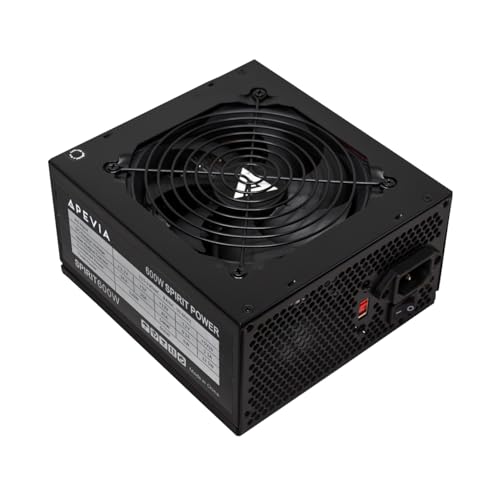
- 600W output with 45A on 12V
- Two PCIe 6+2-pin and four SATA connectors
- Thermal fan and multiple protections
Best For: Budget ATX PCs with standard components
Efficient Gaming Pick

- 80 Plus Gold certified
- Four PCI-E 6+2-pin connectors
- Five-year warranty
Best For: Midrange gaming PCs needing efficient 650W power
Best for Everyday Use

- 700W ATX output
- Broad connector selection
- Multiple listed safety protections
Best For: Budget desktops needing higher wattage and varied connectors
White Build Choice

- 80 Plus Gold with Active PFC
- White ATX casing
- Four PCI-E 6+2-pin connectors
Best For: White gaming PCs needing efficient 600W power
Efficient Bronze Power

- 80 PLUS Bronze certified
- 120mm temperature-controlled fan
- Five-year warranty and multiple protections
Best For: Mainstream gaming and everyday desktop builds
Flexible White Build Option

- 700W ATX output
- Semi-modular cable design
- White casing with 120mm thermal fan
Best For: White-themed gaming PCs and higher-power builds
Trusted Entry-Level Choice

- 500W continuous output
- 80 PLUS certification with active PFC
- Five-year warranty and 120mm fan
Best For: Modest desktops and lower-power PC builds
Premium Upgrade – MSI MAG A750GL PCIE5
For shoppers comparing computer power supplies under 100, the MSI MAG A750GL stands out with 750W output, 80 PLUS Gold certification, and a fully modular design. Its ATX 3.1 and PCIe 5.1 compatibility makes it a forward-looking option for compatible gaming PCs.
Best For: Modern gaming builds needing strong capacity, modular cable management, and newer power standards.
Pros:
- 750W output with 80 PLUS Gold certification
- Fully modular design helps reduce unused cables
- ATX 3.1 and PCIe 5.1 ready with a native 12V-2×6 cable
- Backed by a 10-year limited warranty
Cons:
- May offer more capacity and newer-standard support than basic PCs require
- As an ATX unit, it may not fit compact or nonstandard cases
The MSI is the most feature-rich choice here, combining efficient operation, modern connector support, and long warranty coverage. Confirm your case supports its ATX form factor before buying.
High-Wattage Value – Apevia ATX-SP700 Spirit 700W
The Apevia ATX-SP700 Spirit offers 700W for shoppers seeking computer power supplies under 100 with straightforward, conventional connectivity. It includes a thermally controlled 120mm fan, a single 12V output, and multiple built-in protections.
Best For: Budget ATX gaming or general-purpose PCs that need several standard power connectors.
Pros:
- 700W output with a single 12V rail rated at 53A
- Includes two PCIe 6+2-pin connectors and four SATA connectors
- 120mm auto-thermally controlled fan
- Protection against short circuit, over-current, over-voltage, over-power, under-voltage, and overheating
Cons:
- Non-modular design can leave extra cables in the case
- The supplied notes do not list an efficiency certification
- Check connector compatibility carefully for newer graphics cards
This model prioritizes wattage, conventional connectors, and protection features over modularity or newer standards. It is a practical fit when your system uses the included ATX, PCIe, SATA, and peripheral connections.
Efficient Essentials – ARESGAME AGV Series 500W
The ARESGAME AGV Series is a sensible pick among computer power supplies under 100 for systems with moderate power needs. Its 500W continuous output, 80 PLUS Bronze certification, and non-modular ATX design provide a straightforward foundation for a general-purpose PC.
Best For: Mainstream desktop builds that do not require high wattage or modular cabling.
Pros:
- 500W continuous output for moderate PC configurations
- 80 PLUS Bronze certified with typical-load efficiency of 85% or higher
- Includes OVP, UVP, OPP, and SCP protection
- Five-year manufacturer warranty
Cons:
- Non-modular cabling offers less cable-management flexibility
- 500W capacity may not suit higher-powered gaming systems
- The supplied notes do not specify the connector count or types
With a defined efficiency rating and a five-year warranty, the AGV Series is a balanced option for modest builds. Verify the available connectors and your system’s estimated power draw before purchase.
Compact Budget Build – Apevia SPIRIT600W
The Apevia SPIRIT600W provides 600W for shoppers evaluating computer power supplies under 100 for a basic gaming or desktop build. It uses a non-modular ATX layout, a thermally controlled 120mm fan, and standard motherboard, CPU, PCIe, SATA, and Molex connectors.
Best For: Budget ATX systems needing more capacity than a basic 500W supply and conventional cabling.
Pros:
- 600W output with 45A on the 12V rail
- Includes two PCIe 6+2-pin, four SATA, and four Molex connectors
- 120mm auto-thermally controlled fan
- Includes short-circuit, over-current, over-voltage, over-power, under-voltage, and over-temperature protection
Cons:
- Non-modular design may make cable management less tidy
- One-year replacement warranty is shorter than some alternatives
- The supplied notes do not list an efficiency certification
The SPIRIT600W is a connector-friendly budget option for standard ATX builds. Its 600W rating adds useful headroom, but buyers should confirm their components’ requirements and accept the shorter warranty coverage.
Efficient Gaming Pick – Segotep 650W Gold PSU
For shoppers comparing computer power supplies under 100, the Segotep GN-650 offers 650 watts of output, an 80 Plus Gold rating, and support for modern graphics cards through four PCI-E 6+2-pin connectors. Its non-modular design keeps the upfront setup straightforward, though cable organization requires more planning.
Best For: Gaming PCs that need efficient 650W power and multiple GPU connectors.
Pros:
- 80 Plus Gold certification for efficient operation
- Four PCI-E 6+2-pin connectors support 40-series graphics cards
- Single 12V output and global voltage adaptation
- Five-year warranty and 120mm fan
Cons:
- Non-modular cables can make cable management more difficult
- Power input should be checked for compatibility with the intended region and setup
This is a well-equipped option for a midrange gaming build, especially when efficiency and GPU connectivity matter. Confirm your case space and total system requirements before buying.
Best for Everyday Use – ESGAMING 700W ATX PSU
Among computer power supplies under 100, this ESGAMING model emphasizes capacity and broad connector coverage with a 700-watt ATX design. Its built-in 120mm fan and listed protection features suit budget desktop upgrades, while the non-modular layout keeps all cables permanently attached.
Best For: Budget desktop builds that need 700 watts and a wide selection of legacy and modern connectors.
Pros:
- 700-watt output for higher-power desktop configurations
- Includes PCI 6+2-pin, SATA, PATA, CPU, and main power connectors
- 120mm auto-thermally controlled cooling fan
- Lists short-circuit, over-current, over-voltage, over-power, under-voltage, and over-temperature protection
Cons:
- Non-modular design may add cable clutter
- Input voltage is selected with a 110–230V switch, so it requires careful setup
- One-year manufacturer warranty is shorter than some alternatives
This model is practical when connector variety and wattage take priority in a value-oriented build. Verify the voltage switch and ensure the included connectors match your components before installation.
White Build Choice – Apevia Prestige 600W Gold PSU
For computer power supplies under 100 in a light-colored gaming build, the Apevia Prestige combines a white casing with 600 watts, 80 Plus Gold certification, and Active PFC. It also provides four PCI-E 6+2-pin connectors and a 135mm thermally controlled fan for compatible multi-GPU or gaming configurations.
Best For: White ATX gaming PCs that need Gold-rated 600W power and multiple GPU connectors.
Pros:
- 80 Plus Gold certified with Active PFC
- White casing complements coordinated PC builds
- Four PCI-E 6+2-pin connectors support multiple GPU platforms
- Includes DC-to-DC conversion and listed OVP, OPP, and SCP protections
Cons:
- Non-modular design can make cable management less flexible
- Three-year limited replacement warranty is shorter than some five-year options
- Requires all necessary PC cables to be connected before powering on
The Apevia is a strong fit for builders who value a matching white finish alongside efficiency and GPU connectivity. Check the available case clearance and connect the motherboard, CPU, and component cables before testing the system.
Efficient Bronze Power – EVOUNIC 650W ATX PSU
For shoppers comparing computer power supplies under 100, the EVOUNIC 650W is a practical ATX option for mainstream gaming, office, and everyday desktop builds. Its 80 PLUS Bronze certification, broad 100–240V input, and five-year warranty add useful value for budget-conscious PC builders.
Best For: Mainstream gaming PCs, multitasking desktops, and general-purpose builds that need 650W of power.
Pros:
- 80 PLUS Bronze certified for improved efficiency.
- 120mm temperature-controlled fan helps balance cooling and noise.
- Includes two 6+2-pin PCIe connectors and two 4+4-pin CPU connectors.
- Offers OVP, UVP, SCP, and OPP protection with a five-year warranty.
Cons:
- Non-modular cables can make cable management less flexible.
- The supplied notes do not specify a modular cable option or premium efficiency tier.
Overall, this EVOUNIC model stands out when you want solid capacity and useful protections without moving beyond a budget-oriented build. Confirm that its permanently attached cable set fits your case and component layout.
Flexible White Build Option – Apevia Essence 700W PSU
Among computer power supplies under 100, the Apevia Essence 700W offers extra capacity and a semi-modular design for builders who want a cleaner installation. Its white sandblasted casing also makes it a natural fit for coordinated gaming PC builds.
Best For: White-themed gaming PCs and systems that benefit from 700W capacity and semi-modular cabling.
Pros:
- 700W output supports higher-power desktop configurations.
- Semi-modular design can simplify cable management.
- Includes two PCIe 6+2-pin connectors and four SATA connectors.
- 120mm auto-thermally controlled fan and multiple heavy-duty protections.
Cons:
- Input range is listed as 115–230V, rather than the wider range offered by some alternatives.
- The supplied notes do not mention an 80 PLUS efficiency certification.
The Apevia is appealing when appearance, capacity, and semi-modular installation matter most. Review your system’s voltage requirements and connector needs before choosing it for a particular build.
Trusted Entry-Level Choice – Thermaltake Smart 500W PSU
The Thermaltake Smart 500W is a straightforward choice for shoppers seeking computer power supplies under 100 for modest desktops and compatible entry-level gaming systems. It provides continuous 500W output, 80 PLUS certification, active PFC, and a five-year warranty.
Best For: Everyday desktops and lower-power PC builds using standard ATX12V or EPS12V components.
Pros:
- Delivers 500W continuous output at 40°C.
- 80 PLUS certified and equipped with active power factor correction.
- Includes two PCIe 6+2-pin connectors for compatible graphics cards.
- 120mm ultra-quiet fan, three listed protections, and a five-year warranty.
Cons:
- Non-modular cables offer less installation flexibility.
- 500W capacity may be limiting for higher-power gaming or upgrade-focused systems.
This Thermaltake model makes the most sense for builds with moderate power demands and conventional ATX connectivity. Check your graphics card and component wattage requirements before selecting a 500W unit.
How We Picked the Best Computer Power Supplies Under 100
We evaluated these models by comparing their rated wattage, efficiency certification, modularity, connector compatibility, cooling design, protection features, warranty information, and intended use. We also considered practical build factors such as cable management, ATX compatibility, fan noise, and whether a unit offers enough headroom for future upgrades.
Specifications can vary by revision and seller, so confirm the exact model number, included cables, input-voltage range, and warranty terms before purchasing. A higher wattage rating alone does not guarantee a better power supply.
Quick Comparison
- Best for modern gaming upgrades: MSI MAG A750GL PCIE5, with a fully modular design and newer ATX 3.1 and PCIe 5.1 support.
- Best for efficiency on a budget: The 80 PLUS Gold models offer stronger efficiency than basic White-rated units under comparable conditions.
- Best for simple office or entry-level builds: A 500W or 600W model can be sufficient when paired with modest components and no high-power graphics card.
- Best for clean cable management: Fully or semi-modular supplies let you avoid using some unnecessary cables.
Key Buying Factors for Computer Power Supplies Under 100
Wattage and Upgrade Headroom
Estimate your system’s peak draw, then leave practical headroom rather than buying the smallest possible unit. A 500W supply may suit integrated graphics or entry-level cards, while 650W to 750W is more flexible for mainstream gaming systems. Check your graphics card manufacturer’s recommended PSU rating before ordering.
Efficiency Certification
80 PLUS Bronze and Gold ratings indicate efficiency targets, although they do not independently prove overall build quality. Gold-rated units generally waste less energy as heat than White-rated models, but price, warranty, protections, and platform quality still matter.
Connectors and Standards
Modern graphics cards may require PCIe 5-compatible connections or a 12V-2×6 cable. If you are building around a newer GPU, choose a supply with the correct native connector rather than relying on questionable adapters. Also verify the number of EPS, PCIe, SATA, and peripheral connectors you need.
Modularity, Size, and Cooling
Fully modular units simplify installation, while semi-modular designs provide a middle ground. Confirm the PSU’s physical dimensions will fit your case, and look for an adequately sized fan and sensible thermal design if low noise is important.
Protection and Warranty
Prioritize documented over-voltage, under-voltage, over-power, short-circuit, and over-temperature protection. A longer, clearly stated warranty can also signal greater manufacturer confidence and provide better long-term value.
Who Should Buy Which Computer Power Supplies Under 100?
Choose a 500W model for an office PC, home theater system, or entry-level desktop with modest graphics requirements. Choose 600W to 650W for many mainstream gaming builds, provided the graphics card’s requirements fit. Choose 700W to 750W when pairing a stronger GPU with a performance CPU or when you want additional upgrade capacity.
For the cleanest installation and the most forward-looking connectivity, a fully modular ATX 3.1 model is the strongest choice. For a basic low-cost build, a non-modular unit may be perfectly practical if its protections, connectors, and warranty meet your needs. Finally, avoid selecting any PSU solely because it has the highest wattage or lowest price; compatibility and documented reliability are more important.