A dependable power supply is the foundation of a workstation. It affects system stability, upgrade flexibility, noise levels, and how safely expensive components receive power under sustained loads.
These 10 computer power supplies for workstations cover practical options for office systems, creative machines, engineering PCs, and high-performance builds. Use the guide below to match wattage, connectors, efficiency, and features to your workload.
Best 10 Computer Power Supplies for Workstations Picks for 2026
Quiet High-Capacity Pick

- 1000W ATX 3.1 output with native 12V-2x6
- Semi-passive cooling for quiet low-load operation
- Fully modular and 80 PLUS Gold certified
Best For: High-end, quiet workstations with modern GPUs
Balanced Modular Choice

- 850W ATX 3.1 and PCIe 5.1-ready design
- Native 12V-2x6 cable included
- Fully modular with low-noise cooling
Best For: Modern workstations needing efficient 850W power
Budget Basic Option

- 500W continuous ATX output
- 80 PLUS certified with active PFC
- Two PCIe 6+2-pin connectors and basic protections
Best For: Basic, lower-power office workstations
High-Headroom Mainstay

- 1000W ATX 3.1 and PCIe 5.1-ready output
- Native 12V-2x6 cable for modern GPUs
- Fully modular, low-noise design
Best For: Powerful workstations needing upgrade headroom
Modern Midrange Pick
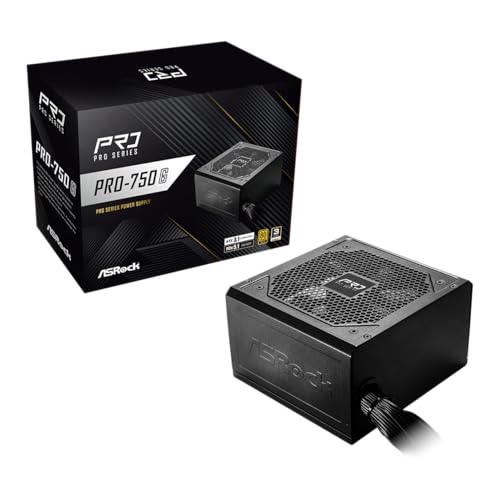
- 750W with 80 Plus Gold efficiency
- ATX 3.1 and PCIe 5.1 compliant
- Native 12V-2x6 connector for newer GPUs
Best For: Mid-range workstations with modern graphics cards
Next-Gen Modular Choice
Thermaltake Toughpower GT 850W

- 850W, 80 Plus Gold certified output
- ATX 3.1 and PCIe 5.1 ready
- Fully modular with native 450W GPU connector
Best For: High-end workstations with modern GPUs
High-Capacity Pick

- 1000W output with 80 PLUS Gold efficiency
- ATX 3.1, PCIe 5.1, and 12V-2x6 ready
- Fully modular with 140mm smart-control fan
Best For: Power-hungry workstation builds
Compact Midrange Choice

- 750W output with 80 PLUS Gold certification
- Fully modular and ATX 3.1 ready
- Native dual-color 12V-2x6 cable and 10-year warranty
Best For: Moderate-power workstation systems
Balanced Headroom Pick

- 850W output with 80 PLUS Gold certification
- ATX 3.1, PCIe 5.1, and 12V-2x6 ready
- Fully modular with a 10-year warranty
Best For: Performance workstations needing extra reserve
Quiet High-Capacity Pick – Pure Power 13 M 1000W
For demanding computer power supplies for workstations, the be quiet! Pure Power 13 M combines 1000W of continuous output with ATX 3.1 support and a native 12V-2×6 connector. Its fully modular design and semi-passive cooling suit powerful, noise-conscious builds.
Best For: High-end workstations, media creation systems, and builds using next-generation graphics cards.
Pros:
- ATX 3.1 and PCIe 5.1-ready 12V-2×6 connectivity
- 1000W capacity with a single 12V rail and support for substantial transient loads
- Fully modular cabling and semi-passive zero-RPM cooling
- 80 PLUS Gold and Cybenetics Platinum efficiency certifications
Cons:
- Its 1000W capacity may be more than needed for modest workstation configurations
- The supplied warranty details are inconsistent, listing both one year and ten years
This is a strong forward-looking option when quiet operation, modern GPU connectivity, and generous power headroom matter more than minimizing cost.
Balanced Modular Choice – CORSAIR RM850e 2025
The CORSAIR RM850e is a practical 850W choice among computer power supplies for workstations, pairing ATX 3.1 compliance with a native 12V-2×6 cable. Fully modular cabling, a low-noise fan, and 105°C-rated capacitors support clean, dependable workstation builds.
Best For: Mainstream to high-performance workstations that need modern GPU support without stepping up to 1000W.
Pros:
- 850W output with ATX 3.1 and PCIe 5.1 support
- Native 12V-2×6 cable included
- Fully modular design simplifies cable management
- 120mm rifle-bearing fan and Modern Standby compatibility
Cons:
- Lower capacity than 1000W models for especially power-hungry systems
- Its seven-year warranty is shorter than some competing offerings
Choose the RM850e when your workstation fits within an 850W budget and you want current standards, modular installation, and quiet operation in a compact ATX supply.
Budget Basic Option – Thermaltake Smart 500W
The Thermaltake Smart 500W is a straightforward entry-level option among computer power supplies for workstations. It provides 500W of continuous output, 80 PLUS certification, active PFC, and two PCIe 6+2-pin connectors for modest systems.
Best For: Basic office or entry-level workstations with moderate power requirements.
Pros:
- 500W continuous output at 40°C
- 80 PLUS certification and active power factor correction
- Two PCIe 6+2-pin connectors
- Includes over-power, over-voltage, and short-circuit protection
Cons:
- Non-modular cabling can make installation and cable management less convenient
- Older ATX 12V 2.31 and EPS 12V 2.92 standards lack newer ATX 3.1 features
- 500W capacity is not suited to high-end workstation GPUs or major upgrades
This model makes sense for a simple, lower-power workstation, but builders planning a modern graphics card or substantial expansion should consider a newer, higher-capacity supply.
High-Headroom Mainstay – CORSAIR RM1000e 2025
The CORSAIR RM1000e delivers 1000W of workstation-ready capacity with ATX 3.1 compliance and a native 12V-2×6 cable. As computer power supplies for workstations go, its fully modular layout, low-noise fan, and 105°C-rated capacitors make it well suited to demanding builds.
Best For: High-performance workstations with power-hungry processors, graphics cards, or future upgrade plans.
Pros:
- 1000W output with support for PCIe 5.1 transient power excursions
- Native 12V-2×6 cable included for compatible graphics cards
- Fully modular cabling for cleaner installations
- Low-noise 120mm rifle-bearing fan and Modern Standby support
Cons:
- May be excessive for entry-level or lightly configured workstations
- Seven-year warranty is shorter than the listed warranty for some competing models
The RM1000e is a sensible choice when you want substantial power reserve and current GPU connectivity without giving up modular cable management or quieter cooling.
Quiet Gold Workhorse – Thermaltake GF1 850W
For computer power supplies for workstations, the Thermaltake GF1 850W combines high output with a fully modular design, 80 Plus Gold certification, and features aimed at quieter operation. Its single high-amperage +12V rail and built-in protections make it a practical choice for demanding ATX systems.
Best For: Workstations needing 850W of power, modular cable management, and low-noise operation.
Pros:
- 850W output with 80 Plus Gold certification.
- Fully modular design simplifies cable management.
- Smart Zero Fan and a 140mm fluid-bearing fan support quiet cooling.
- Includes built-in industrial-grade protections and a 10-year manufacturer warranty.
Cons:
- Uses the standard ATX platform rather than a stated ATX 3.1 design.
- Its 850W capacity may be more than necessary for lower-power systems.
The GF1 is a strong all-around workstation option when quiet performance, flexible installation, and long warranty coverage matter more than next-generation connector support.
Modern Midrange Pick – ASRock PRO 750G
The ASRock PRO 750G is a sensible option among computer power supplies for workstations that need current connectivity without stepping up to an 850W unit. It offers 750W, 80 Plus Gold efficiency, ATX 3.1 and PCIe 5.1 compliance, plus a native 12V-2×6 connector for compatible graphics cards.
Best For: Mid-range to high-end ATX workstations using newer graphics hardware and requiring 750W.
Pros:
- ATX 3.1 and PCIe 5.1 compliant for newer components.
- Native 12V-2×6 connector supports up to 450W power delivery.
- 80 Plus Gold certification targets up to 90% efficiency.
- 120mm low-noise fan and a standard ATX form factor support practical installation.
Cons:
- Non-modular design offers less cable-management flexibility.
- 750W may not suit workstation builds with especially high power demands.
- The warranty is three years, shorter than some competing options.
Choose the PRO 750G when modern GPU support and a reasonable 750W capacity are priorities, and you are comfortable managing a non-modular cable set.
Next-Gen Modular Choice – Thermaltake Toughpower GT 850W
The Thermaltake Toughpower GT 850W is built for computer power supplies for workstations that need both substantial capacity and newer power standards. Its ATX 3.1 and PCIe 5.1 support, native 450W connector, fully modular cabling, and Smart Zero Fan technology suit modern high-performance builds.
Best For: High-end workstations with current-generation graphics cards and a need for flexible cable management.
Pros:
- 850W output with 80 Plus Gold efficiency.
- ATX 3.1 and PCIe 5.1 support with a native 12V-2×6 connector.
- Fully modular low-profile flat cables make routing easier.
- Smart Zero Fan operation helps minimize noise at low loads.
Cons:
- Its five-year warranty is shorter than the GF1’s stated 10-year warranty.
- The supplied dimensions are relatively large, so chassis clearance should be checked.
The Toughpower GT is the more forward-looking 850W choice here, pairing workstation-friendly capacity with modern GPU connectivity and modular installation.
High-Capacity Pick – SKYLZOR 1000W ATX 3.1 PSU
For demanding computer power supplies for workstations, the SKYLZOR 1000W model combines high capacity with current ATX 3.1 and PCIe 5.1 support. Its fully modular design and included 12V-2×6 cable can help keep a high-end build organized.
Best For: High-performance workstations and systems that need 1000W of available power.
Pros:
- 1000W output with 80 PLUS Gold efficiency rated up to 92%.
- ATX 3.1 and PCIe 5.1 ready, including a 12V-2×6 connector.
- Fully modular cables, 140mm FDB fan, and 105°C Japanese capacitors.
- Includes a 10-year limited warranty according to the product description.
Cons:
- Its 1000W capacity may be more than a lower-power workstation requires.
- The supplied details list a 2-year manufacturer warranty, which differs from the 10-year claim in the feature bullets.
This is the strongest-capacity option in the group and a practical match for power-hungry workstation hardware. Verify the warranty terms before purchase because the supplied listing information is inconsistent.
Compact Midrange Choice – MSI MAG A750GL PCIE5 750W
The MSI MAG A750GL is a sensible option among computer power supplies for workstations when a system calls for 750W rather than a larger reserve. It offers fully modular cabling, Gold certification, and updated ATX 3.1 and PCIe 5.1 compatibility in a compact design.
Best For: Mainstream workstations and personal computers using up to 750W of PSU capacity.
Pros:
- 750W output with 80 PLUS Gold certification.
- Fully modular design helps reduce unnecessary cable clutter.
- ATX 3.1 and PCIe 5.1 ready with a native dual-color 12V-2×6 cable.
- Backed by a 10-year limited warranty.
Cons:
- 750W provides less headroom than the 850W and 1000W options here.
- The supplied listing identifies a 12cm fan rather than the larger fan used by the SKYLZOR model.
Choose the A750GL when your workstation’s components fit comfortably within a 750W power budget. Its modular layout and long warranty make it a balanced fit for a compact, tidy build.
Balanced Headroom Pick – MSI MAG A850GL PCIE5 850W
The MSI MAG A850GL provides a middle ground for computer power supplies for workstations, offering more capacity than a 750W unit without moving to a full 1000W model. Its fully modular design and PCIe 5.1-ready connectivity suit newer performance-focused systems.
Best For: Workstations that need additional power headroom for demanding components.
Pros:
- 850W output with 80 PLUS Gold certification.
- ATX 3.1 and PCIe 5.1 ready with a native dual-color 12V-2×6 cable.
- Fully modular design supports cleaner cable management.
- Includes a 10-year limited warranty.
Cons:
- It costs capacity and likely space compared with a 750W alternative, though pricing and exact dimensions should be checked.
- It may be unnecessary for workstations whose power requirements are comfortably below 850W.
For buyers who want a useful buffer without choosing the largest unit, the A850GL is the balanced choice in this lineup. Confirm your component power requirements and case clearance before selecting it.
How We Picked These Computer Power Supplies for Workstations
We focused on models that offer a useful combination of capacity, efficiency, modern standards, connectivity, and practical installation features. The selection includes 750W, 850W, 1000W, and 500W options so buyers can choose according to their processors, graphics cards, storage devices, and future upgrade plans.
ATX 3.1 and PCIe 5.1 readiness were prioritized where available because newer graphics cards can produce short power spikes and may use a native 12V-2×6 connector. We also considered modular cabling, fan behavior, warranty coverage, physical size, and recognized efficiency ratings. A higher rating does not automatically make a supply better, but it can indicate reduced wasted energy and heat during regular use.
Quick Comparison
| Capacity | Best suited to | What to look for |
|---|---|---|
| 500W | Basic office and entry-level workstations | Modest CPU, integrated graphics, or low-power GPU |
| 750W | Mainstream professional systems | Gold efficiency, modular cables, modern GPU connector |
| 850W | Powerful single-GPU workstations | ATX 3.1 support and sufficient transient headroom |
| 1000W | High-end CPUs and demanding GPUs | Extra capacity, native 12V-2×6 support, quiet cooling |
Key Buying Factors for Computer Power Supplies for Workstations
Wattage and Headroom
Estimate the system’s sustained draw, then leave room for transient spikes and future upgrades. A supply operating well below its maximum capacity generally has more flexibility and may run quieter. Avoid choosing wattage solely from the graphics card recommendation; the processor, drives, fans, USB devices, and expansion cards also contribute.
Connectors and Standards
Check that the unit includes the connectors your motherboard and graphics card require. ATX 3.1 and PCIe 5.1 models with a native 12V-2×6 cable can simplify newer GPU installations and reduce dependence on adapters. Confirm cable routing and connector clearance inside the case before buying.
Efficiency, Noise, and Cooling
80 PLUS Gold models are a sensible balance for many workstation builds, while higher independent efficiency certifications can be useful for systems that run continuously. Semi-passive or zero-RPM fan modes can reduce noise at light loads, but airflow and room temperature still affect operating sound.
Form Factor and Reliability
Verify ATX compatibility, unit length, modular-cable clearance, and the manufacturer’s warranty. A fully modular design helps with cable management, while a compact model can be valuable in smaller cases. Select a reputable model rather than treating wattage or efficiency as the only indicators of quality.
Who Should Buy Which Computer Power Supplies for Workstations?
Choose a 500W unit for a basic workstation with integrated graphics or a low-power discrete card. A 750W model fits many mainstream professional PCs and offers a practical balance of cost and upgrade room. Step up to 850W for a workstation with a high-performance single GPU, sustained rendering workloads, or a higher-power processor. A 1000W supply is the better choice for demanding graphics cards, multiple drives, heavy compute workloads, or planned upgrades.
Before ordering, total your components’ requirements, confirm the included GPU cable, and measure the case. The best Computer Power Supplies for Workstations are not necessarily the highest-wattage models; they are the ones that provide appropriate headroom, compatible connectors, efficient operation, and dependable support for the way you work.