If your VR headset is picky about USB stability, a good expansion card can make setup far less frustrating. The right PCIe card can improve connectivity, reduce dropouts, and free you from overloaded motherboard ports.
Below, we focus on cards that are practical for VR users, with an eye on bandwidth, power delivery, controller quality, and platform compatibility.
Best 10 Pcie USB Expansion Card for Vr Picks for 2026
Maximum Port Count
7-Port USB 3.0 PCIe Expansion Card
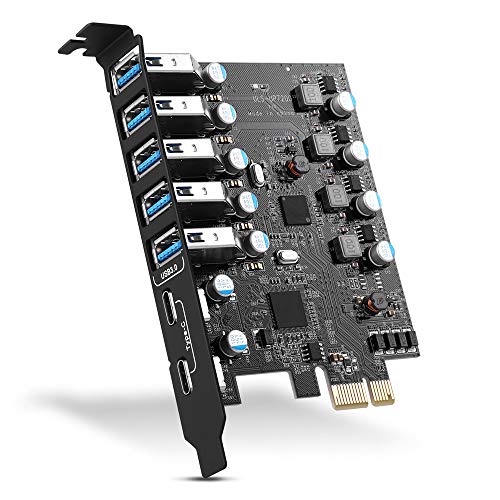
- 7 USB 3.0 ports total
- Includes 2 USB-C and 5 USB-A
- Supports USB VR and other peripherals
Best For: Users who want maximum port count for VR and mixed USB devices
Self-Powered Simplicity
4-Port USB 3.0 PCIe Expansion Card

- No extra power cable required
- Supports USB VR systems
- 4 USB-A ports at 5Gbps shared bandwidth
Best For: Users who want a simple self-powered USB 3.0 upgrade for VR and peripherals
High-Count Mixed Ports
8-Port USB-C and USB-A PCIe Card

- Adds 2 USB-C and 6 USB-A ports
- USB 3.2 Gen 1 with shared 5Gbps bandwidth
- No extra power supply needed
Best For: Users who want a high-port-count card with both USB-C and USB-A
Balanced USB-C Mix
4-Port USB-A and USB-C PCIe Card
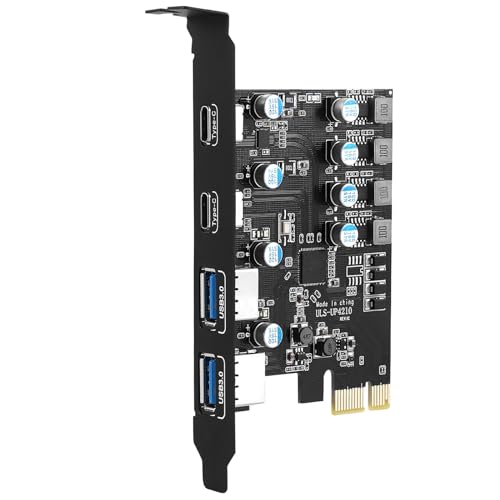
- 2 USB-A plus 2 USB-C ports
- Supports VR sensors and storage enclosures
- No external power adapter needed
Best For: Desktop users who want a compact mix of USB-A and USB-C for VR gear
Compact USB-C Upgrade
2-Port 10Gb PCIe USB-C Card for X1 Slots

- Adds 2 USB-C ports from a PCIe x1 slot
- Supports up to 5V/2A per port
- Compatible with Windows, Linux, and macOS
Best For: Users who want a compact PCIe x1 USB-C add-in card for VR and other powered devices
High-Port USB Hub Card
8-Port PCIe USB 3.2 Expansion Card

- 8 total ports with 6 USB-A and 2 USB-C
- USB 3.2 Gen2 support up to 10Gbps theoretical speed
- Independent power modules and fault protection
Best For: Users who need a dense USB expansion card for lots of peripherals
Budget Port Expander
7-Port PCIe USB 3.0 Card with UASP

- Adds 7 USB 3.0 ports through a PCIe x1 slot
- UASP support with 4 dedicated channels
- Over-current protection plus aluminum heatsink
Best For: Users who want an easy, high-port-count USB 3.0 expansion card
Dedicated Bandwidth PCIe Card
StarTech 4-Port USB 5Gbps with Independent Controllers

- 4 ports with dedicated 5Gbps channels
- Optional SATA or LP4 power support
- Built for VR headsets and other USB peripherals
Best For: VR setups needing isolated USB bandwidth
Self-Powered Two-Port Pick
FebSmart FS-U2S-Pro USB 3.0 Expansion Card

- 2 x 5Gbps USB-A ports
- No extra PSU power cable needed
- Supports VR systems and other USB-A devices
Best For: Compact desktops that need simple VR-capable USB expansion
Seven-Port Capacity Option
ELUTENG 7-Port PCIe USB 3.0 Expansion Card

- Adds 7 USB 3.0 Type-A ports
- Independent power module with 5V/2A per port
- Works in PCI-E x1 through x16 slots
Best For: Desktop users who need maximum USB port expansion
Maximum Port Count – 7-Port USB 3.0 PCIe Expansion Card
If you need a pcie usb expansion card for vr and also want more general-purpose connectivity, this 7-port card is built to add a lot of USB 3.0 capacity to a desktop. With 2 USB-C and 5 USB-A ports, it’s a practical upgrade for systems that need extra room for headsets, sensors, and everyday peripherals.
Best For: Desktop users who want the most ports possible for VR gear and mixed USB devices.
Pros:
- 7 total USB 3.0 ports, including 2 USB-C and 5 USB-A
- Supports USB VR, webcams, game controllers, printers, and storage devices
- Up to 5Gbps transfer rate for USB 3.0 devices
- Works with PCIe x1, x4, x8, and x16 slots
Cons:
- Windows XP/Vista/7 and Server systems require driver installation
- Actual transfer speed depends on the connected device
- Best suited to standard tower cases rather than compact builds
This is a strong all-around option if your priority is port count and broad compatibility. It stands out for users who want one card to cover VR accessories plus a lot of other USB expansion needs.
Self-Powered Simplicity – 4-Port USB 3.0 PCIe Expansion Card
If you want a pcie usb expansion card for vr without extra power cables, this 4-port model is designed around self-powered operation. It adds four USB-A 3.0 ports and is aimed at desktop PCs that need stable power for higher-demand USB devices.
Best For: Desktop and workstation users who want a simple, self-powered USB 3.0 upgrade for VR and high-power peripherals.
Pros:
- 4 USB-A ports with up to 5Gbps shared bandwidth
- Built-in self-powered technology, no extra PSU cable needed
- Explicitly supports USB VR-systems and other high-power USB 3.0 devices
- Compatible with Windows 11/10/8.x/7/Vista/XP and Linux kernels
Cons:
- All four ports share the card’s total 5Gbps bandwidth
- Not supported on Mac OS X
- Uses a full-height bracket, so it is not for slim PCs
This card makes sense if you want fewer complications and no extra power wiring. It is a straightforward choice for adding reliable USB 3.0 ports to a standard desktop or NAS-style build.
High-Count Mixed Ports – 8-Port USB-C and USB-A PCIe Card
This pcie usb expansion card for vr is a good pick when you want lots of modern port variety in one slot. It adds 2 USB-C and 6 USB-A USB 3.2 Gen 1 ports, making it useful for VR accessories, storage, and a wide range of desktop or server peripherals.
Best For: Users who want a high-port-count expansion card with both USB-C and USB-A connections.
Pros:
- 8 total ports: 2 USB-C and 6 USB-A
- Supports USB 3.2 Gen 1 speeds up to 5Gbps shared across PCIe x1 bandwidth
- Designed to support high-power devices with grouped 5V/3A power management
- Works with Windows, Linux, PC/server/NAS builds, and needs no extra power supply
Cons:
- Not compatible with Mac OS
- Not intended for slim cases
- Bandwidth is shared through a PCIe x1 connection
If you want lots of ports and a mix of USB-C plus USB-A, this is one of the more flexible options. It is especially appealing for builds that need several connected devices without adding another power brick.
Balanced USB-C Mix – 4-Port USB-A and USB-C PCIe Card
If your goal is a pcie usb expansion card for vr with a balanced mix of connector types, this 4-port model adds 2 USB-A and 2 USB-C ports to a desktop. It is designed for devices like VR sensors and external storage, while keeping installation simple on a standard PCIe x1 slot.
Best For: Desktop users who want a compact mix of USB-A and USB-C ports for VR gear and everyday peripherals.
Pros:
- 2 USB-A and 2 USB-C ports in one PCIe expansion card
- Supports high-power devices such as HDD/SSD enclosures and VR sensors
- No external power adapter required
- Compatible with Windows 7/8/10/11 and Linux
Cons:
- USB 3.0 speed is listed as 5Gbps max total
- Windows 7 needs a driver installed
- BC 1.2 charging is not supported
This model is a practical middle ground if you do not need a huge port count. It offers useful USB-C support and enough power handling for VR-related devices in a tidy desktop-friendly layout.
Compact USB-C Upgrade – 2-Port 10Gb PCIe USB-C Card for X1 Slots
If you need a pcie usb expansion card for vr and want to save larger expansion slots, this dual USB-C model is a practical fit. It uses a PCIe x1 interface, adds two USB-C ports, and supports up to 5V/2A per port for higher-power devices like VR gear, industrial cameras, and NVMe accessories.
Best For: Desktop builders who want two USB-C ports from a free PCIe x1 slot for VR or other power-hungry peripherals.
Pros:
- Uses a free PCIe x1 slot instead of occupying x4/x8/x16 slots
- Two USB-C ports with USB 3.2 Gen 2 support
- Separate power management with up to 5V/2A per port
- Works with Windows, Linux, and macOS
Cons:
- Windows 7 needs a driver
- X1 design shares upstream bandwidth
This is a solid option if slot availability matters more than raw port count. Its biggest advantage is flexibility: you get modern USB-C connectivity without sacrificing a larger PCIe slot needed for graphics or other add-in cards.
High-Port USB Hub Card – 8-Port PCIe USB 3.2 Expansion Card
This pcie usb expansion card for vr is aimed at users who need lots of connected devices on one board. It combines 6 USB-A and 2 USB-C ports, uses two main control chips, and is built around independent power modules to keep each interface stable under load.
Best For: PC owners who want a high-port-count USB expansion card for multiple peripherals or VR-related devices.
Pros:
- 8 total USB ports: 6 USB-A and 2 USB-C
- USB 3.2 Gen2 support up to 10Gbps theoretical speed
- Independent power design for more stable operation
- Built-in protection cuts power during faults or overcurrent events
Cons:
- Windows-only support in the supplied notes
- Designed as a classic PCIe card, not a slot-saving x1-focused model
If your main goal is connecting many USB devices at once, this card stands out for sheer port count and stability features. It makes more sense for heavily loaded desktops than for minimalist builds where a simpler adapter would do.
Budget Port Expander – 7-Port PCIe USB 3.0 Card with UASP
If you want a straightforward pcie usb expansion card for vr or general desktop use, this 7-port model focuses on practical expansion without much setup hassle. It adds seven USB 3.0 ports through a PCIe x1 slot, supports UASP, and includes dedicated channels to help keep transfers smoother under load.
Best For: Desktop users who want a simple, driver-friendly USB 3.0 expansion card with lots of ports.
Pros:
- Seven USB 3.0 ports from a single PCIe x1 card
- UASP support and 4 dedicated channels
- Plug-and-play support for many Windows versions and Linux
- Over-current protection and aluminum heatsink for stability
Cons:
- Top speed is 5Gbps, not USB 3.2 Gen2 class
- Some older systems may still need drivers
This is the most all-around option in the group if you care more about port count and easy compatibility than cutting-edge speed. It’s a sensible pick for desktops that need extra USB connections for everyday peripherals or VR accessories.
Dedicated Bandwidth PCIe Card – StarTech 4-Port USB 5Gbps with Independent Controllers
If you need a PCIe USB expansion card for VR or other high-bandwidth peripherals, this StarTech model stands out for its four independent USB 3.0 controllers. Each USB-A port gets a dedicated 5Gbps channel, which is a strong fit for devices that benefit from isolated bandwidth rather than sharing one upstream path.
Best For: VR headsets and other USB devices that need dedicated, high-bandwidth connections.
Pros:
- 4 USB-A ports with dedicated 5Gbps channels
- Supports external hard drives, VR headsets, game controllers, and other USB devices
- Optional SATA or LP4 power connectors for higher-power peripherals
- UASP support can improve speeds with compatible enclosures
Cons:
- Designed for desktop PCs with an internal PCI Express slot
- May require extra power connection for power-hungry devices
This is the most performance-focused option here, especially if your priority is keeping USB traffic separated across multiple ports. For VR setups and mixed peripheral loads, the dedicated-controller design is the key advantage.
Self-Powered Two-Port Pick – FebSmart FS-U2S-Pro USB 3.0 Expansion Card
This PCIe USB expansion card is a practical choice for a VR-ready desktop if you only need two fast USB-A ports and want simple installation. The built-in self-powered design means you do not need an extra power cable from the PSU, while still supporting up to 5V/2A per port for devices like USB VR systems and other demanding accessories.
Best For: Users who want a compact, self-powered PCIe USB card for VR and everyday peripherals.
Pros:
- Two USB 3.0 ports at up to 5Gbps each
- No additional PSU power cable required
- Supports USB VR systems, enclosures, gamepads, and other USB-A devices
- Works with Windows, Linux, and most Mac systems per the notes
Cons:
- Only two ports, so it is less expandable than larger cards
- Requires driver installation on older Windows versions
For a streamlined build, this card offers a good balance of convenience and compatibility. It is not the most port-rich option, but the self-powered design makes it appealing when you want fewer cables and a straightforward install.
Seven-Port Capacity Option – ELUTENG 7-Port PCIe USB 3.0 Expansion Card
If your goal is to add a lot of USB ports through a PCIe USB expansion card for VR, this ELUTENG model focuses on quantity and stable power delivery. It adds seven USB 3.0 Type-A ports, uses independent power circuitry, and is described as able to operate without an external or auxiliary power supply.
Best For: Users who want the most ports possible for a desktop USB expansion.
Pros:
- Seven USB 3.0 Type-A ports
- Independent power supply module and 5V/2A output per interface
- Each port has its own solid capacitor for stable power
- Compatible with PCI-E x1/x4/x8/x16 slots
Cons:
- Not compatible with Mac
- Not fit for Mini/Small PC cases
- Not compatible with older PCI slots
This is the best match when port count matters more than a minimal footprint. For VR and other desktop setups that need multiple USB connections, the seven-port layout provides plenty of room to grow.
How We Picked the Best Pcie USB Expansion Card for Vr
For a Pcie USB Expansion Card for Vr, the biggest priorities are stable data transfer, dependable power, and broad compatibility with common headsets and desktop platforms. We favored cards with USB 3.x support, sensible port counts, and designs that reduce shared-bandwidth bottlenecks.
We also looked for features that matter in real use: dedicated controllers where available, PCIe slot compatibility, external power options or self-powered designs, and Windows/Linux/macOS support when relevant. VR users generally benefit more from consistency than from the highest advertised port count.
Quick Comparison: What Matters Most
High port count is useful only if each port can sustain steady performance. A 4-port card with independent controllers may be a better VR choice than a larger hub-style board if you run a headset, sensors, and accessories at the same time. For modern headsets that use USB-C, a card with at least one USB-C port can simplify cable management.
In practice, choose based on your setup: USB-A-heavy accessory loads, USB-C headset connections, or mixed use with external drives and charging devices.
Key Buying Factors for a Pcie USB Expansion Card for Vr
Bandwidth and USB Generation
USB 3.0/3.1 Gen 1 at 5Gbps is enough for many VR headsets and accessories, while USB 3.2 Gen 2 at 10Gbps provides more headroom for newer devices and future-proofing. Look beyond marketing names and confirm the actual speed rating.
Power Delivery and Stability
VR setups can fail when a port cannot supply consistent power. Self-powered or externally powered cards tend to be safer for headsets and tracking peripherals than bus-only designs, especially when multiple devices are connected.
Controller Architecture
Independent USB controllers can help prevent all ports from competing for the same bandwidth. This matters if your headset, camera, and accessories are active together. Shared hub designs can still work, but they are usually a weaker choice for demanding VR use.
Port Type and Layout
Check whether you need USB-A, USB-C, or both. A mixed layout can be ideal for VR because it supports legacy accessories and newer headset cables without adapters.
Who Should Buy Which Pcie USB Expansion Card for Vr?
If you want the safest all-around choice for a VR desktop, prioritize a card with solid power design and independent controllers. If you mainly need extra ports for a single headset plus a few accessories, a reliable 4-port USB 3.0 card is often enough. If your setup is newer and USB-C focused, choose a PCIe 3.2 Gen 2 option for extra flexibility.
For users on Windows, Linux, or macOS, compatibility should be checked carefully before buying. The best Pcie USB Expansion Card for Vr is the one that matches your headset requirements, your available PCIe slot, and your real-world device mix—not just the one with the most ports.