Choosing a vr flight stick with throttle can make cockpit flying feel far more precise, immersive, and comfortable in VR. The right setup improves control without forcing you to overreach for keyboard shortcuts.
In this roundup, we focus on controls, compatibility, build quality, and value so you can match the right HOTAS to your sim style and platform.
Best 10 Vr Flight Stick with Throttle Picks for 2026
Premium Combat HOTAS
Thrustmaster HOTAS Warthog A10 Replica

- All-metal 1:1 A-10C replica design
- Hall Effect stick sensors for precision
- Dual throttle with 55 programmable buttons
Best For: serious PC sim pilots who want authentic combat-style controls
Feature-Rich Sim System
Turtle Beach VelocityOne Flightdeck
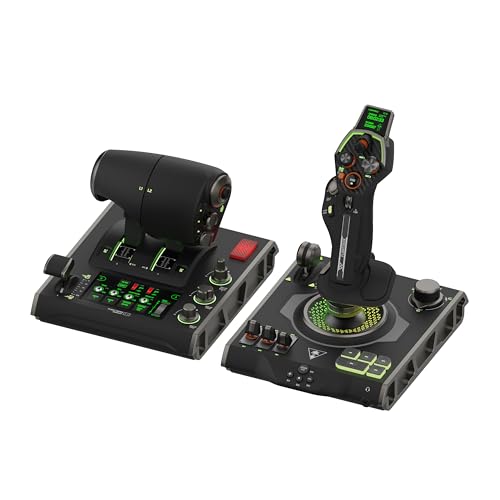
- OLED flight touch display and HUD
- 139 programmable controls
- Hall-effect stick and adjustable haptic throttle
Best For: PC pilots who want advanced customization and built-in display features
Console-Friendly HOTAS
Thrustmaster T-Flight Hotas One

- Works with PC and Xbox Series X|S
- Detachable stick and throttle
- 14 programmable buttons with adjustable resistance
Best For: beginners and Xbox or PC players who want an easy HOTAS
High-Control VR HOTAS

- 189 programmable controls
- Twin throttles with friction adjuster
- Hall-effect sensors and VR-friendly layout
Best For: VR and PC sim players who want maximum mapping and twin throttles
Official Microsoft Flight Sim Hotas Pick
Thrustmaster T-Flight Hotas One MSFS 2024

- Officially licensed for Microsoft Flight Simulator 2024
- Detachable throttle works together or separately
- 5 axes, 14 buttons, and dual rudder control
Best For: Xbox and PC sim pilots who want an easy-to-use HOTAS
High-Control VR Combat Bundle
Logitech G X56 HOTAS with Pedals

- Includes joystick, throttle, and rudder pedals
- VR-friendly control placement with subtle button feel
- Mini analog stick and software customization add flexibility
Best For: VR and space-sim players who want a full control bundle
Classic Plug-and-Play Hotas Value
Thrustmaster T-Flight Hotas X USB

- Detachable real-size throttle for flexible placement
- 12 programmable buttons and 5 axes
- Plug-and-play setup with adjustable resistance
Best For: PC sim pilots who want a comfortable, easy starter HOTAS
Airbus-Style Precision Pick
Thrustmaster TCA Sidestick Airbus Edition

- 1:1 Airbus A320 replica design
- Integrated throttle and thrust reverser
- Magnetic sensor for drift-free precision
Best For: PC flight sim users who want an authentic Airbus sidestick with built-in throttle
Easy Entry Flight Stick

- Plug-and-play USB setup
- Integrated throttle and twist rudder
- Weighted base with adjustable resistance
Best For: New or casual PC and PS3 sim players who want an easy all-in-one joystick
Full-Sim HOTAS Bundle
Thrustmaster T-Flight Full Kit

- Complete HOTAS bundle with pedals included
- Hall-effect joystick with 5 axes
- Works with PC and Xbox
Best For: Players who want a full flight-sim setup with throttle, stick, and pedals in one box
Premium Combat HOTAS – Thrustmaster HOTAS Warthog A10 Replica
If you want a vr flight stick with throttle that prioritizes realism over simplicity, the Thrustmaster HOTAS Warthog is built around a full-size A-10C replica feel. Its all-metal construction, Hall Effect stick sensors, and dual throttle make it a serious choice for high-fidelity PC flight simulation.
Best For: Experienced sim pilots who want a heavy-duty, military-style HOTAS for realistic combat and advanced aircraft control on PC.
Pros:
- 1:1 A-10C replica design with almost entirely metal construction
- H.E.A.R.T Hall Effect sensors for precise, long-lasting stick accuracy
- Dual metal throttle supports independent engine management
- 55 programmable buttons plus an 8-way POV hat for deep control
Cons:
- PC-focused, so it is not the most versatile option for console players
- Its premium metal build and control layout may be more than casual flyers need
The Warthog stands out as a benchmark HOTAS for pilots who want authentic hardware and plenty of hands-on control. If realism and durability matter most, this set is built to stay at the center of a dedicated sim setup.
Feature-Rich Sim System – Turtle Beach VelocityOne Flightdeck
The Turtle Beach VelocityOne Flightdeck is a feature-heavy vr flight stick with throttle aimed at users who want a modern control hub for air and space combat simulation. Its touchscreen-style OLED display, Hall-effect controls, and 139 mappable controls make it one of the most customizable PC HOTAS options in this group.
Best For: PC sim players who want a highly customizable HOTAS with lots of controls and built-in display features.
Pros:
- World’s first flight touch display with customizable OLED HUD
- 139 programmable controls for deep mapping flexibility
- Hall-effect controls for precision and durability
- Adjustable haptic throttle detent and multi-zone RGB lighting
Cons:
- PC and Windows-focused, so it is not a universal console pick
- Its wide feature set may be more complex than a basic plug-and-play setup
This is a strong pick if you want a modern HOTAS that goes beyond the basics and gives you plenty to customize. For simulation fans who like extra inputs and a more advanced desktop interface, it offers a lot of capability in one system.
Console-Friendly HOTAS – Thrustmaster T-Flight Hotas One
The Thrustmaster T-Flight Hotas One is a practical vr flight stick with throttle for players who want a simpler setup on PC or Xbox. Its detachable design, adjustable resistance, and 14 programmable buttons make it a straightforward entry point for flight sim and space sim flying.
Best For: Beginners and console players who want an easy-to-use HOTAS for PC or Xbox without a complicated setup.
Pros:
- Compatible with Windows PC and Xbox Series X|S
- Detachable stick and throttle for flexible desk or lap use
- Adjustable joystick resistance and responsive trigger
- 14 programmable buttons for essential flight controls
Cons:
- Fewer buttons than premium HOTAS systems
- Not as specialized for high-end sim cockpit builds
This model keeps things accessible while still delivering the core HOTAS experience. If you want a reliable way to get into flight simulation on a budget-friendly, multi-platform setup, it is an easy recommendation.
High-Control VR HOTAS – Logitech G X56 HOTAS
The Logitech G X56 is a control-heavy vr flight stick with throttle built for pilots who want a lot of inputs under their fingers. With twin throttles, Hall-effect sensors, adjustable spring tension, and 189 programmable controls, it is designed for detailed PC flight and space simulation.
Best For: VR and PC sim players who want maximum control mapping and twin-throttle flexibility.
Pros:
- 189 programmable controls for extensive customization
- Twin throttles with friction adjuster and throttle lock
- Hall-effect sensors and 16-bit axes for precise control
- Recommended for VR and designed with controls placed under your fingers
Cons:
- Requires two USB 2.0 ports on PC
- More complex than simpler entry-level HOTAS setups
If your goal is to map nearly every function and keep control close at hand in VR, the X56 is especially compelling. It is built for sim enthusiasts who want a highly configurable setup with plenty of fine control.
Official Microsoft Flight Sim Hotas Pick – Thrustmaster T-Flight Hotas One MSFS 2024
If you want a vr flight stick with throttle that keeps setup simple, the Thrustmaster T-Flight Hotas One MSFS 2024 Collector Edition is built around plug-and-play convenience and official Microsoft Flight Simulator compatibility. Its detachable throttle, 5-axis control set, and dual rudder options make it a practical choice for a wide range of flight sim setups on Xbox or PC.
Best For: Sim pilots who want an officially licensed, beginner-friendly HOTAS with flexible throttle placement.
Pros:
- Officially licensed for Microsoft Flight Simulator 2024 and compatible with Xbox Series X|S and PC
- Detachable throttle lets you use the stick and throttle together or separately
- 5 axes, 14 action buttons, rapid trigger, and hat switch cover core flight sim controls
- Dual rudder control via stick Z-axis or throttle lever adds versatility
Cons:
- Not the most button-heavy option compared with higher-end setups
- Best suited to flight sim use rather than broader controller customization
This is a strong pick if you want a straightforward HOTAS that focuses on core flying controls and easy setup. The modular throttle design and official sim support make it especially appealing for players who want a clean, reliable entry into flight simulation.
High-Control VR Combat Bundle – Logitech G X56 HOTAS with Pedals
For buyers seeking a vr flight stick with throttle for more advanced flying, the Logitech G X56 H.O.T.A.S bundle stands out with military-grade precision, a dense control layout, and included rudder pedals. The controls are designed to sit naturally under your fingers, which is especially useful when you want to keep your attention on the headset experience instead of hunting for inputs.
Best For: VR and space-sim players who want a highly configurable HOTAS bundle with pedals included.
Pros:
- Includes throttle, joystick, and Pro Flight rudder pedals in one bundle
- Ideal for VR with controls placed for easy reach and subtle button distinctions
- Mini analog stick adds extra directional control for pitch, roll, yaw, and more
- RGB backlighting and software customization help tailor the setup
Cons:
- Windows-only compatibility narrows its audience
- The bundle is more complex than a simple plug-and-play starter option
If you want a more immersive and feature-rich cockpit setup, this bundle gives you a lot of control surface in one purchase. The included pedals and VR-friendly layout make it a strong fit for users who are ready to spend more time tuning their setup.
Classic Plug-and-Play Hotas Value – Thrustmaster T-Flight Hotas X USB
The Thrustmaster T-Flight Hotas X is a practical vr flight stick with throttle choice for PC users who want a simple, comfortable setup without extra fuss. With a detachable throttle, adjustable stick resistance, and plug-and-play mapping, it covers the essentials for casual flying, combat, and long sessions.
Best For: PC flight sim players who want an affordable, easy-to-set-up HOTAS with a comfortable throttle.
Pros:
- Detachable full-size throttle gives you flexible desk or cockpit-style placement
- 12 programmable buttons and 5 axes cover the basics well
- Adjustable resistance and weighted base help with comfort and stability
- Plug-and-play setup with built-in memory keeps configuration simple
Cons:
- PC-focused design limits cross-platform use
- Fewer buttons than more advanced HOTAS systems
This is a sensible option if you want a no-nonsense HOTAS that gets you flying quickly. It is less expansive than premium bundles, but the comfortable grip, detachable throttle, and easy setup make it appealing for everyday sim use.
Airbus-Style Precision Pick – Thrustmaster TCA Sidestick Airbus Edition
If you want a vr flight stick with throttle feel in a compact, desktop-friendly setup, this Airbus-inspired sidestick is built around realism and easy control. Its 1:1 A320 replica design, integrated throttle, and rotating rudder handle make it a strong fit for civil flight sims where accuracy and immersion matter more than a crowded cockpit of extras.
Best For: Flight sim players who want an authentic Airbus-style stick with built-in throttle and rudder control.
Pros:
- Officially licensed A320 sidestick replica with ergonomic layout
- Built-in throttle plus thrust reverser for all-in-one control
- Drift-free magnetic sensor and Hall sensor design for precise input
- 17 mappable action buttons with swappable head modules
Cons:
- Designed for PC use only
- Airbus styling is better suited to airliners than general-purpose combat setups
Overall, this is a practical choice if you want a compact stick that still delivers a realistic throttle experience. It is especially appealing for simmers who value authentic cockpit styling and low-maintenance magnetic sensing.
Easy Entry Flight Stick – Thrustmaster T-Flight Stick X
For buyers searching for a vr flight stick with throttle that keeps setup simple, this USB joystick is focused on immediate use and dependable basics. It combines an integrated throttle, twist rudder, and adjustable stick resistance, making it a straightforward option for new sim pilots or anyone who wants a tidy single-device controller.
Best For: Beginners and casual sim players who want an easy plug-and-play stick with built-in throttle.
Pros:
- Plug-and-play USB setup with no complicated installation
- Integrated throttle lever saves desk space
- Twist rudder control with locking system
- Adjustable resistance and weighted base for stable handling
Cons:
- Only 12 programmable buttons
- Older design compared with more feature-rich HOTAS setups
This model makes sense if you want a reliable all-in-one stick without extra accessories or a steep learning curve. It covers the core controls well and keeps the focus on getting into the sim quickly.
Full-Sim HOTAS Bundle – Thrustmaster T-Flight Full Kit
If you want a vr flight stick with throttle plus a more complete cockpit feel, this full kit brings together a joystick, detachable throttle, and included rudder pedals. It is aimed at sim users who want broader control coverage for flight games on PC or Xbox, with Hall-effect joystick precision, multiple axes, and enough buttons to support different aircraft types.
Best For: Sim racers and flight sim players who want a bundled HOTAS setup with pedals included.
Pros:
- Complete HOTAS kit with detachable throttle and rudder pedals
- Hall-effect joystick and 5 axes for precise control
- 14 mappable buttons plus hat switch and rapid fire trigger
- Xbox and PC support with dedicated console buttons
Cons:
- Large, heavy setup takes more desk or floor space
- More complex than a simple single-stick controller
For players who want a more immersive all-in-one setup, this kit offers the most complete control package in the group. The included pedals make it especially appealing if you want to avoid buying separate rudder hardware later.
How We Picked the Best Vr Flight Stick with Throttle
We looked for a Vr Flight Stick with Throttle that offers reliable control inputs, solid ergonomics, and sensible platform support. Priority went to models with strong sensor technology, enough buttons for cockpit workflows, and a throttle layout that feels natural in long VR sessions.
We also weighed setup ease, adjustability, and whether a bundle makes sense for buyers who want a more complete flight-sim solution.
Quick Comparison
When comparing options, the biggest differences usually come down to platform compatibility, control density, and realism. Entry-level HOTAS sets are easier to set up and usually cheaper, while premium systems offer more programmable inputs, sturdier construction, and better long-term precision.
If you fly casually, a compact all-in-one unit may be enough. If you spend hours in DCS, MSFS, or space sims, you may want a more robust throttle and a stick with higher-resolution sensors.
Key Buying Factors for a Vr Flight Stick with Throttle
Compatibility
Confirm support for your platform first. Some models are PC-only, while others work on Xbox and PC. Also check whether your sim recognizes the controller cleanly without extra software.
Sensor Type and Precision
Hall-effect and magnetic sensors generally provide smoother, more durable input than basic potentiometer designs. In VR, small control corrections matter, so precision is worth paying for.
Buttons, Hats, and Axes
A good Vr Flight Stick with Throttle should reduce keyboard reliance. Look for enough programmable buttons, hat switches, and axes for trim, view, gear, flaps, and weapon or camera control.
Ergonomics and Resistance
Comfort matters more in VR because you cannot rely on visual cues as easily. Adjustable resistance, a stable base, and a natural grip can make a big difference during longer flights.
Who Should Buy Which Vr Flight Stick with Throttle?
Choose a more affordable HOTAS if you are new to flight sims, mainly play casual airliners or arcade-style titles, or want a simple upgrade from a gamepad. Step up to a premium set if you fly combat sims, want maximum programmable controls, or need a more authentic setup.
If you want the most complete immersion, consider bundles that include rudder pedals. If you prefer simplicity and desk space savings, a standalone stick-and-throttle combo is often the smarter choice.