Choosing the right hotas flight controls for vr can make a huge difference in immersion, comfort, and control accuracy. The best setups balance smooth input, easy reach, and dependable compatibility.
Whether you fly in a space sim, combat sim, or civilian cockpit, this roundup highlights options that suit beginners, serious sim pilots, and VR users who want a cleaner, more natural control layout.
Best 10 Hotas Flight Controls for Vr Picks for 2026
Budget-Friendly Starter HOTAS
Thrustmaster T-Flight Hotas X USB Flight Sim Stick & Throttle

- Detachable throttle for flexible setup
- 12 programmable buttons and 5 axes
- Plug-and-play with preset memory
Best For: Entry-level sim pilots who want an affordable, simple HOTAS
Feature-Rich Combat Rig
Logitech G Pro Flight X56 Rhino HOTAS

- Ideal for VR with controls under your fingers
- 16-bit axes with hall-effect sensors
- Twin throttles and mini analog stick controls
Best For: VR and space-sim users who want deep customization and many inputs
Precision Value HOTAS
Thrustmaster T16000M FCS HOTAS

- Hall effect magnetic sensors for accuracy
- 4 axes including twist rudder
- Up to 30 buttons and multiple inputs
Best For: PC pilots who want precision and a high button count at a sensible price
High-Input Premium HOTAS

- Over 189 programmable controls
- Ideal for VR with controls within reach
- Twin throttles with hall-effect sensors
Best For: Experienced PC sim players who want maximum mapping depth and premium controls
Quest VR HOTAS
Tyco Tech HOTAS/Flight Stick System for Quest
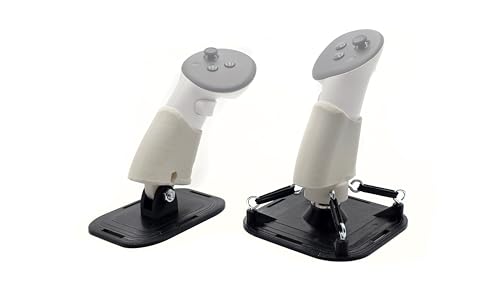
- Built for Quest 2, Quest 3/3s, and Quest Pro
- Spring-loaded stick with auto-centering
- Adjustable throttle tension with elastic bands
Best For: Quest VR flyers who want a dedicated HOTAS setup
Full HOTAS Flight Kit
Thrustmaster T-Flight Full Kit HOTAS with Pedals

- Includes HOTAS plus TFRP rudder pedals
- Hall-effect joystick with adjustable resistance
- 14 buttons and Xbox-friendly controls
Best For: PC or Xbox sim players wanting a complete flight control kit
PC HOTAS System
Logitech G Saitek X52 Pro Flight Control System

- Separate stick and throttle for PC sims
- LCD display and illuminated buttons
- 16 buttons with programmable controls
Best For: PC sim users who want a customizable HOTAS with extra features
Entry-Level USB HOTAS
Thrustmaster T-Flight Hotas One

- Detachable throttle for flexible desk or lap use
- USB plug-and-play for PC and Xbox Series X|S
- 14 programmable buttons with adjustable stick resistance
Best For: Beginners wanting an easy-to-use HOTAS for PC or Xbox sim flying
Premium Metal Combat HOTAS

- All-metal 1:1 A-10C replica for realistic control feel
- H.E.A.R.T Hall Effect sensors for precise, wear-resistant input
- Dual throttles and 55 programmable buttons for advanced sims
Best For: Experienced PC sim pilots who want a military-style HOTAS with maximum realism
MSFS 2024 Collector Pick
T-Flight Hotas One MSFS Edition

- Officially licensed for Microsoft Flight Simulator 2024
- 5 axes with 10-bit precision, 14 buttons, and rapid trigger
- Detachable throttle with dual rudder control options
Best For: MSFS 2024 players on Xbox or PC who want a themed HOTAS
Budget-Friendly Starter HOTAS – Thrustmaster T-Flight Hotas X USB Flight Sim Stick & Throttle
If you want hotas flight controls for vr-style immersion without spending a lot, the Thrustmaster T-Flight Hotas X is a straightforward entry point. Its detachable throttle, adjustable stick resistance, and plug-and-play setup make it easy to jump into flight sims on PC with minimal fuss.
Best For: New sim pilots who want an affordable, easy-to-learn HOTAS with flexible desktop setup.
Pros:
- Detachable full-size throttle for compact or split setup
- 12 programmable buttons and 5 axes for basic customization
- Adjustable resistance and dual rudder control for smoother handling
- Built-in preset memory and plug-and-play convenience
Cons:
- PC-focused and aimed more at simpler setups than premium rigs
- Fewer controls than higher-end HOTAS options
Overall, this is a practical pick if you value comfort and simplicity over advanced features. It gives you the core HOTAS layout with enough flexibility to feel useful in a VR cockpit-style setup.
Feature-Rich Combat Rig – Logitech G Pro Flight X56 Rhino HOTAS
For hotas flight controls for vr that need a more advanced control layout, the Logitech G Pro Flight X56 Rhino stands out with its customizable inputs and controls positioned for easy reach. The twin throttles, mini analog stick controls, and hall-effect sensors make it a strong fit for demanding flight and space sim play.
Best For: VR and space-sim players who want a highly customizable HOTAS with lots of reachable controls.
Pros:
- Ideal for VR with controls placed under your fingers
- 16-bit aileron and elevator axis with hall-effect sensors
- Twin throttles with friction adjuster and throttle lock
- Mini analog stick control surfaces for extra input options
Cons:
- More complex than a basic starter HOTAS
- Designed for PC, so it is not a universal console choice
This is a strong pick if you want a control set that prioritizes depth and adjustability. It is built for users who like to fine-tune their setup and keep critical controls close at hand in VR.
Precision Value HOTAS – Thrustmaster T16000M FCS HOTAS
The Thrustmaster T16000M FCS HOTAS is a good middle-ground option for hotas flight controls for vr if you want precision and lots of buttons without moving into a top-tier price tier. Its Hall effect sensor stick, twist rudder, and broad button layout give it a capable feel for PC flight sim use.
Best For: PC sim players who want accurate controls and a large button count at a practical value point.
Pros:
- Hall effect magnetic sensors for precise stick input
- 4 independent axes, including twist rudder
- Up to 30 buttons and multiple hat/switch inputs
- PC USB compatibility with Windows support
Cons:
- Sold as a PC-focused controller, not a broad cross-platform option
- Does not include the extra throttle depth found on premium twin-throttle systems
If you want accuracy and a busy control scheme for cockpit-style flying, this is an appealing option. It balances precision and functionality well for users building out a VR-ready flight setup.
High-Input Premium HOTAS – Logitech G X56 H.O.T.A.S
The Logitech G X56 H.O.T.A.S is built for hotas flight controls for vr when you want a very large control set and fine-grained input options. With more than 189 programmable controls, RGB lighting, and twin throttles, it is aimed at users who want maximum flexibility in a flight or space sim cockpit.
Best For: Experienced sim players who want a premium, high-control HOTAS for VR and demanding PC setups.
Pros:
- Over 189 programmable controls for extensive mapping
- Ideal for VR with controls placed for quick access
- Hall-effect sensors and 4-spring stick force system
- Twin throttles with friction adjuster and throttle lock
Cons:
- Requires two USB 2.0 ports and a PC-focused setup
- Likely more controller than casual flyers need
For users who want to map nearly everything and keep it within reach, this is the most expansive option in the group. It makes the most sense when you will actually use the extra controls in a serious VR cockpit workflow.
Quest VR HOTAS – Tyco Tech HOTAS/Flight Stick System for Quest
Tyco Tech HOTAS/Flight Stick System, Compatible with Quest 2, Quest 3, Quest 3s and Quest Pro
Check Price On AmazonIf you want hotas flight controls for vr on Meta Quest headsets, this Tyco Tech system is built specifically for Quest 2, Quest 3, Quest 3s, and Quest Pro. It aims to deliver a more authentic cockpit feel with a spring-loaded stick, auto-centering, and a linear throttle that should suit sim players looking for hands-on control in VR.
Best For: Quest users who want a purpose-built HOTAS setup for VR flight sims and prefer adjustable resistance.
Pros:
- Designed specifically for Meta Quest 2, Quest 3/3s, and Quest Pro
- Spring-loaded flight stick with auto-centering for realistic input feel
- Linear throttle with steel bolt and nut construction for smoother adjustment
- Customizable tension using 4-8 elastic bands per anchor point
Cons:
- HOTAS only; controllers are not included
- Limited to supported Meta Quest headset models
- 3D-printed design may not appeal to buyers wanting a mass-produced metal unit
This is a focused VR-specific HOTAS solution rather than a general-purpose flight peripheral, so it makes the most sense if you are flying in Quest VR and want hardware tuned around that use case. The adjustable tension is a practical touch, especially if you want to fine-tune feel over time.
Full HOTAS Flight Kit – Thrustmaster T-Flight Full Kit HOTAS with Pedals
For sim players who want hotas flight controls for vr on PC or Xbox-supported flight setups, this Thrustmaster bundle combines a HOTAS with rudder pedals. It offers a complete control layout with a detachable throttle, Hall-effect joystick, and 14 mappable buttons, making it a strong option when you want more than just a basic stick.
Best For: PC and Xbox flight sim users who want a full HOTAS plus rudder pedal package.
Pros:
- Includes both a HOTAS and TFRP rudder pedals
- Hall-effect joystick and adjustable resistance for precision control
- 14 mappable buttons plus a hat switch for broader cockpit control
- Xbox-specific integration with Guide, View, and Menu buttons
Cons:
- Large and heavy compared with simpler flight stick options
- Designed for PC and Xbox, not headset-specific VR mounting
- May be more setup than needed for casual VR flying
This kit stands out if you want a more complete flight-sim control system rather than a controller replacement. The included pedals make it especially appealing for players who care about yaw control and a more cockpit-like experience.
PC HOTAS System – Logitech G Saitek X52 Pro Flight Control System
If you are comparing hotas flight controls for vr and want a PC-focused option, the Logitech G Saitek X52 Pro is a well-equipped flight control system with a separate stick and throttle. It includes illuminated buttons, an LCD multi-function display, and a progressive throttle with detents, which should appeal to sim users who want more detailed control and software customization.
Best For: PC flight sim players who want a feature-rich HOTAS with strong customization.
Pros:
- Separate stick and throttle with progressive throttle detents
- No-contact X/Y axes and precision centering for smoother control
- 16 buttons plus an LCD multi-function display
- 5-position handle adjustment for different hand sizes
Cons:
- PC-only compatibility
- Requires two USB 2.0 ports
- Optional software download depends on an internet connection
The X52 Pro is best viewed as a customization-heavy control system for desktop sim setups. If you want illuminated controls, more programming flexibility, and a throttle with detents, it offers a strong feature set for the price tier it targets.
Entry-Level USB HOTAS – Thrustmaster T-Flight Hotas One
If you want hotas flight controls for vr without a complicated setup, the Thrustmaster T-Flight Hotas One is a practical starting point. Its detachable throttle, adjustable stick resistance, and plug-and-play USB connection make it easy to move from a desk setup to a more immersive sim layout.
Best For: Beginners and casual sim pilots who want an affordable, modular HOTAS for PC or Xbox flight sims.
Pros:
- Detachable stick and throttle support flexible desk or lap setups
- Adjustable resistance and 14 programmable buttons help with control and mapping
- Works with Windows PC and Xbox Series X|S via USB plug-and-play
- Compatible with optional TFRP rudder pedals for a more complete setup
Cons:
- Plastic-focused build is less premium than metal enthusiast controls
- Sold as a single controller set, so rudder pedals are not included
- May feel limited for advanced sim users who want more switches and heft
For an accessible HOTAS, this model covers the essentials well and keeps setup simple. It is especially appealing if you want a straightforward way to improve immersion in flight sims and VR-style flying without stepping into a high-end cockpit-grade system.
Premium Metal Combat HOTAS – Thrustmaster HOTAS Warthog
For hotas flight controls for vr where realism and precision matter most, the Thrustmaster HOTAS Warthog is built as a high-end PC setup. The all-metal construction, Hall Effect sensors, and dual throttles make it a strong match for serious combat and advanced flight simulation.
Best For: Advanced sim pilots who want a durable, highly realistic military-style HOTAS for PC.
Pros:
- 1:1 A-10C replica design delivers an authentic military-style control layout
- H.E.A.R.T Hall Effect sensors provide precise, wear-resistant stick input
- Dual metal throttles support independent engine management
- 55 programmable buttons plus an 8-way hat offer deep customization
Cons:
- PC-only compatibility limits versatility for console users
- Large all-metal set takes more space and feels less casual than entry models
- Premium design may be more than many beginner pilots need
This is the pick for sim users who want a serious, long-lasting control system and value authenticity over convenience. If your goal is a cockpit-like feel for combat aircraft or complex simulators, the Warthog is the most specialized option here.
MSFS 2024 Collector Pick – T-Flight Hotas One MSFS Edition
If you specifically want hotas flight controls for vr and Microsoft Flight Simulator 2024, this collector edition keeps the setup approachable while adding MSFS-focused compatibility. The detachable throttle, dual rudder options, and 10-bit precision make it a well-rounded choice for casual to mid-level sim flying on Xbox or PC.
Best For: Microsoft Flight Simulator 2024 players who want an officially licensed HOTAS for Xbox and PC.
Pros:
- Officially licensed for Microsoft Flight Simulator 2024
- 10-bit precision with 5 axes, 14 buttons, rapid trigger, and hat switch
- Detachable throttle supports desk or lap-style setups
- Dual rudder control options add flexibility for different aircraft types
Cons:
- Not as premium or heavy-duty as metal enthusiast-grade systems
- Rudder pedals are optional and sold separately
- Best suited to general sim flying rather than deeply specialized combat setups
This edition stands out if you want a themed setup for MSFS 2024 without giving up the familiar T-Flight Hotas One layout. It balances accessibility and control features nicely, making it a solid fit for immersive flying across jets, helicopters, and prop planes.
How We Picked the Best Hotas Flight Controls for Vr
We focused on VR-friendly controls that are easy to use without constant visual reference, with an emphasis on stable throttles, precise sticks, and practical button layouts. Compatibility matters too, so we favored models that work well with PC and, where relevant, Xbox setups. We also considered build quality, adjustability, and how well each system supports long sessions in VR.
Quick Comparison
For most buyers, the best choice comes down to three things: platform support, realism level, and how much cockpit control you want at your fingertips. Entry-level options are better for accessibility and value, while premium systems suit sim pilots who want more sensors, more programmable controls, and a heavier, more authentic feel.
Key Buying Factors for Hotas Flight Controls for Vr
Compatibility
Check whether the system supports PC only or both PC and console. VR sim users on PC will usually have the widest selection, but if you play on Xbox, platform support becomes the first filter.
Precision and Sensor Type
Hall-effect and high-quality sensor systems typically deliver smoother, more durable input than basic potentiometer-based controls. In VR, that consistency helps when you cannot easily glance down and recalibrate by sight.
Ergonomics and Button Reach
Look for controls that feel natural without requiring awkward hand movement. A good layout reduces fatigue and lets you manage trim, flaps, gear, and targeting without breaking immersion.
Throttle and Grip Adjustability
Adjustable resistance, detachable components, and configurable springs can make a big difference in comfort. If you fly different aircraft types, flexibility is especially useful.
Who Should Buy Which Hotas Flight Controls for Vr?
Beginners and casual flyers should prioritize simple, dependable Hotas Flight Controls for Vr with an easy setup and a manageable button layout. Intermediate users may want more programmable inputs and a stronger throttle system for better multitasking. Enthusiasts and realism-focused sim pilots should look at higher-end sets with premium sensors, replica-style ergonomics, and more advanced control options.
If you want the most immersive experience, choose a system that fits your platform first, then match it to your preferred sim style and budget. That approach will get you the best long-term value from your VR cockpit setup.