If you want a more convincing home cockpit, the right vr flight yoke and throttle quadrant can make a huge difference in both comfort and control. The best setups improve hand positioning, reduce guesswork, and make VR flying feel far more natural.
Below, we’ve focused on 10 options that balance realism, build quality, compatibility, and value so you can choose a setup that fits your simming style and budget.
Best 10 Vr Flight Yoke and Throttle Quadrant Picks for 2026
Premium Boeing-Style Flight Pack
Thrustmaster TCA Yoke & Quadrant Boeing Edition

- Boeing 787-inspired 1:1 replica layout
- Pendular yoke motion with 8.3-inch range
- Metal internal structure and 35 action buttons
Best For: Boeing simmers and MSFS airliner setups
Pro-Control Sim Setup
Logitech G PRO Flight Yoke System

- Yoke and throttle quadrant included together
- 54+ programmable controls with mode switch
- Stainless steel shaft and secure desk clamps
Best For: Sim pilots who want lots of programmable inputs
Beginner-Friendly Lite Bundle
Honeycomb Alpha Flight Controls LITE Bundle

- Streamlined bundle with essential controls only
- 180-degree yoke with steel shaft
- Includes Bravo Throttle Quadrant Lite
Best For: Beginners who want a simpler flight-sim setup
Renewed Classic Flight Rig
Logitech G Saitek PRO USB Flight Yoke System
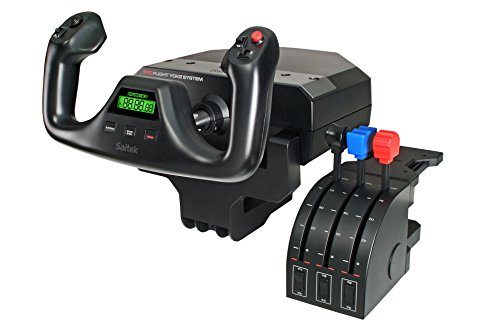
- Renewed yoke and throttle quadrant bundle
- Stainless steel shaft with precise bearings
- 14 buttons plus mode switch and POV hat
Best For: Value-focused pilots who like a classic Saitek layout
Bundle Pick
Versatile All-In-One Flight Controls

- Includes Bravo throttle quadrant and Alpha Flight Controls LITE
- Configurable for single-engine to four-engine aircraft
- Adds LED gear indicators plus an annunciator panel
Best For: Sim pilots seeking a bundled yoke-and-throttle setup
Control Expansion Pick
Expanded Control Set With Pedals

- Includes rudder pedals and a 3-axis throttle quadrant
- Adjustable tension dial and differential toe brakes
- Quadrant can mount on top of or in front of a desk
Best For: Pilots who want rudder pedals plus a flexible throttle quadrant
Full Cockpit Bundle
Yoke Plus Feature-Rich Bravo Quadrant

- Includes Alpha yoke and Bravo throttle quadrant
- Adds autopilot, flap, trim, and annunciator controls
- Configurable for single-engine through four-engine aircraft
Best For: Sim pilots wanting a cockpit-style yoke and throttle bundle
Premium All-In-One Throttle
Honeycomb Bravo Throttle Quadrant

- Configurable for single- to four-engine aircraft
- Includes autopilot, annunciator, gear, flap, and trim controls
- Works with MSFS, X-Plane 11/12, and Prepar3D
Best For: Sim pilots who want a highly configurable throttle quadrant
Yoke Bundle with Controls
Honeycomb Alpha Flight Controls Bundle

- Includes Alpha Flight Controls Yoke & Switch Panel
- Bundles throttle-related modules in one package
- Built as an all-in-one cockpit setup
Best For: Pilots who want a bundled yoke-and-throttle setup
Full Cockpit Pairing
Honeycomb Alpha Yoke and Bravo Bundle

- Pairs the Alpha yoke with the Bravo throttle quadrant
- Alpha offers 180° rotation and damped self-centering
- Bravo adds autopilot, gear, flap, and trim controls
Best For: Sim pilots who want a paired yoke-and-throttle bundle
Premium Boeing-Style Flight Pack – Thrustmaster TCA Yoke & Quadrant Boeing Edition
If you want a vr flight yoke and throttle quadrant that feels built around Boeing-style realism, the Thrustmaster TCA Yoke & Quadrant Boeing Edition is a strong pick. It brings a 1:1 787 Dreamliner-inspired layout, pendular yoke motion, and a matching throttle unit with autopilot controls, making it a good fit for simmers who want a more authentic airliner cockpit feel.
Best For: Boeing fans and Microsoft Flight Simulator players who want a realistic airliner control setup.
Pros:
- Officially licensed Boeing design with a 1:1 Dreamliner-style replica feel
- Pendular motion with an 8.3-inch range for smooth, realistic yoke movement
- 100% metal internal structure for a more durable, premium build
- Throttle quadrant includes Boeing autopilot functions plus 2 extra axes and 35 action buttons
Cons:
- Rudder pedals are not included and are sold separately
- Best suited to airliner simulation rather than simple casual flying
Overall, this bundle is aimed at pilots who care about immersion and Boeing-style control layout. If you want a high-detail yoke system for MSFS or other PC sim setups, it offers a lot of realism in one package.
Pro-Control Sim Setup – Logitech G PRO Flight Yoke System
The Logitech G PRO Flight Yoke System is a practical vr flight yoke and throttle quadrant option for simmers who want a full control set with plenty of programmable inputs. It includes a stainless steel shaft, a throttle quadrant, desk clamps, and a 3-position mode switch, giving you a flexible setup for Microsoft Flight Simulator and other supported PC simulators.
Best For: Pilots who want a feature-rich, customizable yoke system with strong desk mounting.
Pros:
- Includes both yoke and throttle quadrant in the box
- 54+ programmable controls with POV hat, buttons, and mode switch
- Stainless steel shaft is designed for smooth, accurate control
- Desk clamps add secure mounting flexibility for different setups
Cons:
- Requires optional software download for use with supported simulators
- Uses a PS/2 connector cable for the throttle quadrant
This is a solid choice if you want lots of assignable controls and a more traditional flight-sim layout. It is especially appealing for users who value configurability and sturdy hardware over minimalist controls.
Beginner-Friendly Lite Bundle – Honeycomb Alpha Flight Controls LITE Bundle
Honeycomb Aeronautical Alpha Flight Controls LITE Bundle | Bravo Throttle Quadrant Lite, (2 items)
Check Price On AmazonIf you are shopping for a vr flight yoke and throttle quadrant setup but want something simpler, the Honeycomb Aeronautical Alpha Flight Controls LITE Bundle keeps the essentials front and center. It pairs a 180-degree yoke with a Bravo Throttle Quadrant Lite and strips the controls down to the basics, which can make it easier to learn without feeling overwhelmed.
Best For: Newer sim pilots who want an easy, streamlined control bundle.
Pros:
- Essential-control design keeps the setup distraction-free
- 180-degree yoke with steel shaft for smooth, accurate input
- Includes a Bravo Throttle Quadrant Lite as part of the bundle
- Authentic switch layout with POV switch, rocker switches, and programmable buttons
Cons:
- Fewer controls than more advanced flight systems
- Not aimed at users who want a highly complex cockpit layout
For beginners, that simplicity can be a real advantage, especially if you want to focus on flying first and hardware second. It still offers enough realism to grow with you as your sim skills improve.
Renewed Classic Flight Rig – Logitech G Saitek PRO USB Flight Yoke System
The Logitech G Saitek PRO USB Flight Yoke System is a renewed vr flight yoke and throttle quadrant package for simmers who want a proven control layout at a more accessible entry point. It features a stainless steel shaft, a dedicated throttle quadrant with throttle, prop, and mixture controls, and a built-in digital chronograph for IFR-style practice.
Best For: Budget-minded sim pilots who want a traditional, highly configurable yoke system.
Pros:
- Includes both yoke and dedicated throttle quadrant
- Stainless steel shaft with ultra-precise bearings for smooth control inputs
- 14 buttons, a 3-position mode switch, and a POV hat add flexibility
- Smart Technology software allows extensive customization
Cons:
- Renewed unit with a shorter 90-day limited warranty
- Older compatibility notes may matter depending on your system
This model still offers a lot of capability for flight sim work, especially if you like a classic Saitek-style layout. It is a sensible pick for users who want configurability and realism without stepping up to a brand-new premium bundle.
Bundle Pick – Versatile All-In-One Flight Controls
If you want a vr flight yoke and throttle quadrant bundle that covers both primary flight control and engine management, this Honeycomb package is built as an all-in-one cockpit setup. It pairs the Bravo Throttle Quadrant with Alpha Flight Controls LITE for a configurable layout that can handle anything from single-engine general aviation to four-engine commercial flying.
Best For: Sim pilots who want a bundled yoke-and-throttle setup with broad aircraft compatibility.
Pros:
- Includes both the Bravo Throttle Quadrant and Alpha Flight Controls LITE
- Configurable throttle setup for single-engine through four-engine aircraft
- Gear lever includes red and green LED landing gear indicator lights
- Annunciator panel adds 7 two-way programmable switches and 14 warning lights
Cons:
- Bundle is large and heavy at 21.7 pounds
- May be more control than casual flyers need
This is a strong choice if you want a more complete cockpit-style controller set in one purchase. The extra indicators and programmable switches make it especially useful for pilots who want more realism and more functions close at hand.
Control Expansion Pick – Expanded Control Set With Pedals
For a vr flight yoke and throttle quadrant setup that goes beyond the basics, this Logitech combo adds rudder pedals to a dedicated throttle quadrant. The result is a more complete control stack for sim pilots who want smoother directional control, more throttle options, and extra switches without building a system piece by piece.
Best For: Flyers who want rudder pedals and a flexible throttle quadrant in one package.
Pros:
- Smooth, self-centering rudder pedals for realistic directional control
- Adjustable Tension Dial lets you tune the pedal feel
- Differential toe brakes add runway braking control
- Throttle quadrant includes 3 axis levers, 3 two-way rocker switches, and mount options
Cons:
- Does not include a yoke
- Best suited to Windows-based setups
This is a practical pick if you already have a yoke and want to add better rudder and engine-control input. The adjustable pedal tension and configurable quadrant levers make it easy to tailor the setup to different aircraft types.
Full Cockpit Bundle – Yoke Plus Feature-Rich Bravo Quadrant
Honeycomb Alpha Flight Controls Yoke Bundle | Bravo throttle quadrant, (2 items)
Check Price On AmazonIf you’re shopping for a vr flight yoke and throttle quadrant package that feels close to a full cockpit, this Honeycomb bundle combines the Alpha Flight Controls Yoke & Switch Panel with the Bravo Throttle Quadrant. It brings together primary flight control and a feature-rich throttle system, making it a strong option for sim pilots who want more hardware in a single setup.
Best For: Flight sim users who want a bundled yoke and throttle quadrant with cockpit-style extras.
Pros:
- Bundle includes the Alpha Flight Controls Yoke & Switch Panel and Bravo Throttle Quadrant
- Bravo quadrant supports configurable throttle setups from single-engine to four-engine aircraft
- Includes autopilot, annunciator panel, gear lever, flap lever, and trim wheel
- LED landing gear indicator lights add visible status feedback
Cons:
- Large package size may require substantial desk space
- Heavier bundle at 12.13 kg
This bundle is the most cockpit-like of the three options here, with both a yoke and a throttle quadrant plus extra controls built in. It is a compelling fit if you want a more complete hardware layout without adding components one at a time.
Premium All-In-One Throttle – Honeycomb Bravo Throttle Quadrant
If you’re shopping for a vr flight yoke and throttle quadrant setup that can handle everything from light GA flying to airliners, the Honeycomb Bravo is built to be the cockpit centerpiece. It combines a configurable throttle layout with autopilot, annunciator, gear, flap, trim wheel, and thrust reverser controls in one unit.
Best For: Sim pilots who want a highly configurable, all-in-one throttle quadrant for multiple aircraft types.
Pros:
- Configurable throttle setup supports single-engine through four-engine aircraft.
- Includes autopilot panel, annunciator panel, gear lever, flap lever, trim wheel, and thrust reversers.
- Has 7 programmable keys plus multiple switches and indicator lights for customization.
- Works with Microsoft Flight Simulator, X-Plane 11 & 12, and Prepar3D.
Cons:
- Focuses on throttle and cockpit controls rather than including a yoke.
- May be more controller than needed for pilots who only fly one aircraft type.
The Bravo stands out as a flexible throttle solution with serious cockpit-style control depth. If you want one module that can scale from GA to commercial simming, this is an easy one to consider.
Yoke Bundle with Controls – Honeycomb Alpha Flight Controls Bundle
For buyers looking at a vr flight yoke and throttle quadrant bundle, this Honeycomb package combines the Alpha Flight Controls Yoke & Switch Panel with the Bravo Throttle Quadrant and TPM module. It is positioned as an all-in-one cockpit-style setup for simmers who want both yoke control and throttle hardware in one purchase.
Best For: Pilots who want a bundled yoke-and-throttle setup with extra modules included.
Pros:
- Bundle includes the Alpha Flight Controls Yoke & Switch Panel plus throttle-related modules.
- Gives you both yoke and throttle hardware in a single package.
- Designed as an all-in-one cockpit system for a broad range of aircraft.
Cons:
- Supplied notes provide limited detail on the individual module features.
- The bundle is large and heavy at 38.2 pounds.
This bundle is a straightforward way to buy into Honeycomb’s cockpit ecosystem without piecing components together separately. It makes the most sense if you want a coordinated setup rather than a single stand-alone controller.
Full Cockpit Pairing – Honeycomb Alpha Yoke and Bravo Bundle
If you want a vr flight yoke and throttle quadrant combo that covers the basics of a full cockpit, this Honeycomb bundle pairs the Alpha Yoke with the Bravo Throttle Quadrant. The Bravo adds a configurable throttle setup along with autopilot, annunciator, gear, flap, and trim controls, while the Alpha brings 180-degree rotation, steel shaft construction, dual linear bearings, and damped self-centering.
Best For: Sim pilots who want a paired yoke-and-throttle bundle with realistic control feel.
Pros:
- Includes both the Honeycomb Alpha Flight Controls Yoke & Switch Panel and Bravo Throttle Quadrant.
- Alpha yoke features 180-degree rotation, steel shaft, dual linear bearings, and damped self-centering.
- Bravo quadrant adds autopilot, annunciator panel, gear lever, flap lever, and trim wheel.
Cons:
- Bundle may be more hardware than casual sim pilots need.
- Product details in the notes are limited beyond the listed cockpit features.
This is the most complete pairing in the group if you want both primary flight control and engine management hardware together. It is best suited to buyers building a serious desktop cockpit and who want a matched setup from the same brand.
How We Picked the Best Vr Flight Yoke and Throttle Quadrant
To build this roundup, we prioritized products that are widely used for flight simulation, offer strong compatibility with PC and/or Xbox where relevant, and provide the kind of tactile control that matters most in VR. We also looked at ergonomics, throttle layout, realism, expandability, and whether a setup makes sense as a starter kit or a more advanced cockpit upgrade.
Quick Comparison
In simple terms, yoke-and-throttle bundles are best if you want an all-in-one solution, while standalone throttles are ideal if you already own a yoke. More premium options tend to offer smoother motion, sturdier materials, and more switches or controls, while entry-level or renewed picks can be a practical way to save money.
Key Buying Factors for a Vr Flight Yoke and Throttle Quadrant
Compatibility
Make sure the control set works with your platform, sim software, and any console support you need. PC-only gear may offer deeper control mapping, while some products add Xbox support for broader use.
Feel and Precision
For VR, the tactile response of the yoke and throttle matters more than visual styling. Look for smooth centering, stable resistance, and throttles that move cleanly without excessive play.
Control Layout
A good Vr Flight Yoke and Throttle Quadrant should reduce menu diving by placing important functions within easy reach. Extra buttons, switches, trim controls, and autopilot functions can improve immersion and convenience.
Expandability
If you plan to grow your setup, consider whether the system pairs well with rudder pedals, switch panels, or additional quadrants. Modular ecosystems often make it easier to build a full cockpit over time.
Value Versus Realism
Some buyers want the closest possible replica feel, while others just want dependable controls that are comfortable in VR. Decide whether realism, control count, or price matters most before choosing.
Who Should Buy Which Vr Flight Yoke and Throttle Quadrant?
Beginners usually do best with a straightforward bundle that covers both primary flight inputs and keeps setup simple. Intermediate sim pilots may prefer a configurable system with more switches and a better throttle layout. Enthusiasts building a long-term rig should look for premium materials, modular add-ons, and a control set that can grow with their cockpit.
In the end, the best choice is the one that matches your aircraft type, available space, and how much realism you want from your simulator. For VR flying, comfort and intuitive access often matter just as much as raw feature count.