Back buttons can give you quicker access to actions such as jumping, crouching, reloading, or changing controls without moving your thumbs from the sticks. The best choice depends on your platform, preferred connection, button layout, and tolerance for setup complexity.
We compared 10 game controllers with back buttons across Nintendo Switch, Xbox, PlayStation, PC, mobile, and Steam Deck compatibility. The lineup includes programmable controls, Hall Effect or TMR sticks, wireless models, wired designs, and controllers aimed at different budgets and play styles.
Best 10 Game Controllers with Back Buttons Picks for 2026
Best Switch Value
Programmable Switch Controller

- Two programmable rear buttons
- Gyro, vibration, and turbo modes
- 10–15-hour rated battery life
Best For: Switch players seeking versatile rear-button controls
Best for Xbox and PC
FLYDIGI Vader 5S Wired Controller

- Rear and shoulder button mapping
- Adjustable stick tension
- Switchable trigger response
Best For: Competitive Xbox and Windows players
Best Two-Pack

- Two wireless controllers included
- Programmable rear buttons and Hall Effect sticks
- Turbo, RGB, motion, and audio features
Best For: PS4 households and multiplayer setups
Best Premium Features
ManbaOne Interactive Screen Controller

- Four macro-capable back keys
- Built-in 2-inch configuration screen
- 1800mAh battery with charging dock
Best For: Multi-platform players wanting extensive customization
Premium Macro Pick
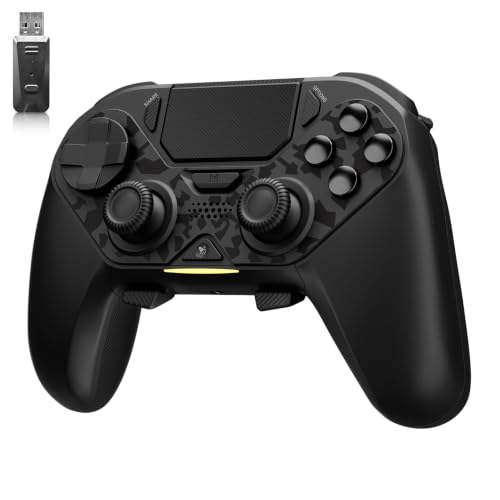
- Four programmable macro back paddles
- TMR joysticks and adjustable triggers
- Works with PS4, Switch, PC, and more
Best For: Multi-platform players wanting four back buttons and macro customization
Xbox Wired Pick

- Two mappable gaming buttons
- Hall Effect thumbsticks
- Three-way trigger locks
Best For: Xbox and Windows players who prefer wired competitive controls
PS4 Value Pick
CHEREEKI Wireless Macro Controller
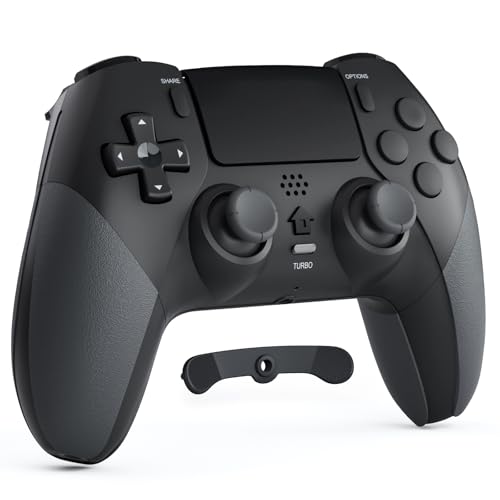
- Two rear macro buttons
- Wireless PS4 compatibility
- Turbo, gyro, and 8-10-hour battery
Best For: PS4 players wanting wireless play with basic rear macro controls
Style-Focused Xbox Pick
Storm Breaker Wireless Controller
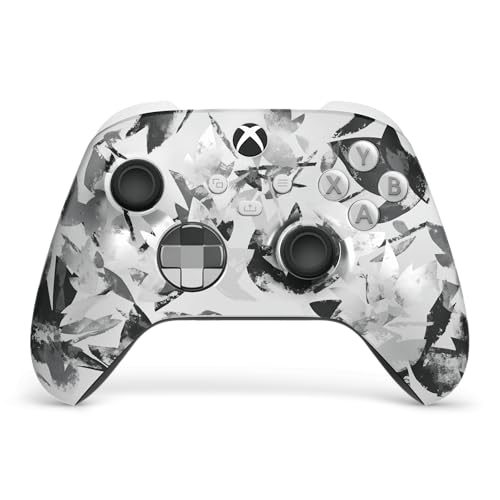
- Rubberized rear grips and textured triggers
- Up to 40 hours of battery life
- Xbox, PC, mobile, Bluetooth, and USB-C support
Best For: Xbox and PC players who want comfort and broad compatibility
Best Value Back-Button Pick

- Two programmable back buttons
- Hall Effect joysticks and triggers
- 2.4G, Bluetooth, and USB-C connectivity
Best For: PC and Steam players seeking flexible controls and anti-drift hardware
Best Switch Value – Programmable Switch Controller
If you want game controllers with back buttons for Nintendo Switch, this wireless model adds two programmable rear controls without giving up motion sensing, vibration, or turbo functions. Its back buttons can be assigned to several face, shoulder, and D-pad inputs, making common actions easier to reach.
Best For: Switch players who want affordable rear-button control, wireless play, and extended battery life.
Pros:
- Two programmable back buttons support single or multi-button programming.
- Includes six-axis gyro sensing, three vibration levels, and adjustable turbo speeds.
- 600mAh battery is rated for approximately 10–15 hours of play.
- Supports one-button wake-up for the Switch after initial pairing.
Cons:
- Does not support Switch 2 wake-up or audio functions.
- Initial connection requires pressing Y + HOME.
This is a feature-rich choice for Switch owners who want rear controls and programmable inputs. Confirm the wake-up and audio limitations if you plan to use it with Switch 2 or a headset.
Best for Xbox and PC – FLYDIGI Vader 5S Wired Controller
The FLYDIGI Vader 5S is a wired option for Xbox and Windows gamers looking for game controllers with back buttons and deeper competitive customization. Its rear and shoulder buttons can handle actions such as jump, crouch, and ping while adjustable sticks and trigger modes let you tailor the controller to different genres.
Best For: Competitive Xbox and PC players who prefer wired reliability and extensive control adjustment.
Pros:
- Rear and shoulder buttons can be mapped to frequently used actions.
- Hall Effect sticks are designed for precise control and reduced drift concerns.
- Joystick tension adjusts from 40gf to 100gf for different games.
- Switchable micro-click or Hall Effect linear triggers suit FPS and racing play.
Cons:
- Wired connectivity limits cable-free play.
- At 450g, it may feel heavier than a basic controller.
With adjustable hardware controls and software profiles, the Vader 5S is aimed at players who want to tune one controller for multiple genres. It is compatible with Xbox One, Xbox Series X|S, and Windows 10/11, but it is not a wireless model.
Best Two-Pack – AceGamer PS4 Controller Set
This AceGamer two-pack brings game controllers with back buttons to PS4 and PC setups, with two programmable rear controls on each controller. Hall Effect joysticks, turbo settings, motion sensing, RGB lighting, and a 3.5mm audio jack add flexibility for both competitive and casual play.
Best For: PS4 households, multiplayer setups, or shoppers who want two rear-button controllers in one package.
Pros:
- Includes two wireless controllers with two programmable back buttons each.
- Dual Hall Effect joysticks are designed to resist traditional stick drift.
- Supports turbo customization, vibration, six-axis motion sensing, and RGB modes.
- Works with PS4, PS4 Pro, PS4 Slim, and Windows PC.
Cons:
- First pairing requires activation with the included USB cable.
- PC Bluetooth-free setups require a receiver, which is not included.
- Low battery power may cause unexpected disconnections.
The two-controller bundle is particularly practical for local multiplayer or replacing multiple aging PS4 pads. Buyers should plan for the initial wired pairing and check their PC’s Bluetooth or receiver requirements.
Best Premium Features – ManbaOne Interactive Screen Controller
The ManbaOne stands out among game controllers with back buttons by combining four macro-capable rear keys with a built-in 2-inch interactive screen. It supports Switch, Switch 2, iOS, Android, and Windows PC, while Hall Effect sticks and triggers, multiple connection modes, and an included charging dock broaden its appeal.
Best For: Multi-platform players who want on-controller configuration, macro-capable back keys, and a charging dock.
Pros:
- Four back keys support macro definition settings and one-click actions.
- 2-inch screen allows button, vibration, joystick, and lighting adjustments without an app.
- Hall Effect sticks and triggers, four joystick modes, and 800Hz+ wired polling are included.
- 1800mAh battery, wireless receiver, and smart charging station come together.
Cons:
- It is not compatible with Xbox, PlayStation, or GeForce Now.
- Switch 2 is supported, but the wake-up function is not.
- The feature-rich design may be more than users seeking a simple controller need.
The ManbaOne is a strong fit when customization and cross-platform flexibility matter more than simplicity. Its screen reduces reliance on software, while the four rear keys provide more programming room than the two-button designs in this roundup.
Premium Macro Pick – AceGamer Hypershadow D4
For shoppers seeking game controllers with back buttons across several platforms, the AceGamer Hypershadow D4 offers four programmable macro paddles, wireless and wired connectivity, and broad compatibility with PS4, Switch, PC, iOS, Android, and Steam Deck. Its TMR joysticks, adjustable triggers, and mechanical-style controls target fast, precise play.
Best For: Multi-platform players who want four macro back buttons and extensive control customization.
Pros:
- Four M1-M4 back buttons support macros of up to 24 inputs each.
- TMR joysticks, micro-switch buttons, and adjustable trigger modes provide responsive control.
- Supports Bluetooth, wired, and 2.4G connections across several compatible platforms.
- Includes turbo, gyro, touchpad, grip vibration, and trigger vibration on PC.
Cons:
- It is not compatible with Xbox.
- The initial setup requires a wired charge to unlock the controller.
- The PS4 cannot use the 2.4G receiver and must connect wirelessly.
The D4 is the most feature-rich option here for players who want multiple back inputs and macro support. Its setup notes and platform-specific limitations are worth checking before purchase.
Xbox Wired Pick – PowerA Advantage Arctic Ice
The PowerA Advantage is a practical wired choice among game controllers with back buttons for Xbox and Windows users. It has two mappable advanced gaming buttons, Hall Effect thumbsticks, three-way trigger locks, and a USB-C connection for responsive wired play.
Best For: Xbox Series X|S and Xbox One players who prefer a wired controller with two programmable buttons.
Pros:
- Two buttons can be mapped on the fly without changing system settings.
- Hall Effect thumbstick modules are designed for smooth control and increased longevity.
- Three trigger-lock positions support faster actions or longer trigger travel.
- Includes rumble, impulse triggers, a headset jack, and a two-year limited warranty.
Cons:
- It is wired rather than wireless.
- It offers two extra programmable buttons, fewer than some four-paddle controllers.
- Compatibility is focused on Xbox consoles and Windows 10/11.
This controller suits Xbox players who want useful rear-button functionality without wireless setup. Its Hall Effect sticks and trigger locks add practical competitive features, while the wired design keeps the configuration straightforward.
PS4 Value Pick – CHEREEKI Wireless Macro Controller
The CHEREEKI wireless controller is a focused PS4 option for shoppers comparing game controllers with back buttons. It adds two rear macro buttons to a familiar layout, along with a touchpad, six-axis motion control, turbo functionality, and an 8-to-10-hour battery claim.
Best For: PS4, PS4 Slim, and PS4 Pro players who want basic macro back buttons and wireless play.
Pros:
- Two macro buttons on the back provide extra input options.
- Designed specifically for PS4, PS4 Slim, and PS4 Pro with wireless range up to 8 meters.
- Includes a touchpad, six-axis sensor, dual vibration, turbo, and a 3.5mm audio jack.
- Rated for 8-10 hours of play per charge.
Cons:
- Compatibility is limited to PlayStation 4 models.
- It has two back macro buttons rather than four.
- It does not offer the broader platform support of the AceGamer model.
The CHEREEKI keeps the feature set centered on PS4 gaming and adds useful extras without requiring a wired connection. It is a reasonable fit for PS4 owners who want rear macros, though multi-platform buyers should look elsewhere.
Style-Focused Xbox Pick – Storm Breaker Wireless Controller
The Xbox Wireless Gaming Controller Storm Breaker is a strong choice for players who want a comfortable, versatile controller, although it is not a back-button model. Its rubberized rear grips, textured triggers, wireless and Bluetooth connectivity, USB-C support, and Xbox Accessories app customization make it practical across Xbox, PC, mobile, and supported streaming devices.
Best For: Xbox and PC players who prioritize style, comfort, broad device support, and long battery life over dedicated rear buttons.
Pros:
- Rubberized rear grips support comfort and control during longer sessions.
- Works with Xbox consoles, PC, mobile devices, TVs, and supported cloud-gaming setups.
- Offers up to 40 hours of battery life and includes wireless, Bluetooth, and USB-C connectivity.
- Button mapping and controller profiles are available through the Xbox Accessories app.
Cons:
- Does not include dedicated programmable back buttons.
- Its Xbox-focused feature set may be less suitable for players seeking a specialized competitive PC controller.
The Storm Breaker stands out for its official Xbox compatibility, distinctive design, and flexible connectivity. Choose it if rear buttons are not essential and you want a polished controller for everyday multi-device gaming.
Best Value Back-Button Pick – EasySMX X15
The EasySMX X15 is one of the more directly relevant options for shoppers comparing game controllers with back buttons. It combines two programmable rear buttons with Hall Effect joysticks and triggers, three connection modes, and compatibility with PC, Steam, Switch, Android, and iOS.
Best For: PC and Steam players who want programmable back buttons, drift-resistant controls, and flexible wireless connectivity.
Pros:
- Two programmable back buttons can handle combos and shortcuts.
- Hall Effect joysticks and triggers are designed to reduce stick drift and dead zones.
- Supports 2.4G wireless, Bluetooth, and wired USB-C connections.
- Offers a 1000mAh battery with up to 20 hours of playtime, plus a 1000Hz polling rate.
Cons:
- Does not include a microphone jack or gyro sensor.
- Compatibility should be checked for the specific device before purchase.
The X15 delivers the key features many players seek in a back-button controller without limiting itself to one platform. Its Hall Effect hardware and connection choices make it especially appealing for PC gaming, while Switch and mobile support add versatility.
Most Versatile Back-Button Pick – AceGamer Aurora II
The AceGamer Aurora II is built for shoppers seeking game controllers with back buttons across several platforms. It provides two programmable rear keys with lock switches, Hall Effect joysticks, 2.4G wireless and Bluetooth connectivity, and support for PC, Switch, Switch 2, Android, and iOS.
Best For: Multi-platform players who want programmable rear controls, Hall Effect sticks, and a large battery for extended sessions.
Pros:
- Two programmable back buttons support trigger combos and other custom functions.
- Back-button lock switches provide convenient access and control.
- Hall Effect joysticks offer precise input and reduced drift concerns.
- Includes an upgraded 1000mAh battery and 2.4G wireless and Bluetooth options.
Cons:
- It is not compatible with Xbox systems.
- 2.4G pairing requires a specific button sequence with the receiver.
- Sleep mode activates after five minutes of inactivity.
The Aurora II is a flexible choice for households or players moving between PC, Switch, mobile, and Steam Deck-style setups. Its back-button locks and Hall Effect sticks add useful control features, but Xbox users should choose another model.
How We Picked These Game Controllers with Back Buttons
We focused on controllers that provide rear or back-mounted inputs, whether they use dedicated paddles, macro buttons, or programmable controls. We also considered platform compatibility, connection options, stick technology, trigger design, ergonomics, software or onboard customization, and overall value.
Because compatibility varies widely, a controller was not treated as universally suitable simply because it connects by USB or Bluetooth. Console support, mobile support, wireless receivers, and PC compatibility can differ by model and operating system, so check the listed platforms before buying.
Quick Comparison
| Feature | Why It Matters | Best For |
|---|---|---|
| Wireless connection | Reduces cable clutter and supports flexible seating | Console, living-room, and handheld play |
| Wired connection | Provides consistent power and low setup complexity | Competitive or desk-based gaming |
| Hall Effect or TMR sticks | Uses contactless sensing to help reduce traditional stick-drift risk | Frequent players seeking durability |
| Programmable back controls | Lets you assign frequently used actions to rear inputs | Shooters, action games, and accessibility needs |
| Multi-platform support | Allows one controller to serve several devices | Players with PC, console, and mobile libraries |
Key Buying Factors for Controllers with Back Buttons
Button Layout and Programming
Check how many rear inputs are included and whether they support full remapping, macros, or only fixed functions. Rear buttons should be easy to reach without accidental presses. A textured surface or distinct spacing can help during fast gameplay.
Compatibility and Connection Type
Confirm support for your exact console generation, PC operating system, mobile device, or Steam Deck setup. Wireless models may use Bluetooth, a 2.4GHz USB receiver, or both. Wired controllers are often simpler, but cable length and USB compatibility still matter.
Stick and Trigger Performance
Hall Effect and TMR sticks can be appealing for long-term use, while adjustable or instant triggers may benefit racing and shooter games. These features do not replace good ergonomics, so consider stick placement, grip shape, dead zones, and trigger resistance together.
Battery, Software, and Extras
For wireless controllers, check battery life, charging method, and whether play-and-charge is supported. Companion software can make remapping easier, but onboard profiles are more convenient when switching between devices. RGB lighting and screens are useful only if they fit your priorities and budget.
Who Should Buy Which Game Controllers with Back Buttons?
Choose a Nintendo-focused model if you mainly play on Switch or Switch 2 and want platform-specific compatibility. Xbox players should prioritize officially compatible Xbox options, while PlayStation users should verify PS4 or PS5 support rather than assuming cross-generation compatibility.
PC and Steam Deck users have the broadest selection. A wireless 2.4GHz model suits players who want low cable clutter, while a wired controller is a practical choice for desk gaming and avoids battery maintenance. If durability is your priority, consider Hall Effect or TMR sticks. If faster access to commands is the main goal, prioritize comfortable, programmable rear controls over decorative features.