The right document scanner for receipts can turn a cluttered wallet, desk, or expense folder into organized digital records. The best choice depends on how often you scan, whether you need duplex capture, and where you work.
We selected 10 models ranging from lightweight single-sheet scanners to capable desktop units with wireless connectivity, automatic document feeders, and receipt-focused software.
Best 10 Document Scanner for Receipts Picks for 2026
Best Overall

- 45 ppm duplex scanning with a 100-sheet feeder
- AI-ready receipt and document data extraction
- Wi-Fi and integrations with QuickBooks, TurboTax, and Excel
Best For: High-volume receipt scanning and financial workflows
Best Portable
Hczrc Portable Receipt Scanner

- Lightweight battery-powered handheld design
- Saves JPEG or PDF scans to an included 16GB card
- Selectable 300, 600, and 900 dpi modes
Best For: Travel and occasional receipt scanning away from a desk
Best Wired Duplex

- Automatic duplex scanning for receipts and documents
- Smart software with text recognition and image cleanup
- Compact USB design with a collapsible feeder
Best For: Compact home-office receipt and document organization
Best Small-Footprint Wireless

- Compact design for space-constrained desks
- 30 ppm automatic duplex scanning
- Wi-Fi and USB support for computers, mobile devices, and cloud services
Best For: Flexible receipt scanning in small home or office workspaces
Best Portable Receipt Scanner

- Lightweight 9.44-ounce design
- Scans receipts and ID cards
- USB-powered with OCR
Best For: Mobile users scanning individual receipts and documents
Best High-Volume Receipt Scanner

- 50-sheet automatic document feeder
- Duplex scanning for both sides
- OCR and cloud-sharing features
Best For: Home offices and businesses scanning receipt batches
Best Compact Pick

- Up to 16 ppm in color or black and white
- About 1 pound and under 1 foot long
- USB-powered with OCR and image tools
Best For: Portable receipt scanning from a laptop
Best Lightweight Option

- Weighs just 9.44 ounces
- Scans a page in as fast as 5.5 seconds
- Supports receipts, cards, and pages up to 72 inches
Best For: Lightweight single-sheet scanning on the go
Best for Receipt Organization
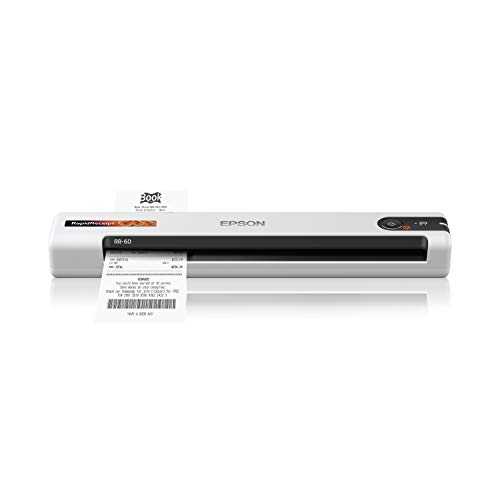
- Converts receipts and invoices into digital data
- Integrates with QuickBooks and TurboTax
- Automatic Feeding Mode scans up to 10 ppm
Best For: Bookkeeping, tax preparation, and receipt organization
Best Overall – Epson RapidReceipt RR-620W
The Epson RapidReceipt RR-620W is a strong document scanner for receipts when speed, wireless connectivity, and organized financial data matter. It scans both sides in one pass at up to 45 pages per minute, includes a 100-sheet feeder, and supports direct scanning to email, cloud storage, or a USB drive.
Best For: Small businesses and home offices processing large batches of receipts, invoices, and documents.
Pros:
- Fast duplex scanning at up to 45 ppm.
- 100-page Auto Document Feeder supports batch scanning.
- AI-ready data extraction and integration with QuickBooks, TurboTax, and Excel.
- Wi-Fi, USB, and computer-free scanning through the color touchscreen.
Cons:
- At 8.2 pounds, it is less portable than handheld models.
- The feature-rich design may be more than occasional users need.
With its touchscreen, wireless workflow, and financial-data integrations, the RR-620W is designed for users who want to turn receipt scanning into a faster, more automated process.
Best Portable – Hczrc Portable Receipt Scanner
This handheld document scanner for receipts is built for portability and simple, computer-free capture. It saves scans directly to the included 16GB Micro SD card, runs on two AA batteries, and offers 300, 600, or 900 dpi settings with JPEG or PDF output.
Best For: Travelers, students, and professionals who need to capture receipts and documents away from a desk.
Pros:
- Compact 9.6-ounce design for travel and field use.
- Stores scans directly to a Micro SD card without software installation.
- Offers three resolution settings up to 900 dpi.
- Supports both JPEG and PDF formats.
Cons:
- Requires two AA batteries, which are not included.
- Manual handheld scanning is less convenient for large batches.
- USB is the listed connection type; wireless scanning is not specified.
The Hczrc favors convenience over automation, making it a practical backup or travel scanner for occasional receipt capture rather than a high-volume office workflow.
Best Wired Duplex – Doxie Pro
The Doxie Pro is a compact wired document scanner for receipts, invoices, photos, and other paperwork. Its automatic duplex scanning captures both sides, while the included software provides text recognition, automatic cropping, rotation, contrast enhancement, and connections to services such as Dropbox, Evernote, OneNote, and iCloud.
Best For: Home offices and small businesses that want a compact wired scanner with straightforward organization tools.
Pros:
- Automatic two-sided scanning for receipts and documents.
- Software includes text recognition, cropping, rotation, and contrast boost.
- Collapsible feeder and direct-feed slot accommodate delicate or thicker paper.
- Compact footprint weighs just over 3 pounds.
Cons:
- It uses a wired USB connection rather than wireless connectivity.
- The feeder capacity is limited to 20 sheets.
- It is less suited to large scanning batches than higher-capacity desktop models.
Doxie Pro is a balanced choice for users who value duplex capture and useful software in a small footprint, especially when wireless operation is not required.
Best Small-Footprint Wireless – ScanSnap iX1300
The ScanSnap iX1300 is a space-saving document scanner for receipts that supports both Wi-Fi and USB connections. It scans at up to 30 pages per minute in duplex mode, handles documents, photos, cards, and thicker items, and can send files to computers, mobile devices, cloud services, or a Chromebook through the mobile app.
Best For: Users with limited desk space who want flexible wireless or USB scanning for receipts and mixed paperwork.
Pros:
- Compact design measures 4.5 by 11.7 by 3.3 inches.
- Wireless or USB connectivity supports computers, mobile devices, and cloud services.
- Up to 30 ppm duplex scanning with automatic de-skew and blank-page removal.
- Handles receipts, photos, cards, and thicker items.
Cons:
- The 20-sheet capacity is modest for larger batches.
- Its 30 ppm speed is lower than the Epson RR-620W.
- Some platform features depend on the ScanSnap Home software or mobile app.
The iX1300 is a versatile middle ground: more connected and automated than a handheld scanner, while smaller and less demanding of desk space than many full-size desktop units.
Best Portable Receipt Scanner – Epson WorkForce ES-50
If you need a document scanner for receipts that can travel with you, the Epson WorkForce ES-50 is a compact, USB-powered option for single-sheet scanning. It handles receipts, ID cards, and documents up to 8.5 by 72 inches, while included OCR can create searchable PDFs and editable Word or Excel files.
Best For: Travelers, mobile workers, and anyone who primarily scans individual receipts and documents at a time.
Pros:
- Compact and lightweight at 9.44 ounces.
- Scans a single page in as little as 5.5 seconds.
- USB-powered, with no batteries or external power supply required.
- Includes OCR and ScanSmart software for organizing and saving files.
Cons:
- Its standard sheet capacity is one page.
- Requires a USB connection to operate.
The ES-50 is best when portability matters more than batch capacity. Its automatic feeding mode can combine successive sheets into one file, but users with large receipt piles may prefer a scanner with an automatic document feeder.
Best Duplex Receipt Scanner – Canon imageFORMULA R10
The Canon imageFORMULA R10 is a portable document scanner for receipts and other mixed media when you want faster, two-sided capture. Its 20-sheet feeder handles receipts, business cards, plastic or embossed cards, and documents, while duplex scanning captures both sides at up to 12 pages per minute.
Best For: Mobile offices and home users who need a portable scanner with an automatic feeder and duplex scanning.
Pros:
- Scans both sides of a document at the same time.
- 20-sheet automatic feeder supports more efficient scanning.
- Handles receipts, business cards, plastic cards, and legal documents.
- Built-in software supports searchable PDFs and scan editing.
Cons:
- USB-powered and designed for use with a Windows or Mac device.
- Not intended for scanning photographs on photo paper or photographic media.
The R10 offers a useful balance of portability and productivity. Its feeder and duplex capability make it more suitable than a single-sheet model for recurring receipt batches, while its built-in software keeps setup straightforward.
Best High-Volume Receipt Scanner – Epson WorkForce ES-400 II
For larger receipt batches, the Epson WorkForce ES-400 II is a desktop document scanner for receipts and office paperwork. Its 50-sheet automatic document feeder, duplex scanning, and double-feed detection are designed to process stacks more efficiently, while OCR helps create searchable and editable files.
Best For: Home offices and businesses digitizing frequent batches of receipts and documents.
Pros:
- 50-sheet automatic document feeder speeds up batch scanning.
- Duplex scanning captures both sides of documents.
- Ultrasonic double-feed detection and skew correction help improve feeding reliability.
- ScanSmart supports cloud uploads, email, OCR, and automatic file naming.
Cons:
- Desktop design is less portable than the other listed models.
- Weighs 3.7 kg and requires a USB connection.
The ES-400 II is the strongest fit for organized, higher-volume scanning rather than occasional travel use. Its larger feeder and document-management features can reduce hands-on work when digitizing accumulated receipts.
Best Compact Pick – Brother DS-640
The Brother DS-640 is a practical document scanner for receipts when portability, USB power, and quick color scanning matter. It scans up to 16 pages per minute and supports receipts, cards, and plain paper, making it useful for mobile work or occasional home-office organization.
Best For: Travelers, remote workers, and anyone who needs a lightweight receipt scanner that can run from a laptop.
Pros:
- Scans color and black-and-white documents at speeds up to 16 pages per minute.
- Compact design weighs about 1 pound and is less than 1 foot long.
- USB-powered operation works without a wall outlet.
- Includes OCR and image-enhancement features, with Windows, Mac, and Linux support.
Cons:
- Single-sheet capacity means documents must be fed one at a time.
- USB connection is required for operation.
The DS-640 is a strong choice for portable receipt scanning, especially if you value speed and broad computer compatibility over automatic feeding.
Best Lightweight Option – Epson DS-70
The Epson DS-70 is a lightweight document scanner for receipts designed for simple, on-the-go single-sheet scanning. It scans a page in as fast as 5.5 seconds, handles receipts and cards, and includes OCR software for creating editable text and searchable PDFs.
Best For: Users who want an especially light scanner for receipts, cards, and occasional long documents.
Pros:
- Weighs 9.44 ounces for easy transport.
- Scans a single page in as fast as 5.5 seconds.
- Handles receipts, business cards, ID cards, and documents up to 8.5 by 72 inches.
- Includes OCR and document-management software.
Cons:
- Single-sheet design requires manual feeding.
- Listed minimum system requirements specify Windows 7.
- USB connection is required.
The DS-70 emphasizes low weight and straightforward operation. It is a sensible fit for mobile users who scan modest quantities rather than large batches.
Best for Receipt Organization – Epson RapidReceipt RR-60
The Epson RapidReceipt RR-60 is a document scanner for receipts built around financial recordkeeping. Its ScanSmart AI technology converts receipts, invoices, and business cards into digital data that can integrate with QuickBooks, TurboTax, and other financial software.
Best For: Small-business owners, tax preparers, and anyone organizing receipts and invoices for digital financial records.
Pros:
- Designed to convert receipts, invoices, and business cards into usable digital data.
- Integrates with QuickBooks, TurboTax, and other financial applications.
- Scans up to 10 pages per minute in Automatic Feeding Mode.
- USB-powered and handles receipts, cards, and long pages up to 8.5 by 72 inches.
Cons:
- Listed minimum system requirements specify Windows 7.
- USB-powered operation requires a connected computer.
- Its financial-data features may be more than casual users need.
The RR-60 stands out when receipt scanning is part of bookkeeping or tax preparation. Its software integrations make it more specialized than a basic portable scanner.
How We Picked the Best Document Scanner for Receipts
We focused on features that matter for receipt and document digitization: scan speed, image quality, portability, duplex capability, connectivity, software support, and ease of handling varied paper sizes. We also considered whether each scanner is better suited to occasional home use, mobile work, or frequent business scanning.
Receipt scanning can be demanding because receipts are often narrow, curled, faded, or printed on thin thermal paper. Models with reliable paper feeding, image correction, and searchable PDF support have an advantage for expense tracking and recordkeeping.
Quick Comparison
| Type | Best For | What to Look For |
|---|---|---|
| Desktop scanner | Frequent home or office scanning | Duplex scanning, an automatic document feeder, and high daily volume |
| Portable mobile scanner | Travel, remote work, and occasional receipts | USB power, compact dimensions, and simple single-sheet feeding |
| Wireless scanner | Shared workspaces and flexible setup | Wi-Fi, computer compatibility, and dependable scanning software |
| Receipt-focused scanner | Expense reports and bookkeeping | Receipt organization, text recognition, and cloud integrations |
Key Buying Factors for a Document Scanner for Receipts
Duplex Scanning and Feeding
Duplex scanning captures both sides in one pass, which is useful for receipts with notes, payment details, or terms printed on the back. An automatic document feeder is valuable when processing batches, while a single-sheet design is often better for portability.
Speed and Capacity
Choose a desktop model if you regularly scan stacks of receipts or mixed documents. Compact scanners are convenient but generally require more hands-on feeding. Check the rated pages per minute and feeder capacity, but remember that real-world performance varies with paper condition and settings.
Portability and Power
USB-powered models are practical for laptops, travel, and temporary workstations. A small footprint matters if the scanner will share limited desk space. Wireless connectivity adds flexibility, especially when several computers need access.
Software and File Formats
Look for software that can create searchable PDFs, recognize text, correct skew, and export to common formats such as PDF or JPEG. Cloud compatibility can simplify expense workflows, but confirm that the software works with your operating system before buying.
Paper Handling and Image Quality
Receipts vary widely in length, thickness, and condition. A dependable feed path and adjustable guides help prevent jams. Optical resolution around 300 dpi is typically sufficient for receipts, while higher settings create larger files without always improving readability.
Who Should Buy Which Document Scanner for Receipts?
Choose a Desktop Model for High-Volume Scanning
If you scan receipts, invoices, forms, and other paperwork every week, a desktop duplex scanner with an automatic feeder is usually the most efficient choice. It reduces manual handling and is better suited to organized office workflows.
Choose a Portable Model for Mobile Work
Frequent travelers, field workers, and people with limited desk space should prioritize a compact USB-powered scanner. These models are easy to carry and work well for occasional receipts, signed forms, and small document batches.
Choose Wireless Connectivity for Shared Workspaces
A wireless scanner makes sense when you want to scan from multiple computers or avoid keeping a cable connected. Confirm network setup requirements and supported platforms before purchasing.
Choose Receipt-Oriented Features for Bookkeeping
For tax preparation, expense reporting, or small-business records, prioritize receipt organization, searchable files, reliable text recognition, and cloud or accounting integrations. The best Document Scanner for Receipts is the one that fits your volume and preserves a workflow you will actually use consistently.