Choosing among the best micro ATX computer cases means balancing compact dimensions with the hardware your build actually needs. GPU length, radiator clearance, airflow, and power-supply layout can matter more than appearance alone.
We compared 10 compact cases across budget, gaming, showcase, and small-form-factor designs so you can find a practical fit for your motherboard, graphics card, cooling setup, and upgrade plans.
Best 10 Micro Atx Computer Cases Picks for 2026
Best ARGB Showcase

- Three included 120mm ARGB fans
- Front and side tempered glass
- Supports up to a 280mm radiator
Best For: RGB-focused micro-ATX gaming builds
Best Compact Hardware Support
Lian Li A3-mATX Wood Black Mesh

- 26.3-liter compact design
- Supports GPUs up to 415mm
- Fits radiators up to 360mm
Best For: Compact high-performance builds with flexible hardware placement
Best Airflow Design
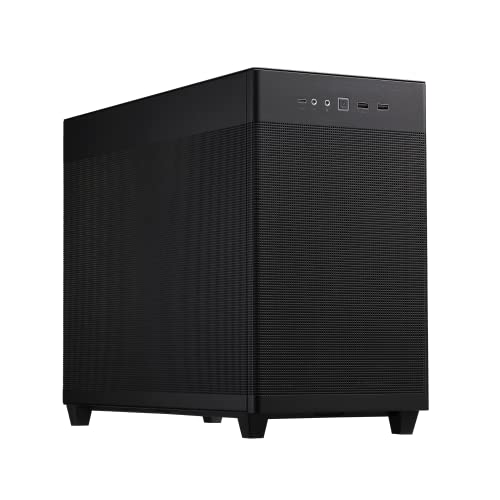
- Fine mesh airflow panels
- Supports radiators up to 360mm
- Tool-free side panels and 32mm cable gap
Best For: High-performance, airflow-focused micro-ATX systems
Best Storage-Friendly Value

- Fully meshed front panel
- Supports up to seven listed drive positions
- Fits graphics cards up to 355mm
Best For: Budget micro-ATX builds with multiple storage drives
Ready-to-Use Value Pick

- 400W power supply included
- Supports Micro-ATX and Mini-ITX
- 240mm front radiator support
Best For: Simple budget office or compact gaming systems
Smallest Footprint Pick

- Compact 17.1-liter design
- Supports standard ATX power supplies
- 260mm GPU and 137mm cooler clearance
Best For: Space-conscious Micro-ATX and Mini-ITX desktop builds
Best Air-Cooling Pick

- Air-cooling-only design with a 165mm CPU-cooler limit
- Three pre-installed 120mm ARGB fans
- Quick-release glass panels and USB-C 5Gbps
Best For: Straightforward, compact air-cooled builds
Best Panoramic Budget Style

- 270-degree panoramic tempered-glass panel
- Three pre-installed fans
- Supports Micro-ATX and Mini-ITX boards
Best For: Compact gaming builds with a strong visual focus
Best ARGB Showcase – Thermaltake View 170 TG ARGB
For builders seeking stylish micro atx computer cases, the Thermaltake View 170 TG ARGB combines a compact micro-ATX layout with front and side tempered-glass panels. Its three included ARGB fans and top radiator support make it a ready-to-use option for gaming builds.
Best For: RGB-focused micro-ATX gaming systems with a visible component layout.
Pros:
- Front and side pillarless tempered-glass panels showcase the build.
- Includes three 120mm ARGB fans.
- Supports a top-mounted radiator up to 280mm.
- Accepts graphics cards up to 340mm long.
Cons:
- Only two USB 3.0 ports are listed on the I/O panel.
- The glass-heavy design may prioritize appearance over maximum airflow.
The View 170 TG ARGB is a practical choice when integrated lighting and presentation matter. Check graphics-card and radiator dimensions before building, especially if using larger components.
Best Compact Hardware Support – Lian Li A3-mATX Wood Black Mesh
The Lian Li A3-mATX is one of the more flexible micro atx computer cases for compact, high-performance builds. Its 26.3-liter design supports GPUs up to 415mm, 360mm radiators, multiple motherboard sizes, and several PSU formats.
Best For: Compact performance builds using a large graphics card or 360mm AIO.
Pros:
- Supports mATX and ITX motherboards.
- Accommodates graphics cards up to 415mm long.
- Supports a 360mm radiator and up to ten 120mm fans.
- Flexible front or side PSU installation improves configuration options.
Cons:
- Fans are not included.
- The one-year warranty is shorter than some competing options.
- Its compact layout may require more careful cable planning.
Choose the A3-mATX when component compatibility and modular placement are more important than a simple installation. The wood front panel also gives it a distinctive minimalist appearance.
Best Airflow Design – ASUS Prime AP201
The ASUS Prime AP201 is a versatile option among micro atx computer cases, using fine mesh panels to encourage airflow while retaining a clean appearance. It supports large radiators, ATX power supplies, and graphics cards up to 338mm.
Best For: Airflow-conscious builders using high-performance components in a 33-liter case.
Pros:
- Quasi-filter mesh uses more than 57,000 precision-machined holes.
- Supports 280mm and 360mm radiators.
- Accepts graphics cards up to 338mm and ATX PSUs up to 180mm long.
- Tool-free side panels and a 32mm cable-management gap simplify assembly.
Cons:
- The 33-liter footprint is larger than some compact mATX designs.
- The listed graphics-card clearance is lower than the Lian Li A3-mATX.
The AP201 balances cooling capacity, component compatibility, and convenient access. It is especially suitable for systems where mesh airflow and straightforward cable management take priority over tempered-glass presentation.
Best Storage-Friendly Value – Cooler Master N200
The Cooler Master N200 is a straightforward choice for shoppers comparing practical micro atx computer cases. Its fully meshed front panel, broad storage support, and compatibility with graphics cards up to 355mm make it suitable for budget-conscious desktops and gaming systems.
Best For: Affordable micro-ATX builds needing several drives and conventional cooling.
Pros:
- Fully meshed front panel supports airflow.
- Supports up to three 3.5-inch HDDs and four 2.5-inch SSDs.
- Fits graphics cards up to 355mm long.
- Supports a front-mounted 240mm liquid CPU cooler.
Cons:
- The listed front I/O is limited to one USB 3.0 and one USB 2.0 port.
- Its design is older and less feature-rich than newer cases.
- The supplied specifications list a 500W maximum power-supply output.
The N200 remains appealing for storage-heavy builds that do not need modern showcase features. Confirm your power-supply and cooling requirements before choosing it for a higher-performance system.
Panoramic Cooling Pick – Lian Li Vector V100 MINI
The Lian Li Vector V100 MINI is a feature-rich option for builders comparing micro atx computer cases. It supports standard and back-connect Micro-ATX boards plus Mini-ITX, while its glass panels and included ARGB fans suit showcase gaming builds.
Best For: Micro-ATX gaming systems with large graphics cards, strong cooling, and panoramic component visibility.
Pros:
- Includes four 120mm ARGB PWM side-intake fans plus a 120mm rear exhaust fan.
- Supports GPUs up to 415mm, CPU coolers up to 163.5mm, and top-mounted 360mm or 240mm radiators.
- Provides a 270-degree tempered-glass view and an adjustable GPU anti-sag bracket.
Cons:
- Does not support full-size ATX motherboards.
- Its “MINI” designation does not mean an ultra-small SFF case; measure your available space.
- The power supply is not included.
Choose this case when cooling capacity, GPU clearance, and presentation matter more than the smallest possible footprint. Confirm your motherboard format and available desk space before ordering.
Ready-to-Use Value Pick – Rosewill FBM-X5
The Rosewill FBM-X5 is a practical choice among micro atx computer cases for straightforward office or gaming builds. It supports Micro-ATX and Mini-ITX boards and includes a non-modular 400W power supply for a simpler initial setup.
Best For: Budget-conscious office PCs and compact systems using modest hardware.
Pros:
- Includes a 400W non-modular power supply.
- Supports Micro-ATX and Mini-ITX motherboards with four expansion slots.
- Offers one 3.5-inch bay, two 2.5-inch bays, and support for a 240mm front radiator.
- Includes one rear 120mm fan and mounting options for additional fans.
Cons:
- Only one fan is pre-installed.
- The included 400W power supply may limit upgrades depending on the selected components.
- The power supply is non-modular, which can make cable management less flexible.
This Rosewill is appealing when you want a basic enclosure and power supply in one package. Review your planned component power requirements and cooling layout before committing to the build.
Smallest Footprint Pick – Zalman CUBIX
The Zalman CUBIX stands out among micro atx computer cases for its compact 17.1-liter design and small desktop footprint. It supports Micro-ATX and Mini-ITX boards, standard ATX power supplies, GPUs up to 260mm, and CPU coolers up to 137mm.
Best For: Compact office, home, or small-form-factor builds using shorter graphics cards.
Pros:
- Compact 17.1-liter chassis with sturdy 0.8T steel construction.
- Supports standard ATX power supplies and four expansion slots.
- Perforated front panel and included 80mm fan provide a basic airflow setup.
- Includes USB 3.0, USB 2.0, and a 3.5mm stereo AUX connection.
Cons:
- GPU clearance is limited to 260mm.
- CPU cooler height is limited to 137mm.
- Only one 80mm fan is included.
The CUBIX is a sensible fit when minimizing case volume is more important than fitting oversized components. Check graphics-card length, cooler height, and airflow requirements carefully before building.
Best Air-Cooling Pick – Okinos Aqua UNO
The Okinos Aqua UNO is a compact option among micro atx computer cases for builders who want straightforward air cooling, built-in lighting, and easy panel access. It supports Micro ATX boards, CPU coolers up to 165mm, and graphics cards up to 309mm.
Best For: Air-cooled gaming or everyday builds that prioritize simple maintenance and a clean panoramic display.
Pros:
- Includes three pre-installed 120mm ARGB fans.
- Quick-release tempered-glass front and side panels simplify access.
- Removable dust filters and dedicated cable-routing paths support easier upkeep.
- Front I/O includes USB-C 5Gbps and USB 3.0.
Cons:
- Does not support radiator installation.
- GPU clearance is limited to 309mm.
- No additional fans can be installed above the PSU shroud.
Choose this case when air cooling is your plan from the start. Its included fans, dust protection, and cable-routing space make it practical, while the glass panels and ARGB lighting give the finished build a more showpiece-oriented appearance.
Best Panoramic Budget Style – MOROVOL MATX V3
The MOROVOL MATX V3 brings a dramatic 270-degree tempered-glass view to the micro atx computer cases category. It supports Micro-ATX and Mini-ITX motherboards and includes three fans, making it a practical starting point for a compact gaming build.
Best For: Builders who want an all-black case with broad glass visibility and basic out-of-box airflow.
Pros:
- Three-sided 270-degree panoramic tempered glass showcases components.
- Three fans are pre-installed for immediate airflow.
- Supports both Micro-ATX and Mini-ITX motherboards.
- Includes a front USB 3.0 connection.
Cons:
- The supplied notes do not specify radiator support.
- Only four expansion slots are listed.
- Its feature set is more basic than cases with USB-C or dual-chamber layouts.
The MATX V3 is a sensible visual-first choice for a compact system. Its panoramic glass and included fans cover the essentials, but confirm your planned component and cooling requirements before buying because the listed specifications provide limited detail on advanced expansion and radiator compatibility.
Best for Flexible Cooling – FOIFKIN F100
The FOIFKIN F100 stands out among micro atx computer cases for combining a dual-chamber layout, panoramic glass, and water-cooling flexibility. It supports Micro-ATX and Mini-ITX boards, GPUs up to 320mm, and 240mm or 120mm radiators.
Best For: Compact performance builds that need stronger cooling options and separated cable management.
Pros:
- Dual-chamber design separates hardware from the power supply and drives.
- Supports up to two 240mm radiators simultaneously.
- Includes three 120mm ARGB fans, including reverse-blade fans.
- Accommodates GPUs up to 320mm and ATX PSUs up to 170mm.
Cons:
- Storage support is limited to one HDD and two SSDs.
- The compact interior requires checking PSU and GPU dimensions carefully.
- Its cooling-focused layout may be more than needed for a simple air-cooled build.
The F100 is the most adaptable option here for builders considering liquid cooling or higher-performance components. Its dual-chamber arrangement can help with cable organization, while the 320mm GPU clearance and included ARGB fans preserve useful flexibility in a compact footprint.
How We Picked the Best Micro Atx Computer Cases
We focused on the details that most affect a successful build: motherboard compatibility, graphics-card clearance, radiator and fan support, front-panel connectivity, dust and airflow design, included fans, and overall space for cable management. We also considered whether each case suits a straightforward budget build or a more demanding gaming system.
Because listed specifications can vary by configuration, check the manufacturer’s current clearance measurements before buying—especially when combining a long GPU, front radiator, thick fans, or a full-size power supply.
Quick Comparison
| Best For | What to Look For |
|---|---|
| Airflow-focused gaming | Mesh panels, multiple fan mounts, and included fans |
| Liquid-cooled builds | 240mm, 280mm, or 360mm radiator compatibility |
| Large graphics cards | Generous GPU clearance and minimal front obstruction |
| Small desks | Short depth, compact height, and efficient internal layout |
| Showcase builds | Tempered-glass panels and tidy component visibility |
| Budget PCs | Included fans or power supply, without sacrificing ventilation |
Key Buying Factors for Micro Atx Computer Cases
Motherboard and Component Clearance
Most options here support micro ATX and mini-ITX boards, but internal layouts differ substantially. Confirm CPU-cooler height, GPU length, and power-supply dimensions before choosing a case. A case that technically supports your graphics card may leave little room for front fans or radiators.
Airflow and Cooling
Mesh fronts generally provide better ventilation than solid or glass fronts. Look for multiple intake and exhaust positions, removable filters, and included fans. If you plan to use a powerful processor or graphics card, prioritize airflow over a purely glass-heavy design.
Radiator Support
All-in-one coolers need careful planning in compact enclosures. A 240mm radiator is common, while 280mm and 360mm support offers more flexibility but may reduce clearance elsewhere. Check whether the radiator can fit with your chosen RAM, GPU, and motherboard heatsinks.
Build Convenience and Expansion
Removable panels, accessible cable-routing spaces, quick-release glass, and sensible drive mounts can make a small build much easier. Also check the number and location of USB ports, front audio connections, storage mounts, and fan headers required by your components.
Who Should Buy Which Micro Atx Computer Cases?
Choose the Thermaltake View 170 TG ARGB, LIAN LI Vector V100 MINI, MOROVOL V3, or FOIFKIN F100 if you want a gaming-focused case with lighting and a panoramic or glass-forward presentation. These are best suited to builders who value visual impact alongside cooling support.
The LIAN LI A3-mATX is a strong choice for builders prioritizing flexible hardware clearance and a refined mesh design, while the ASUS Prime AP201 fits users who want a clean, airflow-oriented enclosure with a more understated look.
For value-oriented builds, consider the Cooler Master N200 or the Rosewill Micro ATX Mini Tower, particularly when included fans or a bundled power supply help control the total system cost. The Zalman CUBIX is better suited to basic, especially compact office or everyday systems. Choose the Okinos Aqua UNO when its compact dimensions and glass styling appeal to you, but account for its stated GPU and radiator limitations before ordering.