Choosing the right wireless video receivers for multi-camera setups can simplify monitoring, live production, and signal distribution without running long cables between cameras, switchers, and displays.
These 10 options cover professional 4K HDMI and SDI systems, long-range transmitters, multi-receiver kits, and practical 1080p solutions for studios, events, classrooms, and home installations.
Best 10 Wireless Video Receivers for Multi Camera Setups Picks for 2026
Best All-in-One Monitor

- Combines monitor, transmitter, and receiver
- Supports up to four monitoring devices
- 1000-nit 7-inch display with professional tools
Best For: Production crews needing an integrated monitor and wireless video hub
Best Multi-TV Value
4-Receiver Wireless HDMI Extender

- Includes four receivers with expansion to eight
- 165-foot dual-band transmission range
- Plug-and-play 1080p multi-screen output
Best For: Venues and presentations distributing one HDMI source to multiple displays
Best for Live Streaming
CineView HE Wireless Video System

- 1200-foot range with under 0.06-second latency
- Supports up to four receivers or mobile devices
- UVC output works with OBS and YouTube
Best For: Live production crews streaming monitored camera feeds to a computer
Best Status Display
4-Receiver HDMI Extender with LED Screen
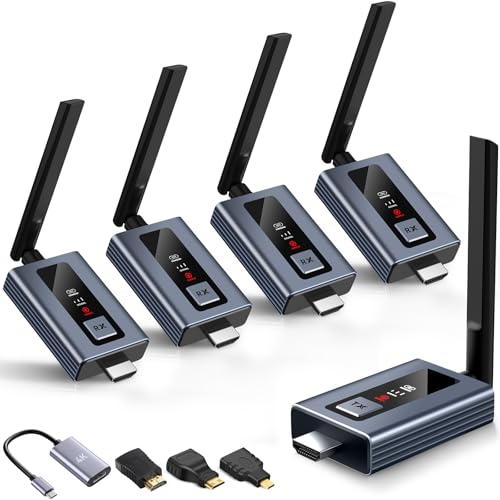
- Supports up to six connected screens
- LED shows connection and signal information
- 165-foot range with 1080p60 output
Best For: Easy multi-screen HDMI distribution in rooms, venues, and classrooms
Professional 4K Flexibility

- 4K HDMI and 3G-SDI support
- 450-foot stated line-of-sight range
- HDMI, SDI, and app monitoring
Best For: Production teams needing flexible SDI/HDMI monitoring
Simple Multi-TV Distribution

- One transmitter with four receivers
- 165-foot open-area stated range
- Plug-and-play dual-band operation
Best For: Multi-screen HDMI presentations and events
Long-Range Broadcast Monitoring

- Up to 3 km stated transmission distance
- 1080p60 with 35ms stated latency
- Broadcast mode supports unlimited receivers
Best For: Long-range, multi-recipient 1080p production monitoring
All-in-One Crew Monitor
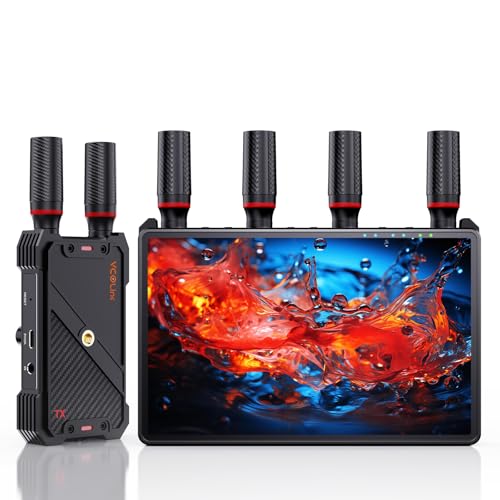
- Built-in 7-inch receiver monitor
- Supports up to five receivers
- 1080p60 with HDMI loop out
Best For: Multi-person HD monitoring on film and live-production sets
Pro 4K Production Pick

- End-to-end 4K30 transmission
- Dual-band 2.4GHz and 5GHz operation
- App-based wireless camera control
Best For: Professional 4K monitoring on complex production sets
Flexible HD Value
Vrriis 1-to-5 Wireless HDMI Kit

- Supports up to five receivers
- Dual HDMI output on each receiver
- Multiple portable power options
Best For: Multi-display 1080p streaming and event monitoring
Best All-in-One Monitor – CineView M7H Pro 4K60
For wireless video receivers for multi camera setups, the Accsoon CineView M7H Pro is a versatile choice that combines a 7-inch field monitor, transmitter, and receiver. It supports up to four monitoring devices, 4K60 HDMI workflows, and a 1200-foot range when paired with compatible CineView transmitters.
Best For: Directors, DPs, and creators who need monitoring, wireless transmission, and camera control in one unit.
Pros:
- Functions as a monitor, transmitter, and receiver.
- Supports up to four monitoring devices with compatible CineView systems.
- Bright 1000-nit display with REC.709 coverage, scopes, focus tools, and LUT support.
- Offers HDMI 2.0 input/output up to 4K60 and recording to SD cards or USB storage.
Cons:
- Wireless camera control is limited to supported camera models and works in Monitor Mode only.
- Its advanced feature set may be more than basic multi-screen monitoring requires.
The M7H Pro is the most production-focused option here, especially when accurate exposure, focus, color, and camera control matter alongside wireless monitoring.
Best Multi-TV Value – 4-Receiver Wireless HDMI Extender
This wireless HDMI kit is designed for distributing one camera, laptop, or other HDMI source to several screens. It includes four receivers and supports expansion to up to eight receivers, making it a practical option for multi camera setups that need synchronized viewing across TVs or monitors.
Best For: Presentations, classrooms, venues, and basic multi-screen camera or HDMI distribution.
Pros:
- One transmitter can coordinate four included receivers and up to eight total receivers.
- Supports up to 165 feet of transmission with 2.4GHz and 5GHz dual-band operation.
- Plug-and-play design requires no Wi-Fi, app, or complicated setup.
- Accepts up to 4K input and provides 1080p output.
Cons:
- Outputs are limited to 1080p even though the system supports 4K decoding.
- Requires the supplied antennas and stable 5V/1A power for reliable operation.
- The notes do not specify production-focused camera features such as camera control or monitoring scopes.
This is a straightforward screen-distribution solution rather than a dedicated cinema wireless system. It makes the most sense when simple, synchronized HDMI viewing is the priority.
Best for Live Streaming – CineView HE Wireless Video System
The Accsoon CineView HE is a strong fit for wireless video receivers for multi camera setups where crew monitoring and live streaming are both important. Its dual-band transmission reaches up to 1200 feet, supports up to four receivers or mobile devices, and adds UVC output for direct computer-based streaming.
Best For: Live streams, events, and production crews that need low-latency monitoring and computer streaming without a separate capture device.
Pros:
- Transmits 1080p60 video with latency under 0.06 seconds.
- Supports up to four receivers or iOS/Android devices in a mix-and-match setup.
- UVC output enables streaming to platforms such as OBS and YouTube through a computer.
- Offers HDMI loop-out with zero-latency lossless output and multiple power options.
Cons:
- Battery and charging cables are not included.
- It is limited to 1080p60 rather than 4K video transmission.
- Additional receivers or mobile devices may be needed for larger monitoring teams.
The CineView HE balances long-range wireless monitoring with streaming-friendly connectivity. Its UVC output makes it especially useful for crews that want to move received camera footage directly into a computer workflow.
Best Status Display – 4-Receiver HDMI Extender with LED Screen
For simple wireless video receivers for multi camera setups, this HDMI extender provides a quick way to mirror one source across several screens. The included four receivers support up to six displays with additional receivers, while the built-in LED screen shows connection, signal, output, and power information.
Best For: Classrooms, conference rooms, restaurants, churches, and home theaters needing easy multi-display HDMI distribution.
Pros:
- Includes four receivers and supports expansion to up to six screens.
- Provides 165 feet of line-of-sight transmission using 2.4GHz and 5GHz bands.
- Plug-and-play setup is designed to connect in about five seconds.
- Accepts 4K input and delivers 1080p at up to 60Hz with latency under 0.1 seconds.
Cons:
- Transmission distance can be affected by solid walls.
- Requires an antenna during operation.
- 1080p is the maximum stated output resolution.
The LED status display is a useful advantage when managing multiple receivers, but this system is aimed at convenient screen mirroring rather than advanced cinema monitoring or camera control.
Professional 4K Flexibility – Hollyland Mars 4K
For production teams comparing wireless video receivers for multi camera setups, the Hollyland Mars 4K stands out for combining 4K HDMI connectivity with professional SDI support. Its 450-foot line-of-sight range, 66ms stated latency, and mobile monitoring options make it a flexible choice for on-set viewing.
Best For: Camera crews and small production teams that need 4K transmission, SDI compatibility, and several monitoring points.
Pros:
- Supports up to 4Kp30 video through HDMI and HD formats through HDMI or SDI.
- Provides HDMI and 3G-SDI input/output, including 23.98, 29.97, and 59.94 fps SDI output.
- Supports up to four app monitoring connections when used without the receiver, plus wired monitor outputs with a receiver.
- Offers multiple power options, including DC input, NP-F batteries, and USB-C power.
Cons:
- The stated 450-foot range and 66ms latency apply to interference-free laboratory conditions.
- QC/PD charging protocols and 5V/2A charging are not supported.
- Its 4K capability is limited to 24, 25, and 30 fps.
The Mars 4K is a strong fit when your setup mixes cinema-style SDI equipment with HDMI cameras and needs both physical and app-based monitoring. It is less compelling if you require 4K at 60 fps or consistently operate in heavily obstructed environments.
Simple Multi-TV Distribution – Wireless HDMI G7R PRO
If your priority is sending one HDMI source to several displays, this G7R PRO kit offers a straightforward approach to wireless video receivers for multi camera setups and multi-screen presentations. It includes one transmitter and four receivers, uses dual-band wireless connectivity, and requires no app, driver, or Wi-Fi network for basic operation.
Best For: Classrooms, conference rooms, churches, events, and home setups that need one source displayed on multiple HDMI screens.
Pros:
- Includes four receivers for multi-TV or multi-monitor distribution.
- Supports up to 165 feet in open environments and up to 50 feet through walls under stated conditions.
- Pre-paired plug-and-play operation over 2.4GHz and 5.8GHz bands.
- Claims 60Hz operation with approximately 0.1-second latency and includes a USB-C-to-HDMI adapter.
Cons:
- The longest stated range requires an open environment without barriers; thick walls and obstacles can reduce performance.
- Both transmitter and receivers require a USB 5V/1A power source.
- The supplied notes describe HDMI distribution but do not specify 4K support.
This kit is best understood as a convenient wireless HDMI distribution system rather than a broadcast-grade camera link. Its four included receivers make it attractive for synchronized screens, while the lack of stated 4K support may matter for higher-resolution production workflows.
Long-Range Broadcast Monitoring – DJI SDR Transmission
For demanding crews evaluating wireless video receivers for multi camera setups, DJI SDR Transmission emphasizes long-distance monitoring and interference management. It supports 1080p60 transmission, automatic frequency hopping across several bands, and a Broadcast mode that can connect one transmitter to an unlimited number of receivers.
Best For: Larger production environments that need extended-range 1080p monitoring and multiple receiver access.
Pros:
- Offers a stated transmission distance of up to 3 km with enhanced penetration.
- Supports 1080p60 video at up to 20 Mbps with stated latency as low as 35ms.
- Automatically hops across 2.4GHz, 5.8GHz, and DFS bands to help manage interference.
- Provides SDI, HDMI, USB-C, direct Wi-Fi monitoring, and Broadcast mode with unlimited receivers.
Cons:
- Maximum range and penetration depend on the operating environment.
- Its supplied specifications focus on 1080p rather than 4K transmission.
- The system requires a 12V battery according to the supplied details.
DJI SDR Transmission is the most scalable option here for multi-recipient monitoring, especially when a production needs long reach and strong wireless resilience. Choose another system if 4K transmission is essential, but consider this one for extensive 1080p field monitoring.
All-in-One Crew Monitor – 1-to-5 Wireless HDMI System
For teams comparing wireless video receivers for multi camera setups, this system stands out by combining a receiver, built-in 7-inch monitor, and expandable HDMI output. It supports one transmitter sending to as many as five receivers, making it practical for crew, client, and director monitoring.
Best For: Film crews, studios, and live productions that need several wireless viewing points with built-in receiver screens.
Pros:
- Supports 1-to-5 transmission for shared on-set monitoring.
- Built-in 7-inch HD display, HDMI output, and 3.5mm headphone monitoring.
- 1080p at 60Hz transmission with claimed range up to 1,312 feet line of sight and latency under 0.05 seconds.
- Offers HDMI loop out, IR remote control, and NP-F, power bank, or USB-C power options.
Cons:
- External HDMI cable is not included.
- Smartphone or tablet use requires a Type-C to HDMI cable.
- The built-in monitor and multi-receiver capability may be unnecessary for simpler single-camera workflows.
This is a flexible choice when your priority is crew collaboration without adding separate monitors to every position. Its 1080p limit is more suited to HD productions than 4K workflows.
Pro 4K Production Pick – Accsoon CineView SE 4K
For wireless video receivers for multi camera setups where image quality and connection stability matter, the Accsoon CineView SE 4K provides an advanced option. It combines 4K30 transmission, H.265 encoding, dual-band wireless operation, and multiple wired or wireless connection paths.
Best For: Professional camera crews, directors, and clients who need detailed 4K monitoring in busy multi-device environments.
Pros:
- Supports end-to-end 4K30 video transmission with H.265 encoding.
- Uses 2.4GHz and 5GHz dual-band transmission with Accsoon’s RTMS 4.0 protocol.
- Supports up to 1,300 feet of range and latency of 0.05 seconds or less, according to the supplied specifications.
- Adds wireless camera control through the Accsoon SEE App and USB-C video output.
Cons:
- Its professional feature set may be more than basic HD monitoring requires.
- Camera control depends on compatibility with the Accsoon SEE App and camera setup.
- The supplied notes do not specify the exact receiver count included in the kit.
This is the strongest fit of the three for detail-focused 4K workflows and demanding RF environments. Choose it when H.265 efficiency, app-based camera control, and dual-band stability are more important than a built-in receiver display.
Flexible HD Value – Vrriis 1-to-5 Wireless HDMI Kit
This Vrriis kit is a practical contender among wireless video receivers for multi camera setups that can stay at 1080p. It offers one-to-five device switching, HDMI loop out, dual HDMI output at the receiver, and several power options for cameras, streaming systems, projectors, or TVs.
Best For: HD streaming, event, and monitoring setups that need multiple displays without running long HDMI cables.
Pros:
- Supports up to one transmitter and five receivers.
- Transmits 1080p at 60Hz with claimed 0.05-second latency and up to 1,300 feet in open-field conditions.
- Provides transmitter loop out and two HDMI outputs on the receiver for simultaneous screen connections.
- Supports NP-F batteries, USB-C power, adapters, and portable rechargeable power sources.
Cons:
- Walls, metal, brick, and glass can significantly reduce signal coverage.
- Transmission distance decreases as additional receivers are added.
- Batteries are not included.
The dual receiver outputs and broad power compatibility make this a useful HD distribution tool for flexible installations and mobile production. It is less suitable if your workflow requires 4K resolution or consistently long range through obstructions.
How We Picked the Best Wireless Video Receivers for Multi Camera Setups
We compared the selected systems by resolution, supported connections, transmission range, latency, receiver capacity, reliability features, and intended workflow. Professional models with HDMI and SDI support are evaluated differently from consumer multi-TV extenders, since camera production demands better synchronization, monitoring, and interference handling.
We also considered setup complexity, loop-out functionality, camera-control support, USB video output, display compatibility, and whether a system is designed for one receiver or several simultaneous endpoints. Published range figures are typically measured in open conditions, so real-world performance depends on walls, competing wireless networks, antenna placement, and local regulations.
Quick Comparison
| Need | Look For | Best Fit |
|---|---|---|
| Professional cinema or event production | 4K support, HDMI and SDI, low latency, robust RF design | Accsoon CineView or Hollyland Mars systems |
| Long-distance 1080p transmission | Extended line-of-sight range and stable signal handling | DJI SDR Transmission or long-range HDMI kits |
| One camera to several TVs | Multiple receivers, plug-and-play HDMI distribution | Multi-receiver wireless HDMI extenders |
| Streaming and computer capture | UVC output, USB compatibility, and low latency | Systems with UVC or capture-friendly outputs |
Key Buying Factors for Wireless Video Receivers for Multi-Camera Setups
Resolution, Frame Rate, and Input Type
Confirm that the transmitter supports the camera’s actual output, including 4K versus 1080p, 24/30/60 frames per second, and the required color or signal format. HDMI is common on mirrorless cameras, while SDI is often preferred for professional cameras and longer wired runs.
Receiver Count and Signal Routing
For several camera operators or remote displays, check the maximum number of receivers and whether each receiver can show the same source simultaneously. Loop-out ports are useful when you need to feed a monitor, recorder, or switcher without interrupting the wireless link.
Latency and Reliability
Low latency matters for live switching, focus pulling, sports, and interactive presentations. Dual-band designs may improve flexibility in crowded environments, but they do not eliminate interference. Keep antennas clear, maintain line of sight where possible, and test the system at the intended venue.
Power and Installation
Battery-powered units suit mobile production, while continuous AC or USB-C power is better for fixed displays. Verify included batteries, mounting options, heat management, and the number of power adapters before planning a multi-camera installation.
Who Should Buy Which Wireless Video Receivers for Multi Camera Setups?
Choose a professional 4K HDMI/SDI system for film sets, live events, broadcast-style monitoring, or workflows that require dependable format support and minimal delay. Choose a multi-receiver HDMI kit when the main goal is sending one source to several televisions or monitors with minimal configuration. Choose a long-range 1080p model for conferences, classrooms, houses of worship, and other installations where distance matters more than 4K detail. Choose a UVC-capable system if the receiver must connect directly to a computer for streaming or video conferencing.