Too many remotes can make even a simple movie night frustrating. The best programmable universal remote controls consolidate key devices into one handset while adding shortcuts, backlighting, macros, or touchscreen access.
This roundup compares 10 options ranging from straightforward TV remotes to advanced custom-programmable models. Use the buying guide below to match features, compatibility, and setup complexity to your entertainment system.
Best 10 Programmable Universal Remote Controls Picks for 2026
Best All-in-One Choice
SofaBaton U3 Smart Universal Remote

- IR, Bluetooth, and RF connectivity
- Macros and app-based customization
- Supports up to 30 devices
Best For: Mixed-device home theater systems
Best Touchscreen Option
Logitech Harmony 1100 Universal Remote

- 3.5-inch color touchscreen
- One-touch activity controls
- Rechargeable with charging stand
Best For: Touchscreen-based home entertainment control
Best Rechargeable Pick
SofaBaton U3 USB-C Universal Remote

- USB-C rechargeable 1,200mAh battery
- IR, Bluetooth, and RF support
- Backlit buttons and LCD screen
Best For: Multi-device setups needing rechargeable convenience
Best Custom Programming
Control MX-450 Programmable Remote

- Controls up to 18 devices
- IR and narrow-band RF control
- End-user macro programming
Best For: Custom-configured audio/video systems
Best for Easy Setup
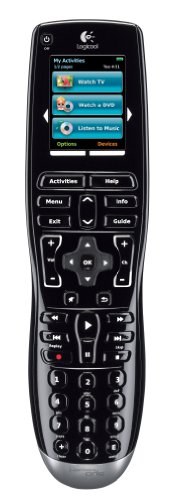
- Color LCD touchscreen and activity buttons
- Internet-based setup with live support
- Learns IR codes from existing remotes
Best For: Users wanting touchscreen control and guided setup
Best Feature-Rich Choice

- Supports IR, Bluetooth, and RF devices
- Global macros and customizable buttons
- Rechargeable battery with air-mouse mode
Best For: Complex mixed-device entertainment setups
Best Simple Multi-Device Option

- Controls up to six devices
- Uses straightforward infrared control
- 10-meter stated maximum range
Best For: Basic multi-device infrared setups
Best with Extra Features
GE Rechargeable Backlit Universal Remote

- Rechargeable battery with included USB-A to USB-C cable
- Controls up to four compatible devices
- Backlit with streaming app hotkeys
Best For: Users who want a rechargeable four-device remote
Best Value Pick

- Controls up to four compatible devices
- Preprogrammed for Samsung TVs
- Automatic code search and direct code entry
Best For: Shoppers seeking affordable basic multi-device control
Best for Dark Rooms
GE Backlit 4-Device Universal Remote

- Blue LED backlighting for dim rooms
- Controls up to four compatible devices
- Preprogrammed for Samsung and Roku boxes
Best For: Viewers who use a remote in low light
Best All-in-One Choice – SofaBaton U3 Smart Universal Remote
For shoppers comparing programmable universal remote controls, the SofaBaton U3 stands out for broad device support and flexible control options. It combines IR, Bluetooth, and RF connectivity, supports up to 30 devices, and uses an app for setup, button customization, and macros.
Best For: Home theater users who want one remote for TVs, soundbars, streaming devices, and other compatible equipment.
Pros:
- Supports IR, Bluetooth, and RF devices across more than 6,000 brands and 500,000 devices.
- Custom macros can combine several commands into one button press.
- Can maintain connections with up to three Bluetooth devices.
- Includes air-mouse control, Google Assistant support on compatible Bluetooth devices, and app-based setup.
Cons:
- Google Assistant features are not compatible with Apple TV, Fire TV, or standard infrared-only devices.
- The R1 repeater for controlling devices in cabinets or other rooms is sold separately.
The U3 is a versatile pick for a mixed-device entertainment setup. Its connectivity range and customization tools are useful, though buyers should verify compatibility with their specific voice-controlled devices.
Best Touchscreen Option – Logitech Harmony 1100 Universal Remote
The Logitech Harmony 1100 is a programmable universal remote control designed around activity-based commands and a color touchscreen. It offers customizable screens and commands, RF wireless capability, and support for a large range of brands and devices.
Best For: Users who prefer touchscreen navigation, one-touch activities, and a rechargeable remote with a charging stand.
Pros:
- 3.5-inch full-color touchscreen supports customizable commands, icons, and screens.
- One-touch, activity-based controls simplify common entertainment routines.
- Supports more than 5,000 brands and 225,000 devices.
- Rechargeable design includes a charging stand.
Cons:
- The supplied specifications list infrared connectivity, so buyers should confirm RF requirements for their setup.
- It is primarily described for television compatibility rather than a broad list of device categories.
Choose the Harmony 1100 if a touchscreen interface and activity controls matter more than newer connectivity features. Its rechargeable design and extensive device database make it a convenient option for compatible systems.
Best Rechargeable Pick – SofaBaton U3 USB-C Universal Remote
This SofaBaton U3 is a strong contender among programmable universal remote controls for users who want modern convenience features. It supports IR, Bluetooth, and RF devices, offers app-based key remapping and macros, and adds USB-C charging, a display, and backlit buttons.
Best For: Users managing several compatible entertainment devices who want rechargeable power, Bluetooth multipoint, and air-mouse control.
Pros:
- Works with IR, Bluetooth, and RF devices and supports up to 30 devices.
- Pairs with up to three Bluetooth devices for quick switching.
- USB-C rechargeable battery, backlit buttons, and a 2.4-inch LCD screen improve everyday usability.
- Supports customizable keys, one-touch macros, Google Assistant on compatible Bluetooth devices, and air-mouse control.
Cons:
- Voice control is limited to compatible Bluetooth devices using Google Assistant.
- Its maximum listed range is 40 feet, which may not suit every room layout.
With its rechargeable battery and illuminated controls, this version is especially practical for frequent use and dark rooms. Confirm that your equipment is compatible with the remote’s IR, Bluetooth, or RF control methods before buying.
Best Custom Programming – Control MX-450 Programmable Remote
Universal Remote Control MX-450 Custom Programmable Remote Control with On-Screen Macro Editing.
Check Price On AmazonThe Control MX-450 is a programmable universal remote control for users who want to configure commands themselves. It combines infrared and narrow-band RF control, includes a color screen, and can operate up to 18 devices.
Best For: Home entertainment users who want end-user programming, on-screen macro editing, and control of compatible audio/video and smart-home equipment.
Pros:
- Can control up to 18 devices.
- Supports both infrared and narrow-band RF control.
- Offers a color screen and on-screen macro editing.
- Can be programmed by the end user and supports optional URC lighting by Lutron.
Cons:
- Its listed maximum range is 30 feet.
- Requires four AA batteries, which are not listed as included.
- It lacks the Bluetooth and USB-C features found on some newer remotes.
The MX-450 makes sense for buyers who value hands-on customization and RF/IR control over newer smart features. Its 18-device capacity is substantial, while the shorter listed range and AA-battery design are worth considering.
Best for Easy Setup – Harmony One
The Logitech Harmony One is a practical choice among programmable universal remote controls if you want guided setup and a touchscreen interface. Its color display, activity buttons, and support for learning IR codes make it useful for consolidating compatible home-entertainment commands.
Best For: Users who prefer a touchscreen remote with internet-based setup and dedicated activity controls.
Pros:
- Color LCD touchscreen with dedicated on-screen activity buttons
- Internet-based setup with live customer support
- Can learn IR codes from existing remote controls
- Contoured backlit buttons improve visibility
Cons:
- Supplied details list compatibility with televisions
- Uses Bluetooth, infrared, and radio-frequency connectivity, which may require checking device compatibility
The Harmony One stands out for its guided setup and polished touchscreen design. Check compatibility with your specific equipment before buying, especially if you plan to control more than a television.
Best Feature-Rich Choice – SofaBaton U3
The SofaBaton U3 is a versatile option among programmable universal remote controls, combining IR, Bluetooth, and RF support with extensive device coverage. It also adds global macros, customizable buttons, air-mouse navigation, and a rechargeable battery for a flexible living-room setup.
Best For: Users managing multiple IR, Bluetooth, and RF devices who want macros, remappable controls, and air-mouse functionality.
Pros:
- Supports up to 30 remotes, 6,000+ brands, and over 500,000 devices
- Controls IR, Bluetooth, and RF devices, with simultaneous Bluetooth connections
- Global Macro button supports custom routines and icons
- Rechargeable battery, remappable buttons, and air-mouse mode
Cons:
- Wi-Fi devices are not supported
- Voice control is limited to devices that natively support Google Assistant over Bluetooth
- R1 repeater for extended IR coverage is sold separately
The U3 offers the broadest feature set of these options, particularly for mixed-device setups. Its compatibility limitations and voice-control requirements are worth checking before purchase.
Best Simple Multi-Device Option – One For All URC 3661
The One For All URC 3661 is a straightforward infrared option for shoppers seeking programmable universal remote controls without advanced connectivity features. It supports up to six devices and uses two AAA batteries, making it a simple replacement for compatible television-focused setups.
Best For: Users who want a basic infrared universal remote for controlling several compatible devices.
Pros:
- Supports up to six devices
- Simple infrared button control
- Specified maximum range of 10 meters
- Includes a manufacturer guarantee
Cons:
- Does not include Bluetooth or radio-frequency connectivity
- Requires two AAA batteries
- Supplied details identify television compatibility, so broader device support should be verified
The URC 3661 is best suited to buyers who value uncomplicated infrared control over smart features. Confirm the remote codes and device compatibility for your particular setup before ordering.
Best with Extra Features – GE Rechargeable Backlit Universal Remote
For shoppers comparing programmable universal remote controls, this GE model stands out with a rechargeable battery, backlighting, and control for up to four compatible devices. It supports automatic code search and direct code entry, with Samsung TVs and Roku streaming boxes preprogrammed.
Best For: Households wanting a rechargeable remote for a TV, streaming box, soundbar, or other compatible infrared devices.
Pros:
- Built-in lithium polymer battery can run for months on a charge
- Controls up to four compatible audio and video devices
- Fully backlit design with dedicated Netflix, Disney+, Prime Video, and YouTube buttons
- Includes automatic code search, direct code entry, and master volume control
Cons:
- Not compatible with RF-only devices such as Roku Streaming Sticks and Amazon Fire TV Sticks
- Streaming hotkeys may vary in support for user-installed apps
This is the most convenient choice of the three if avoiding disposable batteries is a priority. Its infrared connection and four-device limit make it best suited to conventional compatible home entertainment equipment.
Best Value Pick – GE 4-Device Universal Remote
This GE universal remote is a straightforward option for programmable universal remote controls, operating up to four compatible audio and video devices. It uses automatic code search or direct code entry and comes preprogrammed for Samsung TVs.
Best For: Budget-conscious shoppers who need a simple silver remote for a TV and several compatible home entertainment devices.
Pros:
- Controls up to four TVs, players, receivers, soundbars, or streaming devices
- Supports thousands of devices from major brands
- Samsung TV button is preprogrammed for immediate setup
- Includes master volume control and an ergonomic design
Cons:
- Two AAA batteries are required and are not included
- Not compatible with RF devices such as Roku Streaming Sticks and Amazon Fire TV Sticks
- It has a 90-day limited warranty
With broad brand support and a simple setup process, this model is a practical replacement remote for conventional infrared equipment. Choose it when rechargeable power and backlighting are less important than basic multi-device control.
Best for Dark Rooms – GE Backlit 4-Device Universal Remote
If you often use the remote in low light, this GE model is a useful choice among programmable universal remote controls. Its blue LED backlighting helps illuminate the buttons, while preprogrammed Samsung and Roku controls simplify setup for compatible devices.
Best For: Viewers who want a backlit four-device remote for Samsung TVs, Roku streaming boxes, and other compatible infrared equipment.
Pros:
- Blue LED backlighting improves button visibility in dark or dim rooms
- Controls up to four compatible audio and video devices
- Preprogrammed for Samsung TVs and Roku streaming media boxes
- Offers automatic code search, direct code entry, and master volume control
Cons:
- Two AAA batteries are required and are not included
- Not compatible with Roku Streaming Sticks or Amazon Fire TV Sticks
- Uses infrared connectivity rather than RF
This model is a strong fit for nighttime viewing because the backlight is its defining convenience. It provides broad compatibility and useful programming options, provided your equipment uses supported infrared control.
How We Picked the Best Programmable Universal Remote Controls
We focused on remotes that can operate multiple home-entertainment devices and offer meaningful programming flexibility. The selection includes smart all-in-one remotes, touchscreen models, custom-programmable controllers, and simpler replacements for everyday TV and streaming use.
We considered device compatibility, setup method, macro or activity support, button layout, display quality, backlighting, charging options, and the likelihood that a remote will remain practical for regular use. Because product generations and listings can vary, verify current specifications and supported devices before buying.
Quick Comparison
| Best For | What to Look For |
|---|---|
| Basic TV control | Simple setup, dedicated buttons, and broad brand compatibility |
| TV and streaming devices | Device switching, navigation controls, and reliable IR support |
| Complex home theaters | Macros, activities, custom programming, and multiple-device control |
| Low-light rooms | Bright backlighting, readable labels, and an ergonomic layout |
| Frequent use | Rechargeable power, durable construction, and comfortable handling |
Key Buying Factors for Programmable Universal Remote Controls
Compatibility and Setup
Check whether the remote supports your exact TV, receiver, soundbar, Blu-ray player, cable box, or streaming hardware. Some models use brand codes, while others require an app, computer software, or a learning process to copy commands from an existing remote.
Programming Flexibility
Look for activity buttons or macros if you regularly perform several actions together, such as turning on the TV and receiver, selecting an input, and starting a streaming device. Advanced programming is useful for complicated systems but may require more setup time.
Controls, Display, and Lighting
Physical buttons are often fastest for volume, navigation, and playback. Touchscreens can provide customizable layouts, but they may be harder to use without looking. Backlighting is particularly valuable in dark rooms, while large labels help users with reduced visibility.
Power and Everyday Comfort
Rechargeable models reduce battery changes, but confirm how charging works and whether a dock or cable is included. Also consider weight, button spacing, grip, and whether the remote can control your most-used functions without complicated menus.
Who Should Buy Which Programmable Universal Remote Controls?
Choose a basic GE or One For All model if you need an affordable replacement for a television or a small collection of devices. These are generally the easiest choices for guests, bedrooms, and straightforward setups.
A SofaBaton U3-style remote is better suited to users who want one controller for several devices with more flexible configuration. Consider a Logitech Harmony or Universal Remote Control model when you need a more structured home-theater experience, activity-based control, or extensive customization—while confirming availability and software support.
For any option, make a complete list of your devices and required commands before ordering. The right remote is the one that supports your equipment and simplifies your routine, not merely the model with the most programmable features.