A compact PC case can save desk space without forcing you to compromise on cooling, graphics-card support, or upgrade potential. The right choice depends on your motherboard size, component dimensions, airflow needs, and how much room you have for cable management.
We’ve gathered 10 computer cases for compact builds spanning Mini-ITX, Micro-ATX, and compact ATX designs, including small-form-factor enclosures, panoramic glass cases, and practical cases with included fans or power supplies.
Best 10 Computer Cases for Compact Builds Picks for 2026
Smallest Footprint
SilverStone SG13B Mini-ITX Case
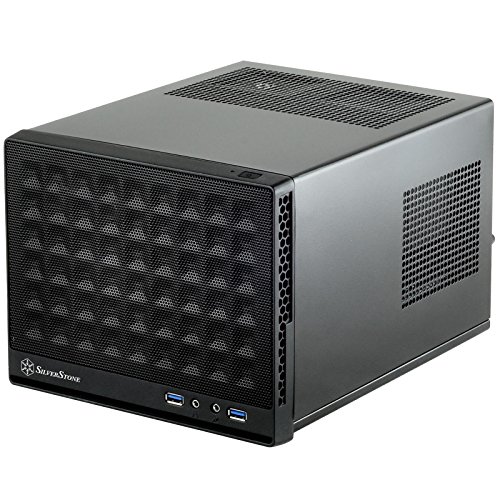
- 11.5-liter ultra-compact design
- ATX PSU and standard-length card support
- Fits 120mm or 140mm AIO coolers
Best For: Space-conscious Mini-ITX builds
Airflow-Focused ATX Pick

- Compact dual-chamber ATX layout
- Three included 120mm fans
- Perforated panels support airflow
Best For: Clean, cool ATX gaming builds
Panoramic Budget Style

- Micro-ATX and Mini-ITX support
- Three fans included
- 270-degree tempered-glass view
Best For: Compact showcase gaming builds
Showcase Dual-Chamber Design

- Three-panel tempered-glass exterior
- Back-connect motherboard support
- Top mesh supports a 360mm AIO
Best For: Premium ATX showcase builds
Small-Form-Factor Flexibility
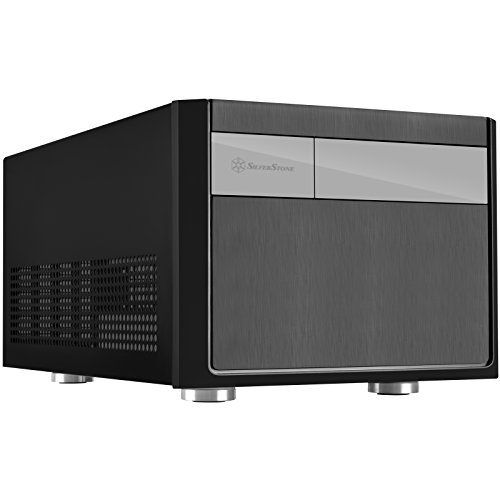
- Micro-ATX, Mini-DTX, and Mini-ITX support
- ATX PSU and any-length GPU compatibility
- 82mm CPU-cooler clearance with 2.5-inch drive support
Best For: Flexible compact Micro-ATX gaming and everyday builds
High-Airflow Compact ATX

- Fine mesh panels support high airflow
- Two 120mm fans included
- Up to 360mm front radiator support
Best For: Airflow-focused ATX and Micro-ATX starter builds
Ready-to-Run Mini Tower

- Pre-installed non-modular 400W PSU
- Micro-ATX and Mini-ITX support
- 240mm/280mm AIO and added-fan support
Best For: Simple office PCs and modest compact gaming builds
Portable ATX Powerhouse

- Supports ATX boards and GPUs up to 335mm
- Built-in handle for easier transport
- 240mm AIO and 162mm air-cooler support
Best For: Portable ATX gaming and workstation builds
Sturdy Small-Form-Factor Value

- Supports Micro-ATX and Mini-ITX boards
- Fits ATX PSUs and GPUs up to 260mm
- Includes an 80mm fan and perforated front panel
Best For: Simple compact desktops and HTPC-style builds
Glass-Sided Compact Gaming

- Fits GPUs up to 340mm
- Supports a 240mm AIO cooler
- Dual panoramic tempered-glass panels
Best For: Showcase gaming and creator builds
Smallest Footprint – SilverStone SG13B Mini-ITX Case
For truly compact computer cases for compact builds, the SilverStone SG13B is a practical Mini-ITX option with an 11.5-liter footprint. It supports a standard-length expansion card, an ATX power supply, and either a 120mm or 140mm all-in-one liquid cooler.
Best For: Mini-ITX or Mini-DTX builds where minimizing case volume matters.
Pros:
- Very compact 11.5-liter design
- Supports ATX PSUs and standard-length expansion cards
- Compatible with 120mm or 140mm single-fan AIO coolers
- Supports both 2.5-inch and 3.5-inch drives
Cons:
- Limited to Mini-ITX and Mini-DTX motherboards
- Compact dimensions may make installation and cable management more involved
The SG13B prioritizes space savings without giving up ATX power-supply compatibility or basic storage flexibility. It is a strong fit for compact systems, provided your components meet its size requirements.
Airflow-Focused ATX Pick – NZXT H6 Flow
The NZXT H6 Flow takes a more spacious approach to computer cases for compact builds, pairing ATX compatibility with a compact dual-chamber layout. Its perforated top and side panels and three included 120mm fans provide a ready-made foundation for a cool, tidy system.
Best For: ATX, micro-ATX, or Mini-ITX gaming builds that need strong airflow and a clean presentation.
Pros:
- Supports ATX, micro-ATX, and Mini-ITX motherboards
- Includes three pre-installed 120mm fans
- Airflow-optimized perforated top and side panels
- Dual-chamber design helps organize cables and components
Cons:
- Larger than ultra-compact Mini-ITX cases
- Panoramic glass panels require more attention to component presentation
The H6 Flow is a balanced choice when compact proportions, ATX support, and out-of-the-box cooling matter more than achieving the smallest possible footprint.
Panoramic Budget Style – MOROVOL MATX V3 Case
The MOROVOL MATX V3 combines a relatively compact micro-ATX format with a 270-degree tempered-glass view. For shoppers comparing computer cases for compact builds, it offers three pre-installed fans, support for Mini-ITX and micro-ATX boards, and a straightforward black gaming design.
Best For: Compact micro-ATX gaming builds where showcasing components is a priority.
Pros:
- Supports micro-ATX and Mini-ITX motherboards
- Three pre-installed fans provide immediate airflow
- 270-degree panoramic tempered-glass panel
- Includes a front-panel USB 3.0 port
Cons:
- Limited to four expansion slots
- Air cooling is the listed cooling method
- Tempered-glass design may show dust and cable clutter
The V3 is suited to builders who want a compact footprint and a highly visible interior. Confirm motherboard, expansion-card, and cooler clearances before choosing it for a higher-powered build.
Showcase Dual-Chamber Design – Lian Li O11 Vision Compact
The Lian Li O11 Vision Compact is a showcase-oriented option among computer cases for compact builds, with three tempered-glass panels and a dual-chamber layout. It supports ATX and micro-ATX motherboards, back-connect motherboards, and a 360mm AIO installation through its included top mesh panel.
Best For: ATX or micro-ATX builders who want a premium-looking display system with concealed cable and AIO routing.
Pros:
- Three-panel tempered-glass design provides an uninterrupted component view
- Supports ATX and micro-ATX motherboards
- Compatible with back-connect motherboards
- Top mesh panel supports a 360mm AIO
Cons:
- At 26.4 pounds, it is not a lightweight compact case
- Only four expansion slots are listed
- Glass-heavy design may require careful handling and cleaning
The O11 Vision Compact favors visual impact and advanced layout flexibility over minimum size. It makes the most sense for a carefully planned showcase build using compatible back-connect components or a side-mounted AIO configuration.
Small-Form-Factor Flexibility – SilverStone SG11B
For computer cases for compact builds, the SilverStone SG11B stands out by combining a small-form-factor layout with Micro-ATX support and compatibility with a standard ATX power supply. It also leaves room for graphics cards of any length and offers up to 82mm of CPU-cooler clearance.
Best For: Compact gaming or general-purpose Micro-ATX systems that need flexible GPU and PSU compatibility.
Pros:
- Supports Micro-ATX, Mini-DTX, and Mini-ITX motherboards.
- Accepts ATX power supplies and graphics cards of any length.
- Offers space for 2.5-inch drives and a clean, modern exterior.
- Provides 82mm of CPU-cooling clearance.
Cons:
- The 82mm CPU-cooler limit may restrict cooling choices.
- Air cooling is the listed cooling method, with no liquid-cooling support specified.
The SG11B is a practical choice when internal compatibility matters more than a minimalist footprint. Its broad motherboard, PSU, and GPU support makes it adaptable for a compact build, though cooler height should be checked before purchasing.
High-Airflow Compact ATX – NZXT H5 Flow
The NZXT H5 Flow is a strong option among computer cases for compact builds when airflow and component cooling are priorities. Its fine mesh panels, perforated PSU shroud, two included 120mm fans, and support for large radiators give a compact ATX build room to manage heat.
Best For: First-time ATX or Micro-ATX builders who want strong airflow, included fans, and future liquid-cooling flexibility.
Pros:
- Supports ATX and Micro-ATX motherboards, along with Mini-ITX and E-ATX compatibility.
- Includes two 120mm airflow fans.
- Supports radiators up to 360mm in front and 240mm on top.
- Mesh panels and a perforated PSU shroud are designed for high airflow.
Cons:
- The included fans are 120mm airflow models rather than a larger preinstalled fan setup.
- Additional 120mm fans for the PSU-shroud intake are not included.
- Its ATX mid-tower format is larger than the other compact cases in this roundup.
The H5 Flow balances compact-mid-tower proportions with a useful cooling ceiling. It is particularly appealing for builders who want an easy starting configuration now and the option to add a sizable radiator later.
Ready-to-Run Mini Tower – Rosewill FBM-X5
The Rosewill FBM-X5 is a practical pick for computer cases for compact builds because it combines a mini-tower design with a pre-installed 400W power supply. Its Micro-ATX and Mini-ITX support, included rear fan, and multiple front and top cooling options make it suitable for straightforward office or entry-level gaming systems.
Best For: Budget-conscious office PCs and compact gaming builds that can use the included 400W power supply.
Pros:
- Includes a non-modular 400W power supply.
- Supports Micro-ATX and Mini-ITX motherboards.
- Provides one 3.5-inch bay and two 2.5-inch drive bays.
- Supports additional fans and a 240mm or 280mm AIO, depending on placement.
Cons:
- The included 400W PSU may limit higher-power component choices.
- The power supply is non-modular, which can make cable management less flexible.
- Only one 120mm fan is pre-installed.
The FBM-X5 offers useful value for a simple compact system by bundling the case and power supply together. Confirm the power requirements of the planned components, then consider adding supported fans for stronger cooling.
Portable ATX Powerhouse – C34 Ultra-Compact ATX Case
The MECHANIC MASTER C34 is a strong option for computer cases for compact builds when you need full ATX compatibility in a space-saving chassis. It supports standard ATX motherboards, full-size ATX power supplies, and graphics cards up to 335mm, while its integrated handle makes transport easier.
Best For: Portable ATX gaming PCs, LAN setups, and compact workstations that need flexible hardware support.
Pros:
- Supports ATX motherboards, full-size ATX PSUs, and GPUs up to 335mm
- Built-in handle improves portability
- Supports a 240mm radiator or CPU air coolers up to 162mm
- Includes USB 3.0 and USB Type-C front-panel connectivity
Cons:
- SFX/L power supplies are recommended for the cleanest cable management
- Compact internal layout may require more careful planning during installation
The C34 stands out for fitting substantial ATX hardware into a compact, transport-friendly design. Its cooling flexibility is useful for performance builds, although builders should check power-supply and cable-clearance needs before purchasing.
Sturdy Small-Form-Factor Value – Zalman CUBIX Compact Case
The Zalman CUBIX is a practical choice among computer cases for compact builds, especially for Micro-ATX or Mini-ITX systems using standard ATX power supplies. Its 17.1-liter volume, perforated front panel, and included 80mm fan provide a straightforward foundation for a smaller desktop.
Best For: Budget-conscious Micro-ATX and Mini-ITX desktops, home-office PCs, and compact HTPC-style systems.
Pros:
- Supports Micro-ATX and Mini-ITX motherboards
- Accepts standard ATX PSUs and GPUs up to 260mm
- Perforated front panel and included 80mm fan support airflow
- Durable 0.8T steel construction
Cons:
- CPU cooler clearance is limited to 137mm
- Only one 80mm fan is included
- Less suitable for especially large graphics cards or elaborate cooling setups
The CUBIX keeps the feature set simple while offering useful compatibility for compact mainstream builds. Its standard ATX PSU support and sturdy steel body make it versatile, but component dimensions should be checked carefully.
Glass-Sided Compact Gaming – RUIX OV502 Pro M-ATX Case
The RUIX OV502 Pro is aimed at builders who want computer cases for compact builds without giving up room for modern gaming hardware. Its upgraded interior supports GPUs up to 340mm and 240mm liquid cooling, while dual panoramic tempered-glass panels put the components on display.
Best For: Compact gaming and creator systems that prioritize large graphics cards, liquid cooling, and component visibility.
Pros:
- Supports graphics cards up to 340mm
- Compatible with 240mm AIO liquid cooling
- Dual panoramic tempered-glass panels showcase the build
- Includes four USB 3.0 ports, a dust filter, and RGB lighting
Cons:
- Listed as a mid-tower despite its compact footprint
- Tempered-glass panels may require more care during handling
- Motherboard support is listed for ATX, so buyers should verify their exact board and layout requirements
The OV502 Pro balances a compact format with generous GPU and radiator clearance, making it more performance-oriented than many small cases. It is a good fit for showcase builds, provided the glass-focused design matches your handling and airflow preferences.
How We Picked the Best Computer Cases for Compact Builds
We focused on cases that reduce overall footprint while still offering practical component compatibility. Our selection considers motherboard support, graphics-card clearance, CPU-cooler or radiator support, ventilation, included fans, power-supply requirements, storage options, front-panel connectivity, and ease of assembly.
Because “compact” can mean very different things, the list includes true Mini-ITX and Mini-DTX enclosures alongside Micro-ATX mini towers and compact ATX cases. This makes it easier to match a case to your intended build rather than choosing based on external dimensions alone.
Quick Comparison
| Build type | Best case category | What to prioritize |
|---|---|---|
| Smallest desktop footprint | Mini-ITX enclosure | Component clearance and cooling limits |
| Affordable compact gaming PC | Micro-ATX mini tower | GPU length, airflow, and expansion space |
| High-performance compact system | Compact ATX case | Radiator support, ventilation, and cable routing |
| Showcase build | Panoramic glass case | Visibility, fan placement, and dust management |
Key Buying Factors for Computer Cases for Compact Builds
Motherboard and Power-Supply Compatibility
Start with the motherboard standard: Mini-ITX, Mini-DTX, Micro-ATX, or ATX. A case may support several formats, but smaller layouts can limit cable access and expansion slots. Also check whether it uses a standard ATX power supply, SFX unit, or a proprietary arrangement. Reusing an existing PSU is only practical when the case explicitly supports its size.
Graphics-Card and Cooling Clearance
Measure the graphics card, including its length, thickness, and power-connector position. Compact cases often list maximum GPU dimensions that change when a front radiator or additional fans are installed. Check CPU-cooler height for air cooling, or radiator length and thickness for an AIO. More powerful parts generally benefit from a larger compact case with unrestricted intake and exhaust paths.
Airflow, Noise, and Dust Control
Mesh panels usually provide better cooling potential than sealed glass or solid-front designs. Look for a clear intake-to-exhaust path, removable dust filters, and enough fan mounts for your components. Included fans can lower build cost, but verify their size, connector type, and whether a controller is supplied.
Usability and Future Upgrades
Consider cable-management room, removable panels, tool-free access, front USB ports, storage mounts, and the number of expansion slots. A case that is slightly larger but easier to build in may be the better long-term choice, especially if you expect to upgrade the GPU, add storage, or install an AIO cooler.
Who Should Buy Which Computer Cases for Compact Builds?
Choose a Mini-ITX case when the smallest possible footprint matters most and you are comfortable planning every component around tight clearances. A Micro-ATX case is often the best balance for budget gaming and general-purpose builds because it offers more expansion room without the bulk of a conventional tower.
Compact ATX models suit users who want full-size motherboard compatibility, stronger upgrade flexibility, or a high-performance system in a shorter chassis. Panoramic glass models are a good fit for showcase builds, while mesh-front designs are preferable for sustained workloads and quieter, cooler operation. Before ordering, compare the case’s published dimensions with your desk space and verify every major component’s clearance.