The right hub can make a smart home more reliable, easier to automate, and less dependent on separate apps. Zigbee support is especially useful for connecting low-power sensors, switches, bulbs, and other devices through a dedicated mesh network.
We compared 10 smart home hubs with Zigbee across compatibility, protocol support, automation features, setup requirements, and ecosystem fit. The best choice depends on whether you prioritize simplicity, local control, Matter support, or broad device compatibility.
Best 10 Smart Home Hubs with Zigbee Picks for 2026
Best Overall
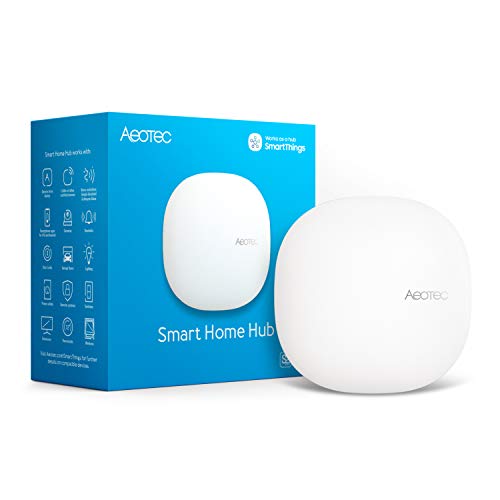
- Supports Zigbee, Matter, Wi-Fi, and Z-Wave Plus
- SmartThings automations can run locally
- Works with Alexa and Google Home
Best For: Broad, multi-protocol smart-home setups
Best for Local Control
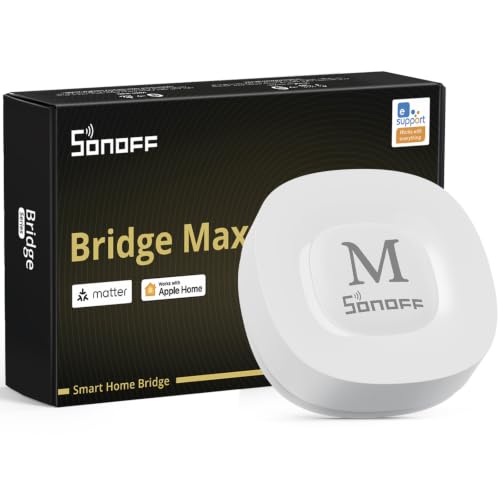
- Local web console with no cloud required
- Bridges Zigbee devices to Matter platforms
- Supports Home Assistant through MQTT
Best For: Local-first Zigbee and Matter bridging
Best Premium Features

- Combines Zigbee, Matter, Thread, Wi-Fi, and IR
- Supports local automation execution
- Includes PoE and a 360-degree IR blaster
Best For: Feature-rich Aqara smart-home systems
Best for Tuya Devices
Smart Multi-Mode Zigbee Gateway

- Combines Zigbee 3.0 and Bluetooth Mesh
- Supports up to 128 Tuya devices
- Works with Alexa and Google Home
Best For: Tuya and Smart Life device ecosystems
Advanced Matter Hub

- Supports Aqara Zigbee and Thread devices
- Matter bridge with local automation support
- 360-degree IR control with feedback
Best For: Aqara users building a Matter-enabled, locally automated home
Simple Zigbee Gateway

- Connects up to 128 Zigbee sub-devices
- Links Zigbee and Wi-Fi devices
- Supports local scenes during network outages
Best For: SONOFF users managing a focused Zigbee setup
Local Multi-Protocol Hub

- Supports Zigbee, Z-Wave, Matter, and Bluetooth
- Runs automations locally without a subscription
- Works with 1,000+ devices across 100+ brands
Best For: DIY builders creating a broad, locally controlled smart home
Best Tuya Gateway

- Supports Tuya Zigbee, Bluetooth Mesh, and Wi-Fi devices
- Works with Alexa and Google Assistant
- Wireless app setup on 2.4 GHz Wi-Fi
Best For: Tuya-based homes needing simple multi-protocol control
Best for Home Assistant

- Combines Zigbee 3.0 and Thread
- Plug-and-play Home Assistant setup
- Matter-ready with extended antenna range
Best For: Local Home Assistant automation using Zigbee and Thread
Best Multi-Protocol Hub
EzloPlus Zigbee and Z-Wave Hub
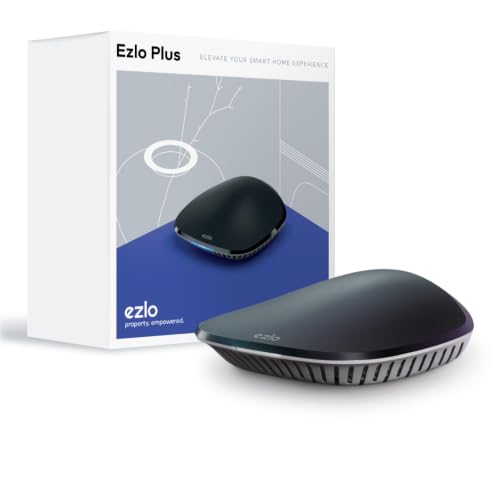
- Supports Zigbee, Z-Wave, RF, and Wi-Fi devices
- Works with Alexa and Google Assistant
- Ethernet setup with MiOS management
Best For: Mixed-brand homes using Zigbee and Z-Wave devices
Best Overall – Aeotec Smart Home Hub
For shoppers comparing smart home hubs with Zigbee, the Aeotec Smart Home Hub is a versatile option built around the SmartThings app. It supports Zigbee, Matter, Wi-Fi, and Z-Wave Plus, with Ethernet or Wi-Fi setup and compatibility with Alexa and Google Home.
Best For: Homes that need broad protocol support and customizable SmartThings automations.
Pros:
- Supports Zigbee, Matter, Wi-Fi, and Z-Wave Plus.
- Works with Alexa, Google Home, Android, iOS, and iPadOS.
- Supports wired Ethernet or Wi-Fi connectivity.
- Many automations can run locally for improved responsiveness.
Cons:
- Designed for use in North America.
- Z-Wave Plus support is specified for the V3 model.
This is a strong all-around pick when you want one hub to coordinate devices across several major smart-home standards rather than limiting your setup to a single ecosystem.
Best for Local Control – SONOFF Bridge-M Zigbee Hub
The SONOFF Bridge-M is a practical choice among smart home hubs with Zigbee if local management and cross-platform bridging matter most. It connects Zigbee, BTHome, and eWeLink devices to Matter platforms, while its local web console can operate without app downloads or cloud reliance.
Best For: Users who want local Zigbee control, Home Assistant integration, and Matter bridging.
Pros:
- Bridges Zigbee, BTHome, and eWeLink devices to Matter platforms.
- Offers a local web console without requiring cloud services.
- Supports Home Assistant through MQTT or device bridging.
- Includes a built-in 90 dB alarm for local security setups.
Cons:
- It is a Matter Bridge, not a Matter Controller.
- It cannot add Matter devices directly.
Choose this model if your priority is connecting Zigbee devices to Alexa, Google Home, Apple Home, or Home Assistant while retaining a local-management option. Confirm the Matter distinction before buying.
Best Premium Features – Aqara Smart Hub M200
The Aqara Smart Hub M200 combines Zigbee with Matter, Thread, Wi-Fi, and infrared control, making it one of the more feature-rich smart home hubs with Zigbee. It also supports PoE, local automations, and integration with Aqara Home, Home Assistant, Apple HomeKit, Alexa, and Google Home.
Best For: Aqara-focused homes that want multi-protocol support, IR control, and local automation.
Pros:
- Acts as a Matter Controller, Matter Bridge, and Thread Border Router.
- Supports up to 40 Aqara Zigbee devices and 40 Thread devices.
- Includes a 360-degree IR blaster with feedback and learning.
- Offers PoE, dual-band Wi-Fi, and local automation execution.
Cons:
- A 2A USB power adapter is not included.
- Some features, including cloud notifications, still require cloud access.
- IR-to-Matter AC functionality exposes only one AC device.
The M200 is a good fit for buyers who want more than basic Zigbee connectivity. Its IR, Thread, Matter, speaker, and PoE features add flexibility, though its strongest value is likely within an Aqara-centered setup.
Best for Tuya Devices – Smart Multi-Mode Zigbee Gateway
This compact gateway is a straightforward option among smart home hubs with Zigbee for households using Tuya or Smart Life devices. It combines Zigbee 3.0 and Bluetooth Mesh, supports Alexa and Google Home voice control, and lets you manage compatible devices remotely through the app.
Best For: Tuya or Smart Life users who need one gateway for Zigbee and Bluetooth Mesh devices.
Pros:
- Combines Zigbee 3.0 and Bluetooth Mesh communication.
- Supports up to 128 Tuya smart-home devices.
- Enables app-based remote control and device automation.
- Works with Alexa and Google Home voice control.
Cons:
- Supports Tuya and Smart Life devices only.
- Uses a 2.4 GHz network.
This gateway makes sense when your existing devices are already in the Tuya ecosystem. Its protocol flexibility is useful within that platform, but the stated device restriction makes it a poor choice for mixed-brand setups.
Advanced Matter Hub – Aqara Smart Home Hub M3
The Aqara Smart Home Hub M3 is a strong choice for shoppers comparing smart home hubs with Zigbee, especially if you use Aqara devices and want Matter, Thread, local automation, and IR control in one unit. It supports up to 127 Aqara Zigbee devices and 127 Thread devices, while offering wired or wireless networking.
Best For: Aqara-focused homes that want Matter integration, local automations, and traditional infrared appliance control.
Pros:
- Combines Aqara Zigbee, Thread, Matter bridge, Bluetooth, Wi-Fi, and PoE connectivity.
- Prioritizes local automation and can migrate Zigbee devices from older Aqara hubs.
- 360-degree IR blaster can control devices and provide feedback, including compatible air conditioners.
- Includes encrypted local storage and flexible wall, ceiling, or tabletop mounting.
Cons:
- The stated Zigbee capacity applies to Aqara Zigbee devices, not third-party Zigbee devices.
- A USB-C power adapter is not included.
- Some cloud-based notifications still require an internet connection.
The M3 is the most feature-rich option here, but its best fit is an Aqara-centered setup rather than a universal third-party Zigbee network. Its Matter and Thread support make it a useful bridge for expanding ecosystems.
Simple Zigbee Gateway – SONOFF Zigbee Bridge Pro
The SONOFF Zigbee Bridge Pro is a compact, straightforward pick among smart home hubs with Zigbee. It connects SONOFF Zigbee devices with Wi-Fi, supports up to 128 sub-devices, and lets compatible scenes and schedules continue operating locally when the network is disconnected.
Best For: SONOFF users who want an affordable-feeling, compact gateway for Zigbee device management and basic local scenes.
Pros:
- Supports up to 128 connected sub-devices.
- Links Zigbee devices with Wi-Fi devices through the gateway.
- Local timing and scene linkage can continue during network outages.
- Supports home, away, and sleep security modes with local alarm functionality.
Cons:
- The notes specifically identify compatibility with SONOFF-released Zigbee devices.
- It does not list Matter, Thread, or Z-Wave support.
- Requires a USB cable for power and setup.
The Bridge Pro makes sense if your system is built around SONOFF switches, plugs, and sensors. It offers useful local behavior, but shoppers seeking broad multi-brand or multi-protocol support may need a more advanced hub.
Local Multi-Protocol Hub – Hubitat Elevation C-8 Pro
The Hubitat Elevation C-8 Pro is designed for shoppers who want smart home hubs with Zigbee plus broad protocol coverage. It combines Zigbee 3.0, Z-Wave 800 Series Long Range, Matter, and Bluetooth with local processing, so automations can keep running without relying on remote servers.
Best For: DIY smart home builders who need multi-brand compatibility, advanced rules, strong local control, and extended wireless range.
Pros:
- Supports Zigbee 3.0, Z-Wave 800 Series Long Range, Matter, and Bluetooth.
- Runs automations locally for fast responses and continued operation during internet outages.
- Works with Alexa, Google Home, Apple HomeKit, and Ring camera integration.
- Offers two dedicated external antennas and supports more than 1,000 devices across over 100 brands.
Cons:
- Its advanced Rule Machine and community-driven ecosystem may involve a steeper learning curve.
- Some integrations and automation features may require hands-on configuration.
- The supplied notes do not describe an included display or built-in voice assistant.
The C-8 Pro is the strongest choice for a growing, mixed-brand installation where local reliability matters. It provides more protocol flexibility and automation depth than the simpler gateways, though beginners may need more time to configure it.
Best Tuya Gateway – Dual-Mode Zigbee Hub
This compact option among smart home hubs with Zigbee is designed specifically for Tuya-compatible devices. It also supports Bluetooth Mesh and Wi-Fi control through the Smart Life or Tuya Smart app, making it useful for straightforward mixed-device automation.
Best For: Tuya households that want app and voice control without connecting the hub by Ethernet.
Pros:
- Supports Tuya Zigbee, Bluetooth Mesh, and Wi-Fi device control.
- Works with Alexa and Google Assistant for voice control.
- Wireless setup connects through the Smart Life or Tuya Smart app.
- Supports device grouping, resets, and automation linkages.
Cons:
- Only compatible with products using the Tuya protocol.
- Requires a 2.4 GHz Wi-Fi network.
- Not compatible with non-Tuya bulbs, locks, or blinds.
If your devices already work with Tuya Smart or Smart Life, this hub offers a simple way to bring Zigbee, Bluetooth, and Wi-Fi products into one control system. Confirm protocol compatibility before buying.
Best for Home Assistant – Zigbee and Thread Gateway
For shoppers comparing smart home hubs with Zigbee for a local automation setup, this gateway combines Zigbee 3.0 and Thread connectivity. It is built for Home Assistant, supports Matter-ready ecosystems, and keeps Zigbee and Thread communication within the home network.
Best For: Home Assistant users who want a plug-and-play Zigbee and Thread controller with extended wireless range.
Pros:
- Combines Zigbee 3.0 and Thread in one device.
- Works natively with Home Assistant ZHA and Thread systems.
- Home Assistant automatically detects and configures it after connection.
- A 4.16 dBi omnidirectional antenna is designed to extend coverage across rooms.
Cons:
- Its supplied integration focus is Home Assistant rather than a general-purpose standalone platform.
- Thread and Zigbee setup is tied to compatible Home Assistant systems.
This is a strong fit for a local, privacy-focused Home Assistant installation. Its dual-protocol design and Matter readiness provide flexibility, while the high-gain antenna targets better coverage through multiple rooms.
Best Multi-Protocol Hub – EzloPlus Zigbee and Z-Wave Hub
This EzloPlus hub suits buyers who need more than Zigbee alone. It supports Zigbee, Z-Wave, RF, and thousands of Wi-Fi devices through the MiOS platform, while Alexa and Google Assistant integration adds convenient voice control.
Best For: Homes combining Zigbee and Z-Wave devices from multiple manufacturers.
Pros:
- Supports Zigbee, Z-Wave, RF, and many Wi-Fi devices.
- Controls lights, locks, sensors, cameras, and other connected products.
- Integrates with Amazon Alexa and Google Assistant.
- Includes an Ethernet cable and in-app setup guide.
Cons:
- Requires an internet-connected router with an available Ethernet port.
- Setup depends on the MiOS mobile or web platform.
- The broad device compatibility may require checking individual product support.
Choose the EzloPlus when your smart home includes multiple wireless standards or brands. Its Ethernet-based setup and MiOS platform make it a versatile central controller, particularly for mixed Zigbee and Z-Wave installations.
How We Picked the Best Smart Home Hubs with Zigbee
We evaluated each hub for its Zigbee implementation, supported wireless standards, ecosystem compatibility, automation capabilities, and ease of setup. We also considered whether a hub supports newer standards such as Matter, Thread, Z-Wave, Bluetooth, or infrared control. App quality, voice-assistant compatibility, device-management features, and suitability for beginners or advanced users were also part of the comparison.
Because compatibility can vary by region, firmware, and device model, check the manufacturer’s current device list before buying—especially if you already own Zigbee products from multiple brands.
Quick Comparison
| Best For | Look For | Why It Matters |
|---|---|---|
| Simple voice-controlled setups | Alexa or Google Assistant support | Provides convenient hands-free control |
| Mixed-brand homes | Zigbee plus Matter or Z-Wave | Expands device and ecosystem options |
| Advanced automation | Local processing and flexible rules | Can improve responsiveness and reliability |
| Brand-specific devices | Matching manufacturer ecosystem | Usually offers the smoothest pairing experience |
| Future expansion | Thread and Matter readiness | Helps support newer smart-home products |
Key Buying Factors for Smart Home Hubs with Zigbee
Compatibility and Protocol Support
Zigbee is only one part of the decision. If your home includes Z-Wave locks, Matter devices, Wi-Fi appliances, or Bluetooth sensors, a multi-protocol hub may reduce the number of bridges you need. Confirm that the hub supports the specific device categories you plan to add.
Local Versus Cloud Control
Cloud-based hubs can be convenient and easy to access remotely, but local processing may deliver faster responses and continued operation during an internet outage. Advanced users should review which automations run locally and whether remote access requires a subscription or account.
Automation and Expansion
Look for schedules, scenes, sensor triggers, presence features, and conditional rules that match your plans. Also consider the size of the Zigbee network, whether the hub supports repeaters, and how easily you can migrate or back up automations.
Setup and Everyday Management
A polished app, clear pairing process, firmware updates, and useful troubleshooting tools matter after installation. A hub with extensive compatibility is less valuable if adding or managing devices is difficult.
Who Should Buy Which Smart Home Hubs with Zigbee?
Choose a brand-focused gateway if you mainly use devices from one manufacturer and want straightforward setup. Pick a multi-protocol hub if you are combining Zigbee with Z-Wave, Matter, Thread, or Wi-Fi products. Advanced users who want detailed rules and greater local control should prioritize a platform built for custom automation. Beginners may prefer a hub with strong voice-assistant support and a simpler mobile app.
Before ordering, list your current devices, identify the protocols they use, and decide whether you need internet-independent automation. That short checklist will help you choose among these Smart Home Hubs with Zigbee and avoid buying an incompatible bridge.