A good desktop soundbar can improve games, music, meetings, and streaming without taking up the space of traditional left-and-right speakers. The right choice depends on your desk width, connection needs, bass preferences, and tolerance for lighting or extra controls.
We’ve gathered 10 compact PC soundbars ranging from simple plug-and-play models to RGB gaming bars and 2.1 systems with dedicated subwoofers. Use the guide below to narrow the list by sound, features, and setup requirements.
Best 10 Soundbars for Desktop Setups Picks for 2026
Best Bass-Boosted Pick

- 15.9-inch bar is only 1.6 inches high
- Includes wired 5-inch subwoofer
- USB, AUX, optical, ARC, and Bluetooth 5.3
Best For: PC gaming and compact desks needing stronger bass
Best Simple Stereo Value
Nylavee SK100 Computer Soundbar

- Bluetooth 5.0 and 3.5mm AUX connectivity
- USB-powered with one-knob operation
- Built-in microphone for calls
Best For: Office and bedroom desktops needing easy stereo audio
Best for Razer Gaming Setups

- USB-C carries power and audio
- Bluetooth 5.0 supports wireless listening
- 14-zone Razer Chroma RGB
Best For: Razer-equipped PC gaming desks
Best for RGB Calls and Gaming
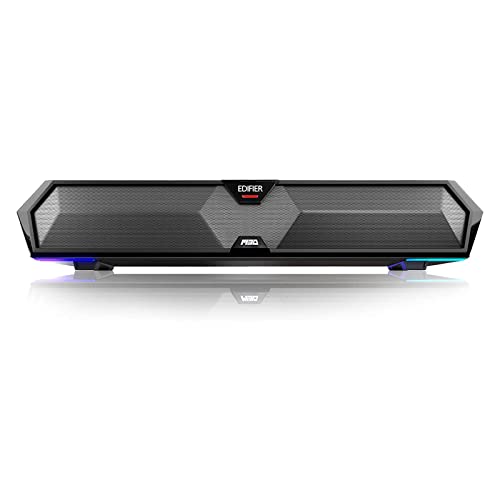
- Bluetooth 5.3 and USB connectivity
- Six switchable RGB lighting effects
- Built-in microphone for communication
Best For: Gaming and work-from-home desktops
RGB Desk Accent
Redragon GS560 Desktop Soundbar

- Compact 16-inch stereo soundbar for desks
- USB-powered with 3.5mm wired audio
- Four RGB modes with music synchronization
Best For: Gamers and workers wanting compact audio with RGB lighting
2.1 Bass Upgrade
Nylavee SK100Pro Computer Speakers

- Dedicated 5.25-inch wired subwoofer
- Bluetooth 5.4 and 3.5mm AUX connectivity
- 30W RMS, 60W peak 2.1-channel audio
Best For: Desktop entertainment setups that need stronger bass
Flexible RGB Soundstage

- 24.17-inch soundbar with SuperWide technology
- USB-C, AUX, optical, and Bluetooth 5.3
- RGB presets and IR remote control
Best For: PC and TV setups needing broad connectivity and lighting
Compact Ambiance Pick
Bluedee SK010 Computer Soundbar

- Bluetooth 5.0 and 3.5mm connectivity
- USB-powered, plug-and-play setup
- Slim profile with ambient light strips
Best For: Small desks and flexible everyday computer audio
Gaming Power Pick
Redragon GS817 RGB Desktop Soundbar

- 30W maximum two-channel stereo output
- Music, Game, and Film EQ modes
- Bluetooth 5.3, AUX, and RGB lighting
Best For: Gaming and entertainment-focused desktop setups
One-Cable RGB Pick

- 10W stereo sound for work and media
- USB audio and power over one cable
- Bluetooth 5.3 with six RGB effects
Best For: Simple computer setups with compatible USB audio
Best Bass-Boosted Pick – MEREDO G38 Desktop Soundbar
For desktop setups that need more impact than a compact bar can usually provide, the MEREDO G38 combines a low-profile 15.9-inch soundbar with a wired 5-inch subwoofer. It is a versatile option among soundbars for desktop setups, with USB, AUX, optical, ARC, and Bluetooth 5.3 connectivity.
Best For: PC gaming, small desks, and users who want fuller bass plus customizable RGB lighting.
Pros:
- Low-profile 1.6-inch height fits beneath many monitors.
- Wired 5-inch subwoofer and 160W peak output add bass presence.
- Multiple inputs, independent bass and treble controls, and headphone output.
- Remote-controlled RGB with seven colors and four dynamic modes.
Cons:
- The subwoofer is wired rather than wireless.
- It does not support Dolby or DTS.
- ARC requires a compatible TV port, and USB audio requires a supporting USB port.
The G38 is a strong choice when desk space is limited but bass and connection flexibility still matter. Its wired subwoofer adds setup bulk, yet the combination of compact dimensions, controls, and lighting makes it a particularly feature-rich desktop option.
Best Simple Stereo Value – Nylavee SK100 Computer Soundbar
The Nylavee SK100 keeps desktop audio straightforward with a 16-inch soundbar, USB power, Bluetooth 5.0, and a 3.5mm AUX connection. Its side knob and compact stereo design make it an approachable pick among soundbars for desktop setups.
Best For: Office desks, bedrooms, and users who want simple wired or wireless stereo audio.
Pros:
- Four speaker units and two independent bass diaphragms support fuller stereo sound.
- Bluetooth 5.0 and 3.5mm AUX offer flexible connections.
- USB-powered design requires no built-in battery.
- Side knob provides direct control, and a built-in microphone supports calls.
Cons:
- USB provides power rather than the listed audio connection.
- Maximum output is listed at 5 watts.
- It lacks the broader input selection and dedicated wired subwoofer of larger systems.
The SK100 is a practical, low-fuss desktop soundbar for everyday listening and calls. Choose it when easy AUX or Bluetooth connectivity and a physical volume knob are more important than high output or extensive customization.
Best for Razer Gaming Setups – Leviathan V2 X PC Soundbar
The Razer Leviathan V2 X is a compact gaming soundbar designed to sit beneath a monitor with minimal cable clutter. It uses one USB-C connection for power and audio, while Bluetooth 5.0 adds a convenient wireless option for compatible devices.
Best For: PC gamers who already use Razer software or want Chroma RGB on a compact desk.
Pros:
- Compact form factor is designed for placement beneath a monitor.
- USB-C delivers both power and audio through a single cable.
- Bluetooth 5.0 supports low-latency wireless switching.
- Razer Chroma RGB offers 14 lighting zones and software customization.
Cons:
- It is a stereo soundbar without a separate subwoofer.
- Customization relies on the Razer Audio App and Razer Synapse.
- The supplied notes list PC-focused use rather than broad home-theater connectivity.
The Leviathan V2 X fits best into a streamlined gaming desk, particularly one already built around Razer peripherals. Its single-cable USB-C setup and Chroma lighting are convenient, but users seeking dedicated bass hardware or multiple physical inputs should consider another model.
Best for RGB Calls and Gaming – Edifier MG300 Sound Bar
The Edifier MG300 is a compact desktop soundbar with USB and Bluetooth 5.3 connectivity, six RGB lighting effects, and a built-in microphone. It is a useful all-in-one choice for soundbars for desktop setups where gaming audio, calls, and straightforward controls share the same space.
Best For: Desktop gamers and remote workers who want lighting, wireless audio, and an integrated microphone.
Pros:
- Bluetooth 5.3 provides a current wireless connection option.
- USB mode is designed for plug-and-play desktop use.
- Six RGB effects can be changed or switched off.
- Built-in microphone supports clearer voice communication.
Cons:
- The listed output is 5 watts, so it is not intended as a high-power system.
- Connectivity is centered on USB and Bluetooth rather than optical or AUX inputs.
- It is a stereo bar without a separate included subwoofer.
The MG300 makes sense for users who want a tidy desktop speaker with lighting and hands-free communication in one unit. Its compact design and simple switching are convenient, while its modest listed output favors near-field desk listening over filling a large room.
RGB Desk Accent – Redragon GS560 Desktop Soundbar
The Redragon GS560 is a compact option for shoppers comparing soundbars for desktop setups. Its 16-inch tabletop design fits beneath many monitors, while USB power, a 3.5mm audio connection, and four RGB lighting modes keep setup simple and visually engaging.
Best For: Desktop gamers and workers who want compact stereo audio with music-synced RGB lighting.
Pros:
- Compact 16-inch form factor suits monitor and laptop setups.
- USB-powered plug-and-play design supports PCs, TVs, laptops, and smartphones.
- Four backlit modes include dynamic and static illumination, with audio sync.
- Front volume knob also provides convenient power control.
Cons:
- Its 4-watt maximum output is better suited to personal desktop listening than large rooms.
- Wired connectivity requires USB power and a 3.5mm audio connection.
- It provides stereo audio rather than a separate subwoofer-based system.
The GS560 prioritizes desk-friendly size, straightforward controls, and RGB presentation. Choose it when lighting and easy wired setup matter more than room-filling volume or deep dedicated-bass performance.
2.1 Bass Upgrade – Nylavee SK100Pro Computer Speakers
The Nylavee SK100Pro stands out among soundbars for desktop setups by pairing a computer soundbar with a wired 5.25-inch subwoofer. Bluetooth 5.4 and AUX inputs support flexible connections, while the side knob handles power, source selection, and volume.
Best For: Desktop users who want stronger bass and flexible wired or Bluetooth playback for games, movies, and music.
Pros:
- 2.1-channel design combines the soundbar with a dedicated 5.25-inch bass driver.
- 30W RMS and 60W peak power provide more output potential than compact low-power bars.
- Bluetooth 5.4 and 3.5mm AUX support desktops, laptops, MacBooks, consoles, and mobile devices.
- Side control knob manages power, modes, volume, and reset without software.
Cons:
- The separate wired subwoofer requires more desk or floor space and cable management.
- It uses an external power adapter and does not include a built-in battery.
- Its listed dimensions and 3 kg weight make it less compact than a single-bar design.
This is the strongest fit for buyers prioritizing bass and versatility over minimal footprint. The subwoofer adds setup complexity, but the 2.1 layout and dual connection options make the SK100Pro a capable desktop entertainment system.
Flexible RGB Soundstage – Creative Sound Blaster GS5
The Creative Sound Blaster GS5 is a wide-format choice for soundbars for desktop setups, with a 24.17-inch body designed to sit beneath a PC monitor or TV. It combines RGB presets with USB-C, AUX, optical, and Bluetooth 5.3 connectivity, making it useful across several source devices.
Best For: PC and TV users who want a wider soundbar, multiple input options, remote control, and customizable RGB effects.
Pros:
- SuperWide technology and up to 60W peak acoustic power are designed for a broad, immersive presentation.
- USB-C, AUX, optical, and Bluetooth 5.3 provide flexible connection choices.
- Multiple RGB presets include Chasers, Aurora, Peak Meter, Glow, Wave, and Cycle.
- IR remote provides playback, source, treble, bass, and audio-mode controls.
Cons:
- The 24.17-inch width requires more room beneath a monitor than compact desktop bars.
- Its listed maximum output is 24 watts despite the advertised 60-watt peak acoustic power.
- The supplied details list no warranty.
The GS5 is a feature-rich pick when connection flexibility and a wide soundstage are priorities. Its larger footprint and remote-controlled design suit monitor-plus-console or TV desks better than minimalist workstations.
Compact Ambiance Pick – Bluedee SK010 Computer Soundbar
For shoppers comparing soundbars for desktop setups, the Bluedee SK010 is a compact stereo option with Bluetooth 5.0, a 3.5mm connection, USB power, and subtle light strips. Its slim profile is designed to sit beneath a monitor while keeping cabling relatively tidy.
Best For: Small desks, everyday computer audio, and users who want flexible wired or Bluetooth connectivity with ambient lighting.
Pros:
- Dual drivers and diaphragms are designed to balance high notes and bass.
- Supports both Bluetooth 5.0 and a 3.5mm audio connection.
- USB-powered design works with a computer, laptop, power bank, or adapter.
- Compact 16.4-inch-wide profile and braided Y-cable help conserve desk space.
Cons:
- It is not water resistant.
- USB power and separate audio connectivity may still require attention to cable placement.
The SK010 is a practical choice when desk space and connection flexibility matter more than a larger speaker system. Its lighting and slim shape add visual appeal without requiring additional software or drivers.
Gaming Power Pick – Redragon GS817 RGB Desktop Soundbar
The Redragon GS817 stands out among soundbars for desktop setups with up to 30W of output, two-channel stereo sound, wireless connectivity, and AUX input. It also adds selectable EQ modes and RGB lighting for gaming, movies, and music.
Best For: Desktop gamers and listeners who want stronger output, quick sound-profile changes, and customizable RGB lighting.
Pros:
- 30W maximum output provides more headroom for games, films, and music.
- Three EQ modes cover Music, Game, and Film listening.
- Bluetooth 5.3 supports wireless streaming from compatible devices up to 10 meters away.
- Touch controls and five preset RGB modes make adjustments straightforward.
Cons:
- Its 3.62-inch height may take more monitor-clearance space than slimmer bars.
- Wireless range is listed at up to 10 meters, so distance and obstacles can affect placement.
- The warranty is listed as one year.
With its higher stated output and gaming-focused controls, the GS817 is suited to users who want their desktop speaker to play a visible role in an entertainment setup. It is less minimalist than a basic work-focused soundbar but offers more adjustment options.
One-Cable RGB Pick – Bluedee SK200Li USB Soundbar
The Bluedee SK200Li is a straightforward option for soundbars for desktop setups, combining 10W stereo output with USB audio, Bluetooth 5.3, and six RGB lighting effects. Its one-cable wired mode handles audio and power together when connected to a compatible USB audio port.
Best For: Workstations and casual media setups that want simple USB connectivity, Bluetooth support, and customizable desktop lighting.
Pros:
- Full-range drivers are designed for clear vocals and balanced everyday audio.
- USB-A/C wired operation combines audio and power in one cable on supported devices.
- Bluetooth 5.3 enables wireless playback from phones, tablets, and computers.
- Six lighting effects and seven colors provide desktop customization.
Cons:
- Wired mode requires a USB port that supports digital audio output.
- Some monitors, PlayStation systems, and Xbox devices may not support direct USB audio.
- Its 10W output is more suited to everyday listening than high-volume desktop entertainment.
The SK200Li offers a clean setup for compatible computers, especially when minimizing cables is a priority. Check your device’s USB audio support before buying, and use Bluetooth when direct USB audio is unavailable.
How We Picked These Soundbars for Desktop Setups
We focused on desktop-friendly soundbars that fit beneath or near a monitor and offer practical connectivity for PCs. The selection covers USB, 3.5mm AUX, Bluetooth, stereo, RGB, microphone, and subwoofer-equipped designs. We also considered rated power, control placement, wireless convenience, and whether each model suits everyday work, gaming, calls, or entertainment.
Specifications can vary by configuration and seller, so confirm the included cables, power requirements, compatibility, and current dimensions before buying.
Quick Comparison
| Best For | Look For |
|---|---|
| Simple desktop audio | USB or AUX plug-and-play connection |
| Gaming setups | RGB lighting, low-latency connections, and accessible controls |
| Stronger bass | A 2.1 system with a separate subwoofer |
| Flexible device use | Bluetooth plus wired inputs |
| Small desks | A low-profile bar with a short footprint |
| Video calls | An integrated microphone, if supported by your computer |
Key Buying Factors for Soundbars for Desktop Setups
Size and Placement
Measure the space beneath your monitor, including the stand’s feet. A bar that is too tall can block the display or interfere with a laptop dock. Check whether the controls face forward or sit on top, and leave room for cables and ventilation.
Connections
USB is convenient for many computers, while 3.5mm AUX works with desktops, laptops, consoles, and monitors that provide an analog output. Bluetooth reduces cable clutter but may introduce pairing steps or latency. For the least uncertainty, choose a model with both wireless and wired options.
Sound and Bass
Compact stereo bars are efficient for speech, casual music, and general system audio. They cannot create the same physical bass as a separate subwoofer, so choose a 2.1 model if low-end impact matters for games, films, or music. Higher peak wattage is not a guarantee of better sound; driver design, tuning, and room placement also matter.
Lighting and Controls
RGB effects can complement a gaming desk, but they are not a sound-quality feature. Look for independent lighting controls or an easy way to disable them if you work in a dark room. Front-facing volume and input controls are especially useful when the soundbar is connected to several devices.
Who Should Buy Which Soundbars for Desktop Setups?
Choose a compact USB or AUX bar if you want uncomplicated audio for work, video, and casual listening. Pick an RGB model if matching your gaming setup and quick onboard controls are priorities. A Bluetooth-capable soundbar is better for switching between a computer and phone, while a subwoofer-equipped 2.1 system is the strongest choice for fuller bass and more immersive entertainment.
For a shared office or bedroom, prioritize moderate size, adjustable volume, and discreet lighting. For gaming, focus on placement, connection stability, and clear dialogue before chasing maximum power. Finally, check your computer’s available ports and your preferred cable route before ordering; those details often determine whether a desktop soundbar feels genuinely convenient.