The best surge protector with USB ports does more than add outlets. It helps organize crowded workspaces, protect connected electronics, and charge phones, tablets, and other devices without filling every AC socket with an adapter.
These 10 picks cover a range of needs, including high-outlet-count power strips, compact wall extenders, rotating-plug designs, USB-C charging, and heavy-duty cords. Use the guide below to narrow the list by capacity, layout, charging needs, and available space.
Best 10 Surge Protector with USB Ports Picks for 2026
Best High-Capacity Pick
Nuetsa 8-Outlet USB Power Strip

- Eight AC outlets plus four USB ports
- 2,700 joules of surge protection
- Six-foot cord with flat plug
Best For: Powering multiple home-office or entertainment devices
Best Compact Wall Extender
Rotating-Plug USB Outlet Protector

- Six AC outlets and four USB ports
- Rotating plug suits horizontal or vertical sockets
- 1,800 joules of surge protection
Best For: Compact rooms, travel, and wall-mounted charging
Best Spaced-Outlet Design
YISHU 8-Outlet USB Power Strip

- Eight spaced AC outlets and four USB ports
- Three-sided layout reduces plug blockage
- Six-foot cord with flat plug
Best For: Bulky adapters in homes, offices, and dorm rooms
Best Secure Wall-Mount Option
QINLIANF 5-Outlet USB Extender
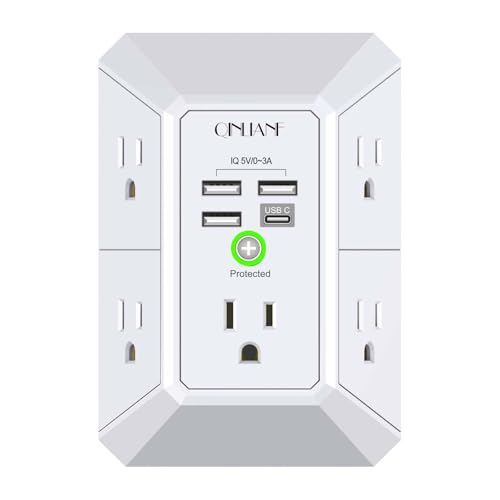
- Five AC outlets plus four USB ports
- Secures to compatible duplex outlets
- 1,680 joules of surge protection
Best For: Fixed indoor charging stations on duplex receptacles
Best for Easy Setup
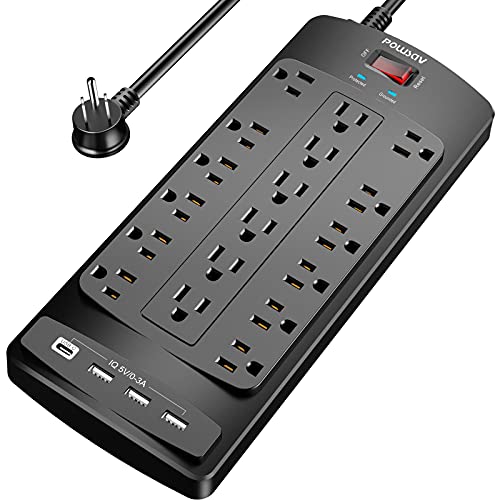
- 18 AC outlets and four USB ports
- 2,100 joules with overload protection
- 6-foot flat-plug cord with cable ties
Best For: Busy desks, gaming setups, and electronics-heavy workspaces
Best Fast-Charging Pick

- 12 AC outlets with spaced plug layout
- 20W USB-C plus two USB-A ports
- 2,100 joules and eight-point safety system
Best For: Home offices and convenient phone charging
Best Wall-Mount Pick
Six-Outlet USB-C Surge Protector

- Six spaced AC outlets and four USB ports
- Two USB-C ports with smart charging
- Secures to compatible duplex outlets
Best For: Compact wall-mounted power expansion in dorms and offices
Best with Extra Features

- 12 AC outlets plus four USB ports
- 2,700 joules of surge protection
- 6-foot cord with spaced outlets
Best For: High-device home offices and entertainment centers
Best Compact Travel Pick

- Six outlets and three USB ports
- Ultra-thin flat plug fits behind furniture
- Compact three-sided travel design
Best For: Travel, dorms, and tight spaces
Best Balanced Option

- Six outlets and three USB ports
- 1,680 joules of surge protection
- 6-foot cord with mounting holes
Best For: Everyday home offices and dorm setups
Best High-Capacity Pick – Nuetsa 8-Outlet USB Power Strip
For shoppers looking for a surge protector with usb ports and plenty of traditional outlets, the Nuetsa power strip combines eight AC outlets with four USB charging ports, including one USB-C port. Its 6-foot cord and flat plug also make it practical for desks, entertainment centers, and other tight spaces.
Best For: Home offices, entertainment setups, and anyone powering several devices from one strip.
Pros:
- Eight AC outlets and four USB ports support up to 12 connected devices.
- Includes 2,700 joules of surge protection and overload protection.
- USB-A ports provide up to 2.4A, while USB-C provides up to 3A.
- Six-foot cord, flat plug, mounting capability, and ETL certification add flexibility.
Cons:
- The USB-C port does not support devices requiring 9–22V charging voltage.
- Its larger outlet count may be more than needed for a compact setup.
This is the strongest capacity-focused option in the group, with the highest stated joule rating and the most AC outlets. Choose it when broad device compatibility and long-cord reach matter more than a wall-mounted design.
Best Compact Wall Extender – Rotating-Plug USB Outlet Protector
This surge protector with usb ports is designed to plug directly into a wall outlet, adding six AC outlets and four USB ports without a trailing power cord. Its rotating plug and three-sided layout help it fit behind furniture or into horizontal and vertical sockets.
Best For: Travel, compact workspaces, and rooms where a wall-mounted outlet extender is more convenient than a corded strip.
Pros:
- Six spaced AC outlets and four USB ports provide 10 charging and power connections.
- Two USB-C ports and two USB-A ports support up to 3A and 2.4A, respectively.
- 180-degree rotating plug accommodates different outlet orientations.
- Provides 1,800 joules of surge protection in a compact, ETL-certified design.
Cons:
- It is limited to the reach of the wall outlet because it has no extension cord.
- The total connected load should not exceed 1,875 watts or 15 amps.
The rotating plug and compact body make this a useful choice when outlet access is awkward or floor space is limited. Its four USB ports are particularly convenient for a bedside or travel setup, provided the connected load stays within the stated rating.
Best Spaced-Outlet Design – YISHU 8-Outlet USB Power Strip
The YISHU is a practical surge protector with usb ports for setups that use bulky adapters. Its three-sided layout and 1.8-inch spacing help reduce blocked outlets, while the 6-foot cord and flat plug make placement easier in homes, offices, and dorm rooms.
Best For: Users with larger plugs who want flexible outlet spacing and a corded strip for a desk or dorm.
Pros:
- Eight widely spaced AC outlets and four USB ports can power up to 12 devices.
- USB-A ports offer up to 2.4A and the USB-C port up to 3A.
- Three-sided design helps keep bulky plugs from covering neighboring outlets.
- Includes a 6-foot cord, 45-degree flat plug, mounting holes, and ETL certification.
Cons:
- The stated surge protection rating is 900 joules, lower than some alternatives.
- The USB-C port is specified for 5V/3A charging rather than higher-voltage charging.
This model emphasizes usable outlet layout rather than the highest surge rating. It is a sensible fit for crowded charging areas where plug spacing, mounting options, and a longer cord are more important than maximum joule capacity.
Best Secure Wall-Mount Option – QINLIANF 5-Outlet USB Extender
For a fixed charging station, the QINLIANF adds five AC outlets and four USB ports directly to a duplex receptacle. This surge protector with usb ports can be secured with the center screw, helping keep the extender in place when devices are plugged in or removed.
Best For: Indoor duplex outlets where a secure, cord-free charging station is preferred.
Pros:
- Five widely spaced AC outlets and four USB ports expand one duplex outlet.
- Two USB-A-style ports provide up to 2.4A and the USB-C port up to 3A.
- Center screw helps secure the unit to a compatible duplex receptacle.
- Offers 1,680 joules of surge protection and ETL certification.
Cons:
- The mounting screw works with duplex outlets, not GFCI outlets or some other configurations.
- The USB-C port is not Quick Charge 3.0 and does not support 9–22V devices.
- It has five AC outlets, fewer than the corded eight-outlet models.
This extender stands out for its secure wall-mounted format, especially where pulling on a loose adapter is a concern. Check outlet compatibility before buying, since its mounting design is intended for specific duplex receptacles.
Best for Easy Setup – 18-Outlet USB Surge Protector
If you need a surge protector with USB ports for a busy desk, gaming setup, or home office, this POWSAV model prioritizes capacity. It provides 18 AC outlets, four USB ports, a 6-foot flat-plug cord, and 2,100 joules of surge protection.
Best For: Desks, gaming setups, and workspaces with many electronics.
Pros:
- 18 widely spaced AC outlets plus four USB ports
- 2,100-joule surge protection with overload protection
- 6-foot cord with a right-angled flat plug and cable ties
- ETL certified with a protected indicator light and 12-month warranty
Cons:
- Its large outlet count creates a relatively substantial 11.7-by-4.9-inch body
- USB charging specifications are less detailed than the AC outlet capacity
This is the practical choice when outlet capacity matters most. Its long cord, flat plug, and cable-management ties add flexibility, while the high joule rating suits a workstation with numerous connected devices.
Best Fast-Charging Pick – Anker 351 USB Surge Protector
For shoppers seeking a surge protector with USB ports and faster phone charging, the Anker 351 combines 12 AC outlets with one USB-C and two USB-A ports. Its 20W USB-C port is designed for fast iPhone charging, while the unit adds 2,100 joules of surge protection.
Best For: Home offices, bedside tables, and users who regularly charge phones alongside larger devices.
Pros:
- 12 AC outlets with extra spacing for bulky plugs
- 20W USB-C port plus two USB-A ports
- 2,100-joule surge protection and an eight-point safety system
- 5-foot cord, mounting screws, and an 18-month warranty
Cons:
- Total USB output is shared and capped at 15W across the USB ports
- It has fewer AC outlets than the 18-outlet POWSAV model
The Anker stands out for its USB-C charging capability and thoughtful outlet spacing. It is a balanced option for everyday charging, though shoppers needing maximum simultaneous connections may prefer a higher-capacity strip.
Best Wall-Mount Pick – Six-Outlet USB-C Surge Protector
This wall-mounted surge protector with USB ports is designed for spaces where a corded power strip would be inconvenient. It adds six widely spaced AC outlets and four USB ports, including two USB-C ports, directly at a duplex wall outlet.
Best For: Dorm rooms, kitchens, offices, and other areas needing compact plug-in expansion.
Pros:
- Six AC outlets arranged across three sides with 2.2-inch spacing
- Four USB ports, including two USB-C ports
- Secure wall attachment with the included center screw design
- ETL certified with 900-joule surge protection and a 12-month warranty
Cons:
- Wall securing works with duplex outlets but not GFCI outlets
- USB-C ports do not support Quick Charge 3.0 or 9–22V devices
- No extension cord is included, so placement depends on the wall outlet
Choose this outlet extender when a clean, space-saving installation is more important than maximum surge capacity. The wide spacing and USB-C support are useful, but check outlet compatibility and charging requirements before buying.
Best with Extra Features – 12-Outlet USB Surge Protector
If you need a surge protector with USB ports for a busy desk, entertainment center, or shared charging area, the ALESTOR offers unusually high capacity. It combines 12 AC outlets with four USB ports, including one USB-C port, plus 2,700 joules of surge protection and a 6-foot cord.
Best For: Home offices, TV cabinets, dorm rooms, and setups with many plugged-in devices.
Pros:
- 12 AC outlets and four USB ports support up to 16 connected devices.
- Two widely spaced outlets accommodate larger power adapters.
- Offers 2,700 joules of surge protection, overload protection, and an ETL-certified design.
- USB-A ports provide up to 2.4A and USB-C provides up to 3A, with smart charging.
Cons:
- Its larger 11-by-3.9-inch body takes more space than compact travel strips.
- The 15A maximum current may be more capacity than a small setup needs.
The ALESTOR is the strongest choice here when outlet count and surge capacity matter most. Its longer cord, spaced outlets, and USB-C charging make it practical for a permanent, high-device setup.
Best Compact Travel Pick – Flat Plug USB-C Power Strip
For travel or tight spaces, this compact surge protector with USB ports emphasizes portability and easy placement. Its ultra-thin flat plug can fit behind furniture, while the three-sided layout provides six AC outlets, two USB-A ports, and one USB-C port.
Best For: Travel, dorm rooms, bedside tables, and outlets hidden behind furniture.
Pros:
- Six outlets and three USB ports can charge nine devices simultaneously.
- Ultra-thin 0.27-inch plug helps conserve space behind furniture.
- Compact, lightweight three-sided design is suited to travel.
- Includes overload protection and rear mounting holes.
Cons:
- The notes specify overload protection but do not list a joule surge-protection rating.
- Its 5-foot cord is shorter than the 6-foot cords on the other listed models.
The Olcorife is a practical space-saving option rather than a high-capacity surge unit. Choose it when a flat plug, compact body, USB-C charging, and easy portability are more important than maximum outlet count or a stated joule rating.
Best Balanced Option – 6-Outlet USB Surge Protector
The Yintar is a balanced surge protector with USB ports for everyday indoor use. It provides six AC outlets, two USB-A ports, one USB-C port, and 1,680 joules of surge protection in a strip with a 6-foot cord and flat-plug design.
Best For: Home offices, dorm rooms, workbenches, and compact charging setups needing straightforward surge protection.
Pros:
- Six AC outlets and three USB ports cover common device-charging needs.
- Provides 1,680 joules of surge protection with a surge indicator.
- One widely spaced outlet helps accommodate a larger adapter.
- Rear mounting holes and reusable cable ties support tidy installation.
Cons:
- Its 10A maximum current is lower than the 15A rating of the ALESTOR and Olcorife.
- It has fewer AC outlets than the ALESTOR for larger device collections.
- The listed warranty is one year.
The Yintar strikes a useful middle ground between capacity and footprint. It is a good fit when you want a 6-foot cord, USB-C charging, mounting flexibility, and a clearly stated surge rating without moving to a 12-outlet model.
How We Picked the Best Surge Protector with USB Ports
We compared these models by looking at the features that matter in everyday use: surge-energy rating, number and spacing of AC outlets, USB port type and count, cord length, plug design, safety certification, and overall layout. We also considered where each design fits best, from a compact bedside setup to a busy home office or entertainment center.
A higher joule rating generally indicates more capacity to absorb surge energy, but it is not the only factor. Outlet spacing, device compatibility, and whether the unit can sit securely against a wall may matter just as much for your setup.
Quick Comparison
- Most outlet capacity: The 18-outlet and 12-outlet strips suit workstations, media centers, and shared charging areas.
- Balanced home-office options: Eight-outlet models provide useful spacing without becoming exceptionally large.
- Best for tight spaces: Wall outlet extenders and rotating-plug designs minimize cord clutter.
- Best for newer devices: Models with USB-C can reduce the need for separate charging bricks.
- Best for portability: Shorter, flatter designs are easier to pack or move between rooms.
Key Buying Factors for a Surge Protector with USB Ports
Surge Rating and Safety
Check the joule rating when comparing traditional power strips; higher ratings can offer greater protection capacity. Look for recognized safety testing, such as ETL listing, and avoid using a power strip as a substitute for professional electrical upgrades. A protected indicator light can also confirm that surge protection remains active.
Outlet Layout and Capacity
Count the devices you expect to connect, then account for bulky adapters. Widely spaced outlets are more practical than tightly grouped sockets when powering laptop chargers, monitor adapters, lamps, or networking equipment. Do not exceed the strip’s stated electrical load.
USB Charging
USB-A ports cover many existing cables, while USB-C is more convenient for newer phones and accessories. Check the total USB output rather than assuming every port supports fast charging. USB ports are useful for charging, but they may not replace a dedicated high-wattage charger for laptops or demanding devices.
Cord, Plug, and Placement
A six-foot cord works well behind desks and entertainment units, while a shorter cord keeps bedside or travel setups neater. Flat plugs fit more easily behind furniture. Rotating or wall-mounted designs are helpful when a standard plug would block nearby outlets.
Who Should Buy Which Surge Protector with USB Ports?
Choose a high-outlet-count strip if you are powering a desktop, several monitors, speakers, and accessories from one location. An eight-outlet model is a strong general-purpose choice for a home office or bedroom. Select a wall extender when you need a compact solution for a nightstand, kitchen counter, or occasional charging station.
For mixed USB devices, prioritize a model with both USB-A and USB-C. If your main concern is cable management, focus on a flat plug, sensible outlet spacing, and a cord long enough to reach the wall without tension. Whichever model you choose, use it indoors as directed, keep ventilation openings clear, and replace the unit after a significant surge or if it shows damage.