Choosing among the best 3D scanners for sculpture means balancing fine-detail capture with the realities of studio work. Large forms, dark materials, complex curves, and limited scanning experience can all affect results.
This roundup compares ten handheld and desktop-friendly scanners across accuracy, speed, tracking, color capture, and portability, so you can select a tool that matches your sculpture size, finish, and intended output.
Best 10 3d Scanners for Sculpture Picks for 2026
Precision Pick

- Up to 0.01 mm single-frame precision
- Multiple laser and structured-light modes
- Handles dark and shiny surfaces without spray
Best For: Precision-focused sculpture scanning and complex surfaces
Beginner-Friendly Pick

- Accessible medium-format scanner for beginners
- 0.07 mm accuracy and 0.10 mm resolution
- Markerless AI tracking helps recover lost alignment
Best For: Hobbyists learning handheld sculpture scanning
Versatile Speed Pick

- Blue laser accuracy up to 0.02 mm
- Infrared mode enables marker-free scanning
- Supports objects from 5 mm to 2000 mm
Best For: Detailed artifacts, figures, and varied sculpture sizes
Professional Workflow Pick

- Up to 90 fps scanning with multiple modes
- Includes CMM-certified accuracy verification plate
- Wireless, battery-powered, and outdoor-capable
Best For: Professional sculpture studios and inspection workflows
Best Budget-Friendly Pick
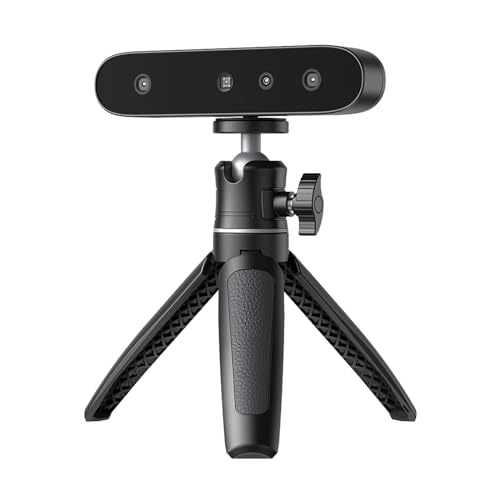
- Anti-shake tracking supports steadier handheld scans.
- Scans black and metallic objects without spray.
- Lightweight 105g body with 24-bit color capture.
Best For: Beginners scanning colorful or dark sculptures on Windows
Best for Outdoor and Mixed-Surface Scans

- Supports shaded or semi-bright outdoor scanning.
- Combines structured light and multi-line laser modes.
- Captures synchronized geometry and full-color textures.
Best For: Artists scanning detailed sculptures across varied environments
Best Marker-Free Option

- AI SLAM tracking helps scan without markers.
- Handles objects from 40mm to 1200mm.
- One-click processing and four export formats simplify workflows.
Best For: Creators scanning sculptures from small figurines to large forms
Wireless Precision Pick

- Up to 0.1mm accuracy and 30FPS capture
- WiFi 6 wireless scanning with anti-shake tracking
- Exports OBJ, STL, and PLY files
Best For: Portable, wireless scanning of medium-to-large sculptures
Detail-and-Range Value

- Dual modes for wide and high-accuracy scanning
- Up to 0.1mm precision with 0.16mm resolution
- RGB camera captures full-color textures
Best For: Large and detailed sculpture capture with Android scanning
Portable Beginner Kit

- Lightweight 105g scanner with travel accessories
- Wireless iOS, Android, PC, and Mac support
- Full-color scanning for 50mm to 2000mm objects
Best For: Beginners and mobile sculpture digitization
Precision Pick – Revopoint MetroX Pro
For sculptors who need highly detailed digital models, the Revopoint MetroX Pro is one of the most precision-focused 3d scanners for sculpture. Its blue laser and structured-light modes are designed to capture fine features, edges, corners, and difficult shiny or dark surfaces.
Best For: Artists and designers prioritizing high-precision scanning, complex surfaces, and color-aware turntable captures.
Pros:
- Up to 0.01 mm single-frame precision and 0.02 mm single-frame accuracy.
- Multiple scanning modes cover fine details, flat surfaces, dark objects, and feature-rich forms.
- Automatic turntable scanning and real-time PC-to-mobile streaming support efficient workflows.
- Can scan shiny or dark surfaces without scanning spray in laser modes.
Cons:
- At 14.82 pounds, the package is less portable than entry-level options.
- Revo Design and Revo Measure are paid software additions and support Windows only.
The MetroX Pro is a strong choice when sculpture scanning demands measurable precision and flexible surface handling. Its advanced modes may be more than casual hobbyists need, but they offer useful room for professional modeling, inspection, and 3D printing.
Beginner-Friendly Pick – 3DMakerpro Fox
The 3DMakerpro Fox offers an approachable starting point for hobbyists exploring 3d scanners for sculpture. It combines medium-format scanning, markerless AI visual tracking, and integrated JMStudio software to simplify capture and cleanup.
Best For: Beginners and hobbyists who want a manageable scanner for sculpture, modeling, measurement, and 3D printing.
Pros:
- Entry-level design is aimed at beginners and hobby users.
- 0.07 mm accuracy and 0.10 mm resolution provide useful detail for many projects.
- Markerless AI tracking can relock onto an object if handheld scanning loses alignment.
- JMStudio combines scanning, editing, and optimization in one software workflow.
Cons:
- Its stated accuracy and resolution are less specialized than the more industrial-focused models here.
- The supplied notes do not specify color capture or dedicated turntable scanning.
Fox is a sensible entry point for learning 3D scanning without jumping straight to industrial equipment. Its tracking and software features can reduce frustration during handheld scans, while the medium-format design suits a range of sculptural objects.
Versatile Speed Pick – Creality CR-Scan Raptor
The Creality CR-Scan Raptor is a versatile option among 3d scanners for sculpture, pairing high-precision blue laser scanning with infrared, marker-free capture. Its two scanning approaches make it suitable for detailed artifacts as well as faces, bodies, and larger forms.
Best For: Sculptors who need both fine-detail laser scanning and marker-free infrared capture across varied object sizes.
Pros:
- Blue laser mode reaches up to 0.02 mm accuracy with seven parallel laser lines.
- Infrared mode supports marker-free scanning of faces, bodies, and artifacts.
- Blue light scanning reaches up to 60 frames per second, while infrared reaches up to 20 fps.
- Handles objects ranging from 5 × 5 × 5 mm to 2000 × 2000 × 2000 mm.
Cons:
- Requires a relatively powerful computer, including 16GB RAM and a suitable GPU on Windows.
- Its laser mode uses optional markers for some scanning scenarios.
- The scanner weighs 8.48 pounds in its package.
The Raptor stands out when a sculpture workflow spans small detailed pieces and larger human-scale subjects. Buyers should plan for the stated computer requirements, but the combination of laser precision, infrared flexibility, and fast capture is compelling.
Professional Workflow Pick – Revopoint MetroY Ultra
The Revopoint MetroY Ultra is aimed at professional users who want metrology-oriented capability alongside fast scanning. For sculpture studios handling large, complex, or outdoor subjects, it offers multiple modes, wireless monitoring, and no-spray scanning for dark or glossy surfaces.
Best For: Professional studios and fabricators needing fast, verifiable scans with measurement and inspection tools.
Pros:
- Provides up to 0.01 mm single-frame precision and 0.015 mm + 0.04 mm/m volumetric accuracy.
- Scans at up to 90 fps with an NVIDIA GPU and includes five scanning modes.
- Included CMM-certified ball plate supports on-site accuracy verification.
- Wi-Fi 6, battery power, outdoor operation, and no-spray dark or shiny-surface scanning support mobile work.
Cons:
- Professional computer requirements are substantial, including 32GB RAM and an RTX 3060-class GPU on Windows.
- Revo Measure software supports Windows 10/11 only.
- The metrology features may be unnecessary for casual sculpting projects.
MetroY Ultra is best suited to sculpture workflows that overlap with fabrication, dimensional verification, or inspection. Its included verification hardware and professional software make it more specialized—and potentially more involved—than a typical creative scanning setup.
Best Budget-Friendly Pick – Creality CR-Ferret SE
For shoppers comparing 3d scanners for sculpture, the Creality CR-Ferret SE is a compact option focused on steady handheld scanning and easy operation. Its anti-shake tracking can help beginners capture usable models even when hand movement is less than perfectly consistent.
Best For: Beginners and hobbyists scanning dark, metallic, or full-color sculptural objects on a Windows PC.
Pros:
- Anti-shake technology helps maintain smoother tracking during handheld scans.
- Can scan black and metallic objects without scanning spray.
- Captures 24-bit full-color data with its built-in 2MP color camera.
- Lightweight 105g design is easy to carry and handle.
Cons:
- PC scanning only; it does not include a battery handle.
- Requires a compatible Windows system with more than 8GB of RAM.
The CR-Ferret SE makes the most sense when portability, approachable operation, and color capture matter more than advanced wireless features. Confirm your Windows setup before buying, especially if you want to scan away from a desktop.
Best for Outdoor and Mixed-Surface Scans – Revopoint INSPIRE 2
The Revopoint INSPIRE 2 stands out among 3d scanners for sculpture when projects involve varied materials, outdoor work, or detailed surface textures. It combines infrared structured light, multi-line laser scanning, wireless connectivity, and full-color capture in a portable 190g body.
Best For: Artists and makers who need outdoor scanning, color textures, or flexible capture modes for mixed-geometry sculptures.
Pros:
- Supports outdoor scanning in lighting up to 20,000 lux.
- Uses dual scanning modules for different materials, sizes, and environments.
- Offers accuracy up to 0.05mm and precision up to 0.03mm, according to the supplied specifications.
- Built-in Wi-Fi 6.0 and RGB color capture support flexible mobile workflows.
Cons:
- Recommended computer requirements are relatively demanding, including 16GB RAM and a discrete RTX 3060-class GPU for Windows.
- Revo Design is paid separately and supports Windows only.
Choose the INSPIRE 2 if your sculpture workflow moves between studio and outdoor settings or includes challenging reflective and dark surfaces. Its broader feature set is useful, but plan for compatible hardware and potential software costs.
Best Marker-Free Option – Fox 3D Scanner
For 3d scanners for sculpture that reduce setup time, the Fox 3D Scanner uses AI SLAM tracking to scan many objects without markers. Its 40–1200mm scanning range, one-click processing, and multiple export formats make it suitable for both small sculptures and larger subjects.
Best For: Beginners and creators who want marker-free scanning for sculptures ranging from small figurines to larger forms.
Pros:
- AI visual tracking reduces the need for markers or stickers.
- Scans objects from 40mm to 1200mm, including sculptures and figurines.
- One-click processing handles alignment, fusion, noise reduction, and mesh optimization.
- Exports OBJ, STL, PLY, and ASC files for modeling and 3D printing workflows.
Cons:
- Compatibility is limited to Windows 10/11 64-bit and macOS 12/13 systems.
- At 210g, it is lightweight but heavier than the Creality option in this roundup.
The Fox is a practical choice when you want a streamlined path from handheld capture to a printable or editable model. Its marker-free workflow is particularly appealing for sculptors who prefer less surface preparation, while the wide size range adds flexibility.
Wireless Precision Pick – CR-Scan Ferret Pro
For artists comparing 3d scanners for sculpture, the Creality CR-Scan Ferret Pro combines up to 0.1mm accuracy, 30FPS scanning, and anti-shake tracking for capturing complex forms. WiFi 6 wireless transmission also makes it convenient for studio, workshop, or outdoor scanning.
Best For: Sculptors who want a portable, wireless scanner for medium-to-large forms and full-color model capture.
Pros:
- Up to 0.1mm accuracy and 0.16mm resolution for detailed dimensional data
- 30FPS scanning with anti-shake tracking for smoother handheld capture
- WiFi 6 wireless transmission and OBJ, STL, and PLY export
- Supports Windows, Mac, Android, and iOS with the required compatible hardware
Cons:
- Best results require avoiding reflective, transparent, or extremely dark surfaces
- Compatible phones and computers must meet the specified operating-system and RAM requirements
The Ferret Pro is a flexible choice when wireless mobility matters. Its accuracy and fast capture suit sculpture digitization, while the stated surface limitations are worth planning for before scanning.
Detail-and-Range Value – CR-Scan Ferret
The Creality CR-Scan Ferret is a practical option among 3d scanners for sculpture, offering wide-range and high-accuracy scanning modes. Its ASIC chipset supports fast processing, while the RGB camera preserves full-color textures for more realistic digital models.
Best For: Creators who need one scanner for larger surfaces and more detailed sculpture capture, with Android mobile scanning support.
Pros:
- Dual-mode scanning supports both broad coverage and fine-detail work
- Up to 0.1mm precision and 0.16mm resolution in high-accuracy mode
- ASIC processing supports up to 60FPS image processing and 30FPS point-cloud capture
- Built-in RGB camera captures full-color textures
Cons:
- Mobile scanning is limited to compatible Android devices; iOS support is specified for the Pro model
- Windows, Mac, and Android devices must meet the listed system requirements
Its combination of scanning modes makes the Ferret useful for sculptors working at different scales. Consider it if full-color capture and Android portability are more important than iOS compatibility.
Portable Beginner Kit – CR-Scan Ferret Pro
For beginners exploring 3d scanners for sculpture, this CR-Scan Ferret Pro package emphasizes simple setup, portability, and wireless operation. It scans in full color with up to 0.1mm accuracy and is designed for objects from 50mm to 2000mm.
Best For: DIY sculptors and 3D-printing enthusiasts who want an easy-to-carry kit with wireless iOS, Android, and PC support.
Pros:
- Lightweight 105g design with a carrying case and included accessories
- Wireless WiFi 6 scanning across compatible Windows, macOS, Android, and iOS devices
- Full-color 24-bit scanning with anti-shake tracking and up to 0.1mm accuracy
- Includes WiFi box, tripod, power bank, phone holder, and one-year warranty
Cons:
- Not intended for very small or highly detailed items such as jewelry or precision parts
- Reflective, transparent, and very dark surfaces may reduce scanning performance
- Compatible devices must meet the listed operating-system and memory requirements
This package is appealing for artists who value a complete, mobile setup rather than a scanner alone. Its stated object-size range fits many sculptures, but extremely fine subjects may require a different solution.
How We Picked the Best 3d Scanners for Sculpture
We evaluated these 3d Scanners for Sculpture by focusing on the factors that matter after the marketing claims: stated accuracy, scanning speed, tracking stability, working distance, object-size range, color capture, connectivity, and ease of processing. We also considered whether each model is better suited to small studies, human-scale forms, textured originals, outdoor work, or repeatable technical capture.
Specifications such as accuracy and frame rate are useful comparisons, but they do not guarantee identical results on every sculpture. Surface color, gloss, ambient light, geometry, and operator technique can have a major effect on the final mesh.
Quick Comparison
- For fine geometric detail: Consider blue-laser models such as the Revopoint MetroX Pro or Creality CR-Scan Raptor.
- For fast capture: High-frame-rate options such as the Revopoint MetroY Ultra can help reduce interruptions during movement.
- For portable studio work: The Revopoint INSPIRE 2, 3DMakerpro Fox, and Creality Ferret models are easier to carry and deploy.
- For color references: Look for models advertising full-color or 24-bit color capture, while remembering that mesh texture quality depends on lighting.
- For difficult tracking: Anti-shake tracking, marker-free workflows, or AI-assisted tracking can make handheld scanning less frustrating.
Key Buying Factors for 3d Scanners for Sculpture
Accuracy and Detail
Choose the highest practical accuracy for the details you need to preserve. A highly precise scanner may be worthwhile for small maquettes, facial features, tool marks, and restoration work, while a more forgiving model can be sufficient for larger forms and visual prototypes.
Size, Range, and Tracking
Check the recommended object range before buying. A scanner designed for small objects may require extensive repositioning on a large sculpture. Stable tracking is equally important: complex, symmetrical, glossy, or textureless surfaces can be harder to follow than irregular, matte forms.
Lighting, Color, and Surface Finish
Blue laser and infrared systems behave differently around dark, reflective, or translucent materials. Color capture can preserve a useful visual reference, but it should not be confused with dimensional accuracy. Matte spray or removable markers may still be needed for challenging surfaces.
Workflow and Connectivity
Review compatible operating systems, software requirements, wireless range, export formats, and processing demands. A scanner that produces excellent data but requires a computer you do not have may be less useful than a slightly less precise model with a smoother workflow.
Who Should Buy Which 3d Scanners for Sculpture?
Artists making small, highly detailed studies should prioritize precision and fine-feature capture, making advanced blue-laser or measurement-oriented models the strongest candidates. Sculptors scanning medium or large pieces should favor broad coverage, reliable tracking, and a comfortable handheld design.
Beginners and students may prefer an accessible scanner with marker-free or assisted tracking and straightforward modeling software. Artists working outdoors or between studios should look for portable hardware, dependable connectivity, and performance that does not depend entirely on a fixed desktop setup.
Before ordering, confirm the scanner’s current software support, included accessories, device compatibility, and realistic scanning range. The best choice is the model that captures your sculpture’s scale and surface reliably without making the rest of your creative workflow unnecessarily complicated.