USB duplicators with offline operation let you copy or clone drives without installing software or keeping a computer connected. That makes them useful for IT deployment, media production, backups, and repeatable field work.
This roundup compares standalone USB copiers, multi-target flash duplicators, and offline hard-drive or M.2 cloning docks. The right choice depends on the media type, target count, speed, and level of control you need.
Best 10 USB Duplicators with Offline Operation Picks for 2026
Best Portable USB Option

- Copies to four USB drives simultaneously
- Standalone operation with no computer required
- Supports USB 1.0/2.0/3.0 and drives above 2TB
Best For: Portable, small-batch USB duplication
Best Dual-Bay HDD Cloner
SABRENT USB 3.0 Docking Station

- Clones SATA drives offline without a computer
- Accepts 2.5-inch and 3.5-inch HDDs or SSDs
- Supports drives up to 10TB
Best For: Offline SATA drive cloning and storage access
Best High-Capacity USB Duplicator
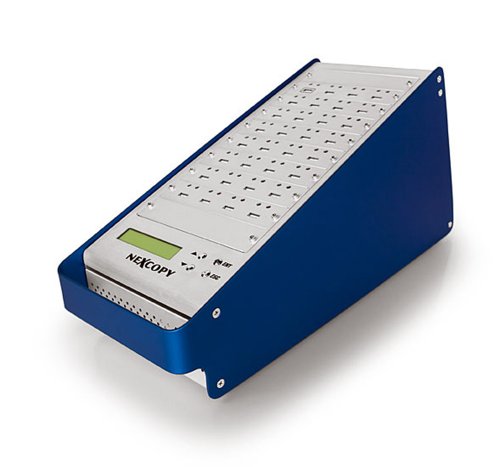
- Duplicates one master to 31 targets
- Standalone design needs no PC or software
- LCD shows real-time status and performance
Best For: Large-volume USB duplication runs
Best USB-C Offline Clone Dock

- Clones SATA disks offline with one click
- Supports two drives up to 18TB each
- Offers USB 3.0 UASP and tool-free bays
Best For: High-capacity SATA drive migration and cloning
Best Compact USB Duplicator

- PC-free copying for up to three USB drives
- Smart Copy and bit-by-bit Raw Copy modes
- DoD erasing and Read Error Skip support
Best For: Small offices and IT teams needing occasional offline duplication
Best Offline Drive Dock

- Clones SATA drives without a computer
- Supports 2.5-inch and 3.5-inch HDDs and SSDs
- Handles drives up to 20TB per bay
Best For: Drive upgrades, backups, and SATA-to-SATA transfers
Best High-Volume USB Duplicator

- Copies to seven USB targets offline
- Supports USB 3.0, 2.0, and 1.0 devices
- Adds secure erase and physical-error prescan
Best For: Professional teams producing multiple USB copies per run
Best NVMe USB Duplicator

- Offline one-button NVMe cloning
- Supports M Key and B+M Key SSDs
- USB 3.2 Gen 2x2 up to 20Gbps
Best For: Compatible NVMe SSD cloning and enclosure use
Best Multi-Port USB Duplicator

- Duplicates up to 10 USB drives
- Touchscreen copy and erase controls
- Supports USB 2.0, 3.0, and 3.1 media
Best For: High-volume USB flash-drive workflows
Best SATA USB Duplicator
WAVLINK Dual-Bay Offline Clone Dock

- Clones 2.5- and 3.5-inch SATA drives offline
- Supports up to 16TB per bay
- UASP transfer support up to 6Gbps
Best For: Driver-free SATA HDD and SSD duplication
Best Portable USB Option – EZ Dupe Mini USB Plus MK II
For shoppers comparing USB duplicators with offline operation, the EZ Dupe Mini USB Plus MK II is a compact standalone choice for copying one USB source to as many as four target drives. It requires no computer, supports USB 1.0, 2.0, and 3.0 media, and can run from a power bank or another USB power source.
Best For: Portable, small-batch USB copying and users who need asynchronous duplication without a computer.
Pros:
- Copies to up to four USB drives simultaneously.
- Standalone plug-and-use operation requires no computer.
- Updated version supports drives above 2TB and offers copy speeds up to 2.5GB per minute.
- Can use a power bank or USB power source.
Cons:
- Limited to four target USB devices at a time.
- External USB storage devices need their own power source.
- Actual speed depends on the connected drives.
This is a practical fit when portability and straightforward USB duplication matter more than high-volume production capacity. Its compact design and asynchronous copying make it flexible for occasional or mobile workflows.
Best Dual-Bay HDD Cloner – SABRENT USB 3.0 Docking Station
The SABRENT EC-HD2B brings offline operation to hard drive and SSD cloning rather than USB flash duplication. Its dual bays accept standard 2.5-inch and 3.5-inch SATA drives, while the included USB 3.0 connection also allows the dock to function as a computer-accessible storage reader.
Best For: Users who need a dual-bay SATA HDD or SSD dock with offline cloning capability.
Pros:
- Supports 2.5-inch and 3.5-inch SATA hard drives and SSDs.
- Offline cloning works without drivers or a computer.
- Supports drives up to 10TB and a stated 20TB storage capacity.
- USB 3.0 transfer speeds reach up to 5Gbps.
Cons:
- Designed for SATA hard drives and SSDs, not USB flash-drive duplication.
- Offline cloning speed is listed at up to 60Mbps.
- Requires a power supply for operation.
Choose this model if your source and target media are bare SATA drives. It is less suitable for a flash-drive-focused kit, but its two-bay layout makes it a convenient option for drive cloning and storage access.
Best High-Capacity USB Duplicator – USB131SA 1-to-31
For organizations needing large production runs, the USB131SA is a standalone duplicator with one master position and 31 target ports. It does not require a PC or software, and its LCD provides real-time performance and status feedback during operation.
Best For: High-volume USB duplication where producing up to 31 copies per batch is the priority.
Pros:
- Supports one master and 31 target USB drives.
- Standalone operation requires no PC or software.
- Advertises copy speeds over 1800MB per minute to each port.
- Supports asynchronous duplication for masters up to 256MB per second.
Cons:
- At 18 pounds, it is substantially less portable than compact duplicators.
- The supplied notes do not specify supported USB generations or maximum drive capacity.
- Large capacity may be excessive for occasional home use.
This model is aimed at scale rather than portability. Its 31-target configuration and status LCD make it a strong candidate for repeated distribution jobs, provided the unspecified media compatibility fits your workflow.
Best USB-C Offline Clone Dock – GODO Dual-Bay SATA Dock
The GODO dual-bay dock is another hard-drive-focused option for shoppers exploring USB duplicators with offline operation. It supports 2.5-inch and 3.5-inch SATA I, II, and III drives, and its one-click offline clone function copies an entire disk without connecting to a computer.
Best For: Tool-free cloning of SATA HDDs or SSDs, with USB-C-connected computer access when needed.
Pros:
- Offline whole-disk cloning requires no computer or software.
- Supports two 2.5-inch or 3.5-inch SATA drives up to 18TB each.
- USB 3.0 with UASP supports transfer rates up to 6Gbps.
- Tool-free, hot-swappable design includes LED indicators.
Cons:
- It is intended for SATA HDDs and SSDs rather than USB flash media.
- Offline cloning is for whole-disk duplication, not selective file copying.
- The supplied details specify Windows 10 as the minimum required operating system for computer-connected use.
With two high-capacity bays and a one-click clone mode, the GODO dock is a practical choice for drive migration and backup tasks. Consider it when you need SATA support and convenient computer-free cloning in a tool-free enclosure.
Best Compact USB Duplicator – 1-to-3 Standalone USB Cloner
If you need usb duplicators with offline operation, the Vinpower USBMiniDup provides a compact, PC-free way to copy up to three USB drives at once. Smart Copy handles accessible files quickly, while Raw Copy supports bit-by-bit duplication for bootable media, software, and complete backups.
Best For: Small businesses, IT teams, schools, offices, and organizations that regularly duplicate or securely erase USB drives.
Pros:
- Standalone operation requires no computer connection.
- Supports both Smart Copy and complete Raw Copy duplication.
- Includes DoD 5220.22-M secure erasing and Read Error Skip for damaged media.
- Compact, lightweight design with three USB ports.
Cons:
- Provides three target ports, which may be limiting for high-volume duplication.
- Designed for USB media rather than internal hard drives or SSDs.
This is a versatile choice when offline USB copying and secure erasing matter more than maximum duplication capacity. Its error-skipping feature adds useful flexibility when working with aging drives.
Best Offline Drive Dock – Dual-Bay SATA Clone Station
For shoppers comparing usb duplicators with offline operation for larger storage devices, the WAVLINK dual-bay dock clones one SATA HDD or SSD to another without a computer. It accepts 2.5-inch and 3.5-inch SATA drives, supports up to two 20TB disks, and also works as a USB 3.0 storage dock.
Best For: Users backing up, upgrading, or transferring data between SATA hard drives and SSDs.
Pros:
- Offline cloning works without a computer.
- Supports both 2.5-inch and 3.5-inch SATA I/II/III drives.
- Dual bays accommodate drives up to 20TB each.
- USB 3.0 with UASP supports high-speed transfers and broad OS compatibility.
Cons:
- It clones SATA drives, not USB flash drives.
- The target drive must have capacity equal to or greater than the source.
- Drive cloning requires a roughly five-second button press to start.
The WAVLINK is better suited to hard-drive and SSD cloning than traditional flash-drive duplication. Its tool-free dual-bay design makes it a practical option for drive upgrades and offline backups.
Best High-Volume USB Duplicator – 1-to-7 Flash Drive Copier
Vinpower Digital USBShark Standalone USB Flash Drive Duplicator - 7 Targets (High Speed)
Check Price On AmazonAmong usb duplicators with offline operation, the Vinpower USBShark stands out for producing up to seven copies in one standalone session. It supports USB 3.0, 2.0, and 1.0 devices, with Smart Copy for accessible files and bit-by-bit duplication for complete data formats.
Best For: Businesses, event organizers, software distributors, and IT departments that need higher-volume USB production without a PC.
Pros:
- Seven target ports support larger duplication runs.
- Operates completely standalone with no PC required.
- Offers Smart Copy and bit-by-bit duplication modes.
- Includes USB prescan for physical read errors and secure erase.
Cons:
- Its 10-pound weight makes it less portable than compact duplicators.
- Seven-port capacity may be unnecessary for occasional home use.
- The supplied notes do not specify a warranty.
This model makes the most sense when throughput is the priority. Its seven-target layout, broad USB compatibility, prescan capability, and secure erase features suit repeat professional workflows.
Best NVMe USB Duplicator – Rosewill Dual-Bay M.2 Cloner
For shoppers comparing usb duplicators with offline operation, the Rosewill RS-N2-CL is a compact choice for cloning compatible NVMe drives without relying on a computer. Its dual-bay design supports M Key and B+M Key NVMe SSDs, while USB 3.2 Gen 2×2 connectivity supports transfer rates up to 20Gbps when used with compatible equipment.
Best For: Users who need an offline NVMe cloner and a fast dual-drive enclosure for compatible M.2 SSDs.
Pros:
- One-button standalone cloning for compatible NVMe drives
- Supports M Key and B+M Key NVMe SSDs
- USB 3.2 Gen 2×2 interface with speeds up to 20Gbps
- Includes USB-C, USB-A, and 12V/2A power cables
Cons:
- Designed for NVMe M.2 drives rather than SATA drives
- Actual performance depends on the connected hardware and interface
The Rosewill stands out when offline NVMe cloning is the priority, especially for buyers who also want enclosure functionality. Its S.M.A.R.T. monitoring and TRIM support add useful drive-management features, but compatibility should be confirmed before purchase.
Best Multi-Port USB Duplicator – EZ Dupe SOHO Touch 1-to-10
The EZ Dupe SOHO Touch is built for copying and managing multiple USB flash drives from one standalone unit. For shoppers seeking usb duplicators with offline operation, it offers a touchscreen interface for copy, compare, format, and erase functions, with support for USB 2.0, 3.0, and 3.1 media.
Best For: Offices, technicians, and repeat-use workflows that require duplication across up to 10 USB flash drives.
Pros:
- 1-to-10 USB duplication capacity
- Touchscreen controls simplify copying, comparison, formatting, and erasing
- Supports all file formats, file sizes, and USB flash-drive capacities according to the supplied notes
- Copies at up to 35MB per second
Cons:
- Focused on USB flash media rather than internal hard drives or SSDs
- Its 3-pound construction may be less convenient for portable use
- No battery is included, so it requires external power
With its large duplication capacity and dedicated touchscreen, the SOHO Touch is a practical fit for recurring USB-media jobs. The integrated compare and erase tools are useful for verification and reuse, while the desktop-oriented design favors stationary operation.
Best SATA USB Duplicator – WAVLINK Dual-Bay Offline Clone Dock
The WAVLINK dual-bay dock is a straightforward option for usb duplicators with offline operation when the source and target drives are 2.5- or 3.5-inch SATA HDDs or SSDs. It supports offline source-to-target cloning, with a target drive capacity that must be equal to or larger than the source.
Best For: Users cloning SATA hard drives or SSDs without installing drivers or connecting the dock to cloning software.
Pros:
- Offline cloning for two 2.5- or 3.5-inch SATA drives
- Supports capacities up to 16TB per bay
- UASP support with transfer rates up to 6Gbps
- Tool-free installation, hot-swapping, and automatic sleep mode
Cons:
- Offline cloning requires the target drive to match or exceed the source capacity
- Does not support online cloning
- Not compatible with M1/M2-based Macs according to the supplied notes
The WAVLINK is a useful choice for conventional SATA drive duplication, particularly when you want a simple dock with a built-in power switch. Its broad Windows, Mac, and Linux compatibility has an important exception for M1/M2 Macs, so confirm your system before ordering.
How We Picked the Best USB Duplicators with Offline Operation
We selected models that support computer-free duplication or cloning and represent a range of common workflows. The list includes compact flash-media copiers, high-volume standalone USB duplicators, dual-bay SATA docks, and an M.2 enclosure for newer solid-state drives.
We considered target capacity, supported drive formats, connection standards, offline functionality, ease of use, and whether each unit is better suited to occasional home use, professional deployment, or repeated production tasks. Product descriptions and specifications should still be checked before purchase because supported capacities and cloning methods can vary by revision.
Quick Comparison
| Best For | Look For | Relevant Picks |
|---|---|---|
| Small batches of USB drives | Compact design and simple standalone controls | EZ Dupe Mini, Vinpower 1-to-3 |
| Higher-volume USB deployment | More target ports and dedicated copying controls | USB131SA, USBShark, EZ Dupe SOHO |
| Hard-drive or SSD cloning | Compatible SATA bays and offline clone support | SABRENT, GODO, WAVLINK docks |
| M.2 SSD cloning | Correct M-key PCIe/NVMe compatibility | Rosewill M.2 duplicator |
Key Buying Factors for USB Duplicators with Offline Operation
Media Compatibility
Start with the source and target media. USB flash duplicators are not interchangeable with SATA docks, and a SATA model may not support M.2 drives. For M.2 devices, verify the key type, PCIe or SATA protocol, and supported size before ordering.
Target Count and Throughput
A one-to-three or one-to-four unit can be efficient for occasional batches, while a seven-, ten-, or thirty-one-target system is better for deployment teams and production environments. More ports can reduce total job time, but actual speed depends on the source, target drives, interface, and copying mode.
Copying and Verification Modes
Look for features such as full-drive cloning, file-system-aware copying, asynchronous operation, comparison or verification, and secure erasing. Full duplication is useful when boot sectors and hidden partitions must be preserved; file-level modes may be faster when target capacities differ.
Usability and Safety
A clear touchscreen or menu can simplify repeat jobs, while status indicators help identify failed targets. Check whether the device supports source-protection safeguards, automatically detects capacity, and provides a reliable way to cancel or confirm destructive operations.
Who Should Buy Which USB Duplicators with Offline Operation?
Choose a compact EZ Dupe or Vinpower unit for occasional USB duplication, travel, classroom use, or small media batches. For IT departments, refurbishers, and software distributors producing many copies at once, the USB131SA, USBShark, or EZ Dupe SOHO offers a more scalable port count.
Choose a dual-bay SATA dock when your workflow involves 2.5- or 3.5-inch HDDs and SSDs rather than thumb drives. The Rosewill model is the more appropriate direction for compatible M.2 PCIe SSDs. Before buying, match the duplicator to your media format and confirm that the target drive is at least as large as the source when performing a full offline clone.