Replacing aging thermal paste can help restore heat transfer between a graphics card’s GPU die and cooler, especially when temperatures or fan noise have increased over time.
We compared 10 popular compounds by thermal performance, application experience, durability, package size, and compatibility to help you choose the right paste for your next GPU service.
Best 10 Thermal Pastes for Graphics Cards Picks for 2026
Proven All-Rounder

- Carbon microparticles support high thermal conductivity
- Non-conductive, metal-free formula
- 8 g tube with easy application
Best For: GPU repasting and beginner-friendly use
Endurance Pick
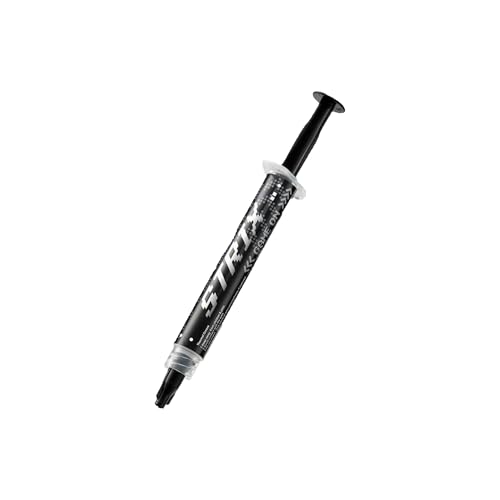
- Premium thermal conductivity
- Smooth, easy spreading
- High-endurance formula for gaming devices
Best For: GPU, CPU, PlayStation, and Xbox maintenance
Complete Maintenance Kit

- No pre-spreading required
- Includes three cleaning wipes
- 3.5 g supports roughly 3–20 applications
Best For: GPU repasting with convenient cleanup
Easy Application Choice

- Includes stencil and spreader
- Non-conductive zinc oxide formula
- 3 g pack for CPU and GPU use
Best For: Desktop GPU users wanting guided application
High-Temperature Value

- Up to 14W/m.k thermal conductivity
- Non-conductive and non-corrosive formula
- Needle applicator plus spatula included
Best For: Easy GPU and heatsink maintenance
Multi-Application Performance

- Low-viscosity formula spreads evenly
- Applicator card included
- 3g quantity supports multiple applications
Best For: Repeat GPU, CPU, and console maintenance
Nanoparticle Cooling

- 14W/mK stated thermal conductivity
- Electrically insulated and moisture resistant
- Balanced viscosity and non-corrosive formula
Best For: High-performance GPU and CPU repasting
Premium Easy-Apply Pick

- Supports high-performance processors up to 250W+ TDP
- Low-viscosity formula spreads evenly
- Includes wipes and an applicator kit
Best For: High-performance desktop CPUs, GPUs, and consoles
Large-Quantity Versatile Pick
USTP128 12.8W/mK Thermal Paste

- 12.8 W/mK thermal conductivity rating
- Generous 10-gram compound supply
- Works with PCs, GPUs, laptops, and listed consoles
Best For: Repeated applications across multiple device types
Overclocking-Focused Pick

- 12.5W thermal conductivity rating
- Includes applicators, spatulas, and cleaning pads
- Designed for demanding setups and graphics cards
Best For: Overclockers and high-performance PC configurations
Proven All-Rounder – ARCTIC MX-4
For shoppers comparing thermal pastes for graphics cards, ARCTIC MX-4 is a practical choice with a well-established formula. Its carbon microparticles support heat transfer, while the metal-free, non-electrically conductive composition helps reduce application risk around GPU components.
Best For: GPU repasting, CPU use, and beginners who want an easy-to-apply compound.
Pros:
- Carbon microparticles provide high thermal conductivity.
- Metal-free and non-electrically conductive for safer application.
- Medium consistency is easy to apply.
- 8 g quantity offers useful reserve for multiple applications.
Cons:
- The supplied notes do not specify included cleaning materials or an applicator.
- It is not water resistant.
MX-4 stands out as a straightforward, versatile option for graphics-card maintenance. Its accessible consistency and non-conductive formula make it especially approachable for first-time repasting.
Endurance Pick – ASUS ROG Strix RG-05
ASUS ROG Strix RG-05 is aimed at users seeking thermal pastes for graphics cards with a premium positioning. The supplied specifications highlight high thermal conductivity, smooth spreading, and a special high-endurance formula for broad gaming-device compatibility.
Best For: Gamers servicing GPUs, CPUs, PlayStation consoles, or Xbox systems.
Pros:
- Designed for high performance and premium thermal conductivity.
- Smooth spreading supports easy application.
- High-endurance formula is suited to long-term use.
- Listed for CPU, GPU, PlayStation, and Xbox applications.
Cons:
- The supplied notes do not state the paste quantity.
- No cleaning wipes or applicator are listed in the provided details.
RG-05 is a sensible fit when compatibility beyond a desktop graphics card matters. Its strongest stated advantages are easy spreading and endurance, though buyers wanting a clearly specified package size may prefer another option.
Complete Maintenance Kit – Noctua NT-H2
Noctua NT-H2 combines high-performance compound with three NA-CW1 cleaning wipes, making it a convenient option among thermal pastes for graphics cards. It is designed for CPU and GPU heatsink contact, requires no pre-spreading, and is supported by stated long-term stability.
Best For: GPU repasting when clean preparation and included wipes are priorities.
Pros:
- Premium compound supports heat transfer from GPU to heatsink.
- No pre-spreading is required before heatsink installation.
- Includes three cleaning wipes for easier maintenance.
- 3.5 g pack supports approximately 3–20 applications depending on component size.
Cons:
- The 3.5 g quantity may provide fewer applications for larger components.
- The supplied notes position it for desktop-compatible devices, so other uses are less clearly specified.
NT-H2 is particularly attractive as a tidy, well-supported repasting package. The included wipes and easy installation approach add practical value, while its stated storage and usage stability suit scheduled maintenance.
Easy Application Choice – Corsair TM30
Corsair TM30 is a useful contender for thermal pastes for graphics cards when application guidance matters. Its zinc oxide-based compound is non-conductive, and the package includes an application stencil and spreader to make coverage more predictable.
Best For: Desktop GPU and CPU users who want guided application and a long-service compound.
Pros:
- Designed for CPU and GPU heat transfer.
- Low viscosity helps fill microscopic surface channels.
- Included stencil and spreader simplify application.
- Non-conductive formula is designed for safer PC use.
Cons:
- The 3 g quantity is smaller than some larger-pack alternatives.
- The supplied notes identify it for desktop use, limiting clearly stated compatibility elsewhere.
TM30 is a practical pick for users who prefer tools that reduce application guesswork. Its low-viscosity zinc oxide compound and stated long service life make it well suited to routine desktop graphics-card maintenance.
High-Temperature Value – Thermalright TF9
For shoppers comparing thermal pastes for graphics cards, the Thermalright TF9 combines a stated thermal conductivity of up to 14W/m.k with a broad operating-temperature range. Its needle-style package and included spatula also make it approachable for routine GPU, CPU, and heatsink applications.
Best For: Beginners and PC or console users who want a non-conductive paste with easy application and long-term stability.
Pros:
- Thermal conductivity rated up to 14W/m.k.
- Non-conductive, non-corrosive, and free of metal particles.
- Needle-style applicator and included spatula simplify application and storage.
- Specified operating range of -220°C to +380°C.
Cons:
- The 1.5g quantity is smaller than some multi-application alternatives.
- The product details do not specify a dedicated graphics-card application kit.
TF9 is a practical choice when electrical safety, durability, and straightforward handling matter as much as cooling performance. Its compact 1.5g package is best suited to individual maintenance jobs rather than frequent repasting.
Multi-Application Performance – CORSAIR XTM60
CORSAIR XTM60 is a useful option among thermal pastes for graphics cards when you want a low-viscosity compound and enough material for repeated applications. The included applicator card is designed to help spread an even layer across a GPU or CPU cooler.
Best For: Enthusiasts and gamers who need a clean, repeatable application process for desktop PCs, graphics cards, or consoles.
Pros:
- Designed for CPU and GPU heat transfer in air- and liquid-cooled systems.
- Low viscosity supports even spreading.
- Included applicator card helps with clean application.
- 3g tube provides enough paste for multiple applications.
Cons:
- The supplied notes do not provide a specific thermal-conductivity rating.
- The larger tube may be more paste than needed for a single repaste.
XTM60 stands out for application convenience and quantity rather than a published conductivity figure. It is a sensible pick for users who expect to service more than one device or want extra paste available for future maintenance.
Nanoparticle Cooling – Cooler Master CryoFuze
Cooler Master CryoFuze uses nanoparticles and lists a thermal conductivity of 14W/mK, making it a strong candidate among thermal pastes for graphics cards and other demanding components. Its electrically insulated, non-moisture-absorbent formula is designed for clean, durable use.
Best For: PC builders and console or laptop users seeking a high-conductivity paste with a balanced consistency and non-corrosive formulation.
Pros:
- Nanoparticle formula with stated 14W/mK thermal conductivity.
- Electrically insulated and non-moisture absorbent.
- Viscosity is balanced for application and cleanup.
- Non-corrosive and oxidation resistant.
Cons:
- The 2g quantity may be limited for frequent multi-device servicing.
- The supplied details do not mention an included applicator tool.
CryoFuze is a well-rounded option for users prioritizing a published conductivity rating alongside safe material properties. Its 2g package fits focused GPU or CPU maintenance while remaining suitable for consoles, laptops, and heatsinks.
Premium Easy-Apply Pick – Corsair XTM70 Thermal Paste
For thermal pastes for graphics cards, CPUs, and consoles, Corsair XTM70 is a practical choice when clean application matters. Its low-viscosity formula is designed to spread evenly, and the kit includes an applicator plus three cleaning wipes for preparing the surfaces.
Best For: High-performance desktop CPUs, GPUs, and consoles requiring an easy, well-equipped application kit.
Pros:
- Designed for processors and cold plates up to 250W TDP and higher.
- Low viscosity helps it spread evenly and cleanly.
- Includes three cleaning wipes and an applicator kit.
- 3g quantity provides enough compound for multiple applications.
Cons:
- The supplied details focus on desktop-compatible applications, so device-specific fit should be checked.
- The kit is more than necessary if you only need a single small application.
XTM70 stands out for combining high-load cooling support with useful preparation accessories, making it a convenient option for graphics card maintenance and other desktop cooling jobs.
Large-Quantity Versatile Pick – USTP128 12.8W/mK Thermal Paste
Among thermal pastes for graphics cards, this 10-gram compound is suited to users who want one product for several electronics. It is listed for laptops, desktops, graphics cards, and game consoles, with a low-viscosity, easy-to-remove formula designed for straightforward application.
Best For: Multi-device repairs and maintenance where a generous 10-gram supply is useful.
Pros:
- Rated at 12.8 W/mK thermal conductivity.
- Large 10-gram quantity supports repeated applications.
- Suitable for laptops, desktops, graphics cards, and several consoles.
- Non-corrosive and non-conductive formulation is designed for processor use.
Cons:
- The notes specify that it is not for PS5.
- No applicator or cleaning accessories are listed as included.
This U.S.-made compound is a flexible choice for households or repair benches handling multiple device types. Its larger quantity and long-service-life claims may appeal to buyers who value repeat use.
Overclocking-Focused Pick – Thermal Grizzly Kryonaut
Thermal Grizzly Kryonaut is aimed at demanding users comparing thermal pastes for graphics cards and other high-performance components. Its 12.5W thermal conductivity rating, precision syringe, and included spreading tools make it suitable for careful installation and overclocking-oriented builds.
Best For: Enthusiasts, overclockers, and demanding PC configurations that need a high-performance paste with application accessories.
Pros:
- 12.5W thermal conductivity rating for demanding configurations.
- Includes three applicators, three spatulas, and six CPU cleaning pads.
- Designed for use on processors and graphics cards.
- Its structure is described as resistant to drying at temperatures up to 80°C.
Cons:
- The supplied temperature rating is limited to 80°C.
- Its enthusiast-focused feature set may be unnecessary for basic repasting.
Kryonaut is the most purpose-built option here for users who prioritize performance-focused maintenance and precise spreading. The included tools and cleaning pads also make the package convenient for multiple installations.
How We Picked the Best Thermal Pastes for Graphics Cards
We focused on compounds suitable for GPU maintenance as well as broader CPU and console use. Our comparison considers stated thermal conductivity, viscosity, spreadability, long-term stability, included application tools, package size, and the practical needs of graphics-card installation. A paste’s published watt-per-meter-kelvin rating can be useful, but it is not a universal performance guarantee; mounting pressure, cooler design, paste coverage, and the condition of the card matter just as much.
We also favored products from established cooling brands and included options ranging from compact single-use syringes to larger packages for multiple applications. None of these compounds should be used on exposed electrical contacts, and users should always follow the graphics card manufacturer’s service guidance.
Quick Comparison
- Best all-around choices: ARCTIC MX-4, Noctua NT-H2, and Corsair XTM60 offer approachable application and broad compatibility.
- For enthusiast performance: Thermal Grizzly Kryonaut, Corsair XTM70, and Cooler Master CryoFuze target users prioritizing high-end cooling.
- For larger quantities: ARCTIC MX-4’s 8 g package and the 10 g high-conductivity option are useful for multiple cards or future servicing.
- For guided application: Products that include an applicator, spatula, or cleaning wipes can simplify a first GPU repaste.
Key Buying Factors for Thermal Pastes for Graphics Cards
Thermal Performance
Look for a compound designed for high heat loads and stable operation across repeated temperature cycles. Conductivity ratings are helpful for initial filtering, but independent testing and the quality of the GPU cooler are better indicators than specifications alone.
Viscosity and Application
Thicker pastes may stay in place well but can require more spreading pressure. Low-viscosity formulas are often easier to distribute across a GPU die. Check whether the package includes a spatula or applicator, particularly if the card uses a large exposed die.
Durability and Electrical Safety
Choose a non-conductive compound for a safer installation around nearby components. Long-term stability matters because opening a graphics card is time-consuming, and a durable paste can reduce the need for frequent maintenance.
Quantity and Value
A 1.5–3 g syringe is generally enough for one or several GPU applications, depending on the die size and technique. Larger packages cost more initially but make sense for builders, repairers, or owners maintaining multiple systems.
Who Should Buy Which Thermal Pastes for Graphics Cards?
Choose ARCTIC MX-4 or Noctua NT-H2 if you want a dependable, easy-to-use compound from a well-known cooling brand. Choose Thermal Grizzly Kryonaut, Corsair XTM70, or CryoFuze if maximizing enthusiast-class cooling is the priority and you are comfortable applying paste carefully.
Choose Corsair XTM60 or TM30 for a balanced desktop or GPU maintenance option with straightforward application. Choose ASUS ROG Strix RG-05 if you prefer a brand-aligned option for gaming hardware and consoles. Choose the larger 8 g or 10 g packages if you plan several repastes or want extra compound available for future repairs. For any selection, clean away the old material completely, use a modest even layer, and reinstall the cooler with consistent pressure.