Choosing the right video switcher with multi-view can make multi-camera production faster, cleaner, and easier to monitor. The products in this roundup range from compact HDMI switchers to more capable systems with SDI, recording, streaming, audio mixing, and built-in displays.
Use the guide below to compare the features that matter most, including input compatibility, preview layouts, resolution support, audio handling, portability, and workflow controls.
Best 10 Video Switcher with Multi View Picks for 2026
Best Portable Kit

- 14-inch integrated monitor
- Four HDMI/SDI inputs
- AC, DC, and USB power options
Best For: Mobile multicamera streaming setups
Best All-in-One Production Hub

- Six HDMI/USB video inputs
- Custom scenes and graphic tools
- Integrated XLR audio and ISO recording
Best For: Audio-rich multicamera productions
Best for 4K Source Monitoring
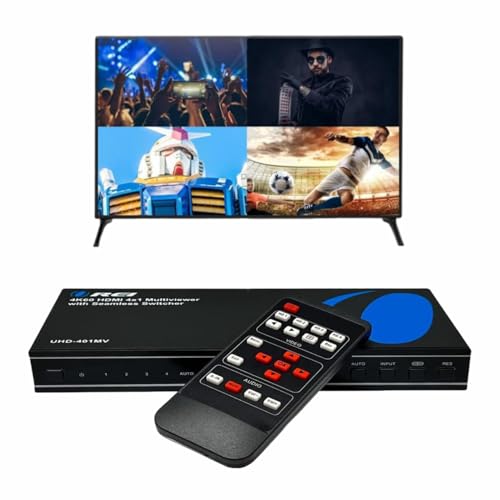
- Four HDMI inputs
- Up to 4K at 60Hz
- Optical and analog audio outputs
Best For: 4K home entertainment and gaming setups
Best Touchscreen Control

- 10.1-inch touchscreen preview
- Four HDMI plus one SDI input
- Chroma key and logo overlay
Best For: Mixed HDMI/SDI multicamera streaming
Best Streaming Control

- Four-camera multiview monitoring
- Built-in streaming, recording, and audio mixing
- HDMI switcher with transitions and keyers
Best For: Multicamera livestreams and presentations
Best Budget Multiviewer

- Six flexible viewing modes
- Seamless switching across four HDMI inputs
- 1080p at 60Hz with scaling support
Best For: HDMI monitoring and gaming setups
Best Hybrid Live Production

- Combines SDI, HDMI, USB-C, and NDI HX sources
- Supports portrait and landscape production
- Streams to up to three platforms
Best For: Advanced HDMI and SDI live events
Best 4K Multi-Viewer
J-Tech Digital 4x1 HDMI Switcher

- 4K at 60Hz support
- Eight layouts with quad view, PiP, and PBP
- RCA and optical audio extraction
Best For: Home theaters, security monitoring, and 4K multi-source viewing
Best Portable Production Hub

- Built-in 4-inch multi-view screen
- Four HDMI inputs with zero-latency switching
- PTZ control, keying, overlays, and AUX output
Best For: Portable multi-camera streaming and live events
Best Compact 4K Streamer
RGBlink Mini V3 Video Switcher

- Four HDMI inputs with 2.1-inch touch screen
- Dual 1080p outputs and UVC webcam mode
- USB recording and optional creative effects
Best For: Portable live streaming and multi-camera creator setups
Best Portable Kit – Osee GoStream Duet Kit
If you need a video switcher with multi view for mobile productions, the Osee GoStream Duet Kit combines switching, monitoring, recording, and streaming connections in a portable package. Its 14-inch display, four HDMI/SDI inputs, and flexible power options make it practical for events and on-location work.
Best For: Mobile multicamera streaming setups that need an integrated monitor and flexible power.
Pros:
- Includes a 14-inch 1080 × 1920 monitor and mounting plates.
- Four HDMI/SDI inputs, two HDMI outputs, and two USB ports support flexible routing.
- Can run from AC, DC, or a USB power bank.
Cons:
- At about 5 kg, it is portable but not especially lightweight.
- The integrated feature set may be more than needed for simple HDMI switching.
This is a strong choice when portability and an integrated multi-view workflow matter more than minimizing equipment size. Its connection options also leave room for cameras, streaming software, and external devices.
Best All-in-One Production Hub – RØDECaster Video
The RØDECaster Video is a video switcher with multi view aimed at creators who also need serious audio control. It handles up to six video sources, custom scenes, overlays, chroma keying, direct streaming, and recording from a front-panel workflow.
Best For: Live productions that combine multicamera video, studio audio, graphics, and direct streaming.
Pros:
- Supports four HDMI and two USB video sources.
- Provides seven customizable multi-source scenes with transitions and overlays.
- Includes XLR audio inputs, direct streaming, USB software output, and ISO recording.
Cons:
- Its broad production feature set may be excessive for basic switching.
- It uses corded electric power rather than a portable power option listed in the notes.
Choose this model when audio and video need to be managed from one production device. Inspect Mode and intelligent audio-based auto-switching add useful options for previewing sources and hands-free operation.
Best for 4K Source Monitoring – OREI 4×1 Multi HDMI Viewer
For buyers seeking a straightforward video switcher with multi view, the OREI 4×1 Multi HDMI Viewer supports four HDMI sources and displays them on one screen. It adds multiple viewing modes, seamless switching, remote control, and optical or analog audio output.
Best For: Home entertainment, gaming, and simple HDMI source monitoring on a 4K display.
Pros:
- Supports four HDMI inputs and switching up to 4K at 60Hz.
- Offers five listed display modes for viewing connected sources.
- Includes optical and L/R audio outputs with broad format support.
Cons:
- It has one HDMI output, limiting more advanced production routing.
- Audio selection allows only one source to output audio at a time.
- It is an HDMI viewer rather than a full live-production mixer.
This compact option fits users who primarily want to view and select among HDMI devices rather than build a streaming production. Its 4K support and audio conversion features make it especially suitable for entertainment systems.
Best Touchscreen Control – FEELWORLD L4 Video Switcher
The FEELWORLD L4 is a video switcher with multi view designed around a 10.1-inch touchscreen and real-time preview. With four HDMI inputs, one SDI input, chroma keying, logo overlays, and USB 3.0 output, it suits compact multicamera streaming workflows.
Best For: Creators who want touchscreen operation and mixed HDMI/SDI camera connectivity.
Pros:
- Provides a 10.1-inch touchscreen, preview interface, buttons, and T-bar control.
- Supports four HDMI and one SDI camera input for five-source streaming.
- Includes chroma keying, logo overlays, and HDMI, SDI, and USB 3.0 outputs.
Cons:
- The supplied notes do not list built-in recording or direct platform streaming.
- Its many supported formats may require careful setup across mixed sources.
This is a practical middle ground for live operators who want a dedicated preview screen without giving up SDI connectivity. The touchscreen and T-bar provide accessible control, while keying and logo overlays help add production polish.
Best Streaming Control – ATEM Mini Pro HDMI
The Blackmagic Design ATEM Mini Pro is a strong video switcher with multi view for creators, educators, presenters, and small production teams. It combines four HDMI inputs with built-in streaming, recording, transitions, keyers, and audio mixing in a compact unit.
Best For: Multicamera livestreams, education and training, business presentations, and esports events.
Pros:
- Provides a four-camera multiview for monitoring sources.
- Supports multiple transitions, including cut, mix, dip, wipe, and DVE.
- Includes built-in streaming, recording, keying, and a six-input, two-channel audio mixer.
- Offers HDMI, USB-C, Ethernet, and 3.5mm audio connectivity.
Cons:
- Limited to four HDMI camera inputs.
- Does not provide the SDI connectivity or broader source selection of more advanced systems.
Choose the ATEM Mini Pro when you want an integrated HDMI production hub rather than a basic display switcher. Its multiview and streaming features make it particularly practical for compact live productions.
Best Budget Multiviewer – PORTTA 4×1 HDMI Multiviewer
The PORTTA 4×1 HDMI Multiviewer is a practical video switcher with multi view for combining up to four HDMI sources on one display. It offers six viewing layouts, seamless source switching, and 1080p at 60Hz support for cameras, computers, consoles, and other HDMI devices.
Best For: HDMI monitoring, gaming setups, security cameras, and simple multi-source display systems.
Pros:
- Offers six layouts, including quad view, side-by-side, picture-in-picture, and one-big-three-small.
- Provides seamless switching between four HDMI inputs.
- Supports up to 1080p at 60Hz with scaler up and down functions.
- Includes IR remote control, RS232 control, optical audio, and 3.5mm audio output.
Cons:
- Designed for HDMI sources and does not include live-streaming or recording functions.
- Its maximum supported resolution is 1080p at 60Hz.
This PORTTA model is best viewed as a display-oriented multiviewer rather than a full broadcast switcher. It is a sensible choice when easy source monitoring and seamless HDMI switching matter more than production effects or streaming tools.
Best Hybrid Live Production – Osee GoStream Duet
Osee GoStream Duet Multiple Camera SDI and HDMI Live Stream Video Mixer Switcher
Check Price On AmazonThe Osee GoStream Duet is a versatile video switcher with multi view for productions using HDMI, SDI, USB-C, NDI HX, and playback sources. It supports landscape and portrait workflows, multiple control methods, advanced key effects, and streaming to up to three platforms at once.
Best For: Hybrid HDMI and SDI live events, portrait or landscape streaming, and more advanced multicamera productions.
Pros:
- Supports source selection from four SDI inputs, four HDMI inputs, USB-C, NDI HX, and SD/SSD playback.
- Includes luma, chroma, pattern, multisource, PIP, and DSK effects.
- Offers MIX, DIP, WIPE, and T-bar transitions.
- Can stream to up to three platforms through Ethernet or a smartphone hotspot.
Cons:
- Has a shorter one-year manufacturer warranty.
- Its wider feature set may be more than needed for simple HDMI switching.
- NDI HX requires downloading the latest firmware to unlock the included license.
The GoStream Duet is the most capable option here for mixed-format and feature-rich live production. Its SDI and HDMI support, portrait workflows, and multistreaming make it a better fit for demanding events than straightforward display switching.
Best 4K Multi-Viewer – J-Tech Digital 4×1 HDMI Switcher
If you need a video switcher with multi view for security feeds, consoles, or media players, the J-Tech Digital JTECH-MV41A combines four HDMI inputs with flexible monitoring on one display. It supports 4K at 60Hz and offers eight viewing modes, including quad view, PiP, and PBP.
Best For: Home theaters, security monitoring, and users who want 4K multi-source viewing with audio extraction.
Pros:
- Supports up to 4K at 60Hz.
- Offers eight display modes, including quad view, PiP, and PBP.
- Includes RCA and optical audio outputs with support for surround formats up to 7.1 channels.
- Mounting ears, a one-year warranty, and lifetime technical support are included.
Cons:
- Designed for switching and monitoring rather than live-production features such as camera control or streaming.
- Only one display output is specified.
The JTECH-MV41A is a practical choice when high-resolution multi-view monitoring matters most. Its audio extraction and adjustable layouts add flexibility, while the feature set is focused on HDMI source management rather than broadcast production.
Best Portable Production Hub – Mixer Plus 4-Channel Switcher
The Mixer Plus is a video switcher with multi view built into a compact live-production system. Its four HDMI inputs, integrated 4-inch screen, real-time source previews, and program and preview windows make it suited to multi-camera streaming, classes, events, and online presentations.
Best For: Portable multi-camera productions that need onboard monitoring and broadcast-style switching tools.
Pros:
- Built-in 4-inch display provides real-time multi-view monitoring.
- Supports four HDMI sources with zero-latency switching and 30 transition effects.
- Includes chroma key, luma key, PIP, DSK, logo overlay, and VISCA-over-IP PTZ control.
- Customizable AUX HDMI output can send program, preview, clean feeds, patterns, or multi-view.
Cons:
- The built-in screen is compact at 4 inches.
- Its listed audio output mode is headphone output.
With dedicated PGM and PVW monitoring plus audio meters, the Mixer Plus gives operators useful visual feedback while switching. It is especially appealing for mobile setups where carrying a separate multi-view monitor is inconvenient.
Best Compact 4K Streamer – RGBlink Mini V3 Video Switcher
The RGBlink Mini V3 is a compact video switcher with multi view designed for entry-level live streaming and multi-camera work. It combines four HDMI inputs, a 2.1-inch touch screen, dual 1080p HDMI outputs, UVC webcam mode, and a physical T-bar in a lightweight unit.
Best For: Creators who want a portable 4K-capable switcher with streaming, recording, and optional production effects.
Pros:
- Provides four HDMI inputs, dual 1080p outputs, and a 2.1-inch touch screen.
- Supports UVC webcam mode for platforms such as YouTube and Facebook.
- Can record to USB drives up to 2TB and offers PIP, chroma key, overlays, and 15 transitions.
- Supports PTZ control and other premium features through TAO Cloud activation.
Cons:
- Recording and selected advanced features require optional TAO Cloud licensing.
- A 35W-or-higher USB-C power adapter is recommended for stable performance.
- The 2.1-inch touch screen is smaller than the display on some portable switchers.
The Mini V3 packs a broad set of streaming features into a 0.49 kg design, making it convenient for compact creator setups. Buyers should account for the optional licensing model and power recommendation when planning a workflow.
How We Picked the Best Video Switcher with Multi View
We selected products across several common production needs rather than focusing on one type of buyer. The lineup includes HDMI and SDI-capable mixers, dedicated multiviewers, portable switchers with built-in screens, and systems that combine video switching with streaming or audio functions.
Our comparison emphasizes input and output formats, multiview usability, supported resolutions, switching controls, audio connectivity, recording or streaming features, and setup convenience. A dedicated multiviewer may be ideal for monitoring several sources, while a production switcher is generally better for creating and distributing a finished program feed.
Quick Comparison
- For full live production: Look at the Osee GoStream Duet systems, RØDE RØDECaster Video, Blackmagic ATEM Mini Pro, and RGBlink Mini V3.
- For straightforward source monitoring: Consider the OREI, PORTTA, or J-Tech Digital multiviewer switchers.
- For portable operation: The FEELWORLD L4 and Mixer Plus models offer built-in displays and compact controls.
- For HDMI-focused setups: Most products here support HDMI cameras, computers, or media players, but verify the exact input and output limits before buying.
Key Buying Factors for a Video Switcher with Multi-View
Inputs, Outputs, and Signal Compatibility
Count the sources you plan to connect and leave room for expansion. Check whether you need HDMI, SDI, or both, and confirm the supported resolution and refresh rate for every device. A 4K-compatible monitor or camera does not guarantee that every switching mode operates at 4K.
Multiview Layout and Display Options
Multiview is most useful when it clearly shows every active source, program output, audio meters, and status information. Quad viewing is convenient for four cameras, while larger productions may need more inputs or customizable layouts. Also check whether the multiview feed requires a separate display.
Switching, Streaming, and Recording Features
Some units only select or display sources; others add transitions, picture-in-picture, chroma keying, recording, USB output, or direct streaming. Choose production features based on your workflow instead of paying for functions you will not use.
Audio and Control Workflow
Review embedded-audio support, 3.5mm or Toslink connections, audio mixing, headphone monitoring, and microphone inputs. Physical buttons and touchscreens can be faster during live events, while software or cloud controls may be more useful for remote operation and configuration.
Who Should Buy Which Video Switcher with Multi View?
Streamers and small production teams should prioritize a switcher that combines multiview, USB or network output, recording, and simple audio controls. Event producers and educators may prefer a portable model with a built-in screen and direct controls. Installers and presentation users often need a reliable 4K multiviewer with EDID, audio extraction, and flexible display modes rather than streaming tools. SDI camera users should choose a model with native SDI inputs or use verified converters, accounting for added cost and possible signal-format limitations.
Before ordering, confirm the connector types, maximum resolution, HDCP behavior, power requirements, and whether cables, software, or a separate multiview monitor are included.