A reliable fan controller can make a water-cooled PC quieter, easier to tune, and better equipped for demanding radiator and case-fan layouts. The right choice depends on fan count, PWM support, RGB compatibility, power limits, and whether you want software control or physical knobs.
We selected 10 options ranging from compact splitters and multi-port hubs to feature-rich controllers with independent channels, SATA or USB-C power, and motherboard or software integration.
Best 10 PC Fan Controllers for Water Cooling Picks for 2026
Best for Individual Control
ARCTIC 10-Port PWM Fan Controller

- 10 individually controlled PWM ports
- 2 A per port, 4.5 A total
- Windows and Linux Kernel 7.2+ support
Best For: Large, software-managed fan setups
Best for Corsair Ecosystems
CORSAIR Commander Duo Fan Controller

- Supports ARGB PWM and iCUE LINK devices
- Two channels support up to six fans each
- Custom curves and synchronized RGB via iCUE
Best For: Corsair-centered water-cooling builds
Best Manual Speed Control

- Physical knob with 1%–99% PWM adjustment
- Supports six four-pin PWM fans
- 60 W/5 A total output
Best For: Simple hands-on fan speed adjustment
Best Value
12V Fan Speed Controller with Splitters

- 3V–12V adjustable output
- Supports 3-pin and 4-pin fans
- Includes two-way splitter
Best For: Basic control of up to two compatible PC fans
Best for Expansion
Thermalright ARGB and PWM Fan Hub X12
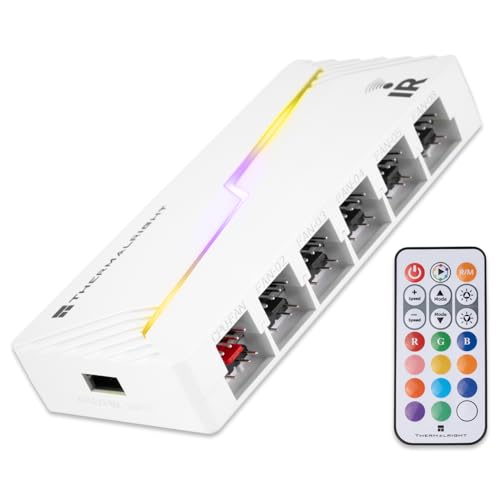
- Supports up to 12 fan groups
- Adds 5V 3-pin ARGB expansion
- SATA-powered for stable output
Best For: Large motherboard-controlled fan and ARGB setups
Best for Water-Cooling Loops
Delinx 60W Variable Fan Controller

- 3V–12V adjustable output up to 60W
- Controls up to five compatible devices
- Includes voltage display and safety protection
Best For: Manual control of multiple fans or pumps
Best ARGB Expansion Hub
Thermalright 8-Port ARGB Fan Hub

- Supports up to eight groups of 5V 3-pin ARGB fans.
- Uses SATA power with magnetic or adhesive mounting.
- Expands connections but does not actively control speed or lighting.
Best For: Multi-fan ARGB water-cooled builds needing cleaner wiring
Best Manual Fan Control

- Four independent knobs provide direct speed adjustment.
- Supports eight channels and 4-pin or 3-pin fan connections.
- PCI-position mounting saves internal chassis space.
Best For: Users wanting simple hands-on control of water-cooling fans
Best High-Power PWM Hub
12V 6-Fan PWM Speed Controller

- Runs up to six 4-pin PWM fans.
- Provides 60W total output with Type-C or DC input.
- Indicator lights show PWM level and input-voltage status.
Best For: Multi-fan PWM systems needing flexible 12V power
Best for Individual Control – ARCTIC 10-Port PWM Fan Controller
For complex water-cooling builds with several radiator or case fans, this ARCTIC unit is one of the more capable pc fan controllers for water cooling. It provides independent PWM control for each of its 10 ports, helping you manage airflow without relying on limited motherboard fan headers.
Best For: Builders who want per-fan control, broad software compatibility, and centralized cable management.
Pros:
- Offers individual PWM control across 10 ports.
- Supports up to 2 A per port and 4.5 A total.
- Provides native Windows and Linux Kernel 7.2+ support.
- Magnetic or adhesive mounting helps simplify installation.
Cons:
- The 4.5 A total limit still requires checking the combined fan load.
- Its extensive control capacity may be unnecessary for smaller builds.
Choose this controller when precise fan-by-fan adjustment matters more than a basic splitter-style setup. Its software support and mounting options also make it practical for custom PC layouts.
Best Simple Hub – ASUS TUF ARGB PWM Fan Hub
The ASUS TUF Gaming ARGB PWM Fan Hub is a straightforward option for water-cooling builds that need to connect several fans while keeping lighting synchronized. It supports up to six fans, combines PWM and RGB connections, and uses SATA power for stable input.
Best For: Gamers building a six-fan setup who want combined fan and ARGB connections with easy magnetic mounting.
Pros:
- Supports up to six PWM fans.
- Combines PWM fan and RGB connections for synchronized control.
- Uses dual SATA power connectors for stable input under full load.
- Includes visible power and operation indicators.
Cons:
- Six-fan capacity is lower than some larger controllers.
- It is a hub rather than an individually controlled multi-port controller.
This is a sensible pick for a compact or mid-sized loop where six fans are enough. Its ARGB integration and magnetic mounting keep installation uncomplicated without adding unnecessary configuration.
Best for Corsair Ecosystems – CORSAIR Commander Duo Fan Controller
The CORSAIR Commander Duo is designed for builders using both ARGB PWM fans and iCUE LINK devices. For water-cooling systems already centered on Corsair hardware, it brings the two ecosystems together and allows fan speeds and lighting to be managed through iCUE.
Best For: Corsair-focused builds that need flexible support for ARGB PWM and iCUE LINK components.
Pros:
- Supports both ARGB PWM fans and iCUE LINK devices with a System Hub.
- Provides two PWM and ARGB channels.
- Each channel supports up to six daisy-chained fans.
- iCUE enables custom fan curves and synchronized RGB lighting.
Cons:
- Its feature set is most useful within a Corsair iCUE setup.
- A System Hub is required for iCUE LINK device integration.
For users already invested in Corsair components, this controller offers a convenient way to avoid choosing between ecosystems. It is less compelling for builds that do not use iCUE LINK or Corsair lighting hardware.
Best Manual Speed Control – 6-Fan 12V PWM Controller
This compact 12V controller suits water-cooling builders who want a physical speed adjustment rather than software-based control. It supports up to six four-pin PWM fans, offers a speed knob, and can accept either SATA or 5.5×2.5mm DC input.
Best For: Users who need simple manual control for up to six compatible four-pin PWM fans.
Pros:
- Supports six four-pin PWM fans.
- Provides a 1%–99% adjustable PWM duty cycle.
- Handles up to 60 W or 5 A total, with 2 A per port.
- Offers SATA and DC 5.5×2.5mm 12V input options.
Cons:
- It is not compatible with two-pin or three-pin fans.
- The package contains the controller only; fans are not included.
- Manual knob control lacks the software integration of advanced controllers.
This is a practical low-complexity choice when your fans are four-pin PWM models and you prefer direct adjustment. Confirm each fan’s connector and the combined power draw before installation.
Best Value – 12V Fan Speed Controller with Splitters
For shoppers comparing pc fan controllers for water cooling, this compact 12V controller offers straightforward manual voltage adjustment. Its 3V–12V range and included two-way splitter support two compatible 3-pin or 4-pin cooling fans without requiring software.
Best For: Simple, budget-friendly control of up to two compatible PC fans.
Pros:
- Adjustable 3V–12V output with up to 2A and 24W capacity.
- Supports 3-pin and 4-pin fan connectors.
- Includes a two-way splitter and power adapter for plug-and-play setup.
Cons:
- Limited to two fans with the included splitter.
- Manual voltage control does not provide motherboard-based PWM synchronization.
This is a practical choice when you want basic, independent fan-speed adjustment rather than integrated motherboard control. Confirm your total fan load stays within the 24W maximum.
Best for Expansion – Thermalright ARGB and PWM Fan Hub X12
Among pc fan controllers for water cooling, the Thermalright X12 is primarily an expansion hub for builds that need more fan and ARGB connections. It supports up to 12 groups of PWM fans and 5V 3-pin ARGB devices, with SATA direct power for stable output under higher loads.
Best For: Expanding fan and 5V ARGB connectivity in a motherboard-controlled build.
Pros:
- Supports connections for up to 12 PC fan groups.
- Combines 4-pin PWM fan and 3-pin 5V ARGB expansion.
- SATA-powered design helps maintain stable output and organize cabling.
Cons:
- Does not independently control fan speed; it expands existing motherboard control.
- 12V 4-pin RGB devices are not supported.
- SATA power cable must be purchased separately.
This hub suits systems already using motherboard PWM and ARGB headers. It is not the right pick if you need a standalone speed dial or direct pump-speed adjustment.
Best for Water-Cooling Loops – Delinx 60W Variable Fan Controller
For pc fan controllers for water cooling, the Delinx 60W model stands out for its adjustable DC output and support for both fans and pumps. The built-in display shows output voltage, while the included five-port splitter can power and control up to five compatible devices.
Best For: Users who want manual voltage control for multiple 12V fans, pumps, or other compatible devices.
Pros:
- Adjusts output from 3V to 12V at up to 5A and 60W.
- Supports 2-pin, 3-pin, and 4-pin devices through the included splitter.
- Displays real-time voltage and includes multiple safety protections.
- 100–240V AC input and an on/off switch simplify standalone use.
Cons:
- Uses manual voltage adjustment rather than motherboard software control.
- Device compatibility depends on DC5521 power requirements and the splitter connection.
- The five-port splitter may be more hardware than needed for a small build.
With its higher 60W capacity and voltage display, this is the most flexible option here for a standalone cooling or water-loop setup. Check the pump and fan specifications before connecting several devices to one output.
Best ARGB Expansion Hub – Thermalright 8-Port ARGB Fan Hub
For builders comparing pc fan controllers for water cooling, the Thermalright ARGB Fan HUB is a tidy expansion option for systems using multiple 5V 3-pin ARGB fans. It supports up to eight fan groups, uses SATA power, and offers magnetic or adhesive mounting. Note that it expands connections rather than providing active speed or lighting adjustment.
Best For: Water-cooled PC builds that need more 5V 3-pin ARGB and fan connections with cleaner cable management.
Pros:
- Supports up to eight groups of ARGB fans and compatible lighting devices.
- SATA power delivery is designed for stable output under high load.
- Magnetic and adhesive mounting options simplify chassis installation.
- Supports PWM fan regulation and speed reading from the fan connected to the red interface.
Cons:
- Does not itself control fan speed or adjust lighting effects.
- Only supports 5V 3-pin ARGB; 12V 4-pin RGB devices are not compatible.
- The motherboard may recognize the speed of only one connected fan.
This is best viewed as a compact ARGB and fan-interface expander, not a standalone controller. Verify your lighting voltage and connector type before installation.
Best Manual Fan Control – SinLoon 8-Channel Fan Hub
The SinLoon 4 Knob controller is a practical choice among pc fan controllers for water cooling when hands-on speed adjustment matters. Its four independent knobs manage connected fans through an eight-channel hub, while the PCI-position installation keeps the controls accessible without taking much internal space.
Best For: Water-cooling and case builds where you want straightforward, manual fan-speed control and reduced noise during lighter workloads.
Pros:
- Provides four independent knobs for manual speed adjustment.
- Supports up to eight fan channels.
- Accepts 4-pin fans and can also connect 3-pin fans.
- PCI-position installation helps save space inside the chassis.
Cons:
- Uses manual controls rather than automatic software-based adjustment.
- Power is supplied through a 4-pin interface, so connector compatibility should be checked.
- Plastic-and-metal construction is functional but lacks a display or monitoring readout.
Choose this hub if you prefer physical knobs over motherboard software control. It is especially useful for tuning fan noise and airflow by hand, but it does not provide a display for temperatures or fan speeds.
Best High-Power PWM Hub – 12V 6-Fan PWM Speed Controller
For pc fan controllers for water cooling that need flexible external power, this 12V PWM hub supports six 4-pin fans and offers Type-C PD3.0/QC3.0 or DC 5.5×2.1mm input. Its 60W total rating and built-in indicator lights make it suitable for higher-demand PWM fan arrangements, provided every connected fan uses a compatible 4-pin connection.
Best For: Compact water-cooling or desktop setups using several 4-pin PWM fans and requiring up to 60W of combined output.
Pros:
- Supports up to six 4-pin PWM fans.
- Offers up to 60W total output, with a 2A limit per port.
- Accepts either Type-C 12V PD/QC input or DC 5521 12V input.
- Ten indicator levels show PWM duty-cycle settings, while color indicates input-voltage status.
Cons:
- Not compatible with 3-pin or 2-pin fans.
- Fans and power adapters are not included.
- Total connected load must remain within the 5A combined-current limit.
This controller is a strong fit for PWM-only systems needing substantial power capacity in a small enclosure. Confirm your adapter can provide the required 12V input and keep the combined fan load within specification.
How We Picked These PC Fan Controllers for Water Cooling
We focused on the practical requirements of water-cooled builds: dependable power delivery, broad fan support, useful port counts, and compatibility with common 4-pin PWM and 3-pin ARGB hardware. We also considered installation flexibility, including magnetic mounting, adhesive backing, SATA power, DC adapters, and external controls.
The list includes both simple hubs and more advanced controllers. A basic hub can be ideal when one motherboard header needs to run several radiator fans, while a multi-channel controller is better for separately tuning intake, exhaust, pump-area airflow, or multiple radiator groups.
Quick Comparison
- Best for independent control: ARCTIC’s multi-port controller offers separate PWM adjustment across many outputs.
- Best for ecosystem integration: CORSAIR’s iCUE LINK controller suits compatible CORSAIR components and software-managed builds.
- Best for large fan groups: Thermalright’s 8- and 12-port hubs accommodate expansive layouts.
- Best for simple physical adjustment: The knob-based controllers provide direct speed control without relying entirely on motherboard software.
- Best for flexible power: SATA-, DC-, and USB-C-powered hubs support different build and adapter requirements.
Key Buying Factors for PC Fan Controllers for Water Cooling
PWM and Connector Compatibility
Choose a controller with 4-pin PWM outputs if you want automatic speed curves based on coolant, CPU, or motherboard temperatures. A 3-pin DC fan may work on some headers, but it does not provide the same control method. Check whether your fans use standard PWM connectors or a proprietary ecosystem.
Power Capacity
Radiator fans can draw modest current individually but become significant as a group. Check both the total wattage or amperage rating and the per-port limit. SATA-powered hubs are common for larger arrays, while motherboard-only splitters may be unsuitable for many high-draw fans.
RGB Standards
ARGB lighting normally uses 5V 3-pin connectors, whereas older RGB uses 12V 4-pin connectors. These standards are not interchangeable. If lighting matters, confirm voltage, connector type, software support, and whether the controller provides signal synchronization with the motherboard.
Control Method and Installation
Software control is convenient for custom curves and profiles, but physical knobs can be useful for quick manual adjustment. Magnetic or adhesive mounting helps keep the controller accessible without cluttering the motherboard area.
Who Should Buy Which PC Fan Controllers for Water Cooling?
Choose a simple powered hub if all radiator fans should follow one motherboard header. Pick an independent multi-channel controller when different fan groups need separate curves. Builders using extensive ARGB hardware should prioritize a hub that matches their lighting standard and preferred software ecosystem. If you want manual adjustment or are working with a system lacking spare fan headers, a knob-based or externally powered controller is the more practical choice.