If you want smoother wireless VR, the right router can make Meta Quest Air Link feel far more stable than a crowded home network. The best picks focus on low latency, strong 5 GHz or 6 GHz performance, and clean local wireless traffic.
Below, we’ve narrowed the field to 10 options that suit different budgets, room sizes, and setup styles—so you can choose a gaming router for Meta Quest Air Link with confidence.
Best 10 Gaming Router for Meta Quest Air Link Picks for 2026
Dedicated VR Link Router
PC-VR Streaming Air Link Compatible with Meta Quest 3S/3/2 AX3000 WiFi6

- PrismPulse Mode creates a dedicated PC-to-VR link
- Wi-Fi 6 AX3000 with 2402 Mbps on 5GHz
- PrismXR app adds scan-and-fix setup tools
Best For: Quest users who want a simple, purpose-built Air Link streaming router
Wi‑Fi 7 Power Router
TP-Link BE6500 Dual-Band WiFi 7 Router (BE400)

- Wi-Fi 7 with MLO, Multi-RUs, and 4K-QAM
- Dual 2.5Gbps ports for multi-gig setups
- Up to 5,764 Mbps on 5GHz and 90-device support
Best For: Shoppers who want a high-capacity Wi-Fi 7 router for VR and the whole home
Budget VR Stream Router
PC-VR Streaming Air Link WiFi6 VR Router Compatible with Meta Quest 3S/3/2
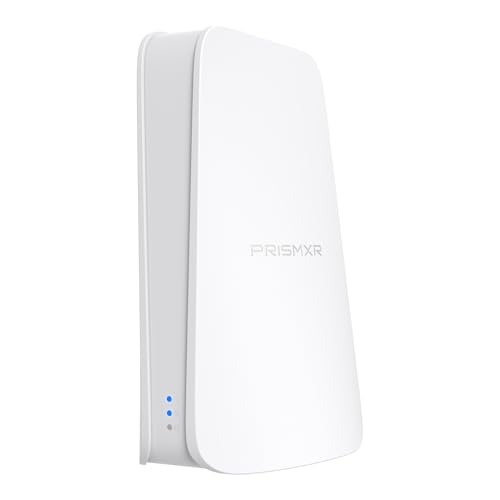
- Dedicated PrismPulse Mode for PC-to-headset streaming
- Wi-Fi 6 up to 1500 Mbps total
- Plug-and-play setup with one-click stream checks
Best For: Budget buyers who want an easy dedicated router for Quest Air Link streaming
Tri-Band Gaming Router
TP-Link Tri-Band AXE5400 Wi-Fi 6E Gaming Router Archer GXE75

- Tri-band Wi-Fi 6E with a 6 GHz band
- Up to 5.4 Gbps and 2.5G WAN port
- Game acceleration, Game Panel, and EasyMesh support
Best For: Gamers who want a versatile Wi‑Fi 6E router for VR and other fast-paced play
Premium Gaming Hub
TP-Link Archer GE400 Wi‑Fi 7 Gaming Router

- Wi‑Fi 7 dual-band router rated up to 6.5 Gbps.
- Dedicated gaming port, QoS, and WTFast acceleration.
- Multi-gig ports and EasyMesh support add flexibility.
Best For: Power users who want a premium gaming router with advanced traffic tools
Reliable All-Around Choice
TP-Link Archer AX73 Long-Range Wi‑Fi 6 Router

- Up to 5400 Mbps Wi‑Fi 6 with HE160 on 5 GHz.
- Six antennas, beamforming, and FEM support stronger coverage.
- MU-MIMO and OFDMA help with busy home networks.
Best For: Buyers who want a dependable long-range router for gaming and streaming
Budget Wi-Fi 6 Pick
TP-Link Archer AX10 for Quest Air Link

- Wi-Fi 6 with OFDMA and MU-MIMO
- Dual-core 900MHz processor
- 4 gigabit LAN ports
Best For: Budget Quest users wanting a Wi-Fi 6 upgrade for Air Link
Strong Midrange Upgrade
TP-Link Archer AX55 for Quest Air Link

- AX3000 Wi-Fi 6 speeds
- OFDMA and MU-MIMO for lower latency
- 4 antennas with beamforming
Best For: Quest Air Link users who want faster Wi-Fi 6 and stronger coverage
Entry-Level Value Pick
TP-Link Archer A54 for Quest Air Link

- Dual-band Wi-Fi 5 router
- Four external antennas
- EasyMesh and Access Point mode
Best For: Affordable basic use and lighter Air Link setups
Dedicated VR Link Router – PC-VR Streaming Air Link Compatible with Meta Quest 3S/3/2 AX3000 WiFi6
If you want a gaming router for meta quest air link that focuses on a single PC-to-headset connection, the Puppis S1 is built around that use case. It uses PrismPulse Mode, a 1.3GHz dual-core chipset, and beamforming to create a dedicated streaming link for Quest 3S/3/2/Pro and other supported headsets.
Best For: Quest owners who want a purpose-built wireless PC-VR streaming setup with simple software tools and no driver install.
Pros:
- Dedicated PrismPulse Mode is designed to bridge PC and VR headset with minimal interference.
- Wi-Fi 6 AX3000 ratings include 2402 Mbps on 5GHz and 575 Mbps on 2.4GHz.
- PrismXR Desktop app adds a one-click scan and fix tool for common streaming issues.
- EaseLink setup avoids driver installs and uses Bluetooth for device management.
Cons:
- Built for a focused VR link rather than broad whole-home routing.
- Only one antenna is listed in the product details.
- Notes indicate the product does not include a C-C data cable.
This is a strong pick if your priority is stable VR streaming over general networking features. It is especially appealing for users who want a streamlined setup and a router made specifically for Air Link-style play.
Wi‑Fi 7 Power Router – TP-Link BE6500 Dual-Band WiFi 7 Router (BE400)
For buyers comparing a gaming router for meta quest air link with a more general high-speed home router, the Archer BE400 brings Wi-Fi 7, dual 2.5Gbps ports, and strong wireless throughput. Its MLO support, 4K-QAM, and 6-stream design are aimed at fast, stable connections for demanding devices, including AR/VR use.
Best For: Homes that want a future-ready Wi-Fi 7 router for gaming, VR, and multi-device coverage.
Pros:
- Wi-Fi 7 features include MLO, Multi-RUs, and 4K-QAM.
- Up to 5764 Mbps on 5GHz and 688 Mbps on 2.4GHz with 6 streams.
- Dual 2.5Gbps ports support multi-gig internet and fast wired connections.
- Coverage claims reach up to 2,400 sq. ft. for up to 90 devices.
Cons:
- It is a general-purpose router, not a dedicated VR-streaming device.
- Wi-Fi 7 benefits depend on compatible client devices.
If you want one router to handle VR, gaming, and the rest of the house, this is a very capable option. It leans more toward overall network strength than Air Link-specific tuning, but the speed and port layout are impressive.
Budget VR Stream Router – PC-VR Streaming Air Link WiFi6 VR Router Compatible with Meta Quest 3S/3/2
If you need a gaming router for meta quest air link without paying for a full-featured flagship, the Puppis S1 Lite is a practical entry point. It uses Wi-Fi 6 dual-band wireless, a dedicated point-to-point streaming link, and a plug-and-play setup that keeps the focus on stable PC-to-VR streaming.
Best For: Budget-minded Quest and Pico 4 users who want a simple dedicated wireless VR link.
Pros:
- Dedicated PrismPulse Mode is built for a focused PC-to-headset connection.
- Wi-Fi 6 speeds reach up to 1500 Mbps total, with 1200 Mbps on 5GHz.
- One-click stream check in the PrismXR Desktop App offers 19 checks and recommendations.
- Plug-and-play setup requires only power and Ethernet.
Cons:
- It is a single dedicated link rather than a full home router.
- Listed coverage is limited to the streaming connection use case.
- Lower total throughput than the higher-end Puppis S1 model.
This model makes sense when you want a straightforward wireless VR streaming setup and do not need extra router features. It trims the extras while keeping the core experience centered on Air Link-style play.
Tri-Band Gaming Router – TP-Link Tri-Band AXE5400 Wi-Fi 6E Gaming Router Archer GXE75
For a gaming router for meta quest air link that still doubles as a full gaming hub, the Archer GXE75 offers tri-band Wi-Fi 6E, a 6 GHz band, and gaming-focused acceleration tools. Its multi-gig port layout, Game Panel, and EasyMesh support make it a strong choice if you want low-latency wireless performance across several devices.
Best For: Gamers who want a feature-rich Wi-Fi 6E router for VR, consoles, and whole-home use.
Pros:
- Tri-band Wi-Fi 6E includes a 6 GHz band for less congested wireless connections.
- Up to 5.4 Gbps total wireless speed with 6-stream support.
- Includes a 2.5G WAN port plus four 1G LAN ports for wired gear.
- Game acceleration, Game Panel, and EasyMesh add gaming-focused control and expansion.
Cons:
- Its gaming features are broader than a dedicated Air Link-specific router.
- Best wireless benefits depend on compatible Wi-Fi 6E devices.
- Advanced features may be more than casual users need.
This router is the most feature-packed option in the list for people who game across multiple devices. If you want VR streaming plus broader performance tuning and expansion options, it is a very flexible choice.
Dedicated VR Streaming Pick – PrismXR Puppis S1 Lite Wi‑Fi 6 VR Router
If you want a gaming router for Meta Quest Air Link, the PrismXR Puppis S1 Lite is built around VR streaming stability rather than general household extras. It uses a dedicated connection mode, Wi‑Fi 6, and advanced beamforming to help keep your Quest 3/3S/2/Pro or compatible Pico headset on a cleaner, more reliable link for PC-VR play.
Best For: Quest owners who want a dedicated, easy-to-set-up router for wireless PC-VR streaming without installing drivers first.
Pros:
- PrismPulse mode is designed for a dedicated PC-to-headset connection with minimal interference.
- Wi‑Fi 6 with 2×2 MIMO, 160MHz bandwidth, and up to 3000 Mbps combined wireless speed.
- PrismXR Desktop app includes a 21-item one-click scan and fix for common setup issues.
- No driver installation required before use, and EaseLink simplifies device management.
Cons:
- Coverage is aimed at a single room to small/medium home or office use.
- Not every setup will need the extra VR-focused software features if you only want a basic router.
- C-C data cable is not included.
Overall, this is a focused VR router choice for users who care most about a stable Air Link-style experience and want setup tools tailored to PC-VR streaming. It is less about broad home-network flexibility and more about making headset-to-PC wireless play smoother.
Premium Gaming Hub – TP-Link Archer GE400 Wi‑Fi 7 Gaming Router
The TP-Link Archer GE400 is a higher-end gaming router for Meta Quest Air Link if you want strong wired and wireless hardware plus gaming-focused traffic tools. It offers Wi‑Fi 7, a dedicated gaming port, game acceleration, and multi-gig connectivity, making it a strong candidate for households that want both VR streaming and serious network headroom.
Best For: Users who want a premium gaming router with Wi‑Fi 7, multi-gig ports, and built-in acceleration features.
Pros:
- Wi‑Fi 7 dual-band performance rated up to 6.5 Gbps total.
- Dedicated multi-gig gaming port plus 2.5G and 1G LAN ports for fast wired setups.
- Game acceleration, QoS, and WTFast support are built in for lower-lag traffic handling.
- EasyMesh support can extend coverage across a larger home.
Cons:
- Does not support the 6 GHz band.
- More features and higher-end hardware may be overkill if you only need a simple VR-only router.
- Mesh compatibility is limited to EasyMesh and is not compatible with Deco mesh systems.
This router makes the most sense if you want one device that can handle Air Link well while also serving as a feature-rich gaming hub for the rest of your network. It is especially appealing when wired ports, traffic prioritization, and expansion matter.
Reliable All-Around Choice – TP-Link Archer AX73 Long-Range Wi‑Fi 6 Router
The TP-Link Archer AX73 is a practical gaming router for Meta Quest Air Link if you want a proven Wi‑Fi 6 model with strong range and high throughput. It is not VR-specific, but its HE160 support, MU-MIMO, OFDMA, and six antennas give it the kind of stable wireless performance that can help a headset stream smoothly across a home network.
Best For: Buyers who want a reliable long-range Wi‑Fi 6 router that also handles streaming and gaming well.
Pros:
- Up to 5400 Mbps Wi‑Fi 6 speed with 4T4R and HE160 on the 5 GHz band.
- Six antennas, beamforming, and high-power FEM for extensive coverage.
- MU-MIMO and OFDMA help reduce congestion when multiple devices are connected.
- Includes a USB 3.0 port for media sharing or private cloud storage.
Cons:
- It is a general-purpose router, not a VR-focused model with headset-specific software tools.
- Wired ports are gigabit-class rather than multi-gig.
- Best performance depends on router placement and home layout, as with any Wi‑Fi setup.
If you want a straightforward, well-equipped router instead of a specialized VR product, the AX73 is the most balanced option here. Its strength is dependable coverage and strong Wi‑Fi 6 performance rather than headset-specific tuning.
Budget Wi-Fi 6 Pick – TP-Link Archer AX10 for Quest Air Link
If you want a gaming router for Meta Quest Air Link without spending a lot, the TP-Link Archer AX10 is a practical Wi-Fi 6 option. Its OFDMA, MU-MIMO, beamforming, and dual-core 900MHz processor are all geared toward smoother wireless traffic, while the dual-band design and gigabit Ethernet ports give you the basics needed for stable PC-to-headset streaming.
Best For: Budget-minded Quest users who want a Wi-Fi 6 router for smoother Air Link gameplay and general home networking.
Pros:
- Wi-Fi 6 with OFDMA and MU-MIMO helps reduce lag across multiple devices.
- Dual-core 900MHz processor is built for reliable streaming and gaming performance.
- Beamforming focuses signal strength toward your devices for better coverage.
- Four gigabit LAN ports give you flexible wired connections for a PC and other gear.
Cons:
- It is a dual-band router, not a tri-band model.
- Top 5 GHz speed is 1201 Mbps, which is lower than faster AX-class routers.
- Best results still depend on placement and home interference.
Overall, the Archer AX10 is a solid entry-level choice if your main goal is dependable Air Link performance with modern Wi-Fi 6 features. It makes the most sense for smaller setups or users upgrading from an older router.
Strong Midrange Upgrade – TP-Link Archer AX55 for Quest Air Link
The TP-Link Archer AX55 is a strong gaming router for Meta Quest Air Link if you want more headroom for wireless PC VR streaming. It combines AX3000 Wi-Fi 6 speeds, OFDMA, MU-MIMO, beamforming, and four high-gain antennas to deliver a more responsive network, while the larger heat sink is designed to keep performance stable.
Best For: Quest Air Link users who want a faster Wi-Fi 6 router with stronger coverage and extra network features.
Pros:
- AX3000 class speeds provide more bandwidth for streaming and downloads.
- OFDMA and MU-MIMO help reduce latency and jitter for smoother gameplay.
- Four high-gain antennas plus beamforming improve whole-home coverage.
- Includes VPN client/server support and TP-Link HomeShield security features.
Cons:
- It is still a dual-band router, not a tri-band model.
- Features like USB 3.0 and VPN support may matter more for general networking than Air Link specifically.
- Setup value depends on having the router placed well for your play area.
For most people, the Archer AX55 is the best balance of speed, coverage, and practical features in this group. If you want a router that feels more future-ready for Air Link and everyday home use, it is the most versatile option here.
Entry-Level Value Pick – TP-Link Archer A54 for Quest Air Link
The TP-Link Archer A54 is a basic gaming router for Meta Quest Air Link if you need a low-cost router for a smaller home or simpler setup. It offers dual-band Wi-Fi, four external antennas, Access Point mode, and EasyMesh compatibility, but its Wi-Fi 5 hardware and 10/100 Mbps Ethernet ports make it the most modest option in this roundup.
Best For: Shoppers who want an affordable, straightforward router for lighter Air Link use and general browsing.
Pros:
- Dual-band Wi-Fi with up to 867 Mbps on 5 GHz.
- Four external antennas help provide stable coverage up to about 1,000 sq. ft.
- Access Point mode can turn a wired connection into wireless service.
- EasyMesh compatibility makes it easier to expand coverage later.
Cons:
- Wi-Fi 5 is older than Wi-Fi 6, so it is less suited to demanding wireless VR.
- 10/100 Mbps Ethernet ports are slower than gigabit ports.
- It is better for light use than for maximizing Air Link performance.
As a value pick, the Archer A54 can work for basic wireless needs, but it is not the strongest match for a demanding VR streaming setup. If Air Link quality is the priority, the Wi-Fi 6 models above are better fits.
How We Picked the Best Gaming Router for Meta Quest Air Link
We focused on routers that are practical for PC VR streaming, not just fast on paper. Priority went to models with strong dual-band or tri-band wireless performance, modern Wi‑Fi standards, stable CPU and antenna design, and at least one Ethernet option that supports a wired PC connection. For a Gaming Router for Meta Quest Air Link, consistency matters more than peak speed numbers.
Quick Comparison
In simple terms, Wi‑Fi 6 models are usually the best value, Wi‑Fi 6E adds a cleaner 6 GHz option for less interference, and Wi‑Fi 7 is the newest choice for future-proofing and top-end throughput. If your router will sit near the play space, a compact Wi‑Fi 6 unit may be enough. If you share the network with many devices or want the strongest headroom, look at 6E or Wi‑Fi 7.
Key Buying Factors for Gaming Router for Meta Quest Air Link
Wireless Band and Interference
Air Link works best on a dedicated, uncongested band. A Gaming Router for Meta Quest Air Link should offer strong 5 GHz performance at minimum, while 6 GHz can help reduce interference if your headset and PC support it.
Ethernet Ports and PC Connection
Connect your gaming PC by Ethernet whenever possible. That leaves Wi‑Fi bandwidth for the headset and helps lower latency. Faster multi-gig ports are useful if you also have a high-speed internet plan or a multi-gig switch.
Processor and Stability Features
Router hardware matters when multiple devices are active. Look for decent CPU specs, beamforming, OFDMA, MU-MIMO, and gaming traffic prioritization features that keep VR traffic responsive under load.
Coverage and Placement
Most Air Link setups perform best in the same room or nearby. Strong coverage is still helpful, but don’t choose a router solely for home size if your actual VR use is local. Placement near the play area often matters more than raw range.
Who Should Buy Which Gaming Router for Meta Quest Air Link?
If you want the simplest value pick, choose a solid Wi‑Fi 6 router with good 5 GHz performance. If your home is busy or you want less wireless congestion, a Wi‑Fi 6E option is a smart middle ground. If you want the newest platform and the most headroom for future devices, a Wi‑Fi 7 model is the premium choice. For budget shoppers, entry-level Wi‑Fi 6 and even basic dual-band routers can work, but they’re best for lighter networks and shorter distances.
For most buyers, the best Gaming Router for Meta Quest Air Link is the one that keeps the headset on a clean band, the PC wired in, and the network as simple as possible.