In VR flight sims, a good keyboard tray can make the difference between smooth cockpit management and constant fumbling. The right setup keeps essential controls within reach without breaking immersion.
Below, we focus on tray-friendly simulator stands, add-on mounts, and cockpit solutions that help you place your keyboard and mouse where they’re easy to use.
Best 10 Vr Flight Simulator Keyboard Tray Picks for 2026
Foldable Dual-Purpose Stand
Anman Racing & Flight Fast Switch

- Separate keyboard and mouse placement
- Supports flight and racing accessories
- Folds for compact storage
Best For: Sim users who need one flexible stand for both flight and racing gear
Dedicated Tray Add-On
GTA Pro Model Keyboard and Mouse Tray
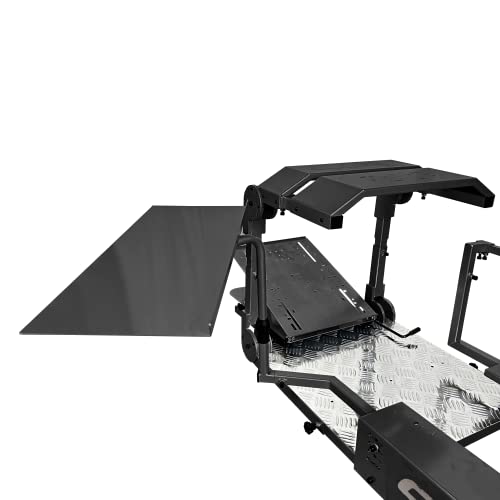
- Add-on tray for the GTA Pro Model
- Adjustable angle for comfort
- Fits standard-size keyboard and mouse
Best For: Owners of the GTA Pro Model who need a simple tray accessory
Modular Cockpit With Tray
Marada Flight Racing Simulator Cockpit

- Board surface can serve as keyboard stand
- Interchangeable panels for flight and racing
- Highly adjustable cockpit layout
Best For: Users who want a full cockpit with a built-in keyboard and mouse surface
Compact Tray Add-On
GTA/GTSF Keyboard and Mouse Tray

- Made for GTA/GTSF simulator models
- Single tray for keyboard and mouse
- Adjustable angle for positioning
Best For: Owners of GTA/GTSF rigs who need a simple add-on tray
Yoke Stand Pick
Deluxe V2 Flight Stand for Saitek Pro Yoke

- Stable, portable, and adjustable Deluxe V2 design
- Quick-release clamps speed up changes
- Not compatible with Honeycomb hardware
Best For: Saitek Pro Flight yoke users who want a sturdy, adjustable stand
Keyboard Tray Upgrade
F-GT Pro Direct Mount Keyboard and Mouse Tray

- 125° swivel helps with easy access
- Reversible mounting suits left or right sides
- Built with Ø50mm carbon steel tubing
Best For: Rig owners who need a durable, adjustable keyboard and mouse tray
Cockpit Frame Kit
Meza Simulator Panel Kit with LED Light Bar

- Pre-cut frame supports organized cockpit layouts
- Integrated dimmable LED light strip
- Electronic controls are not included
Best For: Home sim builders who want a stable cockpit frame with lighting and mounts
Premium VR HOTAS Control
Logitech G X56 H.O.T.A.S Throttle and Joystick

- 189 programmable controls
- VR-friendly control placement
- Twin throttles with adjustable stick force
Best For: VR sim pilots who want a deep, tactile HOTAS setup
Modular Cockpit Stand With Tray Support
Marada Universal Flight Racing Simulator Stand

- Supports mouse and keyboard placement
- Fully adjustable modular frame
- Wide compatibility with flight and racing gear
Best For: Users who want an adjustable cockpit stand with room for keyboard and mouse
Foldable Space-Saving Stand
GTPLAYER Flight Racing Simulation Stand

- Folds for compact storage
- Adjustable height and angle
- High-strength carbon steel frame
Best For: Players who want a sturdy stand that stores easily
Foldable Dual-Purpose Stand – Anman Racing & Flight Fast Switch
If you’re shopping for a vr flight simulator keyboard tray setup that can also handle racing gear, this Anman stand gives you a built-in place to keep your keyboard and mouse separate from the main controls. The wide, pre-drilled panels and quick-switch layout make it practical for mixed flight and racing rigs without forcing a permanent desk-style setup.
Best For: Sim users who want one foldable stand for both flight and racing controls with separate keyboard and mouse placement.
Pros:
- Includes separate keyboard and mouse placement for a cleaner control layout.
- Supports both flight and racing accessories with multiple gear-shift panels.
- X-shape and double-triangle design are built for strong stability.
- Folds down for easier storage when not in use.
Cons:
- It is a stand only, so chair and controllers are not included.
- Best fit is for users who need a flexible platform rather than a dedicated cockpit.
Overall, this is a solid pick if you want a compact, configurable sim stand with room for keyboard and mouse alongside your flight or racing hardware. The focus here is versatility and stability rather than a fully enclosed cockpit feel.
Dedicated Tray Add-On – GTA Pro Model Keyboard and Mouse Tray
For buyers looking for a vr flight simulator keyboard tray that bolts onto an existing rig, this GTA Pro Model add-on keeps your keyboard and mouse in one adjustable spot. It is a straightforward tray solution designed for the GTA Pro Model, with a powder-coated finish and a single-tray layout that fits standard-size peripherals.
Best For: Owners of the GTA Pro Model who want a simple, adjustable keyboard and mouse tray add-on.
Pros:
- Made specifically as a keyboard and mouse tray for the GTA Pro Model.
- Adjustable angle helps fine-tune comfort and reach.
- Fits standard-size keyboard and mouse setups.
- Powder-coated finish offers a clean, simple look.
Cons:
- Only works as an add-on; the simulator rig is not included.
- Limited to users who already own the compatible GTA Pro Model.
This is a practical accessory if you already have the matching rig and just need a dedicated tray for desktop-style controls. It keeps the setup simple, but it is not a universal fit.
Modular Cockpit With Tray – Marada Flight Racing Simulator Cockpit
If you want a vr flight simulator keyboard tray as part of a full cockpit, this Marada setup stands out because it includes a board surface that can serve as a mouse and keyboard stand. It is designed as a modular flight and racing cockpit, so you can reconfigure the panels for different sim styles without losing a dedicated spot for desktop controls.
Best For: Sim racers and flight sim players who want a fully adjustable cockpit with a built-in mouse and keyboard surface.
Pros:
- Includes a board surface that can serve as a mouse and keyboard stand.
- Supports both flight and racing simulation with interchangeable mounting panels.
- Highly adjustable in multiple directions, including seat and panel positioning.
- Heavy-duty square tube construction is designed for stability and low wobble.
Cons:
- Electronic devices are not included.
- Large, heavy cockpit design may be more than some users need.
- More of a complete rig than a simple tray accessory.
For users building a serious sim space, this cockpit offers the most integrated keyboard-and-mouse option in the group. The tradeoff is size and complexity, but the flexibility is strong if you want one adjustable platform for several types of sim use.
Compact Tray Add-On – GTA/GTSF Keyboard and Mouse Tray
This GTA/GTSF add-on is a simple vr flight simulator keyboard tray solution for users who already own the compatible simulator frame. It uses a single-tray design with adjustable angle, giving you a straightforward place for a standard keyboard and mouse without adding unnecessary complexity.
Best For: GTA/GTSF model owners who want a basic, adjustable keyboard and mouse tray add-on.
Pros:
- Designed specifically for GTA/GTSF models.
- Single tray fits standard-size keyboard and mouse.
- Adjustable angle helps with positioning.
- Simple, compact accessory approach.
Cons:
- Simulator is not included.
- Only useful if you already have a compatible GTA/GTSF rig.
- Basic design offers fewer features than a full cockpit solution.
As a dedicated add-on, this tray does the essentials well: it keeps keyboard and mouse within reach and lets you adjust the angle for comfort. It makes the most sense as a compatibility-specific upgrade rather than a standalone purchase.
Yoke Stand Pick – Deluxe V2 Flight Stand for Saitek Pro Yoke
If you want a vr flight simulator keyboard tray-style setup that keeps your controls stable and your desk clear, this Wheel Stand Pro S Flight Stand is built around the Saitek Pro Flight Yoke system. It focuses on adjustability and portability rather than extra accessories, making it a practical foundation for a compact flight sim cockpit.
Best For: Sim pilots using a Saitek Pro Flight yoke who want a sturdy, adjustable stand without moving to a full cockpit.
Pros:
- Stable, portable, and adjustable Deluxe V2 design
- Quick-release clamps make setup changes fast
- Full, stepless adjustment range for better seating comfort
- Handcrafted in Europe with a long-life build focus
Cons:
- Flight system is not included
- Not compatible with Honeycomb hardware
- Designed specifically for Saitek Pro Flight yoke support
This is a strong pick if your priority is a dependable yoke stand that adjusts easily and packs away when needed. It is less of an all-in-one rig and more of a purpose-built support solution for a Saitek-based sim setup.
Keyboard Tray Upgrade – F-GT Pro Direct Mount Keyboard and Mouse Tray
For a vr flight simulator keyboard tray upgrade, this Next Level Racing tray is designed to improve accessibility without crowding your cockpit. It offers a reversible mount and 125° of swivel rotation, so it can be positioned for easier entry, exit, and day-to-day use around a sim rig.
Best For: Sim rig owners who want a durable, side-mounted keyboard and mouse tray with flexible positioning.
Pros:
- 125° swivel rotation improves access
- Reversible mounting for left or right-side placement
- Ø50mm carbon steel tubing for strength
- Matte black powder-coated finish matches cockpit setups
Cons:
- Keyboard and mouse tray only; it is not a full cockpit accessory set
- Newer release with limited long-term user history in the notes provided
This tray is a sensible choice if you want a purpose-built add-on that stays close to your rig and moves out of the way when needed. The emphasis on swivel range and reversible mounting makes it especially useful for organized, space-conscious simulator setups.
Cockpit Frame Kit – Meza Simulator Panel Kit with LED Light Bar
If you are building a vr flight simulator keyboard tray-friendly cockpit and want a cleaner control layout, this Meza panel kit is aimed at organized home sim setups. It is an instrument frame only, with pre-cut mounting positions, LED ambient lighting, and freestanding support for a more structured cockpit build.
Best For: Home flight sim builders who want a sturdy cockpit frame with mounting options and integrated lighting.
Pros:
- Pre-cut frame supports an organized cockpit layout
- Compatible with Logitech yokes, throttle quadrants, and Logitech flight panels
- Integrated dimmable LED light strip adds cockpit ambiance
- Rubber-tipped clamps and adjustable feet support stable placement
Cons:
- Electronic instruments and controls are not included
- Support is limited to up to 2 throttle quadrants
- Best suited to desk or simulator platform mounting, not a simple standalone tray
This kit is more about cockpit structure than a basic accessory tray, so it fits builders who want a cleaner and more immersive station. The combination of mounting flexibility, lighting, and stable construction makes it useful for a more deliberate sim-room setup.
Premium VR HOTAS Control – Logitech G X56 H.O.T.A.S Throttle and Joystick
If you want a vr flight simulator keyboard tray alternative that keeps your controls close at hand, the Logitech G X56 is a strong cockpit-first option. Its VR-friendly layout, twin throttles, and highly programmable inputs are built for sim pilots who prefer tactile control over reaching for a keyboard during flight.
Best For: VR flight sim players who want a full-featured HOTAS setup with extensive control mapping and precise stick input.
Pros:
- 189 programmable controls for complex sim bindings.
- Ideal for VR, with controls placed for easy finger access.
- 16-bit aileron and elevator axis with hall-effect sensors for precise input.
- Adjustable stick force and twin throttles add fine control options.
Cons:
- Requires 2 USB 2.0 ports, so port availability matters.
- More of a dedicated controller setup than a simple tray or mount solution.
Overall, the X56 is best if your priority is immersive hands-on flying and you want a controller set that can replace a lot of keyboard interaction inside VR. It is less about storage convenience and more about putting flight controls exactly where your hands expect them.
Modular Cockpit Stand With Tray Support – Marada Universal Flight Racing Simulator Stand
For shoppers comparing a vr flight simulator keyboard tray solution, this Marada stand stands out because it explicitly supports mouse and keyboard placement as part of its modular design. It is a full simulator frame rather than a small accessory, so it makes more sense if you want an adjustable cockpit-style base for flight and racing gear.
Best For: Players who want a highly adjustable simulator stand with built-in mouse and keyboard placement.
Pros:
- Includes 4 mounting boards that can accommodate mouse and keyboard placement.
- Highly adjustable in front, back, up, down, left, and right directions.
- Modular design supports different flight and racing equipment combinations.
- Compatible with a wide range of flight sim and racing devices.
Cons:
- Electronic devices are not included.
- Bigger footprint than a simple tray-only solution.
This is a practical choice if you want one stand that can be adapted around your controls, rather than a fixed keyboard tray alone. The combination of adjustability and device compatibility makes it especially useful for mixed flight and racing setups.
Foldable Space-Saving Stand – GTPLAYER Flight Racing Simulation Stand
If you are shopping for a vr flight simulator keyboard tray-style setup but need something more compact, this GTPLAYER stand is a storage-friendly cockpit base to consider. It supports mainstream flight and racing devices, adjusts to different body sizes, and folds away when you are done playing.
Best For: VR and sim racers who need a foldable, adjustable stand that is easy to store.
Pros:
- Compatible with many popular Logitech and Thrustmaster devices.
- Height and steering rack angle are adjustable for better positioning.
- Constructed from high-strength carbon steel for stability.
- Folds for storage under a couch, bed, or in a corner.
Cons:
- Devices such as wheel, shifter, and pedals are not included.
- Less specialized for keyboard placement than a dedicated tray accessory.
For buyers who care as much about storage as they do about setup, this stand offers a sensible balance of rigidity and convenience. It is a good pick when you want a cockpit-style foundation that can be tucked away after your session.
How We Picked the Best Vr Flight Simulator Keyboard Tray
We looked for options that improve access in a Vr Flight Simulator Keyboard Tray setup without adding unnecessary clutter. Priority went to stability, adjustability, compatibility with popular yokes and HOTAS gear, and whether the tray could be positioned for both flying and desktop control.
We also considered whether a product is a full cockpit, a stand with an add-on tray, or a dedicated keyboard-and-mouse mount, since different buyers need different levels of integration.
Quick Comparison
The strongest choices fall into three groups: dedicated keyboard and mouse trays for clean access, folding simulator stands for flexible storage, and full cockpit-style rigs for the most complete setup. If you only need a practical place for input devices, a tray add-on is usually the simplest path. If you want a broader sim station, a stand with integrated mounting points may be better.
Key Buying Factors for a Vr Flight Simulator Keyboard Tray
Compatibility
Check whether the tray works with your current stand, cockpit, yoke, throttle, or HOTAS system. Some products are made for specific ecosystems, while others are more universal.
Adjustability and Reach
In VR, you cannot always glance down easily, so tray position matters. Look for trays that sit close enough for comfortable reach but do not block entry, wheel movement, or pedal access.
Stability
A keyboard tray should stay steady when you type or nudge the mouse. If the tray flexes or shifts, it becomes frustrating fast, especially during longer sessions.
Space and Storage
Foldable or compact designs are useful if your sim area doubles as a desk or living space. Larger cockpits may offer better realism, but they demand more permanent room.
Mouse Support
Many sim pilots use the keyboard tray as a combined workspace for keyboard and mouse. If you frequently manage avionics, mapping, or menus, a wider surface or separate mouse placement can be a big advantage.
Who Should Buy Which Vr Flight Simulator Keyboard Tray?
If you want the simplest upgrade, choose a dedicated tray add-on. If you are building a broader sim station around a yoke or HOTAS, a foldable stand or cockpit with tray support is usually the better value. For users who prioritize versatility across racing and flight sims, a modular stand with separate keyboard-and-mouse placement can be the most practical long-term option.
For serious VR pilots, the best setup is the one that keeps your controls consistent, easy to reach, and stable enough that you can focus on flying instead of adjusting your desk.