A good vr flight simulator throttle mount can make VR flying feel more precise, more comfortable, and far less cluttered. By keeping your throttle and stick in a fixed, realistic position, you spend less time reaching and readjusting during flight.
Below, we’ve focused on mounts that balance stability, compatibility, adjustability, and ease of setup so you can choose a cockpit-friendly option that fits your hardware and desk space.
Best 10 Vr Flight Simulator Throttle Mount Picks for 2026
Universal Clamp Option
Hikig 2 Pack Flight Sim Clamp Set

- Fits many HOTAS and flight sim controllers
- Quick clamp design with strong holding power
- Works on desks from 0.2 to 5.3 inches thick
Best For: Users who want one mount that can handle multiple brands and layouts
Warthog Dedicated Mount

- Built only for Thrustmaster HOTAS Warthog
- Steel clamp-on design for secure desk mounting
- 3.2 inches of height adjustment on each mount
Best For: Warthog users who want an ergonomic, dedicated clamp-on setup
Space-Saving Under-Desk Mount
Honeycomb Alpha and Bravo Under-Desk Mount

- Made for Honeycomb Alpha and Bravo units
- Mounts under the desk to free surface space
- No drilling required and uses existing clamps
Best For: Honeycomb owners who want a cleaner, clutter-free cockpit layout
Adjustable Aluminum Mount

- Fits many popular joystick and HOTAS devices
- Adjusts for desks from 0.2 to 5.7 inches thick
- Pre-assembled aluminum design with anti-slip pads
Best For: Users who want an easy-to-set-up, adjustable joystick mount
Heavy-Duty HOTAS Pick
Meza Mount Desk Mount Set of 2

- Two mounts for joystick and throttle
- Adjustable height and position
- Heavy-duty metal build for stable use
Best For: Sim pilots with compatible HOTAS gear who want a rigid desk setup
Single-Bracket Value
XRhinorth 1PC Hotas Desk Mount
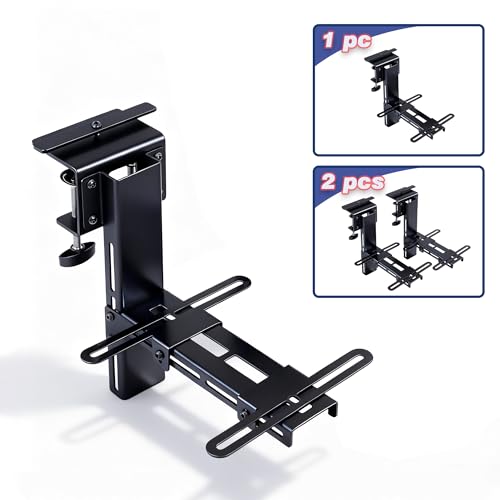
- Single stand for one controller
- Dual-clamp design for better stability
- Fits select Logitech, Thrustmaster, and VKB models
Best For: Users needing one compatible desk mount with a thin enough desk edge
Foldable Convenience
DIWANGUS 2-Pack HOTAS Desk Mount

- 2-pack for joystick and throttle
- 95% preassembled and foldable
- Wide compatibility across major brands
Best For: Pilots who want an easier-to-store dual-mount setup with broad device support
Heavy-Duty Dual Mount Pick
HTLAKIKJ 2 Set Hotas Desk Mount

- Heavy-duty steel plate construction
- Adjustable clamp fits desks up to 2.8 inches
- Compatible with many Thrustmaster and Hotas devices
Best For: A stable dual-mount setup for throttle and joystick users
Space-Saving Desk Mount Pick
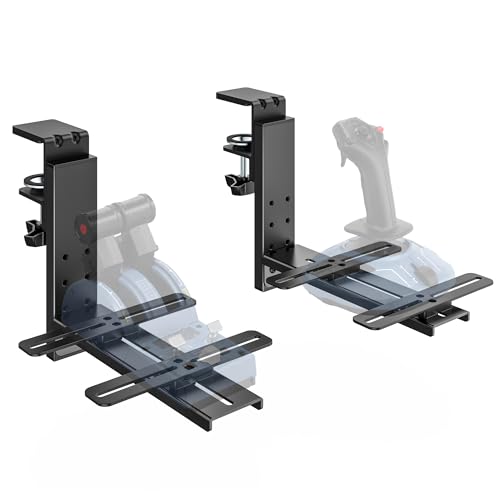
- Heavy-duty metal and plastic construction
- Quick-release clamp with vertical adjustment
- Easy to remove when not flying
Best For: A removable mount for compact desk setups
Wide-Compatibility Setup Pick

- Supports many joystick, throttle, and HOTAS systems
- Height and fore-aft adjustment for better positioning
- Strong 91N.m clamp for stable mounting
Best For: Users who want maximum compatibility and adjustability
Universal Clamp Option – Hikig 2 Pack Flight Sim Clamp Set
If you want a flexible vr flight simulator throttle mount that can handle a wide range of gear, this Hikig desk clamp set is built for broad compatibility and easy repositioning. It works with many popular HOTAS and flight-sim hand controls, making it a practical pick if you swap devices or want both stick and throttle supported at the desk.
Best For: Sim racers and flight sim users who want a versatile clamp mount for multiple HOTAS brands and setups.
Pros:
- Compatible with a wide range of controllers, including Logitech X52/X56, Thrustmaster T.16000M, T.Flight Hotas, VKB, VPC, and more.
- Push-pull quick clamp offers fast setup and strong holding power.
- Supports desk thickness from 0.2 inch to 5.3 inch for broad tabletop fit.
- Dual-handed design works for both left- and right-handed users.
Cons:
- Bulkier metal construction may be more than some minimal desk setups need.
- Designed for tabletop mounting, so it is not an under-desk space-saving solution.
Overall, this is a strong all-around option if your priority is compatibility and stable desk mounting rather than a highly specialized single-device setup. It is especially useful when you want a mount that can adapt as your sim hardware changes.
Warthog Dedicated Mount – VIVO Steel Clamp-on HOTAS Set
For a vr flight simulator throttle mount built specifically around the Thrustmaster HOTAS Warthog, this VIVO clamp-on set keeps the joystick and dual throttle positioned below the desk for a more natural reach. It is a focused choice if you already own the Warthog system and want a sturdy steel solution with simple desk attachment.
Best For: Thrustmaster HOTAS Warthog owners who want a dedicated, ergonomic desk-mounted throttle and joystick solution.
Pros:
- Designed only for the Thrustmaster HOTAS Warthog joystick and dual throttle system.
- Heavy-duty C-clamps attach to desks up to 2.3 inches thick without surface damage.
- 3.2 inches of height adjustment on both mounts helps fine-tune comfort.
- Solid steel construction adds durability for long-term sim use.
Cons:
- Compatibility is limited to the Warthog system only.
- Desk thickness is capped at 2.3 inches, which may rule out thicker surfaces.
This mount makes sense if you want a purpose-built, no-fuss setup for one specific high-end HOTAS. Its biggest advantage is how closely it matches the Warthog ecosystem.
Space-Saving Under-Desk Mount – Honeycomb Alpha and Bravo Under-Desk Mount
If your vr flight simulator throttle mount needs to free up desk space, this under-desk bracket is designed for Honeycomb Alpha and Bravo units using the original clamps. It is a clean, space-saving option for sim pilots who want the controls positioned securely without drilling into the desk.
Best For: Honeycomb Alpha and Bravo owners who want an under-desk mounting solution that keeps the desktop clear.
Pros:
- Designed specifically for Honeycomb Alpha and Bravo units.
- Uses original clamps with no drilling required.
- Under-desk design helps maximize available surface space.
- Clamp-based installation helps protect the desk surface while keeping gear stable.
Cons:
- Only compatible with Honeycomb Alpha and Bravo devices.
- Plastic construction may feel less premium than metal alternatives.
This is a smart pick for a tidy cockpit-style workspace where desk real estate matters. It is less about universal compatibility and more about making a Honeycomb setup cleaner and more immersive.
Adjustable Aluminum Mount – Reashy Hotas Desk Mount
For buyers seeking a lightweight but adjustable vr flight simulator throttle mount, this Reashy aluminum desk mount offers a broad fit for many popular joysticks. It is aimed at users who want a pre-assembled, easy-to-use clamp setup with enough adjustment to dial in a comfortable position.
Best For: Pilots who want a lightweight, adjustable joystick mount for common HOTAS and flight stick hardware.
Pros:
- Compatible with many popular devices, including Logitech X56, X52, Thrustmaster T.16000M, TCA, T.Flight, and VKB Gladiator NXT.
- Adjustable for desktop thickness from 0.2 inch to 5.7 inches.
- Pre-assembled design saves setup time.
- Aluminum build with anti-slip pads and enlarged rotary knob clamp for stability.
Cons:
- Rated weight capacity is listed at 6 pounds, so it is better suited to lighter gear.
- Designed for joysticks, so it may not be the best match if you need a throttle-specific platform.
This mount is a good fit if you want a quick, adjustable solution for a joystick-heavy sim rig. Its appeal is the combination of broad compatibility, easy setup, and a compact aluminum design.
Heavy-Duty HOTAS Pick – Meza Mount Desk Mount Set of 2
If you want a vr flight simulator throttle mount that feels stable under heavy HOTAS gear, this two-piece Meza Mount set is built for exactly that job. It’s designed for compatible Thrustmaster Warthog, WinWing Orion 2, and VPC base setups, with height and position adjustment to help you build a more comfortable cockpit-style layout.
Best For: Sim pilots using supported Warthog, WinWing, or VPC HOTAS hardware who want a rigid desk-mounted throttle and joystick setup.
Pros:
- Two-mount set for both joystick and throttle placement
- Adjustable height and position for a more ergonomic setup
- Heavy-duty metal construction with aluminum profile support columns
- Built to keep controls steady during takeoff, landing, and combat maneuvers
Cons:
- Mounts only; flight controls are not included
- Compatibility is limited to the listed HOTAS systems
- Best suited to users who already know their exact gear fit
This is a practical choice if your priority is stiffness and a cleaner desk-based cockpit layout. Just make sure your throttle and stick are on the supported compatibility list before buying.
Single-Bracket Value – XRhinorth 1PC Hotas Desk Mount
This vr flight simulator throttle mount is a good fit if you only need one stable desk stand instead of a full paired set. The XRhinorth mount uses a dual-clamp design for secure top mounting and supports vertical height adjustment, but it only works with the listed controllers and table edges up to 6 cm thick.
Best For: Buyers who need a single compatible desk mount for one flight stick or throttle and have a desk edge within the size limit.
Pros:
- Single stand option for one controller
- Dual-clamp design for firmer stability during gameplay
- Vertical height adjustment for positioning flexibility
- Compatible with several Logitech, Thrustmaster, and VKB models
Cons:
- Only works with the listed models
- Table edge must be 6 cm or thinner
- Sold as one stand, not a pair
If you want a simpler, more budget-conscious mounting solution for a single control, this is the most focused option here. The main thing is to verify both your device model and desk thickness before ordering.
Foldable Convenience – DIWANGUS 2-Pack HOTAS Desk Mount
For a vr flight simulator throttle mount setup that is easier to live with day to day, the DIWANGUS foldable 2-pack stands out for its 95% preassembled design. It supports a wide range of Logitech, Thrustmaster, Turtle Beach, and VKB gear, making it a flexible option if you want desk-mounted joystick and throttle placement without a complicated build.
Best For: Sim pilots who want a foldable, mostly assembled dual-mount solution for supported HOTAS gear.
Pros:
- 2-pack design for joystick and throttle mounting
- 95% preassembled for easier setup
- Foldable construction for more convenient storage
- Broad compatibility across several popular flight sim lines
Cons:
- Compatibility is still limited to listed devices
- Some users may prefer a heavier fixed-frame design
- Product notes do not provide detailed weight or clamp specs
This is a strong pick if convenience matters as much as stability, especially for players who want a less permanent desk setup. Its broad support list makes it appealing, but you should still match your exact controller model before purchase.
Heavy-Duty Dual Mount Pick – HTLAKIKJ 2 Set Hotas Desk Mount
If you want a vr flight simulator throttle mount that keeps both your throttle and joystick off the desk, this 2-set HTLAKIKJ mount is built for a steadier cockpit-style setup. It uses a heavy-duty steel holder plate, a strong adjustable clamp, and vertical adjustment so you can place your controls at a comfortable height.
Best For: Sim pilots who want a sturdy two-piece desk mount for a throttle and joystick setup.
Pros:
- Heavy-duty steel holder plate with included nuts and bolts for assembly
- Compatible with a wide range of Thrustmaster, Hotas, and Turtle Beach VelocityOne controls
- Adjustable clamp supports desks up to 2.8 inches thick
- Silicone pad under the top plate helps prevent desk damage and slipping
Cons:
- Designed for desk mounting, so it is not a standalone cockpit solution
- Bulkier than a simple desktop stand because it uses two mount pieces
This is a practical choice if your priority is stability and compatibility across common flight sim gear. The adjustable height and secure clamp make it easier to tune your setup for comfortable VR sessions and long flights.
Space-Saving Desk Mount Pick – ARES WING Hotas Mount
This ARES WING hotas mount is a clean option for a vr flight simulator throttle mount setup when you want better desk ergonomics without permanent clutter. It uses heavy-duty sheet metal and engineering-grade plastic, plus a quick-release clamp that makes setup and removal straightforward.
Best For: Players who want a removable, stable desk mount that reclaims space between sessions.
Pros:
- Heavy-duty sheet metal and engineering-grade plastic build
- Quick-release clamp with vertical adjustment for easier positioning
- Works with a broad list of popular joysticks and HOTAS gear
- Removable design helps switch between flight sim and everyday desk use
Cons:
- Clamp range is limited to tables between 0.6 and 2.2 inches thick
- Sold as a joystick mount package, so confirm your exact throttle layout first
Overall, this mount stands out for flexibility and convenience more than sheer size. If you want a secure desk-mounted flight control platform that can be removed quickly, it fits that role well.
Wide-Compatibility Setup Pick – Hikig 2 Set Desk Mount
The Hikig 2 set is a versatile vr flight simulator throttle mount option for users who want broad device support and easy positioning. It is built for stability, uses a 91N.m force clamp, and allows both height and fore-and-aft adjustment so you can dial in a more comfortable flight posture.
Best For: Sim pilots looking for a highly adjustable mount with broad compatibility across flight controls.
Pros:
- Very wide compatibility with many joystick, throttle, and HOTAS systems
- Height adjustment from -175mm to +175mm and position adjustment from 80mm to 300mm
- Strong 91N.m force clamp for stable desk mounting
- Two-piece set supports a more complete flight sim cockpit layout
Cons:
- Heavier than a single-arm desk accessory at 3.74 kg
- Assembly and adjustment may take a little more setup time because of the range of positioning options
If you own multiple flight sim controls or expect to upgrade later, this mount gives you a lot of flexibility. Its broad compatibility and large adjustment range make it especially useful for creating a comfortable, immersive control layout.
How We Picked the Best Vr Flight Simulator Throttle Mount
We looked for mounts that support popular flight sim ecosystems, including Logitech, Thrustmaster, Honeycomb, and similar HOTAS setups. Priority went to models with strong clamp designs, good adjustment range, solid build materials, and practical compatibility for everyday sim use.
We also considered setup convenience, especially for users who want a cleaner desk layout without building a full rig. For a Vr Flight Simulator Throttle Mount, the best choices are the ones that keep controls steady while still allowing quick repositioning when needed.
Quick Comparison
In general, two-piece desk mounts offer the most flexibility for separate stick and throttle placement, while dedicated or brand-specific mounts can offer a cleaner fit for supported hardware. Foldable and preassembled designs are best if you want easy storage or faster installation. Heavy-duty steel and aluminum options usually feel more rigid, while lighter mounts may be easier to move but less substantial under aggressive inputs.
Key Buying Factors for a Vr Flight Simulator Throttle Mount
Compatibility
Check that the mount matches your exact controller model before buying. Some are universal, but many are optimized for specific systems such as X52/X56, Warthog, or Honeycomb gear.
Adjustability
Height, angle, and lateral placement matter more in VR than many buyers expect. A mount should place the throttle and stick where your hands naturally fall, reducing awkward reaching and helping muscle memory.
Stability and Clamp Strength
A sturdy clamp and rigid frame help prevent wobble during aggressive maneuvers. This is especially important if you fly combat sims or make frequent throttle changes.
Desk Space and Storage
If your setup is temporary, a foldable or easier-to-remove mount can be a better fit. Fixed mounts are often more robust, but they take more commitment and permanent space.
Build Quality
Steel and aluminum are the most common durable materials. They tend to hold alignment better over time and feel more premium than thinner lightweight designs.
Who Should Buy Which Vr Flight Simulator Throttle Mount?
If you want the most flexible setup, choose a universal two-pack style mount that lets you place stick and throttle separately. If you use a specific HOTAS like the Warthog or Honeycomb system, a dedicated model may offer better fit and easier positioning. If you need a setup that comes on and off the desk frequently, look for a foldable or preassembled option. For the most immersive VR cockpit experience, pick the mount that best matches your hardware, desk thickness, and flight style rather than the one with the most features on paper.