If you want smoother PCVR streaming, the router matters almost as much as the headset. A strong dedicated router for Virtual Desktop VR can reduce stutter, improve latency, and keep your wireless link stable.
Below, we focus on six options that make sense for Quest users and other wireless PCVR setups, with an eye on real-world performance, setup simplicity, and value.
Best 6 Dedicated Router for Virtual Desktop Vr Picks for 2026
Dedicated VR Streaming Router
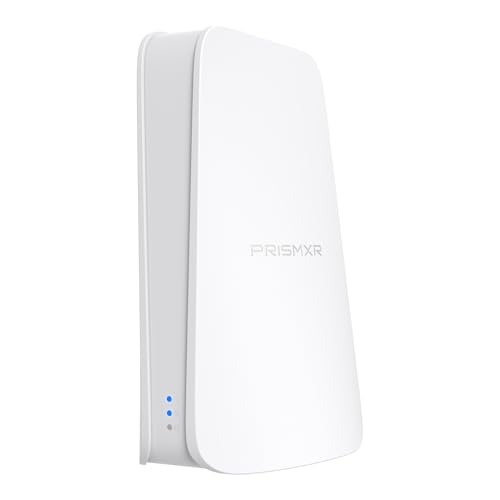
- Wi-Fi 6 dual-band with up to 1500 Mbps total speed
- Creates a dedicated PC-to-VR streaming link
- Supports Virtual Desktop, Steam Link, Quest, and Pico4
Best For: Quest and Pico users who want simple wireless PC VR streaming
Wi-Fi 6E Network Upgrade

- Adds a dedicated 6 GHz band for compatible devices
- Includes a 2.5 Gbps Ethernet port
- Works with existing Wi-Fi routers or gateways
Best For: Homes that need a 6 GHz upgrade for compatible devices
Cable Modem Router Combo

- Modem and WiFi router combined in one unit
- Compatible with Xfinity and Cox cable plans
- Supports internet speeds up to 800 Mbps
Best For: Cable internet homes needing a single modem-router box
Best for Small Spaces

- Purpose-built for PC-to-VR streaming
- Wi-Fi 6 AX3000 with beamforming
- PrismXR app offers scan-and-fix tools
Best For: Players who want a dedicated, VR-first router for Quest or Pico streaming
Budget VR Link Router

- Direct PC-to-headset link over Wi-Fi 6
- Plug-and-play setup with Ethernet and power
- Stream Check tool gives real-time recommendations
Best For: Buyers who want an affordable, cable-free VR streaming router
Wi-Fi 7 Gaming Router

- Wi-Fi 7 BE6500 with MLO and 4K-QAM
- Handles 100+ devices with 2,500 sq ft coverage
- Includes VPN support for WireGuard and OpenVPN
Best For: Power users who want a fast all-purpose router with VR streaming potential
Dedicated VR Streaming Router – Puppis S1 Lite WiFi 6
If you want a dedicated router for virtual desktop vr without the cable clutter, the Puppis S1 Lite is built around a direct PC-to-headset streaming link. It uses Wi-Fi 6 dual-band wireless and PrismPulse Mode to create a dedicated connection, with broad support for Virtual Desktop, Steam Link, and other major streaming tools.
Best For: Quest and Pico users who want a simple, plug-and-play router for wireless PC VR streaming.
Pros:
- Wi-Fi 6 dual-band design with up to 1500 Mbps total network speed
- Dedicated streaming link via PrismPulse Mode for PC-to-VR use
- One-click Stream Check in the PrismXR Desktop App with 19 checks
- Works with Virtual Desktop, Steam Link, Quest, and Pico4 headsets
Cons:
- Single dedicated link coverage, so it is focused on one VR stream setup
- Top speed claims are shared across 5 GHz and 2.4 GHz bands
- Best results depend on a wired Ethernet connection from the PC
For a budget-friendly dedicated router for virtual desktop vr, this model prioritizes ease of setup and targeted streaming tools over extra networking features. It is a practical choice if you want a straightforward wireless VR link with built-in optimization help.
Wi-Fi 6E Network Upgrade – ARRIS SURFboard W6U
If your goal is a dedicated router for virtual desktop vr on a busy home network, the ARRIS SURFboard W6U stands out by adding a dedicated 6 GHz band for compatible devices. It connects to an existing router or gateway and aims to reduce lag and jitter while giving 6GHz-capable client devices a cleaner wireless path.
Best For: Homes that already have Wi-Fi and need a fast 6 GHz upgrade for compatible VR or other devices.
Pros:
- Dedicated 6 GHz band for compatible devices
- 2.5 Gbps Ethernet port for high-speed wired backhaul
- Compatible with any existing Wi-Fi router or gateway
- Designed to reduce lag, jitter, and congestion
Cons:
- Only helps devices that support 6 GHz Wi-Fi 6E
- Requires pairing with existing network equipment
- Not a full all-in-one router replacement
This is a strong option if you want to improve wireless conditions without rebuilding your whole network. For VR streaming, its value comes from isolating compatible devices on the 6 GHz band rather than replacing every part of your setup.
Cable Modem Router Combo – Netgear Nighthawk C7000
The Netgear Nighthawk C7000 is a cable modem WiFi router combo, so it is more about replacing multiple home-network boxes than serving as a dedicated router for virtual desktop vr. It is designed for cable internet users and supports plans up to 800 Mbps with major providers like Xfinity and Cox.
Best For: Cable internet homes that want a modem-router combo for general networking.
Pros:
- Combines a cable modem and WiFi router in one unit
- Compatible with major cable providers including Xfinity and Cox
- Supports cable plans up to 800 Mbps
Cons:
- Not compatible with Verizon, Spectrum, AT&T, CenturyLink, DSL, or bundled voice service
- Does not offer dedicated VR streaming features
- Renewed condition may matter to some buyers
If you need a straightforward cable gateway rather than a specialized VR streaming device, this combo can fit the bill. For dedicated wireless VR use, though, it lacks the focused networking features of the other options here.
Best for Small Spaces – Puppis S1 AX3000 WiFi 6
If you want a dedicated router for virtual desktop vr, the PrismXR Puppis S1 is built around PC-to-headset streaming instead of general home networking. It uses a 1.3GHz dual-core chipset, 2×2 MIMO, 160MHz bandwidth, and beamforming to create a stable wireless link for Quest, Pico, and other supported headsets, while the PrismXR Desktop app adds one-click scan-and-fix tools for troubleshooting.
Best For: VR players who want a purpose-built Wi-Fi 6 router for smoother PC-VR streaming and simple setup.
Pros:
- Dedicated connection mode for PC-VR streaming with no driver install required
- Wi-Fi 6 AX3000 specs with 2402 Mbps on 5GHz and 575 Mbps on 2.4GHz
- Works with Quest 3/3S/2/Pro, Pico 4, Steam, Steam Link, and Virtual Desktop
- PrismXR Desktop app includes 21-item scan and fix tools
Cons:
- Designed for Windows 10/11 systems
- Product notes mention the C-C data cable is not included
This is the most VR-focused option in the group, and its value comes from being tuned for headset streaming rather than general networking. If your priority is a dedicated router for virtual desktop vr with minimal setup friction, Puppis S1 is the most specialized choice here.
Budget VR Link Router – Puppis S1 Lite Wi‑Fi 6
The PrismXR Puppis S1 Lite is a practical pick if you want a dedicated router for virtual desktop vr without stepping up to a more expensive Wi-Fi 7 model. It creates a direct PC-to-headset link over Wi-Fi 6 dual-band wireless, offers plug-and-play setup through power and Ethernet, and uses the PrismXR Desktop app for one-click stream checks and issue monitoring.
Best For: Budget-conscious VR users who want a simple cable-free streaming router with quick setup.
Pros:
- Wi-Fi 6 dual-band design with up to 1500 Mbps total speed
- Plug-and-play setup with no extra configuration needed in streaming software
- One-click scan feature provides real-time monitoring and up to 30 recommendations
- Helps free up the headset USB port by replacing a link cable setup
Cons:
- Lower top speed than the full Puppis S1 model
- Notes list one port, so it is less flexible than a general-purpose router
For buyers focused on value and simplicity, the Lite version covers the basics well. It is a sensible choice if you mainly want a dedicated router for virtual desktop vr and do not need the higher bandwidth headroom of premium gaming routers.
Wi-Fi 7 Gaming Router – GL.iNet Flint 3e BE6500
The GL.iNet Flint 3e is not a VR-dedicated model, but it is a strong general-purpose router if you want a dedicated router for virtual desktop vr and also need fast Wi-Fi 7 performance for the rest of the house. Its BE6500 Wi-Fi 7 design, MLO, 4K-QAM, and low-latency focus make it suitable for gaming and streaming, while the dual-band setup and broad device support give it more flexibility than a headset-only unit.
Best For: Power users who want a fast Wi-Fi 7 router that can handle VR streaming and everyday home networking.
Pros:
- Wi-Fi 7 BE6500 with up to 6.5 Gbps speeds
- MLO and 4K-QAM for lower latency and improved connectivity
- Supports over a hundred devices and offers 2,500 sq ft coverage
- Built-in VPN support with WireGuard and OpenVPN speeds up to 680 Mbps
Cons:
- Not specifically tuned for VR like the PrismXR models
- More of a full-home router than a plug-and-play headset streaming device
If you want a router that can do VR streaming while still serving as your main network hub, Flint 3e is the most versatile option here. It makes the most sense for users who value Wi-Fi 7 features and broad household coverage over a headset-specific workflow.
How We Picked the Best Dedicated Router for Virtual Desktop Vr
For a Dedicated Router for Virtual Desktop Vr, we prioritized fast local wireless throughput, low latency, stable 5 GHz or 6 GHz performance, and features that help a PCVR-only network stay clean and reliable. We also considered ease of setup, Ethernet port quality, and whether the router is better suited as a primary home router or a dedicated streaming access point.
Quick Comparison
In simple terms, Wi-Fi 6 routers are usually the best budget-friendly choice for most Quest 2 and Quest 3 users, while Wi-Fi 6E can be a strong upgrade if you want the extra 6 GHz band and live in a crowded wireless environment. Wi-Fi 7 is the most future-facing option, but it only pays off if the rest of your network and devices can benefit from it.
Key Buying Factors for a Dedicated Router for Virtual Desktop Vr
Wireless Band and Interference
For wireless PCVR, band cleanliness matters more than broad internet speed. A dedicated 5 GHz or 6 GHz connection often performs better than a shared household router because fewer devices compete for airtime.
Ethernet Backhaul and PC Connection
Your gaming PC should connect by Ethernet to the router whenever possible. A solid wired uplink from PC to router helps preserve low latency and keeps the wireless side focused on the headset.
Wi-Fi Standard
Wi-Fi 6 is still excellent for many setups, especially when the headset is close to the router. Wi-Fi 6E adds 6 GHz support, which can be a major advantage for cleaner signal paths. Wi-Fi 7 is worth considering if you want the newest platform and broader headroom for future devices.
Dedicated Use Vs. All-In-One Home Routing
Some buyers want a router that only serves VR streaming, while others need a device that can handle home networking too. A dedicated access point often delivers the simplest PCVR experience, but an all-in-one router may be better if you want fewer boxes and more flexibility.
Who Should Buy Which Dedicated Router for Virtual Desktop Vr?
If you want the simplest upgrade for Quest streaming, a strong Wi-Fi 6 model is usually the safest pick. If you live in an apartment or dense wireless area, a Wi-Fi 6E option with a 6 GHz band may offer the most noticeable stability boost. If you want a premium future-proof setup and also care about broader home networking, a Wi-Fi 7 router is the most ambitious choice.
Accessories and combo products can add convenience, but for pure wireless PCVR performance, focus first on the router’s band support, wired Ethernet path, and how cleanly it can be isolated for your headset traffic.